Category: Uncategorized

  • Keyword Research Template: Free 2026 Download & Guide

    Keyword Research Template: Free 2026 Download & Guide

    You probably already have some version of a keyword research template. It lives in a half-finished Google Sheet, a notes app, or a CSV export from a tool you opened once and never cleaned up. The problem isn't that you lack keywords. The problem is that raw keyword lists rarely turn into an actual publishing plan.

    That's why most SEO efforts stall. A business owner gathers terms, highlights a few rows, then gets stuck on the next question. Which page should target what? Which keywords deserve a landing page instead of a blog post? Which terms should be grouped together? Which ones should be ignored even if they look interesting?

    A good keyword research template fixes that, but only if it's built to make decisions, not just store data. Historically, that's why templates became a standard SEO workflow. They organized manual search data into a repeatable structure so teams could prioritize content instead of guessing, as outlined in Asana's keyword research template overview.

    Table of Contents

    Stop Guessing and Start Planning Your SEO Content

    Most small businesses don't have an SEO problem. They have a planning problem.

    They publish blog posts when someone on the team has time. They target phrases that sound right. They open Ahrefs, Semrush, or Google Keyword Planner, export a list, then stop because the list is too big and the next move isn't obvious. A few months later, the site has content, but no clear coverage of core services, no logical internal linking, and no confidence that the right topics were chosen.

    A keyword research template solves that when it's used correctly. Not as admin work, but as a filter for business decisions. It tells you which topics deserve a page, which phrases belong together, and which opportunities look attractive on paper but won't move the business.

    Practical rule: If a keyword research template doesn't help you decide what to publish next, it's just storage.

    The shift is simple. Stop treating keyword research as idea collection. Start treating it as content planning infrastructure.

    That changes how you work:

    • From random ideas to repeatable prioritization. You compare opportunities using the same fields instead of relying on instinct.
    • From volume chasing to intent matching. You stop writing broad articles that attract the wrong audience.
    • From one-off posts to a real roadmap. Every keyword should connect to a page type, a topic cluster, and a stage of the buying journey.

    This matters even more if you run lean. A founder, in-house marketer, or local business owner doesn't need a giant SEO operation. You need a small system that consistently points you toward the best next page.

    That's what a useful keyword research template does. It reduces noise, makes trade-offs visible, and gives you a practical path from search data to content production.

    Understanding Your Keyword Research Template Fields

    A keyword sheet earns its keep when it helps you choose the next page to build.

    Raw exports cannot do that on their own. They give you terms, volumes, and competition scores, but they do not show which keyword fits a service page, which belongs in a cluster, or which one looks attractive and still will not drive revenue. The template creates that layer of judgment.

    That is why the fields matter. Each column should reduce uncertainty, not add admin work.

    The fields that drive decisions

    Below is the version I use when a client needs a practical system they can maintain without turning keyword research into a full-time job.

    Field Name Description Why It Matters
    Keyword The exact search phrase you're evaluating The term you will assign to a page, section, or cluster
    Topic Cluster The broader subject this keyword belongs to Keeps coverage organized and supports internal relevance
    Search Intent Informational, navigational, commercial, or transactional Tells you what kind of page should target the query
    Monthly Search Volume Average monthly demand for the term Confirms whether there is enough search activity to justify effort
    Keyword Difficulty or Competition A proxy for how competitive the query is Helps you avoid targets your site is unlikely to win yet
    CPC What advertisers pay per click Often signals commercial value, especially for service and product terms
    Geography or Language The market you are targeting Prevents wrong-country or wrong-language decisions
    Relevance How closely the keyword matches your offer Filters out traffic that looks good in a report and weak in the pipeline
    Page Type Blog post, service page, product page, location page, comparison page Turns research into a concrete asset to create
    Priority Your internal rank for what gets created first Forces trade-offs and keeps the backlog realistic
    Existing URL The page already targeting the keyword, if one exists Prevents duplicate work and surfaces update opportunities
    Cannibalization Check Whether another page is already competing for the same term Stops multiple pages from splitting signals
    SERP Features Notes on snippets, local packs, videos, or AI-style answers Helps you judge the click opportunity and content format
    Status Planned, briefed, drafted, published, updated Makes the sheet useful after research is done
    Notes Context such as angle, objections, or sales nuance Captures the details that tools miss

    A few fields carry more weight than the rest.

    Search intent determines the asset. If the query suggests comparison shopping, build a comparison page. If it signals urgency around a service, build or improve the service page. A lot of weak SEO programs fail here. They pick the right phrase and attach it to the wrong page type.

    Relevance is where judgment beats software defaults. I would rather target a lower-volume keyword tied directly to a core offer than chase a broader term that brings in readers who will never buy. Traffic is easy to overvalue. Qualified traffic is harder to get and worth more.

    Page type is the column that closes the gap between research and production. Without it, the template becomes storage. With it, each row starts to answer a real planning question: do we need a new page, a refresh, or no page at all?

    Existing URL and cannibalization check protect the site from self-inflicted problems. Before creating anything new, check whether the site already has a page close enough to improve. In many cases, consolidation beats expansion.

    A useful template should answer three questions fast: should we target this keyword, what page should target it, and how soon should it get made?

    Do not overbuild the scoring model at the start. A simple priority field is enough if the team applies the same logic each time. I usually rank rows based on four inputs: fit with the offer, intent clarity, ranking difficulty, and business value. That gets you most of the benefit without ten custom formulas.

    Once those fields are filled in consistently, the sheet stops being a research document and starts acting like a content planning system. That is the primary job. Tools can gather keywords. A good template decides what deserves production. Platforms like OutRank push that one step further by turning those decisions into briefs, articles, and a live pipeline, but the structure still starts here.

    Populating Your Template with Winning Keywords
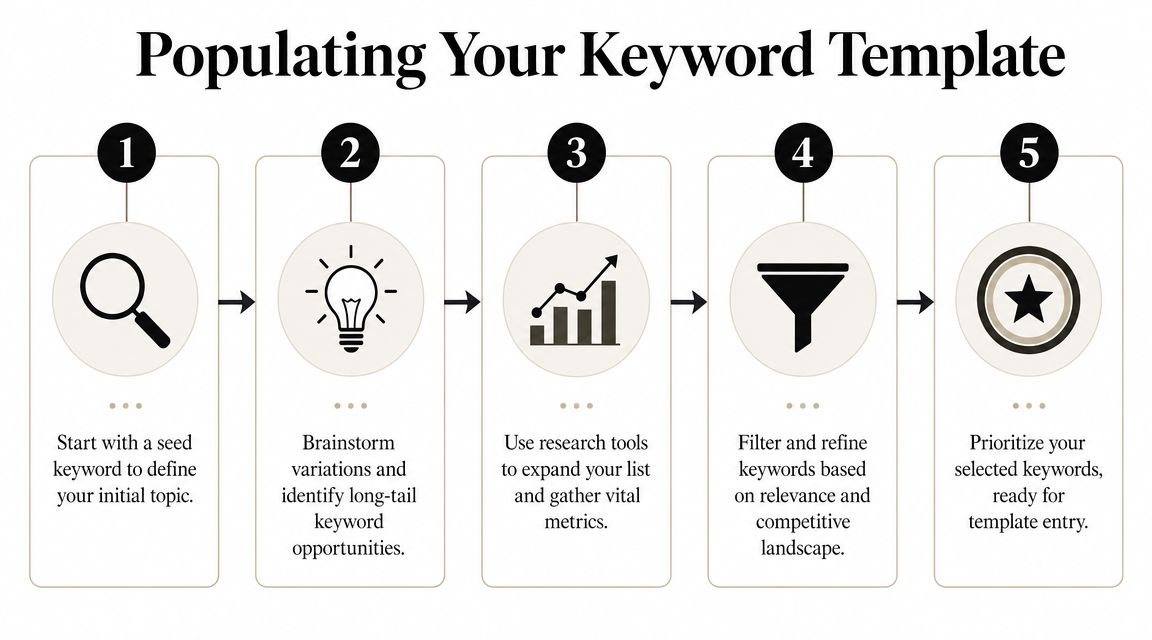
    A five-step infographic showing the process of populating a keyword research template for search engine optimization.

    Start narrow, then expand

    A clean keyword list starts small. Not with thousands of rows.

    A practical workflow is to begin with 6–12 seed terms, expand them in a tool like Google Keyword Planner, filter by search volume and competition, then export a clean list into your spreadsheet, as described in Jellyfish's keyword research funnel process. That basic funnel works because it forces focus before scale.

    Start with phrases that describe what you sell, what your customer wants, and how they describe the problem. For a local plumber, that might be service terms and urgent problem terms. For a SaaS company, it might include product category terms, comparison terms, and problem-awareness terms.

    Use a mix of sources:

    1. Google Ads Keyword Planner for broad discovery and baseline demand.
    2. Ahrefs or Semrush if you want richer filtering and competitor views.
    3. Google itself for autocomplete, related searches, and the current result type.
    4. Your own sales language from calls, emails, and objections.

    A lot of people overcomplicate this phase. You don't need every possible variation. You need enough good inputs to see the viable opportunities.

    Here's a useful walkthrough if you want a visual explanation before building your sheet:

    Clean the list before you score it

    Most keyword lists get weaker after export because people keep too much.

    You want to remove terms that are irrelevant, off-market, vague, or clearly mismatched to your offer. If you target one geography or language, filter hard for that. If you sell a premium service, remove keywords that signal a different audience. If a phrase is interesting but belongs to a different page than the one you're planning, move it into the right cluster instead of leaving it loose.

    Use this cleanup sequence:

    • Delete obvious noise. Misspellings, unrelated terms, or tool-generated junk.
    • Normalize markets. Keep geography and language settings aligned to the actual audience.
    • Tag intent early. Informational, commercial, and transactional terms should not sit in one undifferentiated pile.
    • Group near-duplicates. One page can often cover several close variants.
    • Keep the clean list compact. A shorter list with clear intent beats a huge list full of maybes.

    A bloated spreadsheet feels productive. A trimmed spreadsheet gets published.

    What works and what wastes time

    The fastest wins usually come from keywords with clear relevance and clear page intent. Not from chasing the biggest term in the category.

    What works in practice:

    • Problem-led queries that match what your customer is trying to solve.
    • Commercial investigation terms where the searcher is comparing options.
    • Service and product modifiers tied to use case, location, industry, or need.
    • Question-based terms that support supporting articles and internal links.

    What wastes time:

    • Keeping every variant because the tool exported it.
    • Targeting broad terms too early when your site doesn't yet have enough authority.
    • Mixing page intents in the same cluster.
    • Researching for hours before deciding on page types.

    If you want 80% of the value, build around a simple funnel. Gather seed terms, expand in a tool, trim aggressively, then assign each surviving keyword to a likely page type. That's the point where a keyword research template stops being data entry and starts becoming a publishing engine.

    Example Keyword Templates for Your Business Type
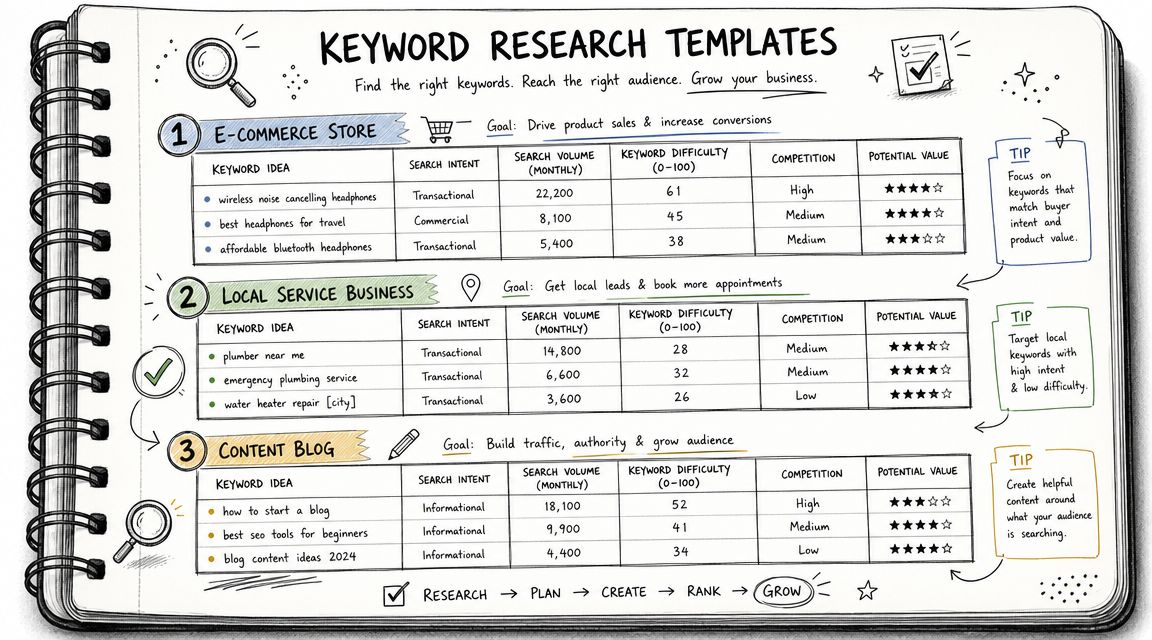
    A hand-drawn notebook page displaying three keyword research templates for e-commerce, local businesses, and content blogs.

    Different businesses should use the same framework, but not the same mix of keywords. The sheet stays consistent. The logic changes by business model.

    E-commerce store example

    Take a shop selling handmade leather goods. The high-value keywords usually sit close to product and category intent.

    Keyword Intent Page Type Topic Cluster Priority Notes
    handmade leather wallet Commercial Category page Wallets High Strong fit for main collection page
    leather card holder Commercial Product category Wallets High Could sit under wallet cluster
    personalized leather wallet Transactional Landing page or category Personalization High Signals buying intent
    leather wallet gift ideas Informational Blog post Gift guides Medium Good support content for seasonal links
    full grain leather wallet Commercial Blog or collection guide Materials Medium Useful for education plus product tie-in

    For e-commerce, the biggest mistake is treating every keyword like a blog topic. Many terms deserve collection pages, comparison pages, or buying guides. If the query suggests product exploration, build pages that help users choose and buy.

    Local service business example

    A local plumber needs a more practical template. Geography matters. Urgency matters. Trust matters.

    Keyword Intent Page Type Topic Cluster Priority Notes
    emergency plumber [city] Transactional Service page Emergency services High Core money page
    drain cleaning [city] Transactional Service page Drain services High Dedicated page if service is core
    water heater repair [city] Transactional Service page Water heater services High High service relevance
    why is my water pressure low Informational Blog post Plumbing problems Medium Good top-of-funnel support
    plumber open now [city] Transactional Local landing page Emergency services High Strong urgency signal

    Local businesses often underbuild service pages and overbuild blog posts. The template should push the opposite. Cover the money pages first, then publish supporting informational content that links back to them.

    B2B-SaaS example

    A B2B SaaS company usually needs a broader intent spread. Some terms support immediate demand. Others create category awareness and trust.

    Keyword Intent Page Type Topic Cluster Priority Notes
    project management software for agencies Commercial Landing page Use cases High Clear audience and use case
    best project management software for agencies Commercial Comparison page Alternatives High Mid-funnel evaluator keyword
    how to manage client projects Informational Blog post Workflow education Medium Supports internal links to product pages
    agency project workflow template Informational Resource page Templates Medium Good lead-generation angle
    [competitor] alternative Commercial Comparison page Alternatives High Often strong buying intent

    The right keyword set depends less on industry and more on how close the searcher is to action.

    Across all three examples, the winning move is the same. Don't just collect keywords. Assign each one a role. Once every row has a likely page type, a cluster, and a priority, the sheet starts behaving like a real operating plan.

    Turning Your Template into a Content Pipeline
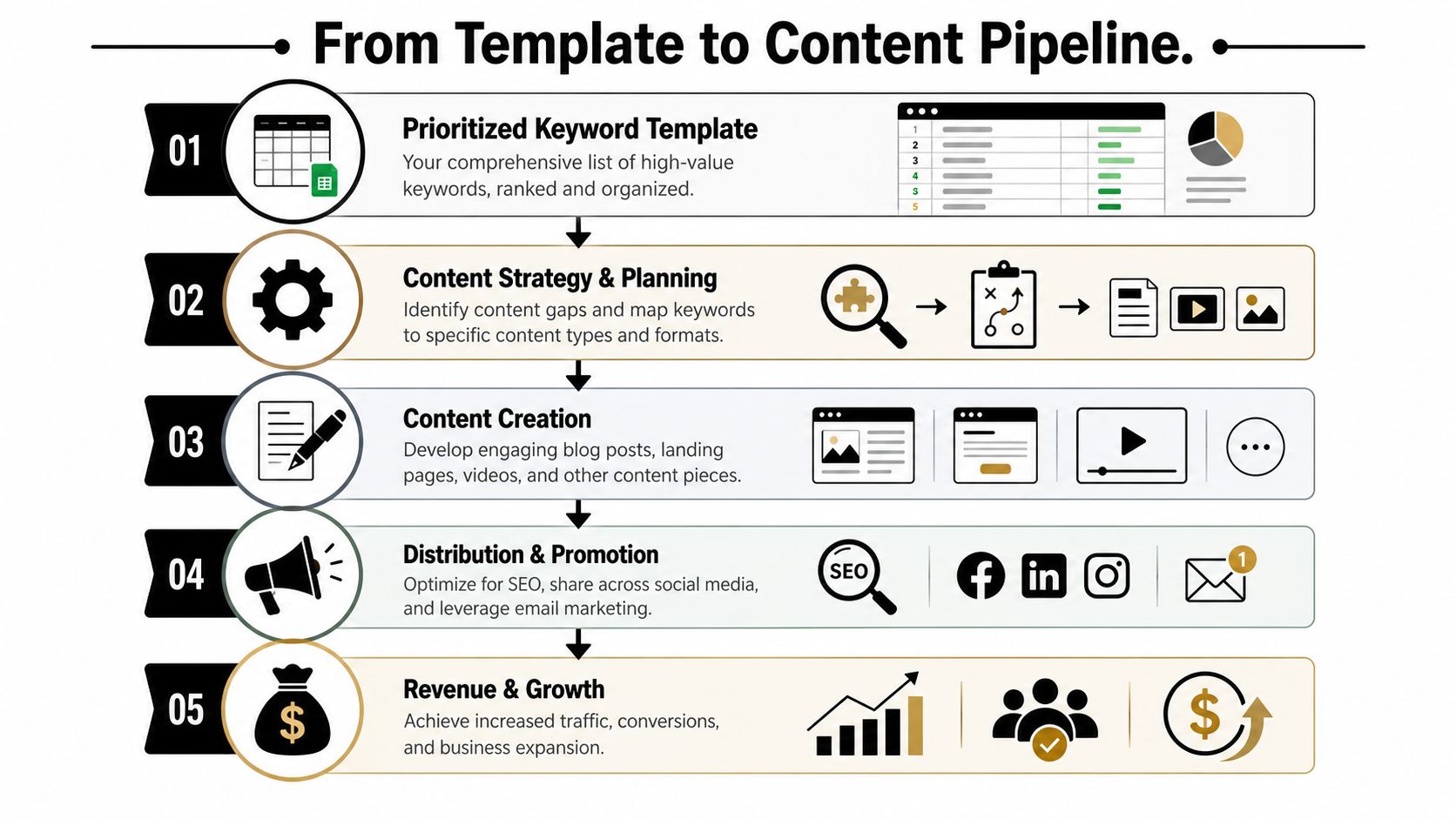
    A five-step infographic showing the content pipeline process from keyword research to revenue growth and business expansion.

    A completed keyword research template is not the deliverable. It's the intake form for your content system.

    Many teams encounter a hurdle here. They have rows, filters, and color coding, but no production logic. They know what keywords exist, but not what to build next or how those pages should work together.

    Group keywords into pages, not chaos

    Start by collapsing related keywords into page-level targets. One core topic. One primary page. Supporting variations that belong on the same asset.

    Advanced workflows need grouping by topic and intent, plus a self-cannibalization check using a site: query so you don't create multiple pages that compete for the same term, as explained in HubSpot's keyword research process.

    Use a simple clustering model:

    • Pillar pages for broad commercial or category topics
    • Supporting articles for informational subtopics
    • Comparison pages for evaluation intent
    • Service or product pages for direct transactional intent

    Then run a cannibalization check before you assign anything new. Search your site for the target phrase. If a page already exists, decide whether to improve it, merge it, or reposition it. Don't create duplicates because the sheet has another row.

    If two pages want the same searcher, one of them usually loses.

    Map each cluster to the buyer journey

    A good content pipeline doesn't just group by topic. It groups by decision stage.

    That means your sheet should lead to a publishing mix, not a pile of unrelated drafts. For each cluster, decide which content supports awareness, evaluation, and purchase.

    A practical way to do that:

    Cluster Buyer Stage Best Page Type Job of the Page
    Core category Commercial or decision Landing page Capture demand close to purchase
    Problem education Awareness Blog post Explain the issue and qualify the reader
    Comparisons Consideration Comparison page Help buyers shortlist options
    Use cases Consideration or decision Use-case landing page Show fit for a specific audience
    FAQs and objections Late-stage trust Support article or FAQ page Remove friction before contact or purchase

    This is the gap most keyword template articles miss. The sheet should directly produce a content calendar like this:

    1. Publish the service or category page first.
    2. Add supporting articles that internally link into it.
    3. Fill comparison and use-case gaps around the main offer.
    4. Refresh clusters as rankings and coverage evolve.

    That gives you a sequence, not just a list.

    Build the operating system, not just the spreadsheet

    Manually, this works well. It also gets slow fast.

    Once you're managing multiple clusters, multiple page types, and ongoing refreshes, the bottleneck isn't research. It's execution. Briefing, drafting, publishing cadence, internal linking, and keeping the map updated all take time.

    That's where automation becomes the sensible next step. Not because the template is wrong, but because the template is only the first layer. The smarter setup turns your keyword research template into a production system that can research, map, draft, and publish without making you manually coordinate every row.

    OutRank fits that role well because it's built around the actual workflow people struggle with after research. You identify opportunities, organize them into a plan, then use automation to move from keyword discovery to published content at scale. That's the primary upgrade. Not replacing strategy, but removing the manual drag that keeps good strategies from shipping.

    Future-Proofing Your Keyword Strategy

    A common failure pattern looks like this. The keyword sheet is filled out, search volume looks promising, content gets published, and the page never becomes a meaningful asset because the SERP answers the query before the click happens.

    Traffic still matters. It just cannot be the only filter in your template anymore.

    Search results now include AI Overviews, featured snippets, People Also Ask, product grids, local packs, and forum results that absorb attention before a user reaches your site. That shifts the job of keyword research. The goal is not only to find terms that can drive visits, but also to identify terms where your brand should appear, shape the answer, or support a money page indirectly. SEO Buddy discusses that shift in this piece on the future of keyword research templates.

    The practical fix is to add a visibility column to your sheet. I usually keep it simple and score each keyword by its best strategic role:

    • Click potential
    • SERP feature opportunity
    • AI citation likelihood
    • Brand recall value
    • Support value for a commercial cluster

    That one extra layer improves prioritization fast. A low-click informational term may still deserve a page if it feeds internal links into a service page, answers a common objection, or gives your brand a better chance of appearing in AI-generated summaries.

    This is the part many templates miss. They help you collect keywords, but not judge which ones strengthen the system around your revenue pages.

    A future-proof template also needs a review rhythm. Recheck clusters every quarter. Look for pages that lost rankings, keywords that picked up new SERP features, and supporting articles that should be refreshed because the buying journey changed. Search behavior changes. So does the shape of the results.

    Handled manually, this is workable for a small site. Once the site grows, the problem becomes coordination. You need to keep the sheet current, update briefs, refresh internal links, and decide what gets rewritten versus replaced.

    OutRank is the sensible next step when you want the template to become an operating system instead of a document. It helps turn research, clustering, briefing, drafting, and publishing into one workflow, which is how you keep a keyword strategy useful after the first round of content goes live.


    Agency Secrets gives business owners a practical SEO playbook without the usual agency bloat. If you want the strategy behind better keyword targeting, stronger content structure, and a simpler path to execution, start with Agency Secrets. If you're ready to move beyond spreadsheets and turn your keyword research template into an automated publishing system, their OutRank workflow is the logical next step.

  • Keyword Research for Local SEO: Your 2026 Success Guide

    Keyword Research for Local SEO: Your 2026 Success Guide

    If you're a small business owner doing your own marketing, keyword research for local SEO usually starts the same way. You open a tool, type in a broad service term, see a pile of keyword ideas, and then get stuck deciding what matters.

    The issue isn't finding more keywords. It's choosing the right local keywords, matching them to the right pages, and focusing on terms that can lead to calls, bookings, and walk-ins without turning this into a full-time job. That's where most small teams lose momentum.

    A practical local SEO workflow is simpler than people make it sound. Start with the services you sell, layer in the places you serve, validate demand with localized tools, study the search results, and then put your best terms on the pages that can win. That's the difference between random optimization and a system that compounds.

    Table of Contents

    The Foundation of Local SEO Keyword Strategy

    Keyword research for local SEO starts with one question. Is the searcher trying to learn, compare, or act nearby right now?

    That sounds obvious, but it's where local businesses go wrong. They treat local search like general SEO and end up writing pages for broad topics that attract curiosity instead of customers. Someone searching for "how to fix a leaky faucet" wants advice. Someone searching for "plumber near me" usually wants a provider, a phone number, hours, reviews, or directions. Those are completely different jobs.

    Why local intent changes everything

    Local search intent is tied to place. The searcher may include a city name, a neighborhood, a ZIP code, or a phrase like "near me." They may also leave the location out and still expect local results. Google often understands that intent from the query itself and responds with maps, listings, reviews, and business profiles.

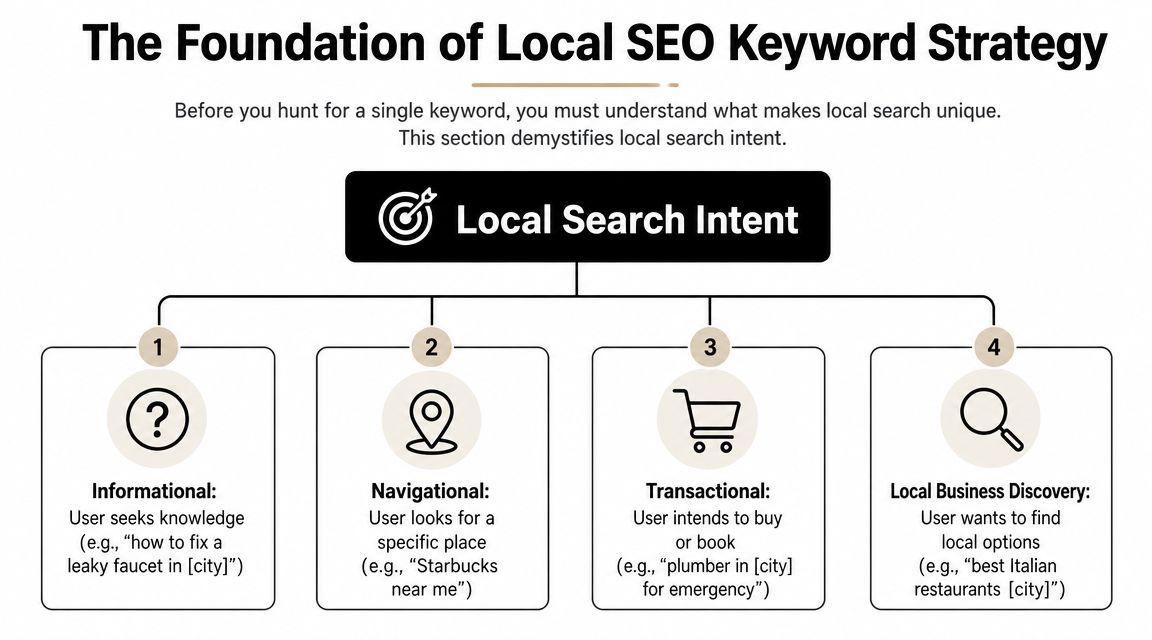
    A diagram illustrating the four types of local search intent for local SEO keyword strategy planning.

    The commercial value of that intent is hard to ignore. SOCi reported that in the U.S., there are over 5.9 million keywords related to "near me" and 800 million searches per month, while LocaliQ found that 28% of local searches lead to a purchase within 24 hours according to SOCi's local SEO statistics roundup. That is why local keyword research belongs at the front of your SEO work, not at the end.

    Practical rule: If a keyword doesn't connect clearly to a service you offer in a place you serve, it's usually not a priority yet.

    Four local intent patterns show up again and again:

    • Informational intent: Searches like "how to choose an HVAC system in Dallas." Useful for trust-building content.
    • Navigational intent: Searches for a specific brand or business, such as "Joe's Auto Repair near me."
    • Transactional intent: Searches with immediate buying or booking intent, such as "emergency dentist in Austin."
    • Local business discovery: Searches like "best coffee shop downtown" where the searcher wants options nearby.

    What success looks like for a local business

    For a local company, traffic alone isn't a useful finish line. A page can get visits and still fail if it doesn't lead to action.

    A better KPI set is grounded in outcomes that matter to a business owner:

    KPI Why it matters
    Phone calls High-intent local searchers often call before they click around
    Direction requests A strong sign that map visibility is doing its job
    Contact form submissions Useful for service businesses with longer sales cycles
    Bookings or appointments Direct proof that the keyword matched buyer intent
    Google Business Profile interactions Important when the search results page is the conversion point

    If you remember one thing, remember this. Local SEO is not a traffic game first. It's an intent-matching game. The business that wins usually isn't the one with the biggest keyword list. It's the one that understands which searches are closest to revenue.

    Discovering Your Core and Long-Tail Local Keywords

    Most small businesses overcomplicate discovery. They start with software when they should start with the business itself.

    The cleanest workflow begins with a short list of seed terms. These are the plain-English names of your services or products. A plumber might start with drain cleaning, water heater repair, leak detection, sewer line repair, and emergency plumbing. A med spa might start with Botox, facials, laser hair removal, and lip filler.

    Start with services, not tools

    An effective local workflow follows a structured path. Semrush and Neil Patel recommend listing solution terms and locations, finding variations with tools, evaluating metrics, analyzing competitors, and then mapping keywords to pages, as outlined in Semrush's local keyword research guide. That's a better approach than opening a tool and chasing whatever looks popular.

    Build your seed list from sources you already have:

    • Service menu: Your main categories, sub-services, and specialty jobs.
    • Sales conversations: The phrases customers use on the phone or in forms.
    • Customer emails and texts: Often more revealing than polished marketing copy.
    • Reviews: They show how people describe your work in natural language.
    • Google Search Console: If your site already has visibility, this often reveals surprise queries worth expanding.

    Once you have your seed list, start combining it with local qualifiers.

    Build your modifier bank

    These are the origins of long-tail local keywords. You don't need to invent clever phrasing. You need to reflect how real customers search.

    Use a bank of modifiers like these:

    • Geographic modifiers: City, neighborhood, district, county, ZIP or postcode, nearby landmarks
    • Service qualifiers: Emergency, same-day, affordable, commercial, residential, 24-hour
    • Problem-based modifiers: Repair, replacement, installation, cost, near me, open now
    • Audience modifiers: Pediatric, family, luxury, small business, apartment, senior

    A few examples make this easier to see:

    Seed term Local modifier Expanded keyword idea
    water heater repair Phoenix water heater repair Phoenix
    dentist near me dentist near me
    dog grooming downtown dog grooming downtown
    HVAC installation 24-hour 24-hour HVAC installation in Tampa
    electrician commercial commercial electrician in Brooklyn

    Broad terms often look attractive in a keyword tool, but small teams usually get faster traction from specific service-plus-location combinations.

    A simple keyword capture template

    You don't need a fancy dashboard. A spreadsheet works.

    Use columns like this:

    Keyword idea Service Location Intent Notes
    emergency plumber Chicago Emergency plumbing Chicago Transactional Strong fit for core service page
    plumber near me General plumbing Service area Discovery Likely Local Pack heavy
    drain cleaning Lincoln Park Drain cleaning Lincoln Park Transactional Candidate for neighborhood section
    how to prevent frozen pipes Chicago Plumbing advice Chicago Informational Blog or FAQ support content

    Keep going until you have a raw list that feels messy. That's normal. Discovery is supposed to create options. The next step is where you cut the list down.

    Analyzing Keywords with Tools and Competitor Insights

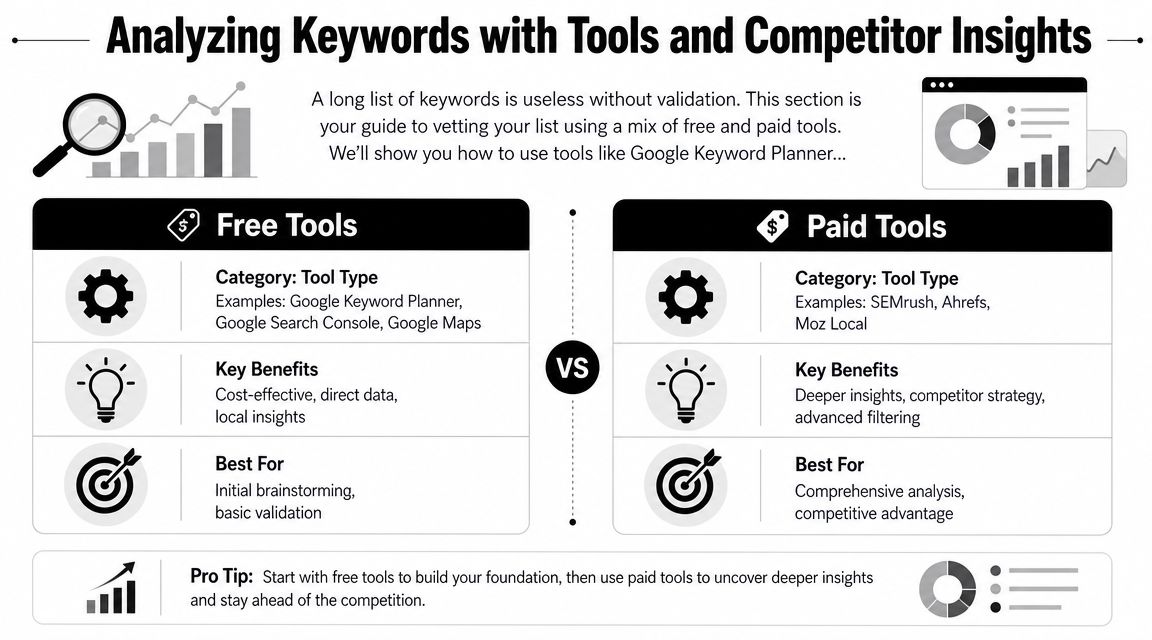
    Raw keyword ideas need a reality check before they deserve a page, a GBP update, or a month of effort. For a small team, that check should answer three questions fast. Is anyone nearby searching for this? Does the search show buying intent? Is Google sending people to websites, the map, or both?

    A comparison chart highlighting the differences between free and paid SEO keyword research and analysis tools.

    I usually tell owners to stop shopping for tools and start building a workflow. Good local keyword analysis comes from combining one source for demand, one for competitor clues, and one manual review of the live search results.

    Good Better Best tool stacks

    Use the stack that matches your time and budget, not the one an agency with six subscriptions uses.

    Level Best for Tool stack Trade-off
    Good Solopreneurs Google Keyword Planner, Google Search Console, Google Trends, Google Maps Low cost, slower research, more manual checking
    Better Small teams Good stack plus Semrush or Ahrefs Faster filtering, better competitor discovery, higher monthly cost
    Best Competitive local markets Better stack plus a dedicated local rank tracker or GBP-focused workflow Better visibility into map performance, more setup and spend

    The trade-off is straightforward. Free tools can get you to good decisions, but they take more judgment. Paid tools save time, surface more variations, and make competitor research easier. They also tempt small teams to chase too many keywords at once.

    A simple rule helps. If you manage one location, start with the Good stack and add one paid tool only after you have clear service pages and a working Google Business Profile. If you compete in a dense market like legal, dental, HVAC, or home services across multiple suburbs, the Better stack usually pays for itself in saved time.

    A practical review workflow

    Run each keyword through the same filter so you do not make decisions based on volume alone.

    1. Check local demand in Google Keyword Planner, Google Trends, and Search Console if you already have some visibility.
    2. Check the live SERP from the target area. Search on mobile and desktop if possible.
    3. Check the map results to see whether the Local Pack is the main conversion point.
    4. Check competitor pages and profiles for the query. Look at page type, GBP categories, reviews, and service wording.
    5. Score the keyword based on relevance, intent, and difficulty to win.

    That fifth step matters because small teams need a way to choose, not just collect.

    A prioritization matrix you can use in a spreadsheet

    This is the version I use with businesses that need to make decisions in one working session.

    Keyword Local demand Intent Local Pack presence Difficulty Business value Priority
    emergency plumber Austin High High High Medium High Do now
    water heater installation Round Rock Medium High Medium Medium High Next
    plumbing tips Austin Medium Low Low Low Low Later
    plumber near me High High Very high High High GBP + service page support

    Keep the scoring simple. High, medium, and low is enough. A messy but usable sheet beats a detailed scoring model you never finish.

    How to read the live search results

    Keyword tools estimate demand. Google's results show the format you have to win.

    Search the phrase as a customer would. For example, search “plumber near me” or “water heater repair Phoenix” and study the first screen. If you mostly see a map with three businesses, reviews, call buttons, and directions, that keyword is not just an SEO content play. It is a Local Pack play. Your page still matters, but your Google Business Profile, category choice, reviews, and landing page alignment matter just as much.

    Check these questions:

    • What shows first? Local Pack, ads, organic pages, directories, AI Overview, or a mix
    • Who is winning? Independent local businesses, large directories, franchises, or national brands
    • What page type ranks? Homepage, service page, location page, review page, or article
    • What intent is Google assuming? Emergency help, general research, price comparison, or brand lookup
    • Is a click to the website even likely? Some searches lead to calls or direction requests straight from the map

    The last point is easy to miss. If the map is doing most of the work, a keyword can still be valuable even when website traffic stays modest. For a locksmith, roofer, dentist, or towing company, phone calls from the Local Pack often matter more than pageviews.

    Analysts cited in Koom's local SEO research article note that local searches often end on the results page itself through map interactions and business profile actions. That matches what small businesses see in practice. The win is often the call, not the click.

    To get a visual walk-through of keyword validation and search result analysis, this overview is useful:

    What to check in the Local Pack

    Local pack analysis sounds technical, but it just means studying the businesses shown in the map for your target search. Open Google, search a service in your area, and inspect the three map listings that appear first.

    Look for patterns you can act on:

    • Primary category fit: Does the listed category closely match the search term?
    • Review language: Do recent reviews mention the exact service in the search query?
    • GBP completeness: Are hours, services, photos, and attributes filled out and current?
    • Landing page match: Does the profile link to a page that clearly answers the query?
    • Location strength: Is the business physically close to the search area or strongly associated with it?
    • Reputation signals: Are ratings, review volume, and recency noticeably stronger than yours?

    Competitor research is useful here, but keep it practical. Do not copy every category, service label, or page title a competitor uses. Find the few signals that repeat across winners, then fix gaps on your own profile and pages.

    I often see businesses lose local rankings because their signals are split. The page targets “drain cleaning,” the GBP leans toward “emergency plumber,” and reviews mostly mention “water heater repair.” Google has to guess what the business is best known for. Competitors with tighter alignment make that decision easy.

    For small teams, that is the goal of this stage. Find the terms where demand exists, the SERP matches your offer, and the Local Pack gives you a realistic path to calls and leads.

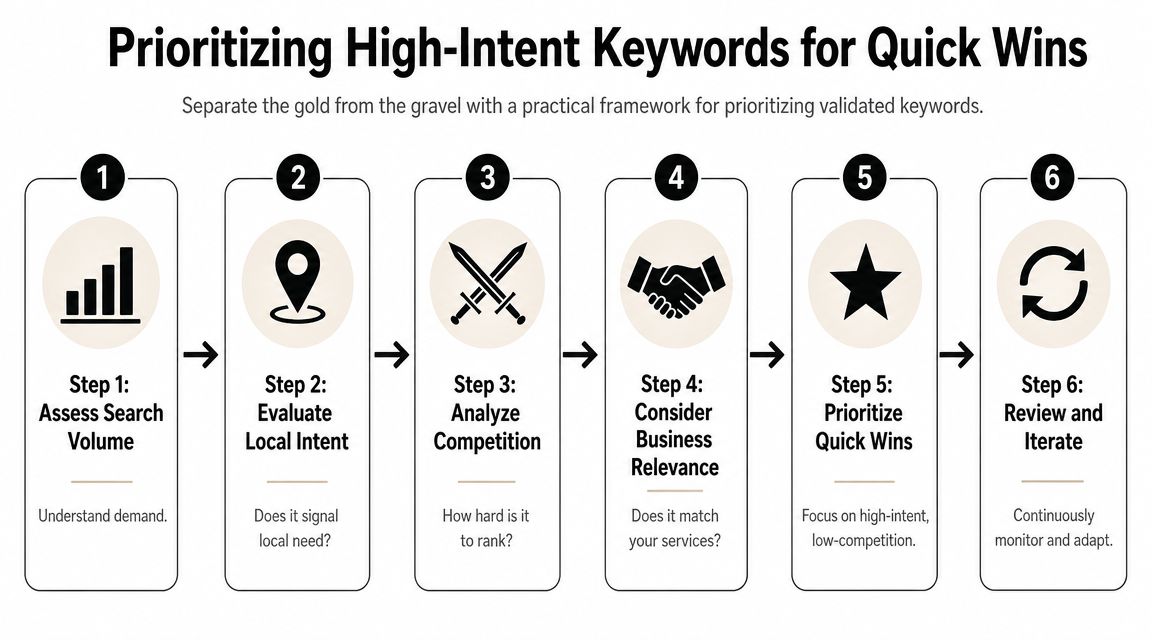
    Prioritizing High-Intent Keywords for Quick Wins

    This is the point where discipline matters. Most small teams don't fail because they chose zero good keywords. They fail because they tried to target too many at once.

    A practical keyword plan favors keywords that are highly relevant, locally validated, commercially useful, and realistically winnable. That's not always the highest-volume term.

    A six-step infographic illustrating a practical framework for prioritizing high-intent keywords to achieve quick SEO wins.

    The four-factor filter that keeps you honest

    Experts at LocalDominator and SEObility agree that local keyword prioritization turns on relevance, local search volume, competition, and intent, with relevance as the most important factor, based on LocalDominator's local keyword research framework.

    Here's how to apply those four factors in practice:

    1. Relevance
      If you don't want the lead, don't target the keyword. A family law firm shouldn't chase "criminal defense lawyer near me" just because it appears nearby on the SERP.

    2. Local volume
      You need evidence that people in your service area search for it. Local demand beats national volume every time in local SEO.

    3. Competition
      Some terms are crowded by directories, mature brands, and aggressive local players. Others have weaker pages, thin profiles, or poor page matching. Those are often better entry points.

    4. Intent
      "How to unclog a sink" and "emergency plumber open now" are not equal. One is educational. One is urgent. If your time is limited, urgency wins.

    A good local keyword often looks boring on paper. That's usually a good sign. Specific service terms convert better than flashy broad phrases.

    A prioritization matrix you can use today

    Use a simple 1 to 3 scoring model. Keep it lightweight so you'll maintain it.

    Keyword Relevance Local volume Competition Intent Total Action
    emergency plumber Chicago 3 3 2 3 11 Target now
    drain cleaning Lincoln Park 3 2 2 3 10 Target now
    plumbing tips Chicago 2 2 2 1 7 Support content
    plumber 2 3 1 2 8 Defer

    A few quick rules make this matrix more useful:

    • Target now: High relevance, strong intent, manageable competition
    • Support content: Useful for blog posts, FAQs, and trust-building pages
    • Defer: Broad terms that need more authority or a stronger local footprint
    • Drop: Keywords that don't fit your business model or service area

    Small teams achieve quick wins. They stop chasing the biggest phrase and start publishing the page most likely to rank and convert first.

    Mapping Keywords to Pages and On-Page Optimization

    Keyword research only starts the job. The ranking asset is the page, and in local SEO, the wrong page match costs calls.

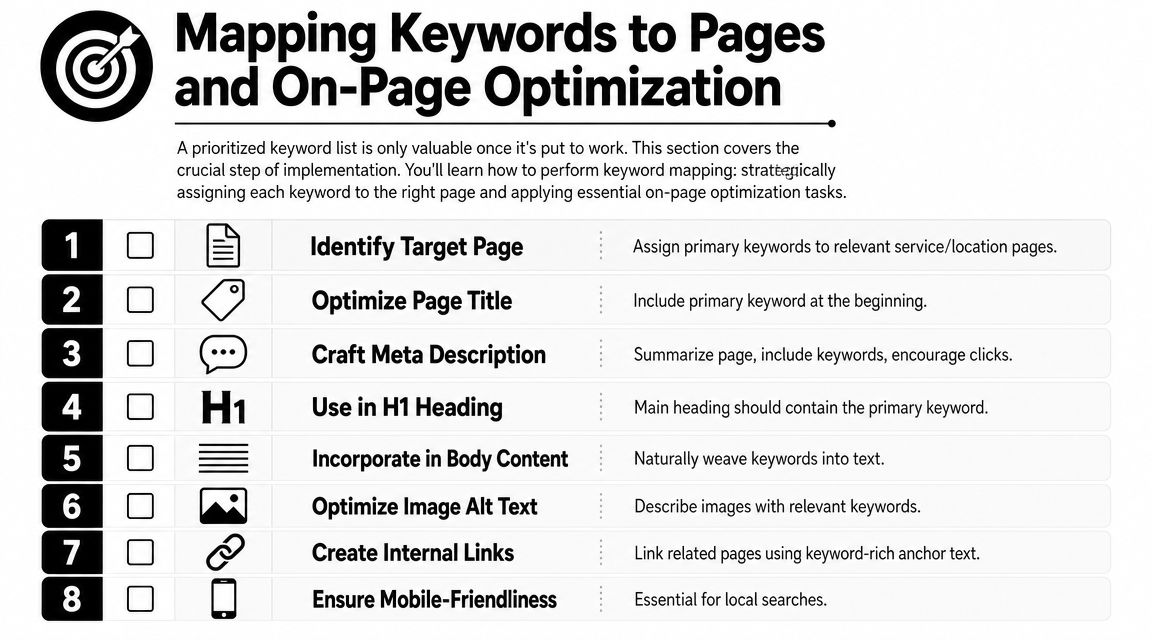
    A common example is a plumber with one general Services page trying to rank for emergency plumbing, drain cleaning, water heater repair, and every neighborhood in the city. Google has to guess which query that page deserves to rank for. Customers have the same problem. A person searching "emergency plumber Chicago" wants a fast, obvious answer, not a page that also talks about remodels and sump pumps.

    A numbered checklist showing eight essential steps for mapping keywords to pages and performing on-page SEO optimization.

    Map existing pages first

    For a small team, the fastest workflow is simple. Start with the pages you already have. Assign one primary keyword to each page. Then look for gaps.

    Use a page map like this:

    Page Primary keyword Secondary terms Keep or create
    Emergency plumbing page emergency plumber Chicago 24-hour plumber Chicago, urgent plumbing repair Keep
    Drain cleaning page drain cleaning Chicago clogged drain repair Chicago Keep
    Water heater page water heater repair Chicago hot water heater repair near me Keep
    Lincoln Park service area page plumber Lincoln Park local plumbing service Lincoln Park Create only if truly distinct

    This step prevents keyword cannibalization, which is just a technical way of saying two pages from the same site compete for the same search.

    A few rules keep the map usable:

    • One primary keyword per page: Variants and close synonyms can support the main term
    • Match intent to page type: Service terms belong on service pages. Informational terms belong on blog posts or FAQs
    • Create location pages only when they can be unique: If the page has no distinct proof, service details, or local relevance, skip it
    • Support the money page instead of competing with it: A blog post on "signs you need drain cleaning" should link to the drain cleaning service page, not target the same main phrase

    If time is tight, use a Good, Better, Best approach.

    • Good: Spreadsheet with page URL, target keyword, title tag, and status
    • Better: Spreadsheet plus a quick SERP check for each keyword to confirm the right page type is ranking
    • Best: Spreadsheet, SERP check, and local pack review to see whether the keyword is won mainly through the website, the Google Business Profile, or both

    That last point matters more than many business owners realize. If the search result is dominated by the map pack, your page still needs to rank, but it also needs to reinforce the profile that may get the click or call first.

    How to optimize the page without stuffing it

    After the keyword is mapped, make the page obvious to both searchers and Google.

    Place the primary keyword in the spots that carry the most meaning:

    • Title tag: Lead with the service and city when it fits naturally
    • H1 heading: Keep it clear and close to the title tag
    • Opening paragraph: Confirm the service and area early
    • Subheadings: Use related service terms and real customer questions
    • Body copy: Add useful local details such as service areas, response times, common job types, and trust signals
    • Image alt text: Describe the image first. Add local context only when it is relevant

    Read the page out loud.

    If it sounds repetitive, salesy, or strange, fix the copy. Local pages usually improve when they are more specific, not when they repeat the exact keyword five extra times.

    Schema can support this work by clarifying business details, services, and location. It helps search engines interpret the page, but it does not fix weak page targeting or thin content.

    Don't ignore your Google Business Profile

    For many local keywords, the Local Pack is the first real conversion point. That is the map and three business listings people see when they search for something like "plumber near me." If your profile shows up there, the customer may call without ever opening your website.

    That changes how page mapping should work.

    Your service pages and your Google Business Profile should use the same service language so Google sees a consistent pattern across your site and profile. Keep that alignment across:

    • Primary and secondary categories
    • Business description
    • Services and products
    • Posts and updates
    • Photos and captions
    • Questions and answers

    Here is the practical trade-off. A page targeting "water heater repair Chicago" may help organic rankings, but if the map pack gets most of the clicks and calls for that query, the win comes from both assets working together. The page supplies relevance and detail. The profile supplies visibility, reviews, hours, and a fast path to contact.

    For a solopreneur, that means prioritizing pages that support high-intent map pack searches first. Build the emergency service page before the broad company overview. Tight alignment beats more content.

    Tracking Your Local SEO Performance and Iterating

    Local SEO work compounds only if you review it. Otherwise you're publishing pages, tweaking profiles, and guessing.

    Tracking doesn't need to be complicated. For a small team, the best system is the one you'll check consistently. That usually means a short keyword set, a simple notes field, and a monthly review of business outcomes.

    Track business signals, not just ranks

    Rank tracking matters, especially by city or service area, but don't treat it as the only scorecard.

    Watch these signals together:

    • Keyword positions in your target area: Especially for service-plus-location terms
    • Google Business Profile actions: Calls, direction requests, and other profile interactions
    • Lead form submissions: Look for pages that start generating qualified inquiries
    • Call quality: Ask staff which services people mention when they call
    • Page engagement: Are visitors landing on the intended page and taking the next step?

    One useful pattern shows up often. A keyword may never drive huge website traffic because the search results page answers the query with map listings and profile details. It can still be a winner if it leads to more calls or direction requests. That's why local SEO performance needs business context.

    A lightweight review rhythm for small teams

    A monthly review works well for most small businesses.

    Use a short checklist:

    • Check your top target keywords: Did any move up, down, or trigger different SERP features?
    • Review your best pages: Are the mapped service pages still the right fit?
    • Inspect one competitor: Did they launch a better page, add reviews, or improve their profile?
    • Look for near-miss keywords: Terms where you're visible but not yet strong enough to win consistently
    • Refine the next batch: Update one page, improve one profile area, and build one supporting asset

    What works is steady iteration. Update pages with better local details. Tighten service language. Improve internal links. Add FAQs that reflect real customer questions. Expand into adjacent neighborhoods only when the current service pages are doing their job.

    The businesses that get the most from keyword research for local SEO don't treat it like a one-time spreadsheet exercise. They use it as a feedback loop. That's where the edge comes from.


    If you want a simpler way to turn keyword research into content and rankings without hiring an agency, Agency Secrets is worth a look. It gives small business owners a practical SEO playbook built around buyer-intent keyword targeting, strong content structure, backlinks, and evergreen growth, with OutRank helping automate research, article creation, publishing, and competitor analysis.

  • Boost Traffic: Best SEO Software for Small Business

    Boost Traffic: Best SEO Software for Small Business

    You're probably in one of two situations right now. Either you've been trying to do SEO with a pile of free tools, spreadsheets, and guesswork, or you've looked at platforms like Semrush and SE Ranking and thought, “I have no idea if I need this much software.”

    That's a normal place to be. Most small business owners don't need more features. They need less manual work, clearer priorities, and a system that turns search traffic into leads and sales. The right seo software for small business doesn't just give you data. It saves hours, cuts decision fatigue, and tells you what to do next.

    Table of Contents

    Why SEO Software Is Your New Must-Have Employee

    Most small business owners don't struggle with SEO because they're lazy. They struggle because SEO looks like ten jobs disguised as one. Keyword research, technical fixes, content planning, rankings, backlinks, local visibility. It becomes one more thing sitting on your desk unfinished.

    That's why I want you to stop thinking about SEO software as a marketing expense. Think of it as an employee. A good one. It doesn't sleep, doesn't forget follow-ups, and keeps checking what customers are searching, what pages need work, and where competitors are pulling ahead.

    SEO is no longer niche or optional. According to AIOSEO's 2026 SEO statistics roundup, 74% of small businesses invest in SEO, the average monthly spend is $497, and the global SEO services market is valued at $83.98 billion in 2026. That should tell you something simple. This isn't experimental anymore. It's standard operating procedure.

    Software gives small teams leverage

    If you run a lean company, software is how you compete without hiring an agency or building an in-house SEO department. It helps you spot buyer-intent keywords, catch technical issues before they hurt visibility, and keep publishing pages that can bring in traffic long after they go live.

    Practical rule: If a tool saves you from guessing what to publish, what to fix, and what to track, it's not overhead. It's leverage.

    True ROI isn't just rankings. It's time saved. It's fewer bad decisions. It's knowing what matters this week instead of poking around in random reports.

    The wrong purchase creates more work

    A lot of seo software for small business fails for one reason. The owner buys a feature-heavy platform, logs in twice, gets overwhelmed, and goes back to doing nothing. That's not a software problem. That's a workflow problem.

    You don't need the most powerful tool on the market. You need the tool that fits the way your business works. If you're a local service company, your priorities are different from an e-commerce store. If you publish content weekly, your needs are different from a five-page brochure site.

    So yes, you need software. But you need software that reduces effort, not software that creates another part-time job for you.

    What SEO Software Actually Does For Your Business

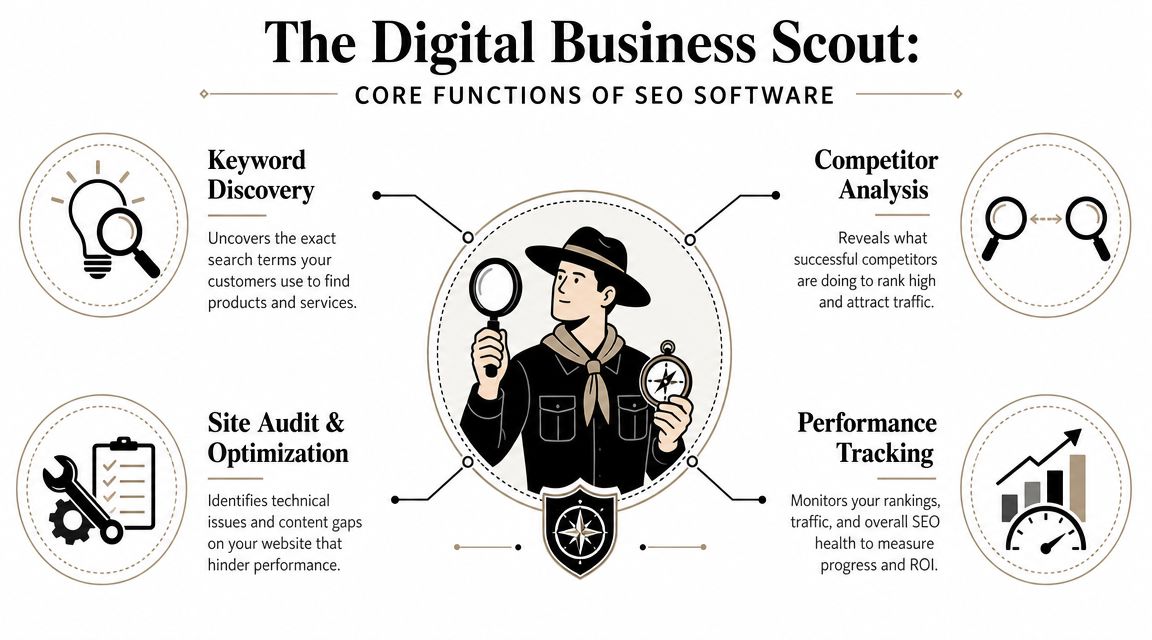
    Good SEO software acts like a digital business scout. It goes out into the market, gathers intelligence, reports back, and helps you act faster than a business relying on instinct alone.

    An infographic titled The Digital Business Scout detailing the four core functions of SEO software for businesses.

    Search is still where people start. SmartClick's overview of SEO tools for small businesses notes that Google processes over 8.5 billion searches per day, and 46% of monthly Google searches have local intent. That's why software evolved from basic keyword tools into platforms that help businesses capture very specific demand.

    It finds demand before your competitors do

    The first job is keyword discovery. Tools uncover the phrases people type when they're ready to compare, buy, book, or call.

    For a small business, this answers practical questions like:

    • What should we build a page around: service terms, product terms, or local variations
    • What should we write next: educational topics, buyer questions, or comparison content
    • Where is intent strongest: broad awareness or ready-to-act searches

    A tool like Google Keyword Planner can help with early research. Platforms like Semrush or SE Ranking take it further by tying keywords to competitors, ranking difficulty, and content opportunities.

    It shows what is broken and what is worth fixing

    The second job is site auditing and optimization. Your website may look fine to a customer and still have problems that weaken search visibility. Broken pages, weak metadata, indexing issues, duplicate content, thin pages, or poor internal linking all chip away at performance.

    The third job is competitor analysis. This isn't about obsessing over rivals. It's about learning what they rank for, which pages bring them traffic, and where they're vulnerable.

    The fourth job is performance tracking. Rankings move. Pages improve. Some fall off. Without tracking, you can't tell whether your SEO work is paying off or whether your team is just staying busy.

    The best tools don't drown you in charts. They shorten the path from insight to action.

    A business owner doesn't need a lecture on crawl depth. They need software that says: these pages are underperforming, these keywords matter, these competitors are outranking you, and these fixes will move the needle first.

    The Must-Have Features Every Small Business Needs

    If a platform can't help you go from opportunity to action in one sitting, it's probably too fragmented. That's the test I use.

    Buy the workflow not the dashboard

    The biggest mistake I see is buying tools based on feature count. More features sounds better until your team has one tool for keywords, another for audits, another for rank tracking, and a fourth for backlink checks. Then nobody keeps the whole machine running.

    Select Software Reviews' buyer guide makes this point well. All-in-one platforms like Semrush and SE Ranking reduce tool fragmentation, which is a major efficiency gain for small teams moving from keyword selection to remediation to monitoring inside one environment.

    That matters because small businesses don't lose at SEO from lack of ambition. They lose because important tasks fall through the cracks.

    The features that actually earn their keep

    Here's what I'd call essential.

    • Keyword research with intent clues
      You need to see what people search for and decide whether those searches could turn into business. Not every keyword deserves a page.

    • Site audits with prioritized fixes
      A long error list is useless. The tool should help you identify what's actually hurting visibility and what can wait.

    • Rank tracking
      You need a reliable view of whether your important pages are moving up, flatlining, or slipping.

    • Competitor visibility research
      If a competitor keeps outranking you, the software should help explain why. Better pages, better links, broader coverage, or stronger local signals.

    • Backlink analysis
      You don't need a fancy report. You need to understand where authority gaps exist and where link opportunities may come from.

    • On-page optimization guidance
      This is the bridge between research and execution. Good tools help shape titles, headings, content structure, and internal links.

    Here's the business question behind each feature:

    Feature The real question it answers
    Keyword research What should we target next
    Site audit What is quietly hurting our visibility
    Rank tracking Are our efforts improving visibility
    Competitor analysis Why are they beating us
    Backlink analysis Where is our authority weaker
    On-page guidance How do we improve this page today

    My blunt recommendation

    If you're serious about search and you have more than a tiny site, buy an integrated platform before you buy another disconnected tool. The point of seo software for small business is efficiency. A platform that saves one or two hours every week is already doing real work for you.

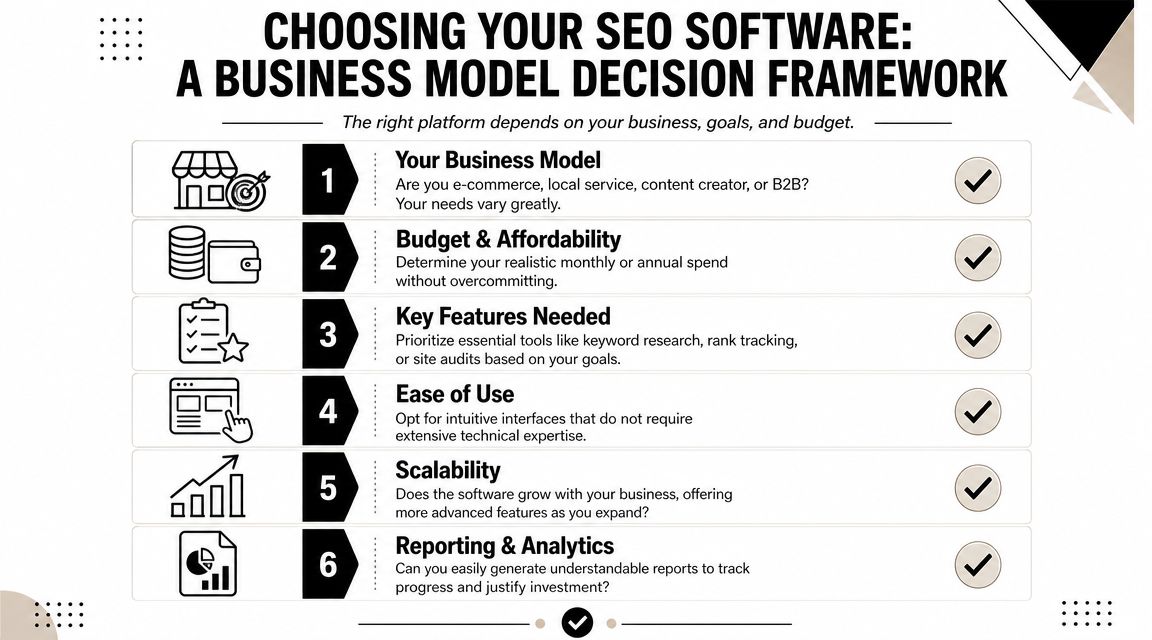
    How to Choose The Right SEO Software For Your Business

    There is no universal best tool. There is only the best fit for your business model and your workflow.

    A visual framework with six numbered steps for selecting the ideal SEO software for your business.

    Most review articles make this harder than it needs to be. They compare feature lists as if every business wants the same thing. They don't. A local clinic, a home services company, an online store, and a B2B firm need different workflows.

    Local businesses should choose differently

    However, many recommendations fall short. If you're a local operator, generic SEO features aren't enough. You need software that helps with Google Business Profile visibility, reviews, citations, Q&A, and map rankings.

    A discussion on local SEO tools including BrightLocal, Local Viking, and Paige by Merchynt highlights this gap well. Many broader platforms are strong on analytics, but local businesses often need tools built around local ranking actions, not just reporting.

    If you run a trade business, clinic, home service, or storefront, ask this first: will this tool help me show up in the places local buyers click?

    If your revenue depends on local discovery, local workflow matters more than broad SEO breadth.

    A simple decision filter

    Use these four filters before you buy anything.

    Business type

    A local service business should prioritize local visibility tools and page optimization for service areas. An e-commerce store needs category, product, and competitor research support. A content-heavy site needs stronger editorial planning and on-page workflow.

    Team size and time

    If you are the team, complexity is expensive. Choose a platform with a clean workflow and clear recommendations. If you have a marketing generalist or content person, you can justify a broader suite.

    Technical comfort

    Some tools assume you already speak SEO. If you hate digging through dashboards, don't buy a platform built for agencies and power users unless someone on your team will operate it.

    Core goal

    Pick based on the business outcome you want most:

    • Leads: prioritize local SEO, service page optimization, and rank tracking
    • Sales: prioritize product keyword research, competitor intelligence, and content support
    • Authority: prioritize content planning, backlinks, and topic coverage
    • Operational simplicity: prioritize all-in-one workflows over specialist tools

    Here's my short take on common fits:

    Business situation Better fit
    First serious SEO setup SE Ranking or Semrush
    Local visibility first BrightLocal-style local tools plus core SEO basics
    Free starting stack Google Search Console, Google Business Profile, Screaming Frog free crawl
    One owner, very little time The simplest workflow-driven option available

    Buying software based on a review site's “best overall” badge is lazy. Buy for the work you need done every week.

    Comparing Common Pricing And Feature Tiers

    You don't need to overspend to get traction. You do need to stop pretending free tools can support a growing SEO operation forever.

    SEO Software Tiers Compared

    Tier Typical Monthly Price Key Features & Limits Best For
    Free or freemium Free Search Console data, basic keyword discovery, limited crawling, manual workflows New sites, very small teams, owners learning the basics
    Starter Lower-cost paid plan More structured keyword research, recurring audits, rank tracking, some competitor visibility Businesses with active SEO but limited scope
    Pro or business Higher paid tier Broader reporting, integrated workflows, larger tracking limits, stronger competitor and backlink analysis Teams publishing regularly or competing in harder markets

    You can build a useful free stack with Google Search Console, Google Keyword Planner, Screaming Frog's free crawl for under 500 URLs, AnswerThePublic, and Ubersuggest-style budget tools. That's enough to learn, audit a small site, and make early improvements.

    But free stacks come with a cost. The cost is manual effort. You jump between tabs, export data, lose context, and react slowly.

    When free tools stop being enough

    The right time to upgrade is not when a salesperson pressures you. It's when your workflow breaks.

    The U.S. Chamber's roundup of free SEO tools for small business points to a practical rule. Upgrade when you have enough content volume or competitive pressure to need daily tracking and integrated workflows. Free tools are a strong starting point, but they don't give you the same competitor analysis or proactive auditing at scale.

    That means you should move up when:

    • You're publishing regularly and need a system for planning and tracking
    • You serve multiple locations and manual checking becomes messy
    • Competitors are aggressive and you need visibility into what they're doing
    • Your site has grown enough that spot checks no longer cut it
    • You keep postponing SEO work because managing the tools is annoying

    Cheap tools get expensive when they waste your time.

    If you have a tiny site and no publishing rhythm, stay lean. If you have momentum and search matters to revenue, pay for the workflow that removes friction.

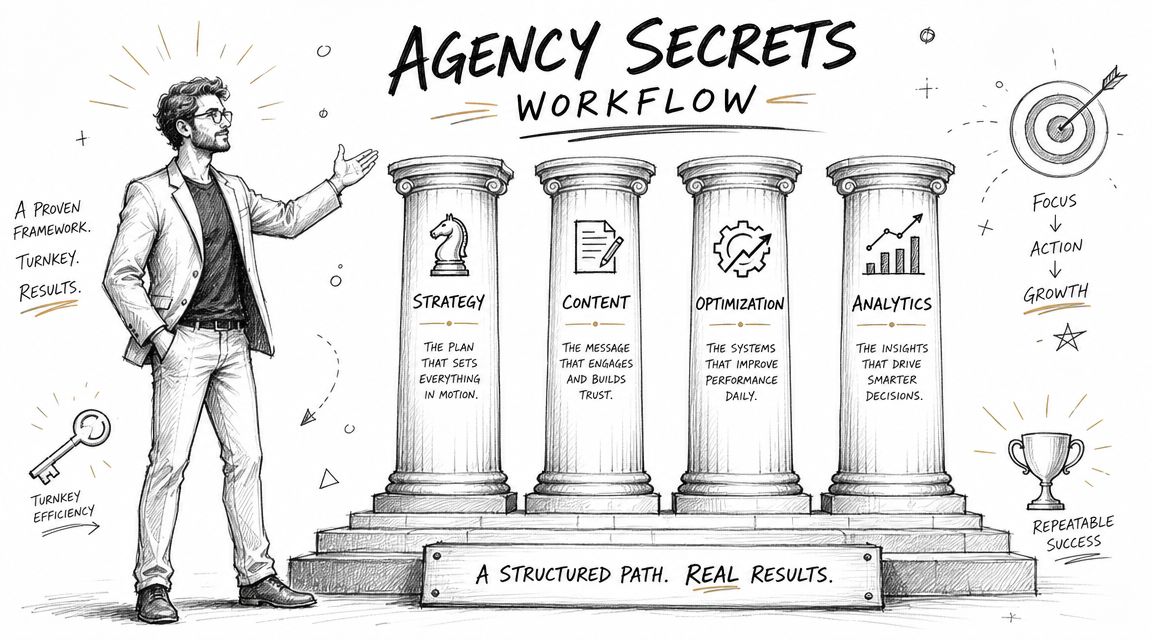
    The Agency Secrets Workflow A Turnkey Path to Results

    Most software discussions stop at tools. That's incomplete. Small businesses don't just need software. They need a repeatable workflow.

    A professional drawing representing an agency secrets workflow featuring four pillars labeled strategy, content, optimization, and analytics.

    The best-performing SEO systems I've seen all run on the same four pillars. Not hacks. Not random publishing. A disciplined engine.

    The four-part workflow that actually moves rankings

    First, buyer-intent keyword research. You don't need more traffic for its own sake. You need pages aimed at searches that can turn into business.

    Second, consistent publishing. Most owners stumble here. They buy software, collect ideas, and never ship enough useful content to build momentum.

    Third, authority building through backlinks. Even strong pages often need external trust signals to compete.

    Fourth, evergreen compounding. Good SEO content keeps working after it's published. It doesn't vanish when ad spend stops.

    Why turnkey beats piecing tools together

    A turnkey workflow matters because most small businesses don't fail from lack of information. They fail from broken execution. Research sits in one tool. Drafts sit in another. Publishing is delayed. Backlink work never happens. Reporting shows up too late.

    That's why systems like OutRank are compelling. Instead of giving you another dashboard to manage, they package the workflow itself. Keyword research, content generation, publishing support, backlink acquisition, and competitor insight live in one process. That's the right direction for owners who want results without turning themselves into part-time SEO operators.

    I'm opinionated on this point. If you're busy, workflow beats features. The software that gets used wins. The software that automates the boring but important work wins faster.

    Smart small businesses should buy momentum, not just access to data.

    If you've been comparing tools line by line, step back. The bigger question is whether the software helps you execute the core SEO jobs consistently with minimal manual effort.

    Your 30-Day Implementation Plan For Quick Wins

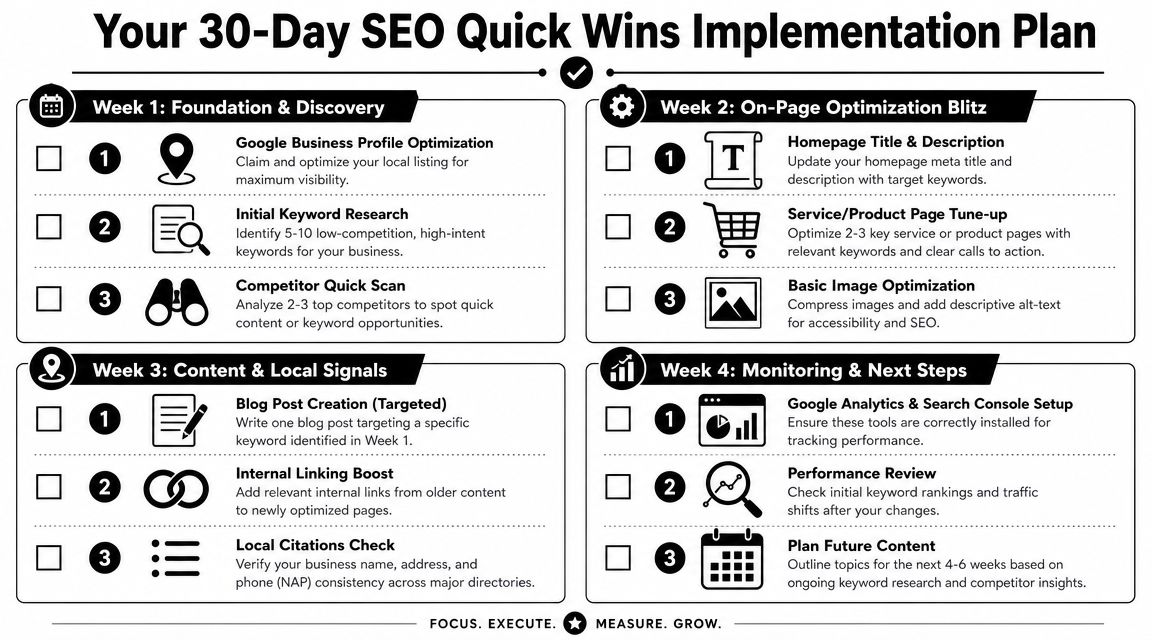
    If you buy software and then spend a month exploring menus, you've already lost. Use the first month to force action.

    Start with this checklist.

    A 30-day SEO quick wins implementation plan infographic for small business owners and digital marketers.

    Week-by-week execution

    Week 1

    • Run a full site audit: find obvious technical issues, weak titles, and missing basics
    • Identify five to ten practical keywords: focus on buyer intent or local intent
    • Check a few competitors: look at what pages they rank with and what topics they cover

    Week 2

    • Fix your homepage metadata: keep it clear and relevant
    • Tune up your top service or product pages: improve headings, copy, and calls to action
    • Clean up images and alt text: this is easy and worth doing

    Week 3

    • Publish one optimized article: answer a real customer question
    • Add internal links: point older pages to your most important updated pages
    • Review local consistency: make sure your business details match across major listings

    A quick walkthrough can help if you want to see the process in motion.

    Week 4

    • Set up Search Console and Analytics correctly: make sure tracking is in place
    • Check early movement: look for impressions, rankings, and page engagement shifts
    • Plan next month's content: don't stop after one post

    What to expect after the first month

    Don't expect a miracle in thirty days. Expect momentum. Expect a cleaner site, clearer keyword targets, and a content process you can repeat.

    The biggest win is operational. You move from random SEO activity to a working system. Once that happens, scaling becomes realistic.


    If you want the fastest path from strategy to execution, look at Agency Secrets. It's built for business owners who want the playbook without hiring an agency, and it points you toward a more turnkey workflow with OutRank so keyword research, publishing, and authority building don't keep stalling on your to-do list.

  • Content Marketing for Local Business: A Winning Playbook

    Content Marketing for Local Business: A Winning Playbook

    You're probably doing what most local owners do. You run a few ads, get a short spike in calls, then watch the leads dry up the moment you pause spend. Meanwhile, your website sits there like an online brochure instead of a sales asset.

    That's the gap content marketing for local business closes. It turns your site into something that keeps working when you're on jobs, seeing patients, serving tables, or handling payroll. A strong service page can bring in calls. A useful FAQ can remove hesitation. A well-written article can attract someone who didn't know your business name yesterday but knows they need help now.

    The part most businesses miss is that this only works as a system. Keyword research feeds content. Content feeds internal links. Better structure supports local SEO. Local SEO makes link building easier. Links strengthen the pages you already published. Over time, the whole thing compounds.

    Table of Contents

    The Local Advantage Why Content Outperforms Ads

    Paid ads are rented attention. Once your budget stops, the traffic stops with it. That's fine for a promotion or a short-term push, but it's a weak foundation for a plumber, dentist, HVAC company, roofer, or café that needs steady demand.

    Content works differently. You publish a page once, improve it over time, and it can keep bringing in visits, calls, and quote requests long after you hit publish. A page about “emergency plumber in South Austin,” a guide to “Invisalign cost in Scottsdale,” or an article on “best coffee beans for French press at home” can keep showing up whenever local buyers search.

    A stressed businessman surrounded by failed marketing campaigns, contrasting ineffective paid ads with the success of content marketing.

    This isn't a fringe tactic anymore. 90% of organizations now have a content marketing strategy, and 71% of marketers say its significance has grown in the past year, according to compiled industry benchmarks on content marketing adoption. For a local business, that means your market is training customers to expect useful content before they call.

    Practical rule: Ads can buy attention. Content can earn trust and keep earning it.

    The best part is the asset value. A good article doesn't disappear like a boosted post. It can support your service pages, rank for long-tail local searches, answer objections, and give other sites a reason to link to you. That's where the compounding starts.

    Here's the trade-off most owners need to hear clearly:

    Approach What it does well What it does poorly
    Paid ads Fast testing, immediate visibility, seasonal promos Stops working when spend stops
    Local content Builds search visibility, trust, and reusable sales assets Takes discipline and consistency
    Both together Captures short-term demand while building long-term reach Requires focus so you don't spread thin

    If your budget is tight, content usually gives you a better long-term position. If your budget is healthy, content still matters because it lowers your dependence on paid acquisition.

    That's why content marketing for local business isn't just blogging. It's a growth engine built from pages, articles, FAQs, internal links, citations, and local trust signals that stack on each other.

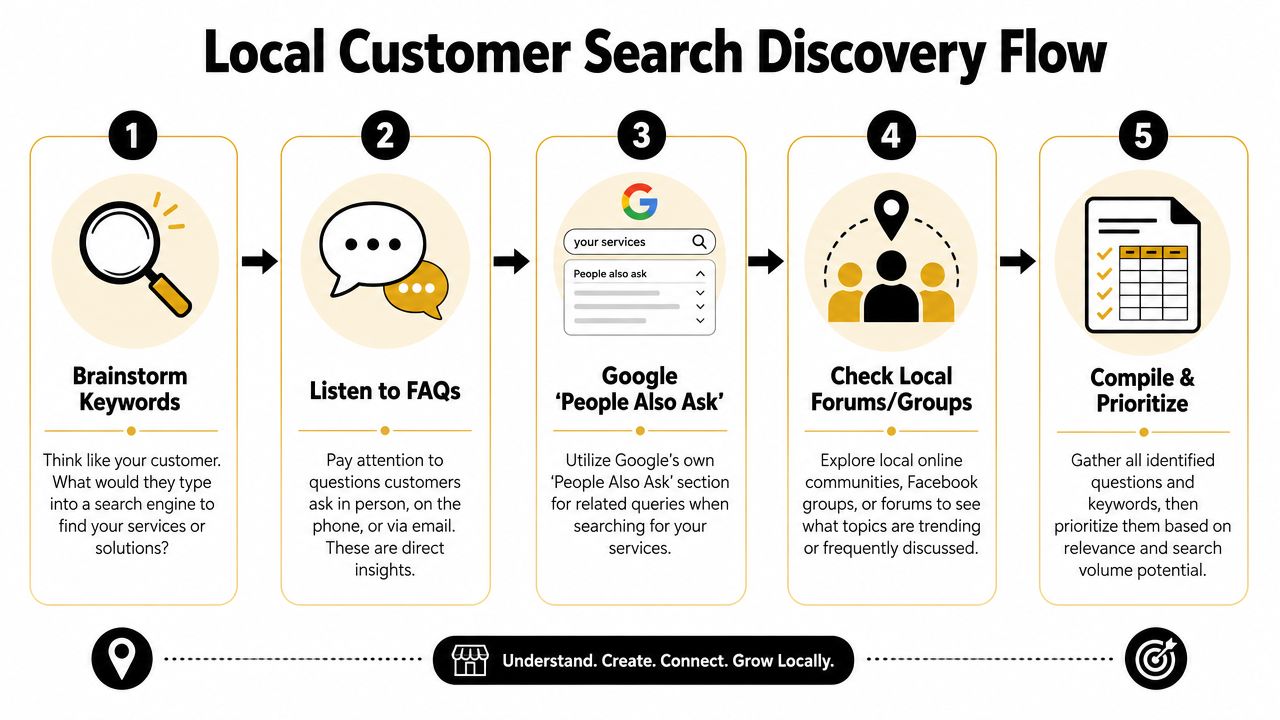
    Find What Your Local Customers Are Asking

    Most local content fails before writing starts. The business guesses what people want, writes broad posts nobody asked for, and wonders why nothing ranks or converts.

    The better approach is simpler. Build content from the questions customers already ask, then match those questions to the phrases they use in search. Salesforce recommends identifying your audience by analyzing customer challenges, and Keap emphasizes keyword research so content reflects the exact phrases people search for, as explained in Salesforce's small business content marketing guidance.

    A five-step flowchart illustrating a local customer search discovery process for SEO and marketing purposes.

    Start with the questions you already hear

    You don't need fancy software to begin. Open a document and list what people ask on calls, in DMs, at the front desk, and during estimates.

    For a plumber, the list might look like this:

    • Urgent service questions: “Do you handle burst pipes at night?” “How fast can someone get here?”
    • Cost questions: “How much does water heater replacement cost?” “Do you charge a callout fee?”
    • Trust questions: “Are you licensed?” “Do you guarantee the work?”
    • Problem questions: “Why does my drain keep backing up?” “Why is my water pressure low?”

    Those aren't just sales questions. They're content topics.

    Customers usually search for the problem first and the provider second.

    Turn one service into many search terms

    Take one core service and expand it with modifiers. A local electrician in Phoenix could start with “electrical repair” and branch into:

    • Service plus city: electrical repair Phoenix
    • Service plus suburb: electrical repair Tempe
    • Service plus urgency: emergency electrician Phoenix
    • Service plus problem: flickering lights electrician Phoenix
    • Service plus cost: electrical panel upgrade cost Phoenix
    • Service plus audience: electrician for older homes Phoenix

    Many owners go wrong. They only target broad service phrases and skip the high-intent searches around symptoms, urgency, and pricing. Those are often the searches that lead to calls because the person already feels the problem.

    A quick way to prioritize is to sort topics into three buckets:

    Bucket What it usually means Example
    Ready to buy The person wants a provider now emergency plumber in South Austin
    Comparing options The person is evaluating service types or pricing tank vs tankless water heater Austin
    Learning first The person wants to understand the issue why does my bathroom sink smell

    Use Google like a customer would

    Type your service into Google and look closely at the results page. Autocomplete, related searches, and “People Also Ask” will show the language buyers use. That's free research.

    If you own a dental clinic, search terms might uncover angles like:

    • Treatment concerns: “Does Invisalign hurt”
    • Price intent: “Invisalign cost Scottsdale”
    • Comparison intent: “Invisalign vs braces adults”
    • Location intent: “cosmetic dentist near Old Town Scottsdale”

    Then check your own Google Business Profile reviews, email inbox, and contact form submissions. If several people phrase the same concern similarly, that wording belongs in your page headings, FAQs, and article titles.

    A practical workflow for content marketing for local business looks like this:

    1. List services you want more of
    2. Write down customer questions tied to those services
    3. Add city, neighborhood, and urgency modifiers
    4. Check Google autocomplete and People Also Ask
    5. Group similar queries into one strong page instead of many weak ones

    Don't create a separate page for every tiny variation. A plumber doesn't need one page for “clogged kitchen sink Austin” and another for “kitchen sink drain clogged Austin” if one solid page can cover the intent well.

    What works is consolidation with clarity. What doesn't work is publishing thin, repetitive pages that say the same thing with slightly different keywords.

    Create Content That Answers Local Questions

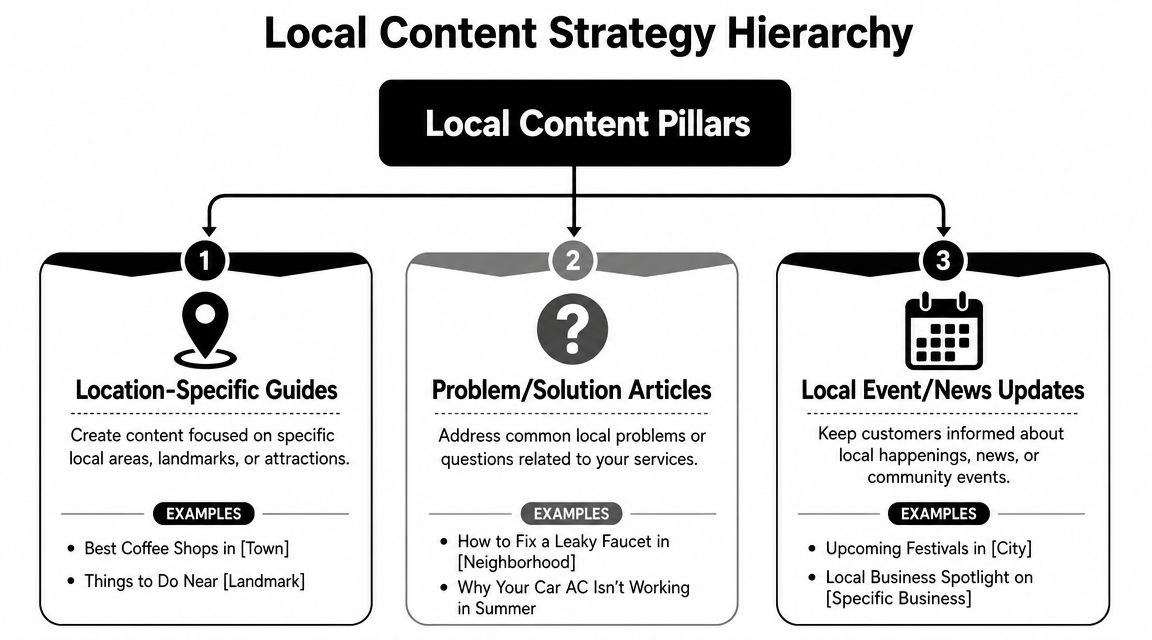
    Once you know what people search, your next job is answering better than anyone local. That doesn't mean writing more. It means publishing the right mix of pages so each piece supports the others.

    HubSpot's 2026 data reports that website, blog, and SEO content is the highest ROI-generating channel for marketers, and blog posts were named among the top five highest-ROI formats by 22.26% of marketers in 2025, with blogs used by 38% of marketers in that year, according to HubSpot marketing statistics. For local businesses, that matters because service pages and evergreen articles can keep attracting buyers long after publication.

    A diagram outlining the Local Content Strategy Hierarchy with three main content pillars for business growth.

    Service pages that convert

    Start with your money pages. These are the pages for services you want booked now.

    A strong local service page usually includes:

    • A clear headline: Say the service and area plainly. “Emergency Plumbing in South Austin” is stronger than “Trusted Solutions for Your Home.”
    • Specific problems you solve: Burst pipes, blocked drains, leaking water heaters, no hot water.
    • Proof and reassurance: Licensing, service area details, process, warranty, financing if relevant.
    • A visible next step: Call button, booking form, request-a-quote form.

    For a dentist, that may be a page on “Dental Implants in Naperville.” For a café, it may be “Coffee Catering for Office Events in Brooklyn.” For a roofer, it may be “Roof Repair in Plano.”

    These pages should be direct. Don't bury the service under brand storytelling.

    Location pages that prove local relevance

    A location page is not the same as a service page. It exists to show that your business understands a specific area and serves it well.

    A useful location page might include:

    Element Example for a plumber Why it matters
    Area-specific intro Common plumbing issues in older homes in Hyde Park Shows local relevance
    Nearby landmarks or neighborhoods Serving Hyde Park, North Loop, and Hancock Helps match local intent
    Local service context Familiar with older pipe systems and slab leak issues Builds trust
    Contact path Call for service in this area today Keeps the page action-oriented

    What doesn't work is copying one template across ten suburbs and swapping the town name. That's easy to spot and rarely persuasive.

    If a local page wouldn't help a real customer in that area, it probably won't help your rankings either.

    A realtor can do this especially well. A page about a neighborhood can include parks, commute patterns, school-adjacent lifestyle points, pet-friendly spots, and housing style notes. That kind of specificity makes the page useful, not just optimized.

    Blog posts that pull in early-stage demand

    Blog content catches people before they're ready to call. Done well, it feeds your service pages with internal links and trust.

    Good local blog topics usually fall into a few patterns:

    • Cost and pricing: “How much does a new roof cost in Denver?”
    • Problem diagnosis: “Why does my AC smell musty in summer?”
    • Comparisons: “Porcelain veneers vs bonding”
    • Local guidance: “What café owners should know about seasonal outdoor seating permits”
    • Preparation content: “What to do before the exterminator arrives”

    A café owner could publish “Best pastries for office breakfast catering” and link that post to a catering service page. A dental clinic could write “How long does Invisalign treatment take” and link to its Invisalign consultation page. A plumber could publish “What to do when a pipe bursts before help arrives” and direct readers to emergency service.

    Here's the important connection. Your blog is not separate from sales. It supports sales when each article points readers toward the next logical page.

    A simple three-part content stack looks like this:

    1. Service page for direct commercial intent
    2. Location page for geographic relevance
    3. Supporting blog post for questions, objections, and early-stage search intent

    That stack turns isolated pages into a content system. Each new article strengthens existing assets instead of sitting alone in your blog archive.

    Master On-Page and Local SEO Fundamentals

    Publishing useful content isn't enough. Google still needs clear signals about what the page is about, where you work, and how the page connects to the rest of your site.

    A lot of owners overcomplicate this part. You don't need advanced technical knowledge to get the basics right. You need a repeatable checklist and the discipline to apply it to every important page.

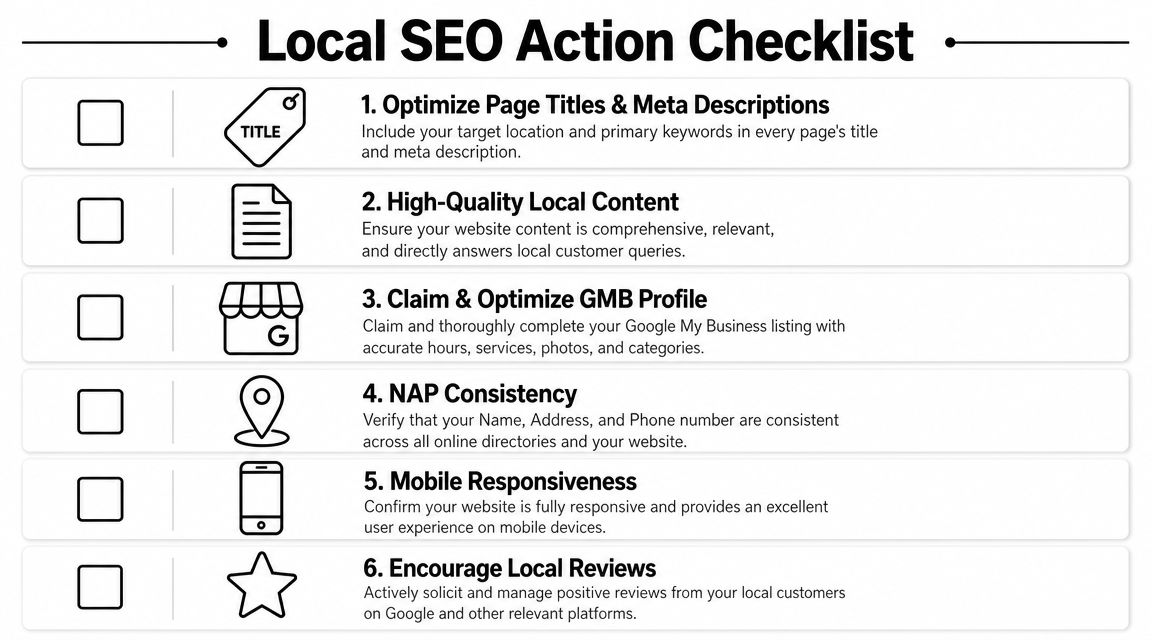
    A checklist infographic titled Local SEO Action Checklist displaying six essential steps for local business search optimization.

    What to fix on every important page

    Start with the page elements users and search engines both read first.

    • Title tag: Include the core service and location naturally. “Emergency Plumber in South Austin | 24 Hour Service”
    • Meta description: Summarize the page clearly and give a reason to click.
    • H1 heading: Match the page topic without being clever.
    • H2 and H3 structure: Break up the page by questions, services, process, and FAQs.
    • Internal links: Link from blog posts to service pages, from service pages to related service pages, and from location pages to contact pages.
    • Image alt text: Describe the image accurately and keep it relevant.

    Here's a simple model:

    Page type Main keyword focus Best internal links
    Service page service + city related services, contact page, FAQs
    Location page service area or neighborhood service page, testimonials, contact page
    Blog post question or problem query service page, location page, relevant FAQ

    Internal links matter more than most local businesses think. They help users move through your site, and they show search engines which pages carry the most weight.

    Before the next checklist, this walkthrough is worth watching if you want a visual explanation of local SEO basics.

    What local businesses need beyond the page

    Local SEO also depends on signals outside the article itself.

    Your baseline checklist should include:

    • Google Business Profile: Claim it, complete it, choose the right categories, and keep hours current.
    • NAP consistency: Your business name, address, and phone number should match across your website and directory listings.
    • Contact page signals: Include your full contact details and service area information.
    • Map embed: Add a Google Map on your contact or location page if you serve from a physical location.
    • Schema markup: LocalBusiness schema helps search engines understand business details in a structured way.
    • Mobile usability: Most local searches happen on phones, so your pages need to load cleanly and make calls easy.

    A local page fails when the user has to hunt for basics like service area, phone number, hours, or next step.
    What works is clarity. What doesn't work is stuffing city names into awkward sentences, hiding contact details, or publishing long pages with no structure.

    If you do the fundamentals well, your content has a better chance to rank, earn clicks, and turn visits into calls. If you skip them, even strong writing can underperform.

    Build Local Trust with Links and Citations

    Local rankings don't come from content alone. Google also looks for trust signals that show your business is real, established, and connected to the community it serves.

    That's where citations and local links come in. Citations confirm your business details across the web. Links from relevant local sites strengthen authority and can send direct referral traffic too.

    Citations first, then relationships

    Start with the boring work because it matters. Make sure your business appears consistently in the places customers and search engines expect to find it.

    That usually means checking:

    • Major business listings: Your core profiles and local directories
    • Industry directories: Dental associations, legal directories, contractor listings, restaurant platforms
    • Community listings: Chamber of commerce pages, neighborhood business directories, local event sites
    • Review platforms: The sites your customers already use to evaluate businesses in your category

    For a dentist, that might mean dental association listings and local directories. For a café, it may include local food guides and city business pages. For a plumber, it often includes contractor and home service directories.

    If your name, address, or phone number varies across those profiles, clean that up before chasing advanced tactics. Messy citations dilute trust.

    How local links happen in real life

    The best local links rarely come from outreach templates. They come from doing real things in your market that other organizations naturally mention online.

    A few examples:

    A plumbing company sponsors a youth baseball team. The league posts sponsor logos and links from its website.

    A dentist hosts a school toothbrush drive. A local nonprofit lists community partners and links to the practice.

    A café collaborates with a nearby bookstore for an evening event. The bookstore publishes the event page and links to the café's site.

    A roofer creates a storm prep checklist for homeowners in a specific county. A neighborhood association shares it in its online resources section.

    Those links are hard for competitors to copy because they're rooted in actual relationships.

    Spammy link tactics usually leave local businesses with junk placements nobody reads. Community-based links do the opposite. They build search trust and local recognition at the same time.

    A strong content asset also makes link building easier. If you publish a useful neighborhood guide, local event roundup, or homeowner checklist, you give other sites a reason to reference your business. That's why the earlier steps matter. Better content creates more link opportunities later.

    Your System for Compounding Growth

    Most local businesses don't need more marketing ideas. They need a system they can keep running while the business stays busy.

    That system is simple. Publish on a schedule you can maintain. Promote each piece in the channels your audience uses. Check performance. Improve what works. Metric Marketing recommends maintaining an editorial calendar, while multi-channel distribution and analytics review are emphasized in the source material summarized at Metric Marketing's small business content guidance.

    A calendar you can actually keep

    You do not need an elaborate publishing machine. You need consistency.

    For most local businesses, a workable rhythm looks like this:

    Week Main task Example
    Week 1 Publish one service or location page update add FAQs to “Emergency Plumbing in Round Rock”
    Week 2 Publish one supporting article “Why your water heater runs out faster in winter”
    Week 3 Distribute and repurpose email newsletter, Facebook post, Instagram story
    Week 4 Review and improve update title, add internal links, expand FAQ

    That's manageable for a small team. It's also enough to create momentum if you stick with it.

    If you own a dental clinic, your month might include one implant page refresh, one blog post about recovery expectations, and one email to past consultation leads. If you run a café, it might be one catering page update, one event-related blog post, and a newsletter promoting both.

    What to measure without drowning in reports

    A lot of owners quit because analytics feels like homework. It doesn't need to.

    Look at a short list:

    • Which pages get search impressions and clicks
    • Which pages drive calls, form submissions, or bookings
    • Which topics hold attention and lead users to another page
    • Which channels help distribute content effectively

    You can get most of this from Google Search Console, Google Analytics, your call tracking setup, and your form submissions.

    The key is pattern recognition. If a plumber's article about slab leaks keeps attracting search traffic, that topic deserves follow-up content and stronger links to the slab leak service page. If a dentist's financing FAQ gets visits but no consultations, the page may need a clearer next step. If a café's catering page gets traffic from email but not search, that points to an SEO gap, not a content gap.
    What doesn't work is publishing, sharing once, and forgetting it. What does work is a loop:

    1. Publish
    2. Promote
    3. Measure
    4. Improve
    5. Link it into the rest of your site

    That's how content marketing for local business becomes a compounding engine instead of a pile of disconnected posts. Each useful page makes the next one easier to rank. Each internal link strengthens existing assets. Each citation and local mention supports trust. Over time, your site stops acting like a brochure and starts acting like a lead source.


    If you want a simpler way to execute this without hiring a full agency, Agency Secrets is worth a look. It focuses on the exact system local businesses need: buyer-intent keyword research, consistent publication of authoritative content, relevant backlinks, and the compounding effect of evergreen SEO. If you want the playbook and the tools to help you run it with less manual work, that's a practical place to start.

  • Buyer Intent Keywords: A Guide to Finding Terms That Sell

    Buyer Intent Keywords: A Guide to Finding Terms That Sell

    You publish blog posts, service pages, maybe a few location pages. Traffic starts to climb. Google Search Console shows more impressions. Analytics says people are landing on your site.

    But the phone doesn't ring more often. Demo requests stay flat. Product sales don't move.

    That usually means you didn't attract the wrong amount of traffic. You attracted the wrong kind of traffic. A visitor searching “how does payroll software work” behaves very differently from someone searching “best payroll software for small business pricing.” One is learning. The other is shopping.

    Buyer intent keywords are the difference between visibility and revenue. They help you target searches made by people who are actively comparing options, narrowing vendors, checking pricing, or trying to buy. For a small business, that matters more than winning broad vanity terms that look good in a report and produce little else.

    Most guides stop at a list of modifiers like “best,” “buy,” and “price.” That's useful, but incomplete. In real SEO work, a keyword only matters if the live search results confirm that Google sees it as a money term. That's the missing piece most small businesses never get taught.

    Table of Contents

    Why High Traffic Does Not Equal High Sales

    A lot of SEO campaigns fail for one simple reason. They target keywords that are easy to publish on, not keywords tied to buying behavior.

    A plumbing company might rank for “why is my water pressure low.” A skincare brand might rank for “how often should you exfoliate.” A software company might rank for “what is CRM.” Those terms can bring visitors, and some of those visitors may convert later, but most aren't ready to choose a provider today.

    That gap is where small businesses get frustrated. They invest time into content, see movement in traffic, and assume sales should follow automatically. They usually don't.

    Traffic can be high quality or low intent

    A search visit only matters if it aligns with the action you want. If you want a booked estimate, a product sale, or a demo request, then search terms tied to comparison and purchase behavior deserve more attention than broad education queries.

    The easiest way to think about it is this:

    • Low-intent traffic fills the top of the funnel. It teaches, introduces, and warms up.
    • Buyer-intent traffic sits closer to revenue. It compares, evaluates, and converts.
    • Mismatched traffic wastes effort because the visitor lands on a page that doesn't fit what they want next.

    Practical rule: If a keyword brings visitors who still need basic education, don't expect that page to behave like a sales page.

    This doesn't mean informational content is useless. It means many small businesses overproduce it because it's easier to write and easier to imagine ranking for. They underproduce the pages that help a buyer make a decision.

    What small businesses usually get wrong

    The common mistakes aren't technical. They're strategic.

    • Chasing broad topics: Broad keywords feel attractive because they seem bigger, but broad often means vague.
    • Publishing blog posts for everything: Some searches don't need a blog post. They need a pricing page, a comparison page, or a service page.
    • Ignoring the SERP: Business owners judge intent by the words in the query and skip the search results entirely.
    • Reporting on traffic alone: Rankings and clicks don't tell you whether the keyword has commercial value.

    Buyer intent keywords fix this because they force you to ask a sharper question. Not “Can I rank for this?” but “If I rank for this, will the visitor be closer to buying?”

    Decoding Searcher Intent with Keyword Modifiers

    Search intent isn't one bucket. Industry-standard guidance breaks it into informational, navigational, commercial, and transactional. In practice, the strongest buyer intent usually sits in the commercial and transactional categories, and modifiers like “best,” “compare,” “vs,” “buy,” and “price” are widely used to identify them, as explained in Semrush's guide to buyer keywords.

    A four-step infographic illustrating the customer search journey from initial browsing to the final product purchase.

    The four intent buckets in plain English

    Think of search like a customer walking through a store.

    An informational search is the person still wandering the aisles. They're trying to understand the problem or learn the basics. Searches often include phrases like “what is,” “how to,” or “why does.”

    A navigational search is the person looking for a specific brand, product line, or destination. They already know the store section they want. Searches may include brand names or exact product names.

    A commercial search is the customer holding two boxes and comparing them. They haven't paid yet, but they're evaluating options. During this evaluation, terms like “best,” “review,” “compare,” and “vs” become useful.

    A transactional search is the customer at the checkout line. They want to buy, book, order, or get pricing. Queries often include “buy,” “price,” “discount,” “coupon,” or direct purchase language.

    The wording matters, but the buyer's mindset matters more. Modifiers are clues to what the searcher wants next.

    What modifiers reveal about buying readiness

    Keyword modifiers aren't magic words. They're signals.

    When someone adds “best” to a query, they're usually trying to narrow choices. When they add “vs,” they're comparing finalists. When they add “price” or “pricing,” they want cost information before committing. When they add “buy,” they want a page that lets them act now.

    Here's a practical way to read them:

    • Early-stage modifiers: “what is,” “how to,” “guide,” “tips”
    • Mid-stage modifiers: “best,” “review,” “top,” “compare,” “vs”
    • Late-stage modifiers: “pricing,” “quote,” “demo,” “trial,” “buy,” “order,” “near me”

    Many businesses get sloppy when they see a valuable modifier and assume they should write a blog post. That often fails. A search for “CRM pricing” doesn't want a general article about customer relationship management. It wants a pricing page or a page that directly addresses plan differences.

    Why modifiers help but don't settle the question

    Modifiers give you a strong starting point. They don't tell the full story on their own.

    The same phrase can behave differently depending on industry, geography, and the current search results. “Best accountant for small business” may reward review-style pages. “Buy office chairs” may be dominated by ads, shopping results, and category pages. The words are helpful, but Google's current interpretation is what decides the page type that can win.

    That's why a serious buyer intent keyword strategy starts with modifiers and ends with validation.

    A Step-by-Step Workflow for Finding Buyer Keywords

    Most small businesses don't need a giant keyword list. They need a short list of terms that lead to calls, checkouts, bookings, and demos.

    A six-step workflow infographic illustrating the process of discovering and prioritizing effective buyer intent keywords.

    Start with products problems and real customer language

    Start from the business, not the tool.

    Write down your core offers. Then list the customer problems each offer solves. A dentist might list “teeth whitening,” “Invisalign,” and “emergency dentist.” A software company might list “inventory management,” “invoice automation,” and “client portal.” An HVAC company might list “AC repair,” “furnace replacement,” and “duct cleaning.”

    Then create three seed groups:

    1. Product or service terms
      These are the obvious head terms tied to what you sell. Think “bookkeeping service,” “meal delivery service,” or “standing desk.”

    2. Problem-solution terms
      These often convert better than broad educational topics because the searcher already feels the pain. Examples include “fix low water pressure,” “software for late invoice payments,” or “CRM for missed follow-ups.”

    3. Brand and comparison terms
      These are often neglected and often valuable. Include your brand, competitor names, and alternative language such as “[brand] vs [brand],” “[competitor] alternatives,” or “[your service] pricing.”

    Expand with tools then validate in the SERP

    Once you have seeds, use a keyword research tool to expand them. Semrush, Google Keyword Planner, and Keyword Insights can all help generate variations. Use intent labels if the tool offers them, but treat them as a draft, not a final answer.

    Then do the part most articles skip. Search the keyword and inspect the live results.

    According to Keyword Insights on buyer intent keyword validation, strong commercial signals include ads appearing in the SERP, plus a results page filled with product pages, listings, pricing pages, or comparison pages. The same source notes that high CPC bids in paid search are often used as a proxy for sales intent because advertisers bid harder on keywords tied to revenue.

    Look for these signs:

    • Ads at the top: Advertisers usually don't spend aggressively on terms with weak purchase intent.
    • Page type concentration: If most results are pricing, product, service, or comparison pages, Google sees buying value in that query.
    • Shopping or local features: These often push a term closer to action, especially for ecommerce and local services.
    • Weak content fit: If the SERP is dominated by page types you can't realistically create, skip it for now.

    Here's the embedded walkthrough if you want a visual overview of the research process.

    Reality check: A keyword isn't a buyer keyword because a list online says it is. It's a buyer keyword when the SERP shows that Google and advertisers treat it like one.

    Mine your own data before chasing new terms

    If your site already gets traffic, your best keyword source may be your own data.

    Look at Google Search Console queries tied to pages that already generate leads or sales. Check which landing pages lead to contact form submissions, booked calls, purchases, or demo requests. First-party conversion behavior tells you more than a giant export from a third-party tool.

    This is especially useful for small businesses with limited time. Instead of starting from zero, you can identify the searches already associated with revenue and expand from there.

    A practical workflow looks like this:

    • Open your conversion pages: Pull your service pages, product pages, pricing page, and demo page.
    • Check query data: Find the searches already bringing impressions and clicks to those pages.
    • Add close variants: Build out related phrases around modifiers like “pricing,” “quote,” “trial,” “near me,” and “alternative.”
    • Review competitors manually: Look at title tags, comparison pages, and menu structure. Competitors often reveal categories and comparison angles you haven't built yet.
    • Scan Google features: Autocomplete, related searches, and People Also Ask often surface buyer language your internal team doesn't use.

    What doesn't work is collecting hundreds of keywords and treating them equally. Small businesses win when they narrow down to terms with obvious business value and clear SERP confirmation.

    Mapping Keywords to Your Content and Sales Funnel

    Finding buyer intent keywords is only half the job. The page has to match what the searcher expects to see.

    If the keyword signals learning, an educational article fits. If it signals evaluation, a comparison page or use-case page usually fits better. If it signals purchase readiness, Google often expects a product, service, pricing, or demo page.

    Match the page type to the search

    User intent determines content format. Guidance summarized by SalesMotion on buyer intent data notes that informational terms like “what is” work with educational articles, while commercial and transactional modifiers such as “pricing,” “buy,” “demo,” and “trial” indicate purchase readiness and require product, comparison, or pricing pages.

    A lot of weak SEO programs fail on this exact issue. They target a comparison query with a generic blog post, or they target a pricing query with a homepage, or they target a demo query with a feature article. The keyword may be right, but the page format is wrong.

    If someone searches with buying language, don't send them to a page that still acts like they just discovered the category.

    Keyword intent to content map

    Intent Type Funnel Stage Example Modifiers Content Type
    Informational Top of funnel what is, how to, why, guide Educational article, glossary page, explainer post
    Navigational Brand-aware brand name, product name, login, location Homepage, brand page, product page, location page
    Commercial Middle to lower funnel best, compare, vs, review, alternatives Comparison page, roundup, category page, solution page
    Transactional Bottom of funnel pricing, buy, quote, demo, trial, order, near me Pricing page, service page, product page, booking page, demo page

    A few practical matches:

    • “Best payroll software for restaurants” usually belongs on a comparison or use-case page.
    • “Payroll software pricing” belongs on a pricing page.
    • “Bookkeeping services near me” belongs on a local service page.
    • “QuickBooks alternative for contractors” belongs on a competitor-alternative page if you can make a credible case.

    The stronger the buying signal, the less patience the visitor has for detours. They want proof, pricing clarity, features, trust elements, and a clear next step.

    How to Prioritize and Track Your Winning Keywords

    Once you have a list, don't ask which keyword is “best” in the abstract. Ask which keyword gives your business the clearest path to rankings and revenue.

    A hand organizing sticky notes related to project management software keyword strategy on a desk

    Use a simple decision filter

    For SMBs, three factors matter most:

    • Business relevance
      Can this keyword lead to a product sale, a booked call, or a qualified lead for something you sell?

    • Reasonable opportunity
      Can you realistically create the page type Google is already rewarding?

    • Enough demand to matter
      You don't need the biggest term. You need terms that can generate meaningful business activity.

    Live SERP analysis becomes your priority filter. Prospeo's analysis of buyer intent keyword lists makes the key point that intent changes by SERP context, and that the strongest signal of true buyer intent is the live SERP. If ads and product pages dominate, the query is transactional. The practical takeaway is that the keyword matters less than the page type Google rewards today.

    That changes how you prioritize. If you can produce a strong comparison page and the SERP rewards comparison pages, that keyword moves up. If the SERP is dominated by giant marketplaces, heavy ad placement, and product feeds you can't compete with, that keyword moves down.

    A simple scoring pass works well:

    • High priority: Strong business fit, SERP matches your page type, and the topic supports direct action
    • Medium priority: Good fit, but the SERP is mixed or you need stronger authority first
    • Low priority: Weak fit, unclear conversion path, or SERP mismatch

    Track revenue signals not vanity metrics

    Rankings matter. They're just not enough.

    Track the chain from keyword to outcome:

    What to track Why it matters
    Landing page impressions and clicks Shows whether the keyword is gaining visibility
    Rankings for priority terms Helps spot momentum or loss
    Form submissions or booked calls from landing pages Connects traffic to leads
    Sales, demos, or purchases from those pages Confirms commercial value
    Assisted conversions Captures keywords that influence later action

    A keyword that ranks fifth and brings qualified leads beats a keyword that ranks first and brings students, researchers, or casual browsers.

    Review your priority terms regularly because SERPs change. A query that once rewarded articles may shift toward product pages or local packs. When that happens, your content strategy needs to change with it.

    Automate Your Buyer Intent Workflow with OutRank

    Manual buyer intent research works. It also takes time most owners don't have.

    The slowest part isn't finding a few modifiers. It's doing the full loop well. You need to generate seed ideas, expand them, inspect the SERP, decide which page type fits, look at competitors, write the right content, publish it consistently, and then keep the whole system moving.

    A conceptual illustration of the OutRank automated machine converting raw keyword data into prioritized buyer intent keywords.

    What takes the most time manually

    Small businesses usually hit the same bottlenecks:

    • Research bottleneck: Too many keywords, not enough clarity on which ones tie to revenue
    • Content bottleneck: Good topics found, but no time to turn them into well-structured pages
    • Consistency bottleneck: A few articles go live, then the process stalls
    • Competitive bottleneck: Rivals publish faster and cover more comparison and bottom-funnel topics

    That creates a familiar problem. You know what should be done, but the workflow breaks under day-to-day operational pressure.

    Where automation actually helps

    The right automation doesn't replace strategy. It removes repetitive work from the strategy.

    OutRank helps by handling the tasks that usually slow execution down:

    • Keyword discovery: It surfaces search opportunities so you don't start every cycle from a blank spreadsheet.
    • Content production: It generates SEO-focused articles mapped to target topics, which helps teams maintain publishing velocity.
    • Competitor analysis: It gives context on what rivals are doing, which makes prioritization easier.
    • Ongoing execution: It reduces the stop-start pattern that kills most SMB SEO efforts.

    For a business owner, that's the core value. You still decide what matters commercially. The tool makes it easier to turn that judgment into a repeatable publishing system.

    If your current process depends on occasional bursts of keyword research followed by inconsistent writing, you don't need more theory. You need a workflow that keeps producing pages aligned with buyer intent.


    If you want a practical SEO system without hiring an agency, Agency Secrets shows small business owners how to target buyer intent, publish consistently, earn stronger backlinks, and use OutRank to automate the heavy lifting. It's built for operators who want search-driven growth without turning SEO into a full-time job.

  • Small Business Content Marketing Strategy: A Simple Plan

    Small Business Content Marketing Strategy: A Simple Plan

    Most small business content advice gets the core job wrong. It tells you to publish more, stay visible, and build awareness, as if attention automatically turns into revenue. It doesn't. A random stream of blog posts, social updates, and recycled tips usually creates a busy marketing calendar, not sales-ready leads.

    A useful small business content marketing strategy starts somewhere else. Each piece of content needs a job. It should target a specific problem, bring in a specific kind of visitor, and push that visitor toward a specific next step. If the article can't do that, it may still be nice for the brand, but it's probably not helping the business enough to justify the time.
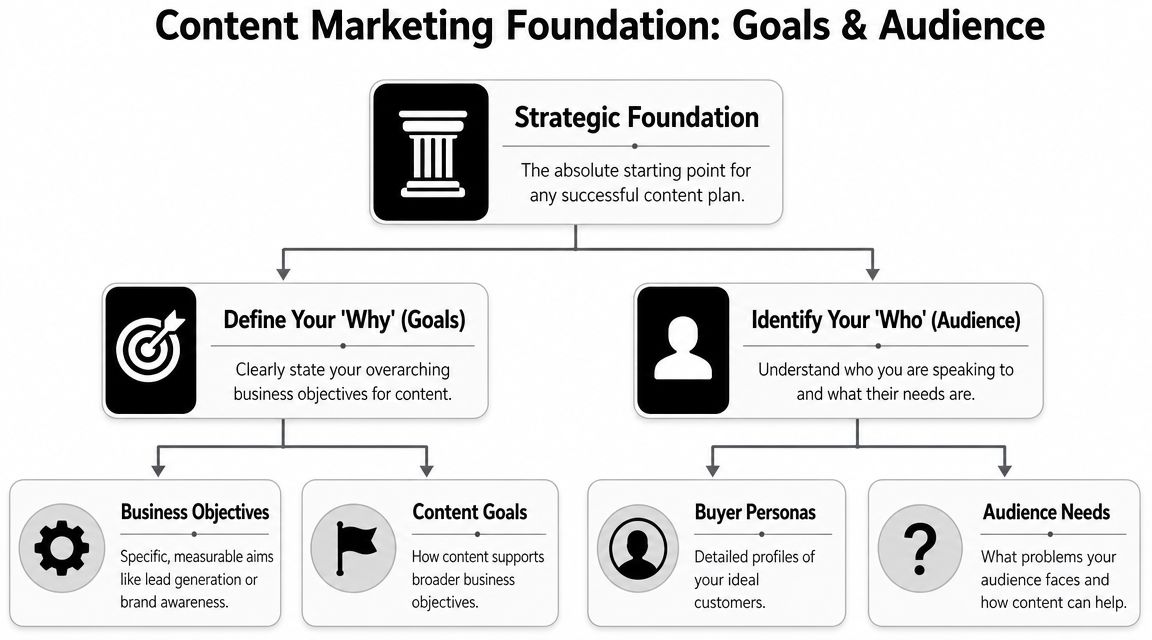
    That matters even more for small teams. You don't have the margin for vanity traffic, sprawling campaigns, or a six-month content experiment with vague goals. You need a system that can work with limited time, limited budget, and limited patience. The upside is that a smaller business can often win by being sharper. Better topic selection, tighter calls to action, stronger local or niche expertise, and cleaner execution beat generic publishing every time.

    Table of Contents

    Your Winning Content Marketing Mindset

    The first shift is simple. Content marketing is not blogging. It's a business system for creating trust, showing expertise, capturing demand, and moving buyers toward action.

    That sounds obvious, but most small businesses still treat content like a side task. They publish when there's time, pick topics based on hunches, and hope consistency alone will rescue weak strategy. It won't. By 2025, 90% of organizations reported having a content marketing strategy, and 66% said that strategy was documented, according to ProperExpression's content marketing statistics roundup. That tells you where the market is. Content is no longer an experiment. It's an operating discipline.

    A scrappy company doesn't need a giant editorial department. It needs a documented plan that answers a few hard questions:

    • Who are we trying to reach
    • What problems are they actively trying to solve
    • What action do we want after each piece
    • What topics deserve effort because they can produce revenue later

    Practical rule: If a topic doesn't map to a customer problem and a next step, it belongs in the backlog, not the publishing queue.

    Smaller businesses often have an edge because they know the objections buyers raise on calls. They know the questions people ask before purchasing. They know where deals stall. That knowledge is more useful than a generic “content calendar” filled with broad awareness posts.

    The mindset to keep is blunt. Don't ask, “What should we post this week?” Ask, “What content would help the right buyer say yes faster?” That question leads to better keywords, better offers, better pages, and better follow-up.

    Define Your Content's Job Before You Write

    If you skip this step, the rest of your strategy collapses into activity. You'll publish, maybe even rank, and still feel unsure whether the effort is working.

    The common mistake is using traffic as the goal. Traffic is useful, but only if the visitor is likely to take a profitable action. A thousand visits from people looking for free advice are less valuable than a small stream of visitors comparing vendors, pricing options, or solutions.

    Stop chasing traffic with no buying intent

    A lot of small businesses would be better off with fewer articles and clearer objectives. That lines up with the broader pattern in the market. 83% of marketers believe higher-quality content published less often is more effective, according to OneLocal's content marketing statistics summary.

    A four-stage funnel diagram illustrating content marketing objectives from initial brand awareness to final customer conversion.

    That's why every piece should have one primary job. Usually it falls into one of four buckets:

    1. Awareness
      The reader realizes they have a problem or sees your category for the first time.

    2. Engagement
      The reader spends time with your brand, joins your email list, or clicks deeper into the site.

    3. Consideration
      The reader compares options, evaluates your approach, or checks whether you fit their use case.

    4. Conversion
      The reader books a call, requests a quote, starts a trial, or buys.

    The mistake isn't publishing awareness content. The mistake is publishing only awareness content and then wondering why leads don't improve.

    If your content never reaches consideration and conversion, you're building an audience for somebody else to close.

    Match the goal to the business model

    A local service company and an e-commerce store shouldn't measure the same content wins.

    For a local service business, a strong content goal often looks like this:

    • Primary win is a booked consultation or quote request
    • Support action is a phone call, form submission, or service-page visit
    • Useful topic types include pricing questions, service comparisons, location pages, and “is this right for me” content

    For an e-commerce business, the content path usually changes:

    • Primary win is a product sale
    • Support action is an add-to-cart, email capture, or category-page click
    • Useful topic types include product comparisons, use-case guides, setup advice, and buyer's guides

    A simple way to pressure-test a topic is to ask three questions:

    Question Good answer Bad answer
    What action should happen next? Book, buy, request, subscribe “Read more stuff”
    Who is this for? A clearly defined buyer or problem Everyone in the market
    Why this topic now? It helps a buyer move forward It sounds interesting

    Content gets much easier when the job is clear. The title is clearer. The CTA is clearer. The page you link to is clearer. Even the intro gets better because you're writing for a reader who needs something specific.

    Find Sales-Ready Keywords Customers Are Using

    Keyword research gets overcomplicated fast. Small businesses don't need jargon-heavy workflows. They need a way to identify phrases real customers use when they're close to acting.

    The best keywords usually don't come from brainstorming in isolation. They come from sales conversations, inbox questions, support tickets, live chat logs, review language, and the wording customers use when they're trying to solve a problem right now.

    A pencil-sketch style illustration of an ear, a magnifying glass, and a notepad representing content strategy.

    Listen before you research

    Start with plain language. Ignore tools for a moment and write down the phrases buyers use naturally.

    A few useful prompts:

    • Problem-driven searches
      “Why is this happening?” “How do I fix this?” “What's causing this issue?”

    • Solution-driven searches
      “Best type of service for…” “Software for…” “Treatment for…” “Product for…”

    • Decision-stage searches
      “Cost,” “pricing,” “near me,” “vs,” “review,” “alternative,” “how long does it take”

    Many businesses often falter. They chase broad terms because they look bigger. Broad terms often bring broad intent. If you sell accounting services, “small business finance tips” may bring readers. “Bookkeeping services for restaurants” is far more likely to bring a buyer.

    Qualify the keyword before you commit

    Before you write, test the phrase against buying intent.

    Ask:

    • Would a person searching this be likely to hire, buy, or inquire soon?
    • Can our business help them directly?
    • Do we have a clear CTA that fits the topic?

    If the answer is yes to all three, the keyword is worth serious effort.

    If the phrase attracts curiosity but not action, it might still be useful, but it should support a stronger bottom-of-funnel page. It shouldn't dominate the calendar.

    A practical keyword mix for a small business usually includes:

    Keyword type What it signals Example intent
    Problem-aware The buyer knows the pain They want diagnosis or clarity
    Solution-aware The buyer is exploring options They want methods, vendors, or categories
    Decision-ready The buyer is close to acting They want pricing, comparisons, proof, or contact

    Add an angle AI can't fake

    Generic content is easier than ever to produce. That means generic content is less valuable than ever. Semrush's small business content marketing guidance highlights an important reality: original research, customer stories, and unique, experience-based content are difficult for competitors and AI tools to replicate.

    That has direct strategic value.

    Instead of publishing another interchangeable article on a broad topic, build pages around assets only you can create:

    • Customer stories that show what changed and why buyers chose you
    • Internal process content that explains how you work and what clients should expect
    • Original observations from jobs completed, products sold, or recurring client questions
    • Comparison pages based on real-world trade-offs you've seen firsthand

    A small business rarely wins by sounding bigger. It wins by sounding more specific, more credible, and closer to the customer's actual decision.

    Build Your Simple Content Creation Engine

    Small businesses do not need a content machine with ten tools, three approval layers, and a full-time editor. They need a system that turns customer questions into pages that can rank, qualify leads, and push the right readers toward contact.

    Consistency matters here, but consistency is usually an operations issue, not a creativity issue. Teams miss publish dates because the process is vague, ownership is unclear, and every article gets reinvented from scratch.

    A simple engine fixes that.

    The two documents that keep production sane

    For most small businesses, the whole operation can run on two working documents:

    • An editorial calendar
      A spreadsheet that tracks what you are publishing, when it goes live, and what business goal it supports.

    • A content brief
      A one-page writing spec that tells the writer exactly what the page needs to do.

    Here's a calendar format that works without adding admin for the sake of admin:

    Publish Date Topic / Title Target Keyword Content Type Primary CTA Status
    Week 1 Service pricing guide service pricing keyword Blog article Request a quote Draft
    Week 2 Comparison page comparison keyword Landing page Book a consultation In progress
    Week 3 Customer story customer result keyword Case study Contact sales Outline
    Week 4 Common mistakes article problem keyword Blog article Visit service page Scheduled

    This table does more than organize ideas. It filters out low-value content before anyone spends time writing it.

    If a topic has no target keyword, no clear CTA, and no path to revenue, it does not belong on the calendar. That rule alone saves a lot of small businesses from publishing traffic bait that never turns into leads.

    Build briefs for conversion, not just completion

    Weak articles usually start with weak instructions. “Write something about this topic” produces exactly the kind of content that gets polite impressions and no sales conversations.

    A useful brief should answer seven questions:

    • Primary keyword
      Choose one main phrase.

    • Search intent
      Is the reader trying to understand a problem, compare options, or hire someone?

    • Audience
      Define the buyer. Local homeowner, operations manager, office admin, founder, procurement lead.

    • Main promise
      State what the page will help the reader figure out or decide.

    • Primary CTA
      Pick one next step.
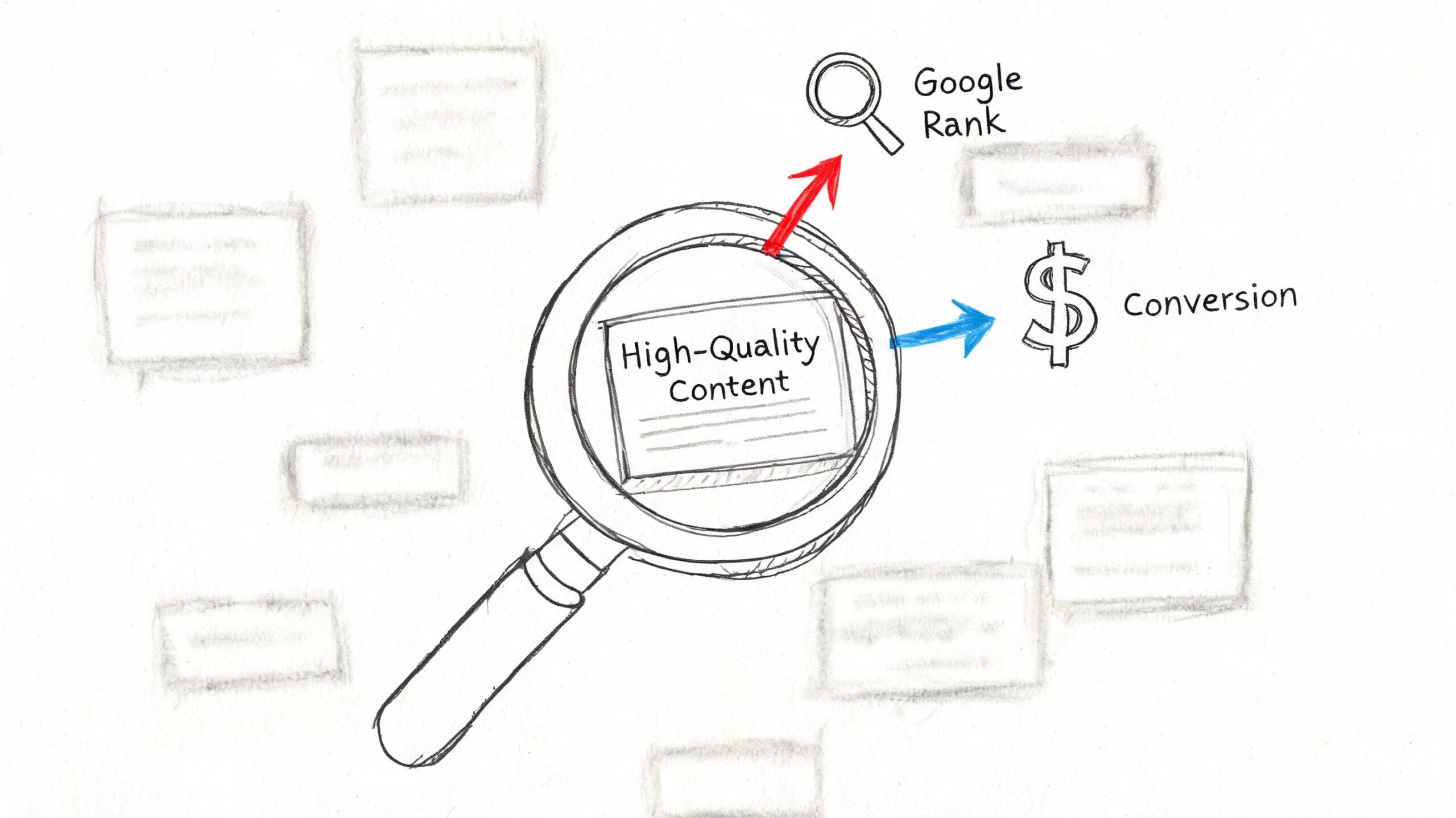
    • Supporting proof
      Add the evidence that makes the page believable. Customer outcomes, pricing context, process steps, objections, FAQs.

    • Conversion angle
      Decide how the content qualifies the reader. Does it explain timelines, budget ranges, fit, trade-offs, or common buying mistakes?

    That last point gets ignored all the time. It matters because a page can rank and still fail the business if it attracts readers who will never buy. Good content does not just answer the query. It helps the right prospect decide whether to contact you.

    Keep the tool stack boring

    Boring is good here. Google Sheets for the calendar and Google Docs for briefs are enough for many teams. Google Search Console or Semrush can handle keyword checks and performance reviews.

    The trade-off is simple. More software gives you more workflow options, but it also creates more places for content to stall. Small businesses usually get better results from a plain system they use every week.

    Agency Secrets also publishes a workflow for buyer-intent keyword research, article creation, publishing, backlinks, and evergreen SEO execution.

    Working rule: Your content engine should reduce decisions, speed up production, and make it easier to publish pages that can produce leads.

    Batch the work wherever possible. Outline multiple articles in one session. Collect examples, proof points, and FAQs at the same time. Review drafts in blocks instead of one by one.

    That approach cuts context switching, keeps quality steadier, and makes it easier to publish even during busy weeks.

    Amplify Your Content Without a Big Budget

    Publishing is the midpoint, not the finish line. Small businesses waste a lot of effort by treating the publish button like the main event. The article goes live, gets one social post, then disappears into the archive.

    That's avoidable. Content marketing works better as a multi-format, multi-channel system. In Content Marketing Institute's benchmark statistics, 92% of B2B marketers used short articles or posts, 89% used organic social media platforms, 84% used blogs on corporate websites, and 71% used email newsletters. The takeaway for a small team is practical. One strong asset should travel.

    A diagram outlining six effective, low-cost strategies for businesses to amplify their online content and reach.

    Use internal linking like store signage

    Internal linking is one of the cheapest ways to get more value from existing content. It's similar to signs in a store. Good signs help people move from browsing to buying.

    A simple internal linking approach looks like this:

    • Link informational posts to service or product pages
      If an article explains a problem, it should naturally point to the page that solves it.

    • Link related articles together
      This keeps visitors engaged and helps search engines understand topic relationships.

    • Link newer posts to older relevant pages, and older pages back to newer ones
      This stops strong pages from becoming dead ends.

    The key is relevance. Don't force links because a plugin told you to. Add them where the next click helps the reader continue the decision process.

    A good test is simple. If someone reads this paragraph, what page would help them next? Add that link.

    To see another perspective on low-cost reach tactics, this video is worth a look.

    Earn backlinks like referrals, not like spam

    Backlinks still matter, but most small businesses approach them badly. They either ignore them completely or buy junk placements that don't help credibility.

    A better approach is to think in terms of referrals. Which other sites already speak to your audience, but don't compete with you directly?

    Start here:

    • Local partnerships
      Suppliers, chambers, associations, neighborhood publications, and complementary businesses

    • Guest contributions
      Write useful articles for industry blogs where your expertise adds something specific

    • Original assets worth citing
      A customer story, local market insight, checklist, or comparison resource that saves others time

    • Podcast and interview outreach
      A founder with real operating experience can often earn mentions by sharing lessons, not by pitching links

    Backlinks are easier to earn when the asset is genuinely useful and the outreach feels like collaboration, not extraction.

    One strong article supported by relevant internal links, an email send, a few social cut-downs, and targeted outreach will outperform ten posts that nobody distributes.

    Measure What Matters to Prove Your ROI

    Most small businesses don't need more dashboards. They need clearer questions. The problem with content reporting isn't lack of data. It's that the data often has no direct connection to business decisions.

    That gap shows up in a lot of content advice. Outbrain's guidance for small business content strategy points to the core issue: many guides discuss goals and formats but don't show small businesses how to prove which content contributes to leads or sales.

    An infographic showing five key metrics for measuring small business content marketing return on investment.

    Are people finding you

    This is the first question. If nobody is discovering the page, conversion analysis can wait.

    Use Google Search Console for this. It will show:

    • the queries bringing impressions
    • which pages appear in search
    • whether your target topics are gaining traction over time

    What you're looking for isn't vanity growth. You're checking whether the right pages are appearing for the right searches. If your service comparison pages and bottom-of-funnel articles never show up, your strategy is probably too top-heavy.

    Do they like what they see

    Visibility alone doesn't mean much if searchers ignore your result. The next question is whether your listing earns the click.

    Again, Search Console is enough for this. Review the pages that get impressions but weak click activity. Usually the issue is one of these:

    • The title is vague
    • The page doesn't match the searcher's intent
    • The meta description doesn't signal a useful outcome
    • The article targets a topic that sounds broader than it really is

    Many businesses discover that “ranking” and “winning” are different. A page can appear in search and still underperform badly if the promise is fuzzy.

    A search impression is not proof of success. It's proof you were invited to compete.

    Are they taking the next step

    This is the question that matters most. Once the visitor lands, do they move toward the business outcome you wanted?

    Use Google Analytics or simple on-site conversion tracking to monitor actions like:

    Business type Meaningful conversion
    Local service Quote request, consultation booking, phone click
    E-commerce Add-to-cart, checkout start, purchase
    B2B lead gen Demo request, form submission, contact page visit
    Newsletter-led business Email signup tied to a relevant offer

    You don't need a complicated attribution model to make this useful. Start by checking which content pieces assist or produce those actions most often. Then do more of what helps movement and less of what only inflates pageviews.

    A lean reporting rhythm works well here:

    1. Monthly
      Review rankings, impressions, clicks, and conversions by page.

    2. Quarterly
      Update underperforming pages, improve CTAs, refresh internal links, and expand the articles that already attract qualified visitors.

    3. Ongoing
      Keep a short list of topics that produce real inquiries or sales conversations.

    The smartest content teams don't obsess over perfect attribution. They build enough visibility into the funnel to answer a practical question: Which pages help us win more business? That's the metric set that keeps a small business content marketing strategy grounded in revenue, not noise.


    If you want a simpler way to execute this kind of SEO-led content system without hiring an agency, Agency Secrets shares practical playbooks for buyer-intent keyword targeting, publishing evergreen articles, earning backlinks, and building compounding organic growth with a small team.

  • Google Keyword Position Checker API: The 2026 Guide

    Google Keyword Position Checker API: The 2026 Guide

    You're probably here because manual rank checking has started to break down.

    At first, checking a few keywords in an incognito window feels manageable. Then you add locations, devices, product lines, service pages, and competitors. Soon you're spending time on a process that still doesn't give you a clean answer. One search shows you near the top. Another shows something else entirely. Your team wants a dashboard, not screenshots.

    That's where a google keyword position checker api becomes useful. But the hard part isn't making an API call. The hard part is choosing the right kind of API in the first place. For most businesses, that choice decides your reporting quality, your maintenance burden, and whether your data is trustworthy enough to guide decisions.

    Table of Contents

    What Is a Google Keyword Position Checker API

    A google keyword position checker api is a way for software to request ranking data automatically instead of having a person search manually. In plain English, an API is a structured way for one system to ask another system for information. For SEO, that usually means asking for ranking data for a keyword, domain, page, location, or device.

    The business value is simple. You stop checking rankings one by one and start pulling them into tools you already use. That could be a reporting dashboard, a spreadsheet, an internal app, or a client portal. Once ranking checks become repeatable, you can track movement over time instead of arguing over isolated screenshots.

    A hand-drawn graph showing a search ranking rising from ten to one under a magnifying glass.

    Why this category exists at all

    A lot of business owners assume Google must provide a native API for live rank checks. It doesn't. A long-running discussion in Google Groups on the old AJAX Search API said there was “no way to check keywords rankings through Google API,” and noted that the Custom Search API was limited to a custom search engine rather than standard google.com results, with a free tier of only 100 requests per day. That limitation is one reason specialist rank-tracking providers took over this category.

    That history matters because it explains the market. If you want live SERP snapshots, competitor checks, or repeated monitoring at scale, you're almost always looking at third-party infrastructure, not Google-native tooling.

    Practical rule: If someone promises “official Google live rank tracking,” they're usually blending together different products that solve different problems.

    What businesses actually use it for

    For the vast majority of teams, rank data isn't useful for its own sake. Instead, it serves to answer operational questions like these:

    • Content teams want to know whether a page is climbing or slipping for target queries.
    • Local businesses need to compare desktop and mobile visibility across service areas.
    • Agencies and consultants need a repeatable way to monitor competitors and client terms.
    • Founders want reporting that doesn't depend on someone remembering to run manual checks.

    A rank-checking API is useful when it turns rankings into a workflow. If it only gives you a raw number with no context, it won't help much.

    Comparing the Three Main API Approaches

    A business usually reaches this decision after the same frustrating moment. Someone asks for weekly rankings, competitor visibility, and local SERP checks in one dashboard, then assumes a single "Google API" will cover all of it.

    It won't. These three approaches solve different business problems, and choosing the wrong one creates bad reporting, wasted spend, or unnecessary legal exposure.

    A chart illustrating three main API approaches for keyword tracking: Google Search Console, custom scraping, and third-party APIs.

    How the three options differ

    Google Search Console API is a first-party source. It reports how Google has recorded search performance for a verified property over time. That makes it strong for measuring your own site, but weak for competitor tracking or on-demand SERP snapshots.

    Third-party SERP APIs are built for observation of the public results page. They are the practical choice when the question is "what ranks for this keyword in this location on this device right now?" That is a different job from Search Console, and the pricing reflects it because the vendor is handling collection, proxies, parsing, and uptime.

    DIY scraping sits in a third category. It can produce the exact output you want if you have the engineering appetite to build and maintain it. In a business setting, though, the cheap-looking option often turns into the expensive one once you account for blocked requests, parser fixes, proxy costs, and the time required to keep it running.

    The comparison is not feature versus feature. It is first-party analytics versus market observation versus custom infrastructure.

    Use Search Console for owned-property performance analysis. Use a third-party SERP API for live rank monitoring and competitor visibility. Build scraping only if custom control matters enough to justify ongoing technical and legal overhead.

    A practical comparison table

    Criterion Google Search Console API Third-Party SERP API DIY Scraping
    Primary use Owned-site search performance reporting Live SERP collection and rank tracking Custom SERP collection pipeline
    Data type Aggregated metrics tied to a verified property Snapshot of search results at a specific time Whatever your system can collect and parse
    Best for Trends, queries, CTR, impressions, average position Competitor monitoring, local rank checks, device-specific tracking Internal tools with unusual data requirements
    Competitor tracking No Yes Yes, if you build and maintain it
    Setup effort Moderate Usually low to moderate High
    Ongoing maintenance Low to moderate Low on your side High on your side
    Legal and platform risk Low for standard use Lower than DIY because the vendor absorbs collection risk Higher
    Reporting quality Strong for owned properties and trend analysis Strong for ranking visibility and SERP features Depends on parser quality and operational discipline

    For decision-making, six criteria matter more than API jargon: accuracy, recency, scale, setup time, legal risk, and whether the data is actually useful in reporting.

    • Choose Google Search Console API if the goal is to understand how your site is performing in Google over time.
    • Choose a third-party SERP API if you need rankings for competitors, local markets, device variants, or fresh snapshots on demand.
    • Choose DIY scraping only if off-the-shelf APIs cannot support a specific workflow and you are prepared to own the maintenance burden.

    That last trade-off gets underestimated. Buying an API can look expensive on a pricing page. Rebuilding one internally is usually more expensive once a developer has to babysit it.

    Using the Google Search Console API for Owned Properties

    Monday morning, the CEO asks a simple question: “Did we move up for our main keyword?” If your only data source is Google Search Console, the honest answer is usually, “We can measure trend and visibility for our site, but not a live, single-slot ranking in the way rank trackers report it.”

    That distinction matters because Search Console is an ownership and performance tool first. It is strongest when the business question is about how Google has exposed your verified site over time, and what that exposure produced in clicks and impressions.

    What GSC is actually good at

    For owned properties, the Search Console API gives you the cleanest line from search visibility to business outcomes. The searchanalytics/query endpoint lets you segment data by query, page, country, device, search type, and date. You can pull clicks, impressions, CTR, and average position, then use those fields to answer questions a snapshot rank checker cannot answer well.

    Examples:

    • Which queries are starting to generate impressions for a newly optimized page
    • Whether mobile performance is improving faster than desktop
    • Which countries deserve separate SEO reporting
    • Whether branded traffic is masking weakness in non-branded discovery
    • Which pages earn visibility but fail to attract clicks

    That last point is where GSC becomes especially useful for decision-making. A position metric on its own can look healthy while CTR stays weak because the snippet is poor, the query intent is mixed, or the SERP is crowded with ads and rich results. Search Console helps separate “we appear” from “we win traffic.”

    What average position really means

    Average position is often misunderstood in executive reporting.

    Google does not return one fixed rank for a keyword across all searches. It returns an aggregated average based on the impressions your property received. That average can blend mobile and desktop behavior, different locations, and different moments in time. For a business owner, the practical implication is simple. “Average position 4.2” does not mean your result sat in slot four every time someone searched.

    Use the metric for trend analysis. Use it to compare periods, pages, devices, and countries. Do not use it as a substitute for a live SERP snapshot.

    A common reporting mistake is turning GSC average position into a claim like “we rank number four.” That overstates the precision of the metric and creates false confidence.

    Where GSC fits in a business stack

    Search Console API is a strong choice when you need reporting that is defensible, low-risk, and directly tied to your own property. It is also usually the cheapest option if your scope is limited to sites you control, because the collection layer already exists inside Google's product.

    The trade-off is visibility. You cannot use GSC to monitor competitors, inspect a precise local SERP on demand, or verify how a result looked at a specific moment for an unverified property. If the business needs those answers, GSC should stay in the stack, but it should not be the only source.

    A practical way to frame it is this: use GSC to measure owned-site performance and SEO progress over time. Use other methods only when the question goes beyond what a verified-property analytics API was designed to show.

    Leveraging Third-Party SERP APIs for Full Visibility

    A common scenario looks like this. A retailer wants to know why revenue dipped for a high-intent keyword, but the answer is not in Search Console because the actual question is broader than their own site. They need to see who replaced them, whether ads pushed organic listings down, and whether mobile results in a specific city look different from desktop results nationwide.

    That is the job third-party SERP APIs handle well.

    A hand-drawn illustration showing a central hub connected to various search engines like Google, Bing, and Yahoo.

    Why businesses pay for this layer

    Third-party SERP APIs collect live or scheduled search results for queries, devices, and locations you choose, then return structured data your team can directly report on. The business value is not just access to rankings. It is the removal of operational work that sits behind reliable collection.

    That matters because Google results are no longer a simple ranked list. A useful API needs to capture organic listings, paid placements, local packs, shopping results, featured snippets, video blocks, images, and other page features that change what "position" means in practice. If your report says you moved from position 3 to 5, the commercial impact depends on what filled the space above you.

    For teams buying software, this is usually the clearest trade-off. You accept a vendor bill and a fixed schema. In return, you get speed, broader visibility, and less engineering overhead.

    What to look for in a SERP API

    The best vendors help answer business questions, not just collect rows of rank data. Evaluate them on points that change decisions:

    • Geo precision. Can you request results at the country, city, or ZIP level if local intent matters?
    • Device coverage. Mobile and desktop often produce different result pages and different click opportunities.
    • SERP feature parsing. Rank alone is incomplete if ads, maps, or snippets are taking attention.
    • Historical collection. Scheduled tracking matters more than one-off checks if you want to separate volatility from a real trend.
    • Output format and limits. Clean JSON, consistent fields, and predictable rate limits reduce downstream reporting work.
    • Vendor reliability. If the API fails during peak reporting periods, the low price stops looking cheap.

    One more filter gets overlooked. Ask how quickly your team can turn the raw response into something a client, founder, or department head can understand. A technically rich API can still be a poor fit if every report requires manual cleanup.

    Where third-party APIs outperform first-party data

    Search Console is strong for owned-site performance over time. Third-party SERP APIs answer a different class of question.

    Use them when the business needs to:

    • Track competitors or marketplaces you do not control
    • Verify rankings for a specific place, device, or search context
    • Measure visibility across multiple domains
    • See the actual SERP composition, not just an averaged metric
    • Run alerting when a keyword changes sharply or a SERP feature appears

    This is why agencies, multi-location businesses, and e-commerce teams often keep a third-party SERP source in the stack even when they already use GSC. The two systems answer different questions.

    The practical trade-offs

    Third-party APIs solve collection, but they introduce vendor dependency. Pricing usually scales with request volume, location depth, frequency, and feature coverage. A cheap plan can become expensive if you track thousands of keywords across many markets. The opposite is also true. Building internal reporting on top of a stable API is often far less expensive than assigning engineers to maintain fragile collection systems.

    Accuracy also needs a realistic definition. No vendor can promise a single universal "true rank" for Google because results vary by device, location, personalization, and timing. Good providers reduce that uncertainty by letting you define the context clearly and collect consistently. That is what makes the data decision-ready.

    This walkthrough gives a feel for how these tools are typically implemented:

    The Risks and Realities of DIY Scraping

    DIY scraping sounds appealing because it promises control. You pick the queries, define the parser, and avoid a monthly vendor bill. On paper, that can feel efficient.

    In practice, most small and mid-sized businesses don't want a scraping project. They want ranking data.

    Why teams underestimate scraping

    The first version of a scraper is usually the easiest part. The hard part is keeping it alive. Search results change layout. Anti-bot defenses tighten. Parsers fail without warning. A field you relied on disappears and now your reports are wrong without obvious errors.

    There's also a policy issue. Scraping public results directly sits in a riskier position than using a vendor designed for this job. Even if a team is technically capable, many businesses don't want legal and operational ambiguity attached to a reporting system.

    A few hidden costs show up fast:

    • Infrastructure overhead grows as you add requests, locations, and retries.
    • Maintenance work never really stops because SERPs keep changing.
    • Debugging time often lands on your most expensive technical people.
    • Trust in the data drops when the system breaks in subtle ways.

    When DIY might make sense

    There are cases where building in-house is defensible. Large companies with specialized engineering support, unusual compliance requirements, or proprietary workflows may decide control is worth the effort.

    For everyone else, DIY usually solves the wrong problem. It optimizes for avoiding vendor spend while creating a fragile internal product. If rank tracking isn't part of your core business model, that's usually a poor trade.

    Practical Code Examples for API Calls

    The mechanics of using a SERP API are much simpler than the category makes them seem. Once you've chosen a provider, the workflow is usually just: define the keyword, pass location or device parameters if needed, send the request, and parse the response.

    You don't need a large software team to make that useful. A developer can wire this into a dashboard quickly, and a technical marketer can usually understand the logic from a short example.

    Python example

    import requests
    
    API_KEY = "YOUR_API_KEY"
    ENDPOINT = "https://api.example.com/google/rank-tracking"
    
    params = {
        "keyword": "best running shoes",
        "location": "United States",
        "device": "desktop",
        "api_key": API_KEY
    }
    
    response = requests.get(ENDPOINT, params=params)
    data = response.json()
    
    # Example logic:
    # Assume the API returns a list of organic results
    organic_results = data.get("organic_results", [])
    
    for result in organic_results:
        print(result.get("position"), result.get("domain"))
    

    This example shows the pattern, not a provider-specific schema. In a real implementation, your developer would map the response fields from the vendor you choose.

    JavaScript example

    const endpoint = "https://api.example.com/google/rank-tracking";
    const params = new URLSearchParams({
      keyword: "best running shoes",
      location: "United States",
      device: "mobile",
      api_key: "YOUR_API_KEY"
    });
    
    fetch(`${endpoint}?${params.toString()}`)
      .then(response => response.json())
      .then(data => {
        const organicResults = data.organic_results || [];
        organicResults.forEach(result => {
          console.log(result.position, result.domain);
        });
      })
      .catch(error => console.error(error));
    

    A practical implementation usually adds three things beyond this starter code:

    • Error handling for failed requests or rate limits
    • Normalization so data from multiple runs follows one schema
    • Storage so you can analyze changes over time instead of printing output once

    The hard part isn't the API call. It's deciding what you'll store, how often you'll check, and which movements should trigger action.

    Best Practices for Managing API Data

    Rank tracking gets expensive when every question triggers a fresh API call. It also gets unreliable fast if historical snapshots are missing, labels change over time, or your team mixes different data sources into one metric.

    A hand-drawn illustration showing multiple data files organized into rows leading to a strategic ranking arrow.

    The practical fix is to treat rank data like reporting data, not like a live lookup tool. Pull on a schedule, store the result, and build reports from your own database or warehouse. That cuts repeat API costs, makes trend analysis possible, and gives you an audit trail when someone asks why a ranking changed last month.

    A simple table structure is enough to start:

    Field Purpose
    keyword The query you're tracking
    checked_at When the snapshot was collected
    search_engine Usually Google, but keep it explicit
    location Country or local market
    device Desktop or mobile
    domain The site being tracked
    rank Observed position in that snapshot
    url Landing page shown in results
    result_type Organic result, ad, or rich-result context

    That schema covers the business questions that come up in reporting. Which keyword moved. In which market. On which device. And whether Google swapped in a different URL.

    A few operating rules prevent messy data later:

    • Use a fixed pull schedule so week-over-week comparisons mean the same thing.
    • Normalize country, device, and domain naming early so reports do not split the same entity into multiple labels.
    • Store raw responses before transformation so your team can debug parser issues or vendor schema changes.
    • Version your logic if you change ranking rules, result classification, or matching methods.
    • Separate collection from reporting so dashboard traffic does not trigger more API calls.

    The trade-off is storage and pipeline work. That cost is usually lower than repeated API requests, manual cleanup, and bad reporting decisions based on inconsistent snapshots.

    How to reconcile GSC with live rank data

    Search Console data and live SERP data answer different questions. Teams get into trouble when they force both into a single "position" field and expect them to line up.

    Use Search Console for owned-site performance over time. Use SERP APIs for point-in-time visibility into a specific query, location, and device. One is impression-based reporting from Google for verified properties. The other is an external observation of the results page in a defined context.

    Keep them separate in your model and in your dashboards:

    • GSC position for search performance reporting on sites you own
    • Live rank for monitored snapshots, competitor checks, and localized tracking
    • Timestamp, location, and device attached to every live observation
    • Clear source labels so executives do not compare unlike metrics

    That single reporting discipline prevents a lot of false alarms.

    One more rule matters if you track multiple APIs over time. Do not assume field names mean the same thing across vendors. One provider's "position" may exclude ads and SERP features. Another may count them. Some return the first organic result position separately from the absolute rank on the page. Map those definitions once, document them, and keep the logic consistent. That is what turns technical API output into reporting a business owner can trust.

    A Decision Framework for Choosing Your API

    The right choice usually becomes obvious when you stop asking “which API is best” and start asking “what question am I trying to answer.”

    Start with the business question

    Ask these in order:

    1. Do you only need performance data for a site you own?
      Start with Search Console API.

    2. Do you need to monitor competitors or public search results for any domain?
      Use a third-party SERP API.

    3. Do you need city-level, device-specific, or highly localized snapshots?
      Lean toward a third-party provider built for that workflow.

    4. Do you have engineers available to maintain a scraping system over time, and are you comfortable with the associated risk?
      Only then should DIY scraping enter the conversation.

    The simplest recommendation for most teams

    For most SMEs, agencies, local businesses, and in-house marketers, the best setup is a hybrid:

    • Use GSC for owned-site performance reporting
    • Use a third-party SERP API for competitor and live snapshot tracking
    • Avoid DIY scraping unless rank collection itself is a strategic capability for your company

    That combination gives you both sides of the picture. You get first-party evidence of how your site is performing and external visibility into what the search results look like.

    Frequently Asked Questions

    Is there an official Google API for live keyword rankings

    No. Google doesn't provide a public API for live SERP rank checking in the way modern SEO tools do. If someone points you to Google's own APIs for this, they're usually referring to Search Console for owned-site analytics or to other Google products that don't mirror standard google.com organic rankings.

    Are third-party rank tracking APIs accurate

    They can be very useful, but accuracy depends on setup. Rankings vary by location, device, language, time, and SERP features. A good API lets you define those parameters clearly. The more specific your request context, the more useful the result.

    The wrong question is “is it perfectly accurate.” The right question is “is it consistently measuring the search context I care about.”

    Can I track competitors with Google Search Console

    No. Search Console works for properties you can verify and access. It's a first-party analytics source, not a public competitive intelligence tool.

    If competitive tracking matters, you need a third-party SERP API or a software platform built on that kind of data collection.

    How should I think about API cost

    Think in total system cost, not subscription cost alone. A paid SERP API may look more expensive than doing it yourself, but a DIY setup can consume technical time, maintenance effort, and reporting trust very quickly.

    For most businesses, cost should be evaluated against three things:

    • How many keywords and markets you need to monitor
    • How much internal time setup and maintenance will consume
    • How costly bad or inconsistent data would be for decision-making

    How do location and device affect rankings

    They affect rankings a lot. A local service business can look strong on mobile in one area and much weaker on desktop or in a nearby city. That's why one generic national rank often tells an incomplete story.

    When choosing an API, make sure it supports the parameters your business needs. For many local and service businesses, this matters more than fancy dashboard features.

    If you report rankings internally, keep these distinctions visible:

    • Separate desktop from mobile
    • Separate brand from non-brand terms
    • Separate core markets from secondary markets
    • Separate live snapshots from aggregated performance data

    Those reporting cuts usually matter more than adding more tracked keywords.


    If you want practical SEO guidance without hiring an agency, Agency Secrets is worth a look. It helps business owners turn data like keyword rankings into action through clear playbooks on keyword research, content production, backlinks, and sustainable organic growth.

  • Free Content Marketing Plan Template: 2026 Strategy Guide

    Free Content Marketing Plan Template: 2026 Strategy Guide

    You're probably doing what most small businesses do with content. You publish when there's time. You chase a keyword idea after seeing a competitor rank for it. You post on social because it feels like you should. Then a month later, traffic is flat, leads are inconsistent, and nobody can say which piece of content was supposed to drive what result.

    That isn't a writing problem. It's a planning problem.

    A good content marketing plan template fixes that, but only if it's built for execution. Most templates are still stuck in the editorial-calendar era. They tell you to list blog ideas, assign dates, and maybe track a few KPIs. That's not enough if your real goal is SEO traffic, qualified leads, and revenue.

    The gap gets worse once AI enters the workflow. Smartsheet's coverage of modern content marketing plan templates notes that marketers are prioritizing content creation efficiency and that teams are increasingly using AI for drafting, repurposing, and optimization. The problem is that many templates still stop at calendars and KPI fields instead of planning for review time, QA, and human oversight. That's exactly why so many “complete” content plans fall apart in practice.

    What works now is a template that does four jobs at once. It sets business goals, maps content to search intent, assigns ownership, and accounts for an AI-assisted workflow without letting quality slip. If you want content to become a dependable acquisition channel, that's the standard.

    Table of Contents

    From Chaos to Conversions Your Actionable Plan

    Small business content usually breaks in the same places. The founder has ideas but no schedule. The marketer has a calendar but no clear keyword strategy. The writer publishes posts that sound good but don't connect to a service page, offer, or next step. The result is motion without any real impact.
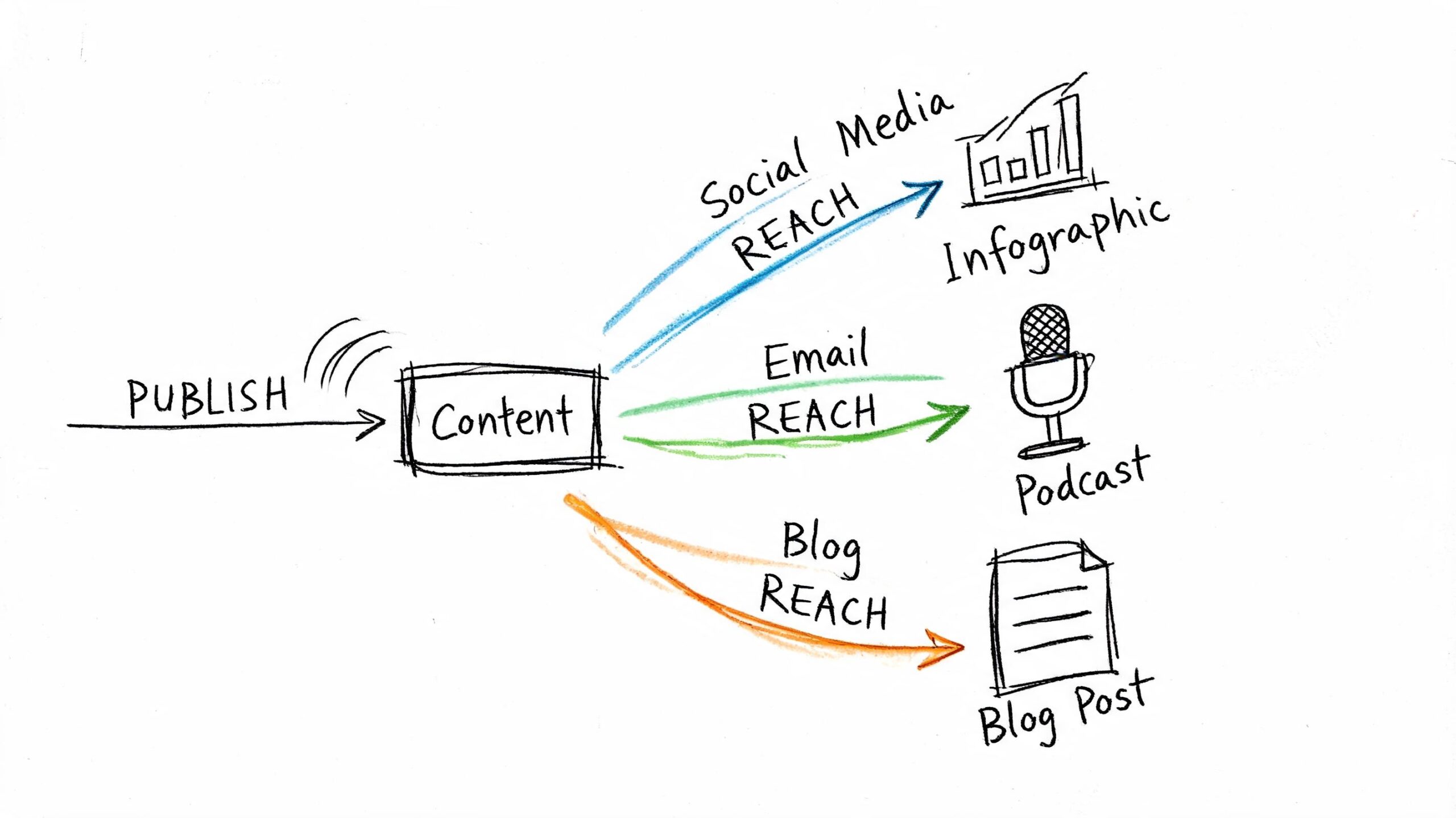
    A working content marketing plan template turns that mess into a repeatable system. It gives each piece of content a job. Some pages attract top-of-funnel searches. Others support comparison intent. Others push visitors toward a quote request, demo, booking, or product page. When the plan is built this way, content stops being a branding side project and starts behaving like a pipeline asset.

    What doesn't work is using a template as a filing cabinet. If it only stores ideas and due dates, it won't fix weak targeting, poor handoffs, or missed opportunities after publication.

    Practical rule: If your template doesn't tell your team why a page exists, which keyword intent it targets, how it will be promoted, and who owns the next step, it's incomplete.

    The useful version is lean. It doesn't need a hundred tabs. It needs the right tabs. For most small businesses, that means:

    • Goal tracking: tie content to leads, sales conversations, or revenue pages
    • Search intent mapping: define whether the page serves awareness, consideration, or decision
    • Workflow control: assign owner, status, QA, and publish date
    • Distribution planning: decide what happens after the page goes live
    • Refresh logic: mark which pieces need updating and when

    That's why the best template isn't “free” because it costs nothing. It's free because it saves you from wasting months publishing disconnected content. Done right, it becomes the operating layer between strategy and revenue.

    Laying the Strategic Foundation Goals and Audience

    A content plan fails fast when it starts with topics instead of outcomes. Before choosing a keyword or writing a brief, define what the business needs content to do.

    Ascendly's content marketing plan template makes that point clearly. It notes that organizations with a documented content marketing strategy are 313% more likely to report success than those without one. That matters because documentation forces decisions. It turns broad ambition into sections like business objectives, buyer personas, content audit, promotion strategy, and KPI selection.

    A diagram outlining the strategic foundation for a content marketing plan, including business goals and audience analysis.

    Start with business goals, not blog ideas

    Most content plans die under vague goals like “increase awareness” or “post more consistently.” Those sound sensible, but they don't help you decide what to publish next.

    Use goals that change behavior. If you run a local plumbing company, your content goal might be tied to quote requests for high-margin services. If you run an ecommerce store selling leather goods, your content may need to support organic traffic to category pages and improve average order value. The exact KPI can differ, but the principle doesn't.

    A strong template should force you to answer these questions:

    Planning field Weak answer Stronger answer
    Business objective Grow brand Generate qualified leads from organic search
    Content goal Get traffic Publish pages that support service and product conversions
    Primary KPI Pageviews Leads, conversion rate, revenue from content
    Secondary KPI Social likes Organic traffic, email subscribers, assisted conversions

    The point isn't to sound clever or refined. The point is to create constraints. Once you define the objective, it becomes easier to reject content that doesn't support it.

    Content teams get into trouble when they measure output first and business impact later.

    Build a usable audience profile

    You don't need a ten-page persona deck. You need a practical customer profile that helps you choose topics, angles, and calls to action.

    Keep it to four things:

    • Buyer problem: What painful issue pushed them to search?
    • Search language: What words would they type into Google?
    • Decision filter: What makes them choose one provider over another?
    • Objection: What might stop them from contacting you or buying?

    For a local plumber, that might look like this:

    • Problem: urgent leak, blocked drain, low water pressure
    • Search language: “emergency plumber near me,” “blocked drain fix,” “why is my shower pressure low”
    • Decision filter: speed, trust, clear pricing, availability
    • Objection: fear of hidden costs or poor workmanship

    That profile is enough to shape content. It tells you to create service pages for urgent intent, educational posts for diagnosis queries, and trust-building content that answers pricing and process concerns.

    Use your content marketing plan template to document audience needs in plain language. Skip the demographic filler unless it affects buying behavior. Search-driven content works when you understand what the customer wants solved, not when you know their favorite app.
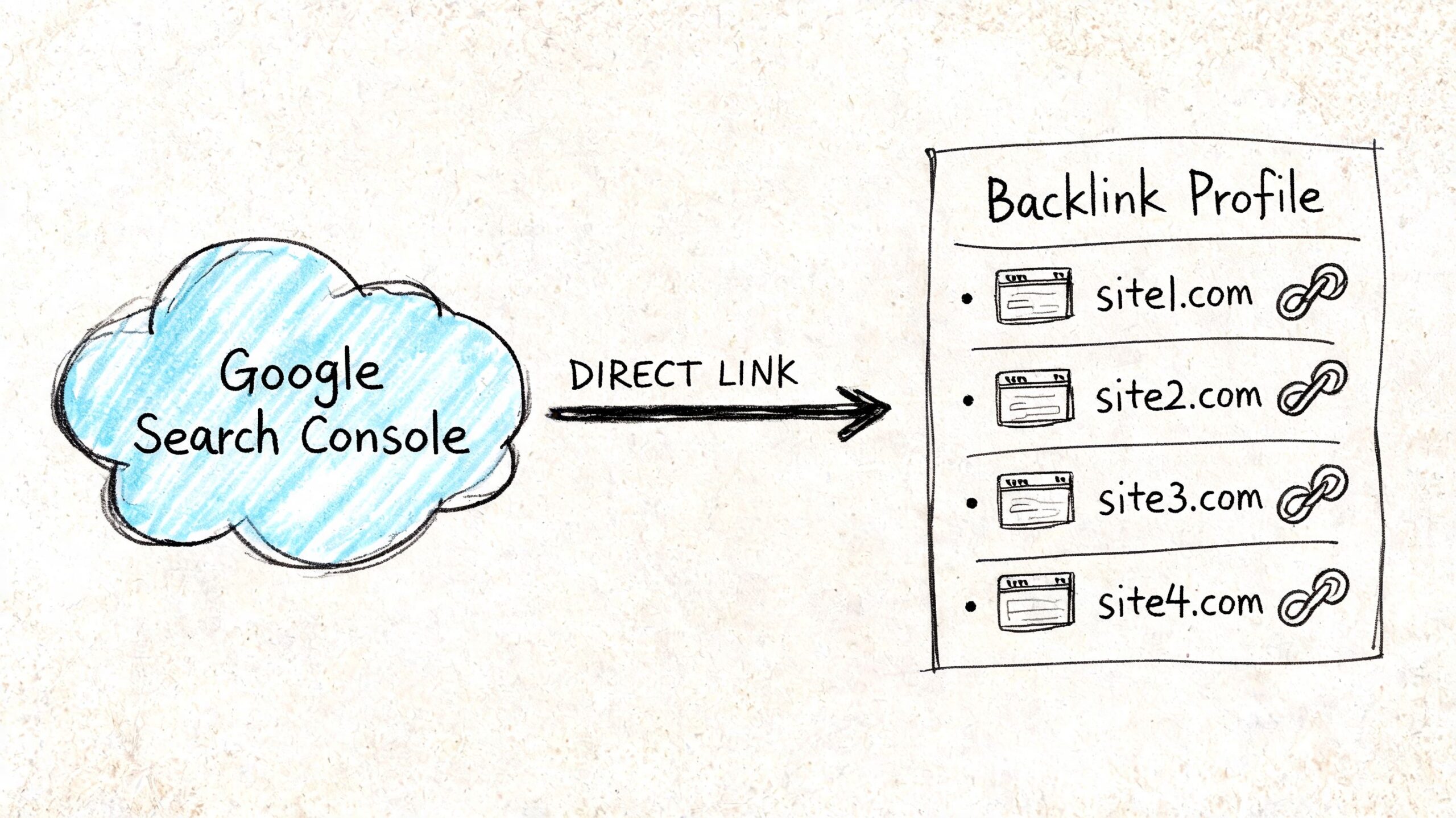
    Building Your Content Engine Pillars and Calendar

    Once the foundation is set, the next mistake is creating random one-off articles. That feels productive for a few weeks, then the site fills with disconnected posts that don't reinforce each other. Rankings become harder to win because your site never builds topical depth.
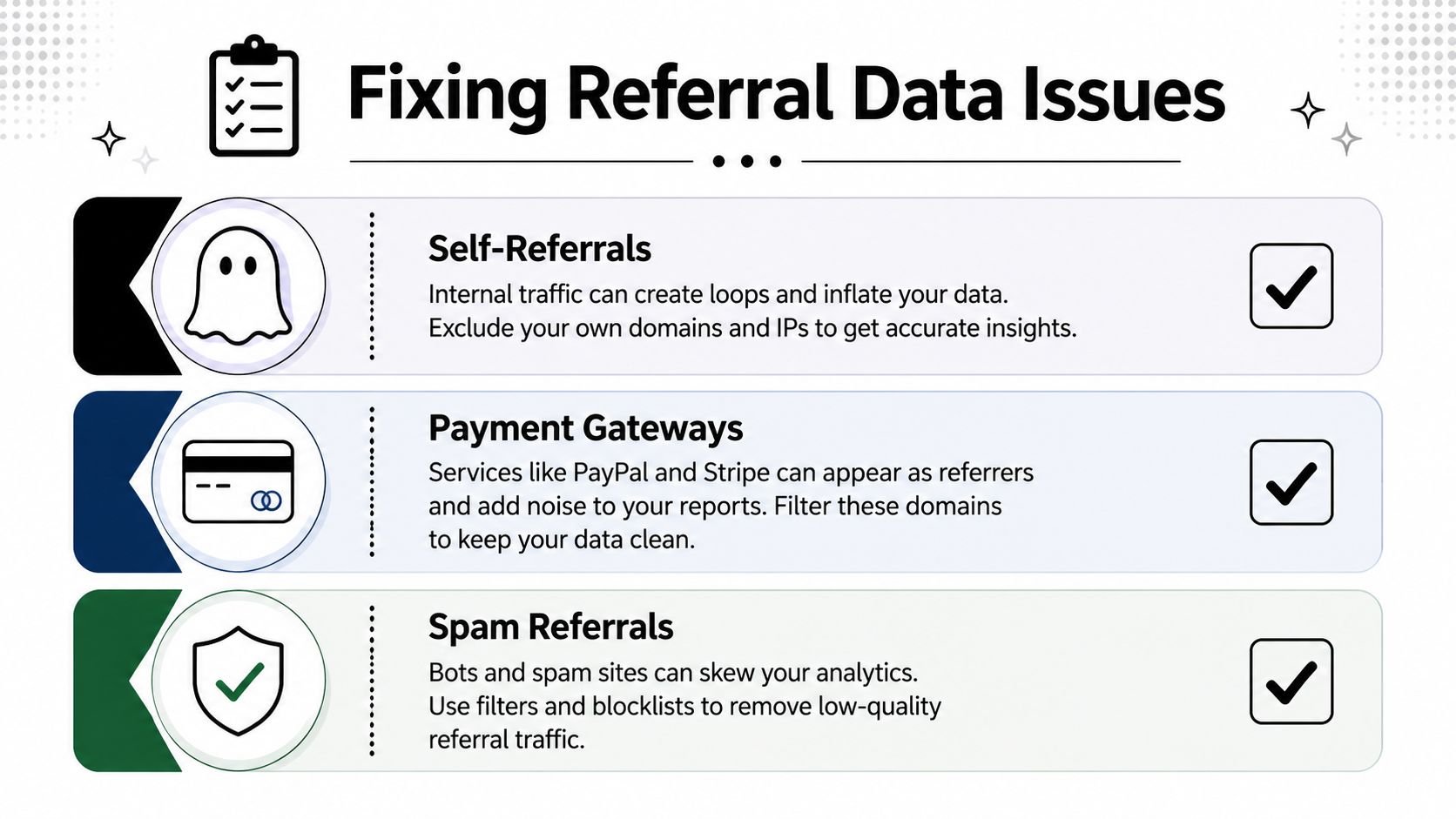
    A better system starts with pillars. These are the core themes your business should be known for in search.

    Choose pillars that support revenue pages

    Your pillars shouldn't come from brainstorming alone. They should come from your offers.

    If you're an accountant, your pillars might be tax planning, bookkeeping, payroll, and small business compliance. If you run a skincare ecommerce store, pillars could include acne routines, ingredient education, product comparisons, and skin-type guides. Each pillar should eventually support a product page, category page, service page, or lead magnet.

    Three to five pillars are usually enough for a small team. More than that spreads effort too thin.

    A practical way to test a pillar is simple. Ask: can this topic produce multiple search-intent articles that naturally link to a revenue page? If the answer is no, it's probably not a pillar. It's just a content idea.

    Turn your calendar into an operating system

    BetterContext's guide to content marketing frameworks recommends building a content calendar 60–90 days ahead and including fields like publish date, content format, keyword, owner or assigned writer, and promotion channels. That advice matters because a real calendar reduces bottlenecks. It also exposes capacity problems before deadlines slip.

    Your calendar should do more than hold dates. It should track the full lifecycle of each asset.

    Use fields like these:

    • Primary keyword: the main query or theme
    • Search intent: awareness, consideration, or decision
    • Content type: blog, landing page, comparison page, email, social post
    • Owner: writer, editor, or marketer responsible
    • Status: ideation, drafting, editing, optimization, published, refresh needed
    • Primary CTA: book call, request quote, shop collection, download guide
    • Promotion channels: email, LinkedIn, Instagram, outreach, internal links

    Here's the difference between a weak and useful calendar entry:

    Field Weak entry Useful entry
    Topic Drain issues Why kitchen drains keep clogging
    Keyword plumbing why does my kitchen sink clog
    Intent not listed Awareness
    CTA none Book drain inspection
    Promotion social Email newsletter, service page link, local Facebook post

    Many teams discover at this stage that they don't have a content problem. They have an operations problem. Without status fields and ownership, work stalls in review. Without promotion fields, pages get published and ignored.

    Plan the next 60 to 90 days in enough detail that nobody has to ask what happens next.

    A content marketing plan template that includes pillars and a working calendar gives you consistency without making you rigid. You can still react to new opportunities. You just won't build the entire engine around last-minute ideas.

    Creating Content That Actually Ranks and Converts

    Generic content rarely fails because the grammar is bad. It fails because it targets the wrong query, speaks to the wrong stage of the journey, or sends readers nowhere useful after they land.

    For SEO-driven businesses, the smarter move is to build around revenue pages and topic clusters first, then create supporting articles that match exact search intent, internal links, and conversion paths. Content Marketing Institute's guidance on strategy checklists and templates supports that approach. It's more practical than a generic calendar, especially for businesses that need compounding organic traffic with a lean team.

    A magnifying glass focusing on high-quality content leading to improved Google rank and increased website conversion rates.

    Match content to buyer intent

    Not all keywords deserve the same content format.

    Someone searching a broad informational query needs education. Someone comparing solutions needs proof and differentiation. Someone searching with transactional intent needs a page that removes friction and makes the next step obvious.

    A simple map looks like this:

    • Awareness: educational posts, definitions, how-to content
    • Consideration: comparison pages, buyer guides, FAQs, use-case content
    • Decision: service pages, product pages, landing pages, pricing or consultation pages

    Topic clusters earn their keep by strengthening a decision page. When supported by awareness and consideration content that links inward with relevance, that decision page can achieve better rankings.

    Use AI for speed, not for strategy

    AI can remove a lot of production drag. It can help with keyword grouping, outlines, first drafts, refresh suggestions, and repurposing. That's useful for small teams because blank-page work is expensive.

    But AI isn't the strategist. It doesn't know which service is highest margin, which audience converts fastest, or where your business has the strongest proof. Those calls still need human judgment.

    When using a tool like OutRank, the best workflow is straightforward:

    1. Choose the revenue target first. Start with the service page, category page, or offer that matters most.
    2. Build the cluster around intent. Add supporting topics that answer the questions buyers ask before they convert.
    3. Generate drafts fast. Let the tool handle structure and initial coverage.
    4. Add expertise manually. Insert examples, objections, process details, and points of view your competitors don't have.
    5. Run QA before publish. Check facts, links, internal anchors, headings, and CTA alignment.

    A lot of AI-assisted content underperforms because teams automate the wrong layer. They automate writing but skip planning, differentiation, and review.

    Here's a useful walkthrough on improving content structure and search visibility:

    Structure every page for rankings and action

    Ranking and conversion usually improve together when the page is easier to use.

    That means:

    • Answer the main query early: don't hide the core response in paragraph six
    • Use clear H2s and H3s: mirror the sub-questions a searcher expects
    • Add internal links with purpose: point readers to related guides, service pages, and comparison content
    • Keep the CTA relevant: a blog post about diagnosis should lead to the next logical step, not a random newsletter form

    The strongest content doesn't just attract a click. It gives the visitor a clear path forward.

    Featured snippets and strong on-page engagement often come from simple structure, not clever writing tricks. If a section can be turned into a checklist, comparison table, or direct answer, do it. Search engines and humans both reward clarity.

    Maximizing Your Reach Distribution and Repurposing

    A page that ranks eventually can still die early if nobody pushes it after publication. Small businesses feel this more than large teams because they can't afford to spend hours creating content that gets one week of attention.

    That's why distribution belongs inside the content marketing plan template, not outside it. If promotion is “something we'll do later,” it usually doesn't happen.

    Build a simple post-publication workflow

    You don't need a giant distribution machine. You need a routine your team can repeat every time.

    Use a checklist like this after each publish:

    • Update internal links: add links from relevant older posts and key navigation pages
    • Send one email: feature the article in your newsletter or customer list if it fits
    • Create social cutdowns: pull out one insight, one objection, and one short takeaway for social posts
    • Notify sales or service staff: give them the article if customers regularly ask that question
    • Log refresh date: decide when to revisit the piece for updates

    That's enough to stop content from becoming invisible the day after it goes live.

    A diagram illustrating the distribution of content across social media, email, and blog platforms for outreach.

    Publish once. Promote repeatedly. Most teams do the first part and skip the second.

    Distribution also improves SEO indirectly. More visibility means more chances for links, more repeat visits, and more signals that the content deserves attention. You don't need to overcomplicate that. Consistency beats intensity here.

    Repurpose one asset into many

    Repurposing is where small teams make up ground on larger competitors. One strong article can power multiple channels if the original piece is built with structure.

    A single pillar post can become:

    Original asset Repurposed version Best use
    Long-form blog post Email newsletter Re-engage subscribers
    Blog section LinkedIn post Professional audience
    FAQ block Instagram carousel Quick education
    Comparison section Sales follow-up email Help hesitant buyers
    How-to steps Short video script Reach non-readers
    Key stats or claims Graphic snippet Social distribution
    Intro plus CTA Landing page teaser Drive to main article

    The trick is not to force every article into every channel. Match the repurposed format to the audience behavior on that channel. A local clinic may get more value from email and short educational reels than from daily LinkedIn posts. A B2B software founder may get the opposite.

    Repurposing also makes AI more useful. Once the original article is strong, AI can help transform it into social posts, summary emails, and draft scripts much faster. That's where automation creates an advantage without sacrificing judgment.

    Measuring What Matters and Proving Your ROI

    If your reporting stops at pageviews, your content program will eventually lose budget, patience, or both. Business owners don't need more charts. They need proof that content supports leads, sales activity, and revenue.

    That's why measurement has to start with the original goal you documented earlier. The KPI for a local service company won't be identical to the KPI for an ecommerce brand. What matters is that the numbers reflect business value, not just audience activity.

    Track business KPIs, not vanity metrics

    Likes, impressions, and time on page can be useful clues. They are not proof of return on investment by themselves.

    GMediaCo's content marketing plan template guidance offers a practical benchmark. It recommends planning content 60–90 days in advance and setting quantified targets such as a 30% increase in organic traffic over six months or 20 inbound leads per month. It also notes that templates specifying content by funnel stage are more likely to support both SEO and conversion goals. The lesson is simple. Good planning becomes measurable when you tie output to a target.

    Use a simple dashboard with these fields:

    • Organic traffic to target pages
    • Keyword rankings for core commercial terms
    • Qualified leads from content
    • Lead-to-customer conversion rate
    • Revenue from content or assisted conversions
    • Pages needing refresh

    A hand-drawn illustration showing social media engagement icons transforming into an upward trending financial growth bar chart.

    A Google Sheet works. Looker Studio works. The tool matters less than the discipline. Review the same indicators on a fixed schedule and compare them against the plan, not against random expectations.

    Use your dashboard to make better decisions

    Effective reporting does more than prove you published. It helps you decide what to do next.

    If one topic cluster brings in qualified leads, build deeper around it. If awareness content gets traffic but never leads visitors toward your service pages, strengthen internal links and CTAs. If older posts still attract impressions but conversions are weak, refresh them with better structure, clearer offers, and updated examples.

    A strong review rhythm usually includes:

    1. Check performance by cluster: not just by individual article
    2. Identify conversion paths: which pages assist inquiries or purchases
    3. Spot content decay: find pages losing relevance or freshness
    4. Reallocate effort: publish more in the areas producing business outcomes

    Good measurement changes the next month's plan. If it doesn't, it's just reporting.

    This is what makes a content marketing plan template worth using long term. It doesn't sit in a folder after kickoff. It becomes the document that tells you what to create, what to update, what to cut, and where to focus next.


    If you want a practical SEO system without hiring an agency, Agency Secrets is worth a look. It breaks down how small business owners can win with buyer-intent keyword research, consistent publishing, backlinks, and evergreen content, and it shows how OutRank can help automate the heavy lifting so you can focus on strategy, quality, and conversions.

  • How to Check Backlinks in Google Analytics (The Right Way)

    How to Check Backlinks in Google Analytics (The Right Way)

    Most advice on how to check backlinks in google analytics is wrong in one important way. It tells you to open GA4, look at referral traffic, and call that your backlink list.

    That isn't a backlink list. It's a traffic report.

    That difference matters because a backlink can exist without ever appearing in Google Analytics. If nobody clicked it, if tracking failed, or if the visit wasn't recorded, GA4 won't show it. So if you rely on Analytics alone, you'll miss links that are real but silent, and you'll overvalue links that send visits but lead nowhere.

    Small business owners don't need more vague SEO advice. They need a clean workflow that answers two different questions. First, what links point to my site. Second, which of those links send useful traffic. Google Search Console helps with the first. GA4 helps with the second.

    Table of Contents

    Why Google Analytics Can't Show You All Your Backlinks

    A lot of articles get this wrong from the start. GA4 is useful for judging which links send visitors. It is not a place to inventory every site that links to you.

    That limitation comes from how Analytics works. GA4 records sessions and events on your site after someone arrives and tracking fires. If a page links to you but nobody clicks, if the click strips referral data, or if tracking never loads, GA4 has nothing to show.

    This is the distinction that matters for the rest of the article: a backlink is the link that exists on another site, while referral traffic is the visit that happens after someone clicks it and GA4 captures the session. Related, yes. Interchangeable, no.

    That difference changes the question you can answer.

    GA4 helps with performance questions such as which referring domains send engaged visitors, conversions, or repeated traffic. Google Search Console helps with discovery questions such as which domains and pages link to your site, including links that have not produced any measurable visit yet.

    The right tool depends on the question you're asking:

    Question you want answered Best tool
    Which external sites sent measurable sessions GA4
    Which pages and domains link to my site Google Search Console
    Which linked pages brought engaged visitors GA4
    Which links exist even without clicks Google Search Console

    Small business owners run into this constantly. They expect to see a partner site in GA4 referrals, do not find it, and assume the link is gone. In practice, several other explanations are common. The link may be live but rarely clicked. The click may open in an app or secure environment that obscures referral details. The landing page may also fail to load GA4 correctly.

    So a backlink check done only in Analytics will miss part of the picture. GA4 still matters because it shows business impact. Search Console fills in the missing link inventory. Using both gives you the full view: what exists, and what drives traffic.

    Finding Your Top Traffic-Driving Links in GA4

    GA4 is useful here, but only if you ask it the right question. This report does not show every backlink pointing at your site. It shows the links that produced a measurable referral visit, which is a narrower and more business-focused view.

    A hand-drawn illustration showing a data stream with referral paths being analyzed through a magnifying glass.

    Open the right GA4 report

    Go to:

    1. Reports
    2. Acquisition
    3. Traffic acquisition

    Start by isolating Referral traffic. The default view mixes referral visits with Direct, Organic Search, and the rest of your acquisition channels, which makes link analysis harder than it needs to be.

    Once the table is filtered to referrals, GA4 becomes much more useful for answering a practical question: which external sites are sending visitors who engage with the site?

    Change the dimension so the data becomes useful

    The default dimension is usually too broad for this job. Switch the primary dimension to Session source / medium.

    That changes the table from a channel summary into a list of referring sources. You can quickly spot which domains are sending visits, then compare those sources using traffic and engagement metrics instead of relying on raw volume.

    A referral source with modest traffic can still be one of your best links if those visitors read, browse, and convert.

    Here's how to read the main columns:

    • Users shows how many people arrived from that source.
    • Sessions shows visit volume.
    • Engaged sessions helps identify sources sending visitors who stay active on the site.
    • Average engagement time gives a quick read on visit quality.
    • Conversions shows whether that source contributed to leads, sales, or another key action.

    Beyond session counts, the quality of the visit reveals the true value of the link. In practice, I often see a niche industry blog send fewer visits than a large directory, yet produce far better conversion rates because the audience is a tighter match.

    After you've set up the main report, this walkthrough can help if you want to see the interface in action:

    Add landing page context

    A referring domain is only half the story. You also need to know which page received the click.

    One option is to keep Session source / medium as the primary view and add landing-page detail. Another is to start from a landing page report and filter for referral traffic. Both approaches work. The better choice depends on the question you are trying to answer. Source-first is better for evaluating partner sites, publishers, and directories. Landing-page-first is better for finding pages that already attract off-site mentions and could convert better with a stronger call to action.

    Add landing page context

    Use a secondary dimension such as Landing page + query string. If you want a walkthrough of the GA4 setup, this GA4 reporting walkthrough shows the process clearly.

    This view helps answer the questions that matter during a real review:

    • Which blog posts attract referral clicks
    • Which service pages get mentioned on other sites
    • Which referral sources send traffic to pages with weak conversion performance
    • Which linked pages deserve updates because they already attract outside attention

    GA4 makes backlink data actionable. Instead of treating backlinks as a vanity metric, you can identify the pages already earning clicks from other websites and improve the pages that receive that traffic. For a small business, that usually means tightening the offer, improving the page layout, and making sure the next step is obvious.

    Using Google Search Console for a Complete Backlink List

    GA4 is useful for one job. It shows visits that happened. If you want the full list of sites and pages linking to you, use Google Search Console.

    A hand-drawn illustration showing a link from Google Search Console to a list of backlink profiles.

    Why Search Console is the starting point

    This distinction trips up a lot of business owners. A backlink is a link pointing to your site. Referral traffic is the visit that happens only if someone clicks that link and your analytics records the session.

    Search Console helps you answer, “Who links to my site, and which pages get those links?” GA4 helps you answer, “Which of those links sent visitors I can measure?” You need both answers if you want a backlink review that is useful.

    Search Console also catches links that have not produced any tracked visits yet. That still matters. Some links support visibility in search, some build credibility, and some send traffic later after the page gets more exposure.

    What to check in the Links report

    Open Google Search Console and click Links in the left menu.

    Start with these two reports:

    Report area What it helps you see
    Top linked pages Which pages on your site attract the most links
    Top linking sites Which external websites link to you most often

    Begin with Top linked pages if you want to spot content worth updating. A guide, location page, or service page that earns links already has authority. Improve that page first. Tighten the copy, add stronger internal links, and make the next step clearer.

    Check Top linking sites if you want to review link quality and relationships. Repeated links from a relevant industry site can be a good sign. Repeated links from scraped directories or unrelated domains deserve a closer look before you treat them as wins.

    You can also export the report and turn it into a working backlink sheet. I usually do that before reporting because it makes review faster and keeps the process honest.

    A simple workflow:

    • Sort by linked pages to find the assets that attract attention from other sites
    • Review linking sites to judge relevance, reputation, and repeat mentions
    • Match those pages and domains against GA4 to see which links also send engaged visitors

    That combined view is the point. Search Console gives you the backlink list Google associates with your site. GA4 shows whether any of those links turn into real visits and business value.

    Troubleshooting Common Referral Data Issues

    Bad referral data creates bad SEO decisions.

    GA4 is useful here, but only if you read the report with the right question in mind. A backlink is a link pointing to your site. Referral traffic is a visit that reached your site through a link or another referring source. Those are related, but they are not the same thing. That difference matters most when you start cleaning up noisy reports.

    An infographic illustrating three common referral data issues: self-referrals, payment gateways, and spam referrals in analytics.

    When referral traffic is not a backlink

    Some referral sources have nothing to do with link building. They show up because of how users move through your site, your checkout process, or connected tools.

    The usual offenders are easy to spot once you know what you are looking for:

    • Self-referrals. Your own domain appears as the referrer, which usually points to a tagging or cross-domain setup problem.
    • Payment gateways. A user leaves your site to pay, then comes back, and GA4 credits the payment domain instead of the original source.
    • Login, scheduling, chat, or booking tools. These can appear as referrals even though nobody intentionally linked to you in a way that helps SEO.

    If those domains stay in the report, your referral list stops being useful for backlink analysis. You start giving credit to technical pass-throughs instead of real mentions from other websites.

    How to clean up the report

    Start with a blunt review of the referral table. Ask a simple question for each domain: would a real person describe this as a website that recommended my business?

    If the answer is no, treat it as setup noise first and marketing value second.

    A practical cleanup checklist:

    1. Check for your own domain in referrals and fix self-referrals at the tracking level.
    2. Review checkout and payment providers so they do not overwrite the original acquisition source.
    3. List third-party tools used in forms, scheduling, logins, or embedded widgets, then decide whether they belong in referral reporting.
    4. Compare sessions with engagement metrics before treating a referring domain as a good opportunity.

    A high volume of visits from a domain means very little if those visitors do not engage. In practice, that usually points to low-quality traffic, a poor landing page match, or a source that was never valuable in the first place.

    How to spot broken backlink traffic

    The best referral cleanup work often leads to recovery, not exclusion.

    A common pattern looks like this. A site links to an old URL, a campaign page was removed, or a service page changed during a redesign. The link still exists, the referring domain still sends visitors, and those visitors land on a 404 or a weak fallback page. That traffic is already earned. It is just being wasted.

    Use GA4 Explore to isolate referral traffic by landing page. Add dimensions such as Session source, Landing page + query string, and Page title. Then filter for referral sources and look for pages tied to errors, outdated URLs, or unusually weak engagement. This is one of the fastest ways to turn referral data into a repair list.

    Look for patterns like:

    Signal Likely issue
    Referral traffic landing on a 404 page Broken external link or deleted destination
    Good source, weak engagement Mismatch between the referring context and the landing page
    Multiple visits to old campaign URLs Missing redirects after URL changes

    These fixes often produce faster gains than another round of outreach. When a relevant site already mentions you, restoring the right destination can recover traffic, leads, and attribution with less effort than earning a new link.

    A Practical Workflow for Backlink Analysis and Reporting

    Most business owners don't need another dashboard. They need a repeatable process that turns backlinks into traffic decisions.

    A hand-drawn sketch illustrating the integration process of Google Search Console and GA4 across three project phases.

    Use a two-tool workflow

    The cleanest process is:

    1. Open Google Search Console first and review the Links report.
    2. Export or note important linking sites and linked pages.
    3. Move into GA4 and check which referral sources produced sessions and engagement.
    4. Match source with landing page so you know which content earns both links and visits.
    5. Flag broken destinations if referral traffic lands on outdated or missing URLs.

    This works because each tool answers a different business question. Search Console gives you coverage. GA4 gives you performance.

    A lot of reporting goes wrong because people try to force one tool to do both jobs.

    Turn reports into decisions

    Once you have both views, your next move should be operational, not academic.

    Use your findings to sort links into buckets:

    • Keep building here when a source sends engaged visitors to relevant pages.
    • Improve the landing page when the source is strong but on-site engagement is weak.
    • Fix and reclaim when referral visitors land on broken pages or outdated URLs.
    • Ignore or exclude when the source is just technical noise.

    Here, analytics becomes useful for growth. You stop asking, “How many backlinks do we have?” and start asking better questions.

    For example:

    • Which linked pages deserve a refresh because they already attract attention?
    • Which referring sites send visitors who read, browse, or buy?
    • Which old URLs need redirects because they still receive referral clicks?
    • Which “top referrals” are really just payment tools or internal systems?

    If you want one advanced habit, make it this one. Review referral traffic to broken pages regularly. The GA4 Explore workflow using Page title, Landing page + query string, and a Referral filter is one of the most practical ways to turn backlink data into a fix list, as outlined in this KRM Digital guide on backlink diagnosis in GA4.

    Good backlink reporting doesn't end with a list of domains. It ends with a next action.

    That's the right way to approach how to check backlinks in google analytics. Use Search Console to find the links. Use GA4 to judge the traffic. Then fix what's broken, improve what's working, and stop treating all links as equal.


    If you want a practical SEO system without hiring an agency, Agency Secrets is worth a look. It focuses on the parts that move organic traffic for small businesses: keyword research, publishing useful content consistently, earning relevant backlinks, and building evergreen pages that keep compounding over time.

  • SEO for Law Firms: Your Client Acquisition Playbook

    SEO for Law Firms: Your Client Acquisition Playbook

    Law firms that invest in SEO see an average 526% return over three years, according to First Page Sage's law firm SEO statistics. That number changes the conversation. SEO for law firms isn't a branding exercise or a nice-to-have website project. It's a client acquisition system.

    Most firm owners don't need another abstract marketing lecture. They need a practical way to turn search demand into consultations, signed matters, and a steadier pipeline of cases. That means focusing on the work that creates an advantage, ignoring vanity metrics, and treating your website like a business asset instead of an online brochure.

    The firms that win in search usually don't win because they “do more marketing.” They win because they make better operational decisions. They target the right case types, publish the right pages, tighten their local visibility, and build trust in ways both Google and potential clients can verify.

    Table of Contents

    Why SEO Is a Non-Negotiable Investment for Growth

    About 96% of people seeking legal advice use a search engine during their process. For a partner or small firm owner, that matters for one reason. Search visibility influences who reaches intake first, how many qualified consultations the firm books, and what it costs to win the next case.

    The budget question is straightforward. Does SEO bring in profitable matters at a lower acquisition cost than referrals, PPC, or legal directories over a 12 to 36 month window? For many firms, it does. As noted earlier, law firm SEO can produce strong long-term returns, especially in practice areas where one retained client covers months of work.

    The reason is simple. SEO compounds.

    A paid campaign shuts off the day the spend stops. An optimized practice area page, a well-managed Google Business Profile, and earned authority from credible mentions can keep producing consultations long after the initial build. That changes the economics of growth. Instead of renting attention every month, the firm builds an asset that can lower cost per lead over time.

    The business case is stronger than many partners assume

    Clients do not search in marketing language. They search by problem, city, urgency, and confidence that the lawyer can handle the matter. If the firm is absent in those moments, intake volume shifts to another office.

    That is why SEO belongs in the same conversation as hiring, intake performance, and practice area expansion. It affects revenue capacity. A family law firm trying to grow uncontested divorce work, or a business litigation firm targeting higher-value disputes, needs a reliable path to demand that is not dependent on personal referrals alone.

    The strongest programs usually line up with four realities of legal demand:

    • Timing matters: Search activity spikes when a legal issue becomes immediate.
    • Local intent matters: Firms usually need visibility in specific cities, counties, or regions.
    • Trust matters: Prospects compare attorney profiles, reviews, results, and page quality before they contact anyone.
    • Economics matter: One retained matter can justify focused investment in a high-value practice area.

    Practical rule: If a service line drives firm revenue, it deserves its own search plan, page set, and intake path.

    What earns cases and what wastes budget

    The firms that win from SEO usually do the unglamorous work consistently. They publish strong service pages, keep location signals accurate, improve site speed and mobile usability, and give prospects a clear path from search to consultation.

    The firms that underperform usually have an execution problem, not a visibility problem alone. Common examples show up fast in an audit:

    • Thin service pages: One broad page rarely ranks well or answers the concerns of a specific case type.
    • Content without commercial intent: Articles that never connect to a practice area or consultation path consume time and produce little pipeline value.
    • Reporting without accountability: Traffic charts do not help a partner decide where to put the next dollar. Signed cases, qualified leads, and cost per retained matter do.
    • Stop-start investment: Firms that pause every few months reset momentum and extend the time to results.

    The opportunity in seo for law firms is operational. Treat it as a growth system with owners, timelines, and revenue targets, and it becomes much easier to budget, delegate, and measure against actual firm goals.

    The Keyword Research Blueprint for Attracting Cases

    Most keyword research fails because firms start with traffic, not cases. A better approach starts with commercial intent. Ask a simpler question. What would someone type into Google right before they call a lawyer?

    That's the center of your keyword strategy. Not every search deserves a page, and not every page deserves ongoing investment. A firm owner should separate terms that attract research-mode visitors from terms that signal hiring intent.

    A pencil sketch of a judge's gavel combined with magnifying glasses and digital network nodes, symbolizing legal SEO.

    Think like intake, not like publishing

    A useful analogy is the first consultation. Some callers want education. Others want representation now. Your keyword portfolio should reflect that difference.

    “DUI penalties in Texas” is often an information query. “DUI defense lawyer Austin” is a buyer-intent query. Both can matter, but they shouldn't get equal weight. The second term usually deserves the stronger page, the stronger internal links, and the clearer call path.

    Here's a practical matrix you can use.

    Intent Type Example Keyword Client Mindset Content Goal
    High intent divorce lawyer near me Ready to speak with counsel Drive consultation request
    Service specific business litigation attorney Chicago Comparing firms for a defined matter Show fit, experience, next step
    Problem aware what to do after a truck accident Concerned, gathering direction Build trust and route to service page
    Process aware how long does probate take Evaluating complexity and timing Educate and introduce representation
    Brand search smith law criminal defense Already knows your firm Confirm trust and convert quickly

    Build a keyword portfolio by practice area

    Don't build one giant list. Build small portfolios tied to revenue lines. If you handle personal injury, family law, and estate planning, each practice area should have its own set of primary and supporting terms.

    Use this sort order:

    1. Core money terms
      These are your “hire a lawyer” phrases. They usually combine service plus geography, such as “estate planning attorney Denver.”

    2. Case-specific variants
      These narrow the service into a matter type. Examples include custody disputes, wrongful death, or contract disputes.

    3. Question terms with commercial relevance
      These support the main pages. Good examples are questions people ask before hiring, not broad legal trivia.

    4. Local modifiers
      Add city, county, neighborhood, and “near me” intent where it matches your service footprint.

    A good keyword list should tell you what pages to build next. If it doesn't, it's research without operational value.

    What to prioritize first

    If your time is limited, start with the pages most likely to turn into signed matters:

    • Main practice area pages: One page per service line.
    • Location pages: Only for places you actively serve.
    • Urgent FAQ pages: Questions that surface right before contact.
    • Attorney bio pages: Especially for branded and trust-driven searches.

    What I usually advise against is chasing broad educational terms too early. They can help later, but they rarely carry the same immediate business value as high-intent local keywords.

    A firm owner doesn't need a giant SEO spreadsheet. They need a short list of terms tied to revenue, matched to real pages, with a clear decision on which pages deserve the next round of investment.

    Building Your Digital Foundation with Local and Technical SEO

    Your site is your digital office. If it loads slowly, confuses visitors, or sends mixed location signals, you lose business before intake gets a chance. That's why the foundation matters more than most firms think.

    Organic search drives 53% of all law firm traffic, 46% of Google searches have local intent, and a fully optimized Google Business Profile influences 32% of local map pack ranking potential, according to Grow Law's legal SEO statistics. For local legal work, your visibility in map results isn't secondary. It's part of your front door.

    A hand-drawn sketch of a location pin placed on a grid representing a foundation site with gears.

    Treat your site like your front office

    A partner wouldn't accept a receptionist who leaves callers on hold, gives inconsistent office information, and forgets to return messages. Yet many firm websites do the equivalent every day.

    Start with the basics that affect search visibility and client experience:

    • Mobile usability: Most prospects will first see your site on a phone. Buttons must be tappable, forms short, and phone numbers clickable.
    • Page speed: Slow pages create drop-off before visitors even read the first paragraph.
    • Site structure: Practice areas, attorney bios, locations, reviews, and contact paths should be easy to find.
    • Technical hygiene: Broken pages, duplicate titles, and crawl confusion dilute performance.

    The Core Web Vitals benchmarks often used for law firm sites are qualitative in practice even when the targets are technical. A good standard is to keep main content loading quickly, reduce layout shifts, and make forms responsive. Use PageSpeed Insights and Lighthouse to identify the pages where poor performance interferes with intake.

    Own your local visibility

    For many firms, local SEO is the most impactful part of seo for law firms. The map pack gets attention because it combines convenience, trust, and intent in one result.

    Your Google Business Profile should be complete and actively managed. That includes accurate categories, office hours, contact details, service descriptions, photos, and regular updates. Just as important, the firm's name, address, and phone information should match across your website and major legal directories.

    This is the type of video I'd want a law firm owner to watch before delegating local SEO, because it clarifies what matters operationally:

    Fix the pages that quietly lose consultations

    Not every technical issue deserves attention. Some are cosmetic. Others cost you leads. Focus on the pages where buyer intent is highest.

    A useful review order looks like this:

    1. Home page and top practice pages
      Make sure they load cleanly, communicate location clearly, and show the next step without forcing visitors to hunt.

    2. Contact and consultation pages
      Check form friction, mobile usability, and click-to-call visibility.

    3. Location pages
      Each should include unique local relevance, not spun copy with swapped city names.

    4. Attorney bio pages
      These often decide whether a prospect trusts the firm enough to call.

    A slow practice area page is the online version of a locked office door.

    A technically clean site doesn't win on its own. But without it, the rest of your SEO work gets harder, more expensive, and less reliable.

    Creating Content That Converts Visitors into Clients

    Content should do legal work. It should answer questions, reduce hesitation, show authority, and move a prospect toward contact. If it only fills space, it's overhead.

    The structure and quality of content directly affect performance. Sites with proper heading structures can rank up to 38% higher, and pages featuring testimonials can see a 34% lift in conversions, as noted in the earlier local SEO research. That's the difference between content that sounds competent and content that helps generate matters.

    A pencil sketch of a handshake merging with a fountain pen symbolizing a signed legal agreement.

    Build practice area pages first

    If I had to choose one content asset to get right for a law firm, it would be the practice area page. On these pages, search intent, trust, and conversion usually meet.

    A strong practice area page should include:

    • A direct opening: State what the firm handles and who it helps.
    • A plain-English explanation: Describe the issue without legal padding.
    • Common scenarios: Show the kinds of cases or matters the firm takes.
    • Process clarity: Explain what happens next if the prospect contacts you.
    • Trust proof: Attorney credentials, testimonials, representative outcomes if appropriate, and local relevance.
    • Clear calls to action: Phone, form, consultation request, and next steps.

    Many firms bury the answer under generic copy. Don't. Lead with the service, the geography, and the practical next move.

    Clients don't read legal marketing the way lawyers write it. They scan for fit, risk, credibility, and what to do next.

    Use supporting content to answer objections

    Blog posts, FAQs, and guides aren't secondary when they serve a conversion role. They work best when they support a core service page and help a prospect get comfortable enough to reach out.

    Examples of useful supporting content include:

    • Decision-stage FAQs: “Do I need a lawyer for a first DUI offense?”
    • Timeline content: “What happens after filing for divorce in [city]”
    • Cost and expectation pages: Explain process and variables without promising outcomes.
    • Evidence of experience: Articles tied to recurring case patterns, procedural issues, or common mistakes.

    Heading structure matters. A page with logical H2s and H3s is easier for both search engines and visitors to process. It also forces clearer thinking. If a page can't be outlined well, it usually isn't answering the client's question thoroughly.

    Content that sounds authoritative versus content that converts

    These aren't always the same thing. Law firms often produce copy that sounds polished but avoids specificity. Prospects notice.

    A better editorial standard is this:

    Weak content habit Better approach
    Broad claims about experience Name practice focus, jurisdictions, and types of matters handled
    Dense paragraphs Break pages into scannable sections with clear headings
    Generic reassurance Use testimonials and practical process explanations
    Vague calls to action Ask for a consultation, case review, or phone call clearly

    The pages that convert well tend to feel calm, direct, and useful. They don't try to impress other lawyers. They help potential clients make a decision.

    Building Authority with Backlinks Reviews and Directories

    A law firm's reputation doesn't come only from its own website. Search engines look for external validation. Potential clients do too. That's why backlinks, reviews, and legal directory listings matter. They're the digital version of professional referrals and public credibility.

    A lot of firms approach this backwards. They chase link volume, buy placement on junk sites, or treat reviews as something that “just happens.” That approach usually creates noise, not authority.

    Backlinks are professional referrals in digital form

    The best backlinks come from relevant, credible sources that make sense in a practical context. If a bar association resource page, local university program, legal publication, chamber of commerce site, or respected community organization mentions your firm, that's stronger than a pile of random directory links.

    The practical ways to earn them are usually straightforward:

    • Publish something worth citing: A thorough local guide, a plain-English explainer, or a resource page for a specific legal problem.
    • Contribute expertise: Write guest commentary for local publications, legal associations, or business groups.
    • Support community institutions: Sponsorships, scholarships, and event participation can create legitimate mention opportunities.
    • Build professional relationships: Vendors, partner professionals, and local organizations often have sensible linking opportunities.

    What doesn't work well is mass outreach with templated emails and generic “guest post” offers. Those campaigns waste time and often attract low-quality sites.

    If a backlink wouldn't help your reputation offline, it probably won't help much online either.

    Reviews and directory consistency shape trust

    For local service firms, reviews often influence both rankings and conversion behavior. A prospect searching for legal help may compare only a few firms before deciding who gets the first call. Reviews can break that tie.

    A good review process has three parts:

    1. Ask consistently
      Don't wait for perfect moments. Build review requests into closing, post-matter follow-up, or client care workflows.

    2. Respond professionally
      Thank positive reviewers. Handle negative reviews carefully and ethically, without disclosing client details.

    3. Spread trust signals Keep profiles current on Google, Avvo, FindLaw, Justia, and other relevant directories where your market looks.

    Directory work is rarely glamorous, but it cleans up trust signals. If your firm name, phone number, categories, or attorney details conflict across platforms, search engines and prospects both get mixed signals.

    A practical standard for firm owners is simple. Keep one master record for core business information, update it everywhere, and review it on a recurring schedule. The firms that do this well don't obsess over every listing on the internet. They keep the important ones accurate and active.

    Implementing E-E-A-T and Schema for Maximum Trust

    E-E-A-T can sound abstract until you translate it into legal terms. Search engines want evidence that a firm has real experience, real expertise, recognized authority, and trustworthy presentation. In law, that's not a branding trick. It's your actual professional standing.

    Schema solves a related problem. It helps search engines interpret who your attorneys are, what services you offer, where you operate, and how those entities connect.

    Translate credentials into search signals

    Most firms have stronger credibility than their websites show. Bar admissions, speaking engagements, publications, awards, clerkships, professional memberships, and case-specific experience often sit buried in PDFs or half-finished bio pages.

    Bring those details into visible, structured page elements:

    • Attorney bios: Include jurisdictions, practice concentration, education, associations, and published work.
    • Firm pages: State service areas, office locations, contact details, and practice scope clearly.
    • Editorial standards: Show who wrote or reviewed substantive legal content.
    • Trust pages: Use testimonials, awards, and media mentions where ethically appropriate.

    Legal search is high-trust search. A personal injury prospect, a business owner facing litigation, or a parent in a custody dispute isn't looking for “content.” They're looking for signs that the lawyer behind the page is real, qualified, and relevant to the problem.

    Use schema to make your firm easier to understand

    Implementing legal-specific schema can lift click-through rates by 20% to 30%, according to the D.C. Bar discussion of SEO fundamentals for lawyers. In practical terms, schema helps your firm earn richer search presentation and clearer local visibility.

    For law firms, the most useful schema types are usually:

    • Attorney schema: Connects individual lawyers to bios, practice areas, reviews, locations, and profiles.
    • LegalService schema: Defines the services the firm provides.
    • LocalBusiness schema: Reinforces location, hours, and contact information.

    A sound implementation approach looks like this:

    Schema element What it should clarify
    Attorney Who the lawyer is and what they handle
    LegalService Which legal services the firm offers
    LocalBusiness Where the office is and how to contact it
    Review-related markup What public trust signals are associated with the firm

    You don't need to turn this into a giant development project. JSON-LD is usually the cleanest format. Validate it with Google's Rich Results Test and inspect how search engines see the pages in Search Console.

    Why E-E-A-T and schema work better together

    E-E-A-T is the credibility layer humans and algorithms both care about. Schema is the structured language that makes that credibility easier to parse. One without the other leaves value on the table.

    If your attorney bios are thin, your service pages generic, and your structured data absent, Google has to infer too much. If your credentials are clear and your schema is properly mapped, your firm becomes easier to classify, trust, and display.

    That's the point. In seo for law firms, the firms that win trust usually make it easy to verify.

    Your SEO Playbook Measuring Success and Optimizing for 2026

    Law firm owners do not need more marketing reports. They need a short operating dashboard tied to consultations, signed cases, and practice areas that justify more investment.

    SEO usually pays off over time, not in a single quarter. Earlier benchmarks in this article showed a long break-even window for law firms, which is why the right management model rewards consistency, disciplined review, and better intake tracking instead of weekly reactions to ranking swings.

    A 2026 legal SEO operational playbook infographic featuring four key steps for law firm website optimization.

    Measure the few numbers that matter

    A useful dashboard for a managing partner or small firm owner should answer three business questions fast:

    • Are qualified prospects finding the firm through search?
    • Are those prospects booking consultations?
    • Which practice areas are producing profitable cases from organic traffic?

    Use Google Analytics, Google Search Console, call tracking, and your intake or CRM system to track:

    1. Organic leads by practice area
      Count phone calls, form fills, and consultation requests that came from organic search, then break them down by service line.

    2. Non-branded organic traffic
      This shows whether your visibility is growing beyond people who already know the firm name.

    3. Buyer-intent rankings
      Track terms tied to case demand, such as service-plus-location searches, instead of celebrating broad informational phrases that rarely produce signed matters.

    4. Page-level conversion behavior
      Identify which pages produce calls and forms, and which ones lose attention before a prospect takes action.

    5. Signed matters from organic search
      This is the metric that should influence budget decisions, even if attribution will never be perfect.

    SEO reporting should support a decision. If it does not help you shift budget, fix a bottleneck, or expand a winning practice area, it is overhead.

    Run a simple quarterly operating rhythm

    Firms that get real ROI from SEO usually review it the same way they review referral sources or intake performance. On a schedule.

    A practical quarterly review looks like this:

    • Month one
      • Check technical health: Review indexing, broken pages, mobile usability, page speed issues that affect conversions, and key contact paths.
      • Review local presence: Update Google Business Profile, office details, and major legal directories.
    • Month two
      • Refresh high-value pages: Improve practice area pages, attorney bios, and location pages that attract traffic but underperform on leads.
      • Strengthen internal links: Push authority toward the pages that generate consultations and signed cases.
    • Month three
      • Review lead quality: Compare organic inquiries against signed matters by practice area.
      • Choose the next priorities: Expand what is producing profitable demand, cut low-value work, and assign resources based on case value, not traffic alone.

    This cadence solves two common problems. Some firms ignore SEO until lead flow softens. Others spend too much time on minor edits that never change case volume.

    What to prioritize for 2026

    For 2026, keep the plan tight.

    First, protect local visibility. Reviews, accurate office data, and strong map presence still influence who finds your firm and who gets the call. Second, improve the conversion performance of your core money pages before publishing more content. A stronger personal injury page in one city usually has more value than four weak blog posts. Third, make attorney credibility easy to verify with stronger bios, visible authorship, and structured data that supports what prospects already see on the page. Fourth, build content around direct, high-intent questions because search results are giving users faster answers and pushing firms to earn trust earlier in the click path.

    The firms that win over the next cycle will usually be the ones with cleaner operations. Better intake attribution. Better service pages. Better review generation. Better follow-up on organic leads.

    If you want seo for law firms to become predictable, manage it like a case pipeline. Define the matters you want, build pages that attract those searches, track what happens after the click, and improve the bottlenecks every quarter.


    If you want a simpler way to execute this playbook without hiring an agency, Agency Secrets shows business owners how to handle keyword research, content, backlinks, and evergreen SEO systems in-house. It's a practical resource for operators who want more organic leads and less marketing overhead.