
You probably already have some version of a keyword research template. It lives in a half-finished Google Sheet, a notes app, or a CSV export from a tool you opened once and never cleaned up. The problem isn't that you lack keywords. The problem is that raw keyword lists rarely turn into an actual publishing plan.
That's why most SEO efforts stall. A business owner gathers terms, highlights a few rows, then gets stuck on the next question. Which page should target what? Which keywords deserve a landing page instead of a blog post? Which terms should be grouped together? Which ones should be ignored even if they look interesting?
A good keyword research template fixes that, but only if it's built to make decisions, not just store data. Historically, that's why templates became a standard SEO workflow. They organized manual search data into a repeatable structure so teams could prioritize content instead of guessing, as outlined in Asana's keyword research template overview.
Table of Contents
- Stop Guessing and Start Planning Your SEO Content
- Understanding Your Keyword Research Template Fields
- Populating Your Template with Winning Keywords
- Example Keyword Templates for Your Business Type
- Turning Your Template into a Content Pipeline
- Future-Proofing Your Keyword Strategy
Stop Guessing and Start Planning Your SEO Content
Most small businesses don't have an SEO problem. They have a planning problem.
They publish blog posts when someone on the team has time. They target phrases that sound right. They open Ahrefs, Semrush, or Google Keyword Planner, export a list, then stop because the list is too big and the next move isn't obvious. A few months later, the site has content, but no clear coverage of core services, no logical internal linking, and no confidence that the right topics were chosen.
A keyword research template solves that when it's used correctly. Not as admin work, but as a filter for business decisions. It tells you which topics deserve a page, which phrases belong together, and which opportunities look attractive on paper but won't move the business.
Practical rule: If a keyword research template doesn't help you decide what to publish next, it's just storage.
The shift is simple. Stop treating keyword research as idea collection. Start treating it as content planning infrastructure.
That changes how you work:
- From random ideas to repeatable prioritization. You compare opportunities using the same fields instead of relying on instinct.
- From volume chasing to intent matching. You stop writing broad articles that attract the wrong audience.
- From one-off posts to a real roadmap. Every keyword should connect to a page type, a topic cluster, and a stage of the buying journey.
This matters even more if you run lean. A founder, in-house marketer, or local business owner doesn't need a giant SEO operation. You need a small system that consistently points you toward the best next page.
That's what a useful keyword research template does. It reduces noise, makes trade-offs visible, and gives you a practical path from search data to content production.
Understanding Your Keyword Research Template Fields
A keyword sheet earns its keep when it helps you choose the next page to build.
Raw exports cannot do that on their own. They give you terms, volumes, and competition scores, but they do not show which keyword fits a service page, which belongs in a cluster, or which one looks attractive and still will not drive revenue. The template creates that layer of judgment.
That is why the fields matter. Each column should reduce uncertainty, not add admin work.
The fields that drive decisions
Below is the version I use when a client needs a practical system they can maintain without turning keyword research into a full-time job.
| Field Name | Description | Why It Matters |
|---|---|---|
| Keyword | The exact search phrase you're evaluating | The term you will assign to a page, section, or cluster |
| Topic Cluster | The broader subject this keyword belongs to | Keeps coverage organized and supports internal relevance |
| Search Intent | Informational, navigational, commercial, or transactional | Tells you what kind of page should target the query |
| Monthly Search Volume | Average monthly demand for the term | Confirms whether there is enough search activity to justify effort |
| Keyword Difficulty or Competition | A proxy for how competitive the query is | Helps you avoid targets your site is unlikely to win yet |
| CPC | What advertisers pay per click | Often signals commercial value, especially for service and product terms |
| Geography or Language | The market you are targeting | Prevents wrong-country or wrong-language decisions |
| Relevance | How closely the keyword matches your offer | Filters out traffic that looks good in a report and weak in the pipeline |
| Page Type | Blog post, service page, product page, location page, comparison page | Turns research into a concrete asset to create |
| Priority | Your internal rank for what gets created first | Forces trade-offs and keeps the backlog realistic |
| Existing URL | The page already targeting the keyword, if one exists | Prevents duplicate work and surfaces update opportunities |
| Cannibalization Check | Whether another page is already competing for the same term | Stops multiple pages from splitting signals |
| SERP Features | Notes on snippets, local packs, videos, or AI-style answers | Helps you judge the click opportunity and content format |
| Status | Planned, briefed, drafted, published, updated | Makes the sheet useful after research is done |
| Notes | Context such as angle, objections, or sales nuance | Captures the details that tools miss |
A few fields carry more weight than the rest.
Search intent determines the asset. If the query suggests comparison shopping, build a comparison page. If it signals urgency around a service, build or improve the service page. A lot of weak SEO programs fail here. They pick the right phrase and attach it to the wrong page type.
Relevance is where judgment beats software defaults. I would rather target a lower-volume keyword tied directly to a core offer than chase a broader term that brings in readers who will never buy. Traffic is easy to overvalue. Qualified traffic is harder to get and worth more.
Page type is the column that closes the gap between research and production. Without it, the template becomes storage. With it, each row starts to answer a real planning question: do we need a new page, a refresh, or no page at all?
Existing URL and cannibalization check protect the site from self-inflicted problems. Before creating anything new, check whether the site already has a page close enough to improve. In many cases, consolidation beats expansion.
A useful template should answer three questions fast: should we target this keyword, what page should target it, and how soon should it get made?
Do not overbuild the scoring model at the start. A simple priority field is enough if the team applies the same logic each time. I usually rank rows based on four inputs: fit with the offer, intent clarity, ranking difficulty, and business value. That gets you most of the benefit without ten custom formulas.
Once those fields are filled in consistently, the sheet stops being a research document and starts acting like a content planning system. That is the primary job. Tools can gather keywords. A good template decides what deserves production. Platforms like OutRank push that one step further by turning those decisions into briefs, articles, and a live pipeline, but the structure still starts here.
Populating Your Template with Winning Keywords
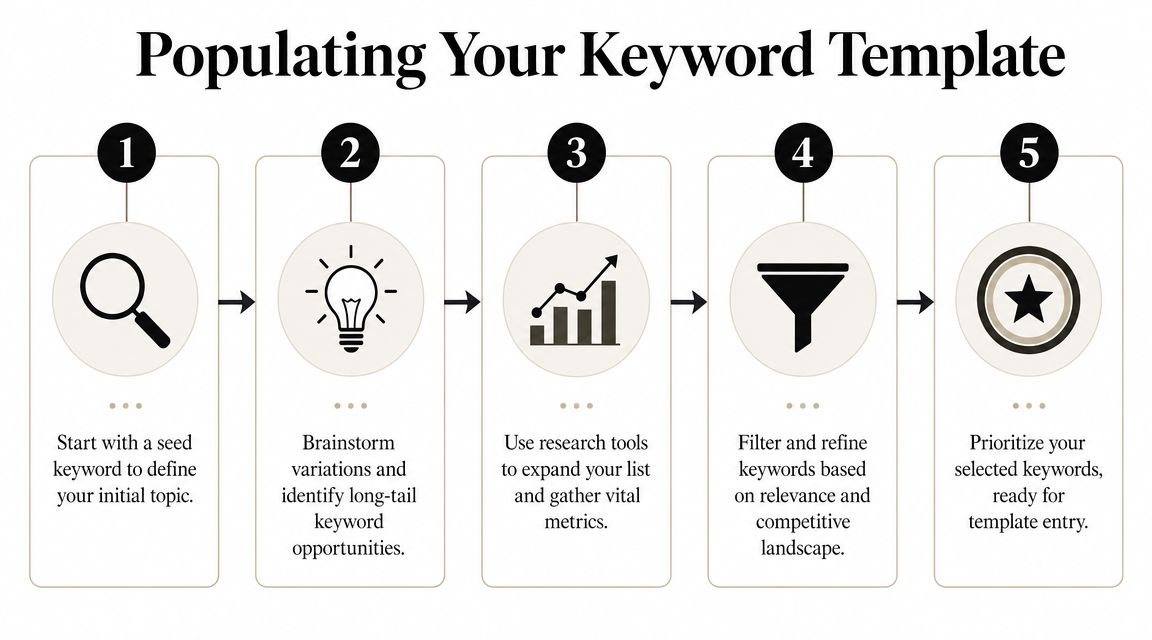
Start narrow, then expand
A clean keyword list starts small. Not with thousands of rows.
A practical workflow is to begin with 6–12 seed terms, expand them in a tool like Google Keyword Planner, filter by search volume and competition, then export a clean list into your spreadsheet, as described in Jellyfish's keyword research funnel process. That basic funnel works because it forces focus before scale.
Start with phrases that describe what you sell, what your customer wants, and how they describe the problem. For a local plumber, that might be service terms and urgent problem terms. For a SaaS company, it might include product category terms, comparison terms, and problem-awareness terms.
Use a mix of sources:
- Google Ads Keyword Planner for broad discovery and baseline demand.
- Ahrefs or Semrush if you want richer filtering and competitor views.
- Google itself for autocomplete, related searches, and the current result type.
- Your own sales language from calls, emails, and objections.
A lot of people overcomplicate this phase. You don't need every possible variation. You need enough good inputs to see the viable opportunities.
Here's a useful walkthrough if you want a visual explanation before building your sheet:
Clean the list before you score it
Most keyword lists get weaker after export because people keep too much.
You want to remove terms that are irrelevant, off-market, vague, or clearly mismatched to your offer. If you target one geography or language, filter hard for that. If you sell a premium service, remove keywords that signal a different audience. If a phrase is interesting but belongs to a different page than the one you're planning, move it into the right cluster instead of leaving it loose.
Use this cleanup sequence:
- Delete obvious noise. Misspellings, unrelated terms, or tool-generated junk.
- Normalize markets. Keep geography and language settings aligned to the actual audience.
- Tag intent early. Informational, commercial, and transactional terms should not sit in one undifferentiated pile.
- Group near-duplicates. One page can often cover several close variants.
- Keep the clean list compact. A shorter list with clear intent beats a huge list full of maybes.
A bloated spreadsheet feels productive. A trimmed spreadsheet gets published.
What works and what wastes time
The fastest wins usually come from keywords with clear relevance and clear page intent. Not from chasing the biggest term in the category.
What works in practice:
- Problem-led queries that match what your customer is trying to solve.
- Commercial investigation terms where the searcher is comparing options.
- Service and product modifiers tied to use case, location, industry, or need.
- Question-based terms that support supporting articles and internal links.
What wastes time:
- Keeping every variant because the tool exported it.
- Targeting broad terms too early when your site doesn't yet have enough authority.
- Mixing page intents in the same cluster.
- Researching for hours before deciding on page types.
If you want 80% of the value, build around a simple funnel. Gather seed terms, expand in a tool, trim aggressively, then assign each surviving keyword to a likely page type. That's the point where a keyword research template stops being data entry and starts becoming a publishing engine.
Example Keyword Templates for Your Business Type
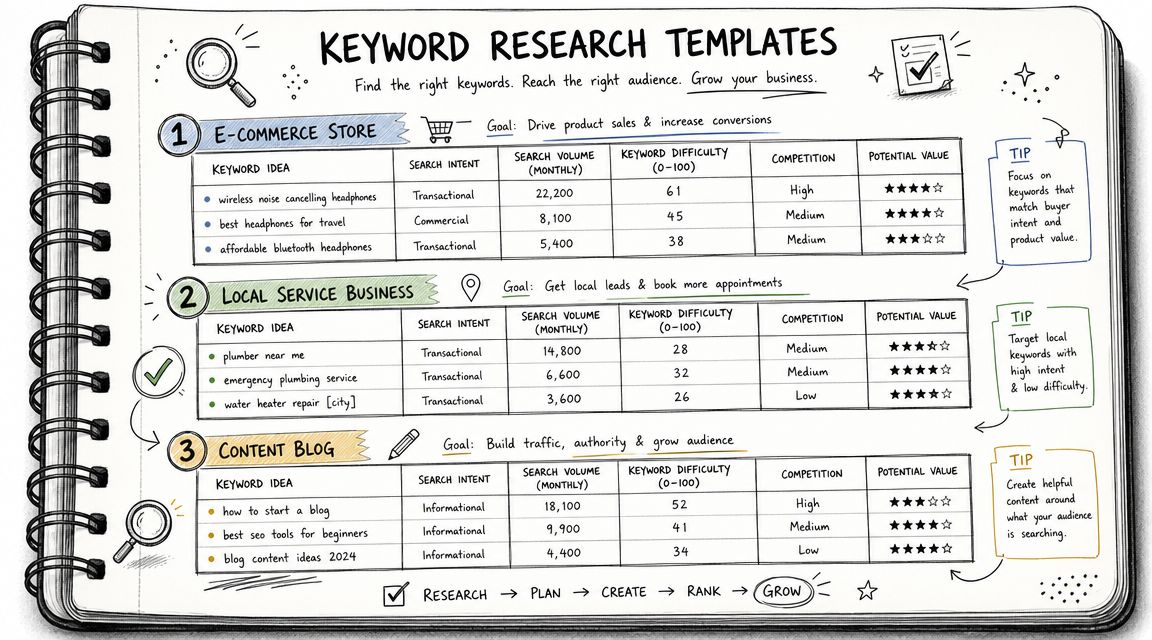
Different businesses should use the same framework, but not the same mix of keywords. The sheet stays consistent. The logic changes by business model.
E-commerce store example
Take a shop selling handmade leather goods. The high-value keywords usually sit close to product and category intent.
| Keyword | Intent | Page Type | Topic Cluster | Priority | Notes |
|---|---|---|---|---|---|
| handmade leather wallet | Commercial | Category page | Wallets | High | Strong fit for main collection page |
| leather card holder | Commercial | Product category | Wallets | High | Could sit under wallet cluster |
| personalized leather wallet | Transactional | Landing page or category | Personalization | High | Signals buying intent |
| leather wallet gift ideas | Informational | Blog post | Gift guides | Medium | Good support content for seasonal links |
| full grain leather wallet | Commercial | Blog or collection guide | Materials | Medium | Useful for education plus product tie-in |
For e-commerce, the biggest mistake is treating every keyword like a blog topic. Many terms deserve collection pages, comparison pages, or buying guides. If the query suggests product exploration, build pages that help users choose and buy.
Local service business example
A local plumber needs a more practical template. Geography matters. Urgency matters. Trust matters.
| Keyword | Intent | Page Type | Topic Cluster | Priority | Notes |
|---|---|---|---|---|---|
| emergency plumber [city] | Transactional | Service page | Emergency services | High | Core money page |
| drain cleaning [city] | Transactional | Service page | Drain services | High | Dedicated page if service is core |
| water heater repair [city] | Transactional | Service page | Water heater services | High | High service relevance |
| why is my water pressure low | Informational | Blog post | Plumbing problems | Medium | Good top-of-funnel support |
| plumber open now [city] | Transactional | Local landing page | Emergency services | High | Strong urgency signal |
Local businesses often underbuild service pages and overbuild blog posts. The template should push the opposite. Cover the money pages first, then publish supporting informational content that links back to them.
B2B-SaaS example
A B2B SaaS company usually needs a broader intent spread. Some terms support immediate demand. Others create category awareness and trust.
| Keyword | Intent | Page Type | Topic Cluster | Priority | Notes |
|---|---|---|---|---|---|
| project management software for agencies | Commercial | Landing page | Use cases | High | Clear audience and use case |
| best project management software for agencies | Commercial | Comparison page | Alternatives | High | Mid-funnel evaluator keyword |
| how to manage client projects | Informational | Blog post | Workflow education | Medium | Supports internal links to product pages |
| agency project workflow template | Informational | Resource page | Templates | Medium | Good lead-generation angle |
| [competitor] alternative | Commercial | Comparison page | Alternatives | High | Often strong buying intent |
The right keyword set depends less on industry and more on how close the searcher is to action.
Across all three examples, the winning move is the same. Don't just collect keywords. Assign each one a role. Once every row has a likely page type, a cluster, and a priority, the sheet starts behaving like a real operating plan.
Turning Your Template into a Content Pipeline
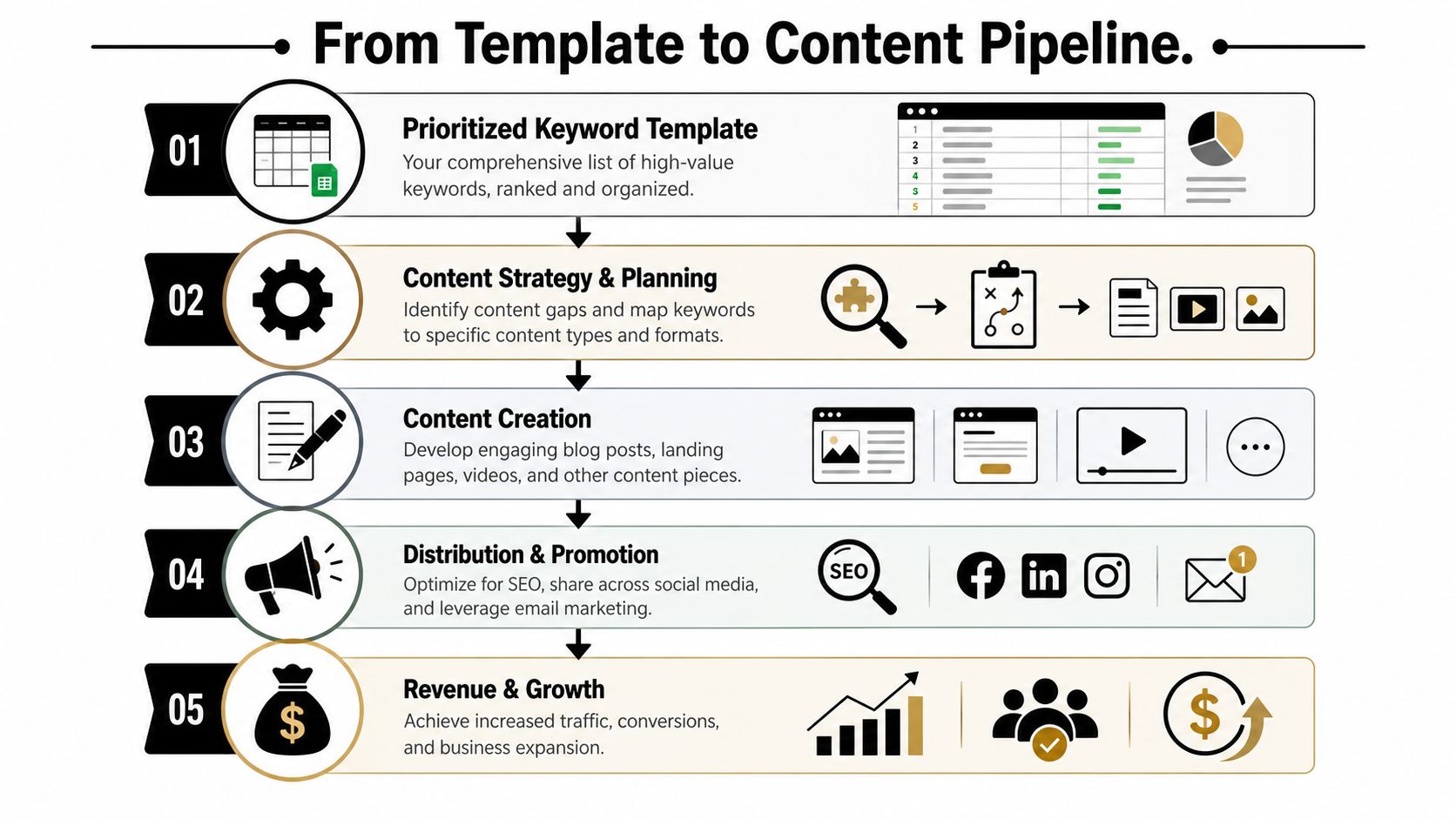
A completed keyword research template is not the deliverable. It's the intake form for your content system.
Many teams encounter a hurdle here. They have rows, filters, and color coding, but no production logic. They know what keywords exist, but not what to build next or how those pages should work together.
Group keywords into pages, not chaos
Start by collapsing related keywords into page-level targets. One core topic. One primary page. Supporting variations that belong on the same asset.
Advanced workflows need grouping by topic and intent, plus a self-cannibalization check using a site: query so you don't create multiple pages that compete for the same term, as explained in HubSpot's keyword research process.
Use a simple clustering model:
- Pillar pages for broad commercial or category topics
- Supporting articles for informational subtopics
- Comparison pages for evaluation intent
- Service or product pages for direct transactional intent
Then run a cannibalization check before you assign anything new. Search your site for the target phrase. If a page already exists, decide whether to improve it, merge it, or reposition it. Don't create duplicates because the sheet has another row.
If two pages want the same searcher, one of them usually loses.
Map each cluster to the buyer journey
A good content pipeline doesn't just group by topic. It groups by decision stage.
That means your sheet should lead to a publishing mix, not a pile of unrelated drafts. For each cluster, decide which content supports awareness, evaluation, and purchase.
A practical way to do that:
| Cluster | Buyer Stage | Best Page Type | Job of the Page |
|---|---|---|---|
| Core category | Commercial or decision | Landing page | Capture demand close to purchase |
| Problem education | Awareness | Blog post | Explain the issue and qualify the reader |
| Comparisons | Consideration | Comparison page | Help buyers shortlist options |
| Use cases | Consideration or decision | Use-case landing page | Show fit for a specific audience |
| FAQs and objections | Late-stage trust | Support article or FAQ page | Remove friction before contact or purchase |
This is the gap most keyword template articles miss. The sheet should directly produce a content calendar like this:
- Publish the service or category page first.
- Add supporting articles that internally link into it.
- Fill comparison and use-case gaps around the main offer.
- Refresh clusters as rankings and coverage evolve.
That gives you a sequence, not just a list.
Build the operating system, not just the spreadsheet
Manually, this works well. It also gets slow fast.
Once you're managing multiple clusters, multiple page types, and ongoing refreshes, the bottleneck isn't research. It's execution. Briefing, drafting, publishing cadence, internal linking, and keeping the map updated all take time.
That's where automation becomes the sensible next step. Not because the template is wrong, but because the template is only the first layer. The smarter setup turns your keyword research template into a production system that can research, map, draft, and publish without making you manually coordinate every row.
OutRank fits that role well because it's built around the actual workflow people struggle with after research. You identify opportunities, organize them into a plan, then use automation to move from keyword discovery to published content at scale. That's the primary upgrade. Not replacing strategy, but removing the manual drag that keeps good strategies from shipping.
Future-Proofing Your Keyword Strategy
A common failure pattern looks like this. The keyword sheet is filled out, search volume looks promising, content gets published, and the page never becomes a meaningful asset because the SERP answers the query before the click happens.
Traffic still matters. It just cannot be the only filter in your template anymore.
Search results now include AI Overviews, featured snippets, People Also Ask, product grids, local packs, and forum results that absorb attention before a user reaches your site. That shifts the job of keyword research. The goal is not only to find terms that can drive visits, but also to identify terms where your brand should appear, shape the answer, or support a money page indirectly. SEO Buddy discusses that shift in this piece on the future of keyword research templates.
The practical fix is to add a visibility column to your sheet. I usually keep it simple and score each keyword by its best strategic role:
- Click potential
- SERP feature opportunity
- AI citation likelihood
- Brand recall value
- Support value for a commercial cluster
That one extra layer improves prioritization fast. A low-click informational term may still deserve a page if it feeds internal links into a service page, answers a common objection, or gives your brand a better chance of appearing in AI-generated summaries.
This is the part many templates miss. They help you collect keywords, but not judge which ones strengthen the system around your revenue pages.
A future-proof template also needs a review rhythm. Recheck clusters every quarter. Look for pages that lost rankings, keywords that picked up new SERP features, and supporting articles that should be refreshed because the buying journey changed. Search behavior changes. So does the shape of the results.
Handled manually, this is workable for a small site. Once the site grows, the problem becomes coordination. You need to keep the sheet current, update briefs, refresh internal links, and decide what gets rewritten versus replaced.
OutRank is the sensible next step when you want the template to become an operating system instead of a document. It helps turn research, clustering, briefing, drafting, and publishing into one workflow, which is how you keep a keyword strategy useful after the first round of content goes live.
Agency Secrets gives business owners a practical SEO playbook without the usual agency bloat. If you want the strategy behind better keyword targeting, stronger content structure, and a simpler path to execution, start with Agency Secrets. If you're ready to move beyond spreadsheets and turn your keyword research template into an automated publishing system, their OutRank workflow is the logical next step.
Leave a Reply