Tag: content strategy

  • 8 Keyword Research Examples: A 2026 Blueprint

    8 Keyword Research Examples: A 2026 Blueprint

    Tired of keywords that don't drive traffic? You've spent hours in keyword tools, found terms that looked reasonable, published the article, and waited for the lift that never came. The page gets indexed, maybe even impressions, but the visits don't turn into leads, calls, demos, or sales.

    That usually happens for one reason. The keyword wasn't wrong, but the strategy behind it was. Good keyword research examples don't stop at "find a phrase with volume." They connect query, intent, SERP format, page type, and business value. If one of those pieces is off, you can rank and still get nothing useful from the effort.

    The other problem is scale. Most search demand lives in the long tail, not in flashy head terms. Ahrefs reports that 94.74% of keywords get 10 monthly searches or fewer, and only 0.0008% get more than 100,000 monthly searches. That is why broad vanity targets rarely carry a small business SEO plan by themselves.

    What works is a repeatable blueprint. Start with a seed topic, expand into related terms and questions, inspect the SERP, assign one page per intent, and write a brief that gives the page a real chance to rank and convert. That's the practical shift from random keyword collection to a defensible content map.

    Table of Contents

    1. Long-Tail Keyword Research with Buyer Intent

    Long-tail keyword research is where most small businesses should start. Broad terms like "CRM software" or "plumber" look attractive, but they bundle too many intents together. A searcher who types "affordable project management tool for freelancers" is telling you far more about what page they want and how close they are to acting.
    keyword research examples

    A practical workflow starts with one seed term, then expands outward. Ahrefs says its free keyword generator returns 20 related keywords and 20 related questions per seed keyword, which is enough to build an initial intent cluster instead of forcing one phrase into one page.

    Why this blueprint works

    Buyer-intent modifiers do the heavy lifting. Words like "best," "for freelancers," "near me," "same day," "size 9," or "open now" narrow the audience and usually sharpen the page type you need.

    Practical rule: If the keyword contains a constraint, use that constraint in the page structure, not just the title.

    For example, an ecommerce store selling hiking gear shouldn't target only "hiking boots." A stronger cluster could include "waterproof hiking boots for women," "lightweight hiking boots for wide feet," and "best hiking boots for wet trails." Those phrases don't belong on three random blog posts. They usually belong in a comparison guide, a filtered collection page, or a buying guide with product blocks.

    Mini-case blueprint

    Take a small SaaS tool serving independent consultants.

    • Seed keyword: project management
    • Target cluster: affordable project management tool for freelancers, best project management software for solo consultants, project tracker for client work
    • Observed SERP pattern: comparison pages, product roundups, lightweight software lists, feature-focused landing pages
    • Best page type: commercial comparison page with a clear product CTA

    Content brief snippet

    • Primary intent: commercial investigation
    • Working title: Best Project Management Tools for Freelancers Who Manage Client Work
    • Must-cover sections: pricing simplicity, client-facing features, invoicing or integrations, setup friction, best fit by use case
    • Internal CTA: start trial, book demo, or view pricing

    What doesn't work here is writing a generic "What Is Project Management?" article and hoping it leads to signups. That page may attract curiosity, but it won't satisfy a buyer comparing lightweight tools for solo work.

    2. Competitor Keyword Gap Analysis

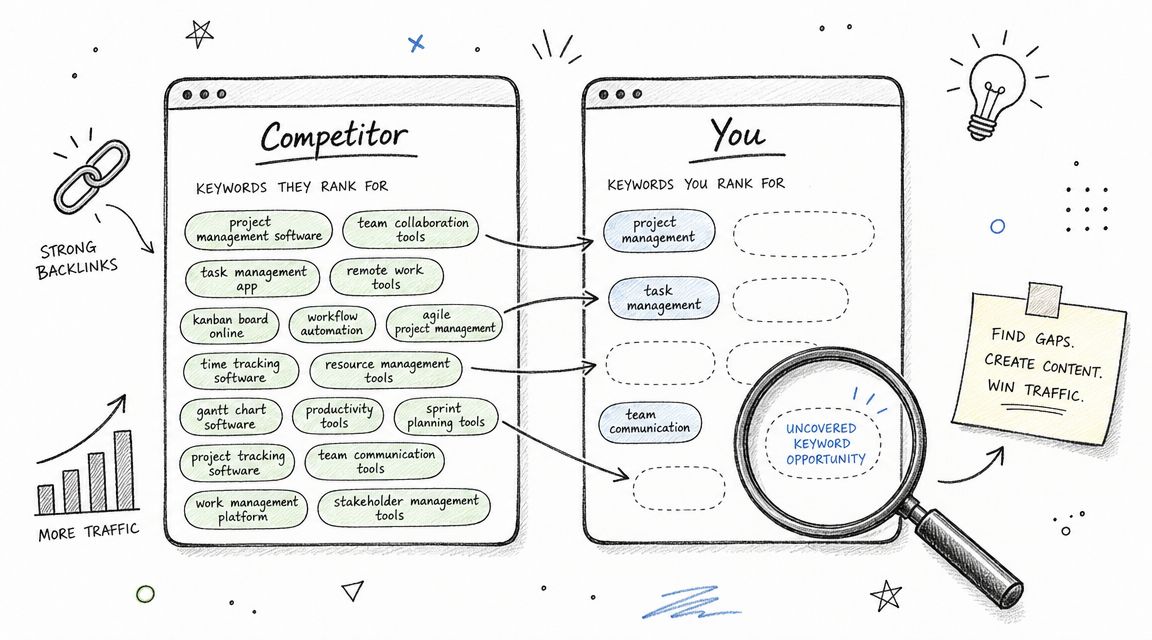
    Competitor gap analysis works best when you stop treating the top-ranking giant as your only benchmark. The useful gaps often sit one layer below the market leader, inside the content libraries of direct competitors who serve the same buyers but haven't covered every use case cleanly.

    Start with the companies a prospect would compare you against. Then inspect which keywords they rank for, which page types win, and where the SERP looks weak.
    keyword research examples

    What to steal and what to ignore

    Don't copy every ranking keyword. Copy patterns.

    A local plumbing company might notice a competitor has a strong page for "drain cleaning near me" but weak or missing coverage for "emergency drain cleaning at night" or "clogged kitchen sink urgent repair." The gap isn't just a missing phrase. It's a missing service-intent page tied to urgency.

    • Steal underserved intents: pages competitors almost rank for, but don't fully satisfy
    • Ignore vanity terms: broad phrases that mainly reward brands with more authority
    • Steal structural clues: pricing blocks, local proof, service-area language, FAQs, and review placement

    Good gap analysis asks, "What intent is under-served?" not "What keyword did they rank for?"

    Mini-case blueprint

    Consider a DTC skincare brand competing in a crowded category.

    • Competitor signals: rivals rank for ingredient pages and "best" listicles, but few have pages around use-case phrases
    • Target cluster: niacinamide serum for oily skin, fragrance-free serum for sensitive acne-prone skin, beginner skincare serum for redness
    • Observed SERP pattern: educational product pages, ingredient explainers, recommendation posts
    • Best page type: hybrid collection and guide page

    Content brief snippet

    • Primary intent: commercial with educational support
    • Working title: Best Serums for Oily and Sensitive Skin Without Harsh Fragrance
    • Must-cover sections: who the product is for, ingredient rationale, how to layer, common irritation concerns, product recommendations
    • Conversion element: shop module above the fold and "how to choose" section below

    If you want a quick visual walkthrough of how SEOs inspect rival rankings and spot openings, this breakdown is useful before you build your own process.

    What doesn't work is publishing a clone of the competitor's top page with a rewritten intro. If the SERP already has ten near-identical pages, your page needs a sharper angle, better alignment with a sub-intent, or a more useful format.

    3. Search Intent Segmentation

    Keyword lists get messy when every phrase sits in the same spreadsheet without an intent label. A term can look relevant and still be useless if you send it to the wrong page type. Search intent segmentation fixes that early.

    The model I use is simple. Split keywords by what the searcher is trying to accomplish, then match that to the page that should exist. Google's own search results usually tell you the answer faster than any spreadsheet.

    A simple intent model

    You can use TIARA as a working frame:

    • Topic-based: broad education and awareness
    • Intent-driven: explicit need clarification
    • Action-oriented: ready to compare or act
    • Revenue-generating: product, service, or money pages
    • Audience-building: useful educational content that attracts future buyers

    Google Keyword Planner helped formalize this kind of workflow because it gives marketers average monthly search volume, three-month percentage change, and market targeting options. That shifted keyword research from guesswork toward a process built around measurable demand and page planning.

    Mini-case blueprint

    Take a bookkeeping service for freelancers.

    • Topic keyword: how to separate business and personal expenses
    • Intent keyword: do freelancers need bookkeeping software
    • Action keyword: best bookkeeping service for freelancers
    • Revenue keyword: freelance bookkeeping service monthly
    • Audience keyword: tax basics for first-year freelancers

    The SERP will usually split these into different winners. The first one tends to reward guides. The third often rewards comparison pages. The fourth belongs on a service landing page.

    Content brief snippet

    • Primary page: bookkeeping service for freelancers
    • Supporting pages: educational guide, software comparison, FAQ article
    • Internal links: guide to service page, comparison to service page, FAQ to consultation page
    • SERP check: if page one is mostly service pages, don't force a blog post into that slot

    What fails here is mixing intents on one page. A page that tries to be a beginner guide, software comparison, and sales page at once usually satisfies nobody.

    4. Question-Based Keyword Research

    Question-based keyword research is where you find language that tools often flatten into generic variants. Real buyers don't always search with polished category terms. They search with hesitation, context, and objections.

    That makes FAQ mining valuable, especially if you serve buyers who need reassurance before they act. Questions often reveal the hidden blockers behind a sale.

    Where the best questions come from

    The best sources are usually visible in plain sight. Advanced keyword research guidance regularly points to Reddit, Quora, niche forums, People Also Ask, autocomplete, and related searches as places to surface real buyer questions and map them to awareness, consideration, and decision stages.

    A dental clinic, for example, might see more value in "does teeth whitening damage enamel" than in another broad article about cosmetic dentistry. That question reveals fear. Fear is often what stops booking.

    Most FAQ pages fail because they answer company questions, not customer questions.

    Mini-case blueprint

    Take a home security SaaS product for small retail shops.

    • Seed topic: store security system
    • Question cluster: can I monitor my shop from my phone, what's the best camera setup for a small retail store, do I need professional installation for store security cameras
    • Observed SERP pattern: how-to explainers, software pages, YouTube walkthroughs, People Also Ask expansions
    • Best page type: question-led resource hub that feeds product and demo pages

    Content brief snippet

    • Primary intent: informational with commercial progression
    • Working title: Can You Monitor a Small Retail Store From Your Phone
    • Must-cover sections: what setup is required, app features, installation paths, privacy concerns, when professional support helps
    • CTA: compare plans or request a demo

    This method also works well for ecommerce. A footwear brand can target "how do I know what shoe size I need" with a size guide that links directly into filtered collections. The trick is not to stop at the answer. The answer should naturally move the searcher toward the next logical page.

    5. Local Keyword Research with Geographic Modifiers

    Local keyword research isn't just city-name stuffing. Good local pages combine service, geography, urgency, and proof. Searchers don't want a generic service page with a neighborhood pasted into the headline. They want confirmation that you serve the area and can solve the exact problem there.

    That changes the keyword list. "Plumber in Austin" and "emergency plumber South Austin open now" do not deserve the same page.

    What local SERPs are really asking for

    In local SEO, modifiers often signal different contexts:

    • City terms: broad service discovery
    • Neighborhood terms: stronger local relevance and often stronger service intent
    • Near me terms: immediate need, especially on mobile
    • ZIP or district terms: useful in large metros where service boundaries matter

    A dental office might build separate assets around "family dentist in [city]," "same-day dentist near me," and "[service] near [neighborhood]." A home service company might need location-service combinations such as drain cleaning, water heater repair, and emergency repairs by area.

    Mini-case blueprint

    Take a locksmith serving a metro area with distinct neighborhoods.

    • Target cluster: emergency locksmith near me, car locksmith in Midtown, house lockout service downtown
    • Observed SERP pattern: local pack, service pages, map results, review-heavy business profiles
    • Best page type: dedicated service-area landing pages supported by a strong Google Business Profile

    Content brief snippet

    • Primary intent: transactional local
    • Working title: Emergency Locksmith in Midtown for Home, Car, and Office Lockouts
    • Must-cover sections: response scenarios, areas served, common lockout cases, trust signals, call CTA, map and service hours
    • Page rule: include local references that are real and useful, not decorative

    What doesn't work is generating dozens of thin city pages with the same body copy. Local SERPs are unforgiving when every page feels templated and untrustworthy.

    6. Seasonal and Trending Keyword Research

    Some keywords don't need more authority. They need better timing. Seasonal research is less about finding a magical trend and more about publishing the right page early enough that it can settle into the SERP before demand peaks.

    This matters for ecommerce, tax and finance services, clinics, home services, and any business tied to recurring events or weather-driven demand.

    Timing matters more than volume

    A retailer selling outdoor gear should not wait until peak winter shopping to create "best winter hiking gloves" pages. A tax preparer shouldn't start their filing-season content when everyone else has already published. Seasonal terms reward preparation and refresh cycles.

    A strong workflow looks like this:

    • Map recurring events: holidays, weather shifts, tax periods, school calendars, industry cycles
    • Create evergreen-seasonal pairs: one stable guide plus one time-sensitive angle
    • Refresh instead of replacing: update pages with current examples, revised intros, and new product blocks
    • Check SERP freshness: if current-year pages dominate, stale pages struggle

    Publish for the next demand wave, not the current one.

    Mini-case blueprint

    Take a landscaping company.

    • Seasonal cluster: spring yard cleanup service, summer irrigation repair, fall leaf removal, holiday outdoor lighting installation
    • Observed SERP pattern: local service pages, seasonal guides, image-heavy galleries
    • Best page type: service landing page supported by seasonal blog content

    Content brief snippet

    • Primary intent: transactional with local urgency
    • Working title: Spring Yard Cleanup Service for Overgrown Lawns and Garden Beds
    • Must-cover sections: what's included, when to book, who it's for, before-and-after examples, estimate CTA
    • Supporting content: spring prep checklist, common yard cleanup mistakes, when cleanup becomes a drainage issue

    What fails here is building one generic "seasonal services" page and expecting it to rank for every spike. Searchers usually want the exact seasonal service, not a category summary.

    7. Keyword Research for Content Clusters and Topic Authority

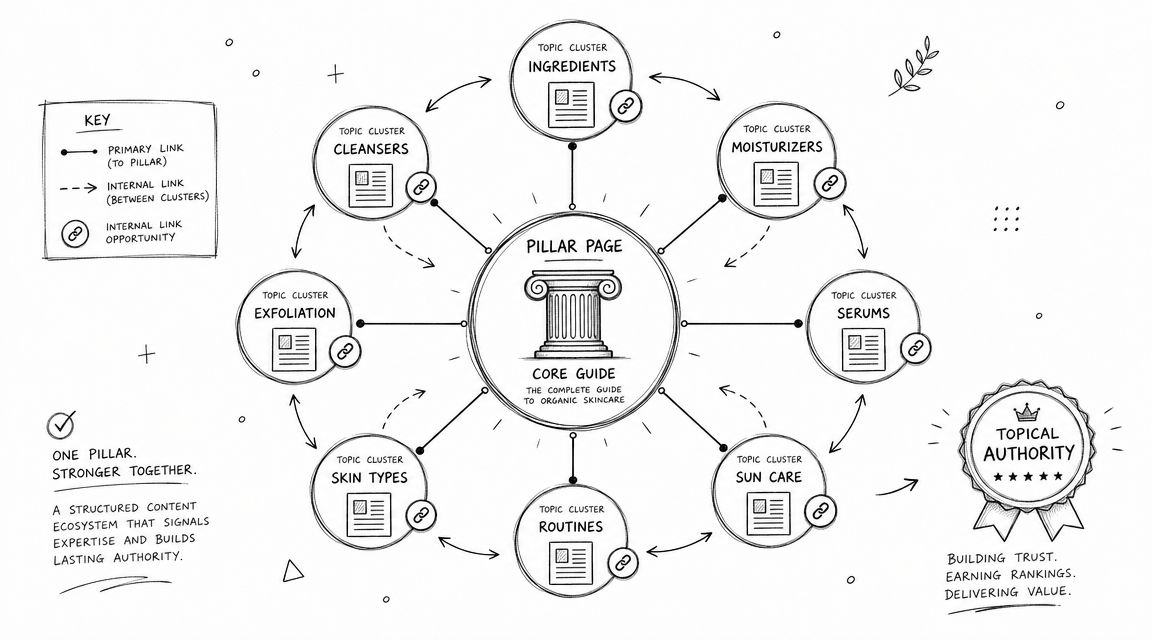
    Content clusters work when each page earns a distinct job. They fail when teams call something a cluster but publish overlapping posts that all target the same core phrase with minor wording changes.

    The upside is real. Since most useful opportunities sit across many specific phrases rather than a few giant terms, cluster planning is often the most practical way to cover a topic completely. That's especially true when your site doesn't have the authority to win broad head terms outright.
    keyword research examples

    How to build the cluster without cannibalizing yourself

    The page map matters more than the raw list. Evidence-based guidance stresses assigning one canonical page per intent to avoid self-competition and cannibalization, with search volume used as a tie-breaker rather than the main decision factor, as explained in this guide to mapping keywords to pages and avoiding overlap.

    For a small business accounting site, that might look like this:

    • Pillar page: small business accounting basics
    • Cluster page: invoice templates for freelancers
    • Cluster page: bookkeeping mistakes new founders make
    • Cluster page: expense tracking for service businesses
    • Cluster page: choosing between cash and accrual accounting

    Mini-case blueprint

    Take an agency serving local businesses with SEO services.

    • Pillar keyword: SEO for small businesses
    • Target clusters: keyword research for small business, local SEO basics, service page SEO, internal linking for SMB sites
    • Observed SERP pattern: long guides, practical walkthroughs, beginner frameworks, downloadable templates
    • Best page type: one pillar guide plus tightly scoped support articles

    Content brief snippet

    • Primary intent: informational with service qualification
    • Working title: SEO for Small Businesses Without a Large Marketing Team
    • Must-cover sections: keyword strategy, on-page basics, local SEO, content cadence, measurement
    • Internal linking rule: every cluster page points back to the pillar, and the pillar clearly routes readers to the matching subtopic

    What doesn't work is publishing "keyword research for small business," "small business keyword research tips," and "how small businesses do keyword research" as separate pages. That's one intent wearing three outfits.

    8. E-A-T Keyword Research and Expertise Positioning

    Some niches punish weak credibility harder than weak optimization. If you're in health, finance, legal, or any category where bad advice can cause real harm, keyword research has to start with expertise boundaries.

    The mistake is assuming every commercially attractive keyword is fair game. Often it isn't. The SERP tells you whether Google expects recognized expertise, strong editorial signals, or institutional trust.

    Where expertise changes the keyword list

    In these spaces, the smartest keyword research examples usually narrow the topic until the brand can speak with authority. A fitness coach may have no business targeting a page that reads like medical treatment advice. That same coach may be credible on habit-building, recovery routines, sleep hygiene basics, or beginner exercise planning.

    A financial educator may struggle to rank for highly sensitive investment terms but can earn traction with grounded budgeting topics for a defined audience. The point is not to think small. It's to align the keyword set with what the business can defend.

    Credibility is part of keyword difficulty, even when tools don't score it directly.

    Mini-case blueprint

    Take a freelance financial coach serving self-employed creatives.

    • Target cluster: budgeting tips for freelancers, irregular income budgeting method, how to pay yourself as a freelancer
    • Avoided cluster: complex investing advice and highly regulated financial topics
    • Observed SERP pattern: expert explainers, publication-style guides, templates, calculators
    • Best page type: educational guide with clear author bio and practical examples

    Content brief snippet

    • Primary intent: informational with trust qualification
    • Working title: Budgeting Tips for Freelancers With Irregular Monthly Income
    • Must-cover sections: income smoothing, expense categories, tax set-asides, pay-yourself method, worksheet or template
    • Trust elements: clear author background, methodology, practical implementation examples, careful scope boundaries

    What doesn't work is trying to "sound authoritative" on topics the business can't credibly support. In E-A-T-sensitive SERPs, shallow confidence is easy to spot.

    8 Keyword Research Strategies Compared

    Strategy Implementation Complexity 🔄 Resource Requirements 💡 Speed / Time-to-impact ⚡ Expected Outcomes ⭐📊 Ideal Use Cases
    Long-Tail Keyword Research with Buyer Intent Moderate, focused, granular research 🔄 Low–Medium, keyword tools + time 💡 Fast–Medium, quicker wins for new domains ⚡ Higher conversion, qualified traffic; easier to rank (⭐⭐⭐) 📊 Small businesses, bootstrapped teams, niche product pages
    Competitor Keyword Gap Analysis Medium–High, comparative multi-site analysis 🔄 Medium–High, paid tools (Ahrefs/SEMrush), time 💡 Medium, faster validation but execution takes effort ⚡ Reveals proven opportunities; prioritizes high-impact content (⭐⭐⭐) 📊 Businesses entering competitive markets or chasing rivals
    Search Intent Segmentation (TIARA Framework) High, requires classification and mapping 🔄 Medium, tools + manual SERP and audience research 💡 Medium, improves ROI as content aligns with intent ⚡ Better conversion alignment; clearer content priorities (⭐⭐⭐) 📊 Content strategy planning, ROI-focused small businesses
    Question-Based Keyword Research (FAQ Mining) Low–Medium, extract and structure queries 🔄 Low–Medium, PAA, forums, AnswerThePublic 💡 Medium, featured snippets can deliver quick visibility ⚡ Improved authority, featured-snippet potential, engagement (⭐⭐) 📊 Educational content, top-of-funnel awareness, authority building
    Local Keyword Research with Geographic Modifiers Low–Medium, local optimization + GBP setup 🔄 Low–Medium, GBP, local citation tools, landing pages 💡 Fast, quick local rankings and Map Pack opportunities ⚡ Higher local conversions; easier to dominate local SERPs (⭐⭐⭐) 📊 Trades, clinics, franchises, local e‑commerce pickup
    Seasonal and Trending Keyword Research Medium, trend monitoring and timing planning 🔄 Low–Medium, Google Trends, editorial calendar 💡 Fast, large short-term traffic spikes if timed well ⚡ Big temporary traffic surges; time-bound conversions (⭐⭐) 📊 E‑commerce campaigns, holiday promos, event-driven content
    Keyword Research for Content Clusters & Topic Authority High, extensive planning and linking strategy 🔄 High, substantial content creation and monitoring 💡 Slow, long-term authority build (6–12+ months) ⚡ Strong topical authority, sustained rankings, better UX (⭐⭐⭐) 📊 Sites aiming for niche dominance, E‑E‑A‑T and content hubs
    E-A-T Keyword Research & Expertise Positioning High, credential alignment and credibility work 🔄 High, expert content, citations, PR/backlinks 💡 Slow, authority and trust take time to establish ⚡ Sustainable high-authority rankings; higher quality leads (⭐⭐⭐) 📊 YMYL niches (health/finance/legal), expert-led organizations

    Your Actionable Keyword Research Playbook

    Effective keyword research isn't about collecting the longest spreadsheet. It's about making fewer, better decisions. The teams that get results usually follow the same sequence. They choose a seed topic tied to revenue, expand it into related terms and questions, inspect the SERP to see what Google rewards, then map one intent to one page.

    That page mapping step is where most weak SEO plans fall apart. People gather a pile of ideas, then publish whatever feels easiest first. Months later, they have overlapping blog posts, no clear route to money pages, and no way to explain why one article exists instead of another. Better keyword research examples solve that problem up front. They force a decision about page type, intent, and business value before content production starts.

    If you're doing this with a small team, don't try to run all eight blueprints at once. Pick the one that matches your immediate constraint.

    • If you're new or underpowered, start with long-tail buyer intent.
    • If competitors keep outranking you, run a gap analysis.
    • If traffic comes but conversions don't, segment by intent.
    • If buyers ask the same objections repeatedly, mine question-based terms.
    • If you serve a physical area, build local keyword combinations.
    • If your revenue swings through the year, work the seasonal calendar.
    • If your site feels scattered, build clusters with one canonical page per intent.
    • If trust is the bottleneck, narrow your keyword universe to what your expertise can support.

    There's also a practical trade-off to remember. Volume alone is a poor decision-maker. Relevance, SERP fit, and business potential usually matter more. A smaller keyword with a clean intent match and a page designed to convert will beat a broader keyword that attracts the wrong audience. This is especially true for small businesses, local operators, and bootstrapped SaaS teams that can't afford to waste six months on vanity topics.

    My advice is to build every keyword target as a mini brief, not a row in a sheet. Include the primary keyword, supporting phrases, search intent, page type, SERP notes, internal links, and the action you want the reader to take. That one habit prevents a lot of bad content.

    If you want to automate more of this workflow, platforms like OutRank can help execute the mechanics, from research to article production and publication. That doesn't remove the need for strategy. It removes some of the manual overhead that slows small teams down. Used well, that gives you more time to make the decisions that change rankings and revenue.


    Agency Secrets gives small business owners a practical way to apply these keyword research examples without hiring an agency-sized team. If you want a clearer SEO playbook built around buyer-intent keywords, consistent publishing, backlinks, and evergreen growth, explore Agency Secrets. It also points you toward OutRank if you want help handling the heavy lifting from keyword research through publication.

  • Keyword Research Template: Free 2026 Download & Guide

    Keyword Research Template: Free 2026 Download & Guide

    You probably already have some version of a keyword research template. It lives in a half-finished Google Sheet, a notes app, or a CSV export from a tool you opened once and never cleaned up. The problem isn't that you lack keywords. The problem is that raw keyword lists rarely turn into an actual publishing plan.

    That's why most SEO efforts stall. A business owner gathers terms, highlights a few rows, then gets stuck on the next question. Which page should target what? Which keywords deserve a landing page instead of a blog post? Which terms should be grouped together? Which ones should be ignored even if they look interesting?

    A good keyword research template fixes that, but only if it's built to make decisions, not just store data. Historically, that's why templates became a standard SEO workflow. They organized manual search data into a repeatable structure so teams could prioritize content instead of guessing, as outlined in Asana's keyword research template overview.

    Table of Contents

    Stop Guessing and Start Planning Your SEO Content

    Most small businesses don't have an SEO problem. They have a planning problem.

    They publish blog posts when someone on the team has time. They target phrases that sound right. They open Ahrefs, Semrush, or Google Keyword Planner, export a list, then stop because the list is too big and the next move isn't obvious. A few months later, the site has content, but no clear coverage of core services, no logical internal linking, and no confidence that the right topics were chosen.

    A keyword research template solves that when it's used correctly. Not as admin work, but as a filter for business decisions. It tells you which topics deserve a page, which phrases belong together, and which opportunities look attractive on paper but won't move the business.

    Practical rule: If a keyword research template doesn't help you decide what to publish next, it's just storage.

    The shift is simple. Stop treating keyword research as idea collection. Start treating it as content planning infrastructure.

    That changes how you work:

    • From random ideas to repeatable prioritization. You compare opportunities using the same fields instead of relying on instinct.
    • From volume chasing to intent matching. You stop writing broad articles that attract the wrong audience.
    • From one-off posts to a real roadmap. Every keyword should connect to a page type, a topic cluster, and a stage of the buying journey.

    This matters even more if you run lean. A founder, in-house marketer, or local business owner doesn't need a giant SEO operation. You need a small system that consistently points you toward the best next page.

    That's what a useful keyword research template does. It reduces noise, makes trade-offs visible, and gives you a practical path from search data to content production.

    Understanding Your Keyword Research Template Fields

    A keyword sheet earns its keep when it helps you choose the next page to build.

    Raw exports cannot do that on their own. They give you terms, volumes, and competition scores, but they do not show which keyword fits a service page, which belongs in a cluster, or which one looks attractive and still will not drive revenue. The template creates that layer of judgment.

    That is why the fields matter. Each column should reduce uncertainty, not add admin work.

    The fields that drive decisions

    Below is the version I use when a client needs a practical system they can maintain without turning keyword research into a full-time job.

    Field Name Description Why It Matters
    Keyword The exact search phrase you're evaluating The term you will assign to a page, section, or cluster
    Topic Cluster The broader subject this keyword belongs to Keeps coverage organized and supports internal relevance
    Search Intent Informational, navigational, commercial, or transactional Tells you what kind of page should target the query
    Monthly Search Volume Average monthly demand for the term Confirms whether there is enough search activity to justify effort
    Keyword Difficulty or Competition A proxy for how competitive the query is Helps you avoid targets your site is unlikely to win yet
    CPC What advertisers pay per click Often signals commercial value, especially for service and product terms
    Geography or Language The market you are targeting Prevents wrong-country or wrong-language decisions
    Relevance How closely the keyword matches your offer Filters out traffic that looks good in a report and weak in the pipeline
    Page Type Blog post, service page, product page, location page, comparison page Turns research into a concrete asset to create
    Priority Your internal rank for what gets created first Forces trade-offs and keeps the backlog realistic
    Existing URL The page already targeting the keyword, if one exists Prevents duplicate work and surfaces update opportunities
    Cannibalization Check Whether another page is already competing for the same term Stops multiple pages from splitting signals
    SERP Features Notes on snippets, local packs, videos, or AI-style answers Helps you judge the click opportunity and content format
    Status Planned, briefed, drafted, published, updated Makes the sheet useful after research is done
    Notes Context such as angle, objections, or sales nuance Captures the details that tools miss

    A few fields carry more weight than the rest.

    Search intent determines the asset. If the query suggests comparison shopping, build a comparison page. If it signals urgency around a service, build or improve the service page. A lot of weak SEO programs fail here. They pick the right phrase and attach it to the wrong page type.

    Relevance is where judgment beats software defaults. I would rather target a lower-volume keyword tied directly to a core offer than chase a broader term that brings in readers who will never buy. Traffic is easy to overvalue. Qualified traffic is harder to get and worth more.

    Page type is the column that closes the gap between research and production. Without it, the template becomes storage. With it, each row starts to answer a real planning question: do we need a new page, a refresh, or no page at all?

    Existing URL and cannibalization check protect the site from self-inflicted problems. Before creating anything new, check whether the site already has a page close enough to improve. In many cases, consolidation beats expansion.

    A useful template should answer three questions fast: should we target this keyword, what page should target it, and how soon should it get made?

    Do not overbuild the scoring model at the start. A simple priority field is enough if the team applies the same logic each time. I usually rank rows based on four inputs: fit with the offer, intent clarity, ranking difficulty, and business value. That gets you most of the benefit without ten custom formulas.

    Once those fields are filled in consistently, the sheet stops being a research document and starts acting like a content planning system. That is the primary job. Tools can gather keywords. A good template decides what deserves production. Platforms like OutRank push that one step further by turning those decisions into briefs, articles, and a live pipeline, but the structure still starts here.

    Populating Your Template with Winning Keywords

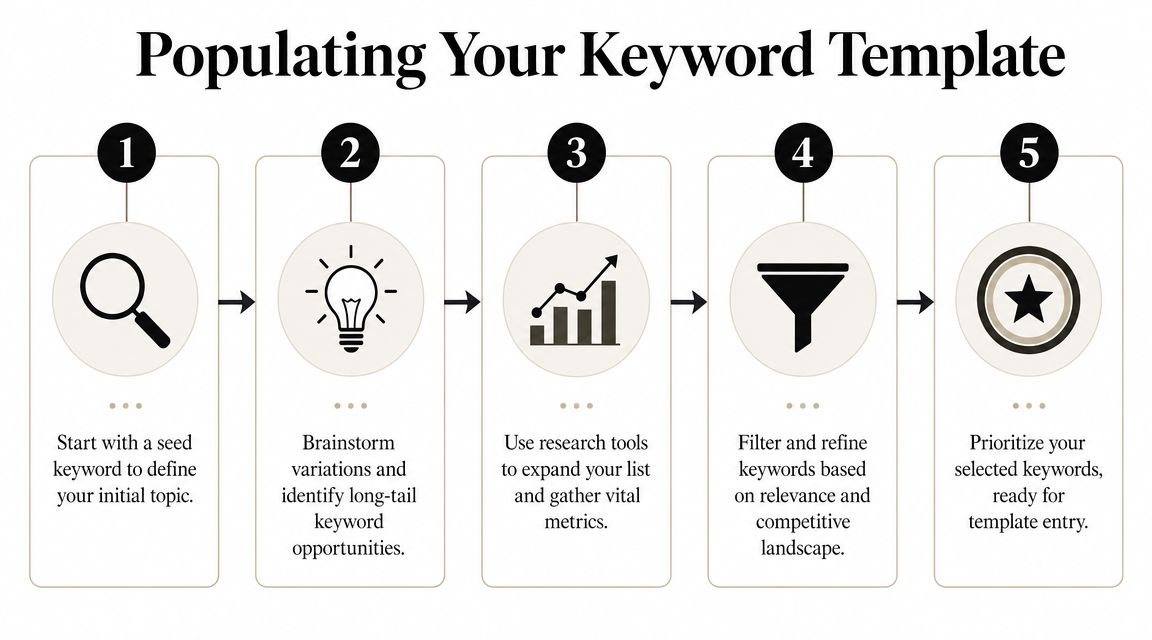
    A five-step infographic showing the process of populating a keyword research template for search engine optimization.

    Start narrow, then expand

    A clean keyword list starts small. Not with thousands of rows.

    A practical workflow is to begin with 6–12 seed terms, expand them in a tool like Google Keyword Planner, filter by search volume and competition, then export a clean list into your spreadsheet, as described in Jellyfish's keyword research funnel process. That basic funnel works because it forces focus before scale.

    Start with phrases that describe what you sell, what your customer wants, and how they describe the problem. For a local plumber, that might be service terms and urgent problem terms. For a SaaS company, it might include product category terms, comparison terms, and problem-awareness terms.

    Use a mix of sources:

    1. Google Ads Keyword Planner for broad discovery and baseline demand.
    2. Ahrefs or Semrush if you want richer filtering and competitor views.
    3. Google itself for autocomplete, related searches, and the current result type.
    4. Your own sales language from calls, emails, and objections.

    A lot of people overcomplicate this phase. You don't need every possible variation. You need enough good inputs to see the viable opportunities.

    Here's a useful walkthrough if you want a visual explanation before building your sheet:

    Clean the list before you score it

    Most keyword lists get weaker after export because people keep too much.

    You want to remove terms that are irrelevant, off-market, vague, or clearly mismatched to your offer. If you target one geography or language, filter hard for that. If you sell a premium service, remove keywords that signal a different audience. If a phrase is interesting but belongs to a different page than the one you're planning, move it into the right cluster instead of leaving it loose.

    Use this cleanup sequence:

    • Delete obvious noise. Misspellings, unrelated terms, or tool-generated junk.
    • Normalize markets. Keep geography and language settings aligned to the actual audience.
    • Tag intent early. Informational, commercial, and transactional terms should not sit in one undifferentiated pile.
    • Group near-duplicates. One page can often cover several close variants.
    • Keep the clean list compact. A shorter list with clear intent beats a huge list full of maybes.

    A bloated spreadsheet feels productive. A trimmed spreadsheet gets published.

    What works and what wastes time

    The fastest wins usually come from keywords with clear relevance and clear page intent. Not from chasing the biggest term in the category.

    What works in practice:

    • Problem-led queries that match what your customer is trying to solve.
    • Commercial investigation terms where the searcher is comparing options.
    • Service and product modifiers tied to use case, location, industry, or need.
    • Question-based terms that support supporting articles and internal links.

    What wastes time:

    • Keeping every variant because the tool exported it.
    • Targeting broad terms too early when your site doesn't yet have enough authority.
    • Mixing page intents in the same cluster.
    • Researching for hours before deciding on page types.

    If you want 80% of the value, build around a simple funnel. Gather seed terms, expand in a tool, trim aggressively, then assign each surviving keyword to a likely page type. That's the point where a keyword research template stops being data entry and starts becoming a publishing engine.

    Example Keyword Templates for Your Business Type

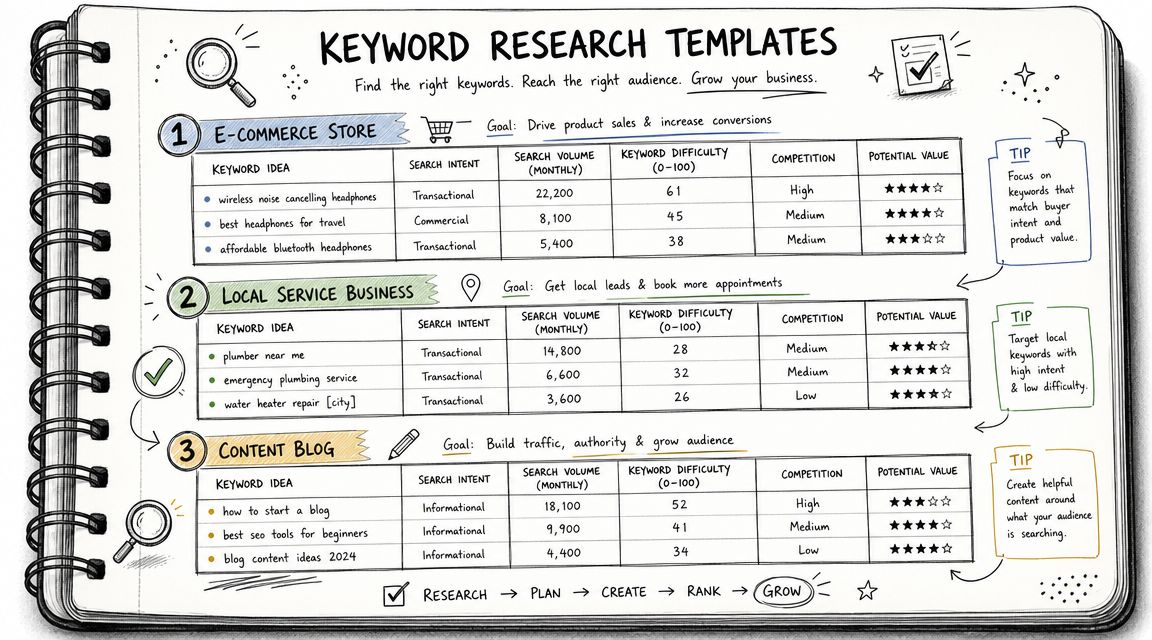
    A hand-drawn notebook page displaying three keyword research templates for e-commerce, local businesses, and content blogs.

    Different businesses should use the same framework, but not the same mix of keywords. The sheet stays consistent. The logic changes by business model.

    E-commerce store example

    Take a shop selling handmade leather goods. The high-value keywords usually sit close to product and category intent.

    Keyword Intent Page Type Topic Cluster Priority Notes
    handmade leather wallet Commercial Category page Wallets High Strong fit for main collection page
    leather card holder Commercial Product category Wallets High Could sit under wallet cluster
    personalized leather wallet Transactional Landing page or category Personalization High Signals buying intent
    leather wallet gift ideas Informational Blog post Gift guides Medium Good support content for seasonal links
    full grain leather wallet Commercial Blog or collection guide Materials Medium Useful for education plus product tie-in

    For e-commerce, the biggest mistake is treating every keyword like a blog topic. Many terms deserve collection pages, comparison pages, or buying guides. If the query suggests product exploration, build pages that help users choose and buy.

    Local service business example

    A local plumber needs a more practical template. Geography matters. Urgency matters. Trust matters.

    Keyword Intent Page Type Topic Cluster Priority Notes
    emergency plumber [city] Transactional Service page Emergency services High Core money page
    drain cleaning [city] Transactional Service page Drain services High Dedicated page if service is core
    water heater repair [city] Transactional Service page Water heater services High High service relevance
    why is my water pressure low Informational Blog post Plumbing problems Medium Good top-of-funnel support
    plumber open now [city] Transactional Local landing page Emergency services High Strong urgency signal

    Local businesses often underbuild service pages and overbuild blog posts. The template should push the opposite. Cover the money pages first, then publish supporting informational content that links back to them.

    B2B-SaaS example

    A B2B SaaS company usually needs a broader intent spread. Some terms support immediate demand. Others create category awareness and trust.

    Keyword Intent Page Type Topic Cluster Priority Notes
    project management software for agencies Commercial Landing page Use cases High Clear audience and use case
    best project management software for agencies Commercial Comparison page Alternatives High Mid-funnel evaluator keyword
    how to manage client projects Informational Blog post Workflow education Medium Supports internal links to product pages
    agency project workflow template Informational Resource page Templates Medium Good lead-generation angle
    [competitor] alternative Commercial Comparison page Alternatives High Often strong buying intent

    The right keyword set depends less on industry and more on how close the searcher is to action.

    Across all three examples, the winning move is the same. Don't just collect keywords. Assign each one a role. Once every row has a likely page type, a cluster, and a priority, the sheet starts behaving like a real operating plan.

    Turning Your Template into a Content Pipeline

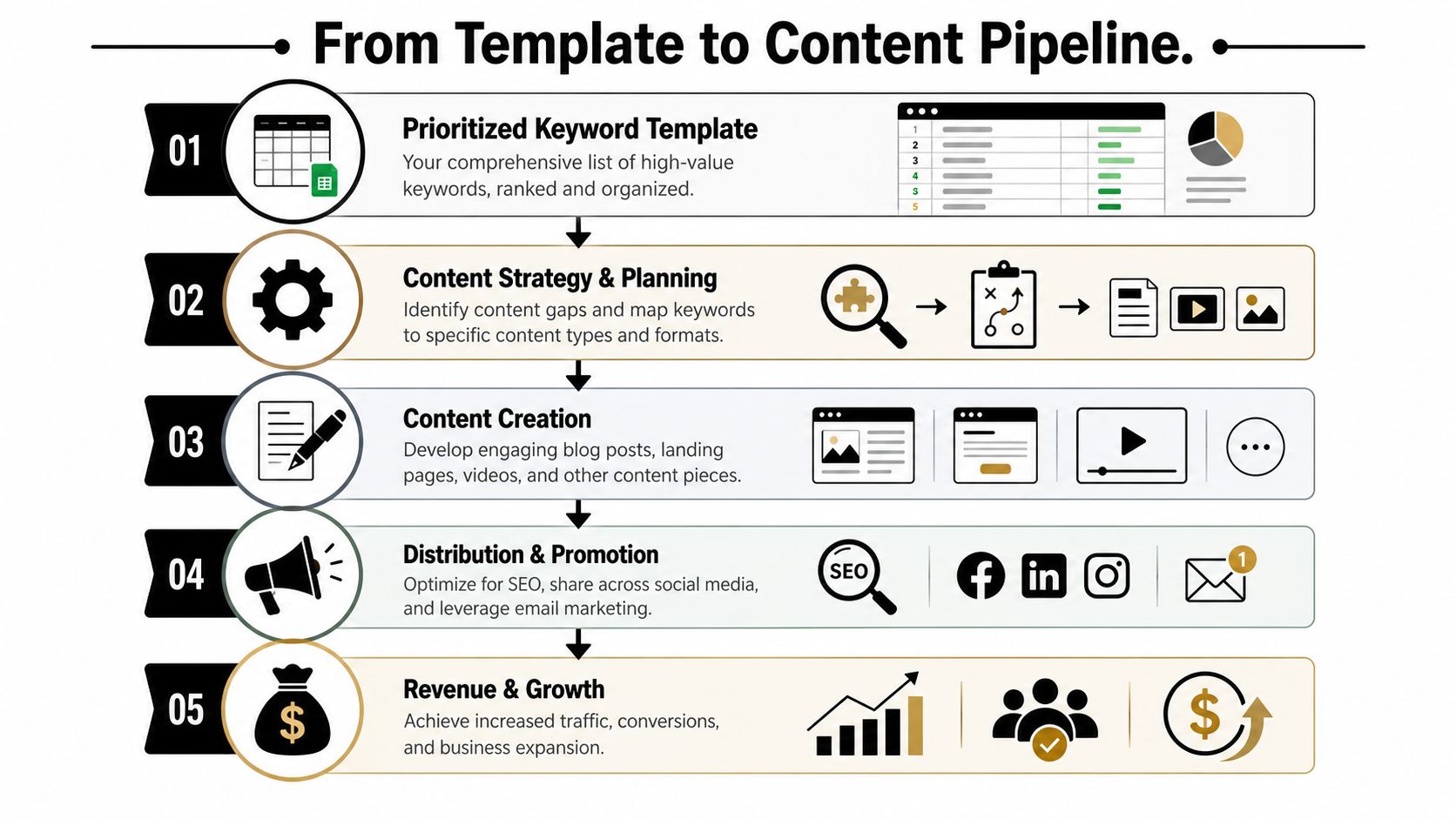
    A five-step infographic showing the content pipeline process from keyword research to revenue growth and business expansion.

    A completed keyword research template is not the deliverable. It's the intake form for your content system.

    Many teams encounter a hurdle here. They have rows, filters, and color coding, but no production logic. They know what keywords exist, but not what to build next or how those pages should work together.

    Group keywords into pages, not chaos

    Start by collapsing related keywords into page-level targets. One core topic. One primary page. Supporting variations that belong on the same asset.

    Advanced workflows need grouping by topic and intent, plus a self-cannibalization check using a site: query so you don't create multiple pages that compete for the same term, as explained in HubSpot's keyword research process.

    Use a simple clustering model:

    • Pillar pages for broad commercial or category topics
    • Supporting articles for informational subtopics
    • Comparison pages for evaluation intent
    • Service or product pages for direct transactional intent

    Then run a cannibalization check before you assign anything new. Search your site for the target phrase. If a page already exists, decide whether to improve it, merge it, or reposition it. Don't create duplicates because the sheet has another row.

    If two pages want the same searcher, one of them usually loses.

    Map each cluster to the buyer journey

    A good content pipeline doesn't just group by topic. It groups by decision stage.

    That means your sheet should lead to a publishing mix, not a pile of unrelated drafts. For each cluster, decide which content supports awareness, evaluation, and purchase.

    A practical way to do that:

    Cluster Buyer Stage Best Page Type Job of the Page
    Core category Commercial or decision Landing page Capture demand close to purchase
    Problem education Awareness Blog post Explain the issue and qualify the reader
    Comparisons Consideration Comparison page Help buyers shortlist options
    Use cases Consideration or decision Use-case landing page Show fit for a specific audience
    FAQs and objections Late-stage trust Support article or FAQ page Remove friction before contact or purchase

    This is the gap most keyword template articles miss. The sheet should directly produce a content calendar like this:

    1. Publish the service or category page first.
    2. Add supporting articles that internally link into it.
    3. Fill comparison and use-case gaps around the main offer.
    4. Refresh clusters as rankings and coverage evolve.

    That gives you a sequence, not just a list.

    Build the operating system, not just the spreadsheet

    Manually, this works well. It also gets slow fast.

    Once you're managing multiple clusters, multiple page types, and ongoing refreshes, the bottleneck isn't research. It's execution. Briefing, drafting, publishing cadence, internal linking, and keeping the map updated all take time.

    That's where automation becomes the sensible next step. Not because the template is wrong, but because the template is only the first layer. The smarter setup turns your keyword research template into a production system that can research, map, draft, and publish without making you manually coordinate every row.

    OutRank fits that role well because it's built around the actual workflow people struggle with after research. You identify opportunities, organize them into a plan, then use automation to move from keyword discovery to published content at scale. That's the primary upgrade. Not replacing strategy, but removing the manual drag that keeps good strategies from shipping.

    Future-Proofing Your Keyword Strategy

    A common failure pattern looks like this. The keyword sheet is filled out, search volume looks promising, content gets published, and the page never becomes a meaningful asset because the SERP answers the query before the click happens.

    Traffic still matters. It just cannot be the only filter in your template anymore.

    Search results now include AI Overviews, featured snippets, People Also Ask, product grids, local packs, and forum results that absorb attention before a user reaches your site. That shifts the job of keyword research. The goal is not only to find terms that can drive visits, but also to identify terms where your brand should appear, shape the answer, or support a money page indirectly. SEO Buddy discusses that shift in this piece on the future of keyword research templates.

    The practical fix is to add a visibility column to your sheet. I usually keep it simple and score each keyword by its best strategic role:

    • Click potential
    • SERP feature opportunity
    • AI citation likelihood
    • Brand recall value
    • Support value for a commercial cluster

    That one extra layer improves prioritization fast. A low-click informational term may still deserve a page if it feeds internal links into a service page, answers a common objection, or gives your brand a better chance of appearing in AI-generated summaries.

    This is the part many templates miss. They help you collect keywords, but not judge which ones strengthen the system around your revenue pages.

    A future-proof template also needs a review rhythm. Recheck clusters every quarter. Look for pages that lost rankings, keywords that picked up new SERP features, and supporting articles that should be refreshed because the buying journey changed. Search behavior changes. So does the shape of the results.

    Handled manually, this is workable for a small site. Once the site grows, the problem becomes coordination. You need to keep the sheet current, update briefs, refresh internal links, and decide what gets rewritten versus replaced.

    OutRank is the sensible next step when you want the template to become an operating system instead of a document. It helps turn research, clustering, briefing, drafting, and publishing into one workflow, which is how you keep a keyword strategy useful after the first round of content goes live.


    Agency Secrets gives business owners a practical SEO playbook without the usual agency bloat. If you want the strategy behind better keyword targeting, stronger content structure, and a simpler path to execution, start with Agency Secrets. If you're ready to move beyond spreadsheets and turn your keyword research template into an automated publishing system, their OutRank workflow is the logical next step.

  • Content Marketing for Local Business: A Winning Playbook

    Content Marketing for Local Business: A Winning Playbook

    You're probably doing what most local owners do. You run a few ads, get a short spike in calls, then watch the leads dry up the moment you pause spend. Meanwhile, your website sits there like an online brochure instead of a sales asset.

    That's the gap content marketing for local business closes. It turns your site into something that keeps working when you're on jobs, seeing patients, serving tables, or handling payroll. A strong service page can bring in calls. A useful FAQ can remove hesitation. A well-written article can attract someone who didn't know your business name yesterday but knows they need help now.

    The part most businesses miss is that this only works as a system. Keyword research feeds content. Content feeds internal links. Better structure supports local SEO. Local SEO makes link building easier. Links strengthen the pages you already published. Over time, the whole thing compounds.

    Table of Contents

    The Local Advantage Why Content Outperforms Ads

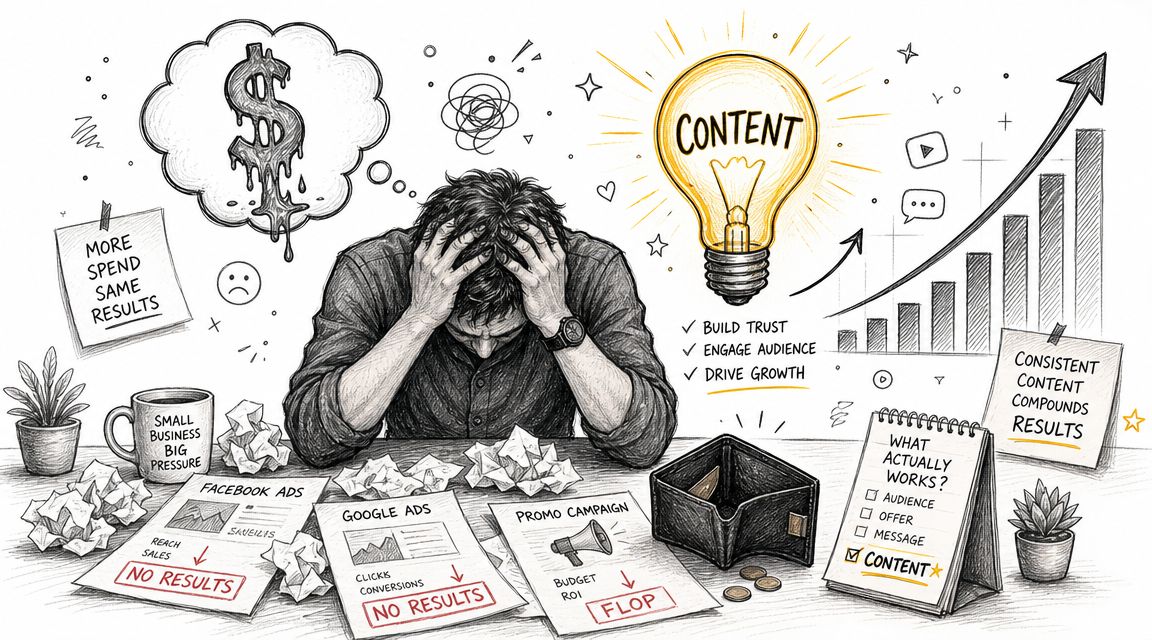
    Paid ads are rented attention. Once your budget stops, the traffic stops with it. That's fine for a promotion or a short-term push, but it's a weak foundation for a plumber, dentist, HVAC company, roofer, or café that needs steady demand.

    Content works differently. You publish a page once, improve it over time, and it can keep bringing in visits, calls, and quote requests long after you hit publish. A page about “emergency plumber in South Austin,” a guide to “Invisalign cost in Scottsdale,” or an article on “best coffee beans for French press at home” can keep showing up whenever local buyers search.

    A stressed businessman surrounded by failed marketing campaigns, contrasting ineffective paid ads with the success of content marketing.

    This isn't a fringe tactic anymore. 90% of organizations now have a content marketing strategy, and 71% of marketers say its significance has grown in the past year, according to compiled industry benchmarks on content marketing adoption. For a local business, that means your market is training customers to expect useful content before they call.

    Practical rule: Ads can buy attention. Content can earn trust and keep earning it.

    The best part is the asset value. A good article doesn't disappear like a boosted post. It can support your service pages, rank for long-tail local searches, answer objections, and give other sites a reason to link to you. That's where the compounding starts.

    Here's the trade-off most owners need to hear clearly:

    Approach What it does well What it does poorly
    Paid ads Fast testing, immediate visibility, seasonal promos Stops working when spend stops
    Local content Builds search visibility, trust, and reusable sales assets Takes discipline and consistency
    Both together Captures short-term demand while building long-term reach Requires focus so you don't spread thin

    If your budget is tight, content usually gives you a better long-term position. If your budget is healthy, content still matters because it lowers your dependence on paid acquisition.

    That's why content marketing for local business isn't just blogging. It's a growth engine built from pages, articles, FAQs, internal links, citations, and local trust signals that stack on each other.

    Find What Your Local Customers Are Asking

    Most local content fails before writing starts. The business guesses what people want, writes broad posts nobody asked for, and wonders why nothing ranks or converts.

    The better approach is simpler. Build content from the questions customers already ask, then match those questions to the phrases they use in search. Salesforce recommends identifying your audience by analyzing customer challenges, and Keap emphasizes keyword research so content reflects the exact phrases people search for, as explained in Salesforce's small business content marketing guidance.

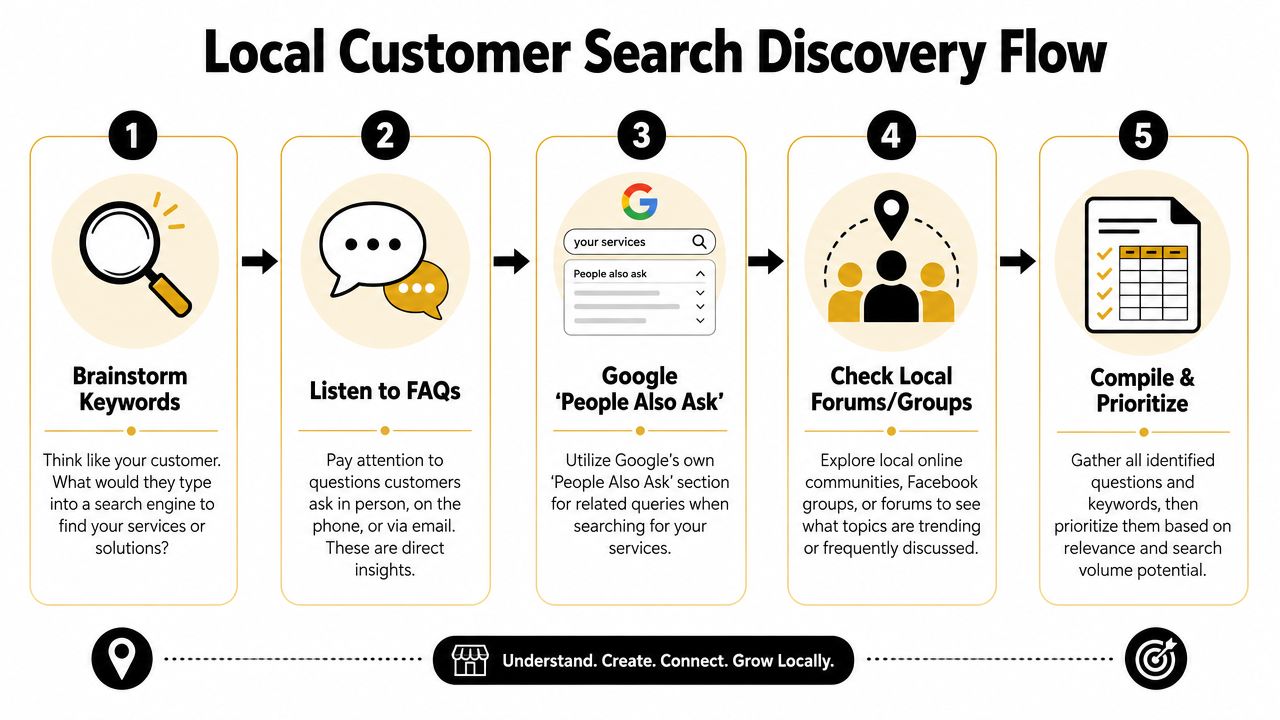
    A five-step flowchart illustrating a local customer search discovery process for SEO and marketing purposes.

    Start with the questions you already hear

    You don't need fancy software to begin. Open a document and list what people ask on calls, in DMs, at the front desk, and during estimates.

    For a plumber, the list might look like this:

    • Urgent service questions: “Do you handle burst pipes at night?” “How fast can someone get here?”
    • Cost questions: “How much does water heater replacement cost?” “Do you charge a callout fee?”
    • Trust questions: “Are you licensed?” “Do you guarantee the work?”
    • Problem questions: “Why does my drain keep backing up?” “Why is my water pressure low?”

    Those aren't just sales questions. They're content topics.

    Customers usually search for the problem first and the provider second.

    Turn one service into many search terms

    Take one core service and expand it with modifiers. A local electrician in Phoenix could start with “electrical repair” and branch into:

    • Service plus city: electrical repair Phoenix
    • Service plus suburb: electrical repair Tempe
    • Service plus urgency: emergency electrician Phoenix
    • Service plus problem: flickering lights electrician Phoenix
    • Service plus cost: electrical panel upgrade cost Phoenix
    • Service plus audience: electrician for older homes Phoenix

    Many owners go wrong. They only target broad service phrases and skip the high-intent searches around symptoms, urgency, and pricing. Those are often the searches that lead to calls because the person already feels the problem.

    A quick way to prioritize is to sort topics into three buckets:

    Bucket What it usually means Example
    Ready to buy The person wants a provider now emergency plumber in South Austin
    Comparing options The person is evaluating service types or pricing tank vs tankless water heater Austin
    Learning first The person wants to understand the issue why does my bathroom sink smell

    Use Google like a customer would

    Type your service into Google and look closely at the results page. Autocomplete, related searches, and “People Also Ask” will show the language buyers use. That's free research.

    If you own a dental clinic, search terms might uncover angles like:

    • Treatment concerns: “Does Invisalign hurt”
    • Price intent: “Invisalign cost Scottsdale”
    • Comparison intent: “Invisalign vs braces adults”
    • Location intent: “cosmetic dentist near Old Town Scottsdale”

    Then check your own Google Business Profile reviews, email inbox, and contact form submissions. If several people phrase the same concern similarly, that wording belongs in your page headings, FAQs, and article titles.

    A practical workflow for content marketing for local business looks like this:

    1. List services you want more of
    2. Write down customer questions tied to those services
    3. Add city, neighborhood, and urgency modifiers
    4. Check Google autocomplete and People Also Ask
    5. Group similar queries into one strong page instead of many weak ones

    Don't create a separate page for every tiny variation. A plumber doesn't need one page for “clogged kitchen sink Austin” and another for “kitchen sink drain clogged Austin” if one solid page can cover the intent well.

    What works is consolidation with clarity. What doesn't work is publishing thin, repetitive pages that say the same thing with slightly different keywords.

    Create Content That Answers Local Questions

    Once you know what people search, your next job is answering better than anyone local. That doesn't mean writing more. It means publishing the right mix of pages so each piece supports the others.

    HubSpot's 2026 data reports that website, blog, and SEO content is the highest ROI-generating channel for marketers, and blog posts were named among the top five highest-ROI formats by 22.26% of marketers in 2025, with blogs used by 38% of marketers in that year, according to HubSpot marketing statistics. For local businesses, that matters because service pages and evergreen articles can keep attracting buyers long after publication.
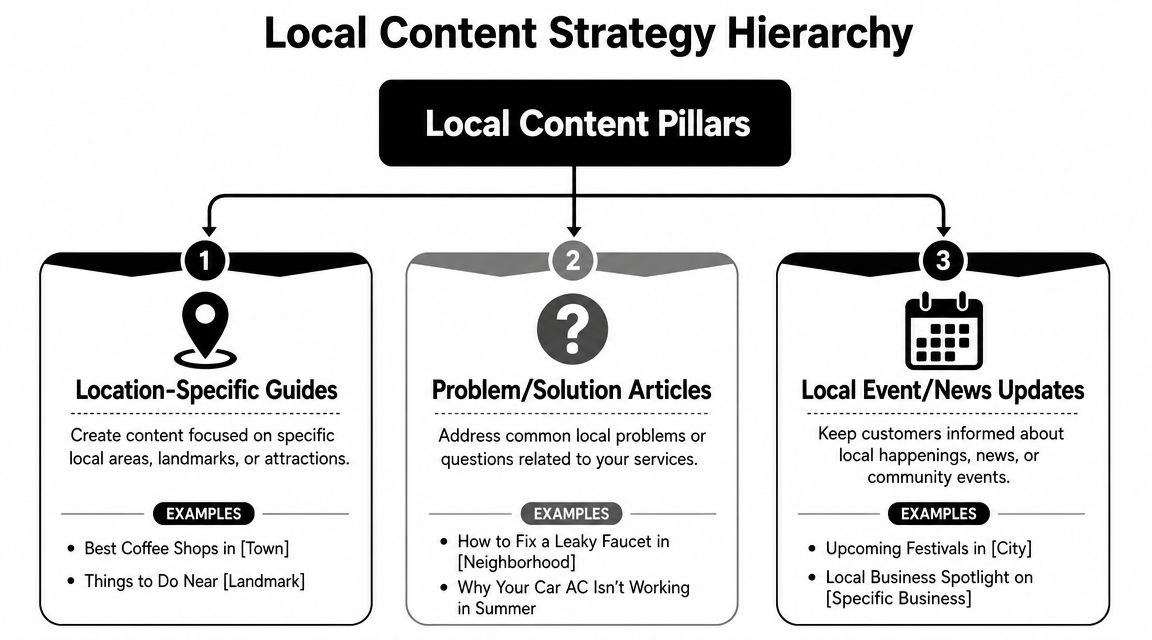
    A diagram outlining the Local Content Strategy Hierarchy with three main content pillars for business growth.

    Service pages that convert

    Start with your money pages. These are the pages for services you want booked now.

    A strong local service page usually includes:

    • A clear headline: Say the service and area plainly. “Emergency Plumbing in South Austin” is stronger than “Trusted Solutions for Your Home.”
    • Specific problems you solve: Burst pipes, blocked drains, leaking water heaters, no hot water.
    • Proof and reassurance: Licensing, service area details, process, warranty, financing if relevant.
    • A visible next step: Call button, booking form, request-a-quote form.

    For a dentist, that may be a page on “Dental Implants in Naperville.” For a café, it may be “Coffee Catering for Office Events in Brooklyn.” For a roofer, it may be “Roof Repair in Plano.”

    These pages should be direct. Don't bury the service under brand storytelling.

    Location pages that prove local relevance

    A location page is not the same as a service page. It exists to show that your business understands a specific area and serves it well.

    A useful location page might include:

    Element Example for a plumber Why it matters
    Area-specific intro Common plumbing issues in older homes in Hyde Park Shows local relevance
    Nearby landmarks or neighborhoods Serving Hyde Park, North Loop, and Hancock Helps match local intent
    Local service context Familiar with older pipe systems and slab leak issues Builds trust
    Contact path Call for service in this area today Keeps the page action-oriented

    What doesn't work is copying one template across ten suburbs and swapping the town name. That's easy to spot and rarely persuasive.

    If a local page wouldn't help a real customer in that area, it probably won't help your rankings either.

    A realtor can do this especially well. A page about a neighborhood can include parks, commute patterns, school-adjacent lifestyle points, pet-friendly spots, and housing style notes. That kind of specificity makes the page useful, not just optimized.

    Blog posts that pull in early-stage demand

    Blog content catches people before they're ready to call. Done well, it feeds your service pages with internal links and trust.

    Good local blog topics usually fall into a few patterns:

    • Cost and pricing: “How much does a new roof cost in Denver?”
    • Problem diagnosis: “Why does my AC smell musty in summer?”
    • Comparisons: “Porcelain veneers vs bonding”
    • Local guidance: “What café owners should know about seasonal outdoor seating permits”
    • Preparation content: “What to do before the exterminator arrives”

    A café owner could publish “Best pastries for office breakfast catering” and link that post to a catering service page. A dental clinic could write “How long does Invisalign treatment take” and link to its Invisalign consultation page. A plumber could publish “What to do when a pipe bursts before help arrives” and direct readers to emergency service.

    Here's the important connection. Your blog is not separate from sales. It supports sales when each article points readers toward the next logical page.

    A simple three-part content stack looks like this:

    1. Service page for direct commercial intent
    2. Location page for geographic relevance
    3. Supporting blog post for questions, objections, and early-stage search intent

    That stack turns isolated pages into a content system. Each new article strengthens existing assets instead of sitting alone in your blog archive.

    Master On-Page and Local SEO Fundamentals

    Publishing useful content isn't enough. Google still needs clear signals about what the page is about, where you work, and how the page connects to the rest of your site.

    A lot of owners overcomplicate this part. You don't need advanced technical knowledge to get the basics right. You need a repeatable checklist and the discipline to apply it to every important page.

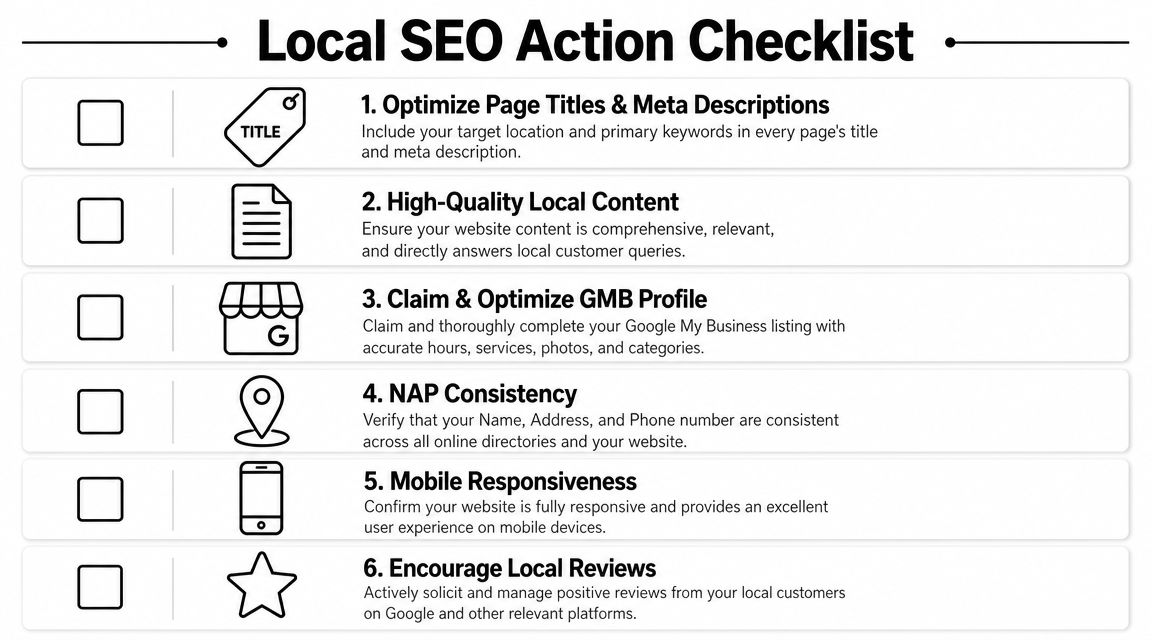
    A checklist infographic titled Local SEO Action Checklist displaying six essential steps for local business search optimization.

    What to fix on every important page

    Start with the page elements users and search engines both read first.

    • Title tag: Include the core service and location naturally. “Emergency Plumber in South Austin | 24 Hour Service”
    • Meta description: Summarize the page clearly and give a reason to click.
    • H1 heading: Match the page topic without being clever.
    • H2 and H3 structure: Break up the page by questions, services, process, and FAQs.
    • Internal links: Link from blog posts to service pages, from service pages to related service pages, and from location pages to contact pages.
    • Image alt text: Describe the image accurately and keep it relevant.

    Here's a simple model:

    Page type Main keyword focus Best internal links
    Service page service + city related services, contact page, FAQs
    Location page service area or neighborhood service page, testimonials, contact page
    Blog post question or problem query service page, location page, relevant FAQ

    Internal links matter more than most local businesses think. They help users move through your site, and they show search engines which pages carry the most weight.

    Before the next checklist, this walkthrough is worth watching if you want a visual explanation of local SEO basics.

    What local businesses need beyond the page

    Local SEO also depends on signals outside the article itself.

    Your baseline checklist should include:

    • Google Business Profile: Claim it, complete it, choose the right categories, and keep hours current.
    • NAP consistency: Your business name, address, and phone number should match across your website and directory listings.
    • Contact page signals: Include your full contact details and service area information.
    • Map embed: Add a Google Map on your contact or location page if you serve from a physical location.
    • Schema markup: LocalBusiness schema helps search engines understand business details in a structured way.
    • Mobile usability: Most local searches happen on phones, so your pages need to load cleanly and make calls easy.

    A local page fails when the user has to hunt for basics like service area, phone number, hours, or next step.

    What works is clarity. What doesn't work is stuffing city names into awkward sentences, hiding contact details, or publishing long pages with no structure.

    If you do the fundamentals well, your content has a better chance to rank, earn clicks, and turn visits into calls. If you skip them, even strong writing can underperform.

    Build Local Trust with Links and Citations

    Local rankings don't come from content alone. Google also looks for trust signals that show your business is real, established, and connected to the community it serves.

    That's where citations and local links come in. Citations confirm your business details across the web. Links from relevant local sites strengthen authority and can send direct referral traffic too.

    Citations first, then relationships

    Start with the boring work because it matters. Make sure your business appears consistently in the places customers and search engines expect to find it.

    That usually means checking:

    • Major business listings: Your core profiles and local directories
    • Industry directories: Dental associations, legal directories, contractor listings, restaurant platforms
    • Community listings: Chamber of commerce pages, neighborhood business directories, local event sites
    • Review platforms: The sites your customers already use to evaluate businesses in your category

    For a dentist, that might mean dental association listings and local directories. For a café, it may include local food guides and city business pages. For a plumber, it often includes contractor and home service directories.

    If your name, address, or phone number varies across those profiles, clean that up before chasing advanced tactics. Messy citations dilute trust.

    How local links happen in real life

    The best local links rarely come from outreach templates. They come from doing real things in your market that other organizations naturally mention online.

    A few examples:

    A plumbing company sponsors a youth baseball team. The league posts sponsor logos and links from its website.

    A dentist hosts a school toothbrush drive. A local nonprofit lists community partners and links to the practice.

    A café collaborates with a nearby bookstore for an evening event. The bookstore publishes the event page and links to the café's site.

    A roofer creates a storm prep checklist for homeowners in a specific county. A neighborhood association shares it in its online resources section.

    Those links are hard for competitors to copy because they're rooted in actual relationships.

    Spammy link tactics usually leave local businesses with junk placements nobody reads. Community-based links do the opposite. They build search trust and local recognition at the same time.

    A strong content asset also makes link building easier. If you publish a useful neighborhood guide, local event roundup, or homeowner checklist, you give other sites a reason to reference your business. That's why the earlier steps matter. Better content creates more link opportunities later.

    Your System for Compounding Growth

    Most local businesses don't need more marketing ideas. They need a system they can keep running while the business stays busy.

    That system is simple. Publish on a schedule you can maintain. Promote each piece in the channels your audience uses. Check performance. Improve what works. Metric Marketing recommends maintaining an editorial calendar, while multi-channel distribution and analytics review are emphasized in the source material summarized at Metric Marketing's small business content guidance.

    A calendar you can actually keep

    You do not need an elaborate publishing machine. You need consistency.

    For most local businesses, a workable rhythm looks like this:

    Week Main task Example
    Week 1 Publish one service or location page update add FAQs to “Emergency Plumbing in Round Rock”
    Week 2 Publish one supporting article “Why your water heater runs out faster in winter”
    Week 3 Distribute and repurpose email newsletter, Facebook post, Instagram story
    Week 4 Review and improve update title, add internal links, expand FAQ

    That's manageable for a small team. It's also enough to create momentum if you stick with it.

    If you own a dental clinic, your month might include one implant page refresh, one blog post about recovery expectations, and one email to past consultation leads. If you run a café, it might be one catering page update, one event-related blog post, and a newsletter promoting both.

    What to measure without drowning in reports

    A lot of owners quit because analytics feels like homework. It doesn't need to.

    Look at a short list:

    • Which pages get search impressions and clicks
    • Which pages drive calls, form submissions, or bookings
    • Which topics hold attention and lead users to another page
    • Which channels help distribute content effectively

    You can get most of this from Google Search Console, Google Analytics, your call tracking setup, and your form submissions.

    The key is pattern recognition. If a plumber's article about slab leaks keeps attracting search traffic, that topic deserves follow-up content and stronger links to the slab leak service page. If a dentist's financing FAQ gets visits but no consultations, the page may need a clearer next step. If a café's catering page gets traffic from email but not search, that points to an SEO gap, not a content gap.

    What doesn't work is publishing, sharing once, and forgetting it. What does work is a loop:

    1. Publish
    2. Promote
    3. Measure
    4. Improve
    5. Link it into the rest of your site

    That's how content marketing for local business becomes a compounding engine instead of a pile of disconnected posts. Each useful page makes the next one easier to rank. Each internal link strengthens existing assets. Each citation and local mention supports trust. Over time, your site stops acting like a brochure and starts acting like a lead source.


    If you want a simpler way to execute this without hiring a full agency, Agency Secrets is worth a look. It focuses on the exact system local businesses need: buyer-intent keyword research, consistent publication of authoritative content, relevant backlinks, and the compounding effect of evergreen SEO. If you want the playbook and the tools to help you run it with less manual work, that's a practical place to start.

  • Small Business Content Marketing Strategy: A Simple Plan

    Small Business Content Marketing Strategy: A Simple Plan

    Most small business content advice gets the core job wrong. It tells you to publish more, stay visible, and build awareness, as if attention automatically turns into revenue. It doesn't. A random stream of blog posts, social updates, and recycled tips usually creates a busy marketing calendar, not sales-ready leads.

    A useful small business content marketing strategy starts somewhere else. Each piece of content needs a job. It should target a specific problem, bring in a specific kind of visitor, and push that visitor toward a specific next step. If the article can't do that, it may still be nice for the brand, but it's probably not helping the business enough to justify the time.

    That matters even more for small teams. You don't have the margin for vanity traffic, sprawling campaigns, or a six-month content experiment with vague goals. You need a system that can work with limited time, limited budget, and limited patience. The upside is that a smaller business can often win by being sharper. Better topic selection, tighter calls to action, stronger local or niche expertise, and cleaner execution beat generic publishing every time.

    Table of Contents

    Your Winning Content Marketing Mindset

    The first shift is simple. Content marketing is not blogging. It's a business system for creating trust, showing expertise, capturing demand, and moving buyers toward action.

    That sounds obvious, but most small businesses still treat content like a side task. They publish when there's time, pick topics based on hunches, and hope consistency alone will rescue weak strategy. It won't. By 2025, 90% of organizations reported having a content marketing strategy, and 66% said that strategy was documented, according to ProperExpression's content marketing statistics roundup. That tells you where the market is. Content is no longer an experiment. It's an operating discipline.

    A scrappy company doesn't need a giant editorial department. It needs a documented plan that answers a few hard questions:

    • Who are we trying to reach
    • What problems are they actively trying to solve
    • What action do we want after each piece
    • What topics deserve effort because they can produce revenue later

    Practical rule: If a topic doesn't map to a customer problem and a next step, it belongs in the backlog, not the publishing queue.

    Smaller businesses often have an edge because they know the objections buyers raise on calls. They know the questions people ask before purchasing. They know where deals stall. That knowledge is more useful than a generic “content calendar” filled with broad awareness posts.

    The mindset to keep is blunt. Don't ask, “What should we post this week?” Ask, “What content would help the right buyer say yes faster?” That question leads to better keywords, better offers, better pages, and better follow-up.

    Define Your Content's Job Before You Write

    If you skip this step, the rest of your strategy collapses into activity. You'll publish, maybe even rank, and still feel unsure whether the effort is working.

    The common mistake is using traffic as the goal. Traffic is useful, but only if the visitor is likely to take a profitable action. A thousand visits from people looking for free advice are less valuable than a small stream of visitors comparing vendors, pricing options, or solutions.

    Stop chasing traffic with no buying intent

    A lot of small businesses would be better off with fewer articles and clearer objectives. That lines up with the broader pattern in the market. 83% of marketers believe higher-quality content published less often is more effective, according to OneLocal's content marketing statistics summary.

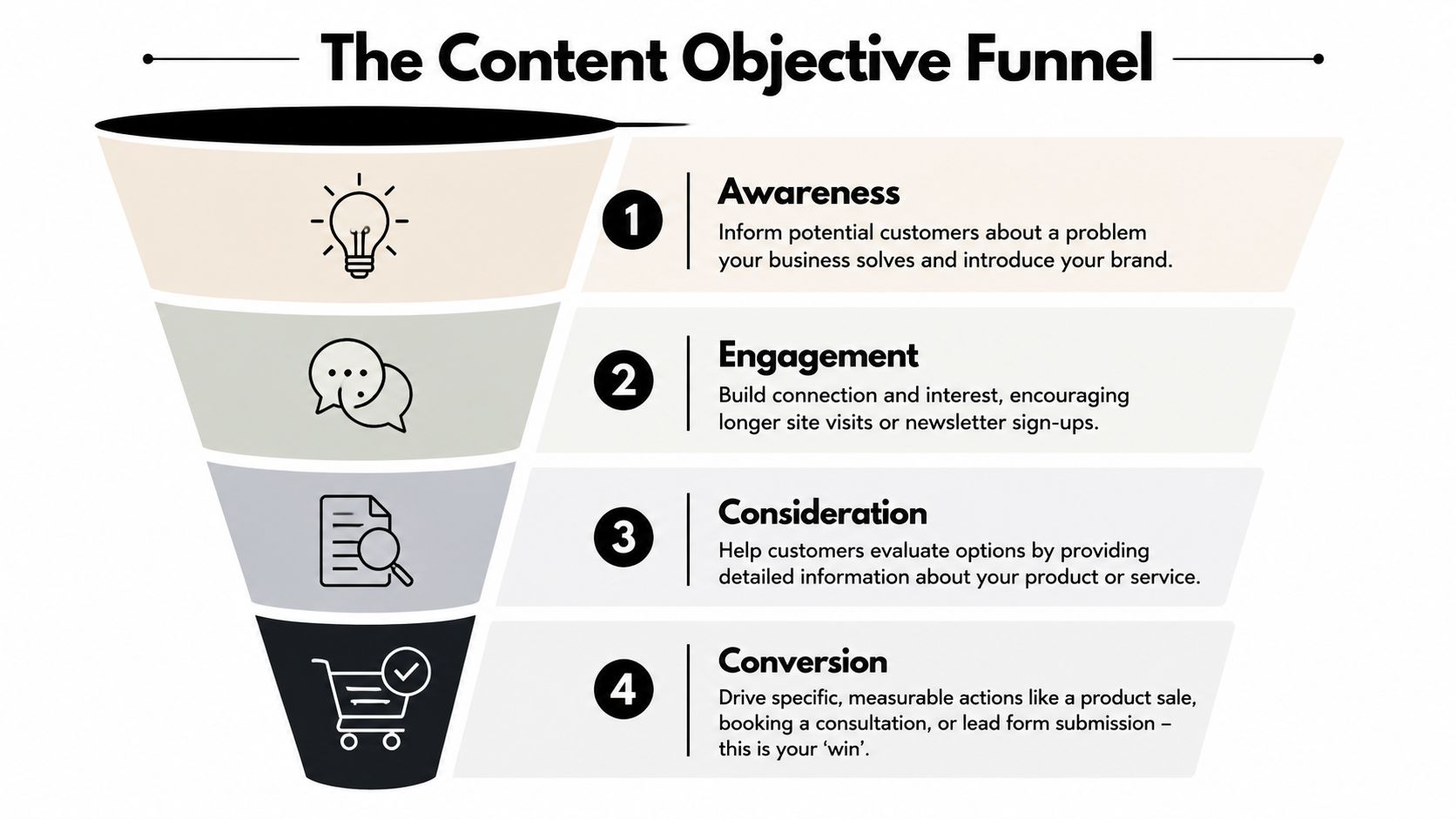
    A four-stage funnel diagram illustrating content marketing objectives from initial brand awareness to final customer conversion.

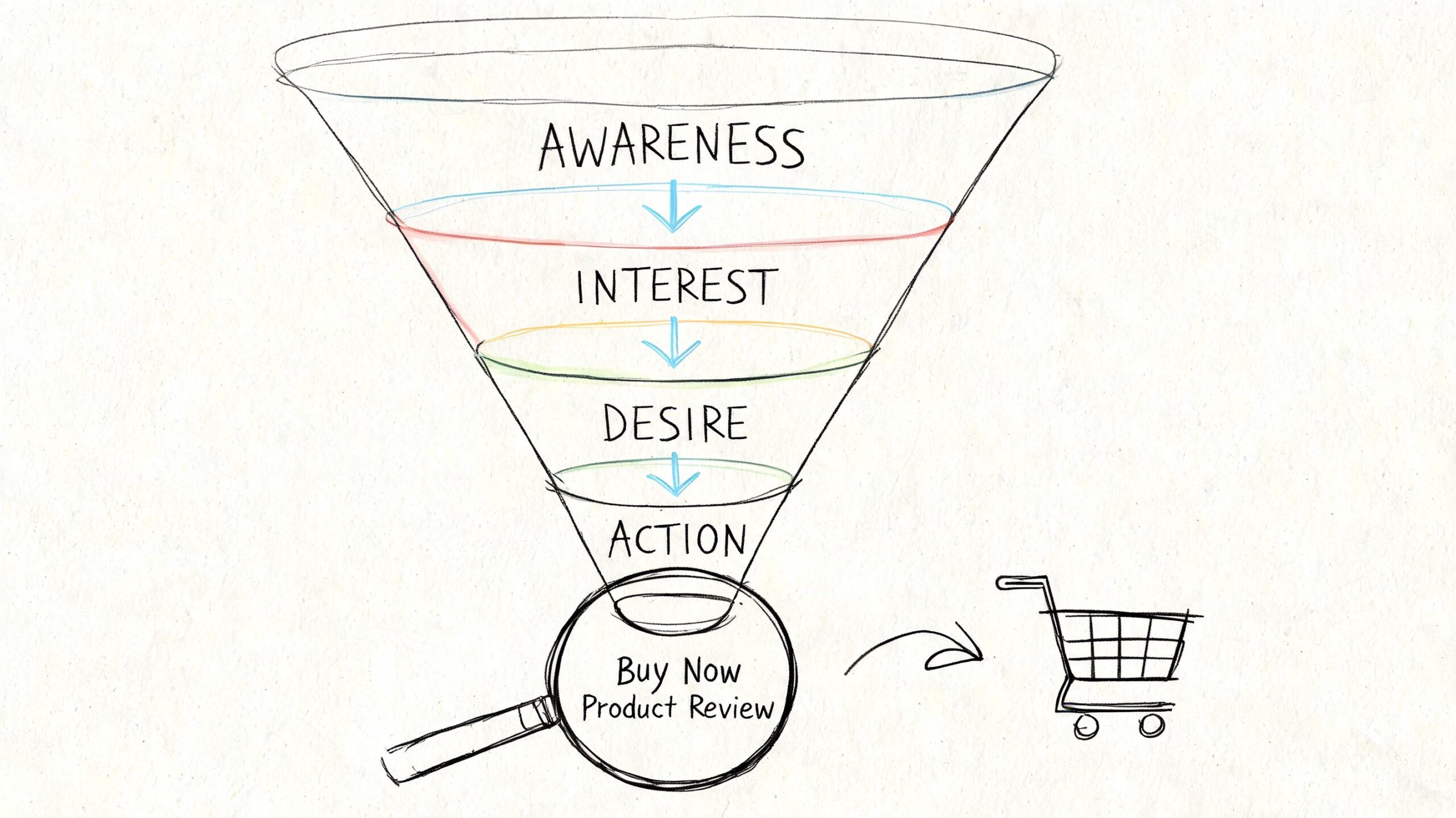
    That's why every piece should have one primary job. Usually it falls into one of four buckets:

    1. Awareness
      The reader realizes they have a problem or sees your category for the first time.

    2. Engagement
      The reader spends time with your brand, joins your email list, or clicks deeper into the site.

    3. Consideration
      The reader compares options, evaluates your approach, or checks whether you fit their use case.

    4. Conversion
      The reader books a call, requests a quote, starts a trial, or buys.

    The mistake isn't publishing awareness content. The mistake is publishing only awareness content and then wondering why leads don't improve.

    If your content never reaches consideration and conversion, you're building an audience for somebody else to close.

    Match the goal to the business model

    A local service company and an e-commerce store shouldn't measure the same content wins.

    For a local service business, a strong content goal often looks like this:

    • Primary win is a booked consultation or quote request
    • Support action is a phone call, form submission, or service-page visit
    • Useful topic types include pricing questions, service comparisons, location pages, and “is this right for me” content

    For an e-commerce business, the content path usually changes:

    • Primary win is a product sale
    • Support action is an add-to-cart, email capture, or category-page click
    • Useful topic types include product comparisons, use-case guides, setup advice, and buyer's guides

    A simple way to pressure-test a topic is to ask three questions:

    Question Good answer Bad answer
    What action should happen next? Book, buy, request, subscribe “Read more stuff”
    Who is this for? A clearly defined buyer or problem Everyone in the market
    Why this topic now? It helps a buyer move forward It sounds interesting

    Content gets much easier when the job is clear. The title is clearer. The CTA is clearer. The page you link to is clearer. Even the intro gets better because you're writing for a reader who needs something specific.

    Find Sales-Ready Keywords Customers Are Using

    Keyword research gets overcomplicated fast. Small businesses don't need jargon-heavy workflows. They need a way to identify phrases real customers use when they're close to acting.

    The best keywords usually don't come from brainstorming in isolation. They come from sales conversations, inbox questions, support tickets, live chat logs, review language, and the wording customers use when they're trying to solve a problem right now.

    A pencil-sketch style illustration of an ear, a magnifying glass, and a notepad representing content strategy.

    Listen before you research

    Start with plain language. Ignore tools for a moment and write down the phrases buyers use naturally.

    A few useful prompts:

    • Problem-driven searches
      “Why is this happening?” “How do I fix this?” “What's causing this issue?”

    • Solution-driven searches
      “Best type of service for…” “Software for…” “Treatment for…” “Product for…”

    • Decision-stage searches
      “Cost,” “pricing,” “near me,” “vs,” “review,” “alternative,” “how long does it take”

    Many businesses often falter. They chase broad terms because they look bigger. Broad terms often bring broad intent. If you sell accounting services, “small business finance tips” may bring readers. “Bookkeeping services for restaurants” is far more likely to bring a buyer.

    Qualify the keyword before you commit

    Before you write, test the phrase against buying intent.

    Ask:

    • Would a person searching this be likely to hire, buy, or inquire soon?
    • Can our business help them directly?
    • Do we have a clear CTA that fits the topic?

    If the answer is yes to all three, the keyword is worth serious effort.

    If the phrase attracts curiosity but not action, it might still be useful, but it should support a stronger bottom-of-funnel page. It shouldn't dominate the calendar.

    A practical keyword mix for a small business usually includes:

    Keyword type What it signals Example intent
    Problem-aware The buyer knows the pain They want diagnosis or clarity
    Solution-aware The buyer is exploring options They want methods, vendors, or categories
    Decision-ready The buyer is close to acting They want pricing, comparisons, proof, or contact

    Add an angle AI can't fake

    Generic content is easier than ever to produce. That means generic content is less valuable than ever. Semrush's small business content marketing guidance highlights an important reality: original research, customer stories, and unique, experience-based content are difficult for competitors and AI tools to replicate.

    That has direct strategic value.

    Instead of publishing another interchangeable article on a broad topic, build pages around assets only you can create:

    • Customer stories that show what changed and why buyers chose you
    • Internal process content that explains how you work and what clients should expect
    • Original observations from jobs completed, products sold, or recurring client questions
    • Comparison pages based on real-world trade-offs you've seen firsthand

    A small business rarely wins by sounding bigger. It wins by sounding more specific, more credible, and closer to the customer's actual decision.

    Build Your Simple Content Creation Engine

    Small businesses do not need a content machine with ten tools, three approval layers, and a full-time editor. They need a system that turns customer questions into pages that can rank, qualify leads, and push the right readers toward contact.

    Consistency matters here, but consistency is usually an operations issue, not a creativity issue. Teams miss publish dates because the process is vague, ownership is unclear, and every article gets reinvented from scratch.

    A simple engine fixes that.

    The two documents that keep production sane

    For most small businesses, the whole operation can run on two working documents:

    • An editorial calendar
      A spreadsheet that tracks what you are publishing, when it goes live, and what business goal it supports.

    • A content brief
      A one-page writing spec that tells the writer exactly what the page needs to do.

    Here's a calendar format that works without adding admin for the sake of admin:

    Publish Date Topic / Title Target Keyword Content Type Primary CTA Status
    Week 1 Service pricing guide service pricing keyword Blog article Request a quote Draft
    Week 2 Comparison page comparison keyword Landing page Book a consultation In progress
    Week 3 Customer story customer result keyword Case study Contact sales Outline
    Week 4 Common mistakes article problem keyword Blog article Visit service page Scheduled

    This table does more than organize ideas. It filters out low-value content before anyone spends time writing it.

    If a topic has no target keyword, no clear CTA, and no path to revenue, it does not belong on the calendar. That rule alone saves a lot of small businesses from publishing traffic bait that never turns into leads.

    Build briefs for conversion, not just completion

    Weak articles usually start with weak instructions. “Write something about this topic” produces exactly the kind of content that gets polite impressions and no sales conversations.

    A useful brief should answer seven questions:

    • Primary keyword
      Choose one main phrase.

    • Search intent
      Is the reader trying to understand a problem, compare options, or hire someone?

    • Audience
      Define the buyer. Local homeowner, operations manager, office admin, founder, procurement lead.

    • Main promise
      State what the page will help the reader figure out or decide.

    • Primary CTA
      Pick one next step.

    • Supporting proof
      Add the evidence that makes the page believable. Customer outcomes, pricing context, process steps, objections, FAQs.

    • Conversion angle
      Decide how the content qualifies the reader. Does it explain timelines, budget ranges, fit, trade-offs, or common buying mistakes?

    That last point gets ignored all the time. It matters because a page can rank and still fail the business if it attracts readers who will never buy. Good content does not just answer the query. It helps the right prospect decide whether to contact you.

    Keep the tool stack boring

    Boring is good here. Google Sheets for the calendar and Google Docs for briefs are enough for many teams. Google Search Console or Semrush can handle keyword checks and performance reviews.

    The trade-off is simple. More software gives you more workflow options, but it also creates more places for content to stall. Small businesses usually get better results from a plain system they use every week.

    Agency Secrets also publishes a workflow for buyer-intent keyword research, article creation, publishing, backlinks, and evergreen SEO execution.

    Working rule: Your content engine should reduce decisions, speed up production, and make it easier to publish pages that can produce leads.

    Batch the work wherever possible. Outline multiple articles in one session. Collect examples, proof points, and FAQs at the same time. Review drafts in blocks instead of one by one.

    That approach cuts context switching, keeps quality steadier, and makes it easier to publish even during busy weeks.

    Amplify Your Content Without a Big Budget

    Publishing is the midpoint, not the finish line. Small businesses waste a lot of effort by treating the publish button like the main event. The article goes live, gets one social post, then disappears into the archive.

    That's avoidable. Content marketing works better as a multi-format, multi-channel system. In Content Marketing Institute's benchmark statistics, 92% of B2B marketers used short articles or posts, 89% used organic social media platforms, 84% used blogs on corporate websites, and 71% used email newsletters. The takeaway for a small team is practical. One strong asset should travel.

    A diagram outlining six effective, low-cost strategies for businesses to amplify their online content and reach.

    Use internal linking like store signage

    Internal linking is one of the cheapest ways to get more value from existing content. It's similar to signs in a store. Good signs help people move from browsing to buying.

    A simple internal linking approach looks like this:

    • Link informational posts to service or product pages
      If an article explains a problem, it should naturally point to the page that solves it.

    • Link related articles together
      This keeps visitors engaged and helps search engines understand topic relationships.

    • Link newer posts to older relevant pages, and older pages back to newer ones
      This stops strong pages from becoming dead ends.

    The key is relevance. Don't force links because a plugin told you to. Add them where the next click helps the reader continue the decision process.

    A good test is simple. If someone reads this paragraph, what page would help them next? Add that link.

    To see another perspective on low-cost reach tactics, this video is worth a look.

    Earn backlinks like referrals, not like spam

    Backlinks still matter, but most small businesses approach them badly. They either ignore them completely or buy junk placements that don't help credibility.

    A better approach is to think in terms of referrals. Which other sites already speak to your audience, but don't compete with you directly?

    Start here:

    • Local partnerships
      Suppliers, chambers, associations, neighborhood publications, and complementary businesses

    • Guest contributions
      Write useful articles for industry blogs where your expertise adds something specific

    • Original assets worth citing
      A customer story, local market insight, checklist, or comparison resource that saves others time

    • Podcast and interview outreach
      A founder with real operating experience can often earn mentions by sharing lessons, not by pitching links

    Backlinks are easier to earn when the asset is genuinely useful and the outreach feels like collaboration, not extraction.

    One strong article supported by relevant internal links, an email send, a few social cut-downs, and targeted outreach will outperform ten posts that nobody distributes.

    Measure What Matters to Prove Your ROI

    Most small businesses don't need more dashboards. They need clearer questions. The problem with content reporting isn't lack of data. It's that the data often has no direct connection to business decisions.

    That gap shows up in a lot of content advice. Outbrain's guidance for small business content strategy points to the core issue: many guides discuss goals and formats but don't show small businesses how to prove which content contributes to leads or sales.

    An infographic showing five key metrics for measuring small business content marketing return on investment.

    Are people finding you

    This is the first question. If nobody is discovering the page, conversion analysis can wait.

    Use Google Search Console for this. It will show:

    • the queries bringing impressions
    • which pages appear in search
    • whether your target topics are gaining traction over time

    What you're looking for isn't vanity growth. You're checking whether the right pages are appearing for the right searches. If your service comparison pages and bottom-of-funnel articles never show up, your strategy is probably too top-heavy.

    Do they like what they see

    Visibility alone doesn't mean much if searchers ignore your result. The next question is whether your listing earns the click.

    Again, Search Console is enough for this. Review the pages that get impressions but weak click activity. Usually the issue is one of these:

    • The title is vague
    • The page doesn't match the searcher's intent
    • The meta description doesn't signal a useful outcome
    • The article targets a topic that sounds broader than it really is

    Many businesses discover that “ranking” and “winning” are different. A page can appear in search and still underperform badly if the promise is fuzzy.

    A search impression is not proof of success. It's proof you were invited to compete.

    Are they taking the next step

    This is the question that matters most. Once the visitor lands, do they move toward the business outcome you wanted?

    Use Google Analytics or simple on-site conversion tracking to monitor actions like:

    Business type Meaningful conversion
    Local service Quote request, consultation booking, phone click
    E-commerce Add-to-cart, checkout start, purchase
    B2B lead gen Demo request, form submission, contact page visit
    Newsletter-led business Email signup tied to a relevant offer

    You don't need a complicated attribution model to make this useful. Start by checking which content pieces assist or produce those actions most often. Then do more of what helps movement and less of what only inflates pageviews.

    A lean reporting rhythm works well here:

    1. Monthly
      Review rankings, impressions, clicks, and conversions by page.

    2. Quarterly
      Update underperforming pages, improve CTAs, refresh internal links, and expand the articles that already attract qualified visitors.

    3. Ongoing
      Keep a short list of topics that produce real inquiries or sales conversations.

    The smartest content teams don't obsess over perfect attribution. They build enough visibility into the funnel to answer a practical question: Which pages help us win more business? That's the metric set that keeps a small business content marketing strategy grounded in revenue, not noise.


    If you want a simpler way to execute this kind of SEO-led content system without hiring an agency, Agency Secrets shares practical playbooks for buyer-intent keyword targeting, publishing evergreen articles, earning backlinks, and building compounding organic growth with a small team.

  • Free Content Marketing Plan Template: 2026 Strategy Guide

    Free Content Marketing Plan Template: 2026 Strategy Guide

    You're probably doing what most small businesses do with content. You publish when there's time. You chase a keyword idea after seeing a competitor rank for it. You post on social because it feels like you should. Then a month later, traffic is flat, leads are inconsistent, and nobody can say which piece of content was supposed to drive what result.

    That isn't a writing problem. It's a planning problem.

    A good content marketing plan template fixes that, but only if it's built for execution. Most templates are still stuck in the editorial-calendar era. They tell you to list blog ideas, assign dates, and maybe track a few KPIs. That's not enough if your real goal is SEO traffic, qualified leads, and revenue.

    The gap gets worse once AI enters the workflow. Smartsheet's coverage of modern content marketing plan templates notes that marketers are prioritizing content creation efficiency and that teams are increasingly using AI for drafting, repurposing, and optimization. The problem is that many templates still stop at calendars and KPI fields instead of planning for review time, QA, and human oversight. That's exactly why so many “complete” content plans fall apart in practice.

    What works now is a template that does four jobs at once. It sets business goals, maps content to search intent, assigns ownership, and accounts for an AI-assisted workflow without letting quality slip. If you want content to become a dependable acquisition channel, that's the standard.

    Table of Contents

    From Chaos to Conversions Your Actionable Plan

    Small business content usually breaks in the same places. The founder has ideas but no schedule. The marketer has a calendar but no clear keyword strategy. The writer publishes posts that sound good but don't connect to a service page, offer, or next step. The result is motion without any real impact.

    A working content marketing plan template turns that mess into a repeatable system. It gives each piece of content a job. Some pages attract top-of-funnel searches. Others support comparison intent. Others push visitors toward a quote request, demo, booking, or product page. When the plan is built this way, content stops being a branding side project and starts behaving like a pipeline asset.

    What doesn't work is using a template as a filing cabinet. If it only stores ideas and due dates, it won't fix weak targeting, poor handoffs, or missed opportunities after publication.
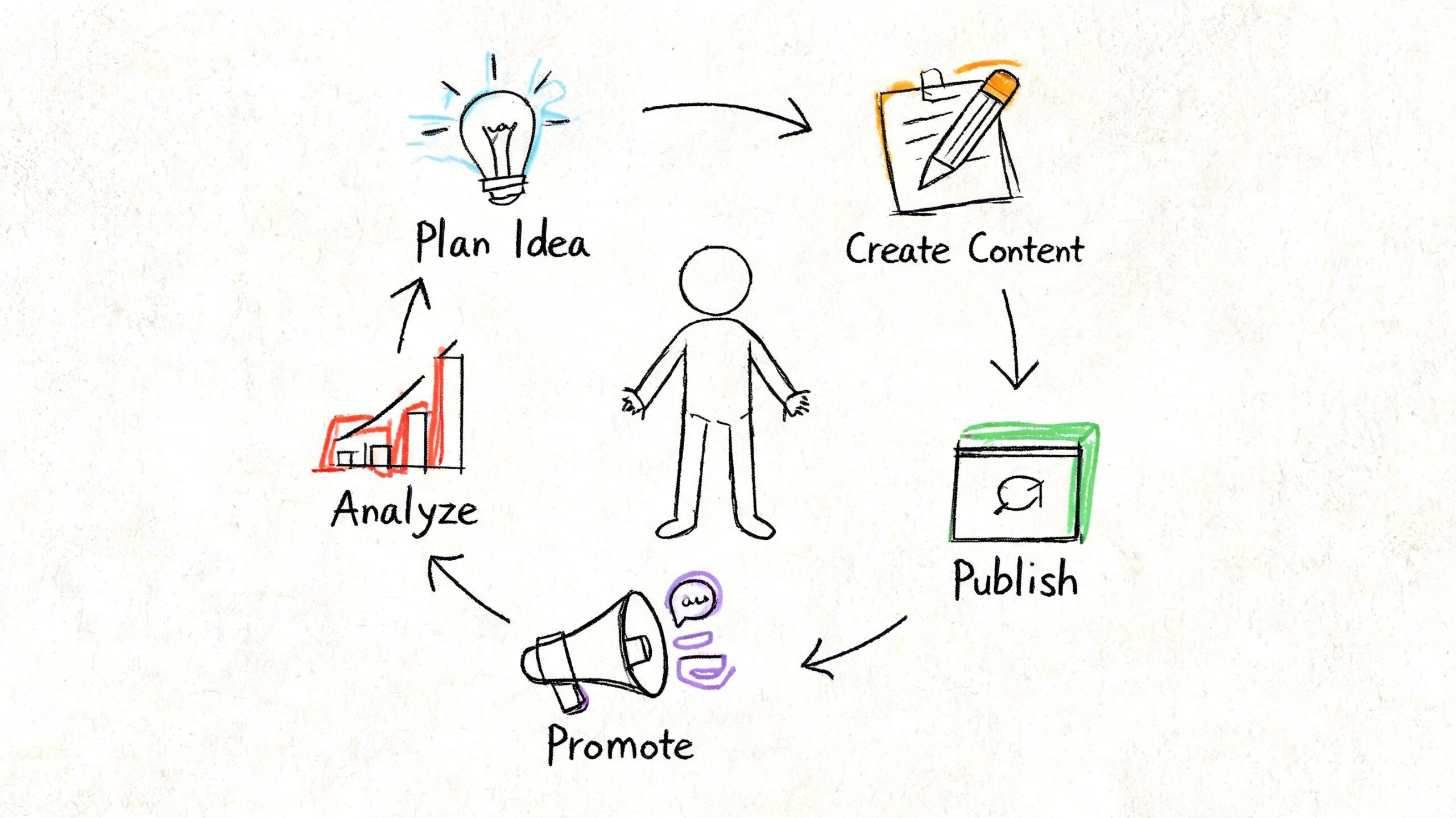
    Practical rule: If your template doesn't tell your team why a page exists, which keyword intent it targets, how it will be promoted, and who owns the next step, it's incomplete.

    The useful version is lean. It doesn't need a hundred tabs. It needs the right tabs. For most small businesses, that means:

    • Goal tracking: tie content to leads, sales conversations, or revenue pages
    • Search intent mapping: define whether the page serves awareness, consideration, or decision
    • Workflow control: assign owner, status, QA, and publish date
    • Distribution planning: decide what happens after the page goes live
    • Refresh logic: mark which pieces need updating and when

    That's why the best template isn't “free” because it costs nothing. It's free because it saves you from wasting months publishing disconnected content. Done right, it becomes the operating layer between strategy and revenue.

    Laying the Strategic Foundation Goals and Audience

    A content plan fails fast when it starts with topics instead of outcomes. Before choosing a keyword or writing a brief, define what the business needs content to do.

    Ascendly's content marketing plan template makes that point clearly. It notes that organizations with a documented content marketing strategy are 313% more likely to report success than those without one. That matters because documentation forces decisions. It turns broad ambition into sections like business objectives, buyer personas, content audit, promotion strategy, and KPI selection.

    A diagram outlining the strategic foundation for a content marketing plan, including business goals and audience analysis.

    Start with business goals, not blog ideas

    Most content plans die under vague goals like “increase awareness” or “post more consistently.” Those sound sensible, but they don't help you decide what to publish next.

    Use goals that change behavior. If you run a local plumbing company, your content goal might be tied to quote requests for high-margin services. If you run an ecommerce store selling leather goods, your content may need to support organic traffic to category pages and improve average order value. The exact KPI can differ, but the principle doesn't.

    A strong template should force you to answer these questions:

    Planning field Weak answer Stronger answer
    Business objective Grow brand Generate qualified leads from organic search
    Content goal Get traffic Publish pages that support service and product conversions
    Primary KPI Pageviews Leads, conversion rate, revenue from content
    Secondary KPI Social likes Organic traffic, email subscribers, assisted conversions

    The point isn't to sound clever or refined. The point is to create constraints. Once you define the objective, it becomes easier to reject content that doesn't support it.

    Content teams get into trouble when they measure output first and business impact later.

    Build a usable audience profile

    You don't need a ten-page persona deck. You need a practical customer profile that helps you choose topics, angles, and calls to action.

    Keep it to four things:

    • Buyer problem: What painful issue pushed them to search?
    • Search language: What words would they type into Google?
    • Decision filter: What makes them choose one provider over another?
    • Objection: What might stop them from contacting you or buying?

    For a local plumber, that might look like this:

    • Problem: urgent leak, blocked drain, low water pressure
    • Search language: “emergency plumber near me,” “blocked drain fix,” “why is my shower pressure low”
    • Decision filter: speed, trust, clear pricing, availability
    • Objection: fear of hidden costs or poor workmanship

    That profile is enough to shape content. It tells you to create service pages for urgent intent, educational posts for diagnosis queries, and trust-building content that answers pricing and process concerns.

    Use your content marketing plan template to document audience needs in plain language. Skip the demographic filler unless it affects buying behavior. Search-driven content works when you understand what the customer wants solved, not when you know their favorite app.

    Building Your Content Engine Pillars and Calendar

    Once the foundation is set, the next mistake is creating random one-off articles. That feels productive for a few weeks, then the site fills with disconnected posts that don't reinforce each other. Rankings become harder to win because your site never builds topical depth.

    A better system starts with pillars. These are the core themes your business should be known for in search.

    Choose pillars that support revenue pages

    Your pillars shouldn't come from brainstorming alone. They should come from your offers.

    If you're an accountant, your pillars might be tax planning, bookkeeping, payroll, and small business compliance. If you run a skincare ecommerce store, pillars could include acne routines, ingredient education, product comparisons, and skin-type guides. Each pillar should eventually support a product page, category page, service page, or lead magnet.

    Three to five pillars are usually enough for a small team. More than that spreads effort too thin.

    A practical way to test a pillar is simple. Ask: can this topic produce multiple search-intent articles that naturally link to a revenue page? If the answer is no, it's probably not a pillar. It's just a content idea.

    Turn your calendar into an operating system

    BetterContext's guide to content marketing frameworks recommends building a content calendar 60–90 days ahead and including fields like publish date, content format, keyword, owner or assigned writer, and promotion channels. That advice matters because a real calendar reduces bottlenecks. It also exposes capacity problems before deadlines slip.

    Your calendar should do more than hold dates. It should track the full lifecycle of each asset.

    Use fields like these:

    • Primary keyword: the main query or theme
    • Search intent: awareness, consideration, or decision
    • Content type: blog, landing page, comparison page, email, social post
    • Owner: writer, editor, or marketer responsible
    • Status: ideation, drafting, editing, optimization, published, refresh needed
    • Primary CTA: book call, request quote, shop collection, download guide
    • Promotion channels: email, LinkedIn, Instagram, outreach, internal links

    Here's the difference between a weak and useful calendar entry:

    Field Weak entry Useful entry
    Topic Drain issues Why kitchen drains keep clogging
    Keyword plumbing why does my kitchen sink clog
    Intent not listed Awareness
    CTA none Book drain inspection
    Promotion social Email newsletter, service page link, local Facebook post

    Many teams discover at this stage that they don't have a content problem. They have an operations problem. Without status fields and ownership, work stalls in review. Without promotion fields, pages get published and ignored.

    Plan the next 60 to 90 days in enough detail that nobody has to ask what happens next.

    A content marketing plan template that includes pillars and a working calendar gives you consistency without making you rigid. You can still react to new opportunities. You just won't build the entire engine around last-minute ideas.

    Creating Content That Actually Ranks and Converts

    Generic content rarely fails because the grammar is bad. It fails because it targets the wrong query, speaks to the wrong stage of the journey, or sends readers nowhere useful after they land.

    For SEO-driven businesses, the smarter move is to build around revenue pages and topic clusters first, then create supporting articles that match exact search intent, internal links, and conversion paths. Content Marketing Institute's guidance on strategy checklists and templates supports that approach. It's more practical than a generic calendar, especially for businesses that need compounding organic traffic with a lean team.

    A magnifying glass focusing on high-quality content leading to improved Google rank and increased website conversion rates.

    Match content to buyer intent

    Not all keywords deserve the same content format.

    Someone searching a broad informational query needs education. Someone comparing solutions needs proof and differentiation. Someone searching with transactional intent needs a page that removes friction and makes the next step obvious.

    A simple map looks like this:

    • Awareness: educational posts, definitions, how-to content
    • Consideration: comparison pages, buyer guides, FAQs, use-case content
    • Decision: service pages, product pages, landing pages, pricing or consultation pages

    Topic clusters earn their keep by strengthening a decision page. When supported by awareness and consideration content that links inward with relevance, that decision page can achieve better rankings.

    Use AI for speed, not for strategy

    AI can remove a lot of production drag. It can help with keyword grouping, outlines, first drafts, refresh suggestions, and repurposing. That's useful for small teams because blank-page work is expensive.

    But AI isn't the strategist. It doesn't know which service is highest margin, which audience converts fastest, or where your business has the strongest proof. Those calls still need human judgment.

    When using a tool like OutRank, the best workflow is straightforward:

    1. Choose the revenue target first. Start with the service page, category page, or offer that matters most.
    2. Build the cluster around intent. Add supporting topics that answer the questions buyers ask before they convert.
    3. Generate drafts fast. Let the tool handle structure and initial coverage.
    4. Add expertise manually. Insert examples, objections, process details, and points of view your competitors don't have.
    5. Run QA before publish. Check facts, links, internal anchors, headings, and CTA alignment.

    A lot of AI-assisted content underperforms because teams automate the wrong layer. They automate writing but skip planning, differentiation, and review.

    Here's a useful walkthrough on improving content structure and search visibility:

    Structure every page for rankings and action

    Ranking and conversion usually improve together when the page is easier to use.

    That means:

    • Answer the main query early: don't hide the core response in paragraph six
    • Use clear H2s and H3s: mirror the sub-questions a searcher expects
    • Add internal links with purpose: point readers to related guides, service pages, and comparison content
    • Keep the CTA relevant: a blog post about diagnosis should lead to the next logical step, not a random newsletter form

    The strongest content doesn't just attract a click. It gives the visitor a clear path forward.

    Featured snippets and strong on-page engagement often come from simple structure, not clever writing tricks. If a section can be turned into a checklist, comparison table, or direct answer, do it. Search engines and humans both reward clarity.

    Maximizing Your Reach Distribution and Repurposing

    A page that ranks eventually can still die early if nobody pushes it after publication. Small businesses feel this more than large teams because they can't afford to spend hours creating content that gets one week of attention.

    That's why distribution belongs inside the content marketing plan template, not outside it. If promotion is “something we'll do later,” it usually doesn't happen.

    Build a simple post-publication workflow

    You don't need a giant distribution machine. You need a routine your team can repeat every time.

    Use a checklist like this after each publish:

    • Update internal links: add links from relevant older posts and key navigation pages
    • Send one email: feature the article in your newsletter or customer list if it fits
    • Create social cutdowns: pull out one insight, one objection, and one short takeaway for social posts
    • Notify sales or service staff: give them the article if customers regularly ask that question
    • Log refresh date: decide when to revisit the piece for updates

    That's enough to stop content from becoming invisible the day after it goes live.

    A diagram illustrating the distribution of content across social media, email, and blog platforms for outreach.

    Publish once. Promote repeatedly. Most teams do the first part and skip the second.

    Distribution also improves SEO indirectly. More visibility means more chances for links, more repeat visits, and more signals that the content deserves attention. You don't need to overcomplicate that. Consistency beats intensity here.

    Repurpose one asset into many

    Repurposing is where small teams make up ground on larger competitors. One strong article can power multiple channels if the original piece is built with structure.

    A single pillar post can become:

    Original asset Repurposed version Best use
    Long-form blog post Email newsletter Re-engage subscribers
    Blog section LinkedIn post Professional audience
    FAQ block Instagram carousel Quick education
    Comparison section Sales follow-up email Help hesitant buyers
    How-to steps Short video script Reach non-readers
    Key stats or claims Graphic snippet Social distribution
    Intro plus CTA Landing page teaser Drive to main article

    The trick is not to force every article into every channel. Match the repurposed format to the audience behavior on that channel. A local clinic may get more value from email and short educational reels than from daily LinkedIn posts. A B2B software founder may get the opposite.

    Repurposing also makes AI more useful. Once the original article is strong, AI can help transform it into social posts, summary emails, and draft scripts much faster. That's where automation creates an advantage without sacrificing judgment.

    Measuring What Matters and Proving Your ROI

    If your reporting stops at pageviews, your content program will eventually lose budget, patience, or both. Business owners don't need more charts. They need proof that content supports leads, sales activity, and revenue.

    That's why measurement has to start with the original goal you documented earlier. The KPI for a local service company won't be identical to the KPI for an ecommerce brand. What matters is that the numbers reflect business value, not just audience activity.

    Track business KPIs, not vanity metrics

    Likes, impressions, and time on page can be useful clues. They are not proof of return on investment by themselves.

    GMediaCo's content marketing plan template guidance offers a practical benchmark. It recommends planning content 60–90 days in advance and setting quantified targets such as a 30% increase in organic traffic over six months or 20 inbound leads per month. It also notes that templates specifying content by funnel stage are more likely to support both SEO and conversion goals. The lesson is simple. Good planning becomes measurable when you tie output to a target.

    Use a simple dashboard with these fields:

    • Organic traffic to target pages
    • Keyword rankings for core commercial terms
    • Qualified leads from content
    • Lead-to-customer conversion rate
    • Revenue from content or assisted conversions
    • Pages needing refresh

    A hand-drawn illustration showing social media engagement icons transforming into an upward trending financial growth bar chart.

    A Google Sheet works. Looker Studio works. The tool matters less than the discipline. Review the same indicators on a fixed schedule and compare them against the plan, not against random expectations.

    Use your dashboard to make better decisions

    Effective reporting does more than prove you published. It helps you decide what to do next.

    If one topic cluster brings in qualified leads, build deeper around it. If awareness content gets traffic but never leads visitors toward your service pages, strengthen internal links and CTAs. If older posts still attract impressions but conversions are weak, refresh them with better structure, clearer offers, and updated examples.

    A strong review rhythm usually includes:

    1. Check performance by cluster: not just by individual article
    2. Identify conversion paths: which pages assist inquiries or purchases
    3. Spot content decay: find pages losing relevance or freshness
    4. Reallocate effort: publish more in the areas producing business outcomes

    Good measurement changes the next month's plan. If it doesn't, it's just reporting.

    This is what makes a content marketing plan template worth using long term. It doesn't sit in a folder after kickoff. It becomes the document that tells you what to create, what to update, what to cut, and where to focus next.


    If you want a practical SEO system without hiring an agency, Agency Secrets is worth a look. It breaks down how small business owners can win with buyer-intent keyword research, consistent publishing, backlinks, and evergreen content, and it shows how OutRank can help automate the heavy lifting so you can focus on strategy, quality, and conversions.

  • Content Marketing for Startups: A Lean Playbook (2026)

    Content Marketing for Startups: A Lean Playbook (2026)

    You shipped the product. A few early users love it. Then growth stalls.

    Your homepage gets some direct traffic, branded search is tiny, and every “we should do content” conversation dies the same way: no one knows what to write, who should write it, or how long it will take before it matters. So the blog becomes a dumping ground for feature updates, generic thought pieces, and posts targeting keywords your biggest competitors already own.

    That approach burns time and teaches founders the wrong lesson. Content marketing for startups doesn't fail because content is slow. It fails because startups treat it like a side project instead of a system.

    The version that works is narrower, sharper, and far less glamorous. You pick a specific buyer. You target a small pocket of demand that bigger companies ignore. You publish content that solves one expensive problem at a time. Then you turn every winning topic into an evergreen asset that keeps pulling in qualified visitors long after publication.

    Table of Contents

    Your Content Marketing Engine Starts Here

    Most founders don't need more marketing ideas. They need fewer moving parts.

    The trap is familiar. You publish when you have time. You choose topics that sound important in meetings. You hope SEO will sort itself out. A few months later, nothing compounds because nothing connects. The audience is vague, the topics are broad, distribution is improvised, and measurement starts and ends with pageviews.

    That's why content feels expensive even when you're doing it in-house.

    A startup needs a repeatable engine, not a content calendar full of disconnected posts. The engine is simple:

    1. Define a narrow audience with a real buying problem.
    2. Find high-intent topics inside underserved micro-segments.
    3. Create useful, authoritative content that earns trust.
    4. Distribute it deliberately instead of waiting for traffic.
    5. Measure business impact so you keep what works and kill what doesn't.
    6. Systemize the winners into an evergreen library.

    Practical rule: If a topic can't be tied to a specific buyer problem and a likely next action, it probably doesn't belong on an early-stage startup blog.

    This approach also matches where the market is going. Content investment is growing, with 54% of businesses planning to increase spending in 2024, and businesses investing $4,000 or more per content piece are 2.6 times more likely to report their strategy as “very successful” than lower-spend brands, according to Reboot's content marketing statistics summary. The lesson for startups isn't “spend recklessly.” It's that thoughtful, high-quality content beats cheap volume.

    If you're resource-constrained, that's good news. You don't need a giant team. You need discipline. One article that targets a real buying question can outperform ten posts written for “awareness” that never influence a decision.

    Pinpoint Your Audience Before Writing a Word

    The fastest way to waste a quarter is writing for “small businesses,” “marketers,” or “founders” as if those are usable audiences.

    They aren't. Those labels are too broad to guide headlines, examples, calls to action, or SEO decisions. Startups that skip audience work usually produce content that sounds polished but misses the buyer's actual problem.

    A high angle ink drawing showing a winding yellow path through dense dark forest foliage.

    Research backs this up. 60% of corporate marketers lack understanding of best practices for buyer persona development, and buyers review an average of 13 pieces of content before making a purchase decision, according to Proven SaaS on startup content marketing. If your content doesn't line up with the buyer's context, those interactions don't build momentum. They just add noise.

    Build a minimum viable persona

    You don't need a bloated persona deck. You need a working profile you can use in editorial decisions this week.

    Focus on these inputs:

    • Role and context who the buyer is inside the company or household
    • Trigger problem what happened that made them look for a solution
    • Buying stage whether they're problem-aware, comparing options, or ready to choose
    • Language the exact phrases they use to describe friction
    • Constraints what makes switching, buying, or implementing hard

    A useful persona sounds like this:

    Element Weak version Useful version
    Audience Small business owner Multi-location clinic owner struggling to manage inbound leads
    Goal Get more customers Increase qualified bookings without hiring another admin
    Pain point Marketing is hard Existing website gets traffic but doesn't convert local service intent
    Search behavior Searches for SEO help Searches for terms tied to compliance, local visibility, and service-specific demand

    That level of specificity changes everything. It tells you what examples to use, which objections to address, and what kinds of keywords deserve attention.

    Run interviews that produce usable insights

    Good audience research doesn't require a research department. It requires curiosity and a repeatable script.

    The proven-saas methodology recommends using surveys, phone interviews, in-person conversations, web analytics, and exit surveys. It also suggests conducting at least 10 to 15 customer interviews per persona, which is realistic if you treat it as part of sales and customer success, not a separate research project.

    Ask questions that reveal decision logic:

    • What was happening right before you started looking for a solution?
    • What did you try first that didn't work?
    • What nearly stopped you from buying?
    • What wording would you type into Google if you had to solve this again?
    • What alternatives were you comparing us against?

    Avoid asking what content people want. Most buyers won't tell you directly. They will tell you their frustrations, hesitations, and decision criteria. That's more valuable.

    A strong walkthrough helps if your team hasn't done this before.

    Turn audience research into editorial decisions

    Many teams stall at this stage. They gather notes, then return immediately to writing generic posts.

    Don't summarize interviews into fluffy persona paragraphs. Convert them into a simple editorial filter.

    Buyers don't care that you published. They care that you understood the job they're trying to get done.

    Use these decisions:

    1. Choose one persona per article. Mixed audiences produce muddled writing.
    2. Map one pain point to one content format. Comparisons for evaluation. How-to content for active problem solving. Checklists for implementation friction.
    3. Write in the buyer's vocabulary. If customers say “missed appointments,” don't rewrite it as “operational inefficiency.”
    4. Attach every article to a stage. Awareness, consideration, or decision.

    Startups don't have the budget for unfocused content. Persona work isn't a branding exercise. It's the difference between publishing into the void and publishing something a buyer can recognize as relevant.

    Find Topics That Win Customers Not Just Clicks

    Broad keywords look impressive in a spreadsheet and terrible in practice.

    If you're a startup, trying to rank for a huge generic term is usually a vanity project. The traffic is broad, the competition is entrenched, and the search intent is messy. You can spend months chasing visibility that never turns into trials, demos, or sales conversations.

    The better move is to hunt where larger companies rarely bother: micro-underserved segments.

    A hand-drawn illustration showing a dashboard with business growth metrics connected to a small green plant.

    According to Invoke Media on underserved market segments, long-tail, intent-driven keywords can drive 3–5× more conversions than broad generic terms. That's exactly why content marketing for startups should focus less on reach and more on precision.

    Start with purchase intent not search volume

    A high-intent keyword usually contains one or more of these signals:

    • Specific audience qualifiers such as industry, company size, or use case
    • Problem qualifiers that imply pain, urgency, or friction
    • Solution qualifiers like software type, compliance need, or workflow requirement
    • Comparison language that signals active evaluation

    Examples:

    • inventory management for Etsy jewelry sellers
    • CRM for small therapy practices
    • local SEO for emergency plumbers
    • appointment reminder software for dental clinics
    • HIPAA-compliant client intake forms for solo practices

    None of these are glamorous trophy terms. That's the point. They attract people with context, not idle curiosity.

    How to spot a micro-niche worth serving

    Good startup topics sit at the overlap of three conditions.

    First, the audience is narrow enough that the problem is described clearly. Second, the pain is expensive enough that people will act. Third, the competition is too broad or too lazy to build dedicated content around it.

    Use this quick decision framework:

    Question Good sign Bad sign
    Is the audience named clearly? “Texas HVAC contractors” “Businesses”
    Is the pain specific? “Low visibility in map results” “Needs more growth”
    Is there buyer intent? “Best scheduling app for mobile detailing” “What is scheduling”
    Can your product plausibly help? Yes, directly Only through a vague brand story

    If a topic fails any of those tests, it probably belongs later, not now.

    Build a topic map your competitors won't bother with

    Large competitors tend to publish horizontally. They want the biggest category terms. Startups win vertically.

    That means taking one niche and building a stack of related evergreen articles around it. For example, if you serve small clinics, your cluster might include:

    • Decision content comparing tools for patient intake or reminders
    • Operational content solving booking, follow-up, or no-show issues
    • Compliance content addressing regulated workflows
    • Local visibility content tied to geography or service lines

    Pick a niche where you can sound like an insider. Outsiders can rank briefly. Insiders build trust.

    Use low-cost tools like Google Search Console, Google autocomplete, competitor title tags, and support ticket language to find these phrases. Then group topics by buyer stage instead of publishing random one-offs.

    That's the moat. Not more content. Better fit.

    Create High-Impact Content on a Startup Budget

    Lean content is often misunderstood. Founders hear “lean” and think cheap, fast, and disposable.

    That's backward. For startups, lean content means protecting limited resources by creating fewer pieces with a better chance of ranking, being shared, and influencing a buying decision. The worst use of a small budget is high-output mediocrity.

    A seven-step process infographic illustrating how lean teams can create high-impact content on a startup budget.

    The market is already moving toward a hybrid workflow. 72% of people used generative AI tools for content tasks in 2024, while 47% of organizations use AI for content creation and 51% use it for real-time optimization, according to BYYD's overview of content marketing trends citing Statista data. For startups, that matters because it cuts production friction without removing human judgment.

    Why one strong article beats a pile of weak ones

    A startup article needs to do more than exist. It should answer the search intent cleanly, show practical expertise, and move the reader toward a next step.

    That usually means:

    • a direct answer near the top
    • examples grounded in a real use case
    • structure that makes scanning easy
    • internal links to related resources
    • a call to action matched to buyer stage

    Short, generic posts often fail on all five.

    There's also a quality threshold issue. From the startup content pitfalls covered by Technical.ly, articles over 1,000 words generate significantly more leads than very short content, but composition still matters more than raw length. The takeaway isn't “make everything longer.” It's “earn the reader's attention with substance.”

    Use AI like a production assistant not a replacement

    AI is useful at the parts of content creation that drain time but don't require your sharpest strategic thinking.

    Use it for:

    • Outline generation based on a target query and buyer stage
    • Angle expansion when you need supporting subtopics
    • First-draft assembly from your notes, transcript, or brief
    • Optimization passes for clarity, heading structure, and coverage gaps
    • Repurposing a pillar article into email, FAQ, or social snippets

    Don't hand it the entire job.

    What still needs a human:

    • deciding whether the topic deserves to exist
    • injecting product and customer insight
    • cutting generic filler
    • checking claims and examples
    • aligning the article with brand voice and sales reality

    AI speeds up production. It doesn't create authority. Your experience, customer context, and editorial judgment still do that.

    Teams often go wrong here. They publish AI drafts that sound competent but say nothing distinctive. Search engines and buyers both recognize that quickly.

    A lean editorial workflow that actually ships

    The easiest way to keep quality high is to standardize the process. Not every article needs a full editorial board. It does need checkpoints.

    A practical startup workflow looks like this:

    1. Brief the article clearly
      Define the target query, persona, stage, and desired next action. If you can't explain why the article should exist in two sentences, kill it early.

    2. Collect proprietary input
      Pull in sales call notes, support questions, onboarding friction, and implementation examples. This is the material competitors can't easily copy.

    3. Draft fast
      Use Google Docs, Notion, or an AI-assisted writing workflow to build the first version. Speed matters at this stage because perfectionism kills consistency.

    4. Edit for utility
      Remove repeated points, simplify jargon, and make sure the opening answers the query immediately.

    5. Optimize structure
      Clean H2s and H3s, useful internal links, concise title, and a CTA that matches buyer intent.

    6. Publish and refresh
      Evergreen articles shouldn't be treated as finished. Update examples, tighten weak sections, and add links as your library grows.

    Here is the trade-off many organizations face: content quality typically increases when the founder or operator provides insight, but publishing frequency typically increases when the task is delegated. The solution is not to pick one. The solution is to separate insight from production. Founders provide raw material. Editors and tools shape it.

    That division is what makes content marketing for startups sustainable instead of exhausting.

    A Smart Distribution Strategy for Zero-Audience Startups

    Publishing is not distribution. It's inventory creation.

    A new startup blog has no authority, no audience habit, and no built-in amplification. If you hit publish and wait for search traffic, you'll probably wait a long time. Early distribution has to be active, targeted, and tied to places where your buyers already pay attention.

    Borrow trust before you try to build it

    The fastest route to early visibility is borrowed authority.

    That means showing up in niche environments where your audience already asks questions and evaluates vendors. Depending on your market, that could be Reddit communities, Slack groups, LinkedIn comment threads, industry newsletters, association sites, or partner audiences.

    A simple priority order works well:

    • Communities first because they already contain buyer conversations
    • Partnership distribution second through co-marketing, guest contributions, or vendor ecosystems
    • Founder-led distribution third through personal LinkedIn posts, email replies, and direct outreach
    • Organic social last unless you already have audience traction

    Don't drop links and vanish. Quote the key point from the article, answer a specific question, then link only when it helps.

    Turn every article into an email asset

    Email matters more than most startup teams admit because it's the one distribution channel you own.

    Every strong article should create at least one email use case:

    Content type Email angle Goal
    How-to guide Teach one tactic and link to full article Re-engage subscribers
    Comparison post Summarize decision criteria Support evaluation
    Checklist Offer a practical takeaway Drive clicks and saves
    Evergreen FAQ Answer a common objection Move hesitant leads forward

    Buyers rarely convert after one touch. A strong article gives you something useful to send in onboarding, nurture, reactivation, and sales follow-up.

    The distribution mistakes that waste the most time

    Most startup teams don't fail because they ignore distribution completely. They fail because they engage in distribution with low impact that feels productive.

    Common mistakes:

    • Posting everywhere at once instead of going deep in the few channels where buyers spend time
    • Rewriting the same generic social caption for every article
    • Treating backlinks like a separate SEO project instead of a byproduct of useful, promotable assets
    • Ignoring sales and customer success even though those teams already know what content prospects ask for

    Technical.ly's framework on startup content pitfalls emphasizes that channel-specific distribution playbooks matter, and that the “build-it-and-they-will-come” assumption hurts even strong content. That's exactly right. A post without a distribution routine is just a document on your website.

    The early goal isn't mass reach. It's getting the right article in front of the right small group often enough that it starts generating feedback, links, and pipeline influence.

    Measure What Matters and Prove Content ROI

    A lot of startup content reporting is theater.

    Traffic is up. Impressions increased. Time on page looks decent. None of that answers the only question leadership cares about: did this content help create qualified demand?

    A diagram illustrating the funnel process from content and engagement to measuring ROI and performance.

    Disciplined startups can outperform larger teams by avoiding common pitfalls. 85% of B2B marketing leaders fail to connect content activities to measurable business outcomes, and 56% cite data quality and completeness as the primary obstacle, according to Technical.ly's breakdown of startup content marketing pitfalls. If you measure cleanly from the start, you don't just make better decisions. You create internal credibility.

    Traffic is useful but it is not the scoreboard

    Traffic matters because it shows whether distribution and SEO are working. It does not tell you whether the topic attracts the right people.

    A startup should treat traffic as an input metric, not the final result.

    If an article brings visitors who never subscribe, start a trial, request a demo, or assist a sales conversation, it may be winning in analytics and losing in the business.

    That's why vanity metrics are dangerous. They reward broad topics, catchy headlines, and weak-fit visitors. Early-stage companies can't afford that distortion.

    A simple startup measurement model

    You don't need a giant attribution stack. You need a clean chain from content to commercial signal.

    Track content using four levels:

    1. Visibility
      Search impressions, clicks, rankings, and referral visits. This tells you whether people can find the piece.

    2. Engagement quality
      Scroll depth, time on page, CTA clicks, and return visits. This shows whether the content is doing its job once someone lands.

    3. Lead capture
      Email signups, demo requests, free trial starts, or contact form submissions tied to the article.

    4. Pipeline influence
      Whether the article appears in journeys that lead to opportunity creation or closed business.

    A basic review table helps:

    Metric type Ask this question Keep or kill signal
    Visibility Is the article getting discovered? If no, improve title, linking, and distribution
    Engagement Are readers consuming the core message? If no, tighten intro and structure
    Conversion Does it create a next action? If no, fix CTA and intent match
    Influence Does it show up in buyer journeys? If no, topic may be attracting the wrong audience

    How to review content without fooling yourself

    Set a review cadence and use the same questions every time.

    Look for patterns such as:

    • articles that rank but don't convert
    • articles that convert but need stronger distribution
    • topics that attract the wrong ICP
    • clusters where one page performs and related pages lag behind

    When you find a winner, don't celebrate and move on. Update it, link to it from newer articles, add FAQs from sales calls, and turn it into related assets. When you find a loser, be honest. Some topics are bad fits, even if they sound smart in strategy meetings.

    Good measurement makes content less political. It shifts the conversation from opinions about what feels valuable to evidence about what moves buyers.

    Scale Your Success with an Evergreen Content System

    One-off campaigns create activity. Evergreen systems create compounding returns.

    That's the shift most startups need to make after the first few wins. Stop thinking article by article. Start thinking in terms of assets that can be improved, linked together, repurposed, and redistributed without starting from zero every time.

    According to Averi's guide to content marketing for startups, content marketing generates 3x more leads at 62% lower cost than traditional marketing, yet few teams build low-maintenance systems designed to keep paying off over time. The startups that do usually organize around pillars, clusters, refresh cycles, and reuse.

    Build once improve repeatedly

    An evergreen engine has a few characteristics:

    • Pillar pages that cover a core topic in depth
    • Cluster articles that address narrow variations, objections, and use cases
    • Internal linking that moves readers and authority through the library
    • Refresh routines so strong pages stay current
    • Repurposing workflows that turn one article into email, sales enablement, and community posts

    Automation earns its place. Not as a shortcut for replacing expertise, but as a system for reducing repetitive production work.

    What the engine looks like in practice

    A practical engine looks like this in operation:

    A buyer question appears in sales calls. That question becomes a tightly scoped article. If the article performs, you build related pieces around adjacent pain points, comparisons, and implementation issues. Those pieces link together. The strongest page gets refreshed and redistributed. Over time, that cluster becomes the default resource center for a narrow problem your larger competitors still treat generically.

    That's how content marketing for startups stops being a blog and starts becoming infrastructure.


    If you want a practical way to run this playbook without hiring an agency or building a large in-house team, Agency Secrets is worth a look. It's built for operators who want better keyword targeting, stronger evergreen content, and a simpler path to sustainable organic growth.

  • Content Marketing for E-commerce: A Practical Guide (2026)

    Content Marketing for E-commerce: A Practical Guide (2026)

    You’re probably in one of two situations right now. Your store gets traffic, but too much of it comes from ads that stop working the second you stop paying. Or you’ve built a decent product line, but organic sales still feel random, and every month starts with the same question: how do I get more people to buy without burning margin?

    That’s where content marketing for e-commerce stops being a “brand play” and starts being an operating system. Not the fluffy kind built around posting more on social because someone said you should. The kind built around answering buying questions, ranking for searches with intent, tightening product pages, and tracking which content leads to revenue.

    Small stores usually don’t win by outspending larger brands. They win by being more useful, more specific, and easier to trust. That’s why SEO-driven, text-based content is still one of the most underused advantages in e-commerce. A helpful buying guide, a product comparison, or a sharp product page often does more for sales than another forgettable batch of generic social posts.

    Table of Contents

    Why Your Store Needs More Than Just Products

    A shopper lands on your store from Google, opens three product tabs, then leaves without buying. The products may be fine. The missing piece is the information that helps them trust what they’re seeing, compare options, and decide with less risk.

    A catalog by itself rarely does that job.

    Product pages close demand that already exists. Content creates and captures demand earlier, especially for small stores that cannot outspend larger brands on ads, creators, or constant promotions. That is why text-based, search-driven content matters so much in e-commerce. It keeps working after publication, it lives on your site, and it meets buyers while they are still figuring out what to buy.

    Paid traffic still has a place. I use it. But ads stop the moment spend stops, while a useful buying guide or comparison page can keep bringing in qualified traffic for months. According to BrightEdge research on channel performance, organic search drives a large share of overall website traffic, which is exactly why SEO content punches above its weight for smaller merchants.

    The advantage is not volume for its own sake. The advantage is intent.

    If someone searches “best pillow for side sleepers with neck pain,” a solid article or collection page can do work that a standard product grid cannot. It can explain the trade-offs, narrow the options, answer objections, and move the shopper to the right SKU. That is sales support, not publishing for appearance.

    Small stores win by answering buyer questions better

    Large retailers often win on assortment, price pressure, and brand recognition. Small stores can still win the click and the sale by being more useful.

    In practice, that usually means publishing pages like these:

    • Pre-purchase education: “How to choose the right espresso grinder for a small kitchen”
    • Decision support: “Ceramic vs stainless steel lunch containers”
    • Purchase confidence: “What size weighted blanket should you buy”

    These pages do not exist to collect empty traffic. They reduce hesitation that blocks conversion.

    That discipline is where many stores fall short. The Content Marketing Institute’s research with MarketingProfs found broad adoption of content marketing among B2B organizations, while a smaller share report having a documented strategy. E-commerce has the same problem in plain English. Stores publish blog posts, but many never connect those posts to a category, a product, or a measurable revenue goal.

    I have seen this play out over and over. A store posts broad lifestyle articles that bring in readers who were never going to buy. Traffic goes up. Revenue does not.

    The fix is usually straightforward:

    • Cut broad topics that have no clear link to what you sell
    • Prioritize search-led articles over expensive formats that are hard to produce consistently
    • Treat product and collection copy as conversion assets, not admin tasks
    • Measure content by assisted revenue, product page visits, and conversion paths, not likes or pageviews alone

    Useful text content looks plain compared with polished video campaigns. It often wins anyway, especially for lean teams. A well-ranked guide, comparison page, FAQ, or use-case article can bring in buyers every week without another production cycle or media budget.

    A good content asset should do one job well. Bring in the right shopper, help them choose, or remove a reason not to buy.

    Mapping Content to Your Sales Funnel

    Think about your online store the same way you’d think about a physical shop.

    Some people are walking past the window. Some are inside, comparing options. Some are standing at the counter with their card in hand, deciding whether to go through with it. Your content should match that moment.

    A diagram illustrating how content marketing strategies map to the different stages of an e-commerce sales funnel.

    Top of funnel is your storefront window

    Top-of-funnel content brings in people who know the problem or interest, but haven’t chosen a product yet. They’re browsing the window. They’re not asking for a discount code. They’re asking basic questions.

    Educational blog posts, beginner guides, and simple social content do the heavy lifting.

    Typical examples:

    • Problem-first articles: how to store coffee beans properly
    • Beginner content: starter guide to home Pilates equipment
    • Lifestyle education: what to pack for a winter hiking trip

    The mistake here is trying to sell too hard, too early. If someone searches for advice and lands on a page that feels like a thin sales pitch, they bounce.

    Middle of funnel is the sales floor

    Middle-of-funnel content helps a shopper evaluate options. This is the in-store moment where a good associate asks the right questions, narrows the choices, and explains trade-offs.

    Useful formats here include:

    • Product comparisons
    • Buying guides
    • Expert reviews
    • Category pages with educational copy
    • Video demos that answer practical questions

    A comparison page works because it helps the customer make a decision without leaving your ecosystem. Instead of forcing them back to search results to compare products elsewhere, you guide the comparison on your site.

    One of the smartest ways to structure this content is through topic clusters. Research cited by JoinBrands on content marketing best practices found that organizing content around a pillar page linked to 10 to 15 supporting cluster articles can improve rankings for the topic set by 23% to 40% within 6 to 12 months compared to disconnected content.

    That matters because e-commerce stores often publish isolated pieces. A buying guide here, a product page there, maybe a blog post from six months ago. Search engines respond better when those pieces clearly connect.

    Bottom of funnel is the checkout counter

    Bottom-of-funnel content closes the sale. This is the checkout counter. The customer is close, but close isn’t the same as sold.

    This stage depends on:

    • Product pages that answer objections
    • Product descriptions that explain value clearly
    • Customer testimonials and reviews
    • FAQ sections
    • Offer pages and launch pages

    The strongest bottom-funnel content removes friction. It covers sizing, use case, compatibility, materials, shipping expectations, return concerns, and who the product is best for.

    For many stores, the fix with the greatest impact isn’t more traffic. It’s better conversion content on the pages that already get visits.

    Don’t create content by format first. Create it by sales job first. Then choose the format that matches the moment.

    A simple way to judge any asset is to ask: is this attracting, guiding, or converting? If you can’t answer that in one line, the content probably doesn’t have a real role.

    Finding Keywords That Drive Sales

    Keyword research for e-commerce doesn’t start with volume. It starts with intent.

    You’re not looking for random topics that happen to get searched. You’re looking for questions and phrases that lead naturally to a product category, a product page, or a high-intent next step.

    A hand-drawn marketing funnel showing the stages of awareness, interest, desire, and action for e-commerce.

    Start with buyer questions, not topic ideas

    Most store owners brainstorm content from the brand’s point of view. That usually produces weak ideas. “Our spring collection.” “Behind the scenes.” “Why we started the company.”

    There’s a place for brand content, but it usually isn’t what drives search-led sales. The better starting point is this: what does a customer type into Google before they buy?

    The overlooked opportunity is old-fashioned SEO content. As Semrush notes in its e-commerce content strategy guide, most e-commerce content marketing advice leans toward visual formats, while educational blog posts and text-based SEO content are often overlooked, even though they can help smaller stores capture high-intent organic traffic.

    A quick research process works well:

    1. Open Google and start with product-led phrases
      Type your category, then note autocomplete suggestions.

    2. Look at People Also Ask
      These are buying objections and pre-purchase questions handed to you.

    3. Use your own site search and support inbox
      Customer questions are keyword seeds.

    4. Check category modifiers
      Words like best, for beginners, for small spaces, vs, worth it, how to choose.

    Separate informational and transactional searches

    This is the divide most stores miss.

    Informational keywords attract people earlier in the journey. They often start with phrases like how to, what is, why does, or best way to. These belong in blog posts, guides, and FAQ content.

    Examples:

    • how to clean suede sneakers
    • how much protein powder should a beginner use
    • what bedding is best for hot sleepers

    Transactional keywords show stronger buying intent. They often include product types, comparisons, or qualifiers that suggest the shopper is narrowing choices.

    Examples:

    • best protein powder for beginners
    • cooling sheets queen
    • suede sneaker protector spray

    The video below gives a practical look at search intent and content structure.

    The trick isn’t choosing one or the other. It’s pairing them. A strong informational article should lead naturally to a category, buying guide, or product. A strong transactional page should still educate enough to remove hesitation.

    Build clusters around product categories

    Treat each major category like a content hub.

    If you sell skincare, one category cluster might center on cleansers. If you sell outdoor gear, one cluster might center on daypacks. From there, build supporting pages around needs, comparisons, care, fit, use cases, and common questions.

    A practical cluster could include:

    • Pillar page: beginner’s guide to choosing a daypack
    • Support article: daypack vs hiking backpack
    • Support article: what size daypack do you need
    • Support article: best daypack features for commuters
    • Commercial page: best daypacks for travel and daily use

    This structure does two things well. It helps the shopper move logically through a decision, and it makes internal linking much easier. Every article can point readers toward the most relevant category or product collection.

    If a keyword doesn’t connect to a product path, be careful. It may still be worth publishing, but it shouldn’t dominate your calendar.

    Search traffic only matters if the visitor is close enough to your product to matter commercially.

    For a small e-commerce store, that filter saves a lot of wasted effort.

    Your E-commerce Content Type Playbook

    A small store usually does not lose on content because it picked the wrong channel. It loses because it publishes the same kind of asset over and over. Three blog posts. Then a burst of Instagram. Then a product launch email. None of it is bad, but none of it covers the full buying journey.

    The fix is a tighter mix of formats tied to revenue. For small e-commerce brands, text usually carries more of that load than people admit. Search-friendly articles, buying guides, comparison pages, FAQs, and stronger product copy keep working after publish day. They also cost less to produce than a steady stream of video or creator campaigns.

    Match the format to the buying decision

    Use content types based on the question the shopper is trying to answer.

    Content Type Primary Funnel Stage Main Goal Example Title
    Blog post Top of funnel Attract search traffic from problem-aware shoppers How to Choose the Right Running Belt for Long Runs
    Buying guide Middle of funnel Help shoppers compare options and narrow choices The Best Coffee Grinder Type for Small Apartments
    Product comparison page Middle of funnel Capture high-intent evaluation searches Ceramic vs Stainless Steel Travel Mug
    Product page copy Bottom of funnel Convert visitors who are close to purchase Compact Cold Brew Maker With Stainless Filter
    FAQ page Bottom of funnel Remove objections and reduce hesitation Questions About Our Organic Cotton Sheet Set
    Customer review roundup Bottom of funnel Reinforce trust with social proof Why Customers Keep Reordering Our Everyday Tote
    Demo video Middle to bottom Show use, fit, or setup clearly How Our Adjustable Desk Lamp Works in Small Spaces
    Email content Middle to bottom Re-engage visitors and move them back to product pages Which Backpack Fits Your Weekend Travel Style

    That table keeps teams honest.

    If traffic is the problem, publish search-driven articles and comparison pages. If conversion is the problem, improve product pages, FAQs, review roundups, and post-visit email. A lot of stores skip straight to social content because it feels faster. In practice, text-based assets often produce a better return for smaller catalogs because they rank, answer buying questions, and support internal linking at the same time.

    What each format is best at

    SEO blog posts work when the topic is specific and close to a purchase. Broad lifestyle content rarely pays back for a smaller store unless it supports a brand play with a long time horizon. The better move is to answer a narrow question a shopper asks right before comparing products.

    A practical post usually does four things in order:

    • Answer the question fast
    • Explain the decision criteria
    • Show which features or product types fit each need
    • Send the reader to the right product or collection

    Buying guides sit one step closer to revenue. They help shoppers choose between types, sizes, materials, or use cases. They also tend to convert better than general blog content because the visitor is already evaluating options.

    Product comparison pages deserve more attention than they get. Searches like “X vs Y,” “best for small apartment,” or “ceramic vs stainless” often come from shoppers who are close to buying and trying to reduce risk. For many small stores, these pages are some of the highest-value text assets on the site.

    Product page copy carries more sales weight than a lot of brands realize. The Salsify 2024 Consumer Research report found that product descriptions and product images rank among the top information shoppers use when deciding what to buy online. That matches what shows up in store data. Weak copy forces the shopper to guess. Strong copy answers the last few questions before checkout.

    A product page that sells usually includes:

    • A clear use case
    • Specific benefits tied to real outcomes
    • Material, feature, or ingredient detail
    • Size, fit, care, or compatibility information
    • Answers to common objections
    • Proof close to the buy button

    FAQ pages pull more weight than their name suggests. They help on-page conversion, capture long-tail searches, and reduce support tickets if the questions are real. “How does this fit?” “Will this work with X?” “How long does it last?” Those are sales questions, not housekeeping.

    Customer review roundups and user-generated content work best near the point of decision. A polished testimonial page buried in the footer does very little. A review snippet, customer photo, or short quote placed next to sizing, materials, or delivery details can remove hesitation fast.

    Video still has a place, but the trade-off matters. Video takes more time, costs more to produce, and is harder to update at scale. Use it where motion or setup changes the buying decision: apparel fit, furniture assembly, texture, before-and-after use, or side-by-side demonstration. Skip it for products that can be explained clearly in photos and copy.

    Build a stack, not isolated assets

    The strongest content programs are built in layers.

    A search article brings in a shopper who is defining the problem. A buying guide helps narrow the field. A comparison page resolves the final debate. The product page closes. Email and reviews help recover visitors who needed more time.

    That sequence is why SEO-driven text content is still so useful for small e-commerce stores. One good article can bring traffic for months. One good comparison page can assist dozens of product visits. One better product page can lift conversion without any extra traffic.

    The playbook is simple. Publish fewer content types, but make each one do a clear sales job.

    Creating a Simple Content Workflow

    Monday starts with good intentions. By Thursday, you are answering support tickets, fixing a product feed issue, chasing inventory, and the draft you meant to publish is still sitting in Google Docs. That is how content dies in small e-commerce stores. Not because the ideas were bad, but because nothing in the week was built to get the work out the door.

    A simple workflow fixes that.

    A hand-drawn illustration showing the circular five-step content marketing process from planning to analyzing.

    Build one source of truth

    A spreadsheet is enough for a small store. The point is not to create an editorial machine. The point is to stop losing good topics, publishing disconnected pieces, and forgetting which pages were supposed to support which products.

    Track these fields:

    • Keyword or topic
    • Search intent
    • Funnel stage
    • Target page type
    • Primary product or category linked
    • Status
    • Publish date
    • Results notes

    Documented processes tend to beat ad hoc ones. Content Marketing Institute has repeatedly found that marketers with a documented content strategy are more likely to describe their efforts as successful. The reason is practical. A written plan forces topic selection, publishing cadence, and business goals into the same place.

    For e-commerce, that matters even more because text content only pays off when it connects to a product path. A keyword without a destination page is traffic. A keyword tied to a collection, product, or comparison page is potential revenue.

    Keep the workflow small enough to survive a busy week

    I have seen stores kill momentum by building a workflow meant for a six-person team. Solo founders and lean teams need a process that still works during a messy week.

    A workable rhythm looks like this:

    • Research block: pull search terms from Search Console, customer emails, reviews, and competitor gaps
    • Outline block: map 3 to 5 pieces at once so the angle is clear before writing starts
    • Draft block: write fast, leave editing for later
    • Optimization block: add product references, on-page SEO, images, and conversion points
    • Publish block: upload, schedule, and log the page in your tracker

    Batching cuts switching costs. It also makes SEO-driven content easier to sustain, which is one of the few channels where a small store can still compound results without paying for every click.

    One useful rule. Keep one content format in production at a time. If you are already writing a buyer's guide, do not also try to script three videos, launch a quiz, and redesign a category page in the same week.

    Assign clear ownership

    Content stalls when every step depends on someone remembering what comes next.

    Even a two-person team should decide who owns research, who drafts, who reviews product accuracy, and who publishes. If one person handles all of it, write the steps down anyway. That removes guesswork and makes it easier to outsource pieces later without breaking quality.

    Use simple status labels such as:

    • Backlog
    • Researching
    • Drafting
    • Review
    • Ready to publish
    • Published
    • Updating

    That last status matters. Text content for e-commerce is not a one-and-done asset. Sizes change, product lines shift, and comparison pages get stale fast. A lightweight update cycle often produces better ROI than publishing more net-new posts.

    Use a pre-publish checklist that protects revenue

    Before anything goes live, check the page against the job it is supposed to do.

    For blog posts

    • Intent match: Does the article answer the exact question behind the search?
    • Commercial path: Is there a clear next click to a product, collection, or comparison page?
    • Specificity: Does the copy include details a shopper can use to decide?

    For product pages

    • Speed to clarity: Can someone understand the product in a few seconds?
    • Objection handling: Are fit, compatibility, materials, shipping, or care questions answered?
    • Scannability: Can a shopper skim benefits, specs, and proof without reading every line?

    For all content

    • Headline quality: Is the promise clear and specific?
    • Support media: Does an image, chart, or short demo improve understanding?
    • Measurement setup: Can you track organic visits, clicks to product pages, assisted conversions, and sales?

    The goal is consistency, not perfection. Small stores do not need a heavy content operation. They need a repeatable system that publishes useful pages, ties them to products, and makes ROI easier to measure later.

    Promoting Your Content to Drive Traffic

    A small store publishes a solid buying guide, posts it once on Instagram, gets a handful of clicks, and writes content off as a bad channel. I’ve seen that mistake over and over. The page was often fine. Distribution was the weak point.

    For e-commerce, promotion works best when it starts with channels that keep paying back. Search is first on that list, especially for small stores that cannot afford to chase reach every week. A useful, text-based page that ranks for a purchase-adjacent query can bring in qualified traffic for months, sometimes longer, with only light updates. That is a much better bet than pouring hours into social posts that disappear in a day.

    Email comes next because it turns content into action. A comparison article can go to shoppers who viewed a collection and stalled. A care guide can support post-purchase customers and reduce confusion that leads to returns. A fit explainer can help hesitant buyers get comfortable enough to click through to a product page.

    Use promotion paths that match how people buy:

    • New guide to email subscribers: give a specific reason to read, such as choosing the right size, material, or model
    • Browse abandonment emails: send comparison or decision-support content, not just a discount
    • Post-purchase flows: send setup, care, or usage content that improves the customer experience
    • Category merchandising: place educational content near collection promotions so shoppers can move from research to product pages

    Social still has a place, but it is usually a support channel for small e-commerce teams, not the engine. A raw blog link dropped into a feed rarely drives meaningful sales. A tighter approach is to pull one sharp point from the article, pair it with a product angle, and send people back to the full piece on your site.

    The strongest content also gets reused. One well-built article can feed several revenue-focused assets without creating from zero again.

    A buying guide can become:

    • A short email series
    • Several social posts built around objections or questions
    • Product page FAQ copy
    • Retargeting ad angles
    • Support copy for category pages

    That matters because competition keeps rising. As noted earlier, more brands are investing in content. Small stores do not win by publishing everywhere. They win by publishing text content that captures search intent, then pushing that same asset through owned channels that move shoppers closer to a purchase.

    My rule is simple. Put the full version on your site first. Build it to rank. Send it to your list. Then adapt it for other channels only after it proves it can pull clicks to products, assist conversions, or generate sales.

    For a small store, one useful article promoted well usually beats five articles that get posted once and forgotten.

    That approach is less flashy than influencer campaigns or constant video production. It is also easier to measure, cheaper to sustain, and often more profitable for stores that need content to earn its keep.

    Measuring the ROI of Your Content

    A small store publishes a buying guide, gets a few hundred visits, and calls it a win. Two months later, that same guide has sent 47 readers to product pages, assisted 9 orders, and brought in more revenue than three weeks of social posts. That is the level to measure at.

    Content earns its keep when it helps sell products. For a lean e-commerce team, that usually means text-based pages that rank for buyer intent, pull shoppers into product paths, and keep doing that without ongoing media spend.

    Track revenue, not just reach

    Many e-commerce content guides spend plenty of time on formats and promotion, then get vague on measurement. CXL points out the need for a clear framework for tying content work to revenue, especially in e-commerce where the goal is sales, not attention alone (CXL).

    Start with a short list of metrics you can act on:

    • Revenue from sessions that start on content pages
    • Assisted conversions from content
    • Clicks from content pages to product or category pages
    • Conversion rate for readers who continue to a commercial page
    • Email signups from content, if email helps close the sale
    • Repeat purchases from customers first acquired through content

    This keeps the focus where it belongs. A post with modest traffic can outperform a high-traffic article if it consistently sends qualified visitors into the catalog.

    Use a simple attribution model

    You do not need expensive attribution software to answer the core question: which pages help produce orders?

    Use a setup like this:

    1. Tag internal calls to action
      Track clicks from articles to category pages, collection pages, and products so you can see which content pushes readers deeper into the store.

    2. Group content by job
      Separate educational posts, buying guides, comparisons, product education, and on-page product content. Each type plays a different role and should not be judged the same way.

    3. Check assisted conversions
      Review orders where a shopper visited content before buying, even if the final session came through email, direct, or branded search.

    4. Review common paths
      Look for content pages that appear often before product views, add-to-carts, or purchases.

    5. Score commercial usefulness
      Give more weight to content that leads to product engagement than content that only pulls top-of-funnel traffic.

    I like piece-level math because it forces honesty. If an article costs $400 to research, write, and publish, and it drives $625 in attributable sales, the ROI is clear. That is not perfect attribution, but it is good enough to decide whether the page deserves an update, more internal links, or a companion article.

    Judge content over a realistic window

    Timing matters.

    A comparison page can influence revenue within days if it targets bottom-funnel searches. A search-first educational article usually needs more time to rank, collect impressions, and start assisting purchases. Treating both on the same timeline leads to bad decisions, usually cutting pages that would have become profitable with another month or two.

    A simple review model works well:

    Content bucket What to measure first What matters later
    Educational blog posts Qualified traffic and clicks to commercial pages Assisted conversions and first-order revenue
    Buying guides and comparisons Product page click-through and add-to-cart behavior Direct and assisted revenue
    Product page content improvements Conversion rate and average behavior on page Repeat purchase quality and support load reduction

    The trade-off is straightforward. Educational content often has a slower payoff but can compound through search. Buyer-intent content usually drives fewer visits, but the visits are worth more. Small stores tend to do better when they know which lane each piece belongs in before publishing it.

    The practical standard is simple. Keep content that brings in qualified search traffic and moves shoppers closer to a sale. Update content that shows promise but weak product engagement. Cut or merge content that attracts visits and does nothing else.

    If content marketing for e-commerce is going to deserve budget, it has to prove it can produce orders, assist revenue, or lower acquisition costs over time. That is why SEO-driven text content is so useful for smaller stores. It is cheaper to produce than constant video, easier to test than influencer campaigns, and far easier to measure against sales.