Tag: local seo

  • Keyword Research for Local SEO: Your 2026 Success Guide

    Keyword Research for Local SEO: Your 2026 Success Guide

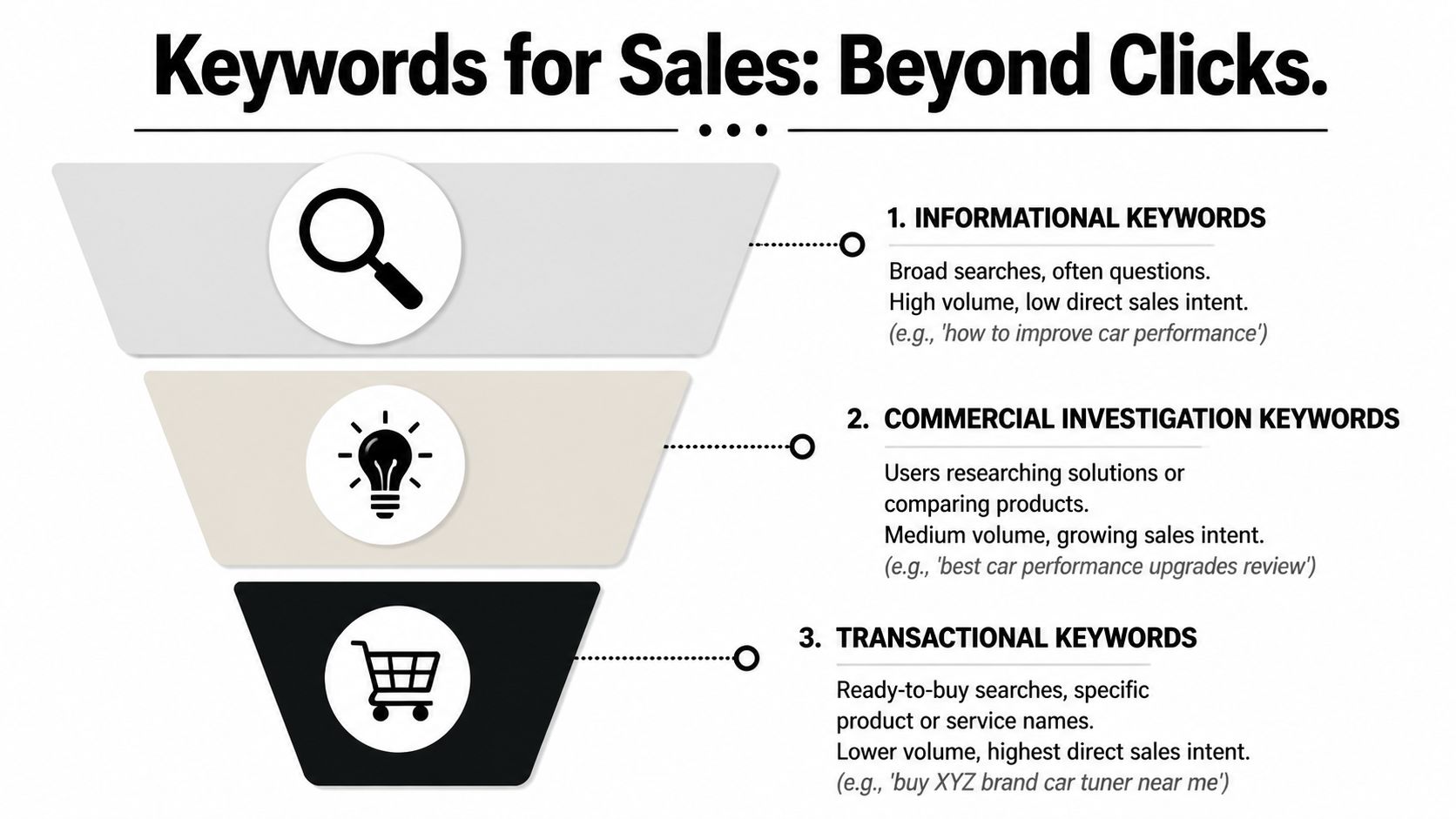
    If you're a small business owner doing your own marketing, keyword research for local SEO usually starts the same way. You open a tool, type in a broad service term, see a pile of keyword ideas, and then get stuck deciding what matters.

    The issue isn't finding more keywords. It's choosing the right local keywords, matching them to the right pages, and focusing on terms that can lead to calls, bookings, and walk-ins without turning this into a full-time job. That's where most small teams lose momentum.

    A practical local SEO workflow is simpler than people make it sound. Start with the services you sell, layer in the places you serve, validate demand with localized tools, study the search results, and then put your best terms on the pages that can win. That's the difference between random optimization and a system that compounds.

    Table of Contents

    The Foundation of Local SEO Keyword Strategy

    Keyword research for local SEO starts with one question. Is the searcher trying to learn, compare, or act nearby right now?

    That sounds obvious, but it's where local businesses go wrong. They treat local search like general SEO and end up writing pages for broad topics that attract curiosity instead of customers. Someone searching for "how to fix a leaky faucet" wants advice. Someone searching for "plumber near me" usually wants a provider, a phone number, hours, reviews, or directions. Those are completely different jobs.

    Why local intent changes everything

    Local search intent is tied to place. The searcher may include a city name, a neighborhood, a ZIP code, or a phrase like "near me." They may also leave the location out and still expect local results. Google often understands that intent from the query itself and responds with maps, listings, reviews, and business profiles.
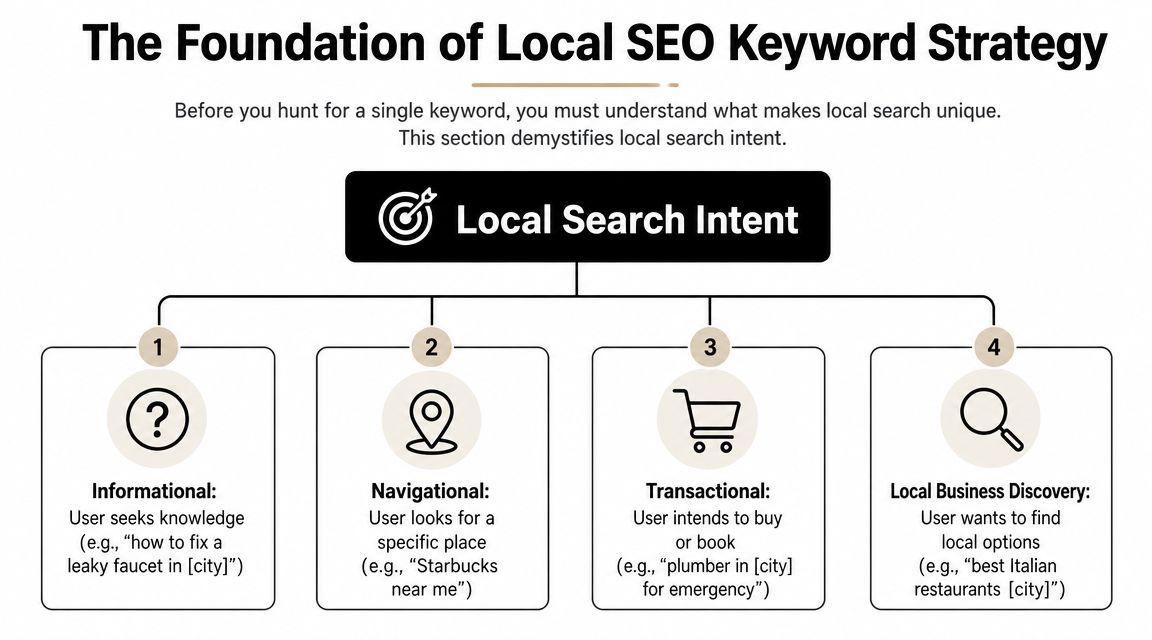
    A diagram illustrating the four types of local search intent for local SEO keyword strategy planning.

    The commercial value of that intent is hard to ignore. SOCi reported that in the U.S., there are over 5.9 million keywords related to "near me" and 800 million searches per month, while LocaliQ found that 28% of local searches lead to a purchase within 24 hours according to SOCi's local SEO statistics roundup. That is why local keyword research belongs at the front of your SEO work, not at the end.

    Practical rule: If a keyword doesn't connect clearly to a service you offer in a place you serve, it's usually not a priority yet.

    Four local intent patterns show up again and again:

    • Informational intent: Searches like "how to choose an HVAC system in Dallas." Useful for trust-building content.
    • Navigational intent: Searches for a specific brand or business, such as "Joe's Auto Repair near me."
    • Transactional intent: Searches with immediate buying or booking intent, such as "emergency dentist in Austin."
    • Local business discovery: Searches like "best coffee shop downtown" where the searcher wants options nearby.

    What success looks like for a local business

    For a local company, traffic alone isn't a useful finish line. A page can get visits and still fail if it doesn't lead to action.

    A better KPI set is grounded in outcomes that matter to a business owner:

    KPI Why it matters
    Phone calls High-intent local searchers often call before they click around
    Direction requests A strong sign that map visibility is doing its job
    Contact form submissions Useful for service businesses with longer sales cycles
    Bookings or appointments Direct proof that the keyword matched buyer intent
    Google Business Profile interactions Important when the search results page is the conversion point

    If you remember one thing, remember this. Local SEO is not a traffic game first. It's an intent-matching game. The business that wins usually isn't the one with the biggest keyword list. It's the one that understands which searches are closest to revenue.

    Discovering Your Core and Long-Tail Local Keywords

    Most small businesses overcomplicate discovery. They start with software when they should start with the business itself.

    The cleanest workflow begins with a short list of seed terms. These are the plain-English names of your services or products. A plumber might start with drain cleaning, water heater repair, leak detection, sewer line repair, and emergency plumbing. A med spa might start with Botox, facials, laser hair removal, and lip filler.

    Start with services, not tools

    An effective local workflow follows a structured path. Semrush and Neil Patel recommend listing solution terms and locations, finding variations with tools, evaluating metrics, analyzing competitors, and then mapping keywords to pages, as outlined in Semrush's local keyword research guide. That's a better approach than opening a tool and chasing whatever looks popular.

    Build your seed list from sources you already have:

    • Service menu: Your main categories, sub-services, and specialty jobs.
    • Sales conversations: The phrases customers use on the phone or in forms.
    • Customer emails and texts: Often more revealing than polished marketing copy.
    • Reviews: They show how people describe your work in natural language.
    • Google Search Console: If your site already has visibility, this often reveals surprise queries worth expanding.

    Once you have your seed list, start combining it with local qualifiers.

    Build your modifier bank

    These are the origins of long-tail local keywords. You don't need to invent clever phrasing. You need to reflect how real customers search.

    Use a bank of modifiers like these:

    • Geographic modifiers: City, neighborhood, district, county, ZIP or postcode, nearby landmarks
    • Service qualifiers: Emergency, same-day, affordable, commercial, residential, 24-hour
    • Problem-based modifiers: Repair, replacement, installation, cost, near me, open now
    • Audience modifiers: Pediatric, family, luxury, small business, apartment, senior

    A few examples make this easier to see:

    Seed term Local modifier Expanded keyword idea
    water heater repair Phoenix water heater repair Phoenix
    dentist near me dentist near me
    dog grooming downtown dog grooming downtown
    HVAC installation 24-hour 24-hour HVAC installation in Tampa
    electrician commercial commercial electrician in Brooklyn

    Broad terms often look attractive in a keyword tool, but small teams usually get faster traction from specific service-plus-location combinations.

    A simple keyword capture template

    You don't need a fancy dashboard. A spreadsheet works.

    Use columns like this:

    Keyword idea Service Location Intent Notes
    emergency plumber Chicago Emergency plumbing Chicago Transactional Strong fit for core service page
    plumber near me General plumbing Service area Discovery Likely Local Pack heavy
    drain cleaning Lincoln Park Drain cleaning Lincoln Park Transactional Candidate for neighborhood section
    how to prevent frozen pipes Chicago Plumbing advice Chicago Informational Blog or FAQ support content

    Keep going until you have a raw list that feels messy. That's normal. Discovery is supposed to create options. The next step is where you cut the list down.

    Analyzing Keywords with Tools and Competitor Insights

    Raw keyword ideas need a reality check before they deserve a page, a GBP update, or a month of effort. For a small team, that check should answer three questions fast. Is anyone nearby searching for this? Does the search show buying intent? Is Google sending people to websites, the map, or both?
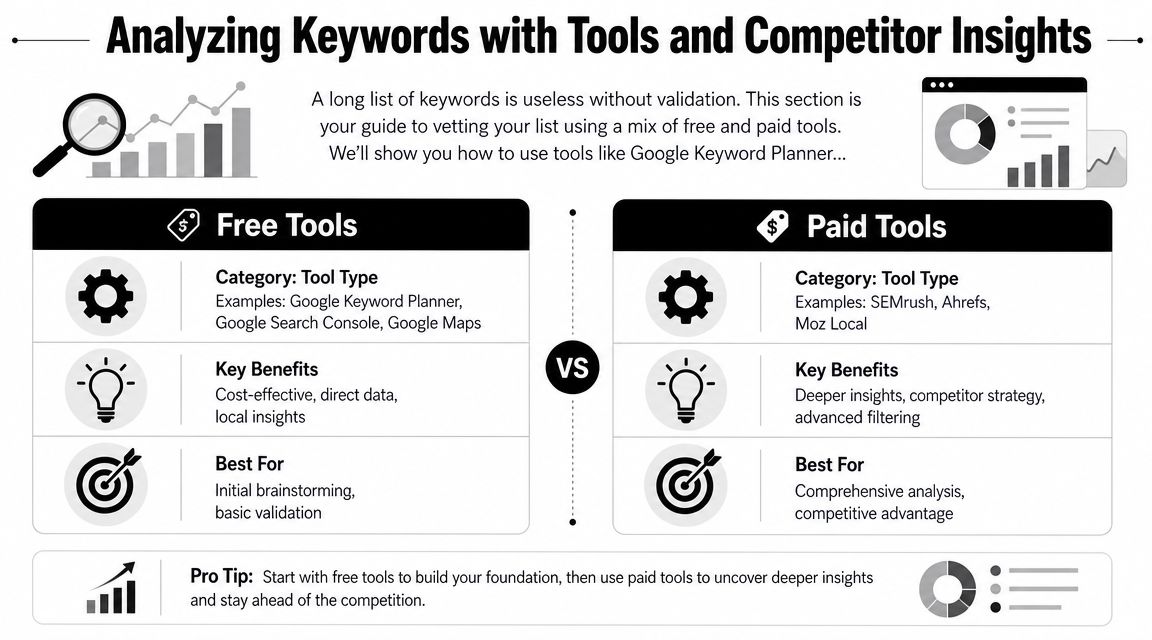
    A comparison chart highlighting the differences between free and paid SEO keyword research and analysis tools.

    I usually tell owners to stop shopping for tools and start building a workflow. Good local keyword analysis comes from combining one source for demand, one for competitor clues, and one manual review of the live search results.

    Good Better Best tool stacks

    Use the stack that matches your time and budget, not the one an agency with six subscriptions uses.

    Level Best for Tool stack Trade-off
    Good Solopreneurs Google Keyword Planner, Google Search Console, Google Trends, Google Maps Low cost, slower research, more manual checking
    Better Small teams Good stack plus Semrush or Ahrefs Faster filtering, better competitor discovery, higher monthly cost
    Best Competitive local markets Better stack plus a dedicated local rank tracker or GBP-focused workflow Better visibility into map performance, more setup and spend

    The trade-off is straightforward. Free tools can get you to good decisions, but they take more judgment. Paid tools save time, surface more variations, and make competitor research easier. They also tempt small teams to chase too many keywords at once.

    A simple rule helps. If you manage one location, start with the Good stack and add one paid tool only after you have clear service pages and a working Google Business Profile. If you compete in a dense market like legal, dental, HVAC, or home services across multiple suburbs, the Better stack usually pays for itself in saved time.

    A practical review workflow

    Run each keyword through the same filter so you do not make decisions based on volume alone.

    1. Check local demand in Google Keyword Planner, Google Trends, and Search Console if you already have some visibility.
    2. Check the live SERP from the target area. Search on mobile and desktop if possible.
    3. Check the map results to see whether the Local Pack is the main conversion point.
    4. Check competitor pages and profiles for the query. Look at page type, GBP categories, reviews, and service wording.
    5. Score the keyword based on relevance, intent, and difficulty to win.

    That fifth step matters because small teams need a way to choose, not just collect.

    A prioritization matrix you can use in a spreadsheet

    This is the version I use with businesses that need to make decisions in one working session.

    Keyword Local demand Intent Local Pack presence Difficulty Business value Priority
    emergency plumber Austin High High High Medium High Do now
    water heater installation Round Rock Medium High Medium Medium High Next
    plumbing tips Austin Medium Low Low Low Low Later
    plumber near me High High Very high High High GBP + service page support

    Keep the scoring simple. High, medium, and low is enough. A messy but usable sheet beats a detailed scoring model you never finish.

    How to read the live search results

    Keyword tools estimate demand. Google's results show the format you have to win.

    Search the phrase as a customer would. For example, search “plumber near me” or “water heater repair Phoenix” and study the first screen. If you mostly see a map with three businesses, reviews, call buttons, and directions, that keyword is not just an SEO content play. It is a Local Pack play. Your page still matters, but your Google Business Profile, category choice, reviews, and landing page alignment matter just as much.

    Check these questions:

    • What shows first? Local Pack, ads, organic pages, directories, AI Overview, or a mix
    • Who is winning? Independent local businesses, large directories, franchises, or national brands
    • What page type ranks? Homepage, service page, location page, review page, or article
    • What intent is Google assuming? Emergency help, general research, price comparison, or brand lookup
    • Is a click to the website even likely? Some searches lead to calls or direction requests straight from the map

    The last point is easy to miss. If the map is doing most of the work, a keyword can still be valuable even when website traffic stays modest. For a locksmith, roofer, dentist, or towing company, phone calls from the Local Pack often matter more than pageviews.

    Analysts cited in Koom's local SEO research article note that local searches often end on the results page itself through map interactions and business profile actions. That matches what small businesses see in practice. The win is often the call, not the click.

    To get a visual walk-through of keyword validation and search result analysis, this overview is useful:

    What to check in the Local Pack

    Local pack analysis sounds technical, but it just means studying the businesses shown in the map for your target search. Open Google, search a service in your area, and inspect the three map listings that appear first.

    Look for patterns you can act on:

    • Primary category fit: Does the listed category closely match the search term?
    • Review language: Do recent reviews mention the exact service in the search query?
    • GBP completeness: Are hours, services, photos, and attributes filled out and current?
    • Landing page match: Does the profile link to a page that clearly answers the query?
    • Location strength: Is the business physically close to the search area or strongly associated with it?
    • Reputation signals: Are ratings, review volume, and recency noticeably stronger than yours?

    Competitor research is useful here, but keep it practical. Do not copy every category, service label, or page title a competitor uses. Find the few signals that repeat across winners, then fix gaps on your own profile and pages.

    I often see businesses lose local rankings because their signals are split. The page targets “drain cleaning,” the GBP leans toward “emergency plumber,” and reviews mostly mention “water heater repair.” Google has to guess what the business is best known for. Competitors with tighter alignment make that decision easy.

    For small teams, that is the goal of this stage. Find the terms where demand exists, the SERP matches your offer, and the Local Pack gives you a realistic path to calls and leads.

    Prioritizing High-Intent Keywords for Quick Wins

    This is the point where discipline matters. Most small teams don't fail because they chose zero good keywords. They fail because they tried to target too many at once.

    A practical keyword plan favors keywords that are highly relevant, locally validated, commercially useful, and realistically winnable. That's not always the highest-volume term.
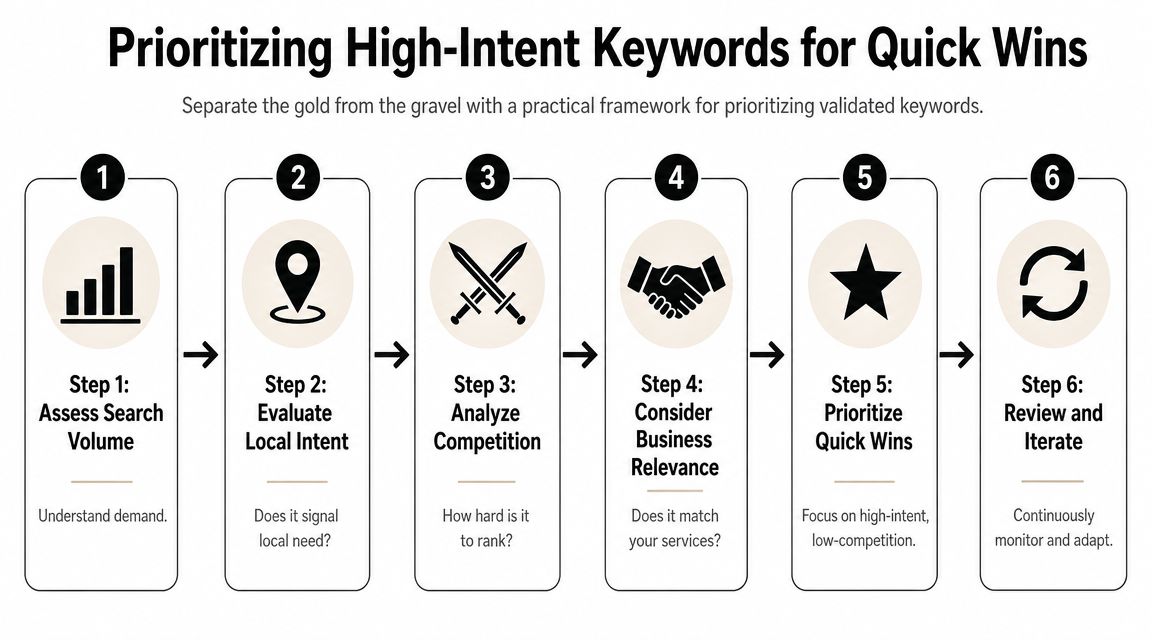
    A six-step infographic illustrating a practical framework for prioritizing high-intent keywords to achieve quick SEO wins.

    The four-factor filter that keeps you honest

    Experts at LocalDominator and SEObility agree that local keyword prioritization turns on relevance, local search volume, competition, and intent, with relevance as the most important factor, based on LocalDominator's local keyword research framework.

    Here's how to apply those four factors in practice:

    1. Relevance
      If you don't want the lead, don't target the keyword. A family law firm shouldn't chase "criminal defense lawyer near me" just because it appears nearby on the SERP.

    2. Local volume
      You need evidence that people in your service area search for it. Local demand beats national volume every time in local SEO.

    3. Competition
      Some terms are crowded by directories, mature brands, and aggressive local players. Others have weaker pages, thin profiles, or poor page matching. Those are often better entry points.

    4. Intent
      "How to unclog a sink" and "emergency plumber open now" are not equal. One is educational. One is urgent. If your time is limited, urgency wins.

    A good local keyword often looks boring on paper. That's usually a good sign. Specific service terms convert better than flashy broad phrases.

    A prioritization matrix you can use today

    Use a simple 1 to 3 scoring model. Keep it lightweight so you'll maintain it.

    Keyword Relevance Local volume Competition Intent Total Action
    emergency plumber Chicago 3 3 2 3 11 Target now
    drain cleaning Lincoln Park 3 2 2 3 10 Target now
    plumbing tips Chicago 2 2 2 1 7 Support content
    plumber 2 3 1 2 8 Defer

    A few quick rules make this matrix more useful:

    • Target now: High relevance, strong intent, manageable competition
    • Support content: Useful for blog posts, FAQs, and trust-building pages
    • Defer: Broad terms that need more authority or a stronger local footprint
    • Drop: Keywords that don't fit your business model or service area

    Small teams achieve quick wins. They stop chasing the biggest phrase and start publishing the page most likely to rank and convert first.

    Mapping Keywords to Pages and On-Page Optimization

    Keyword research only starts the job. The ranking asset is the page, and in local SEO, the wrong page match costs calls.

    A common example is a plumber with one general Services page trying to rank for emergency plumbing, drain cleaning, water heater repair, and every neighborhood in the city. Google has to guess which query that page deserves to rank for. Customers have the same problem. A person searching "emergency plumber Chicago" wants a fast, obvious answer, not a page that also talks about remodels and sump pumps.
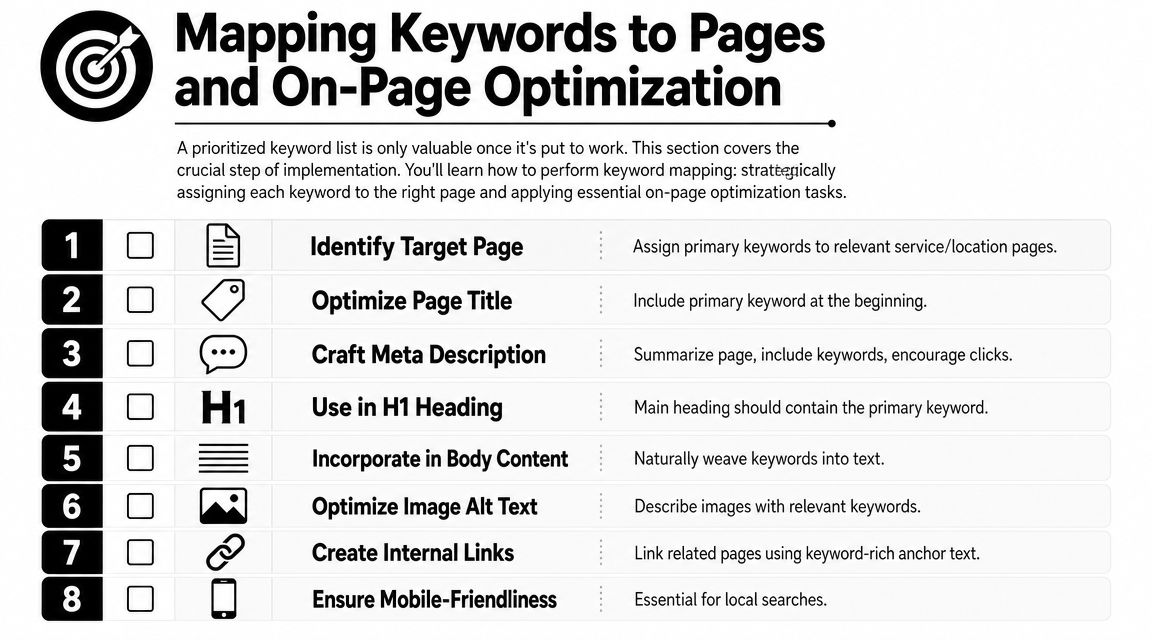
    A numbered checklist showing eight essential steps for mapping keywords to pages and performing on-page SEO optimization.

    Map existing pages first

    For a small team, the fastest workflow is simple. Start with the pages you already have. Assign one primary keyword to each page. Then look for gaps.

    Use a page map like this:

    Page Primary keyword Secondary terms Keep or create
    Emergency plumbing page emergency plumber Chicago 24-hour plumber Chicago, urgent plumbing repair Keep
    Drain cleaning page drain cleaning Chicago clogged drain repair Chicago Keep
    Water heater page water heater repair Chicago hot water heater repair near me Keep
    Lincoln Park service area page plumber Lincoln Park local plumbing service Lincoln Park Create only if truly distinct

    This step prevents keyword cannibalization, which is just a technical way of saying two pages from the same site compete for the same search.

    A few rules keep the map usable:

    • One primary keyword per page: Variants and close synonyms can support the main term
    • Match intent to page type: Service terms belong on service pages. Informational terms belong on blog posts or FAQs
    • Create location pages only when they can be unique: If the page has no distinct proof, service details, or local relevance, skip it
    • Support the money page instead of competing with it: A blog post on "signs you need drain cleaning" should link to the drain cleaning service page, not target the same main phrase

    If time is tight, use a Good, Better, Best approach.

    • Good: Spreadsheet with page URL, target keyword, title tag, and status
    • Better: Spreadsheet plus a quick SERP check for each keyword to confirm the right page type is ranking
    • Best: Spreadsheet, SERP check, and local pack review to see whether the keyword is won mainly through the website, the Google Business Profile, or both

    That last point matters more than many business owners realize. If the search result is dominated by the map pack, your page still needs to rank, but it also needs to reinforce the profile that may get the click or call first.

    How to optimize the page without stuffing it

    After the keyword is mapped, make the page obvious to both searchers and Google.

    Place the primary keyword in the spots that carry the most meaning:

    • Title tag: Lead with the service and city when it fits naturally
    • H1 heading: Keep it clear and close to the title tag
    • Opening paragraph: Confirm the service and area early
    • Subheadings: Use related service terms and real customer questions
    • Body copy: Add useful local details such as service areas, response times, common job types, and trust signals
    • Image alt text: Describe the image first. Add local context only when it is relevant

    Read the page out loud.

    If it sounds repetitive, salesy, or strange, fix the copy. Local pages usually improve when they are more specific, not when they repeat the exact keyword five extra times.

    Schema can support this work by clarifying business details, services, and location. It helps search engines interpret the page, but it does not fix weak page targeting or thin content.

    Don't ignore your Google Business Profile

    For many local keywords, the Local Pack is the first real conversion point. That is the map and three business listings people see when they search for something like "plumber near me." If your profile shows up there, the customer may call without ever opening your website.

    That changes how page mapping should work.

    Your service pages and your Google Business Profile should use the same service language so Google sees a consistent pattern across your site and profile. Keep that alignment across:

    • Primary and secondary categories
    • Business description
    • Services and products
    • Posts and updates
    • Photos and captions
    • Questions and answers

    Here is the practical trade-off. A page targeting "water heater repair Chicago" may help organic rankings, but if the map pack gets most of the clicks and calls for that query, the win comes from both assets working together. The page supplies relevance and detail. The profile supplies visibility, reviews, hours, and a fast path to contact.

    For a solopreneur, that means prioritizing pages that support high-intent map pack searches first. Build the emergency service page before the broad company overview. Tight alignment beats more content.

    Tracking Your Local SEO Performance and Iterating

    Local SEO work compounds only if you review it. Otherwise you're publishing pages, tweaking profiles, and guessing.

    Tracking doesn't need to be complicated. For a small team, the best system is the one you'll check consistently. That usually means a short keyword set, a simple notes field, and a monthly review of business outcomes.

    Track business signals, not just ranks

    Rank tracking matters, especially by city or service area, but don't treat it as the only scorecard.

    Watch these signals together:

    • Keyword positions in your target area: Especially for service-plus-location terms
    • Google Business Profile actions: Calls, direction requests, and other profile interactions
    • Lead form submissions: Look for pages that start generating qualified inquiries
    • Call quality: Ask staff which services people mention when they call
    • Page engagement: Are visitors landing on the intended page and taking the next step?

    One useful pattern shows up often. A keyword may never drive huge website traffic because the search results page answers the query with map listings and profile details. It can still be a winner if it leads to more calls or direction requests. That's why local SEO performance needs business context.

    A lightweight review rhythm for small teams

    A monthly review works well for most small businesses.

    Use a short checklist:

    • Check your top target keywords: Did any move up, down, or trigger different SERP features?
    • Review your best pages: Are the mapped service pages still the right fit?
    • Inspect one competitor: Did they launch a better page, add reviews, or improve their profile?
    • Look for near-miss keywords: Terms where you're visible but not yet strong enough to win consistently
    • Refine the next batch: Update one page, improve one profile area, and build one supporting asset

    What works is steady iteration. Update pages with better local details. Tighten service language. Improve internal links. Add FAQs that reflect real customer questions. Expand into adjacent neighborhoods only when the current service pages are doing their job.

    The businesses that get the most from keyword research for local SEO don't treat it like a one-time spreadsheet exercise. They use it as a feedback loop. That's where the edge comes from.


    If you want a simpler way to turn keyword research into content and rankings without hiring an agency, Agency Secrets is worth a look. It gives small business owners a practical SEO playbook built around buyer-intent keyword targeting, strong content structure, backlinks, and evergreen growth, with OutRank helping automate research, article creation, publishing, and competitor analysis.

  • Content Marketing for Local Business: A Winning Playbook

    Content Marketing for Local Business: A Winning Playbook

    You're probably doing what most local owners do. You run a few ads, get a short spike in calls, then watch the leads dry up the moment you pause spend. Meanwhile, your website sits there like an online brochure instead of a sales asset.

    That's the gap content marketing for local business closes. It turns your site into something that keeps working when you're on jobs, seeing patients, serving tables, or handling payroll. A strong service page can bring in calls. A useful FAQ can remove hesitation. A well-written article can attract someone who didn't know your business name yesterday but knows they need help now.

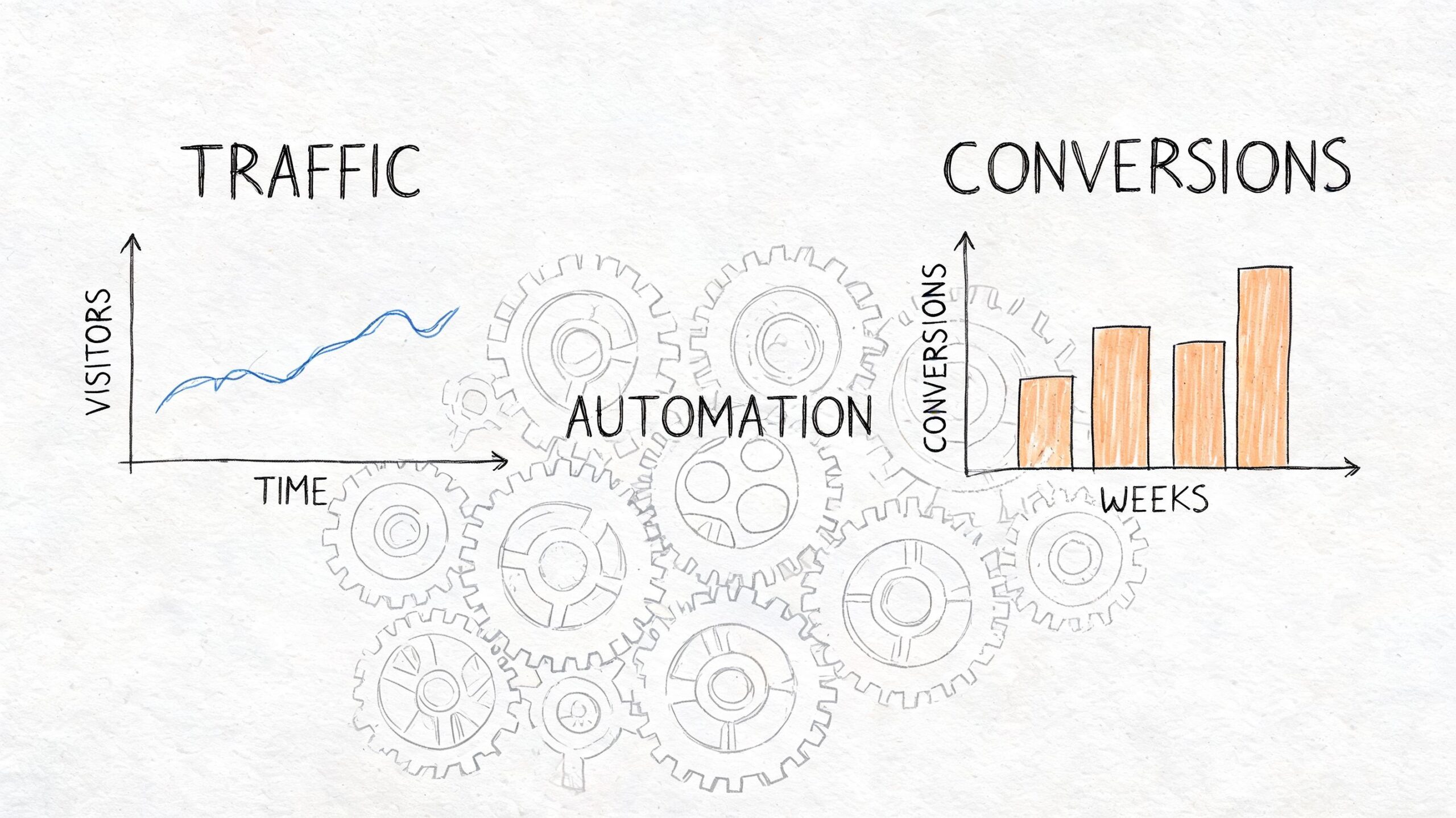
    The part most businesses miss is that this only works as a system. Keyword research feeds content. Content feeds internal links. Better structure supports local SEO. Local SEO makes link building easier. Links strengthen the pages you already published. Over time, the whole thing compounds.

    Table of Contents

    The Local Advantage Why Content Outperforms Ads

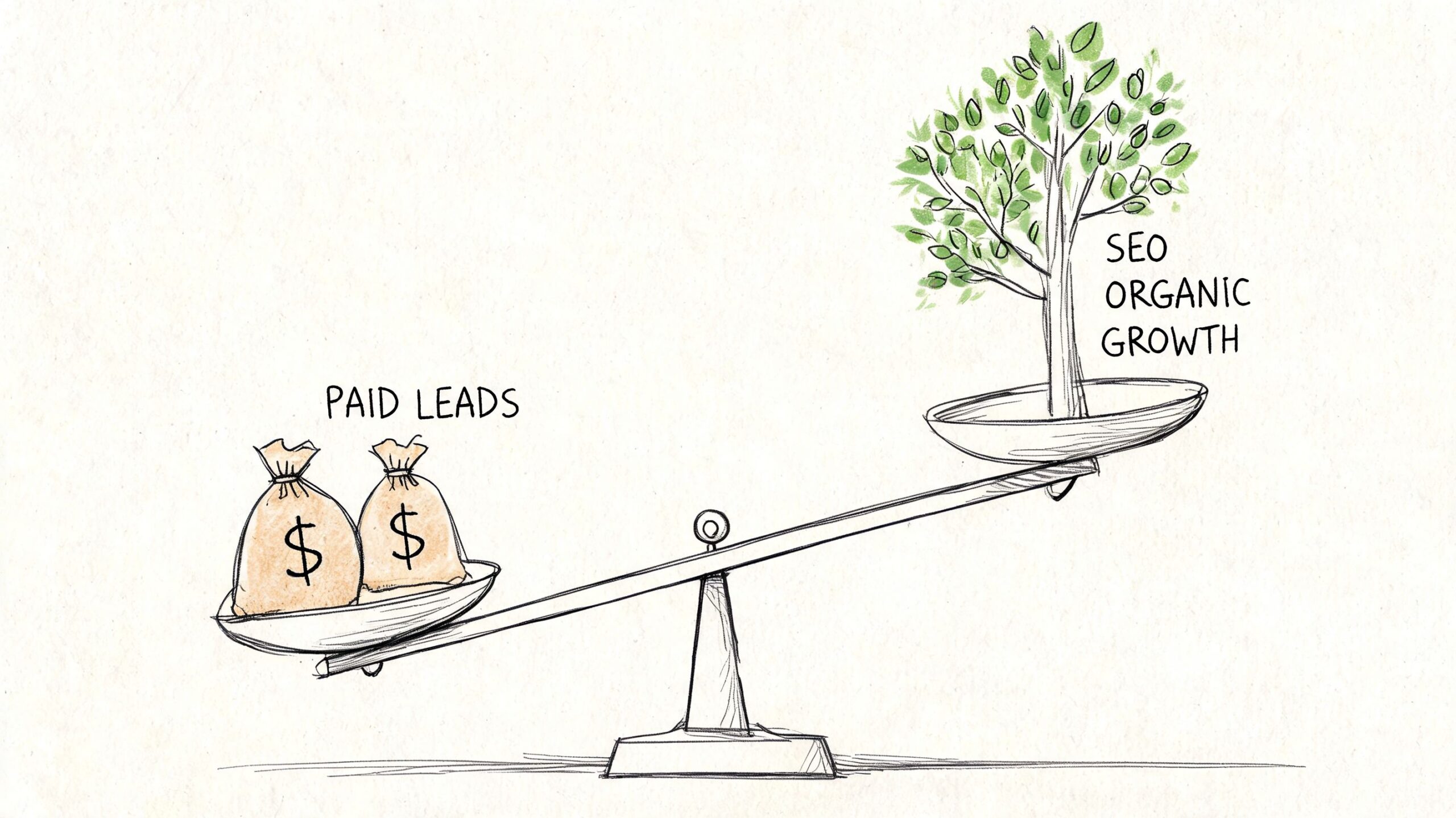
    Paid ads are rented attention. Once your budget stops, the traffic stops with it. That's fine for a promotion or a short-term push, but it's a weak foundation for a plumber, dentist, HVAC company, roofer, or café that needs steady demand.

    Content works differently. You publish a page once, improve it over time, and it can keep bringing in visits, calls, and quote requests long after you hit publish. A page about “emergency plumber in South Austin,” a guide to “Invisalign cost in Scottsdale,” or an article on “best coffee beans for French press at home” can keep showing up whenever local buyers search.

    A stressed businessman surrounded by failed marketing campaigns, contrasting ineffective paid ads with the success of content marketing.

    This isn't a fringe tactic anymore. 90% of organizations now have a content marketing strategy, and 71% of marketers say its significance has grown in the past year, according to compiled industry benchmarks on content marketing adoption. For a local business, that means your market is training customers to expect useful content before they call.

    Practical rule: Ads can buy attention. Content can earn trust and keep earning it.

    The best part is the asset value. A good article doesn't disappear like a boosted post. It can support your service pages, rank for long-tail local searches, answer objections, and give other sites a reason to link to you. That's where the compounding starts.

    Here's the trade-off most owners need to hear clearly:

    Approach What it does well What it does poorly
    Paid ads Fast testing, immediate visibility, seasonal promos Stops working when spend stops
    Local content Builds search visibility, trust, and reusable sales assets Takes discipline and consistency
    Both together Captures short-term demand while building long-term reach Requires focus so you don't spread thin

    If your budget is tight, content usually gives you a better long-term position. If your budget is healthy, content still matters because it lowers your dependence on paid acquisition.

    That's why content marketing for local business isn't just blogging. It's a growth engine built from pages, articles, FAQs, internal links, citations, and local trust signals that stack on each other.

    Find What Your Local Customers Are Asking

    Most local content fails before writing starts. The business guesses what people want, writes broad posts nobody asked for, and wonders why nothing ranks or converts.

    The better approach is simpler. Build content from the questions customers already ask, then match those questions to the phrases they use in search. Salesforce recommends identifying your audience by analyzing customer challenges, and Keap emphasizes keyword research so content reflects the exact phrases people search for, as explained in Salesforce's small business content marketing guidance.

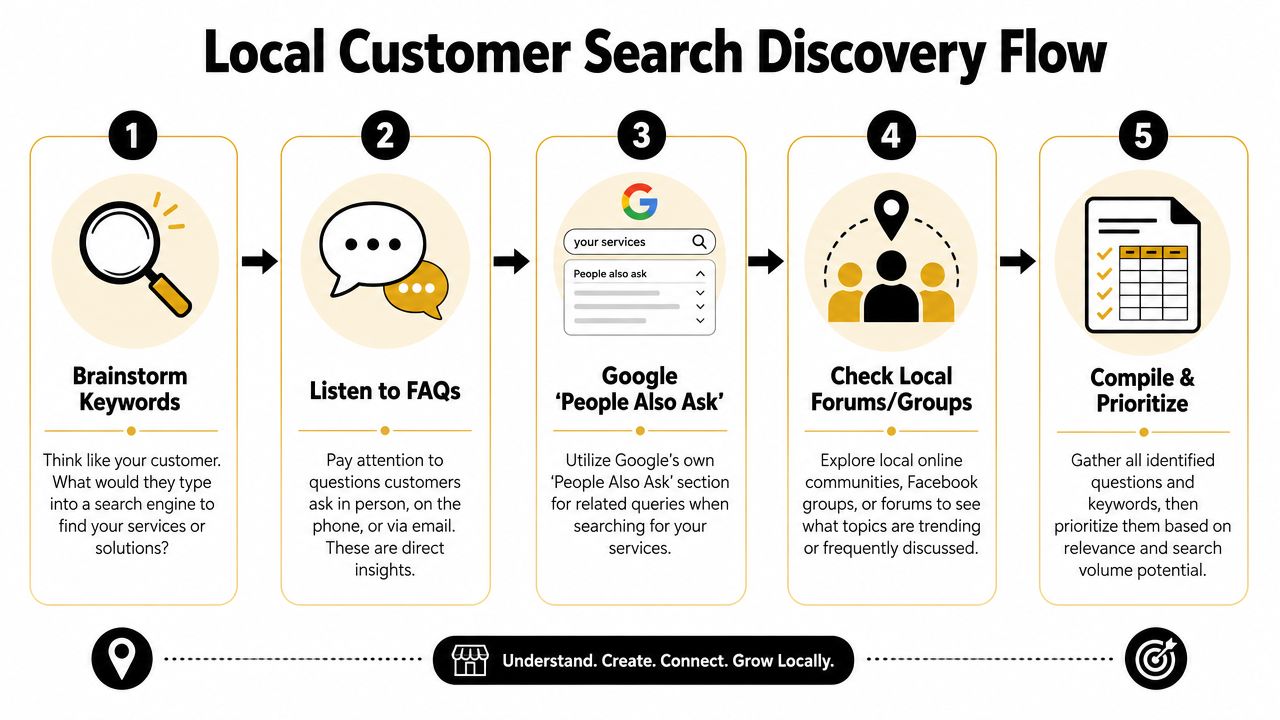
    A five-step flowchart illustrating a local customer search discovery process for SEO and marketing purposes.

    Start with the questions you already hear

    You don't need fancy software to begin. Open a document and list what people ask on calls, in DMs, at the front desk, and during estimates.

    For a plumber, the list might look like this:

    • Urgent service questions: “Do you handle burst pipes at night?” “How fast can someone get here?”
    • Cost questions: “How much does water heater replacement cost?” “Do you charge a callout fee?”
    • Trust questions: “Are you licensed?” “Do you guarantee the work?”
    • Problem questions: “Why does my drain keep backing up?” “Why is my water pressure low?”

    Those aren't just sales questions. They're content topics.

    Customers usually search for the problem first and the provider second.

    Turn one service into many search terms

    Take one core service and expand it with modifiers. A local electrician in Phoenix could start with “electrical repair” and branch into:

    • Service plus city: electrical repair Phoenix
    • Service plus suburb: electrical repair Tempe
    • Service plus urgency: emergency electrician Phoenix
    • Service plus problem: flickering lights electrician Phoenix
    • Service plus cost: electrical panel upgrade cost Phoenix
    • Service plus audience: electrician for older homes Phoenix

    Many owners go wrong. They only target broad service phrases and skip the high-intent searches around symptoms, urgency, and pricing. Those are often the searches that lead to calls because the person already feels the problem.

    A quick way to prioritize is to sort topics into three buckets:

    Bucket What it usually means Example
    Ready to buy The person wants a provider now emergency plumber in South Austin
    Comparing options The person is evaluating service types or pricing tank vs tankless water heater Austin
    Learning first The person wants to understand the issue why does my bathroom sink smell

    Use Google like a customer would

    Type your service into Google and look closely at the results page. Autocomplete, related searches, and “People Also Ask” will show the language buyers use. That's free research.

    If you own a dental clinic, search terms might uncover angles like:

    • Treatment concerns: “Does Invisalign hurt”
    • Price intent: “Invisalign cost Scottsdale”
    • Comparison intent: “Invisalign vs braces adults”
    • Location intent: “cosmetic dentist near Old Town Scottsdale”

    Then check your own Google Business Profile reviews, email inbox, and contact form submissions. If several people phrase the same concern similarly, that wording belongs in your page headings, FAQs, and article titles.

    A practical workflow for content marketing for local business looks like this:

    1. List services you want more of
    2. Write down customer questions tied to those services
    3. Add city, neighborhood, and urgency modifiers
    4. Check Google autocomplete and People Also Ask
    5. Group similar queries into one strong page instead of many weak ones

    Don't create a separate page for every tiny variation. A plumber doesn't need one page for “clogged kitchen sink Austin” and another for “kitchen sink drain clogged Austin” if one solid page can cover the intent well.

    What works is consolidation with clarity. What doesn't work is publishing thin, repetitive pages that say the same thing with slightly different keywords.

    Create Content That Answers Local Questions

    Once you know what people search, your next job is answering better than anyone local. That doesn't mean writing more. It means publishing the right mix of pages so each piece supports the others.

    HubSpot's 2026 data reports that website, blog, and SEO content is the highest ROI-generating channel for marketers, and blog posts were named among the top five highest-ROI formats by 22.26% of marketers in 2025, with blogs used by 38% of marketers in that year, according to HubSpot marketing statistics. For local businesses, that matters because service pages and evergreen articles can keep attracting buyers long after publication.

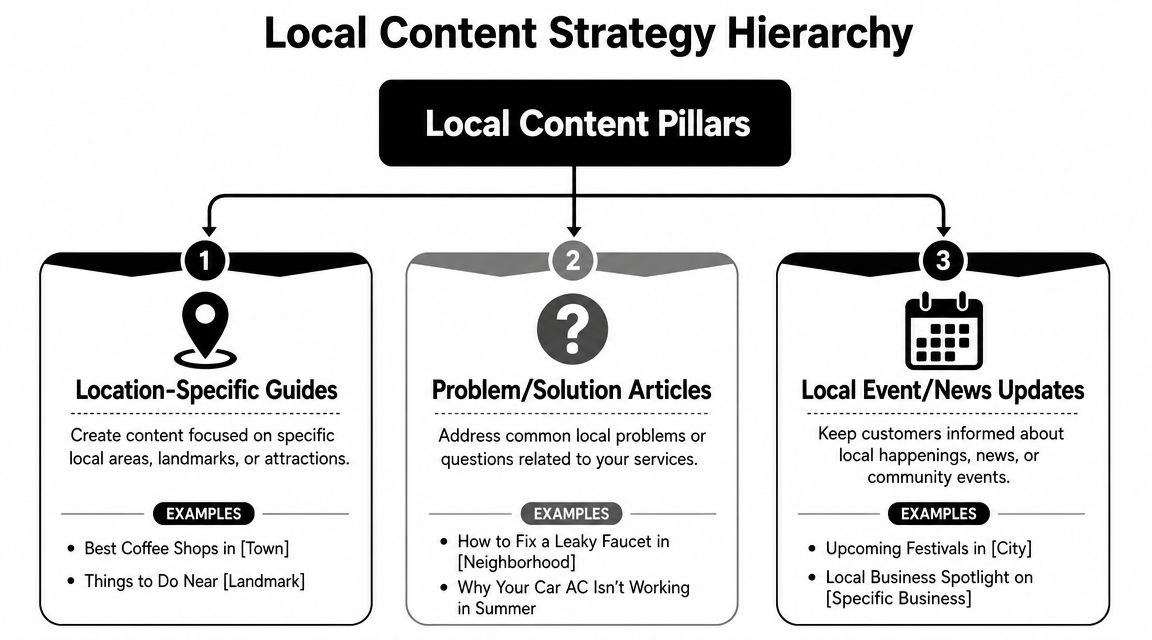
    A diagram outlining the Local Content Strategy Hierarchy with three main content pillars for business growth.

    Service pages that convert

    Start with your money pages. These are the pages for services you want booked now.

    A strong local service page usually includes:

    • A clear headline: Say the service and area plainly. “Emergency Plumbing in South Austin” is stronger than “Trusted Solutions for Your Home.”
    • Specific problems you solve: Burst pipes, blocked drains, leaking water heaters, no hot water.
    • Proof and reassurance: Licensing, service area details, process, warranty, financing if relevant.
    • A visible next step: Call button, booking form, request-a-quote form.

    For a dentist, that may be a page on “Dental Implants in Naperville.” For a café, it may be “Coffee Catering for Office Events in Brooklyn.” For a roofer, it may be “Roof Repair in Plano.”

    These pages should be direct. Don't bury the service under brand storytelling.

    Location pages that prove local relevance

    A location page is not the same as a service page. It exists to show that your business understands a specific area and serves it well.

    A useful location page might include:

    Element Example for a plumber Why it matters
    Area-specific intro Common plumbing issues in older homes in Hyde Park Shows local relevance
    Nearby landmarks or neighborhoods Serving Hyde Park, North Loop, and Hancock Helps match local intent
    Local service context Familiar with older pipe systems and slab leak issues Builds trust
    Contact path Call for service in this area today Keeps the page action-oriented

    What doesn't work is copying one template across ten suburbs and swapping the town name. That's easy to spot and rarely persuasive.

    If a local page wouldn't help a real customer in that area, it probably won't help your rankings either.

    A realtor can do this especially well. A page about a neighborhood can include parks, commute patterns, school-adjacent lifestyle points, pet-friendly spots, and housing style notes. That kind of specificity makes the page useful, not just optimized.

    Blog posts that pull in early-stage demand

    Blog content catches people before they're ready to call. Done well, it feeds your service pages with internal links and trust.

    Good local blog topics usually fall into a few patterns:

    • Cost and pricing: “How much does a new roof cost in Denver?”
    • Problem diagnosis: “Why does my AC smell musty in summer?”
    • Comparisons: “Porcelain veneers vs bonding”
    • Local guidance: “What café owners should know about seasonal outdoor seating permits”
    • Preparation content: “What to do before the exterminator arrives”

    A café owner could publish “Best pastries for office breakfast catering” and link that post to a catering service page. A dental clinic could write “How long does Invisalign treatment take” and link to its Invisalign consultation page. A plumber could publish “What to do when a pipe bursts before help arrives” and direct readers to emergency service.

    Here's the important connection. Your blog is not separate from sales. It supports sales when each article points readers toward the next logical page.

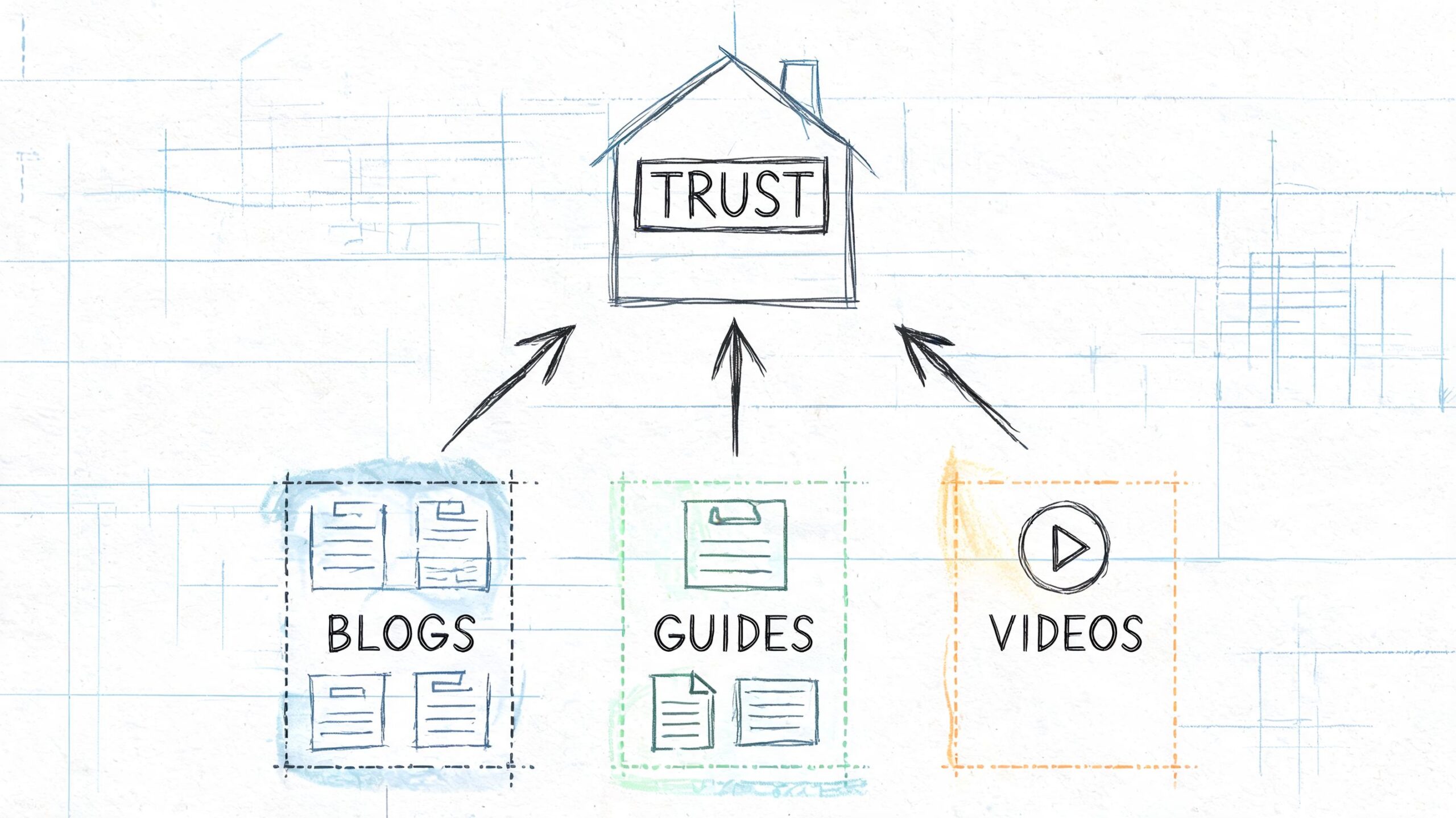
    A simple three-part content stack looks like this:

    1. Service page for direct commercial intent
    2. Location page for geographic relevance
    3. Supporting blog post for questions, objections, and early-stage search intent

    That stack turns isolated pages into a content system. Each new article strengthens existing assets instead of sitting alone in your blog archive.

    Master On-Page and Local SEO Fundamentals

    Publishing useful content isn't enough. Google still needs clear signals about what the page is about, where you work, and how the page connects to the rest of your site.

    A lot of owners overcomplicate this part. You don't need advanced technical knowledge to get the basics right. You need a repeatable checklist and the discipline to apply it to every important page.

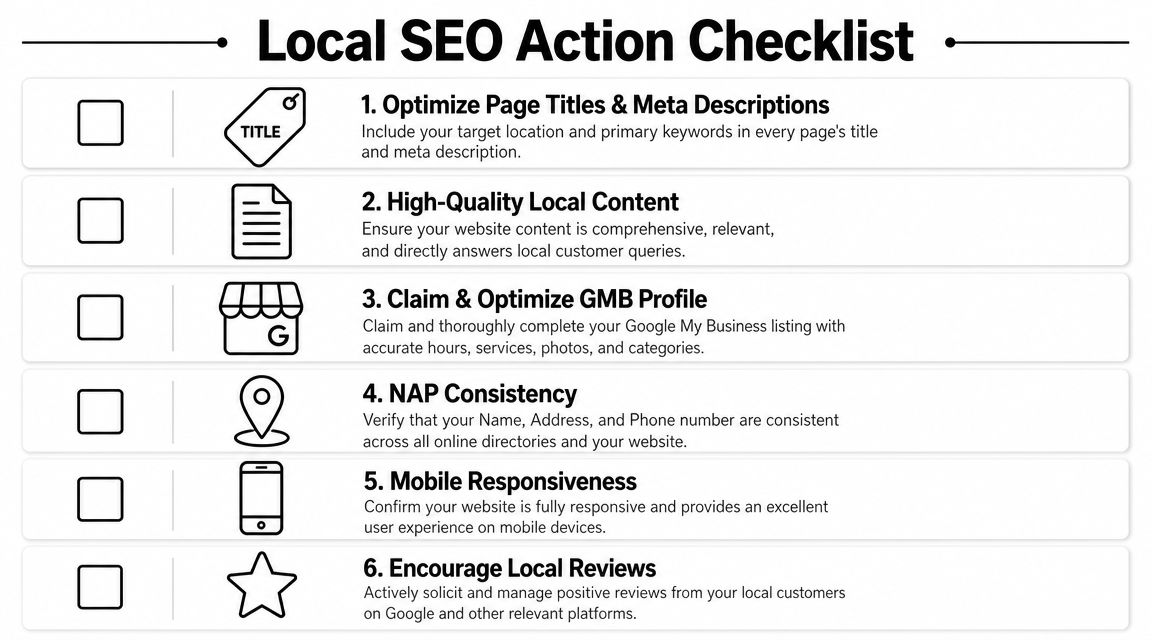
    A checklist infographic titled Local SEO Action Checklist displaying six essential steps for local business search optimization.

    What to fix on every important page

    Start with the page elements users and search engines both read first.

    • Title tag: Include the core service and location naturally. “Emergency Plumber in South Austin | 24 Hour Service”
    • Meta description: Summarize the page clearly and give a reason to click.
    • H1 heading: Match the page topic without being clever.
    • H2 and H3 structure: Break up the page by questions, services, process, and FAQs.
    • Internal links: Link from blog posts to service pages, from service pages to related service pages, and from location pages to contact pages.
    • Image alt text: Describe the image accurately and keep it relevant.

    Here's a simple model:

    Page type Main keyword focus Best internal links
    Service page service + city related services, contact page, FAQs
    Location page service area or neighborhood service page, testimonials, contact page
    Blog post question or problem query service page, location page, relevant FAQ

    Internal links matter more than most local businesses think. They help users move through your site, and they show search engines which pages carry the most weight.

    Before the next checklist, this walkthrough is worth watching if you want a visual explanation of local SEO basics.

    What local businesses need beyond the page

    Local SEO also depends on signals outside the article itself.

    Your baseline checklist should include:

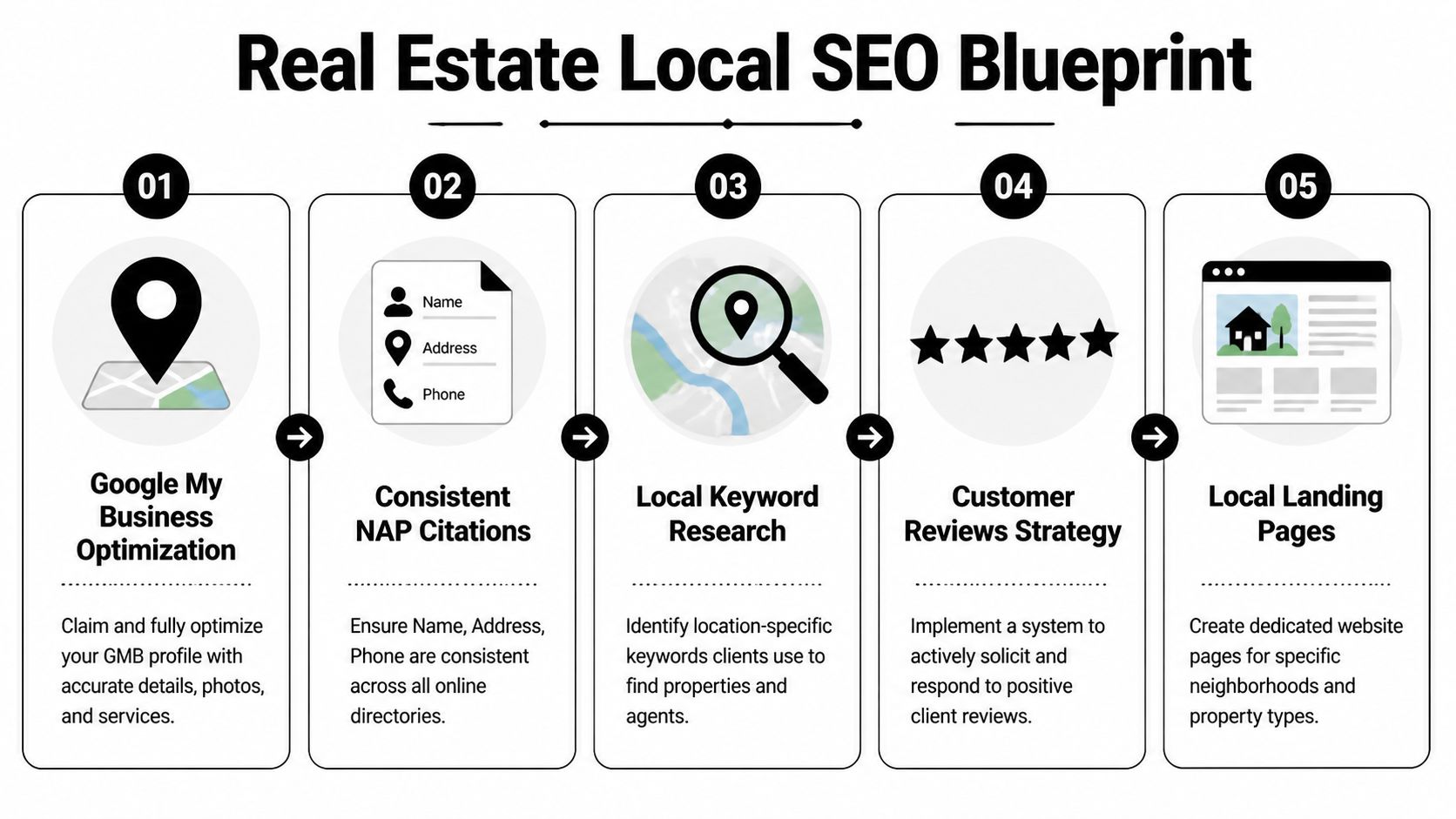
    • Google Business Profile: Claim it, complete it, choose the right categories, and keep hours current.
    • NAP consistency: Your business name, address, and phone number should match across your website and directory listings.
    • Contact page signals: Include your full contact details and service area information.
    • Map embed: Add a Google Map on your contact or location page if you serve from a physical location.
    • Schema markup: LocalBusiness schema helps search engines understand business details in a structured way.
    • Mobile usability: Most local searches happen on phones, so your pages need to load cleanly and make calls easy.

    A local page fails when the user has to hunt for basics like service area, phone number, hours, or next step.

    What works is clarity. What doesn't work is stuffing city names into awkward sentences, hiding contact details, or publishing long pages with no structure.

    If you do the fundamentals well, your content has a better chance to rank, earn clicks, and turn visits into calls. If you skip them, even strong writing can underperform.

    Build Local Trust with Links and Citations

    Local rankings don't come from content alone. Google also looks for trust signals that show your business is real, established, and connected to the community it serves.

    That's where citations and local links come in. Citations confirm your business details across the web. Links from relevant local sites strengthen authority and can send direct referral traffic too.

    Citations first, then relationships

    Start with the boring work because it matters. Make sure your business appears consistently in the places customers and search engines expect to find it.

    That usually means checking:

    • Major business listings: Your core profiles and local directories
    • Industry directories: Dental associations, legal directories, contractor listings, restaurant platforms
    • Community listings: Chamber of commerce pages, neighborhood business directories, local event sites
    • Review platforms: The sites your customers already use to evaluate businesses in your category

    For a dentist, that might mean dental association listings and local directories. For a café, it may include local food guides and city business pages. For a plumber, it often includes contractor and home service directories.

    If your name, address, or phone number varies across those profiles, clean that up before chasing advanced tactics. Messy citations dilute trust.

    How local links happen in real life

    The best local links rarely come from outreach templates. They come from doing real things in your market that other organizations naturally mention online.

    A few examples:

    A plumbing company sponsors a youth baseball team. The league posts sponsor logos and links from its website.

    A dentist hosts a school toothbrush drive. A local nonprofit lists community partners and links to the practice.

    A café collaborates with a nearby bookstore for an evening event. The bookstore publishes the event page and links to the café's site.

    A roofer creates a storm prep checklist for homeowners in a specific county. A neighborhood association shares it in its online resources section.

    Those links are hard for competitors to copy because they're rooted in actual relationships.

    Spammy link tactics usually leave local businesses with junk placements nobody reads. Community-based links do the opposite. They build search trust and local recognition at the same time.

    A strong content asset also makes link building easier. If you publish a useful neighborhood guide, local event roundup, or homeowner checklist, you give other sites a reason to reference your business. That's why the earlier steps matter. Better content creates more link opportunities later.

    Your System for Compounding Growth

    Most local businesses don't need more marketing ideas. They need a system they can keep running while the business stays busy.

    That system is simple. Publish on a schedule you can maintain. Promote each piece in the channels your audience uses. Check performance. Improve what works. Metric Marketing recommends maintaining an editorial calendar, while multi-channel distribution and analytics review are emphasized in the source material summarized at Metric Marketing's small business content guidance.

    A calendar you can actually keep

    You do not need an elaborate publishing machine. You need consistency.

    For most local businesses, a workable rhythm looks like this:

    Week Main task Example
    Week 1 Publish one service or location page update add FAQs to “Emergency Plumbing in Round Rock”
    Week 2 Publish one supporting article “Why your water heater runs out faster in winter”
    Week 3 Distribute and repurpose email newsletter, Facebook post, Instagram story
    Week 4 Review and improve update title, add internal links, expand FAQ

    That's manageable for a small team. It's also enough to create momentum if you stick with it.

    If you own a dental clinic, your month might include one implant page refresh, one blog post about recovery expectations, and one email to past consultation leads. If you run a café, it might be one catering page update, one event-related blog post, and a newsletter promoting both.

    What to measure without drowning in reports

    A lot of owners quit because analytics feels like homework. It doesn't need to.

    Look at a short list:

    • Which pages get search impressions and clicks
    • Which pages drive calls, form submissions, or bookings
    • Which topics hold attention and lead users to another page
    • Which channels help distribute content effectively

    You can get most of this from Google Search Console, Google Analytics, your call tracking setup, and your form submissions.

    The key is pattern recognition. If a plumber's article about slab leaks keeps attracting search traffic, that topic deserves follow-up content and stronger links to the slab leak service page. If a dentist's financing FAQ gets visits but no consultations, the page may need a clearer next step. If a café's catering page gets traffic from email but not search, that points to an SEO gap, not a content gap.

    What doesn't work is publishing, sharing once, and forgetting it. What does work is a loop:

    1. Publish
    2. Promote
    3. Measure
    4. Improve
    5. Link it into the rest of your site

    That's how content marketing for local business becomes a compounding engine instead of a pile of disconnected posts. Each useful page makes the next one easier to rank. Each internal link strengthens existing assets. Each citation and local mention supports trust. Over time, your site stops acting like a brochure and starts acting like a lead source.


    If you want a simpler way to execute this without hiring a full agency, Agency Secrets is worth a look. It focuses on the exact system local businesses need: buyer-intent keyword research, consistent publication of authoritative content, relevant backlinks, and the compounding effect of evergreen SEO. If you want the playbook and the tools to help you run it with less manual work, that's a practical place to start.

  • Keyword Research for Small Business: A Profit-First Guide

    Keyword Research for Small Business: A Profit-First Guide

    You've probably done some version of this already. You wrote a few blog posts, added service pages, maybe paid for a keyword tool, and watched impressions or visits creep up. Then you checked the numbers that matter: calls, quote requests, booked jobs, product sales, and the lift wasn't there.

    That's the trap.

    Most small businesses don't fail at SEO because they ignore keyword research for small business. They fail because they pick keywords like a publisher chasing pageviews instead of an owner chasing profit. They go after broad phrases, celebrate traffic, and end up attracting people who were never going to buy.

    A small business doesn't need more random visitors. It needs the right searches from the right people at the right moment. That changes how you build your keyword list, how you judge opportunities, and what you publish first.

    Table of Contents

    Stop Chasing Traffic and Start Winning Customers

    Much SEO advice pushes small businesses toward the wrong scoreboard. It tells you to find high-volume terms, publish more content, and grow traffic. That sounds sensible until you realize traffic can rise while revenue stays flat.

    A man in a suit holding a small bucket while standing before a large, cascading waterfall.

    Traffic can hide a bad strategy

    A local service business can rank for broad, educational terms and still struggle to get leads. An online store can publish top-of-funnel guides that bring readers who are curious, not ready. A clinic can attract people researching symptoms while missing the searches from people looking to book.

    That's why raw traffic is a vanity metric unless it connects to a business outcome.

    The better question is simple: does this keyword bring someone who is likely to call, book, request a quote, start a cart, or compare providers seriously?

    Practical rule: If a keyword doesn't align with a service, product, or profitable next step, it belongs lower on the list, no matter how attractive the volume looks.

    Small businesses usually waste time here. They target broad words because the numbers feel bigger. But bigger isn't better if the searcher's intent is vague.

    Profit-first keywords change the game

    The strongest keyword research for small business starts with buying signals, not ego. Long-tail keywords are where this becomes obvious. According to AIOSEO's analysis of keyword research for small businesses, long-tail keywords typically have 3 to 5 or more words, can convert up to 2.5 times better than short-tail terms, and account for approximately 70% of all search traffic.

    That matters because long-tail searches usually reveal what the person wants. “Plumber” is broad. “Emergency hot water heater repair Denver” is specific, urgent, and commercial. One keyword inflates your impression count. The other can bring a customer.

    A profit-first approach changes your filter:

    • Choose buyer language: Use phrases that signal need, urgency, comparison, or action.
    • Ignore vanity volume: A keyword with lower volume can still be the better business asset if the searcher is ready.
    • Tie SEO to money pages: Prioritize terms that map to services, product collections, category pages, or quote pages.
    • Accept smaller audiences: A smaller search pool with clear intent often beats a large pool with mixed motives.

    The right ten keywords can outperform a giant list of weak ones because they attract people who want help now, not someday.

    Uncovering Keywords by Thinking Like a Customer

    A homeowner wakes up to a leaking water heater, grabs a phone, and searches the way stressed people search. Fast. They do not care what you call the service internally. They care about the problem, the cost, how soon you can help, and whether you serve their area.

    That is the starting point for useful keyword discovery.

    Small business owners often begin with a service list. That creates tidy spreadsheets, but it misses the language customers use when they are ready to act. Profit-first keyword research starts closer to the sale. Pull terms from the moments when real buyers ask for help.

    Mine the words customers already use

    Your best keyword source is usually sitting in plain sight. Check contact form submissions, call transcripts, live chat logs, estimate requests, emails, reviews, and sales notes. Those phrases come from people with a real need, which makes them far more useful than a generic brainstorm.

    Look for patterns like these:

    • Problem language: “water heater leaking,” “toilet won't stop running,” “drain backing up”
    • Urgency language: “same day,” “emergency,” “open now,” “after hours”
    • Cost language: “how much,” “quote,” “price,” “cost to replace”
    • Location language: neighborhood names, city names, “near me”

    Write them down exactly as customers say them.

    Do not rewrite “hot water tank busted” into a cleaner industry term just because it sounds better on a service menu. Searchers rarely use your polished internal wording. They use the words they would say on the phone when they need a fix today.

    A simple process works well. Review the last 20 to 30 customer conversations, highlight repeated phrases, and group them by theme. You are not trying to build a master keyword file yet. You are trying to catch buying language before it gets buried under SEO jargon.

    Study direct competitors without copying them

    Competitor research is useful when you treat it as pattern spotting, not imitation. Pick 2 or 3 businesses that target the same customers, then search your core services and open the pages that appear again and again.

    Check for specifics:

    • Which services have their own pages
    • Which words show up in title tags and headings
    • Which city or neighborhood modifiers they use
    • Which customer questions they answer on service pages
    • Which profitable services are missing or poorly covered

    This part matters because competitors often reveal what the market already responds to. If every strong local player has dedicated pages for emergency repair, same-day service, and water heater replacement, that is a signal. If none of them have a focused page for a higher-margin service you offer, that gap may deserve attention before you chase broader terms.

    Use their coverage to sharpen your list. Do not copy their wording line by line. You want market clues, not duplicate pages.

    Customers search for the outcome they want, the problem they have, or the urgency they feel.

    Use Google's results pages as free keyword research

    Good early-stage keyword research does not require expensive software. Google gives small businesses enough raw material to build a solid starting list if you know where to look.

    Type a service into search and pay attention before you even hit enter. Autocomplete shows common phrasing. After that, scan the results page for useful variations and intent clues:

    • People Also Ask: question-based searches and objections
    • Related searches: modifiers, alternatives, and adjacent needs
    • Titles of ranking pages: common wording that matches demand
    • Local pack listings: city and service combinations Google keeps surfacing

    For a local service business, searches like these usually expose strong variations:

    1. Core service plus city
      “water heater repair denver”

    2. Problem plus urgency
      “emergency plumber for burst pipe”

    3. Service plus qualifier
      “best drain cleaning near me”

    4. Cost question
      “cost to replace water heater”

    The goal here is not to collect hundreds of phrases. A bloated list makes prioritization harder, especially for a small business with limited time and budget. Build a short list of terms tied to real customer language, clear problems, and services you want to sell more of.

    That gives you a keyword pool with a much better chance of producing revenue, not just traffic.

    Qualifying Keywords A Simple Vetting Process

    A raw keyword list is noisy. Some phrases fit your business perfectly. Others look promising but attract the wrong audience. The fastest way to clean the list is to run every keyword through three filters: relevance, intent, and competition.

    A hand holds a sieve filtering gold nuggets labeled relevance, intent, and competition from small stones.

    Relevance comes first

    This is the filter that is frequently skipped.

    A keyword can have decent search volume and still be a bad target if it doesn't connect to a core service, profitable product line, or meaningful next step. Relevance asks one blunt question: if someone lands on your site from this term, can you serve them well and profitably?

    For a plumber, “how does a water heater work” may be loosely related. “water heater replacement near me” is directly relevant. One searcher wants education. The other may want a job booked.

    Use this quick relevance check:

    • High relevance: directly tied to a service or product you want more of
    • Medium relevance: adjacent topic that supports a buying journey
    • Low relevance: loosely related, broad, or unlikely to create business value

    If relevance is low, discard it. Don't rescue weak keywords with hope.

    Intent tells you who is close to buying

    Intent is where keyword research for small business stops being academic and starts getting useful. The same topic can produce very different searchers.

    The four intent types are simple in practice:

    Intent type What the searcher wants Common modifiers
    Informational Learn or understand how, why, guide, tips
    Navigational Find a brand or website brand names, login, company names
    Commercial Compare options before acting best, top, vs, review
    Transactional Take action now buy, quote, near me, book, repair

    Commercial and transactional terms usually deserve first attention because they're closer to revenue. Informational terms still matter, but they work best when they support a core service or product path.

    Working test: Search the keyword in Google. If the results are mostly service pages, product pages, or comparison pages, the intent is probably valuable. If the results are mostly general blog posts, the keyword is likely earlier-stage.

    Competition decides whether the keyword is worth your effort

    Plenty of small businesses choose the right intent and still lose because they chase terms that are too competitive for their current site.

    Search volume and difficulty become useful at this stage. According to Macmillan Design's guide to keyword research for small businesses, keywords balancing 100 to 1,000 monthly searches and difficulty scores under 40 offer the highest ranking success rates for small businesses, up to 60% higher than high-competition terms.

    That's a practical benchmark, not a law. But it's a strong default if you don't have a large site, a powerful backlink profile, or a big content budget.

    Use free or entry-level tools like Google Keyword Planner or Ubersuggest to sense-check demand and competition. Then ask:

    • Can I publish a better page than what's ranking?
    • Does this keyword fit a page that could generate revenue?
    • Is the competition realistic for my site today, not in theory?

    A keyword with modest volume and manageable difficulty often beats a glamorous term dominated by strong sites. Small businesses win by being precise, not by picking fights they can't finish.

    The Profit Priority Matrix Which Keywords to Target First

    Once you've qualified your list, the next problem appears fast. You still can't do everything.

    A small business needs a ranking system that answers one practical question: what gets worked on first? The cleanest way to do that is a simple matrix using two axes, commercial intent and competition.

    How to place a keyword in the matrix

    Take each qualified keyword and ask two questions.

    First, how likely is this searcher to become a lead or sale if they land on the right page?

    Second, how realistic is it for your site to compete for that term in the near term?

    That creates four buckets.

    Quadrant Keyword Profile Strategic Action
    Quick Wins High intent, low competition Build or optimize these first. They have the fastest path to leads.
    Core Targets High intent, high competition Keep these in your plan, but support them with stronger pages, internal links, and related content over time.
    Content Plays Low intent, low competition Use selectively for trust-building and supporting the buyer journey.
    Avoid Low intent, high competition Skip these unless they serve a very specific strategic purpose.

    This matrix keeps you from treating every keyword as equally valuable. They aren't.

    What to do in each quadrant

    Quick Wins are your best first moves. Think local service terms, product-specific modifiers, or urgent problem phrases with clear buying intent. If you only have a few hours each week, spend them here first.

    Core Targets matter, but they need patience. These are often broader service phrases or stronger commercial terms that bigger sites also want. They deserve a page, but not at the expense of easier revenue opportunities.

    Content Plays can still be useful when they support a sale. A cost question, comparison query, or common objection can help someone move toward action if you connect it to your service or product naturally.

    Avoid is the quadrant where time disappears. Broad educational phrases with heavy competition often look attractive because they seem important. For many small businesses, they create work without creating pipeline.

    Here's a fast example for a local plumbing company:

    • Quick Win: “emergency water heater repair denver”
    • Core Target: “plumber denver”
    • Content Play: “cost to replace a water heater”
    • Avoid: broad DIY queries unrelated to booked work

    Pick the keywords that can pay you back soonest. Authority grows faster when early pages bring real business results.

    The matrix also keeps your content mix honest. You can still publish informational pieces, but they stop taking over the strategy. Revenue-led pages stay at the center.

    Turning Keywords into Content and Conversions

    Keywords don't make money by sitting in a spreadsheet. They need a destination, a page built for the right searcher, with the right message, and a clear next step.

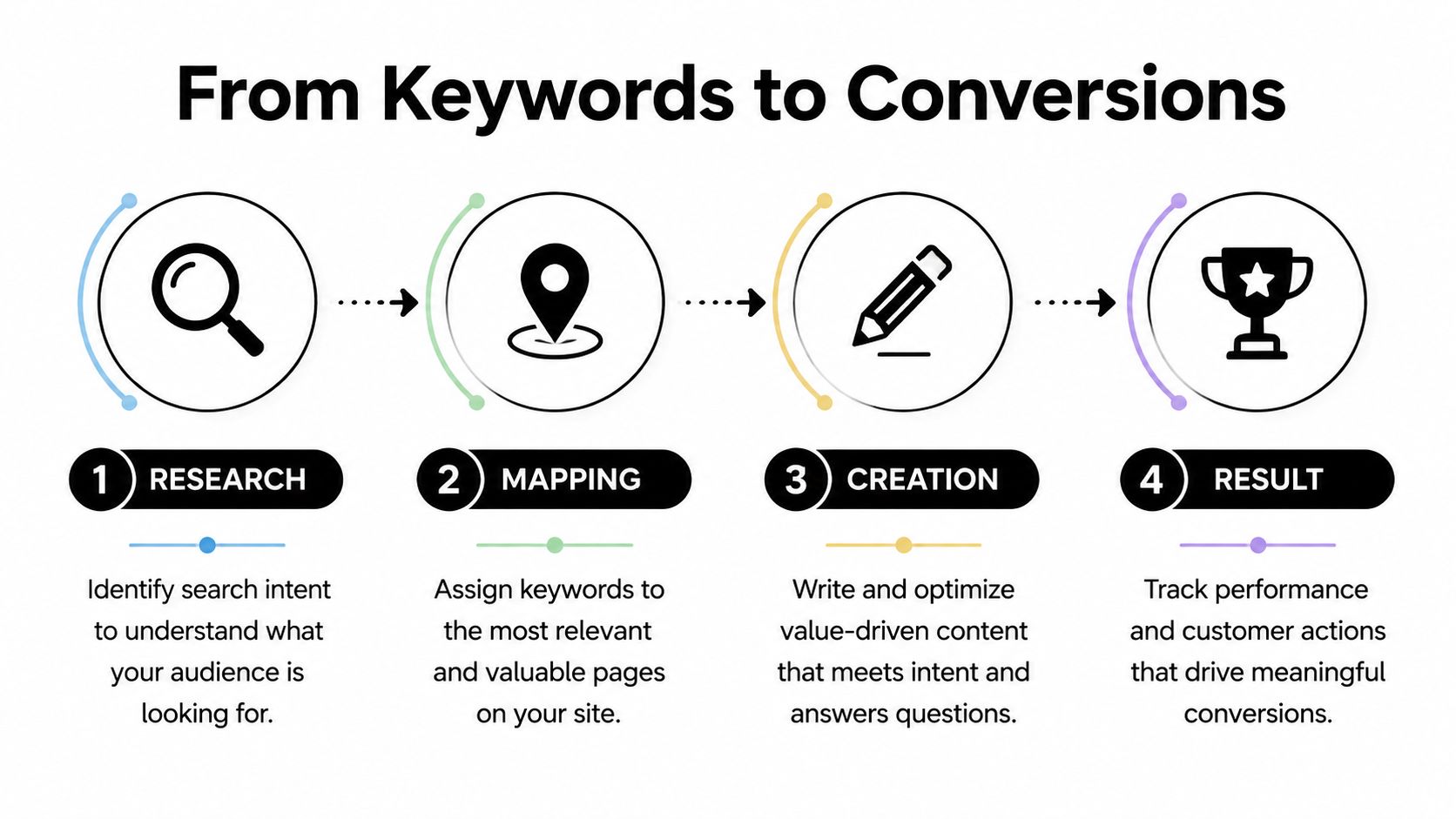
    A four-step infographic illustrating the process from keyword research to achieving website conversions.

    Match page type to search intent

    Many small businesses leak value during this stage of the process. They find a strong transactional keyword, then target it with a blog post. Or they chase an informational query with a thin service page. The mismatch weakens rankings and conversions.

    Use this mapping instead:

    • Transactional keywords belong on service pages, product pages, collection pages, or booking pages.
    • Commercial keywords often fit comparison pages, buyer guides, or tightly written landing pages.
    • Informational keywords belong on blog posts, FAQs, and resource pages that support the sales path.
    • Navigational keywords usually belong to brand and core site architecture, not campaign content.

    For example, “emergency plumbing repair near me” should point to a conversion-focused service page. “Water heater repair cost” can support that page as an informational article that answers a common buying question and links naturally into the service page.

    Use clusters to build authority around buying topics

    A single isolated page rarely does enough. Small businesses get better traction when they group related keywords under a parent topic and build a small content silo.

    According to Leadpages' keyword research guidance for small businesses, small businesses applying keyword clustering see 3.2x faster ranking, often under 90 days, and 25% to 40% traffic growth in 6 months. The same source notes that clustering related terms such as “emergency plumber” and “24/7 hot water repair” helps build topical authority.

    That matters because Google doesn't just evaluate a single page in isolation. It looks at whether your site shows depth around a topic. A cluster helps you send that signal without producing random content.

    A practical cluster for a local plumber could look like this:

    • Primary service page: emergency plumber in your city
    • Supporting service page: water heater repair
    • Support article: signs your water heater needs repair
    • Support article: repair vs replacement questions
    • FAQ page: after-hours plumbing questions

    The key is focus. Don't build clusters around anything vaguely related to your industry. Build them around topics that connect back to booked work or sales.

    A simple content map for a small business website

    If you want keyword research for small business to stay manageable, map each target phrase to one page and one goal.

    Here's a practical model:

    1. Homepage
      Use a broad brand and category signal. Keep the messaging clear about who you help and where.

    2. Core service or product pages
      Target your highest-intent priority keywords. These pages should answer the main need quickly and make the next action obvious.

    3. Supporting pages
      Build out related commercial terms, niche services, and local variations where relevant.

    4. Blog and FAQ content
      Cover objections, cost questions, comparisons, and educational queries that help the buyer move forward.

    A useful internal rule is simple. If a keyword signals action, send it to a money page. If it signals research, support the money page with content that earns trust and links inward.

    Done well, this turns SEO into a system. Keywords feed pages. Pages feed leads. New customer questions feed the next round of content.

    Your First 90 Days of Keyword-Driven Growth

    A small business owner blocks off a Saturday to “work on SEO,” opens a keyword tool, and ends the day with a spreadsheet full of terms that will never produce a sale. Ninety days later, nothing has changed because the work was aimed at traffic instead of revenue.

    The first 90 days should do one job. Prove that keyword research can turn into leads, booked calls, and sales without draining your time or budget.

    A practical 90-day plan

    Start with five keywords, not fifty.

    Use the research and vetting process above to choose your top five Quick Win opportunities. Keep the filter tight. Each one should match a real service or product, show clear buying intent or strong pre-buying intent, and be realistic for your site to compete on. If a keyword looks attractive in a tool but has weak commercial value, leave it alone.

    Next, build or improve one page for each keyword. Put your best effort into a small set of pages instead of publishing a pile of thin content. Transactional terms belong on service or product pages. Research-driven terms belong on support content that helps the buyer make a decision and pushes them toward the right money page.

    Then measure outcomes that matter to the business. Rankings are useful feedback, but they are not the scorecard. Watch calls, form submissions, quote requests, booked appointments, demo requests, and sales tied to those pages.

    A simple operating loop keeps this manageable:

    • Research gives you the language buyers use
    • Focused pages capture high-intent searches
    • Sales calls, emails, and customer questions reveal new keyword opportunities
    • Those opportunities shape the next batch of pages

    That cycle is how a small company builds search growth on a limited budget. It stays practical because every step connects back to profit.

    What success should look like

    In the first 90 days, success looks like traction, not volume.

    A few pages that attract the right visitors and produce action are worth far more than a large blog archive that brings in the wrong audience. I would rather see a local service business publish three pages that generate quote requests than thirty articles that never influence a sale.

    A small site grows faster when every page has a job.

    Once the first pages start producing qualified leads, the next decisions get easier. Expand into the next tier of Core Targets. Build a tighter cluster around the service that is already converting. Fix pages that attract visits but fail to produce calls or inquiries. In practice, that usually means the keyword was weak, the page intent was mismatched, or the offer was not clear enough.

    That is the profit-first version of SEO. You stop asking what might bring more traffic and start asking which keyword has the best chance of producing business value next.

    Building a keyword-driven growth engine works because it compounds over time. If you want a faster, agency-free way to put this process into practice, Agency Secrets is built for that job. It shows small business owners how to find buyer-intent keywords, publish useful content, build authority, and turn SEO into a repeatable growth channel without hiring an expensive consultant or assembling a large team.

  • SEO for Auto Repair Shops: A 2026 Local Playbook

    SEO for Auto Repair Shops: A 2026 Local Playbook

    You know the pattern. Your techs do solid work, your repeat customers trust you, and your schedule should be fuller than it is. Then you search your own shop name, or worse, “brake repair near me,” and a weaker competitor is sitting above you in Google Maps with more reviews, a cleaner website, and a better online footprint.

    That gap usually isn’t about who fixes cars better. It’s about who built the better local search system.

    SEO for auto repair shops works when it’s tied to how drivers buy. They search on their phones, compare a few options fast, scan reviews, tap to call, and book with the shop that looks trustworthy and easy to reach. In 2026 local search benchmarks for auto repair shops, mobile devices account for 65-80% of organic search sessions, according to Authority Specialist’s auto repair SEO statistics. If your site is clunky on mobile or your profile is incomplete, you’re losing people before they ever ask for a quote.

    Most shop owners don’t need another generic marketing checklist. They need a playbook that gets them more calls, more appointments, and more cars in the bays without turning them into full-time marketers. That’s what this is.

    Table of Contents

    Your Blueprint for Local SEO Success in 2026

    Most shops don’t have an SEO problem. They have a focus problem. They spread effort across random blog posts, half-finished profile updates, and broad homepage copy that tries to rank for everything from oil changes to engine rebuilds on one page.

    The better approach is simpler. Build your local presence in layers. First, lock down your Google Business Profile. Second, give every core service its own page. Third, publish useful supporting content. Fourth, strengthen trust with reviews, citations, and technical cleanup. Then track calls, direction requests, and bookings so you know what’s effective.

    That order matters because local SEO for a repair shop isn’t won by traffic alone. It’s won by being visible at the exact moment someone needs brakes, diagnostics, tires, AC work, or routine maintenance nearby.

    Practical rule: If a tactic doesn’t help a local driver find you, trust you, or contact you faster, it’s probably not a priority for your shop.

    There’s also a real trade-off between doing everything manually and doing what will get done. Shop owners are busy. Service managers are busy. If your SEO plan depends on somebody remembering to publish articles, update links, request reviews, and audit pages every week, it usually stalls.

    A working system for seo for auto repair shops needs three traits:

    • Clear service targeting: Each money-making repair category needs its own destination page.
    • Local proof: Reviews, profile completeness, and citation consistency need to support what your website claims.
    • Operational consistency: Content, updates, and authority building need a cadence you can maintain.

    The shops that win don’t always have the biggest brand. They usually have the cleanest execution.

    Dominate Google Maps with Your Business Profile

    Monday morning, a driver hears grinding brakes on the way to work and searches “brake repair near me.” Your shop shows up in the map pack beside two competitors. At that point, ranking helps, but the profile that looks complete, current, and trustworthy usually gets the call.

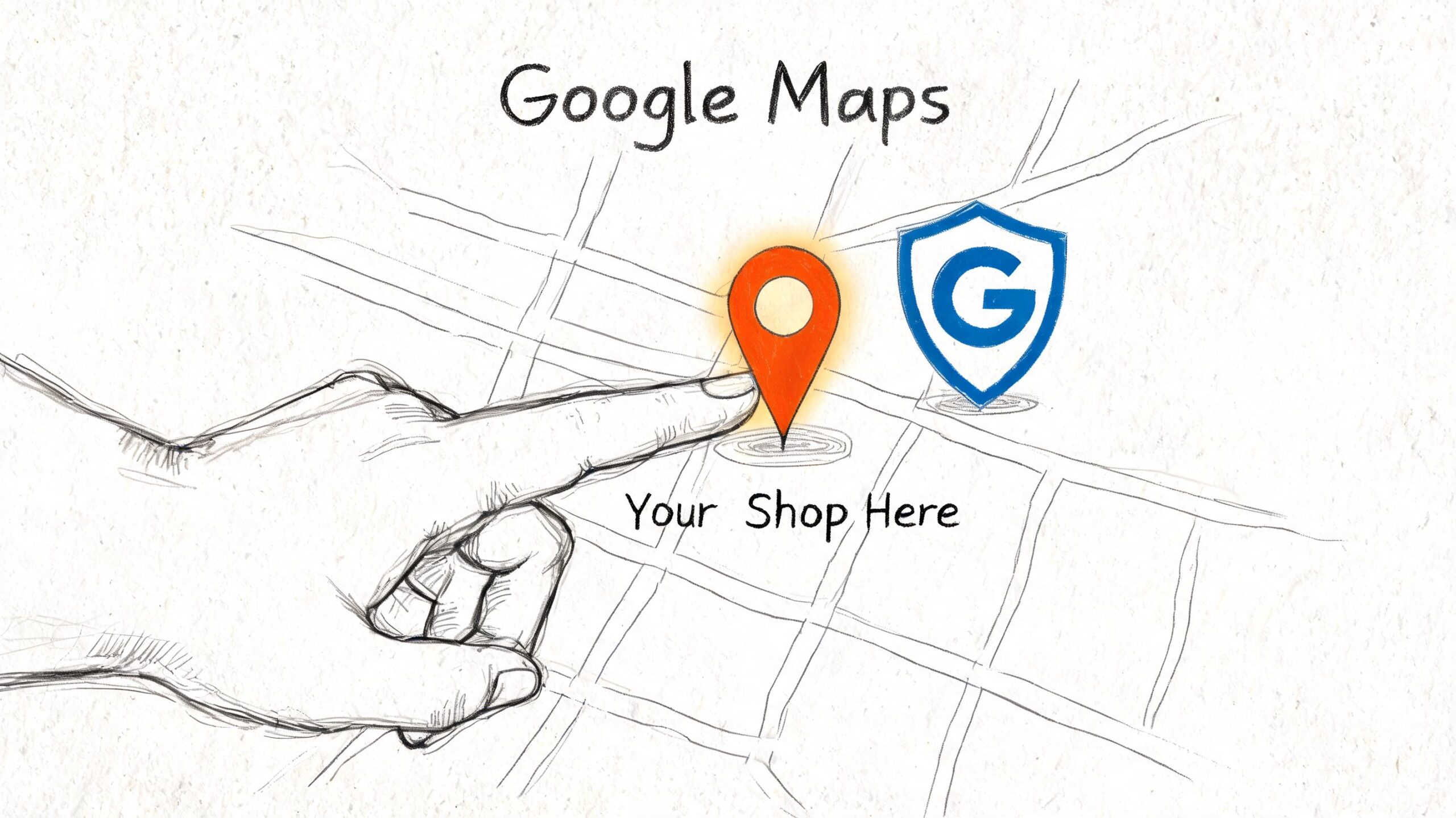
    A hand pointing to a location pin on a drawn map, illustrating local SEO for shop visibility.

    I treat Google Business Profile like a second homepage for auto shops. In many cases, it gets checked before the website. Drivers want fast answers. Can this shop handle my problem, is it open, and does it look credible enough to trust with my car?

    A claimed profile with a phone number is not enough. The shops that pull more calls usually have tighter category targeting, fuller service lists, better photos, and recent activity that shows the business is open and paying attention. That matters even more for busy owners who do not have time to babysit marketing every week. This is one of the best places to use AI and automation well. Use it to draft Google Posts, turn common front-desk questions into Q&A entries, and build a monthly checklist your team can follow.

    Treat your profile like a front counter that sells

    Start with the fields that shape relevance and trust.

    • Choose the right primary category: For most shops, that means selecting the category that matches the core business, not the broadest label available. Secondary categories should reflect real revenue lines such as brake service, oil change service, transmission shop, tire shop, or auto air conditioning service if those fit the business.
    • Write a useful business description: Say what the shop does, which vehicles it works on, and what makes the operation credible. Mention diagnostics, scheduled maintenance, fleet work, diesel repair, or European vehicles only if those are real strengths.
    • Build out the services list: Add each major service a customer might search for. Brake repair, check engine light diagnostics, suspension repair, wheel alignment, AC service, battery replacement, tire replacement, and transmission service should not be missing if you sell them every week.
    • Upload current photos: Show the storefront, service bays, waiting area, scan tools, alignment rack, technicians, and finished work. Fresh photos do two jobs. They improve trust with searchers and give Google more signals that the business is active.
    • Seed your own Q&A: Put common pre-appointment questions in place before random users do it for you. Cover warranty terms, towing, shuttle service, after-hours key drop, financing, same-day appointments, and whether you service specific makes.

    Shops ask about Google Posts all the time. They help most when they support buying intent, not when they read like filler. Post about seasonal AC inspections before summer, battery testing before winter, holiday hours, or a short explanation of what a brake inspection includes. Skip generic “Happy Monday” updates. They do nothing for calls.

    A quick walkthrough helps if you haven’t touched your profile much lately.

    What to update every month

    A Google Business Profile does not need constant tinkering. It needs clean maintenance and quick response times.

    Area What good looks like Common mistake
    Photos Fresh shop, team, and service photos Same old storefront image for months
    Hours Standard and holiday hours are accurate Wrong holiday hours
    Services Service list matches what you actually sell Missing profitable services
    Q&A Common buyer questions answered Leaving public questions unanswered
    Posts Timely updates tied to real offers or service needs Posting generic motivational content

    For busy shops, I recommend assigning this to a simple monthly workflow. Have AI draft the post, suggest new Q&A ideas from recent phone calls, and flag missing photos or outdated hours for approval. The owner or service manager still reviews the final updates, but the prep work gets done faster. That trade-off matters. Manual SEO plans often die in the service lane.

    A strong Google Business Profile helps a rushed driver decide to call you in under a minute.

    Keep the priority straight. A polished profile gets you shortlisted in Google Maps. Reviews, accurate service details, and a credible website are what turn that visibility into booked work.

    Build a Website That Converts Searchers into Customers

    A driver searches "brake repair near me" from a phone in your parking lot, lands on your site, and still does not call. That usually comes down to one problem. The page does not match the service they need, or it makes the next step harder than it should be.

    For auto shops, website SEO is not about publishing more pages for the sake of volume. It is about building the few pages that line up with high-intent searches and turn that visit into an appointment request or phone call. Shops that are short on time can use AI to speed up page drafts, pull common customer questions from call logs, and keep service copy current. The owner still approves the final version. The time savings are what keep the plan running.

    Use one service per page

    A single "Services" page forces Google and the customer to do too much work. If you want to show up for brake repair, oil changes, engine diagnostics, AC recharge, transmission service, and suspension work, each service needs its own page.

    That structure works because it matches how people search.

    A brake page should focus on brake problems, warning signs, inspection steps, repair options, and how to book. An oil change page should speak to maintenance intervals, oil types, filter replacement, and wait time. Those are different searches with different buying intent, even if both happen in the same shop.

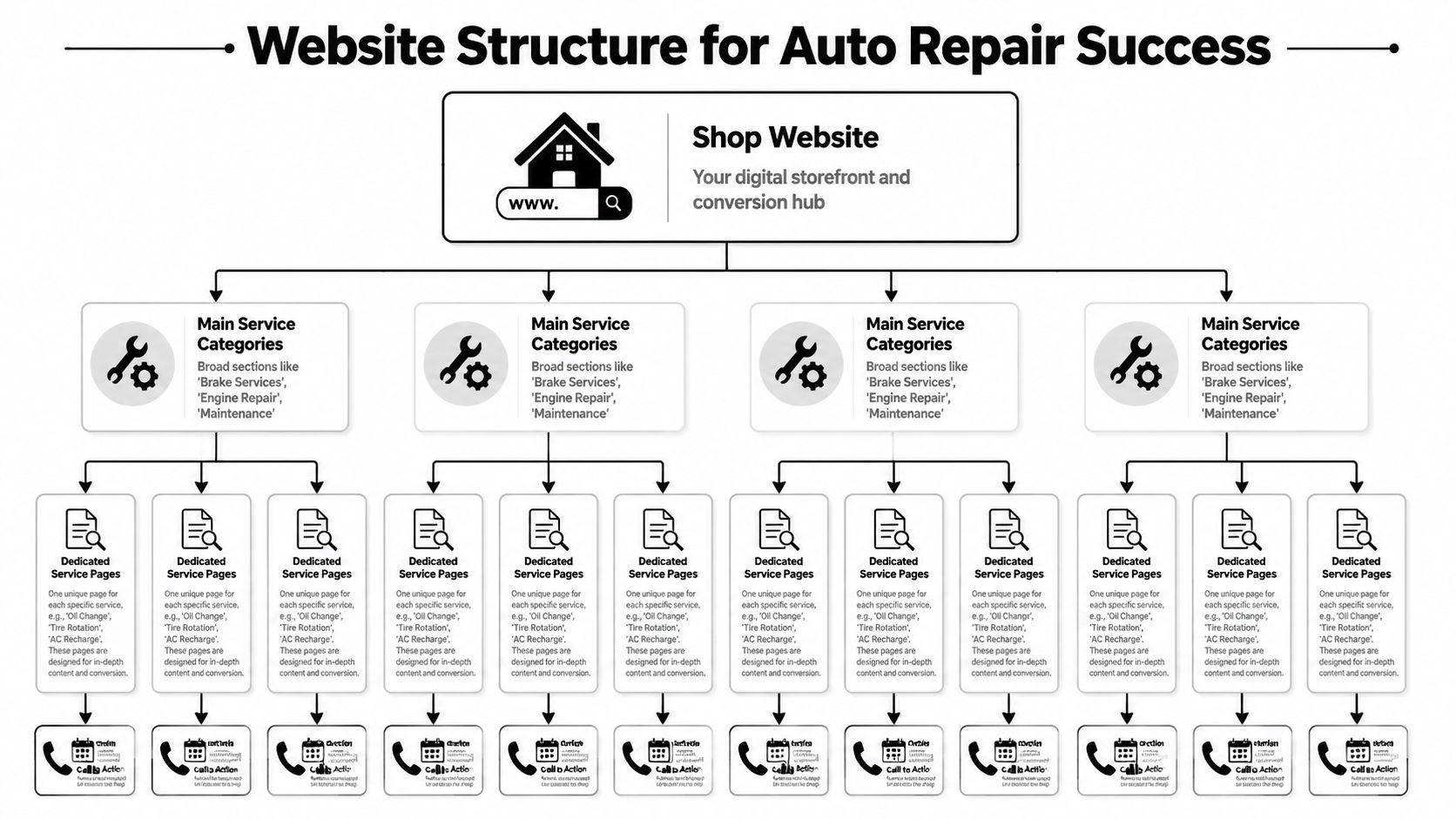
    A diagram illustrating a tiered website structure designed for auto repair shop search engine optimization and conversions.

    Thin location pages with swapped city names are still common in this industry, and they still underperform. A useful service page answers the questions a real customer asks before calling. What does the noise mean? Is the car safe to drive? What does your inspection include? Do you work on my make?

    Here is a page hierarchy that fits most independent shops:

    • Homepage: Brand, primary location, trust signals, and immediate contact options
    • Main service category pages: Broad areas like maintenance, diagnostics, brake service, and engine repair
    • Dedicated service pages: Specific jobs such as oil change, check engine light diagnostics, brake pad replacement, and AC recharge
    • Contact and appointment pages: Clear paths for customers who are ready to book

    What a high-converting service page needs

    The best service pages rank because they are specific. They convert because they reduce doubt.

    Every core service page should include:

    1. A precise title and H1
      "Brake Repair in Austin" tells both Google and the customer what the page covers.

    2. A first paragraph that matches the search
      Someone who searched for engine diagnostics wants a repair answer fast, not a long intro about your company's history.

    3. Service details in plain language
      Explain what the service includes, what symptoms usually lead to it, and what the customer should do next.

    4. Proof that your shop is trustworthy
      Warranties, certifications, technician experience, review snippets, brands serviced, and years in business all help.

    5. A visible CTA above the fold and again near the bottom
      "Call now," "Request an appointment," and "Schedule an inspection" work because they are direct.

    6. Mobile-first contact options
      Tap-to-call buttons, short forms, map access, and hours should be easy to find on a phone.

    One trade-off matters here. Long pages can rank well if they answer real questions, but they still need to get to the point fast. I usually front-load the page with the problem, the service, trust signals, and the CTA, then use the rest of the page to handle objections and support the ranking.

    AI can help here too. It can turn service advisor notes, review themes, and recorded FAQs into draft copy for each service page, which cuts production time without forcing your team to write from scratch. That matters for busy shops with ten profitable services and no marketing department.

    If your phone number is buried, your forms ask for too much information, or your key service pages sit three clicks deep in a menu, fix that first. Rankings help. Easy booking gets the job.

    Automate Content and Links to Build Authority

    Content and link building are where most shop SEO plans die. Not because they’re unimportant, but because they take time your team doesn’t have. The owner isn’t going to become a part-time publisher. The service writer isn’t going to research keywords between customer calls.

    That’s why automation matters now. It isn’t a shortcut around strategy. It’s a way to execute strategy consistently.

    Manual content breaks down fast

    Most shops know they should publish useful content. They just never get around to it. The result is a website with a few service pages, an outdated blog, and no support around the questions drivers search.

    That leaves easy authority on the table. Content topics for auto shops are practical and repetitive in a good way. Drivers ask the same things every week:

    • Maintenance timing: When should I get an oil change?
    • Warning signs: What does a grinding brake noise mean?
    • Urgency questions: Can I drive with the check engine light on?
    • Cost framing: What affects the price of AC repair?
    • Seasonal concerns: Why does my battery keep dying in cold weather?

    Recent data reports that AI SEO tools have generated over 750k articles with 4.7 ratings, enabling small businesses to publish 30 optimized posts per month and secure high-authority backlinks, driving up to 3x traffic growth for local services in 2025-2026 benchmarks, according to Auto Repair SEO’s report on common shop SEO mistakes and AI-driven execution.

    A hand-drawn illustration depicting content automation and link building gears working together to increase website authority.

    What to automate and what to keep human

    Many often stumble at this point. They either reject AI entirely or let it publish generic junk. Neither approach is smart.

    Use automation for repeatable production work:

    • Keyword clustering: Group related questions around brakes, maintenance, diagnostics, tires, and AC service.
    • Draft generation: Create first drafts for FAQ posts, maintenance explainers, and local support content.
    • Publishing workflows: Keep content going out on a schedule instead of in random bursts.
    • Backlink outreach support: Surface relevant opportunities and standardize outreach steps.

    Keep human review on the parts that shape trust:

    • Local accuracy: Make sure your city, service area, and actual offerings are correct.
    • Shop voice: The content should sound like your shop, not a generic automotive encyclopedia.
    • Offer positioning: Mention what makes your process better, faster, more transparent, or more convenient.
    • Compliance and quality control: Remove vague claims and make sure advice is technically sound.

    If your competitors still rely on occasional manual blog posts, consistent automation becomes an unfair advantage.

    The trade-off is simple. Manual work can be better when a subject is highly specialized, but it usually happens less often. Automated workflows can scale fast, but only if someone sets standards and reviews output. For most independent shops, the right answer is a hybrid system. Let automation handle volume and consistency, then have a human tighten the details that affect trust and conversions.

    Lock Down Your Local Reputation and Citations

    You can have a strong profile and solid pages and still lose the click if your reputation signals are weak. In local search, drivers make snap decisions. They compare ratings, scan recent feedback, and look for signs that your shop is active and reliable.

    Reviews and citations do different jobs, but both build trust. Reviews help convince people. Citations help confirm that your business information is consistent across the web.

    Build a review request system your front desk will actually use

    The mistake most shops make is treating review requests as optional. They ask when they remember, usually after a great interaction, then go quiet for a week. That creates uneven momentum.

    A better system is simple and repeatable.

    • Ask at the right moment: Right after a successful pickup or follow-up call, when the customer is relieved and satisfied.
    • Use one link everywhere: Put the same review request link in texts, emails, invoices, and follow-up messages.
    • Train the counter staff: Give them one natural sentence they can use every time.
    • Reply to every review: Thank happy customers and respond calmly to complaints with specifics and professionalism.

    Here’s a response style that works well:

    Thanks for trusting us with your vehicle. We appreciate the feedback and are glad we could help.

    And for a negative review:

    We’re sorry the visit didn’t meet expectations. We take that seriously and would like to review what happened and make it right.

    Keep the tone human. Don’t argue in public. Don’t copy and paste robotic responses.

    Keep your citations boring and consistent

    Citations are mentions of your name, address, and phone number on business listings, directories, maps, and industry sites. This is not a creative task. It’s a consistency task.

    Your shop details should match exactly across your website, Google Business Profile, Apple Business Connect, Bing Places, Yelp, and relevant automotive directories. If one listing says “Suite B,” another drops it, and a third has an old phone number, you create trust friction for both search engines and customers.

    Use this cleanup checklist:

    Citation item What to check
    Business name Same spelling everywhere
    Address Same formatting everywhere
    Phone number One primary local number
    Website URL Correct canonical homepage or location page
    Hours Match current operating hours
    Categories Relevant to your actual services

    A few shop-specific directories can also help if the listings are accurate and complete. What matters most is not how many you build in a rush. It’s whether your core listings are clean, duplicate-free, and maintained.

    If you’ve changed locations, phone numbers, or branding, citation cleanup becomes urgent. Old data lingers for a long time and confuses both ranking systems and customers trying to contact you.

    Essential Technical SEO Checks for Your Shop Website

    A shop owner usually notices technical SEO when the phone goes quiet after a site redesign. Rankings slip, mobile visitors hit the page, the tap-to-call button loads late or the form breaks, and those searchers move to the next shop. That is the version of technical SEO that matters for auto repair. It affects calls, appointments, and direction requests.

    For most local shops, the work is straightforward. Get the site fast enough on mobile, remove friction from key actions, and make your business details easy for Google to read. AI tools can speed up the audit process by flagging broken schema, large images, slow templates, and indexing issues in minutes, which is useful if you do not have time to hunt through reports yourself. The fix still needs human judgment. A busy brake repair page matters more than a blog post nobody visits.

    Fix the issues that block calls first

    Start with page speed on your money pages. If your oil change, brake repair, check engine light, or transmission service pages drag on mobile, you lose high-intent traffic before the page has a chance to convert. Focus on Core Web Vitals, but do not treat them like a trophy. The practical goal is simple. Your main service pages should load quickly enough that someone on a phone can read, tap, and call without waiting.

    Mobile usability comes next, and many shop sites fall short here. I regularly see websites that look fine on desktop but force mobile visitors to pinch the screen, fight a sticky popup, or scroll past a giant hero image before they can contact the shop. That is not a design issue. It is lost revenue.

    Check these items on an actual phone, not just in a browser preview:

    • Tap-to-call buttons appear above the fold
    • Forms are short and submit cleanly
    • Menus open without covering the whole screen
    • Text is readable without zooming
    • Maps, hours, and location details are easy to find

    Then add LocalBusiness schema and keep it accurate. Schema gives search engines a cleaner read on your shop name, location, hours, phone number, and services. It will not fix weak local SEO by itself, but it supports the rest of the signals you are already building.

    Your website needs to help a stressed driver call you fast. Fancy effects do not help if the page is slow or the contact path is clumsy.

    Give your developer a short, specific ticket list

    Vague requests produce vague results. Send a punch list tied to lead generation.

    • Speed: compress oversized images, delay nonessential scripts, and improve load times on service and location pages
    • Mobile UX: test tap targets, menu behavior, form fields, and click-to-call buttons on real devices
    • Schema: add valid LocalBusiness markup to the homepage and location pages
    • Indexing: make sure important service pages are crawlable, indexable, and included in the sitemap
    • Security: keep the site on HTTPS and fix mixed-content warnings
    • Internal linking: connect related services naturally so Google and users can move between them

    If you manage the site in-house, use PageSpeed Insights, Google Search Console, and Google’s Rich Results Test to catch the obvious problems. AI site audit tools can help prioritize the list so you are not wasting hours on minor warnings. Fix the pages that drive calls first. For most shops, that means service pages, location pages, and the contact page.

    Measure What Matters and Refine Your Strategy

    Monday starts the same way at a lot of shops. The bays are full, the phone rang all weekend, and the owner still has no clear read on whether SEO is producing brake jobs, diagnostics, or transmission work. A traffic chart does not answer that. Booked work does.

    The shops that improve fastest track lead signals tied to revenue, then use that data to decide what to fix next. If a location page gets more impressions but calls stay flat, the issue is probably conversion. If GBP calls rise after new reviews and fresh photos, keep pushing there. Good reporting should tell you where the next appointment is coming from and where the bottleneck is.

    Track revenue signals, not vanity metrics

    For an auto repair shop, the core question is simple. Did search visibility turn into calls, direction requests, and appointments?

    Use three tools as your baseline:

    • Google Business Profile insights for calls, views, and direction requests
    • Google Analytics 4 for form submissions, call clicks, and the pages that drive leads
    • Google Search Console for keyword impressions, clicks, and page-level visibility

    Here’s the KPI set I watch for local shop campaigns:

    KPI Why it matters
    Calls from GBP Strong signal that map visibility is producing high-intent leads
    Direction requests Good proxy for local buying intent and walk-in demand
    Appointment form submissions Direct website lead volume
    Rankings for core service keywords Visibility for pages tied to revenue
    Top landing pages Shows which services and locations attract real demand

    A hand-drawn illustration showing bar charts for bookings and revenue being analyzed under a KPI magnifying glass.

    A shop owner does not need a custom dashboard with 40 widgets. They need a short scorecard they can review in 10 minutes. That is where AI helps. Instead of pulling reports by hand, use automation to summarize month-over-month movement, flag drops on money pages, and surface patterns like "oil change page up, AC repair page down, GBP calls flat." Busy owners usually do not skip SEO because they disagree with it. They skip it because reporting takes too much time.

    Run a monthly review loop

    Monthly is enough for most independent shops. Weekly checks make sense if you run aggressive promotions or manage multiple locations, but for a single shop, a disciplined monthly review catches the important shifts without turning SEO into a second job.

    253 Media’s local SEO results for auto repair shops show what happens when a shop sticks with a consistent process over time. Rankings improve, calls increase, and paid ads become less necessary for every lead.

    Use this review loop:

    1. Check lead volume first
      Review GBP calls, direction requests, appointment forms, and call clicks from the site.

    2. Review the pages tied to real jobs
      Look at brake repair, check engine light diagnostics, AC repair, transmission service, and your top location pages. Those pages should carry the campaign.

    3. Compare visibility against outcomes
      If rankings improved but leads did not, strengthen the page. Add clearer service details, trust signals, financing info, stronger calls to action, or better mobile contact options.

    4. Update one underperforming asset
      Refresh a weak service page, add new before-and-after photos to GBP, tighten title tags, or expand a thin page that gets impressions but few clicks.

    5. Queue the next month’s work with automation
      Use AI to draft page updates, pull review themes into on-page copy, generate FAQ ideas from Search Console queries, and prepare content briefs without spending half a day in spreadsheets.

    That last step matters more than many owners realize.

    A lot of SEO campaigns stall because the review happens, but nothing ships after it. The best system is the one your shop can keep running while managing technicians, parts delays, and front desk traffic. AI does not replace strategy. It handles the repetitive execution so the strategy gets carried out.

    If one page starts producing calls, build around it. Add related FAQs. Strengthen internal relevance on the page itself. Create supporting content that answers adjacent search intent, like "why does my car shake when braking" or "how long does AC repair take." If a page gets impressions but no leads, fix the offer and contact path before chasing more traffic.

    If you want a practical way to execute this without hiring an agency or building a content team, Agency Secrets is worth a look. It lays out a clear SEO playbook for small business owners and pairs it with OutRank, which helps automate keyword research, article production, publishing, and backlink workflows so your shop can keep building organic visibility while you stay focused on running the business.

  • SEO for Real Estate Agents: Generate Leads in 2026

    SEO for Real Estate Agents: Generate Leads in 2026

    You’re probably in one of two spots right now. You’re either paying for leads and wondering why every month starts at zero again, or you’ve got a website that looks decent but barely produces calls, valuation requests, or serious buyer inquiries.

    That’s where most agents get stuck. They don’t need another giant SEO checklist. They need the few actions that move rankings, show up in Google Maps, and turn local searches into conversations. That’s what seo for real estate agents should be about. Not vanity traffic. Not blogging for the sake of blogging. Leads.

    The playbook below is the one that matters when time is tight and consistency is the primary bottleneck. It focuses on the handful of moves that create local visibility, build authority, and keep generating inquiries long after the work is published. It also addresses directly the trade-off every busy agent faces: do it manually and risk inconsistency, or automate the repetitive parts so the strategy is executed.

    Table of Contents

    Why SEO Is Your Best Investment for Leads in 2026

    Agents feel the pain of paid lead channels fast. You fund ads, buy portal exposure, or pay for promoted placements, and the moment you stop paying, the pipeline slows down. That model can work for short bursts, but it doesn’t build an asset you own.

    SEO does. A strong local site keeps attracting buyers and sellers while you’re on appointments, handling inspections, or negotiating offers. That’s the part many agents miss. Good seo for real estate agents isn’t just marketing activity. It’s business infrastructure.

    A scale weighing paid leads against organic growth tree to show value of SEO for real estate.

    The economics are hard to ignore. Organic search drives 300% more traffic to websites than social media, 97% of homebuyers start their search online, and real estate SEO delivers an average ROI of 1,389% over three years, according to Siteimprove’s real estate SEO overview. That’s why SEO keeps outperforming channels that rely on constant spend.

    SEO brings in better intent

    Traffic alone doesn’t pay the bills. Intent does.

    Someone searching for your name after a referral is useful. Someone typing “realtor near me,” “homes for sale in [neighborhood],” or “how to price my home in [city]” is often even better because they’re actively trying to solve a property problem right now. SEO captures that demand at the moment it exists.

    Practical rule: If a page doesn’t target a search with clear local or transaction intent, it’s usually not a priority page.

    That’s why broad lifestyle content rarely carries a solo agent’s growth plan on its own. It can support authority, but the pages that generate leads usually sit closer to action: area pages, seller pages, service pages, and detailed local guides.

    SEO compounds while paid media resets

    Paid campaigns can still have a place. They’re useful when you need immediate visibility. But they reset every month. SEO compounds. A neighborhood guide you publish today can keep ranking, attracting clicks, and feeding inquiries long after the page goes live.

    There’s also a control issue. Portals own their platform. Ad networks control pricing. Your website is the one marketing asset you fully control. If you want predictable inbound leads over time, that asset deserves the first serious investment.

    A lot of agents delay SEO because it feels technical. In practice, the winning version is much simpler. Get found locally. Publish pages around buyer and seller intent. Keep the site fast and usable. Earn local trust signals. Repeat consistently.

    The Foundation Winning Local Search and Google Maps

    If an agent asks where to start, the answer is almost never “write more blogs” first. It’s local search. Specifically, Google Business Profile, reviews, citations, and location relevance. If those signals are weak, you’ll struggle to appear where high-intent local searches happen.

    For local visibility, a fully optimized Google Business Profile is paramount, and success metrics include mobile site speed scores above 80 and accurate IDX data feeds, according to FatJoe’s real estate SEO guide.

    This visual breaks the local blueprint into the core actions worth doing first.

    A five-step blueprint infographic outlining essential strategies for improving local SEO for real estate agents.

    Treat your Google Business Profile like a sales page

    Most agent profiles are half-complete. That leaves money on the table.

    A fully built profile should include:

    • Correct business details: Your name, address, phone number, website, and service areas must match everywhere else online.
    • Service clarity: Add services that match what you want to rank for, such as buyer representation, listing agent services, relocation help, or property valuations.
    • Real photos: Office photos, team photos, local area shots, and property-related images help the profile feel active and credible.
    • Ongoing updates: Use Google Posts for listings, market updates, and local news. It keeps the profile fresh and gives searchers more reasons to click.
    • Q&A coverage: Seed common questions and answer them clearly. Think valuation timelines, neighborhoods served, or whether you handle first-time buyers or luxury sellers.

    A neglected profile sends the wrong signal. Google wants complete local businesses it can trust. So do prospects.

    After your profile, make sure your website supports it. That means your city and neighborhood pages should exist, load cleanly on mobile, and reflect the same core business information.

    A practical walkthrough helps here:

    Reviews and citations decide whether Google trusts you locally

    Reviews do more than build persuasion. They strengthen local relevance.

    The mistake is asking randomly. The better system is to request reviews at moments when clients already feel relief or excitement, right after a successful closing milestone, after handing over keys, or after solving a difficult issue well. Keep the request short, direct, and easy to complete.

    What matters most:

    • Consistency: A steady flow of reviews looks healthier than occasional bursts.
    • Specificity: Reviews that mention neighborhoods, buying or selling experience, and service quality help both users and local relevance.
    • Responses: Reply to every review. A thoughtful response shows activity and professionalism.

    The Map Pack usually goes to the agent who looks the most complete, trusted, and locally relevant, not the one with the fanciest website.

    Citations matter for the same reason. Your NAP data, meaning name, address, and phone, should be identical across directories like Yelp and BBB, plus any local chambers, broker pages, or industry profiles you control. Inconsistent details create avoidable confusion.

    One more local search trap deserves attention. Many agent sites have messy IDX feeds. If listing pages are thin, outdated, or duplicative, they often clutter the site without adding ranking strength. Accurate IDX data is useful. A bloated IDX setup isn’t. Keep indexable pages focused on the ones that provide unique value.

    Keyword Research That Finds Ready-to-Act Clients

    Keyword research for agents goes wrong when it starts and ends with volume. High search volume looks exciting, but it often pulls you toward broad phrases that are hard to rank for and weaker at converting.

    The better approach is intent layering. You’re not just collecting keywords. You’re mapping what people search when they’re learning, comparing, and getting ready to act. Follow Up Boss describes this well: effective SEO involves semantic search, where you identify a primary keyword like “homes for sale in [Neighborhood]” and layer related questions from Google into the page so it satisfies user intent more completely. Their guide also warns against keyword stuffing and recommends a hub-and-spoke structure for connected pages, as shown in Follow Up Boss’s realtor SEO tactics.

    Think in intent layers, not just keywords

    A useful keyword set for seo for real estate agents usually spans three buckets:

    Client Type Search Intent Example Keyword
    Buyer Early research cost to buy a house in Austin
    Buyer Comparison homes for sale in Hyde Park Austin
    Buyer Transactional realtor near me
    Seller Early research best time to sell home in Dallas
    Seller Comparison how to price my home in Bishop Arts
    Seller Transactional listing agent in Dallas

    Each search warrants a distinct page type. Early research queries fit guides and explainers. Comparison terms fit neighborhood pages and market pages. Transactional terms belong on service pages that make contacting you easy.

    A few practical patterns work well:

    • Buyer research terms: target moving guides, cost guides, school-area guides, and neighborhood comparisons.
    • Mid-funnel location terms: target pages about specific suburbs, ZIP codes, building types, or lifestyle pockets.
    • Bottom-funnel service terms: target agent, valuation, and sell-with-me pages.

    If you lump all of that onto one generic homepage, you dilute the relevance.

    Seller keywords are the opening most agents ignore

    Most agents overbuild buyer content because listings feel more tangible. That’s a mistake. Seller intent is often less crowded and closer to revenue.

    Good seller topics include:

    • Pricing questions: “how to price my home in [area]”
    • Timing questions: “best time to sell in [neighborhood]”
    • Condition questions: “should I renovate before selling”
    • Process questions: “what to expect when selling a home in [city]”

    These searches usually come from owners making decisions, not casual browsers. They also let you compete where big portals are weaker. Portals dominate listing inventory. They don’t dominate nuanced local seller advice.

    Use tools like Google Ads Keyword Planner, Keywords Everywhere, and Google’s related questions to build the list manually. If consistency is the issue, this is one of the best areas to automate with OutRank. It can surface buyer and seller topics continuously, which is useful when you don’t have time to sit in spreadsheets every week.

    A strong content calendar for an agent should include seller topics every month, not just listing pages and buyer articles.

    One caution. Don’t force exact-match phrases into every line. Semantic SEO works because the page answers the topic broadly and naturally. Stuffing “seo for real estate agents” or “homes for sale in [area]” into awkward sentences does the opposite of what you want.

    Creating Content That Builds Authority and Trust

    The easiest way to tell whether an agent understands content is to look at their neighborhood pages. Weak ones read like brochure copy. Strong ones help someone make a decision.

    That difference matters because Google rewards pages that answer the search. Prospects do too. If a buyer lands on your page and learns something useful about the area, schools, commute patterns, housing style, or local buying considerations, you’ve done more than attract a click. You’ve started building trust.

    A hand-drawn illustration showing blogs, guides, and videos building up to a house labeled trust.

    What a strong neighborhood guide actually looks like

    A useful neighborhood guide has a clear main topic and a structure that helps both readers and search engines. The page might target a phrase like “living in [neighborhood]” or “homes for sale in [neighborhood],” but it shouldn’t stop at a thin paragraph and a listings widget.

    A solid page usually includes:

    • A direct opening answer: Explain who the area suits and why people move there.
    • Lifestyle detail: Cover parks, walkability, housing stock, transport, and local amenities.
    • Buyer context: Mention who tends to buy there, such as families, commuters, or downsizers, without making unsupported claims.
    • Relevant FAQs: Add natural subheadings based on real search questions.
    • Strong internal links: Connect to related suburb pages, buyer guides, valuation pages, and contact pages.

    One practical example. If you’re building a page on a family-oriented suburb, don’t just say it’s “popular.” Explain what a buyer would want to know: property types, school-related decision factors, commuting trade-offs, and nearby amenities that shape day-to-day living.

    Write pages that rank and still sound human

    On-page SEO is mostly about clarity.

    Use a title that leads with the core topic. Write an H1 that matches the page intent. Break the page into H2s and H3s that answer real questions. Add a meta description that makes the click worthwhile. If you’re writing a property page, practical keyword-led titles like those recommended in the earlier Follow Up Boss guidance work well because they align with how people search.

    The same principle applies to seller content. Creating content for seller-intent searches like “how to price my home in [city]” can yield 2-3x higher conversion rates, according to Visuable’s guide to SEO for real estate agents. That’s why seller pages deserve the same attention as buyer guides.

    A simple content stack for agents looks like this:

    • Core money pages: city pages, neighborhood pages, buyer service pages, seller service pages
    • Trust builders: neighborhood guides, market explainers, moving guides, school-area content
    • Conversion helpers: FAQs, valuation pages, contact pages, listing appointment pages

    Good real estate content shouldn’t read like it was written for an algorithm. It should feel like the most helpful agent in town sat down and answered the search properly.

    This is also where automation can make sense. Writing one strong page is manageable. Publishing and interlinking useful pages month after month is where agents fall off. OutRank can help keep the publication rhythm going, but the strategy still has to be right. Automation amplifies a good plan. It doesn’t rescue a weak one.

    Technical SEO and Backlinks Made Simple

    Technical SEO sounds intimidating until you strip it down to what affects lead generation. For most agent sites, the big issues are speed, mobile usability, crawl clarity, and structured data. If those are in reasonable shape, your content and local relevance can do their job.

    Backlinks are similar. People overcomplicate them or turn them into spam. In practice, the best links for agents usually come from local relationships, partnerships, and useful content that deserves a mention.

    Fix the three technical issues that hurt agents most

    Start with the basics:

    1. Speed
      Slow pages lose leads. Heavy images, bloated themes, and scripts from too many plugins are common causes. Compress images, keep templates lean, and test key pages on mobile.

    2. Mobile usability
      Most property searches happen on phones. If your contact buttons are awkward, text is cramped, or forms are painful to complete, rankings aren’t your only problem. Conversion drops too.

    3. Schema and structure
      Clear headings, logical site architecture, and basic schema markup help search engines understand your pages. For agent sites, schema such as RealEstateAgent can add useful context.

    The important part is restraint. You don’t need to chase every technical tweak on a checklist. You need a site that loads well, works on mobile, and makes your key pages easy to crawl and understand.

    A few common problems are worth removing fast:

    • Thin duplicate area pages: These often happen when agents create dozens of near-identical location pages.
    • Broken internal links: They weaken crawl paths and create a poor user experience.
    • Index bloat from poor IDX setups: Too many low-value pages can distract from the pages you want ranking.

    Backlinks work best when they come from real local relationships

    Think of link building as digital PR.

    The strongest link opportunities for agents often come from the work they already do offline. Mortgage brokers, stagers, conveyancers, local charities, builders, neighborhood businesses, and community publications all create realistic paths to relevant mentions.

    Useful approaches include:

    • Local partnerships: Exchange useful resource mentions with trusted local businesses.
    • Community involvement: Sponsor an event or support a local organization that lists partners on its website.
    • Expert contributions: Offer market commentary to local publications or contribute a housing article.
    • Directory quality control: Keep profiles on credible directories complete and accurate.

    What doesn’t work well is the cheap shortcut approach. Random paid links, irrelevant blog networks, and spammy outreach usually create more risk than value. Agents don’t need hundreds of questionable links. They need a credible local footprint.

    Field note: If you’d be embarrassed to show the website linking to you to a client, it’s probably not a backlink worth chasing.

    This is another area where automation helps if done carefully. Outreach, prospecting, and placement take time. OutRank can reduce that workload, which is useful for solo operators, but it should still support a quality-first approach. Relevance beats volume.

    Tracking What Matters and Automating for Growth

    SEO only feels vague when you measure the wrong things. Agents who obsess over every keyword fluctuation usually burn out. Agents who track visibility and lead signals stay focused.

    The main numbers worth watching are straightforward: organic traffic, rankings for your main city and neighborhood terms, Google Business Profile visibility, and conversions like calls or form submissions. The question isn’t “Did traffic go up?” It’s “Did the right pages bring the right inquiries?”

    Watch lead signals, not just ranking reports

    A clean monthly review should include:

    • Organic traffic by landing page: Which pages are bringing search visitors in?
    • Local keyword rankings: Are your city, suburb, and service pages moving up?
    • Click-through rate from search: Low CTR often means your titles and meta descriptions need work.
    • Conversions: Calls, valuation requests, contact forms, and booked consultations matter most.

    If a page ranks but never converts, look at intent mismatch. You may be attracting the wrong visitor, or the page may fail to move them toward contact. If a page gets impressions but poor clicks, rewrite the title and meta description. If a page gets traffic and no inquiries, the CTA may be weak or buried.

    A realistic timeline helps keep expectations grounded. Agents typically see initial ranking improvements within 3–6 months, while significant organic traffic from content like neighborhood guides often takes 6–12 months to build, according to SEO Team Toronto’s guidance on real estate SEO timelines.

    A hand-drawn sketch illustrating how automation drives website traffic and business conversions over time.

    Automation is how busy agents stay consistent

    That timeline is exactly why execution discipline matters. Most agents don’t fail at SEO because they chose the wrong tactic. They fail because they stop. They publish a few pages, update a profile once, ask for a handful of reviews, then disappear back into reactive marketing.

    Automation solves a practical problem. It keeps the machine running.

    Used properly, OutRank can help with:

    • Keyword discovery: so you keep finding buyer and seller topics worth publishing
    • Content production: so the site grows even when your week gets consumed by deals
    • Backlink support: so authority building doesn’t become another abandoned task
    • Competitor monitoring: so you can see where rivals are gaining ground

    That doesn’t remove the need for judgment. You still need to know which pages matter, which neighborhoods deserve dedicated coverage, and which seller topics match your market. But once the playbook is clear, automation is often the difference between a strategy that sounds good and one that compounds.

    The agents who win with seo for real estate agents usually do boring things well for a long time. They own their Google Business Profile. They build pages around buyer and seller intent. They publish useful local content. They keep the site technically healthy. They measure leads. Then they repeat.


    If you want that process without hiring an agency or turning SEO into a second job, Agency Secrets is a practical place to start. It lays out the playbook clearly and shows how to use OutRank to automate the heavy lifting, from keyword research and article publishing to backlinks and competitor analysis, so your site keeps growing while you stay focused on clients and closings.

  • SEO for Small Business: The 2026 Playbook

    SEO for Small Business: The 2026 Playbook

    You’re probably doing what most small business owners do. You post on social media when you remember, boost a few posts, maybe run some ads, and hope something sticks. Then a month later you’re looking at the spend, looking at the leads, and wondering why marketing feels like rent instead of an asset.

    That’s exactly why seo for small business matters. Done right, it doesn’t behave like a campaign. It behaves like an engine. One useful page ranks, brings in customers, and keeps working long after you publish it. The problem is that most DIY SEO advice turns that engine into a second full-time job.

    You don’t need a giant checklist. You need the few actions that move revenue. This playbook strips SEO down to the work that drives sales, local visibility, and long-term growth, without forcing you to become a full-time marketer.

    Table of Contents

    Why SEO Is Your Best Investment in 2026

    You put money into ads on Monday, get calls on Tuesday, and watch the pipeline go quiet the week you cut budget. That cycle burns small businesses out. SEO gives you a system that keeps working after the initial setup, which is exactly why it deserves a bigger share of your 2026 marketing budget.

    Google’s own SEO starter guide makes the core point plain. Search visibility comes from building useful pages that search engines can understand and users can trust. For a small business, that matters because one well-built page can keep bringing in calls, quote requests, and store visits long after you publish it.

    A hand drawing a line graph illustrating SEO growth alongside a chaotic marketing spend black hole.

    Paid attention is rented

    Paid traffic is useful for launches, promotions, and short-term demand. It is not a durable growth engine for a budget-conscious business.

    SEO gives you owned visibility. A service page, location page, or product page can keep attracting buyers without daily babysitting. That is the difference small business owners should care about. You are building a sales asset, not feeding a meter.

    Practical rule: If a customer asks the question before they call, search for it, or compare options online, your site needs a page that answers it clearly.

    SEO compounds while ads reset

    The compounding effect is what DIY guides often miss. You do not need 200 blog posts and a color-coded content calendar. You need the few pages that drive revenue, a site structure that supports them, and a simple workflow to keep them updated.

    That is the 80/20 play. Publish the pages closest to a sale. Improve the pages already getting impressions. Automate the repetitive work, like performance checks, review requests, schema generation, and routine content updates. Small businesses win with consistency, not content volume.

    Here’s the blunt takeaway:

    Marketing channel What happens when you stop spending Long-term value
    Paid ads Traffic drops fast Limited unless continuously funded
    Social posting Reach fades quickly Inconsistent
    SEO Pages can keep attracting customers High if built well

    If your budget is tight, SEO is the practical investment. It lowers your dependence on ads, turns your website into a sales tool, and scales better when you use automation instead of doing everything by hand.

    Find Keywords That Drive Sales Not Just Clicks

    Most keyword research advice is useless because it trains you to chase volume instead of buyers. Traffic alone won’t save your business. You need search terms that map to money.

    The fastest way to improve seo for small business is to split keywords into three buckets: informational, commercial, and transactional. Then prioritize the phrases closest to revenue first.

    A funnel diagram illustrating three types of SEO keywords: informational, commercial investigation, and transactional.

    Stop chasing broad traffic

    A keyword like “how to fix a leaking pipe” may bring visitors. But if you’re a plumber, that search could be full of DIY people who never hire anyone. A keyword like “emergency plumber near me” is different. That search comes from someone who has a problem now and wants to pay someone to fix it.

    Use this lens when you evaluate every keyword:

    • Informational keywords help you build trust. They answer questions.
    • Commercial keywords catch people comparing options.
    • Transactional keywords bring in people ready to buy, book, call, or visit.

    Broad traffic feels productive. Buyer-intent traffic pays the bills.

    A busy owner should build pages in this order:

    1. Core service and product pages first. These target the searches closest to a sale.
    2. Location pages second. These win local demand.
    3. Supporting articles third. These answer questions and feed authority into the money pages.

    How a local service business should think

    Let’s say you run a plumbing company. Don’t start by writing general advice articles. Start with what a customer types when there’s urgency or intent.

    Good targets look like this:

    • Service plus city such as “water heater repair in Denver”
    • Problem plus city such as “drain cleaning in Denver”
    • Urgency plus service such as “emergency plumber near me”
    • Comparison intent such as “best plumber for sewer line repair”

    Now check Google itself. Type the phrase in. Look at autocomplete, People Also Ask, and the businesses already ranking. You’re not trying to be clever. You’re trying to match the wording customers already use.

    Then map each phrase to a dedicated page. Don’t cram five different services onto one vague page called “Our Services.” That’s lazy, and Google knows it.

    How an ecommerce store should think

    If you sell products online, the mistake is similar. Owners often write top-of-funnel content and ignore collection pages, product pages, and comparison content.

    Focus on searches like:

    • Product plus modifier such as “waterproof hiking backpack”
    • Use case searches such as “best backpack for weekend travel”
    • Comparison searches such as “leather tote vs canvas tote”
    • Brand or model intent if relevant to your catalog

    A simple workflow works well:

    Keyword type Best page type Business value
    Transactional Product page or collection page Highest direct conversion potential
    Commercial Comparison article or category guide Strong buying influence
    Informational Blog article or FAQ Builds trust and supports internal linking

    If you only have a few hours a month, don’t spend them writing random blog posts. Build the pages that answer “what do you sell,” “where do you sell it,” and “why should I choose you.” That’s where small business SEO gets practical.

    Structure Content That Ranks and Converts

    Most small business websites don’t have a content problem. They have a structure problem. The information exists, but it’s buried, vague, or written like a brochure.

    Google wants clarity. Customers want clarity too. If your page makes people hunt for the answer, it loses.

    A hand-drawn flowchart illustrating a website layout with an introduction, key benefits section, and call to action.

    The page structure that works

    A strong page should answer the main question immediately. Don’t spend four paragraphs warming up. If the page is about “roof repair in Austin,” say what you do, who you serve, and how to take the next step near the top.

    Use a clean hierarchy:

    • Headline that matches the search intent
    • Short opening that gives the answer fast
    • H2 sections for key subtopics
    • H3 sections for details, examples, FAQs, or proof
    • Call to action placed naturally, not hidden at the bottom

    This isn’t just for blog posts. It applies to service pages, product pages, location pages, and resource content.

    If a visitor can’t understand your offer in a quick scan, your page is underperforming before rankings even matter.

    Internal links are not optional

    Internal linking is one of the most ignored levers in seo for small business. It helps search engines understand what pages matter, and it helps visitors move from research to action.

    If you write a guide about “how to choose the right water heater,” link it to your water heater installation page. If you have a city page for “HVAC repair in Phoenix,” link it from broader service pages and related articles. This builds topical relevance and directs real users toward conversion pages.

    A good internal link system does three jobs:

    • Shows relevance by connecting related pages
    • Passes authority toward revenue pages
    • Improves navigation so visitors don’t stall on one page

    Here’s a useful explainer if you want to see how content structure supports rankings:

    A simple example

    Say you own a med spa. A weak site has one general services page and a few disconnected blog posts. A strong site looks more like this:

    1. A main Botox page
    2. Separate location pages for each target area
    3. Supporting articles like “Botox vs fillers” and “How long Botox lasts”
    4. Internal links from those articles back to the Botox service page and booking page

    That structure helps Google understand the site’s topic. It also helps a real customer move from curiosity to appointment.

    Don’t write content to “have a blog.” Write content that supports your service pages and gives your site a clear center of gravity.

    Master the Technical Basics That Matter

    Technical SEO scares small business owners because it sounds like developer territory. Most of it isn’t. You do not need to become technical. You need to stop ignoring the few technical basics that directly affect rankings, clicks, and usability.

    The highest-impact fixes are Core Web Vitals, mobile performance, and structured data.

    Fix speed first

    According to the 2026 SEO checklist for small businesses from AMST, the key projected Core Web Vitals benchmarks for 2026 are LCP under 2.5 seconds, CLS under 0.1, and INP under 200ms. The same source says optimizing for these can lower bounce rates by 24%.

    In plain English, this means your site should load fast, stay visually stable, and respond quickly when someone taps or clicks.

    Start with this checklist:

    • Audit before guessing using Google PageSpeed Insights or Lighthouse in Chrome DevTools.
    • Compress large images with tools like TinyPNG and use lazy loading where appropriate.
    • Minify CSS and JavaScript with tools such as Autoptimize, and defer non-critical scripts.
    • Use a CDN like Cloudflare if your site serves visitors across regions.
    • Check mobile first because that’s where weak sites usually break.

    If your site runs on WordPress, watch plugin bloat. Too many plugins, heavy themes, and page builders can turn a normal site into a slow one.

    Use schema so Google understands your business

    Structured data helps search engines interpret your pages more clearly. For small businesses, the most useful schema types are LocalBusiness, Product, Review, and FAQ.

    The Gen3 Marketing guide on advanced small business SEO tactics says implementing structured data can boost click-through rates by 20% to 30%, and notes strong use cases for rich snippets and AI overviews.

    A simple LocalBusiness JSON-LD example looks like this:

    <script type="application/ld+json">
    {
      "@type":"LocalBusiness",
      "name":"Business Name",
      "address":{
        "@type":"PostalAddress",
        "streetAddress":"123 Main St",
        "addressLocality":"City"
      },
      "telephone":"+1-xxx-xxx-xxxx",
      "openingHours":"Mo-Fr 09:00-17:00"
    }
    </script>
    

    Use Google’s Structured Data Markup Helper if you want assistance generating it, then validate it with Google’s Rich Results Test.

    Keep the technical stack lean

    Small business owners often make one technical mistake that causes five others. They stack tools, themes, widgets, and plugins until the site becomes fragile.

    Keep the setup simple:

    Technical area What to do What to avoid
    Speed Compress images, defer scripts, test mobile Oversized media and plugin overload
    Schema Add only relevant schema types per page Duplicated or invalid markup
    Hosting Choose reliable hosting and monitor performance Cheapest hosting with slow response

    Technical SEO doesn’t need to be advanced. It needs to be clean.

    If you only fix one part of your site this month, fix the pages that already attract impressions and leads. That’s where technical improvements pay off fastest.

    Win Your Local Area and Build Authority

    For most small businesses, national rankings don’t matter. Your market is local. Your revenue is local. Your authority should start there too.

    That means two things. First, you need a Google Business Profile that helps you win. Second, you need local trust signals that make your website look credible, not isolated.

    A sketched illustration of a red map location pin inside a glowing shield surrounded by small houses.

    Treat your Google Business Profile like a sales page

    A neglected profile is a wasted asset. Fill out every field you can. Make sure your business name, address, phone number, hours, service categories, and photos are accurate. Then keep it active.

    Here’s the practical standard:

    • Complete every core field so Google has no ambiguity about what you do.
    • Use real photos of your location, team, work, or products.
    • Collect reviews consistently and respond to them like a business owner, not a robot.
    • Match your site and listings so your contact details stay consistent everywhere.

    If you serve multiple nearby areas, create useful location pages on your site that support the profile. Don’t duplicate the same page and swap city names. Write pages that reflect actual services, neighborhoods, and customer needs.

    Local SEO works best when your profile, website, and customer reviews tell the same story.

    Build local authority the practical way

    Most small businesses don’t need some elaborate digital PR campaign. They need credible local mentions and relevant links.

    Good link opportunities usually come from things you’re already doing:

    • Sponsor something local such as a school event, charity run, or community program.
    • Join business organizations where your profile includes a real website link.
    • Partner with nearby businesses for local guides, resource pages, or event pages.
    • Publish useful local resources that people in your area would refer to.

    Examples work better than theory. A family law firm might publish a plain-English local guide to filing paperwork. A gardening professional might build a seasonal planting guide for the region. A pediatric clinic might create a back-to-school health checklist for local parents.

    Those pages do more than rank. They give chambers, local blogs, community groups, and nearby businesses something worth linking to.

    Keep your standards high. Don’t buy junk links. Don’t stuff city names into every paragraph. Don’t confuse “local SEO” with spam. The goal is simple: become the obvious local result for the services you provide.

    Scale Your SEO Without an Agency

    A common failing of small business SEO advice is this: The strategy might be sound, but the execution assumes you have spare time, a content team, and the patience to do repetitive work forever.

    You don’t.

    Manual SEO breaks small teams

    The core problem is capacity. According to the Network Solutions small business SEO guide, 70% of small businesses are solo-operated or have tiny teams. The same source says AI-driven automation tools can deliver 4x traffic growth in 6 months for bootstrapped sites, without the typical $5k per month agency fee.

    That’s why the usual advice fails. Manual keyword research, manual briefs, manual writing, manual publishing, manual optimization, manual outreach. It sounds disciplined on paper. In real life, it becomes another job you won’t sustain.

    The owners who win usually do one thing differently. They remove repetitive work from the process.

    What to automate first

    You should still control strategy. You should not personally handle every task inside the system.

    Automate the parts that are slow, repetitive, and easy to standardize:

    • Keyword discovery so you keep finding buyer-intent opportunities
    • Content production workflows so pages publish consistently
    • Optimization checks so articles follow clear on-page rules
    • Backlink support so authority grows without endless manual chasing
    • Competitor monitoring so you can react when rivals create better pages

    That doesn’t mean handing everything to a black box and hoping for miracles. It means building a repeatable workflow that keeps your site moving without constant willpower.

    Track a few simple signals in Google Search Console:

    Metric Why it matters
    Impressions Shows whether Google is surfacing your pages more often
    Clicks Shows whether titles and rankings are earning traffic
    Queries Reveals what buyers actually find you for
    Top pages Helps you identify winners worth improving further

    If you’re a solo founder or running lean, this is the right way to think about seo for small business. Keep your judgment. Automate the grind. Consistency beats intensity every time.


    If you want a practical, agency-free system for doing this without turning SEO into another full-time job, Agency Secrets is worth your attention. It breaks SEO down into the work that effectively drives growth, and its recommended workflow helps small business owners handle keyword research, content publishing, backlinks, and evergreen compounding without building a big team.