Tag: small business seo

  • Free SEO Roadmap Template for Strategic 2026 Growth

    Free SEO Roadmap Template for Strategic 2026 Growth

    Your SEO work probably lives in five places right now. A few notes in Google Docs. A half-finished audit in Screaming Frog. Keywords dumped into a spreadsheet. A plugin nagging you about metadata. Maybe a freelancer telling you to “build backlinks” without saying which pages matter first.

    That's where most small businesses get stuck.

    The problem usually isn't effort. It's sequence. You can spend weeks “doing SEO” and still have no clear path to more leads, more booked calls, or more sales. That's why a real SEO roadmap template matters. Not as a prettier to-do list, but as a way to decide what deserves your limited time, what can wait, and what should be ignored for now.

    If you're building your first serious plan without an agency, you need a roadmap that acts like an operating system. It should connect business goals to SEO actions, assign ownership, force prioritization, and leave room for changes when search shifts again.

    Table of Contents

    From SEO Chaos to a Clear Action Plan

    Monday morning, you open your SEO notes and see 47 ideas. Update title tags. Write three blog posts. Fix Core Web Vitals. Build citations. Ask for backlinks. Refresh old pages. Somewhere in that pile are a few actions that could bring in leads. The rest can wait, but without a plan, they all feel urgent.
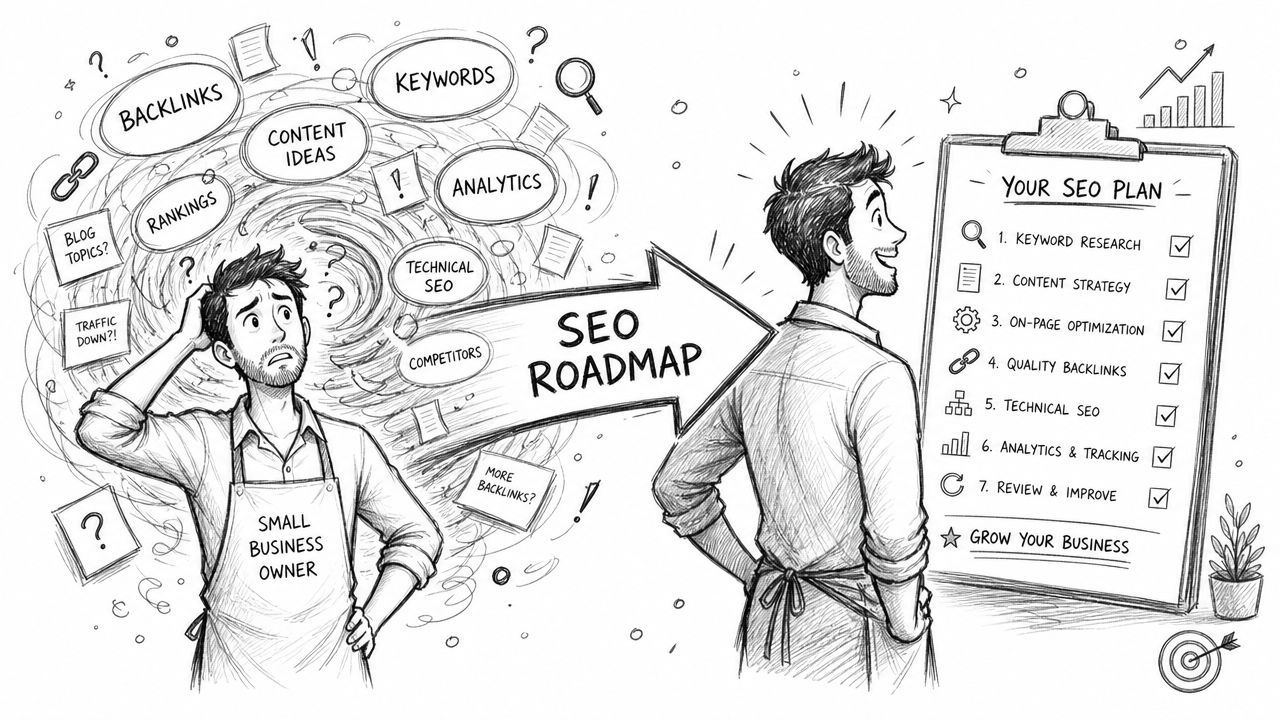
    A small business owner transitioning from confused SEO planning to a clear organized seven step roadmap.

    That is the core SEO problem for a small business. It is rarely a lack of ideas. It is a lack of prioritization. A roadmap solves that by turning SEO from a pile of tasks into a resource-allocation tool. It helps you decide what earns time this month, what gets scheduled later, and what does not deserve attention yet.

    For a team with limited budget and limited hours, that matters more than having a long checklist. I have seen small businesses lose months on activity that looked productive but had no path to revenue. Publishing top-of-funnel articles before the main service pages are clear. Obsessing over minor on-page tweaks while key pages are not indexed. Starting outreach before the site has anything worth linking to. The roadmap prevents that kind of drift.

    What changes when you use a real roadmap

    Work gets tied to constraints. You assign an owner, set a deadline, estimate effort, and write down the business reason. That last piece is where DIY SEO usually breaks. Business owners often know the ingredients of SEO. The hard part is choosing the right sequence for the team, budget, and sales goal in front of them.

    Practical rule: If a task does not have an owner, a due date, and a reason it matters to revenue, it is not part of a roadmap. It is just a note.

    A useful roadmap also creates permission to defer work. That matters even more now that AI search is changing how people discover businesses. You do not need to react to every new SEO trend. You need pages that clearly explain what you sell, strong site architecture, evidence of trust, and a publishing plan you can maintain. The roadmap keeps you focused on assets that compound instead of busywork that expires.

    What an effective roadmap tells you not to do

    Generic templates usually fail here. They tell you what SEO includes, but they do not help you make hard calls.

    For example:

    • Do not chase broad blog topics if your service pages barely explain what you sell.
    • Do not spend weeks polishing minor metadata if Google cannot properly crawl or understand your core pages.
    • Do not start link outreach before your most important landing pages deserve links.
    • Do not build twenty content ideas at once if your real publishing capacity is two strong pieces a month.

    A strong SEO roadmap gives a small business owner a working answer to one expensive question: given our limits, what should we do first?

    The Anatomy of a High-Impact SEO Roadmap

    Most roadmap templates look fine until you try to run a quarter of work through them. Then you realize they're missing the fields that help you choose between competing priorities. A strong template needs both strategic pillars and decision columns.
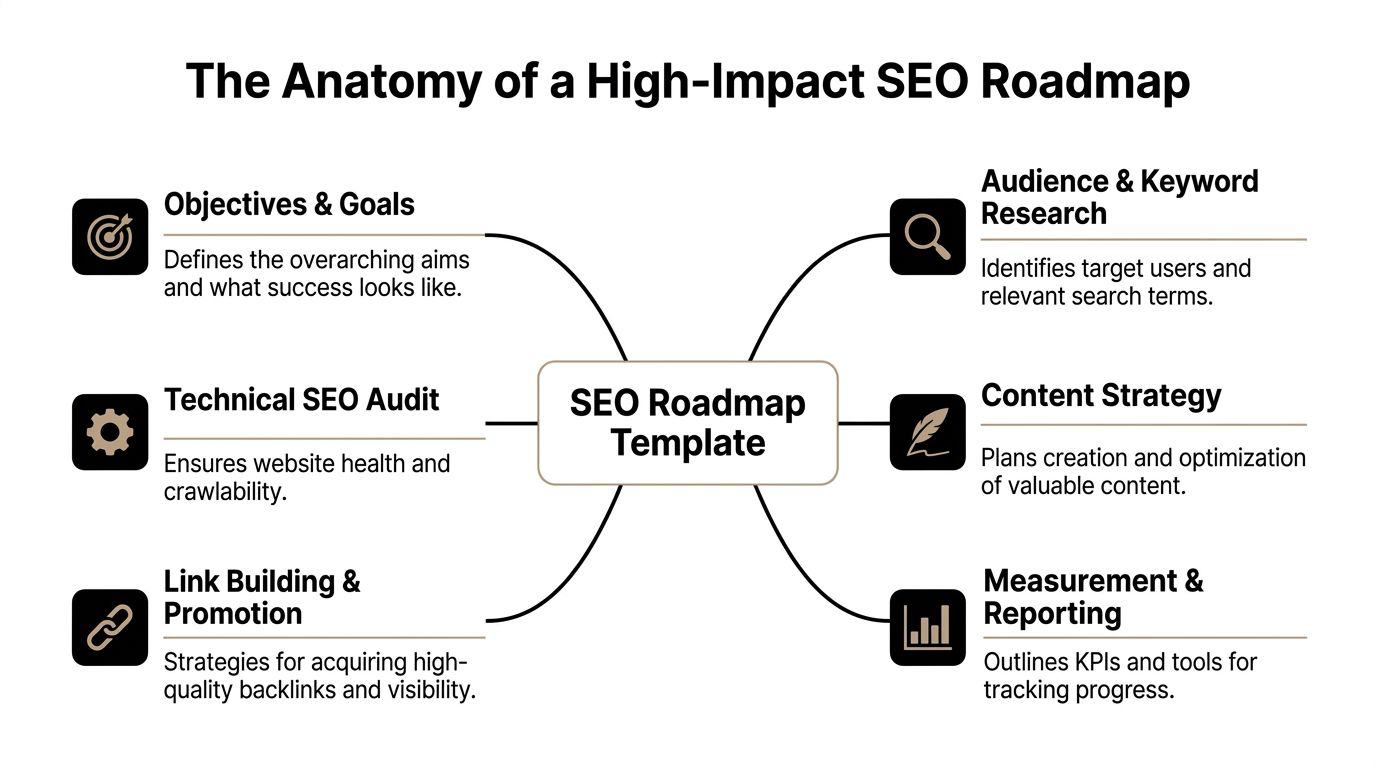
    A diagram outlining the key components of an SEO roadmap template, including research, strategy, and technical audits.

    What the roadmap must contain

    I like to organize a small-business roadmap into four working pillars. It keeps the plan focused without turning it into enterprise theater.

    • Technical foundations
      This covers crawlability, indexing, mobile usability, speed issues, redirects, broken pages, and structured data basics. If search engines or users hit friction here, everything else works harder for less return.

    • Content engine
      This is the system for service pages, category pages, pillar pages, support articles, and internal linking. It's where keyword research becomes publishable assets.

    • Authority building
      This includes backlinks, digital PR, local mentions, and broader entity signals. Small businesses often overestimate how much of this they need early on, but they still need a plan for it.

    • Measurement and reporting
      Measurement and reporting involves tracking whether work is producing movement in the KPIs that matter. It also keeps the roadmap from drifting into busywork.

    A roadmap should behave like an operating document. If you can't scan it and see the business opportunity, level of effort, and likely impact of each initiative, it won't guide real decisions.

    That idea matches a stronger planning approach from The Gray Company's roadmap framework, which recommends capturing the action item, business opportunity, priority, level of effort, scope, goal alignment, status, and estimated SEO impact before ranking work against available resources.

    The spreadsheet fields that make decisions easier

    You don't need fancy software to make this work. A Google Sheet, Airtable base, or ClickUp board is enough. The key is using fields that force clarity.

    Here's a simple structure.

    Task/Initiative Pillar (Content, Tech, Links) Impact (1-5) Effort (1-5) Priority Score (Impact/Effort) Target KPI Status
    Rewrite top service page Content 5 2 2.5 Leads from organic Not started
    Fix noindex on key pages Tech 5 1 5 Indexed core pages In progress
    Build partner outreach list Links 3 2 1.5 Referring domains Planned

    Each field does a specific job:

    • Task or initiative keeps the item concrete.
    • Pillar stops the roadmap from leaning too heavily toward one kind of work.
    • Impact forces you to estimate upside.
    • Effort protects your calendar.
    • Priority score gives you a simple way to sort.
    • Target KPI ties the task to a business result.
    • Status keeps execution visible.

    A stronger SEO roadmap template can add more columns later, such as owner, deadline, dependency, or notes. But this core version is enough to start making better choices today.

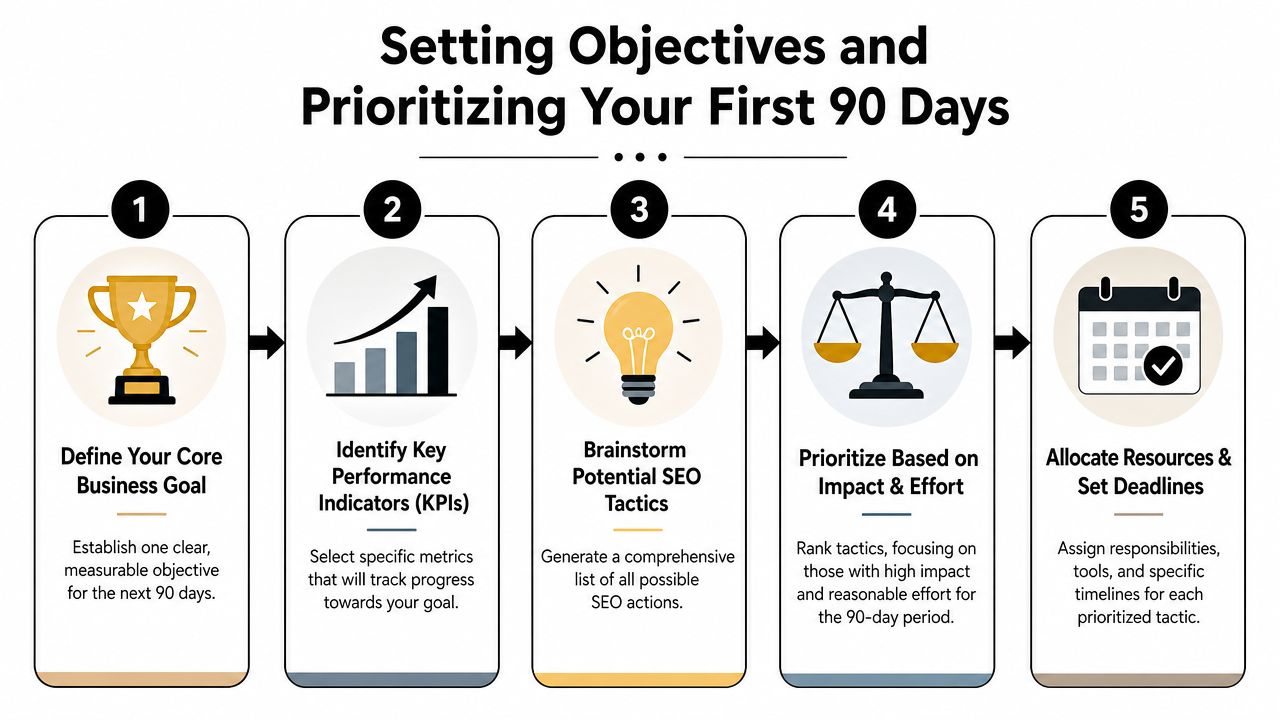
    Setting Objectives and Prioritizing Your First 90 Days

    A small business usually hits the same wall in month one of SEO. The owner has a long list of fixes, a writer wants topics, a developer has limited hours, and every task sounds important. Without a clear order of operations, the quarter disappears into low-impact work.

    The first 90 days need to function as a resource-allocation plan, not a wish list. Keep a 12-month direction in view, but make quarterly decisions based on what you can ship with your current team, budget, and sales goals. That discipline matters even more now that AI search can reduce clicks on broad informational queries. For many small businesses, the safer bet is to prioritize pages and topics that influence leads, calls, and sales directly.
    A five-step infographic guide titled Setting Objectives and Prioritizing Your First 90 Days for business strategy.

    Start with one business goal

    Choose one outcome for the quarter. A good objective ties organic search to revenue or pipeline, not vanity metrics.

    Strong first-quarter goals include:

    • Generate more leads from service pages
    • Increase sales from product category pages
    • Grow booked consultations from high-intent searches
    • Improve visibility for one core service in one target market

    That choice should make trade-offs easier. If booked calls are the goal, service pages, local landing pages, and conversion points deserve attention before broad blog content. If ecommerce revenue is the goal, category pages, product filters, internal linking, and merchant feed issues may matter more than publishing three new articles.

    Pick a small set of KPIs that help you decide what to do next. Good examples include organic form submissions, calls from local pages, demo requests, revenue from organic landing pages, or non-brand clicks to a priority service page. If a metric will not change next month's priorities, it does not belong at the center of the roadmap.

    For a practical walkthrough of this 90-day planning process, the video below breaks down each step.

    Use impact versus effort to make hard calls

    Once the goal is clear, build a raw backlog of SEO initiatives. Get the ideas out of email, Slack, and your head, then score them against reality.

    Common first-quarter items include:

    • Content work such as rewriting thin service pages, improving category copy, or creating a tightly scoped support article
    • Technical fixes such as repairing crawl problems, resolving duplicate pages, improving mobile usability, or adding structured data
    • Authority tasks such as reclaiming unlinked mentions, improving local profiles, asking partners for links, or running focused outreach

    Then score each item on two factors:

    1. Impact
      How likely is this task to improve qualified traffic, conversions, or visibility on pages tied to revenue?

    2. Effort
      How difficult is it for your actual business to complete, given your people, tools, approvals, and available time?

    I usually tell small business owners to be brutally honest on effort. A task that looks simple to an agency can become a six-week delay if it needs developer support, legal review, and new copy. The best 90-day plans favor work that reaches a money page fast and can be completed without heroic coordination.

    That often puts these items near the top:

    • Fixing indexation issues on pages with buying intent
    • Rewriting title tags, headings, and copy on core service or category pages
    • Adding internal links from existing content to commercial pages
    • Publishing one strong pillar asset with a few support pieces, instead of trying to fill an entire editorial calendar

    Put your reporting on a rhythm

    A roadmap loses value when nobody revisits it until the quarter ends.

    Use a simple review cadence:

    • Weekly check-ins for shipped tasks, blockers, and new issues
    • Monthly reviews for KPI movement and priority changes
    • Quarterly reviews for bigger shifts in strategy, budget, and team capacity

    At this point, many first-time SEO plans break down. The problem is rarely the template itself. The problem is treating the roadmap like a static document instead of a live set of choices. If AI Overviews start reducing clicks to one content cluster, or a service page begins driving qualified leads after a rewrite, the roadmap should reflect that quickly.

    A useful SEO roadmap template helps you choose what to do, what to delay, and what to drop. That is how a small business gets traction in the first quarter without wasting time on busywork.

    Building Your Core SEO Workstreams

    A good roadmap stops being useful if each workstream is just a label. "Content," "technical SEO," and "link building" do not help a small business decide what gets done this week, what waits until next month, and what is not worth touching yet. Each workstream needs a clear job, an owner, a level of effort, and a direct tie to leads or sales.

    For a lean team, I usually set up three workstreams: content that helps money pages rank and convert, technical fixes that remove friction, and authority work that supports pages already worth promoting. That structure keeps the plan focused on resource allocation, not activity for its own sake.

    Content engine

    Content work should earn its place on the roadmap. If a service page, collection page, or product category is thin, unclear, or missing the terms buyers use, fix that before adding another blog post.

    Small businesses get more from a tight content system than a large publishing calendar. One strong commercial page update can beat five low-intent articles that never influence revenue. One useful topic hub can create support content for months without forcing the team to start from scratch every week.

    A practical content workstream looks like this:

    • Upgrade priority commercial pages with clearer search intent targeting, stronger headings, better copy, and sharper calls to action
    • Create one primary topic asset that supports a core offer and gives you something worth linking to
    • Publish supporting articles only if they answer real pre-sale questions and can pass internal link value back to a service or category page
    • Add internal links on purpose from existing traffic pages to revenue pages
    • Refresh aging content that already has impressions or rankings before creating net-new pieces

    Keep the scope tight. A "content sprint" should name the URL, target query, business goal, owner, and publish or update date. If the task says only "write blog post," it is too vague to prioritize properly.

    AI search changes the bar here. Informational content that only repeats basic advice is easier to replace in search results. Pages that combine first-hand experience, product detail, local context, pricing guidance, comparison points, or service-specific proof are harder to ignore. That is where a small business can still win.

    Technical foundation

    Technical SEO deserves time only when it clears a real blockage. A clean audit spreadsheet does not create revenue by itself. The roadmap should separate issues that stop important pages from performing from issues that are mostly cosmetic.

    Start with the pages that matter most to the business. If those pages are hard to crawl, slow on mobile, broken by redirect chains, or missing basic markup, fix that first. Leave low-impact cleanup for later unless it can be bundled into work already planned by your developer.

    Use this filter for every technical task: does it help a priority page get indexed, load better, rank better, or convert better?

    A focused technical workstream usually includes:

    • Resolve crawl or indexation problems on service, product, or location pages
    • Improve mobile page experience where it affects form fills, calls, or checkout behavior
    • Fix broken internal links, redirect loops, and duplicate page versions that waste crawl attention or confuse users
    • Add or validate structured data on pages where it supports search understanding
    • Group larger development requests into planned sprints instead of scattering them across the quarter

    Trade-offs matter. A template bug affecting every title tag may deserve immediate attention. A minor page speed gain on low-value blog posts probably does not. Small teams do better when they treat technical SEO as a support function for revenue pages, not a separate perfection project.

    Authority building

    Authority work should match the business model and the team's actual capacity. A local contractor, med spa, or accounting firm rarely needs a large digital PR program in month one. They usually need cleaner citations, stronger business profiles, better review support, and links from organizations they already know.

    For a local or service business, start with reachable wins:

    • Claim or clean up important listings and profiles
    • Request links from suppliers, trade groups, chambers, and referral partners
    • Turn offline relationships into online mentions
    • Recover unlinked brand mentions where someone already referenced the business

    For e-commerce and B2B companies, authority work often needs stronger assets behind it. Comparison pages, buying guides, original examples, implementation checklists, and glossary pages give other sites a reason to link. Generic outreach to weak guest post sites usually adds little and eats time a small team does not have.

    The rule is simple. Promote pages that deserve visibility already. If the landing page is thin, confusing, or weak on conversion, fix the asset before spending hours trying to get links to it.

    A useful roadmap turns authority building into a prioritization decision, not a standing monthly chore. If the team only has five hours this month, spend them on the highest-probability links to the highest-value page. That discipline matters more than the size of the outreach list.

    Real-World SEO Roadmap Examples

    The value of an SEO roadmap template shows up when two businesses with the same checklist make completely different decisions. That's what small operators need to see. The right plan depends on business model, sales cycle, and constraints.
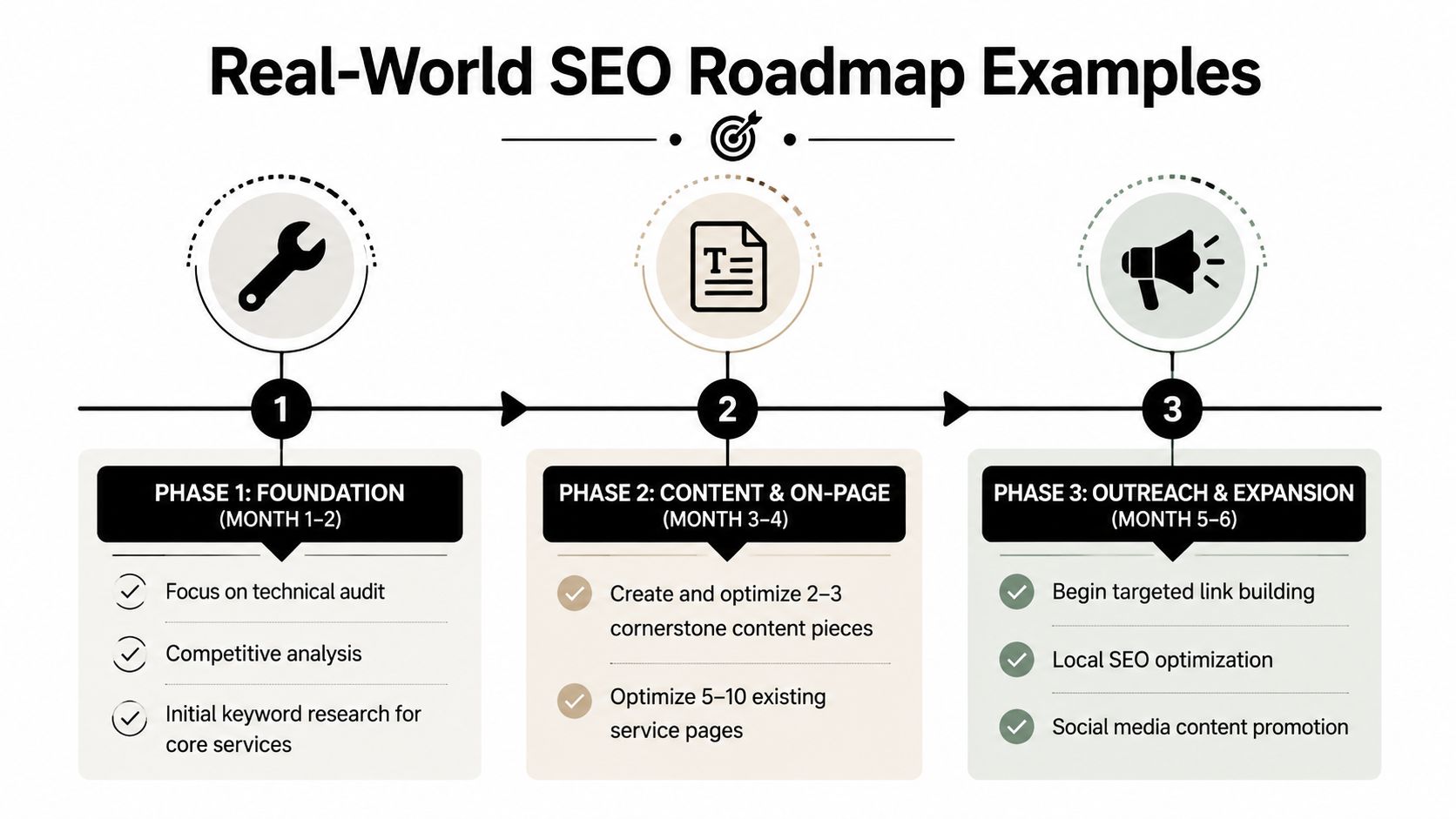
    A three-phase SEO roadmap infographic illustrating foundation, content creation, and outreach strategies over six months.

    Most generic templates miss this. They tell you what belongs on the list, but not what gets delayed when time, staff, or cash are tight. That gap is exactly why a smaller team needs the roadmap to act as a resource-allocation tool, as highlighted in ClickUp's discussion of SEO roadmap templates.

    Local service business

    A plumbing company doesn't need a giant blog machine first. It needs stronger local intent coverage and cleaner service pages.

    Their first three months might look like this:

    • Month one focuses on fixing service page titles, rewriting thin location pages, cleaning up Google Business Profile details, and tightening internal links.
    • Month two adds FAQ content for urgent service queries, improves mobile UX, and builds out structured local information across core pages.
    • Month three starts authority work through local directories, supplier relationships, chamber listings, and review-support workflows.

    What gets deferred? Broad educational content with weak buying intent. Fancy link campaigns. Deep technical edge cases.

    The best roadmap for a local business usually makes the shortest path from search to phone call easier.

    E-commerce store

    A handmade goods store has a different problem set. Category pages, collection structure, filters, and product discoverability matter more than publishing endless blog content.

    A practical opening roadmap might prioritize:

    Focus area First moves Work left for later
    Site structure Clean category hierarchy, improve internal links, remove index bloat risks Large-scale content expansion
    Commercial pages Rewrite category copy, sharpen metadata, improve image and product context Broad top-of-funnel publishing
    Authority Reach out to creators, niche gift guides, and relevant communities General guest posting

    This business may still need content, but not in the generic “write blogs for traffic” sense. Better assets might be gift guides, comparison pages, seasonal collection hubs, and evergreen care guides that support product discovery.

    B2B consulting firm

    A consulting firm often has long sales cycles and high-value leads. That changes the roadmap again. Here, authority and trust matter more than volume.

    The first quarter often works best when it includes:

    • Rebuilding service pages around actual buyer problems
    • Publishing one strong thought-leadership pillar tied to a core service
    • Adding supporting articles that answer comparison, process, and implementation questions
    • Improving author credibility signals and clearer conversion paths
    • Starting selective outreach to podcasts, industry sites, and partner ecosystems

    This type of business usually should not chase a large keyword footprint right away. It needs a tighter set of pages that show expertise and support sales conversations.

    Each of these examples uses the same SEO roadmap template. The difference is prioritization. That's the whole game.

    Your Roadmap Is a Living Document for an Evolving Web

    An SEO roadmap that isn't reviewed regularly becomes a stale spreadsheet. Search changes. Your offers change. Competitors change. The roadmap only stays useful if you treat it as a working document and revisit it on a steady rhythm.

    That matters even more now because search behavior isn't as simple as rankings and clicks anymore. Some current roadmap advice still underplays how much AI search is changing discovery. As noted in The Stacc's analysis of SEO roadmap templates, many templates still fail to account for AI search volatility, even as Gartner has projected significant declines in traditional search volume. A modern roadmap needs room for zero-click results, entity optimization, and content shaped for AI citation.

    So keep the document flexible.

    Review technical issues and task progress monthly. Re-rank your backlog quarterly. Watch whether your best pages are still the right pages. Test whether your content is structured clearly enough to be summarized, cited, or surfaced outside classic blue-link results. If not, adapt.

    The businesses that get value from an SEO roadmap template aren't the ones with the prettiest spreadsheet. They're the ones that use it to make better choices every month, with less guesswork and more discipline.


    If you want the agency-free version of this playbook, Agency Secrets is built for exactly that. It helps small business owners turn SEO into a practical growth system instead of a vague marketing project, with clear execution guidance and tools that make keyword research, publishing, and backlink growth far easier to manage.

  • Keyword Research for Local SEO: Your 2026 Success Guide

    Keyword Research for Local SEO: Your 2026 Success Guide

    If you're a small business owner doing your own marketing, keyword research for local SEO usually starts the same way. You open a tool, type in a broad service term, see a pile of keyword ideas, and then get stuck deciding what matters.

    The issue isn't finding more keywords. It's choosing the right local keywords, matching them to the right pages, and focusing on terms that can lead to calls, bookings, and walk-ins without turning this into a full-time job. That's where most small teams lose momentum.

    A practical local SEO workflow is simpler than people make it sound. Start with the services you sell, layer in the places you serve, validate demand with localized tools, study the search results, and then put your best terms on the pages that can win. That's the difference between random optimization and a system that compounds.

    Table of Contents

    The Foundation of Local SEO Keyword Strategy

    Keyword research for local SEO starts with one question. Is the searcher trying to learn, compare, or act nearby right now?

    That sounds obvious, but it's where local businesses go wrong. They treat local search like general SEO and end up writing pages for broad topics that attract curiosity instead of customers. Someone searching for "how to fix a leaky faucet" wants advice. Someone searching for "plumber near me" usually wants a provider, a phone number, hours, reviews, or directions. Those are completely different jobs.

    Why local intent changes everything

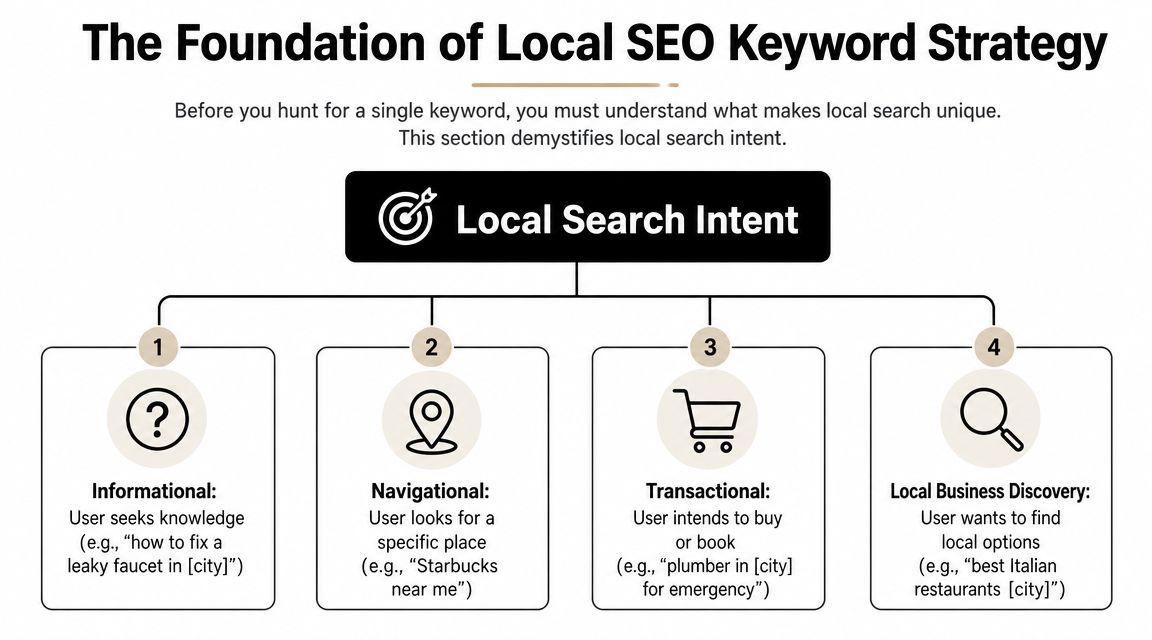
    Local search intent is tied to place. The searcher may include a city name, a neighborhood, a ZIP code, or a phrase like "near me." They may also leave the location out and still expect local results. Google often understands that intent from the query itself and responds with maps, listings, reviews, and business profiles.

    A diagram illustrating the four types of local search intent for local SEO keyword strategy planning.

    The commercial value of that intent is hard to ignore. SOCi reported that in the U.S., there are over 5.9 million keywords related to "near me" and 800 million searches per month, while LocaliQ found that 28% of local searches lead to a purchase within 24 hours according to SOCi's local SEO statistics roundup. That is why local keyword research belongs at the front of your SEO work, not at the end.

    Practical rule: If a keyword doesn't connect clearly to a service you offer in a place you serve, it's usually not a priority yet.

    Four local intent patterns show up again and again:

    • Informational intent: Searches like "how to choose an HVAC system in Dallas." Useful for trust-building content.
    • Navigational intent: Searches for a specific brand or business, such as "Joe's Auto Repair near me."
    • Transactional intent: Searches with immediate buying or booking intent, such as "emergency dentist in Austin."
    • Local business discovery: Searches like "best coffee shop downtown" where the searcher wants options nearby.

    What success looks like for a local business

    For a local company, traffic alone isn't a useful finish line. A page can get visits and still fail if it doesn't lead to action.

    A better KPI set is grounded in outcomes that matter to a business owner:

    KPI Why it matters
    Phone calls High-intent local searchers often call before they click around
    Direction requests A strong sign that map visibility is doing its job
    Contact form submissions Useful for service businesses with longer sales cycles
    Bookings or appointments Direct proof that the keyword matched buyer intent
    Google Business Profile interactions Important when the search results page is the conversion point

    If you remember one thing, remember this. Local SEO is not a traffic game first. It's an intent-matching game. The business that wins usually isn't the one with the biggest keyword list. It's the one that understands which searches are closest to revenue.

    Discovering Your Core and Long-Tail Local Keywords

    Most small businesses overcomplicate discovery. They start with software when they should start with the business itself.

    The cleanest workflow begins with a short list of seed terms. These are the plain-English names of your services or products. A plumber might start with drain cleaning, water heater repair, leak detection, sewer line repair, and emergency plumbing. A med spa might start with Botox, facials, laser hair removal, and lip filler.

    Start with services, not tools

    An effective local workflow follows a structured path. Semrush and Neil Patel recommend listing solution terms and locations, finding variations with tools, evaluating metrics, analyzing competitors, and then mapping keywords to pages, as outlined in Semrush's local keyword research guide. That's a better approach than opening a tool and chasing whatever looks popular.

    Build your seed list from sources you already have:

    • Service menu: Your main categories, sub-services, and specialty jobs.
    • Sales conversations: The phrases customers use on the phone or in forms.
    • Customer emails and texts: Often more revealing than polished marketing copy.
    • Reviews: They show how people describe your work in natural language.
    • Google Search Console: If your site already has visibility, this often reveals surprise queries worth expanding.

    Once you have your seed list, start combining it with local qualifiers.

    Build your modifier bank

    These are the origins of long-tail local keywords. You don't need to invent clever phrasing. You need to reflect how real customers search.

    Use a bank of modifiers like these:

    • Geographic modifiers: City, neighborhood, district, county, ZIP or postcode, nearby landmarks
    • Service qualifiers: Emergency, same-day, affordable, commercial, residential, 24-hour
    • Problem-based modifiers: Repair, replacement, installation, cost, near me, open now
    • Audience modifiers: Pediatric, family, luxury, small business, apartment, senior

    A few examples make this easier to see:

    Seed term Local modifier Expanded keyword idea
    water heater repair Phoenix water heater repair Phoenix
    dentist near me dentist near me
    dog grooming downtown dog grooming downtown
    HVAC installation 24-hour 24-hour HVAC installation in Tampa
    electrician commercial commercial electrician in Brooklyn

    Broad terms often look attractive in a keyword tool, but small teams usually get faster traction from specific service-plus-location combinations.

    A simple keyword capture template

    You don't need a fancy dashboard. A spreadsheet works.

    Use columns like this:

    Keyword idea Service Location Intent Notes
    emergency plumber Chicago Emergency plumbing Chicago Transactional Strong fit for core service page
    plumber near me General plumbing Service area Discovery Likely Local Pack heavy
    drain cleaning Lincoln Park Drain cleaning Lincoln Park Transactional Candidate for neighborhood section
    how to prevent frozen pipes Chicago Plumbing advice Chicago Informational Blog or FAQ support content

    Keep going until you have a raw list that feels messy. That's normal. Discovery is supposed to create options. The next step is where you cut the list down.

    Analyzing Keywords with Tools and Competitor Insights

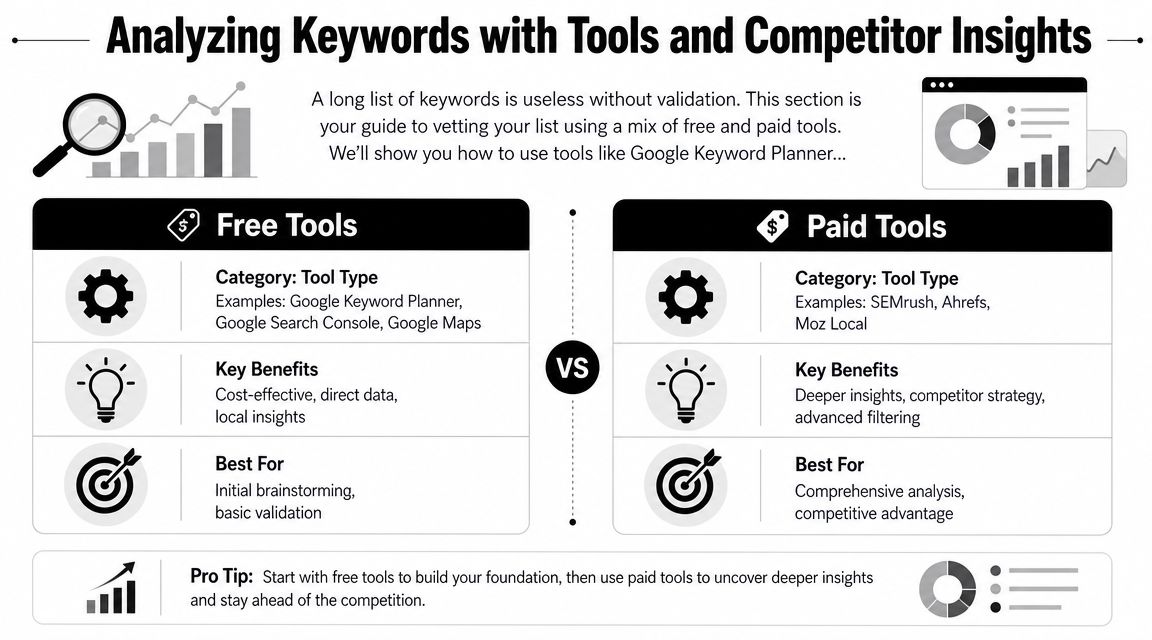
    Raw keyword ideas need a reality check before they deserve a page, a GBP update, or a month of effort. For a small team, that check should answer three questions fast. Is anyone nearby searching for this? Does the search show buying intent? Is Google sending people to websites, the map, or both?

    A comparison chart highlighting the differences between free and paid SEO keyword research and analysis tools.

    I usually tell owners to stop shopping for tools and start building a workflow. Good local keyword analysis comes from combining one source for demand, one for competitor clues, and one manual review of the live search results.

    Good Better Best tool stacks

    Use the stack that matches your time and budget, not the one an agency with six subscriptions uses.

    Level Best for Tool stack Trade-off
    Good Solopreneurs Google Keyword Planner, Google Search Console, Google Trends, Google Maps Low cost, slower research, more manual checking
    Better Small teams Good stack plus Semrush or Ahrefs Faster filtering, better competitor discovery, higher monthly cost
    Best Competitive local markets Better stack plus a dedicated local rank tracker or GBP-focused workflow Better visibility into map performance, more setup and spend

    The trade-off is straightforward. Free tools can get you to good decisions, but they take more judgment. Paid tools save time, surface more variations, and make competitor research easier. They also tempt small teams to chase too many keywords at once.

    A simple rule helps. If you manage one location, start with the Good stack and add one paid tool only after you have clear service pages and a working Google Business Profile. If you compete in a dense market like legal, dental, HVAC, or home services across multiple suburbs, the Better stack usually pays for itself in saved time.

    A practical review workflow

    Run each keyword through the same filter so you do not make decisions based on volume alone.

    1. Check local demand in Google Keyword Planner, Google Trends, and Search Console if you already have some visibility.
    2. Check the live SERP from the target area. Search on mobile and desktop if possible.
    3. Check the map results to see whether the Local Pack is the main conversion point.
    4. Check competitor pages and profiles for the query. Look at page type, GBP categories, reviews, and service wording.
    5. Score the keyword based on relevance, intent, and difficulty to win.

    That fifth step matters because small teams need a way to choose, not just collect.

    A prioritization matrix you can use in a spreadsheet

    This is the version I use with businesses that need to make decisions in one working session.

    Keyword Local demand Intent Local Pack presence Difficulty Business value Priority
    emergency plumber Austin High High High Medium High Do now
    water heater installation Round Rock Medium High Medium Medium High Next
    plumbing tips Austin Medium Low Low Low Low Later
    plumber near me High High Very high High High GBP + service page support

    Keep the scoring simple. High, medium, and low is enough. A messy but usable sheet beats a detailed scoring model you never finish.

    How to read the live search results

    Keyword tools estimate demand. Google's results show the format you have to win.

    Search the phrase as a customer would. For example, search “plumber near me” or “water heater repair Phoenix” and study the first screen. If you mostly see a map with three businesses, reviews, call buttons, and directions, that keyword is not just an SEO content play. It is a Local Pack play. Your page still matters, but your Google Business Profile, category choice, reviews, and landing page alignment matter just as much.

    Check these questions:

    • What shows first? Local Pack, ads, organic pages, directories, AI Overview, or a mix
    • Who is winning? Independent local businesses, large directories, franchises, or national brands
    • What page type ranks? Homepage, service page, location page, review page, or article
    • What intent is Google assuming? Emergency help, general research, price comparison, or brand lookup
    • Is a click to the website even likely? Some searches lead to calls or direction requests straight from the map

    The last point is easy to miss. If the map is doing most of the work, a keyword can still be valuable even when website traffic stays modest. For a locksmith, roofer, dentist, or towing company, phone calls from the Local Pack often matter more than pageviews.

    Analysts cited in Koom's local SEO research article note that local searches often end on the results page itself through map interactions and business profile actions. That matches what small businesses see in practice. The win is often the call, not the click.

    To get a visual walk-through of keyword validation and search result analysis, this overview is useful:

    What to check in the Local Pack

    Local pack analysis sounds technical, but it just means studying the businesses shown in the map for your target search. Open Google, search a service in your area, and inspect the three map listings that appear first.

    Look for patterns you can act on:

    • Primary category fit: Does the listed category closely match the search term?
    • Review language: Do recent reviews mention the exact service in the search query?
    • GBP completeness: Are hours, services, photos, and attributes filled out and current?
    • Landing page match: Does the profile link to a page that clearly answers the query?
    • Location strength: Is the business physically close to the search area or strongly associated with it?
    • Reputation signals: Are ratings, review volume, and recency noticeably stronger than yours?

    Competitor research is useful here, but keep it practical. Do not copy every category, service label, or page title a competitor uses. Find the few signals that repeat across winners, then fix gaps on your own profile and pages.

    I often see businesses lose local rankings because their signals are split. The page targets “drain cleaning,” the GBP leans toward “emergency plumber,” and reviews mostly mention “water heater repair.” Google has to guess what the business is best known for. Competitors with tighter alignment make that decision easy.

    For small teams, that is the goal of this stage. Find the terms where demand exists, the SERP matches your offer, and the Local Pack gives you a realistic path to calls and leads.

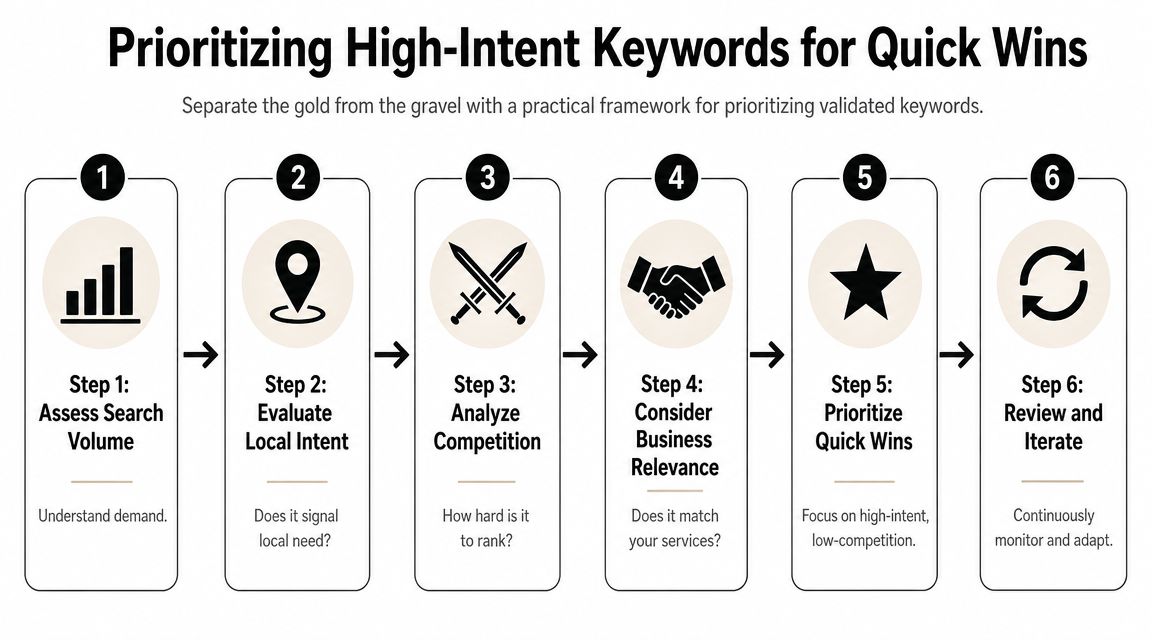
    Prioritizing High-Intent Keywords for Quick Wins

    This is the point where discipline matters. Most small teams don't fail because they chose zero good keywords. They fail because they tried to target too many at once.

    A practical keyword plan favors keywords that are highly relevant, locally validated, commercially useful, and realistically winnable. That's not always the highest-volume term.

    A six-step infographic illustrating a practical framework for prioritizing high-intent keywords to achieve quick SEO wins.

    The four-factor filter that keeps you honest

    Experts at LocalDominator and SEObility agree that local keyword prioritization turns on relevance, local search volume, competition, and intent, with relevance as the most important factor, based on LocalDominator's local keyword research framework.

    Here's how to apply those four factors in practice:

    1. Relevance
      If you don't want the lead, don't target the keyword. A family law firm shouldn't chase "criminal defense lawyer near me" just because it appears nearby on the SERP.

    2. Local volume
      You need evidence that people in your service area search for it. Local demand beats national volume every time in local SEO.

    3. Competition
      Some terms are crowded by directories, mature brands, and aggressive local players. Others have weaker pages, thin profiles, or poor page matching. Those are often better entry points.

    4. Intent
      "How to unclog a sink" and "emergency plumber open now" are not equal. One is educational. One is urgent. If your time is limited, urgency wins.

    A good local keyword often looks boring on paper. That's usually a good sign. Specific service terms convert better than flashy broad phrases.

    A prioritization matrix you can use today

    Use a simple 1 to 3 scoring model. Keep it lightweight so you'll maintain it.

    Keyword Relevance Local volume Competition Intent Total Action
    emergency plumber Chicago 3 3 2 3 11 Target now
    drain cleaning Lincoln Park 3 2 2 3 10 Target now
    plumbing tips Chicago 2 2 2 1 7 Support content
    plumber 2 3 1 2 8 Defer

    A few quick rules make this matrix more useful:

    • Target now: High relevance, strong intent, manageable competition
    • Support content: Useful for blog posts, FAQs, and trust-building pages
    • Defer: Broad terms that need more authority or a stronger local footprint
    • Drop: Keywords that don't fit your business model or service area

    Small teams achieve quick wins. They stop chasing the biggest phrase and start publishing the page most likely to rank and convert first.

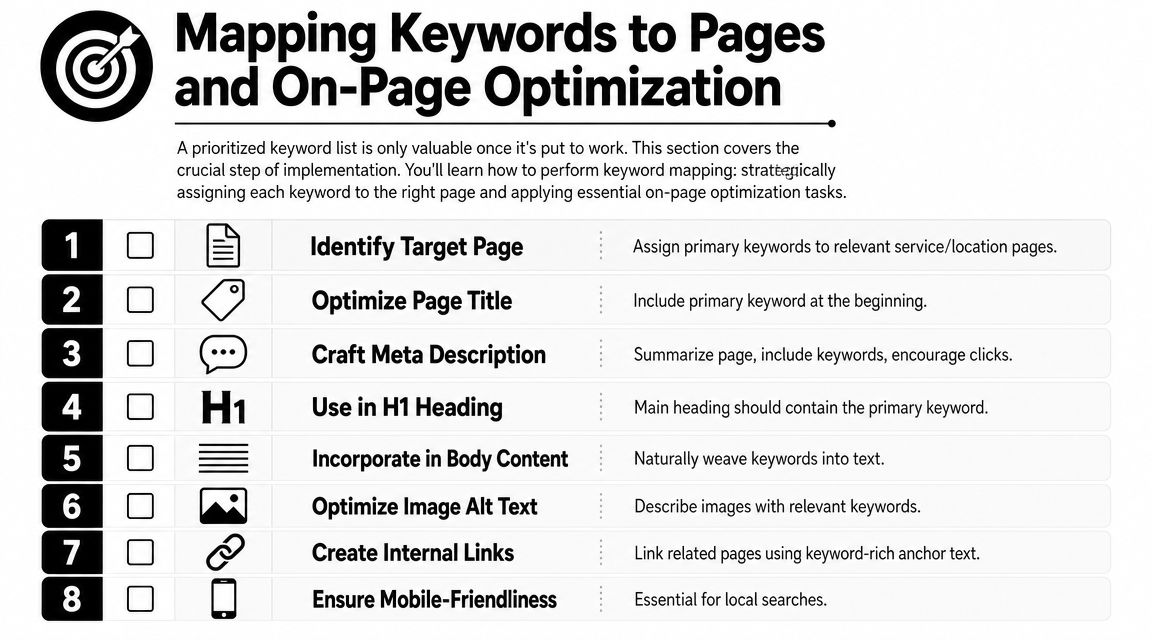
    Mapping Keywords to Pages and On-Page Optimization

    Keyword research only starts the job. The ranking asset is the page, and in local SEO, the wrong page match costs calls.

    A common example is a plumber with one general Services page trying to rank for emergency plumbing, drain cleaning, water heater repair, and every neighborhood in the city. Google has to guess which query that page deserves to rank for. Customers have the same problem. A person searching "emergency plumber Chicago" wants a fast, obvious answer, not a page that also talks about remodels and sump pumps.

    A numbered checklist showing eight essential steps for mapping keywords to pages and performing on-page SEO optimization.

    Map existing pages first

    For a small team, the fastest workflow is simple. Start with the pages you already have. Assign one primary keyword to each page. Then look for gaps.

    Use a page map like this:

    Page Primary keyword Secondary terms Keep or create
    Emergency plumbing page emergency plumber Chicago 24-hour plumber Chicago, urgent plumbing repair Keep
    Drain cleaning page drain cleaning Chicago clogged drain repair Chicago Keep
    Water heater page water heater repair Chicago hot water heater repair near me Keep
    Lincoln Park service area page plumber Lincoln Park local plumbing service Lincoln Park Create only if truly distinct

    This step prevents keyword cannibalization, which is just a technical way of saying two pages from the same site compete for the same search.

    A few rules keep the map usable:

    • One primary keyword per page: Variants and close synonyms can support the main term
    • Match intent to page type: Service terms belong on service pages. Informational terms belong on blog posts or FAQs
    • Create location pages only when they can be unique: If the page has no distinct proof, service details, or local relevance, skip it
    • Support the money page instead of competing with it: A blog post on "signs you need drain cleaning" should link to the drain cleaning service page, not target the same main phrase

    If time is tight, use a Good, Better, Best approach.

    • Good: Spreadsheet with page URL, target keyword, title tag, and status
    • Better: Spreadsheet plus a quick SERP check for each keyword to confirm the right page type is ranking
    • Best: Spreadsheet, SERP check, and local pack review to see whether the keyword is won mainly through the website, the Google Business Profile, or both

    That last point matters more than many business owners realize. If the search result is dominated by the map pack, your page still needs to rank, but it also needs to reinforce the profile that may get the click or call first.

    How to optimize the page without stuffing it

    After the keyword is mapped, make the page obvious to both searchers and Google.

    Place the primary keyword in the spots that carry the most meaning:

    • Title tag: Lead with the service and city when it fits naturally
    • H1 heading: Keep it clear and close to the title tag
    • Opening paragraph: Confirm the service and area early
    • Subheadings: Use related service terms and real customer questions
    • Body copy: Add useful local details such as service areas, response times, common job types, and trust signals
    • Image alt text: Describe the image first. Add local context only when it is relevant

    Read the page out loud.

    If it sounds repetitive, salesy, or strange, fix the copy. Local pages usually improve when they are more specific, not when they repeat the exact keyword five extra times.

    Schema can support this work by clarifying business details, services, and location. It helps search engines interpret the page, but it does not fix weak page targeting or thin content.

    Don't ignore your Google Business Profile

    For many local keywords, the Local Pack is the first real conversion point. That is the map and three business listings people see when they search for something like "plumber near me." If your profile shows up there, the customer may call without ever opening your website.

    That changes how page mapping should work.

    Your service pages and your Google Business Profile should use the same service language so Google sees a consistent pattern across your site and profile. Keep that alignment across:

    • Primary and secondary categories
    • Business description
    • Services and products
    • Posts and updates
    • Photos and captions
    • Questions and answers

    Here is the practical trade-off. A page targeting "water heater repair Chicago" may help organic rankings, but if the map pack gets most of the clicks and calls for that query, the win comes from both assets working together. The page supplies relevance and detail. The profile supplies visibility, reviews, hours, and a fast path to contact.

    For a solopreneur, that means prioritizing pages that support high-intent map pack searches first. Build the emergency service page before the broad company overview. Tight alignment beats more content.

    Tracking Your Local SEO Performance and Iterating

    Local SEO work compounds only if you review it. Otherwise you're publishing pages, tweaking profiles, and guessing.

    Tracking doesn't need to be complicated. For a small team, the best system is the one you'll check consistently. That usually means a short keyword set, a simple notes field, and a monthly review of business outcomes.

    Track business signals, not just ranks

    Rank tracking matters, especially by city or service area, but don't treat it as the only scorecard.

    Watch these signals together:

    • Keyword positions in your target area: Especially for service-plus-location terms
    • Google Business Profile actions: Calls, direction requests, and other profile interactions
    • Lead form submissions: Look for pages that start generating qualified inquiries
    • Call quality: Ask staff which services people mention when they call
    • Page engagement: Are visitors landing on the intended page and taking the next step?

    One useful pattern shows up often. A keyword may never drive huge website traffic because the search results page answers the query with map listings and profile details. It can still be a winner if it leads to more calls or direction requests. That's why local SEO performance needs business context.

    A lightweight review rhythm for small teams

    A monthly review works well for most small businesses.

    Use a short checklist:

    • Check your top target keywords: Did any move up, down, or trigger different SERP features?
    • Review your best pages: Are the mapped service pages still the right fit?
    • Inspect one competitor: Did they launch a better page, add reviews, or improve their profile?
    • Look for near-miss keywords: Terms where you're visible but not yet strong enough to win consistently
    • Refine the next batch: Update one page, improve one profile area, and build one supporting asset

    What works is steady iteration. Update pages with better local details. Tighten service language. Improve internal links. Add FAQs that reflect real customer questions. Expand into adjacent neighborhoods only when the current service pages are doing their job.

    The businesses that get the most from keyword research for local SEO don't treat it like a one-time spreadsheet exercise. They use it as a feedback loop. That's where the edge comes from.


    If you want a simpler way to turn keyword research into content and rankings without hiring an agency, Agency Secrets is worth a look. It gives small business owners a practical SEO playbook built around buyer-intent keyword targeting, strong content structure, backlinks, and evergreen growth, with OutRank helping automate research, article creation, publishing, and competitor analysis.

  • Content Marketing for Local Business: A Winning Playbook

    Content Marketing for Local Business: A Winning Playbook

    You're probably doing what most local owners do. You run a few ads, get a short spike in calls, then watch the leads dry up the moment you pause spend. Meanwhile, your website sits there like an online brochure instead of a sales asset.

    That's the gap content marketing for local business closes. It turns your site into something that keeps working when you're on jobs, seeing patients, serving tables, or handling payroll. A strong service page can bring in calls. A useful FAQ can remove hesitation. A well-written article can attract someone who didn't know your business name yesterday but knows they need help now.

    The part most businesses miss is that this only works as a system. Keyword research feeds content. Content feeds internal links. Better structure supports local SEO. Local SEO makes link building easier. Links strengthen the pages you already published. Over time, the whole thing compounds.

    Table of Contents

    The Local Advantage Why Content Outperforms Ads

    Paid ads are rented attention. Once your budget stops, the traffic stops with it. That's fine for a promotion or a short-term push, but it's a weak foundation for a plumber, dentist, HVAC company, roofer, or café that needs steady demand.

    Content works differently. You publish a page once, improve it over time, and it can keep bringing in visits, calls, and quote requests long after you hit publish. A page about “emergency plumber in South Austin,” a guide to “Invisalign cost in Scottsdale,” or an article on “best coffee beans for French press at home” can keep showing up whenever local buyers search.

    A stressed businessman surrounded by failed marketing campaigns, contrasting ineffective paid ads with the success of content marketing.

    This isn't a fringe tactic anymore. 90% of organizations now have a content marketing strategy, and 71% of marketers say its significance has grown in the past year, according to compiled industry benchmarks on content marketing adoption. For a local business, that means your market is training customers to expect useful content before they call.

    Practical rule: Ads can buy attention. Content can earn trust and keep earning it.

    The best part is the asset value. A good article doesn't disappear like a boosted post. It can support your service pages, rank for long-tail local searches, answer objections, and give other sites a reason to link to you. That's where the compounding starts.

    Here's the trade-off most owners need to hear clearly:

    Approach What it does well What it does poorly
    Paid ads Fast testing, immediate visibility, seasonal promos Stops working when spend stops
    Local content Builds search visibility, trust, and reusable sales assets Takes discipline and consistency
    Both together Captures short-term demand while building long-term reach Requires focus so you don't spread thin

    If your budget is tight, content usually gives you a better long-term position. If your budget is healthy, content still matters because it lowers your dependence on paid acquisition.

    That's why content marketing for local business isn't just blogging. It's a growth engine built from pages, articles, FAQs, internal links, citations, and local trust signals that stack on each other.

    Find What Your Local Customers Are Asking

    Most local content fails before writing starts. The business guesses what people want, writes broad posts nobody asked for, and wonders why nothing ranks or converts.

    The better approach is simpler. Build content from the questions customers already ask, then match those questions to the phrases they use in search. Salesforce recommends identifying your audience by analyzing customer challenges, and Keap emphasizes keyword research so content reflects the exact phrases people search for, as explained in Salesforce's small business content marketing guidance.

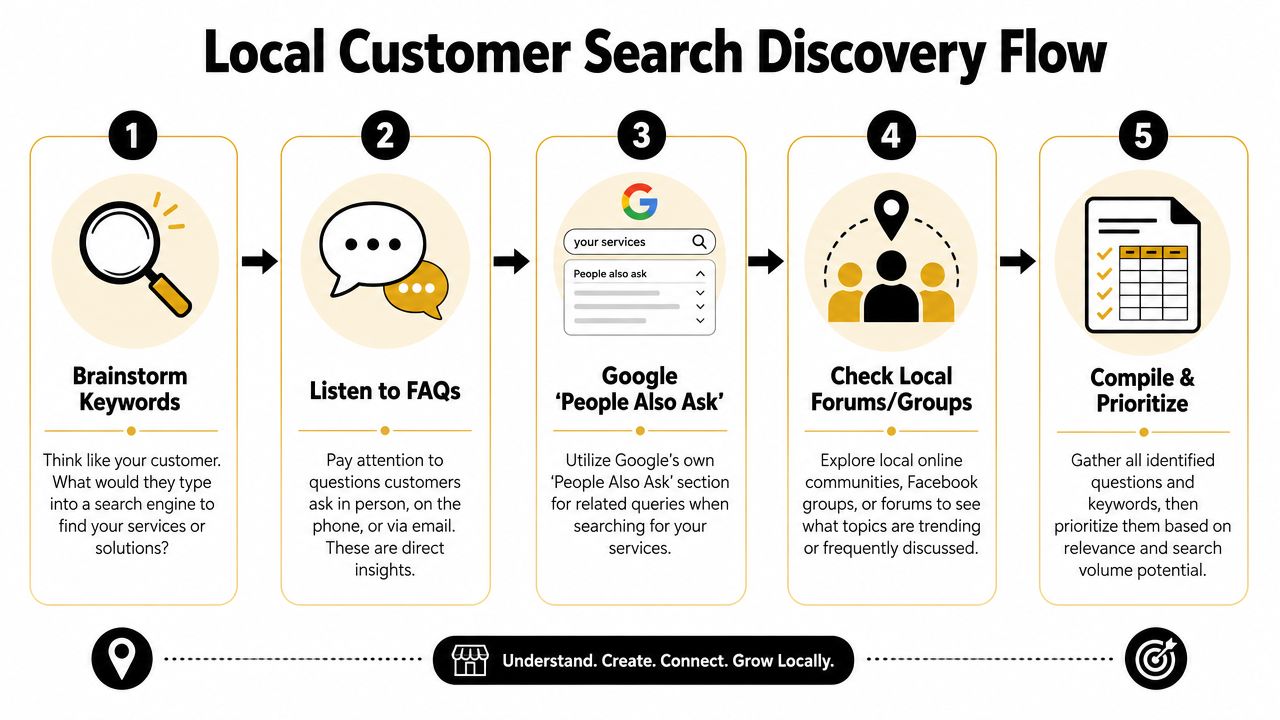
    A five-step flowchart illustrating a local customer search discovery process for SEO and marketing purposes.

    Start with the questions you already hear

    You don't need fancy software to begin. Open a document and list what people ask on calls, in DMs, at the front desk, and during estimates.

    For a plumber, the list might look like this:

    • Urgent service questions: “Do you handle burst pipes at night?” “How fast can someone get here?”
    • Cost questions: “How much does water heater replacement cost?” “Do you charge a callout fee?”
    • Trust questions: “Are you licensed?” “Do you guarantee the work?”
    • Problem questions: “Why does my drain keep backing up?” “Why is my water pressure low?”

    Those aren't just sales questions. They're content topics.

    Customers usually search for the problem first and the provider second.

    Turn one service into many search terms

    Take one core service and expand it with modifiers. A local electrician in Phoenix could start with “electrical repair” and branch into:

    • Service plus city: electrical repair Phoenix
    • Service plus suburb: electrical repair Tempe
    • Service plus urgency: emergency electrician Phoenix
    • Service plus problem: flickering lights electrician Phoenix
    • Service plus cost: electrical panel upgrade cost Phoenix
    • Service plus audience: electrician for older homes Phoenix

    Many owners go wrong. They only target broad service phrases and skip the high-intent searches around symptoms, urgency, and pricing. Those are often the searches that lead to calls because the person already feels the problem.

    A quick way to prioritize is to sort topics into three buckets:

    Bucket What it usually means Example
    Ready to buy The person wants a provider now emergency plumber in South Austin
    Comparing options The person is evaluating service types or pricing tank vs tankless water heater Austin
    Learning first The person wants to understand the issue why does my bathroom sink smell

    Use Google like a customer would

    Type your service into Google and look closely at the results page. Autocomplete, related searches, and “People Also Ask” will show the language buyers use. That's free research.

    If you own a dental clinic, search terms might uncover angles like:

    • Treatment concerns: “Does Invisalign hurt”
    • Price intent: “Invisalign cost Scottsdale”
    • Comparison intent: “Invisalign vs braces adults”
    • Location intent: “cosmetic dentist near Old Town Scottsdale”

    Then check your own Google Business Profile reviews, email inbox, and contact form submissions. If several people phrase the same concern similarly, that wording belongs in your page headings, FAQs, and article titles.

    A practical workflow for content marketing for local business looks like this:

    1. List services you want more of
    2. Write down customer questions tied to those services
    3. Add city, neighborhood, and urgency modifiers
    4. Check Google autocomplete and People Also Ask
    5. Group similar queries into one strong page instead of many weak ones

    Don't create a separate page for every tiny variation. A plumber doesn't need one page for “clogged kitchen sink Austin” and another for “kitchen sink drain clogged Austin” if one solid page can cover the intent well.

    What works is consolidation with clarity. What doesn't work is publishing thin, repetitive pages that say the same thing with slightly different keywords.

    Create Content That Answers Local Questions

    Once you know what people search, your next job is answering better than anyone local. That doesn't mean writing more. It means publishing the right mix of pages so each piece supports the others.

    HubSpot's 2026 data reports that website, blog, and SEO content is the highest ROI-generating channel for marketers, and blog posts were named among the top five highest-ROI formats by 22.26% of marketers in 2025, with blogs used by 38% of marketers in that year, according to HubSpot marketing statistics. For local businesses, that matters because service pages and evergreen articles can keep attracting buyers long after publication.

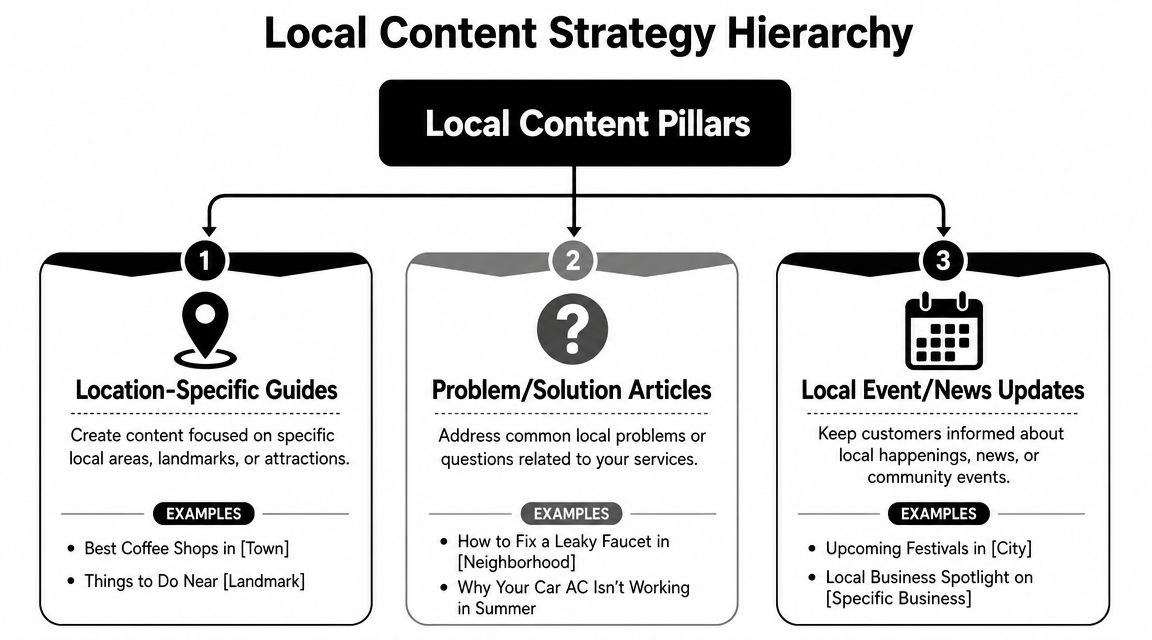
    A diagram outlining the Local Content Strategy Hierarchy with three main content pillars for business growth.

    Service pages that convert

    Start with your money pages. These are the pages for services you want booked now.

    A strong local service page usually includes:

    • A clear headline: Say the service and area plainly. “Emergency Plumbing in South Austin” is stronger than “Trusted Solutions for Your Home.”
    • Specific problems you solve: Burst pipes, blocked drains, leaking water heaters, no hot water.
    • Proof and reassurance: Licensing, service area details, process, warranty, financing if relevant.
    • A visible next step: Call button, booking form, request-a-quote form.

    For a dentist, that may be a page on “Dental Implants in Naperville.” For a café, it may be “Coffee Catering for Office Events in Brooklyn.” For a roofer, it may be “Roof Repair in Plano.”

    These pages should be direct. Don't bury the service under brand storytelling.

    Location pages that prove local relevance

    A location page is not the same as a service page. It exists to show that your business understands a specific area and serves it well.

    A useful location page might include:

    Element Example for a plumber Why it matters
    Area-specific intro Common plumbing issues in older homes in Hyde Park Shows local relevance
    Nearby landmarks or neighborhoods Serving Hyde Park, North Loop, and Hancock Helps match local intent
    Local service context Familiar with older pipe systems and slab leak issues Builds trust
    Contact path Call for service in this area today Keeps the page action-oriented

    What doesn't work is copying one template across ten suburbs and swapping the town name. That's easy to spot and rarely persuasive.

    If a local page wouldn't help a real customer in that area, it probably won't help your rankings either.

    A realtor can do this especially well. A page about a neighborhood can include parks, commute patterns, school-adjacent lifestyle points, pet-friendly spots, and housing style notes. That kind of specificity makes the page useful, not just optimized.

    Blog posts that pull in early-stage demand

    Blog content catches people before they're ready to call. Done well, it feeds your service pages with internal links and trust.

    Good local blog topics usually fall into a few patterns:

    • Cost and pricing: “How much does a new roof cost in Denver?”
    • Problem diagnosis: “Why does my AC smell musty in summer?”
    • Comparisons: “Porcelain veneers vs bonding”
    • Local guidance: “What café owners should know about seasonal outdoor seating permits”
    • Preparation content: “What to do before the exterminator arrives”

    A café owner could publish “Best pastries for office breakfast catering” and link that post to a catering service page. A dental clinic could write “How long does Invisalign treatment take” and link to its Invisalign consultation page. A plumber could publish “What to do when a pipe bursts before help arrives” and direct readers to emergency service.

    Here's the important connection. Your blog is not separate from sales. It supports sales when each article points readers toward the next logical page.

    A simple three-part content stack looks like this:

    1. Service page for direct commercial intent
    2. Location page for geographic relevance
    3. Supporting blog post for questions, objections, and early-stage search intent

    That stack turns isolated pages into a content system. Each new article strengthens existing assets instead of sitting alone in your blog archive.

    Master On-Page and Local SEO Fundamentals

    Publishing useful content isn't enough. Google still needs clear signals about what the page is about, where you work, and how the page connects to the rest of your site.

    A lot of owners overcomplicate this part. You don't need advanced technical knowledge to get the basics right. You need a repeatable checklist and the discipline to apply it to every important page.

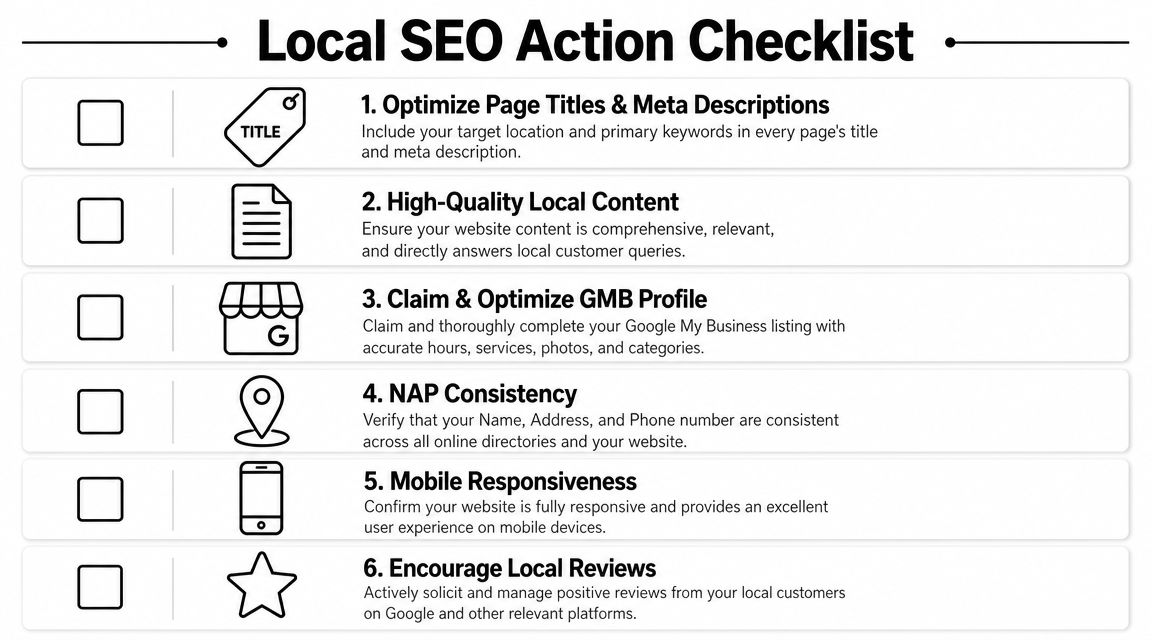
    A checklist infographic titled Local SEO Action Checklist displaying six essential steps for local business search optimization.

    What to fix on every important page

    Start with the page elements users and search engines both read first.

    • Title tag: Include the core service and location naturally. “Emergency Plumber in South Austin | 24 Hour Service”
    • Meta description: Summarize the page clearly and give a reason to click.
    • H1 heading: Match the page topic without being clever.
    • H2 and H3 structure: Break up the page by questions, services, process, and FAQs.
    • Internal links: Link from blog posts to service pages, from service pages to related service pages, and from location pages to contact pages.
    • Image alt text: Describe the image accurately and keep it relevant.

    Here's a simple model:

    Page type Main keyword focus Best internal links
    Service page service + city related services, contact page, FAQs
    Location page service area or neighborhood service page, testimonials, contact page
    Blog post question or problem query service page, location page, relevant FAQ

    Internal links matter more than most local businesses think. They help users move through your site, and they show search engines which pages carry the most weight.

    Before the next checklist, this walkthrough is worth watching if you want a visual explanation of local SEO basics.

    What local businesses need beyond the page

    Local SEO also depends on signals outside the article itself.

    Your baseline checklist should include:

    • Google Business Profile: Claim it, complete it, choose the right categories, and keep hours current.
    • NAP consistency: Your business name, address, and phone number should match across your website and directory listings.
    • Contact page signals: Include your full contact details and service area information.
    • Map embed: Add a Google Map on your contact or location page if you serve from a physical location.
    • Schema markup: LocalBusiness schema helps search engines understand business details in a structured way.
    • Mobile usability: Most local searches happen on phones, so your pages need to load cleanly and make calls easy.

    A local page fails when the user has to hunt for basics like service area, phone number, hours, or next step.

    What works is clarity. What doesn't work is stuffing city names into awkward sentences, hiding contact details, or publishing long pages with no structure.

    If you do the fundamentals well, your content has a better chance to rank, earn clicks, and turn visits into calls. If you skip them, even strong writing can underperform.

    Build Local Trust with Links and Citations

    Local rankings don't come from content alone. Google also looks for trust signals that show your business is real, established, and connected to the community it serves.

    That's where citations and local links come in. Citations confirm your business details across the web. Links from relevant local sites strengthen authority and can send direct referral traffic too.

    Citations first, then relationships

    Start with the boring work because it matters. Make sure your business appears consistently in the places customers and search engines expect to find it.

    That usually means checking:

    • Major business listings: Your core profiles and local directories
    • Industry directories: Dental associations, legal directories, contractor listings, restaurant platforms
    • Community listings: Chamber of commerce pages, neighborhood business directories, local event sites
    • Review platforms: The sites your customers already use to evaluate businesses in your category

    For a dentist, that might mean dental association listings and local directories. For a café, it may include local food guides and city business pages. For a plumber, it often includes contractor and home service directories.

    If your name, address, or phone number varies across those profiles, clean that up before chasing advanced tactics. Messy citations dilute trust.

    How local links happen in real life

    The best local links rarely come from outreach templates. They come from doing real things in your market that other organizations naturally mention online.

    A few examples:

    A plumbing company sponsors a youth baseball team. The league posts sponsor logos and links from its website.

    A dentist hosts a school toothbrush drive. A local nonprofit lists community partners and links to the practice.

    A café collaborates with a nearby bookstore for an evening event. The bookstore publishes the event page and links to the café's site.

    A roofer creates a storm prep checklist for homeowners in a specific county. A neighborhood association shares it in its online resources section.

    Those links are hard for competitors to copy because they're rooted in actual relationships.

    Spammy link tactics usually leave local businesses with junk placements nobody reads. Community-based links do the opposite. They build search trust and local recognition at the same time.

    A strong content asset also makes link building easier. If you publish a useful neighborhood guide, local event roundup, or homeowner checklist, you give other sites a reason to reference your business. That's why the earlier steps matter. Better content creates more link opportunities later.

    Your System for Compounding Growth

    Most local businesses don't need more marketing ideas. They need a system they can keep running while the business stays busy.

    That system is simple. Publish on a schedule you can maintain. Promote each piece in the channels your audience uses. Check performance. Improve what works. Metric Marketing recommends maintaining an editorial calendar, while multi-channel distribution and analytics review are emphasized in the source material summarized at Metric Marketing's small business content guidance.

    A calendar you can actually keep

    You do not need an elaborate publishing machine. You need consistency.

    For most local businesses, a workable rhythm looks like this:

    Week Main task Example
    Week 1 Publish one service or location page update add FAQs to “Emergency Plumbing in Round Rock”
    Week 2 Publish one supporting article “Why your water heater runs out faster in winter”
    Week 3 Distribute and repurpose email newsletter, Facebook post, Instagram story
    Week 4 Review and improve update title, add internal links, expand FAQ

    That's manageable for a small team. It's also enough to create momentum if you stick with it.

    If you own a dental clinic, your month might include one implant page refresh, one blog post about recovery expectations, and one email to past consultation leads. If you run a café, it might be one catering page update, one event-related blog post, and a newsletter promoting both.

    What to measure without drowning in reports

    A lot of owners quit because analytics feels like homework. It doesn't need to.

    Look at a short list:

    • Which pages get search impressions and clicks
    • Which pages drive calls, form submissions, or bookings
    • Which topics hold attention and lead users to another page
    • Which channels help distribute content effectively

    You can get most of this from Google Search Console, Google Analytics, your call tracking setup, and your form submissions.

    The key is pattern recognition. If a plumber's article about slab leaks keeps attracting search traffic, that topic deserves follow-up content and stronger links to the slab leak service page. If a dentist's financing FAQ gets visits but no consultations, the page may need a clearer next step. If a café's catering page gets traffic from email but not search, that points to an SEO gap, not a content gap.

    What doesn't work is publishing, sharing once, and forgetting it. What does work is a loop:

    1. Publish
    2. Promote
    3. Measure
    4. Improve
    5. Link it into the rest of your site

    That's how content marketing for local business becomes a compounding engine instead of a pile of disconnected posts. Each useful page makes the next one easier to rank. Each internal link strengthens existing assets. Each citation and local mention supports trust. Over time, your site stops acting like a brochure and starts acting like a lead source.


    If you want a simpler way to execute this without hiring a full agency, Agency Secrets is worth a look. It focuses on the exact system local businesses need: buyer-intent keyword research, consistent publication of authoritative content, relevant backlinks, and the compounding effect of evergreen SEO. If you want the playbook and the tools to help you run it with less manual work, that's a practical place to start.

  • Small Business Content Marketing Strategy: A Simple Plan

    Small Business Content Marketing Strategy: A Simple Plan

    Most small business content advice gets the core job wrong. It tells you to publish more, stay visible, and build awareness, as if attention automatically turns into revenue. It doesn't. A random stream of blog posts, social updates, and recycled tips usually creates a busy marketing calendar, not sales-ready leads.

    A useful small business content marketing strategy starts somewhere else. Each piece of content needs a job. It should target a specific problem, bring in a specific kind of visitor, and push that visitor toward a specific next step. If the article can't do that, it may still be nice for the brand, but it's probably not helping the business enough to justify the time.

    That matters even more for small teams. You don't have the margin for vanity traffic, sprawling campaigns, or a six-month content experiment with vague goals. You need a system that can work with limited time, limited budget, and limited patience. The upside is that a smaller business can often win by being sharper. Better topic selection, tighter calls to action, stronger local or niche expertise, and cleaner execution beat generic publishing every time.

    Table of Contents

    Your Winning Content Marketing Mindset

    The first shift is simple. Content marketing is not blogging. It's a business system for creating trust, showing expertise, capturing demand, and moving buyers toward action.

    That sounds obvious, but most small businesses still treat content like a side task. They publish when there's time, pick topics based on hunches, and hope consistency alone will rescue weak strategy. It won't. By 2025, 90% of organizations reported having a content marketing strategy, and 66% said that strategy was documented, according to ProperExpression's content marketing statistics roundup. That tells you where the market is. Content is no longer an experiment. It's an operating discipline.

    A scrappy company doesn't need a giant editorial department. It needs a documented plan that answers a few hard questions:

    • Who are we trying to reach
    • What problems are they actively trying to solve
    • What action do we want after each piece
    • What topics deserve effort because they can produce revenue later

    Practical rule: If a topic doesn't map to a customer problem and a next step, it belongs in the backlog, not the publishing queue.

    Smaller businesses often have an edge because they know the objections buyers raise on calls. They know the questions people ask before purchasing. They know where deals stall. That knowledge is more useful than a generic “content calendar” filled with broad awareness posts.

    The mindset to keep is blunt. Don't ask, “What should we post this week?” Ask, “What content would help the right buyer say yes faster?” That question leads to better keywords, better offers, better pages, and better follow-up.

    Define Your Content's Job Before You Write

    If you skip this step, the rest of your strategy collapses into activity. You'll publish, maybe even rank, and still feel unsure whether the effort is working.

    The common mistake is using traffic as the goal. Traffic is useful, but only if the visitor is likely to take a profitable action. A thousand visits from people looking for free advice are less valuable than a small stream of visitors comparing vendors, pricing options, or solutions.

    Stop chasing traffic with no buying intent

    A lot of small businesses would be better off with fewer articles and clearer objectives. That lines up with the broader pattern in the market. 83% of marketers believe higher-quality content published less often is more effective, according to OneLocal's content marketing statistics summary.

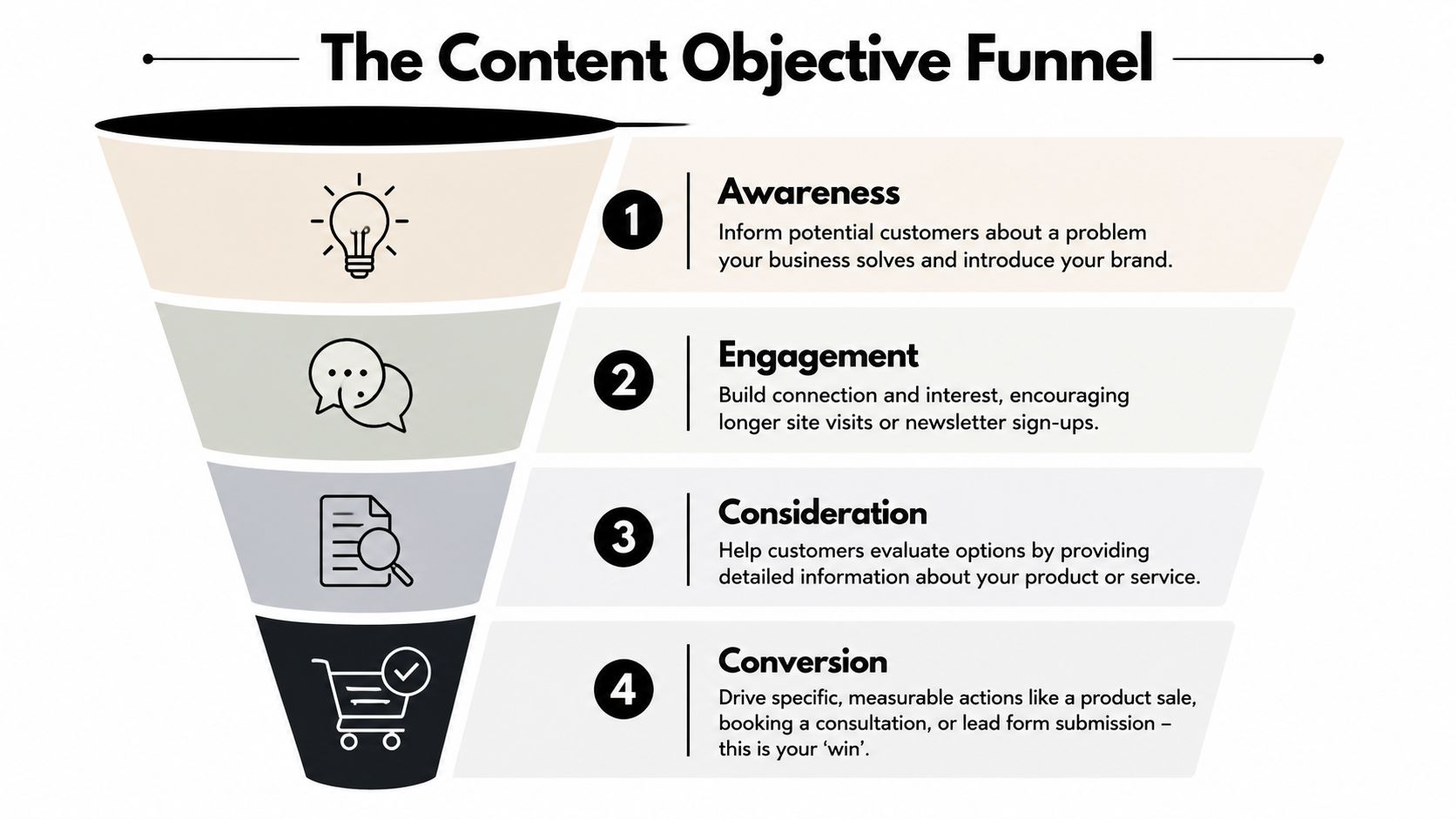
    A four-stage funnel diagram illustrating content marketing objectives from initial brand awareness to final customer conversion.

    That's why every piece should have one primary job. Usually it falls into one of four buckets:

    1. Awareness
      The reader realizes they have a problem or sees your category for the first time.

    2. Engagement
      The reader spends time with your brand, joins your email list, or clicks deeper into the site.

    3. Consideration
      The reader compares options, evaluates your approach, or checks whether you fit their use case.

    4. Conversion
      The reader books a call, requests a quote, starts a trial, or buys.

    The mistake isn't publishing awareness content. The mistake is publishing only awareness content and then wondering why leads don't improve.

    If your content never reaches consideration and conversion, you're building an audience for somebody else to close.

    Match the goal to the business model

    A local service company and an e-commerce store shouldn't measure the same content wins.

    For a local service business, a strong content goal often looks like this:

    • Primary win is a booked consultation or quote request
    • Support action is a phone call, form submission, or service-page visit
    • Useful topic types include pricing questions, service comparisons, location pages, and “is this right for me” content

    For an e-commerce business, the content path usually changes:

    • Primary win is a product sale
    • Support action is an add-to-cart, email capture, or category-page click
    • Useful topic types include product comparisons, use-case guides, setup advice, and buyer's guides

    A simple way to pressure-test a topic is to ask three questions:

    Question Good answer Bad answer
    What action should happen next? Book, buy, request, subscribe “Read more stuff”
    Who is this for? A clearly defined buyer or problem Everyone in the market
    Why this topic now? It helps a buyer move forward It sounds interesting

    Content gets much easier when the job is clear. The title is clearer. The CTA is clearer. The page you link to is clearer. Even the intro gets better because you're writing for a reader who needs something specific.

    Find Sales-Ready Keywords Customers Are Using

    Keyword research gets overcomplicated fast. Small businesses don't need jargon-heavy workflows. They need a way to identify phrases real customers use when they're close to acting.

    The best keywords usually don't come from brainstorming in isolation. They come from sales conversations, inbox questions, support tickets, live chat logs, review language, and the wording customers use when they're trying to solve a problem right now.

    A pencil-sketch style illustration of an ear, a magnifying glass, and a notepad representing content strategy.

    Listen before you research

    Start with plain language. Ignore tools for a moment and write down the phrases buyers use naturally.

    A few useful prompts:

    • Problem-driven searches
      “Why is this happening?” “How do I fix this?” “What's causing this issue?”

    • Solution-driven searches
      “Best type of service for…” “Software for…” “Treatment for…” “Product for…”

    • Decision-stage searches
      “Cost,” “pricing,” “near me,” “vs,” “review,” “alternative,” “how long does it take”

    Many businesses often falter. They chase broad terms because they look bigger. Broad terms often bring broad intent. If you sell accounting services, “small business finance tips” may bring readers. “Bookkeeping services for restaurants” is far more likely to bring a buyer.

    Qualify the keyword before you commit

    Before you write, test the phrase against buying intent.

    Ask:

    • Would a person searching this be likely to hire, buy, or inquire soon?
    • Can our business help them directly?
    • Do we have a clear CTA that fits the topic?

    If the answer is yes to all three, the keyword is worth serious effort.

    If the phrase attracts curiosity but not action, it might still be useful, but it should support a stronger bottom-of-funnel page. It shouldn't dominate the calendar.

    A practical keyword mix for a small business usually includes:

    Keyword type What it signals Example intent
    Problem-aware The buyer knows the pain They want diagnosis or clarity
    Solution-aware The buyer is exploring options They want methods, vendors, or categories
    Decision-ready The buyer is close to acting They want pricing, comparisons, proof, or contact

    Add an angle AI can't fake

    Generic content is easier than ever to produce. That means generic content is less valuable than ever. Semrush's small business content marketing guidance highlights an important reality: original research, customer stories, and unique, experience-based content are difficult for competitors and AI tools to replicate.

    That has direct strategic value.

    Instead of publishing another interchangeable article on a broad topic, build pages around assets only you can create:

    • Customer stories that show what changed and why buyers chose you
    • Internal process content that explains how you work and what clients should expect
    • Original observations from jobs completed, products sold, or recurring client questions
    • Comparison pages based on real-world trade-offs you've seen firsthand

    A small business rarely wins by sounding bigger. It wins by sounding more specific, more credible, and closer to the customer's actual decision.

    Build Your Simple Content Creation Engine

    Small businesses do not need a content machine with ten tools, three approval layers, and a full-time editor. They need a system that turns customer questions into pages that can rank, qualify leads, and push the right readers toward contact.

    Consistency matters here, but consistency is usually an operations issue, not a creativity issue. Teams miss publish dates because the process is vague, ownership is unclear, and every article gets reinvented from scratch.

    A simple engine fixes that.

    The two documents that keep production sane

    For most small businesses, the whole operation can run on two working documents:

    • An editorial calendar
      A spreadsheet that tracks what you are publishing, when it goes live, and what business goal it supports.

    • A content brief
      A one-page writing spec that tells the writer exactly what the page needs to do.

    Here's a calendar format that works without adding admin for the sake of admin:

    Publish Date Topic / Title Target Keyword Content Type Primary CTA Status
    Week 1 Service pricing guide service pricing keyword Blog article Request a quote Draft
    Week 2 Comparison page comparison keyword Landing page Book a consultation In progress
    Week 3 Customer story customer result keyword Case study Contact sales Outline
    Week 4 Common mistakes article problem keyword Blog article Visit service page Scheduled

    This table does more than organize ideas. It filters out low-value content before anyone spends time writing it.

    If a topic has no target keyword, no clear CTA, and no path to revenue, it does not belong on the calendar. That rule alone saves a lot of small businesses from publishing traffic bait that never turns into leads.

    Build briefs for conversion, not just completion

    Weak articles usually start with weak instructions. “Write something about this topic” produces exactly the kind of content that gets polite impressions and no sales conversations.

    A useful brief should answer seven questions:

    • Primary keyword
      Choose one main phrase.

    • Search intent
      Is the reader trying to understand a problem, compare options, or hire someone?

    • Audience
      Define the buyer. Local homeowner, operations manager, office admin, founder, procurement lead.

    • Main promise
      State what the page will help the reader figure out or decide.

    • Primary CTA
      Pick one next step.

    • Supporting proof
      Add the evidence that makes the page believable. Customer outcomes, pricing context, process steps, objections, FAQs.

    • Conversion angle
      Decide how the content qualifies the reader. Does it explain timelines, budget ranges, fit, trade-offs, or common buying mistakes?

    That last point gets ignored all the time. It matters because a page can rank and still fail the business if it attracts readers who will never buy. Good content does not just answer the query. It helps the right prospect decide whether to contact you.

    Keep the tool stack boring

    Boring is good here. Google Sheets for the calendar and Google Docs for briefs are enough for many teams. Google Search Console or Semrush can handle keyword checks and performance reviews.

    The trade-off is simple. More software gives you more workflow options, but it also creates more places for content to stall. Small businesses usually get better results from a plain system they use every week.

    Agency Secrets also publishes a workflow for buyer-intent keyword research, article creation, publishing, backlinks, and evergreen SEO execution.

    Working rule: Your content engine should reduce decisions, speed up production, and make it easier to publish pages that can produce leads.

    Batch the work wherever possible. Outline multiple articles in one session. Collect examples, proof points, and FAQs at the same time. Review drafts in blocks instead of one by one.

    That approach cuts context switching, keeps quality steadier, and makes it easier to publish even during busy weeks.

    Amplify Your Content Without a Big Budget

    Publishing is the midpoint, not the finish line. Small businesses waste a lot of effort by treating the publish button like the main event. The article goes live, gets one social post, then disappears into the archive.

    That's avoidable. Content marketing works better as a multi-format, multi-channel system. In Content Marketing Institute's benchmark statistics, 92% of B2B marketers used short articles or posts, 89% used organic social media platforms, 84% used blogs on corporate websites, and 71% used email newsletters. The takeaway for a small team is practical. One strong asset should travel.

    A diagram outlining six effective, low-cost strategies for businesses to amplify their online content and reach.

    Use internal linking like store signage

    Internal linking is one of the cheapest ways to get more value from existing content. It's similar to signs in a store. Good signs help people move from browsing to buying.

    A simple internal linking approach looks like this:

    • Link informational posts to service or product pages
      If an article explains a problem, it should naturally point to the page that solves it.

    • Link related articles together
      This keeps visitors engaged and helps search engines understand topic relationships.

    • Link newer posts to older relevant pages, and older pages back to newer ones
      This stops strong pages from becoming dead ends.

    The key is relevance. Don't force links because a plugin told you to. Add them where the next click helps the reader continue the decision process.

    A good test is simple. If someone reads this paragraph, what page would help them next? Add that link.

    To see another perspective on low-cost reach tactics, this video is worth a look.

    Earn backlinks like referrals, not like spam

    Backlinks still matter, but most small businesses approach them badly. They either ignore them completely or buy junk placements that don't help credibility.

    A better approach is to think in terms of referrals. Which other sites already speak to your audience, but don't compete with you directly?

    Start here:

    • Local partnerships
      Suppliers, chambers, associations, neighborhood publications, and complementary businesses

    • Guest contributions
      Write useful articles for industry blogs where your expertise adds something specific

    • Original assets worth citing
      A customer story, local market insight, checklist, or comparison resource that saves others time

    • Podcast and interview outreach
      A founder with real operating experience can often earn mentions by sharing lessons, not by pitching links

    Backlinks are easier to earn when the asset is genuinely useful and the outreach feels like collaboration, not extraction.

    One strong article supported by relevant internal links, an email send, a few social cut-downs, and targeted outreach will outperform ten posts that nobody distributes.

    Measure What Matters to Prove Your ROI

    Most small businesses don't need more dashboards. They need clearer questions. The problem with content reporting isn't lack of data. It's that the data often has no direct connection to business decisions.

    That gap shows up in a lot of content advice. Outbrain's guidance for small business content strategy points to the core issue: many guides discuss goals and formats but don't show small businesses how to prove which content contributes to leads or sales.

    An infographic showing five key metrics for measuring small business content marketing return on investment.

    Are people finding you

    This is the first question. If nobody is discovering the page, conversion analysis can wait.

    Use Google Search Console for this. It will show:

    • the queries bringing impressions
    • which pages appear in search
    • whether your target topics are gaining traction over time

    What you're looking for isn't vanity growth. You're checking whether the right pages are appearing for the right searches. If your service comparison pages and bottom-of-funnel articles never show up, your strategy is probably too top-heavy.

    Do they like what they see

    Visibility alone doesn't mean much if searchers ignore your result. The next question is whether your listing earns the click.

    Again, Search Console is enough for this. Review the pages that get impressions but weak click activity. Usually the issue is one of these:

    • The title is vague
    • The page doesn't match the searcher's intent
    • The meta description doesn't signal a useful outcome
    • The article targets a topic that sounds broader than it really is

    Many businesses discover that “ranking” and “winning” are different. A page can appear in search and still underperform badly if the promise is fuzzy.

    A search impression is not proof of success. It's proof you were invited to compete.

    Are they taking the next step

    This is the question that matters most. Once the visitor lands, do they move toward the business outcome you wanted?

    Use Google Analytics or simple on-site conversion tracking to monitor actions like:

    Business type Meaningful conversion
    Local service Quote request, consultation booking, phone click
    E-commerce Add-to-cart, checkout start, purchase
    B2B lead gen Demo request, form submission, contact page visit
    Newsletter-led business Email signup tied to a relevant offer

    You don't need a complicated attribution model to make this useful. Start by checking which content pieces assist or produce those actions most often. Then do more of what helps movement and less of what only inflates pageviews.

    A lean reporting rhythm works well here:

    1. Monthly
      Review rankings, impressions, clicks, and conversions by page.

    2. Quarterly
      Update underperforming pages, improve CTAs, refresh internal links, and expand the articles that already attract qualified visitors.

    3. Ongoing
      Keep a short list of topics that produce real inquiries or sales conversations.

    The smartest content teams don't obsess over perfect attribution. They build enough visibility into the funnel to answer a practical question: Which pages help us win more business? That's the metric set that keeps a small business content marketing strategy grounded in revenue, not noise.


    If you want a simpler way to execute this kind of SEO-led content system without hiring an agency, Agency Secrets shares practical playbooks for buyer-intent keyword targeting, publishing evergreen articles, earning backlinks, and building compounding organic growth with a small team.

  • How to Rank for Low Competition Keywords in 2026

    How to Rank for Low Competition Keywords in 2026

    Most SEO advice still pushes small businesses toward the biggest keywords in the room. That's backwards.

    If you're a local service business, solo founder, ecommerce operator, or lean in-house marketer, you probably don't lose in search because your product is worse. You lose because you're trying to compete on terms built for companies with bigger sites, larger teams, and stronger backlink profiles. Going after broad keywords too early burns time, drains budget, and usually ends with a page stranded far from page one.

    The underdog play is different. You win by being more precise. You target the phrases larger competitors ignore, the ones tied to specific problems, narrow use cases, and clear buyer intent. That's how smaller sites start ranking, earn trust, and build momentum without hiring an agency.

    Table of Contents

    Why Chasing High-Volume Keywords Is a Losing Game

    Small businesses get trapped by search volume.

    A founder opens a keyword tool, sees a giant term in the niche, and assumes that's the prize. So they publish a page for something broad like "marketing software," "plumber," or "project management app." Then they wait. And wait. Meanwhile, the search results are crowded with massive brands, old domains, layered content hubs, and backlink-heavy pages that have been accumulating authority for years.

    That isn't a content problem. It's a strategy problem.

    Broad keywords look attractive because they suggest scale. But for a smaller site, they often create the worst mix possible: vague intent, strong competition, and a long path to any meaningful return. Even if you do rank someday, the traffic can be messy because broad terms pull in people who are early in research mode, casually browsing, or looking for something adjacent to what you sell.

    Go where the giants aren't paying attention. That's usually where the practical revenue lives.

    A better path is to stop treating SEO like a popularity contest and start treating it like market positioning. Precision beats brute force. A narrow keyword with the right intent can bring in fewer visitors and still produce more leads, calls, demos, or sales than a flashy head term.

    Here are the trade-offs most smaller businesses learn the hard way:

    • Big volume usually means bigger incumbents. You aren't just competing with pages. You're competing with domain strength, content depth, and brand familiarity.
    • Broad intent creates weak conversion paths. A visitor searching a general term may not be close to action.
    • Longer timelines create fragile commitment. When a page takes too long to move, teams stop publishing or start chasing the next shiny keyword.
    • Low competition keywords stack. One page rarely changes a business. A focused set of pages does.

    This is why underdogs should build from the edges inward. Rank for the specific query first. Earn clicks, links, and internal topical relevance. Then move one layer broader.

    That approach isn't glamorous. It works.

    What Makes a Keyword Low Competition

    A low competition keyword isn't just a phrase with lower search volume. It's a keyword where the current search results give you a realistic opening.

    Think of SEO like choosing a route. A high-competition keyword is the packed highway at rush hour. Everyone wants it, everyone is fighting for position, and the biggest vehicles dominate the lane. A low competition keyword is the backroad. Fewer cars. Less pressure. You still reach the destination, but you don't waste resources forcing your way through traffic.

    According to Semrush's low-competition keyword methodology, low-competition keywords are often identified by Keyword Difficulty scores below 30 to 40, and scores under 30% are labeled "Easy", which makes them feasible for new or low-authority domains. The same source notes that SMBs focusing on KD below 30% clusters saw 150% to 300% organic traffic uplifts in case studies from 2020 to 2025.

    A diagram illustrating the four key factors that define low competition keywords for content strategy.

    The highway versus backroad test

    When I assess whether a keyword is low competition, I don't stop at a tool score. I look for four conditions working together.

    • Lower difficulty. This is the obvious one. If the keyword sits in the easier range, it deserves attention.
    • Specific wording. Narrow phrases usually mean a narrower SERP. That's good for smaller sites.
    • Intent clarity. A keyword with obvious purpose is easier to satisfy with a focused page.
    • Weaker existing results. If the top pages are thin, outdated, off-intent, or from forums and mixed directories, you have a shot.

    A keyword can have modest volume and still be far more useful than a broad term because the visitor knows what they want. That's why long-tail and use-case-driven phrases often outperform the obvious targets for underdog sites.

    Practical rule: If the current top results look generic, loosely matched, or half-finished, the keyword may be easier than the number suggests.

    Keyword Difficulty thresholds that matter

    KD isn't perfect, but it's useful when you treat it as a filter rather than a verdict.

    KD Score Range Competition Level What It Means for Your Business
    0-29 Easy Best hunting ground for newer sites, local businesses, and smaller brands
    30-39 Low to moderate Possible if intent is clear and the current SERP is weak
    40+ Competitive Usually not the first place an underdog should spend energy

    Many businesses struggle with this specific step. They use one number in isolation. But KD only tells part of the story. Search results can still be beatable if the ranking pages don't solve the query well.

    Look for signs like these:

    • Forum-heavy SERPs. Google may be struggling to find a strong page.
    • Mismatched content types. Product pages ranking for informational searches, or blog posts ranking for commercial queries.
    • Thin local pages. Common in service niches where competitors haven't invested in content.
    • Weak topical depth. The top page answers the core question but leaves obvious follow-up questions untouched.

    Low competition keywords aren't magic. They're just winnable. That's enough.

    A Practical Workflow for Discovering Hidden Gem Keywords

    Most businesses don't need more keyword ideas. They need a better way to separate useful ideas from junk.

    Start manually. Tools help later. If you skip the manual step, you'll end up with a list that looks clean in a spreadsheet but has no connection to how customers search.

    A hand holding a magnifying glass over a hand-drawn map to identify a hidden gem niche concept.

    Start where customers already complain and compare

    The best low competition keywords often show up in places where people describe their problem in plain language.

    Search these sources with a notebook open:

    1. Reddit threads
      Product comparisons, frustration posts, niche subreddits, and "what should I use for…" questions are full of raw keyword phrasing.

    2. Quora and industry forums
      Not because the answers are always good, but because the questions reveal recurring demand.

    3. Google autocomplete
      Type a seed phrase and run the alphabet soup method. Add letters after the phrase and note what keeps appearing.

    4. People Also Ask
      This is one of the fastest ways to map adjacent questions and supporting subtopics.

    5. Competitor navigation and page titles
      If a competitor has a page for a narrow use case, that's often a sign the query has value.

    Build a list from these sources first. Don't judge it too early. You're trying to capture language, not declare winners.

    Then sort the list by theme. A local roofer might end up with clusters like emergency repair, insurance claims, leak diagnosis, and neighborhood-specific searches. A software company might see clusters around alternatives, integrations, pricing, and use-case pages.

    Use tools to narrow the list, not to replace judgment

    Once you have themes, move into a keyword tool and filter aggressively.

    According to SEOptimer's overview of high-volume low-competition keywords, high-volume low-competition keywords are defined as terms with 1,000 or more monthly searches and low KD scores below 30, and sites targeting long-tails with 100 to 1,000 volume achieved 40% to 60% first-page ranking rates within 90 days, compared with 5% to 10% for high-KD terms in Ahrefs and Semrush data from 2020 to 2025.

    That doesn't mean you should only chase the highest numbers inside the easy range. It means you should prioritize combinations that are still realistic.

    Use filters like these:

    • Minimum relevance first. If the term doesn't connect to what you sell, cut it.
    • Low KD second. Keep the list focused on terms your site can plausibly win.
    • Volume as a tiebreaker. Use it to prioritize among good options, not to override intent.
    • SERP sanity check last. Open the results and look at what's ranking.

    A practical shortlist usually includes three buckets:

    Bucket What it looks like Why it matters
    Quick wins Narrow problem-focused phrases Easier to rank and useful for early traction
    Commercial terms Alternatives, reviews, best-for pages Stronger buying intent
    Authority builders Closely related informational topics Support internal links and topical coverage

    After you've built that shortlist, watch this walkthrough for another angle on researching easier terms:

    One more thing matters here. Don't confuse weird with valuable. Some low competition keywords are easy because nobody searching them is likely to buy, call, or care. The point isn't to find obscure phrases. The point is to find overlooked phrases that map to real demand.

    Validating Keywords for Profit Not Just Traffic

    A keyword isn't good because it can bring visits. It's good if those visits can turn into business.

    Many small sites waste months at this stage. They publish informational content that attracts curious readers, students, and people with no intention to buy. The analytics dashboard looks alive, but the pipeline doesn't move.

    A hand balancing a scale with traffic represented by a cloud and profit represented by a gold coin.

    Traffic can distract you from revenue

    Bottom-of-funnel keywords deserve more attention than they usually get, especially for lean businesses. According to this YouTube discussion on BOFU keyword opportunities, specific buyer-intent phrases such as "best zero-based budgeting app for freelancers" are often undertargeted and can rank in weeks rather than months compared with broader terms.

    That's the kind of asymmetry underdogs should exploit.

    Someone searching a broad educational query may only want a definition. Someone searching an alternative, review, best-for, or near-me phrase is much closer to taking action. Those keywords often have less competition precisely because they're narrow. Large publishers prefer scale. Small businesses need qualified demand.

    If a keyword sounds like something a real buyer would type five minutes before making a decision, pay attention.

    A simple intent checklist

    Before adding any keyword to your calendar, run it through this screen:

    • Does the searcher want information, comparison, or action?
      Action and comparison terms usually deserve priority if leads or sales matter now.

    • Can your business satisfy the intent directly?
      If the searcher wants a tool comparison and you sell one, great. If they want free templates and you only sell consulting, think harder.

    • Would the ideal customer search it?
      Not every relevant keyword is commercially useful. Relevance alone isn't enough.

    • Can one page answer the query cleanly?
      If the topic is too broad or mixes multiple intents, it may need a different angle.

    • Is there a natural next step?
      Strong pages make the conversion path obvious. Book a call. Request a quote. Start a trial. View pricing.

    Here's a quick lens for judging intent:

    Intent type Example pattern Priority for a small business
    Informational how to, what is, why does Useful when tightly connected to your offer
    Commercial best, review, alternative, comparison Usually high priority
    Transactional buy, near me, pricing, quote Highest priority when relevant
    Navigational brand names, login, support Usually low priority unless it's your brand

    The hard truth is simple. A smaller business doesn't need the most traffic. It needs the right traffic first.

    Content and Link Building for Low Competition Terms

    Once you've chosen the keyword, don't overcomplicate the page.

    Low competition keywords usually don't require a giant content production machine or an expensive backlink campaign. What they do require is a page that matches intent better than what's already ranking. That means relevance, clarity, structure, and a strong internal link network.

    Build the page that should rank

    For easier terms, content quality often wins before raw authority does. But quality in SEO doesn't mean "long." It means the page earns the click and then satisfies the search.

    A page targeting a specific low competition keyword should usually do these things:

    • Answer the main question early. Don't hide the value in paragraph eight.
    • Match the content type already favored by the SERP. If searchers want a comparison page, don't force a generic blog post.
    • Cover obvious follow-up questions. Use subheadings that reflect how buyers think.
    • Show real specificity. Mention use cases, constraints, trade-offs, and who the option is best for.
    • Link to supporting pages. Build clusters so the page isn't isolated.

    A focused page with sharp intent usually beats a bloated page that tries to rank for everything.

    Internal linking matters more than most small businesses realize. If you publish a page about "best accounting software for freelance designers," link to it from broader pages about freelancer accounting, tax workflows, invoicing, and software comparisons. That helps search engines understand the page belongs inside a real topical system, not as a random one-off article.

    A simple cluster often includes:

    1. A commercial page targeting the main buyer-intent term
    2. Supporting informational pages that answer adjacent questions
    3. A broader category or hub page that links the topic together

    Earn links you can actually get

    You don't need a heroic outreach campaign for every low competition keyword. Many smaller sites stall because they think link building means sending hundreds of cold emails. Usually, they would be better off earning a handful of highly relevant mentions.

    Realistic tactics include:

    • Podcast guesting. Niche shows often link to your homepage or resource page.
    • Expert commentary. Journalists, newsletters, and industry writers need usable quotes.
    • Partnership pages. Suppliers, software integrations, and associations often maintain member or partner listings.
    • Local relevance links. Chambers, sponsorships, neighborhood guides, and event pages can help local service sites.
    • Original utility assets. A calculator, checklist, template, or comparison table gives people something to cite.

    What doesn't work well for most underdogs is building links to pages that don't deserve them. If the content is vague, over-optimized, or written without first-hand usefulness, even a decent link won't save it.

    The best sequence is simple. Pick a narrow keyword. Publish the page that answers it cleanly. Support it with nearby content. Then earn a few relevant links that make contextual sense.

    How to Automate and Scale Your Keyword Strategy

    The manual playbook is enough to get traction. It isn't enough to maintain consistency once the business gets busy.

    That's where automation helps. Not as a shortcut for weak strategy, but as a way to apply a strong process repeatedly without rebuilding it from scratch every week.

    A hand-drawn sketch of a business process automation workflow labeled as Agency Secrets on notebook paper.

    Good automation follows a clear process

    If your workflow is fuzzy, automation just helps you make mistakes faster. But if your workflow is already sound, automation can remove the repetitive parts that slow teams down.

    That usually means systematizing work like this:

    • Keyword discovery based on low competition and clear intent
    • Clustering related phrases into pages instead of creating cannibalized content
    • Content briefs that reflect the actual SERP and intent
    • Publishing cadence that doesn't collapse when the founder gets busy
    • Internal linking across related pages and categories

    Where AI actually helps

    According to Seoprofy's discussion of low-competition keyword workflows, an emerging trend is using AI tools with precise prompts to find low-competition keyword clusters for low-DA sites, and tools that integrate People Also Ask and social data can automate discovery and publication of up to 30 articles per month while helping build authority 2x faster.

    That matters because the biggest challenge for smaller teams usually isn't knowing one good keyword. It's turning one good keyword into a durable publishing system.

    Used well, AI can help with:

    • Expanding seed topics into clusters
    • Finding long-tail variations that reflect real customer language
    • Drafting faster around a validated outline
    • Maintaining consistency across many supporting pages

    Used badly, AI floods your site with generic content around weak keywords. That's worse than publishing slowly.

    The winning setup is simple: humans decide the market, intent, offer, and trade-offs. Automation handles the repetition.


    Agency Secrets gives small business owners a practical way to run this playbook without hiring an agency. It focuses on buyer-intent keyword research, consistent publication, relevant backlinks, and evergreen compounding, then pairs that strategy with OutRank to automate the heavy lifting. If you want an agency-free system for finding low competition keywords, publishing at scale, and growing organic traffic while you run the business, explore Agency Secrets.

  • Evergreen Content Strategy: Boost Traffic & Sales in 2026

    Evergreen Content Strategy: Boost Traffic & Sales in 2026

    Evergreen content generates three times more traffic than time-sensitive articles, according to a 2026 HubSpot finding summarized here. That should change how most small businesses think about content.

    A lot of owners are still trapped in a publishing cycle that looks productive but creates very little lasting value. They post a quick reaction piece, a seasonal update, a short promotional blog, then repeat the process next week because traffic falls off almost immediately. The work never stops, yet the asset base never grows.

    An evergreen content strategy fixes that by shifting the goal. You stop treating content as disposable output and start treating it as infrastructure. A useful guide, tutorial, checklist, or pillar page can keep attracting search traffic, assist sales conversations, support email nurture, and answer customer questions long after it’s published.

    That matters even more for lean teams. If you run a local service business, an e-commerce store, or a small B2B company, you probably don’t need more random posts. You need a content system that keeps working when you’re busy serving customers.

    Table of Contents

    Stop the Content Treadmill Start Building Assets

    Most small businesses don't have a content problem. They have an asset problem.

    They publish often enough, but too much of that work is tied to short-lived topics. A promotion expires. A platform update changes. A trend cools off. Then the post that took hours to write stops pulling its weight. The team moves on, but the workload stays.

    That cycle feels like momentum because something is always getting published. In practice, it acts more like rent than investment. You keep paying for attention, but you don't build much equity.

    Why more content often produces less leverage

    Time-sensitive content has a role. It can capture a spike of interest, support a launch, or give your brand a reason to comment on something current. The problem starts when it becomes the whole strategy.

    When every article depends on novelty, your calendar controls you. You have to keep feeding it. That usually creates three issues:

    • The archive loses value: Old posts stop helping because they were never built to last.
    • Sales teams get weak support: Reps can't keep reusing content that goes stale fast.
    • SEO compounds slowly: Search performance gets scattered across disconnected posts instead of strengthening a topic over time.

    Practical rule: If a piece won't still help a prospect months from now, it probably shouldn't be the core of your content plan.

    What an asset-first mindset looks like

    An evergreen asset does more than rank. It answers a durable question your customers keep asking. Think "how to choose the right HVAC system," "what affects shipping costs," or "how to compare bookkeeping software for a small business."

    Those topics don't depend on a news cycle. They map to recurring customer intent.

    A strong evergreen content strategy treats each piece as something that can serve multiple jobs:

    Content type Short-term role Long-term role
    Buyer guide Supports active prospects Keeps attracting search traffic
    Tutorial Reduces pre-sale friction Becomes a reusable support asset
    FAQ hub Helps conversion pages Builds topical relevance over time

    This is the shift that matters. You stop asking, "What can we post this week?" and start asking, "What can we publish once, improve over time, and use everywhere?"

    For a small business, that's a much better game.

    What Is an Evergreen Content Strategy

    Think of content like a garden.

    A trending content garden needs constant replanting. You get a burst of color, then it fades. If you stop planting, it stops producing. An evergreen content strategy works more like a perennial garden. You choose the right plants, put them in the right places, maintain them on a schedule, and they keep growing back stronger.

    A hand-drawn illustration depicting plants labeled Evergreen, Sustainable Growth, and Seasonal to contrast growth strategies.

    That analogy helps because evergreen isn't about age. It's about continued relevance. A page can be published today and still be evergreen if the topic stays useful over time.

    What counts as evergreen

    Evergreen topics solve recurring problems, explain stable concepts, or guide buyers through decisions that don't disappear. Good examples include:

    • How-to guides: step-by-step instructions tied to enduring needs
    • Beginner explainers: pages that answer foundational questions
    • Comparison resources: content that helps buyers evaluate options
    • Operational checklists: repeatable processes customers want to follow
    • Core FAQs: answers your team gives repeatedly in sales or support

    These formats work because they align with persistent intent. People keep searching for them, and businesses keep benefiting from having them published.

    What doesn't count

    Some content should never be mistaken for evergreen:

    • News reactions
    • Seasonal promotions
    • Year-specific trend posts
    • Short-lived platform updates
    • Announcements with an expiration date

    That content isn't bad. It's just not a durable foundation.

    Evergreen content should still feel useful after the original campaign ends.

    The strategy is bigger than the article

    A lot of teams misunderstand evergreen by treating it as a writing style. It isn't. It's an operating model.

    The strategy includes topic selection, keyword filtering, content format, internal linking, update cadence, and repurposing. It also includes deciding where current content fits. Some businesses need a few trend-driven pieces for social reach or launch support, but those should sit on top of a stable evergreen base, not replace it.

    A practical way to judge a topic is simple. Ask three questions:

    1. Will customers still care about this later?
    2. Can sales or support reuse it?
    3. Can it connect to other pages on the same topic?

    If the answer is yes to all three, you're probably looking at evergreen potential.

    The Compounding ROI of an Evergreen Approach

    The primary advantage of an evergreen content strategy isn't that it sounds disciplined. It's that the economics are better.

    A trending article often acts like a campaign expense. It gets attention, then tapers off. An evergreen asset behaves more like owned media. It can keep producing traffic, support conversions, and create linking opportunities long after publication. That changes the return profile of every hour you put into content.

    Start with the right content mix

    A useful baseline comes from Allied Insight's evergreen versus trending analysis, which states that an 80/20 evergreen-to-trending content ratio serves as the optimal baseline for B2B strategies, and that one original piece often generates five additional assets like infographics, videos, and case studies.

    That mix works because it protects both sides of the business. You keep enough timely content to stay relevant, but the bulk of your effort goes into pages that can keep earning results.

    For small businesses, that usually means your monthly calendar should be built around assets first, then topped up with reactive pieces only when they serve a clear purpose.

    Why the return compounds

    Evergreen content can improve performance in several ways at once:

    • Search value accumulates: A useful page can keep collecting impressions, clicks, and backlinks over time.
    • Sales enablement improves: One guide can answer objections in calls, emails, and landing pages.
    • Repurposing gets cheaper: A strong original article can become a short video, email series, lead magnet, or FAQ page without starting from zero.
    • Update costs stay lower than replacement costs: Improving an existing winner is usually more efficient than inventing a new post every week.

    That last point is where many owners miss the opportunity. They keep commissioning net-new content when a stronger move is often to expand, improve, and redistribute assets that already proved demand.

    Owner mindset: Don't ask whether a post performed in week one. Ask whether it can keep helping your business next quarter.

    Asset value versus activity value

    Here’s the trade-off in plain terms.

    Approach What you get fast What you keep later
    Trending-heavy publishing Short-term spikes and social hooks Limited residual value
    Evergreen-heavy publishing Slower early momentum in some cases Reusable assets and steadier search value

    This is why the system matters. If your team is always optimizing for immediate activity, you'll produce a lot and retain little. If you're building evergreen assets, each publication can strengthen the next one.

    A guide can become a cluster. A cluster can support a category page. A category page can help your whole domain rank better on a commercial theme. That isn't abstract theory. That's what sustainable content economics look like.

    The Core Components of a Winning Strategy

    A strong evergreen content strategy usually stands or falls before the writing starts. Most weak results come from one of three mistakes. The topic isn't durable, the format doesn't fit the intent, or the keyword target was chosen because it sounded good instead of because demand looked stable.

    A six-step infographic outlining a comprehensive evergreen content strategy blueprint for long-term marketing success and growth.

    Choose topics that survive your next campaign

    The best evergreen topics come from repeated customer questions. Look at sales call notes, chat transcripts, support tickets, quote requests, and product demos. If people keep asking the same thing, that topic has staying power.

    Good examples by business type:

    • Local services: repair timelines, cost factors, buying criteria, service comparisons
    • E-commerce: sizing guides, material care, compatibility, product selection help
    • B2B services: implementation steps, vendor evaluation, pricing models, common mistakes

    Bad topic selection usually sounds more exciting than useful. "Big changes in the market" gets attention for a minute. "How to compare payroll providers for a growing company" keeps earning its place.

    Pick formats built for long shelf life

    Format matters more than people think. Some formats naturally support skimming, updates, and internal links. Others age badly.

    The formats I trust most for evergreen work are:

    • Pillar guides for broad educational topics
    • Step-by-step tutorials for process-driven searches
    • Checklists for operational tasks
    • Comparison pages for evaluation-stage intent
    • FAQ libraries for recurring objections

    These formats hold up because they are modular. You can revise a section, add examples, improve structure, and keep the URL intact. That's hard to do with content built around novelty or opinion.

    A durable format makes maintenance easier. That becomes critical once your library grows.

    Filter keywords for staying power

    A simple technical filter can save you from a lot of wasted effort. Leadspanda's evergreen guidelines state that targeting keywords with sustained search volume of at least 1,000 monthly searches is a critical benchmark, because it signals durable interest rather than a short-lived spike.

    That doesn't mean every small business should ignore lower-volume terms. It means this threshold is a useful benchmark when you're evaluating whether a topic has broad, lasting demand.

    Use tools like Google Search Console, GA4, and your keyword platform of choice to check whether interest looks stable. Favor queries that are question-based, problem-based, or decision-based. Be careful with keywords that depend on dates, product releases, or temporary events.

    A practical planning table helps:

    Component What to look for What to avoid
    Topic Recurring customer problem Trend-driven curiosity
    Format Update-friendly structure One-off commentary
    Keyword Stable informational intent Short-term spike terms

    When those three line up, you don't just have an article idea. You have something worth building into a system.

    A Practical Playbook for Evergreen Execution

    Execution is where most evergreen plans fall apart. Teams either overcomplicate the process or they publish isolated articles with no structure behind them.

    A better approach is simple. Build one authoritative page, surround it with closely related support content, then maintain the cluster on a schedule.

    A hand selecting the Optimize step within a four-part marketing workflow process diagram.

    Start with one pillar, not ten blog posts

    Most businesses should begin with a pillar page. This is the main resource on a core topic your audience cares about. It should be thorough, well structured, and designed to answer the major questions around that topic in one place.

    That structure isn't just neat. It's effective. According to GWI's evergreen content strategy write-up, employing topic clusters, with a central pillar page linking to supporting articles, can lift cluster rankings by 15-25% within 6 months, and longer formats of 2,000-4,000 words rank 2x higher for informational intent.

    That makes the choice pretty clear. Don't scatter effort across thin posts. Build one strong hub.

    Build the cluster around real buying questions

    Once the pillar exists, create supporting pages that go deeper on subtopics. Each one should answer a specific question and link back to the pillar with clear anchor text. The pillar should also link out to those supporting pages where relevant.

    A simple cluster might look like this:

    • Pillar page: Complete guide to choosing a home security system
    • Support article: Wired versus wireless systems
    • Support article: What installation typically involves
    • Support article: Common mistakes when comparing providers
    • Support article: Maintenance checklist for homeowners

    This model works because it matches how people search. Some want the broad overview. Others want one narrow answer. Your cluster lets both paths strengthen the same topic.

    Internal links should help readers finish a decision, not just satisfy an SEO checklist.

    Use a simple editorial calendar

    Small businesses don't need a fancy content operation. They need consistency.

    Here’s a practical monthly rhythm:

    Week Primary task Output
    Week 1 Research core topic and search intent Pillar outline
    Week 2 Publish pillar page Main evergreen asset
    Week 3 Publish support article Cluster expansion
    Week 4 Refresh older page and re-promote Maintenance and distribution

    If you have more capacity, add another support article. If you have less, keep the rhythm but slow the volume. The system still works.

    Later in the process, this video gives a useful view of how evergreen planning fits broader SEO execution:

    Refresh before content decays

    Publishing is only half the job. Evergreen content needs upkeep.

    A lightweight refresh checklist keeps pages useful:

    1. Review search intent: Does the page still match what searchers want?
    2. Update examples: Remove anything dated or unclear.
    3. Strengthen internal links: Add links to new supporting pages.
    4. Improve readability: Tighten headings, bullets, tables, and summaries.
    5. Check conversion paths: Make sure the next step is obvious.

    What doesn't work is random rewriting. Keep the core URL and topic stable. Improve the page without turning it into something else. That's how you preserve momentum while making the asset stronger.

    Automate and Scale Your Strategy with OutRank

    The biggest myth about evergreen content is that it's low-effort. It isn't. It's lower waste.

    That distinction matters. A good evergreen content strategy still needs research, production, internal linking, optimization, republishing, and refresh cycles. For a solo founder or a small in-house team, that workload becomes the bottleneck long before strategy becomes the problem.

    A hand presses a red OutRank button to transform complex SEO strategy and analytics into optimized content results.

    Manual upkeep is where small teams get stuck

    At this stage, many content plans frequently falter. The first few articles go live, then daily business pulls attention elsewhere. No one updates old pages. No one expands clusters. No one checks which rankings slipped.

    That problem isn't theoretical. Evergreen Feed's analysis notes that evergreen content requires "active maintenance" to preserve authority, as static assets can see 20-30% traffic drops after 12 months, and it specifically frames this as a challenge for SMEs.

    If you're running payroll, handling service delivery, and answering leads, manual maintenance usually loses.

    What automation should handle

    Here, a tool like OutRank becomes useful. Not because it replaces strategy, but because it removes repetitive production work that small businesses struggle to do consistently.

    The right automation layer should help with:

    • Keyword discovery: surface relevant search opportunities tied to stable intent
    • Content production: generate structured drafts at a consistent publishing pace
    • Competitor analysis: identify gaps and themes worth covering
    • Publishing workflow: reduce the friction between draft and live page
    • Update cycles: flag assets that need revision before they slide

    For a lean operator, that changes the math. You don't need to build a mini agency inside the business just to keep your evergreen system alive.

    Automation should take over repeatable steps. Humans should still decide positioning, accuracy, and commercial relevance.

    What not to automate blindly

    There are real trade-offs here.

    Don't hand your strategy to a tool and assume output equals authority. If your offers are poorly positioned, your topics are off-target, or your internal linking is sloppy, automation will produce more of the wrong thing faster.

    Use tools for speed, but keep editorial judgment on these points:

    • Topic priority
    • Brand voice
    • Offer alignment
    • Accuracy checks
    • Conversion paths

    The businesses that win with automation don't abandon discipline. They use automation to protect discipline. That's what makes an evergreen content strategy accessible to small teams instead of just large marketing departments.

    Build Your Traffic Engine for 2026 and Beyond

    The businesses that get the most from content don't act like publishers chasing constant novelty. They act like asset builders.

    That's the key lesson behind an evergreen content strategy. You choose durable topics. You package them in formats that hold up. You structure them into clusters. You maintain them before they lose value. Then you automate the repetitive parts so the system keeps moving even when the team is busy.

    This approach is better for ROI because it reduces waste. It is better for SEO because it builds topical depth. It is better for sales because prospects keep finding useful answers at the exact moment they need them. And it is better for small businesses because it doesn't require a giant budget to work.

    The trade-off is patience. Evergreen content usually asks for more planning up front and more discipline after publication. But the alternative is the treadmill. More posts, more scrambling, more short-lived spikes, and very little compounding value.

    A sustainable traffic engine isn't built from random output. It's built from a repeatable system.

    If you want content to keep helping your business months from now, start with one pillar page on a recurring customer problem. Build a cluster around it. Put a refresh date on the calendar. Then use automation where manual effort would otherwise stall the whole process.


    If you want a practical, agency-free way to put this into action, Agency Secrets shows small business owners how to build an SEO system around buyer-intent keywords, strong evergreen articles, relevant backlinks, and consistent publishing. It also points you to OutRank, which can automate large parts of that workflow so you can create, publish, and maintain search-driven assets without hiring a full team. Start there, test the system on one core topic, and build your traffic engine from the ground up.

    Refined using the Outrank tool

  • How to Monitor Web Traffic: A Founder’s Guide for 2026

    How to Monitor Web Traffic: A Founder’s Guide for 2026

    You launched the site. The pages look sharp. Your offer is clear in your head. Then you log in a week later and ask the question almost every founder asks at some point: is anyone visiting, and if they are, are they the right people?

    That’s where most small businesses go wrong. They check a traffic number, feel either encouraged or discouraged, and move on. But how to monitor web traffic isn’t really about counting visits. It’s about learning which pages attract buyers, which channels send time-wasters, and where your site leaks revenue.

    If you run a low-volume, high-margin business, that distinction matters even more. A local service company, consultant, clinic, or niche e-commerce store doesn’t need a flood of random clicks. It needs the right visitors, on the right pages, taking the right actions.

    Table of Contents

    Beyond Visitors You Need to Understand Them

    A founder checks analytics and sees 100 visits for the week. The first reaction is often, "We need more traffic." Sometimes you do. Sometimes you already have enough of the right people visiting, but the site is doing a poor job turning interest into inquiries.

    That distinction matters a lot in small, high-margin businesses. If one qualified lead can turn into a project worth thousands, traffic monitoring should help you separate serious buyers from casual readers. Raw visit counts will not do that. You need to know which pages attract prospects, which sources send people who take buying actions, and where good opportunities stall.

    A pencil sketch of a hand interacting with a blank computer monitor screen with a question mark above.

    Why raw traffic numbers mislead founders

    Traffic totals flatten important differences.

    Someone who lands on a blog post, skims for 20 seconds, and leaves is not equal to someone who visits a service page, reads your pricing, checks your testimonials, and fills out a form. If both count as just "one visitor," you cannot tell whether your marketing is attracting buyers or tire-kickers.

    I see this mistake all the time with small firms that sell expensive services. They celebrate a spike in traffic from a broad informational article, then wonder why sales stay flat. The answer is usually simple. The traffic was cheap in effort or cost, but weak in commercial intent.

    A better rule is this:

    If a metric does not help you decide what to improve, promote, or stop, it is probably a vanity metric.

    Useful monitoring answers business questions such as:

    • Which pages start visits that turn into leads
    • Which traffic sources bring people who view pricing, case studies, or contact pages
    • Which content attracts the right-fit prospect instead of low-intent visitors
    • Where interested visitors hesitate or exit before contacting you

    What useful monitoring looks like

    Good monitoring connects attention to outcome.

    For a small business, that usually means tracking more than sessions and pageviews. Watch the path people take. Do they move from a search landing page to a service page? Do they visit your pricing page before they submit a form? Do referral visitors from a directory bounce, while visitors from local search spend time on bottom-of-funnel pages? Those patterns are much closer to ROI than a top-line traffic chart.

    This is also where trade-offs show up. A blog post that brings in a lot of visitors may still be worth keeping if it introduces qualified prospects to your brand and assists conversions later. On the other hand, a traffic source that sends volume but produces irrelevant inquiries can waste sales time, especially for lean teams.

    The goal is not to admire traffic. The goal is to identify which visits have business value.

    That changes the questions you ask. Instead of asking, "How many visitors did we get?" ask, "Which channel brings people who act like buyers?" Instead of asking, "Which page gets the most clicks?" ask, "Which page helps a prospect move one step closer to revenue?"

    A store owner would not judge a day by how many people walked past the window. They would care who came in, who asked informed questions, and who bought. Your website should be measured with the same standard.

    Choosing Your Traffic Monitoring Toolkit

    Most founders don’t need more tools. They need the right few, chosen for the right reason.

    Some businesses need deep event tracking and flexible reporting. Others need a simpler setup with fewer privacy headaches. If you operate in a regulated market, the wrong analytics stack can create compliance problems you only discover after the fact.

    Pick tools based on business risk

    GA4 is still the default for many businesses because it gives broad traffic and event visibility. If you want to monitor channels, page performance, and conversion paths in one system, it’s powerful.

    But power comes with trade-offs. The interface can be more than a small business owner needs, and for companies in stricter jurisdictions, privacy questions aren’t academic. As Shoplazza’s overview of site traffic tools points out, businesses in regions with strict data protection laws like the EU may need a privacy-compliant option such as Matomo because some setups involving Google Analytics can create compliance risk if not configured correctly.

    That means the right tool choice depends on more than price. It depends on what would hurt more in your business: limited reporting, setup complexity, or a legal cleanup later.

    Don’t choose analytics software the way people choose a to-do app. Choose it based on reporting depth, compliance exposure, and whether you’ll actually use it every week.

    Traffic Monitoring Tool Comparison

    Tool Type Best For Cost Key Feature
    GA4 Businesses that want broad traffic and conversion tracking Free Event-based analytics and flexible reporting
    Matomo Businesses that need stronger privacy control Paid or self-managed depending on setup Data ownership and privacy-focused analytics
    Built-in website platform stats Founders who want simple visibility fast Usually included with platform Quick view of traffic basics without extra setup
    Server log or host-level reporting Technical teams that want raw access data Varies Direct traffic records from the hosting layer

    A few practical calls:

    • Use GA4 if you want depth and are willing to invest time in setup.
    • Use Matomo if privacy compliance sits near the top of your risk list.
    • Use built-in platform stats if you need a quick pulse check, but don’t mistake them for a real decision system.
    • Use server-side or host reporting as a supplement, not your main dashboard, unless you’re unusually technical.

    For most founders, the worst option is not “the wrong tool.” It’s half-installing three tools and trusting none of them.

    Getting Your Tracking Codes in Place

    A lot of small business owners reach this point, paste in a tracking code, see pageviews coming through, and assume the job is done. Then six months later they still cannot answer a basic question: which traffic source brings actual buyers, not just people who browse and leave.

    That problem starts in setup.

    If your tracking only measures visits, you will overvalue channels that drive curiosity and miss the ones that produce qualified calls, booked consultations, and closed deals. For a low-volume, high-margin business, that mistake gets expensive fast. Ten visits from the right audience can matter more than 500 from the wrong one.

    A hand illustration showing how to embed a tracking script code snippet into an HTML document structure.

    Direct install versus tag manager

    You have two practical ways to install tracking. Put the base script directly on the site, or install it through a tag manager.

    Direct install is fine for a simple site with a few pages and one primary conversion action. It is usually faster to launch, and there is less that can break during setup. The trade-off is maintenance. Every new event, ad platform tag, or call tracking script may require another site edit.

    A tag manager takes a little more care up front, but it usually pays for itself once you want to track more than pageviews. If you expect to measure form submits, appointment clicks, checkout starts, phone taps on mobile, or traffic from multiple ad platforms, a tag manager gives you more control without asking your developer to touch the site every time.

    Use a simple decision rule:

    • Choose direct install if your site is small, your tracking needs are limited, and you want the fastest path to reliable basics.
    • Choose a tag manager if you plan to test campaigns, add events over time, or need cleaner control over multiple tags.

    Whichever route you choose, complete the setup in this order:

    1. Create the analytics property in your chosen platform.
    2. Install the base tag on every page, either directly or through your tag manager.
    3. Verify it fires on your main entry pages, service pages, contact page, and thank-you page.
    4. Set up your core conversion events before building reports.

    What to track from day one

    Founders often ask whether they should track everything. No. Track the actions that signal buying intent.

    For a local service business, a homepage view is weak evidence. A pricing-page visit, consultation request, financing-page click, or completed lead form tells you much more about commercial value. Those are the signals that help you judge traffic quality.

    Start with actions like these:

    • Form submissions on contact, quote, or service pages
    • Quote or consultation requests
    • Checkout starts for e-commerce
    • Key CTA clicks such as “book now,” “get pricing,” or “call today”
    • Thank-you page views that confirm a completed action

    The goal is not more events. The goal is cleaner decisions.

    If organic search sends fewer visitors than social, but those visitors request estimates at a much higher rate, you have learned something useful. If paid traffic drives lots of landing page visits but no booked calls, that traffic may be cheap and still unprofitable. Good tracking lets you spot that difference early.

    A short walkthrough helps if the setup feels abstract:

    If you use WordPress, Shopify, or Squarespace, the menu names will vary. The standard does not. Install the tag once, confirm it loads on the pages that matter, then test your important actions yourself. Submit the form. Click the booking button. Reach the thank-you page. If your analytics platform does not record those actions, fix that before you trust any traffic report.

    Building a Dashboard That Tells a Story

    A default analytics account gives you data. It doesn’t give you judgment.

    The right dashboard should help you answer business questions quickly, not admire charts. For a founder, the best dashboard is usually a one-page view that tells you whether traffic quality is improving, stagnating, or drifting toward the wrong audience.

    Start with five business questions

    A dashboard becomes useful when every widget earns its place. Keep only the views that help you decide what to do next.

    Start with these questions:

    • How many sessions are we getting
    • Where are those sessions coming from
    • Which pages bring people in
    • Which actions signal buyer intent
    • How does this compare with the previous period

    A flowchart diagram illustrating the six steps to transform raw web analytics data into actionable business insights.

    A session is one of the few web metrics that deserves first-page treatment. HubSpot defines sessions as a series of user activities on your site within a 30-minute window, and notes that healthy sites often average 2 to 3 pages per session and 2 to 3 minutes of duration in many cases. It also recommends monitoring sessions by source to understand which channels bring engaged visitors in its web traffic analytics documentation.

    That “by source” part matters more than the top-line number. Organic, referral, direct, email, and paid traffic often behave very differently. If one source sends short, shallow visits and another sends fewer but better sessions, the smaller source may deserve more investment.

    The simplest dashboard that works

    A founder dashboard doesn’t need twenty charts. It needs a clean reading of signal over noise.

    A strong version includes:

    Dashboard Element Why it matters
    Sessions trend Shows whether overall demand is rising or falling
    Sessions by source Reveals where engaged traffic comes from
    Top landing pages Shows which pages attract attention first
    Conversion actions Connects visits to business outcomes
    Period comparison Helps you spot direction, not just totals

    A good dashboard answers “What changed?” A great dashboard also answers “Why should I care?”

    One more rule. Keep your dashboard review short. If it takes longer than a few minutes to understand the story, the dashboard is doing too much. Founders need signal they can act on before the next meeting, not a new hobby in data analysis.

    Interpreting What Your Traffic Is Telling You

    Analytics becomes valuable when you stop reading numbers as verdicts and start reading them as clues.

    A founder sees “high bounce rate” and thinks failure. An analyst sees a starting point: wrong message, wrong audience, weak page structure, slow load, unclear offer, or a mismatch between the promise in the source and the reality on the page.

    How to read bounce rate without guessing

    Bounce rate is the percentage of single-page visits. It’s useful because it often exposes friction fast.

    According to Semrush’s website metrics overview, bounce rate averages 40 to 60% across industries, and a rate above that on a key landing page is a warning sign. If your services page shows a 70% bounce rate, that points to a problem in messaging, pricing clarity, or user experience.

    That doesn’t mean every high bounce is bad. A visitor may get the answer they needed and leave. But on a page meant to generate leads, high bounce with low inquiry volume usually means something is off.

    Use this diagnostic sequence:

    1. Check the source. Did the traffic come from a keyword or campaign that mismatches the offer?
    2. Check the message. Does the headline confirm what the visitor expected?
    3. Check the path. Is the next step obvious, credible, and easy to take?

    Ask “why?” three times for every bad metric. The first answer is usually too shallow to fix the real issue.

    Patterns that point to revenue problems

    Some combinations of metrics are more revealing than any single number.

    • High traffic and weak inquiries often means the content attracts interest but not buyers.
    • Strong engagement on one page and weak performance elsewhere usually means that page has a sharper promise than the rest of the site.
    • A spike from one article or referral source often signals a topic or channel worth expanding.
    • Traffic to informational pages without movement to service or product pages suggests your internal linking or calls to action need work.

    Low-volume businesses require discipline. If you only get a modest number of visits, each wrong click costs attention. You can’t afford to optimize for empty traffic.

    The better question isn’t “Which page has the most visitors?” It’s “Which page attracts people who act like future customers?”

    Troubleshooting and Automating Your Monitoring

    Even a well-built setup breaks. Plugins update, scripts disappear, pages change, and reports suddenly look wrong.

    The fix is to stop treating analytics as something you manually inspect only when you feel nervous. Build a baseline, then let the system alert you when something unusual happens.

    Fix the common failures first

    If traffic suddenly drops to zero, don’t start with panic. Start with the boring checks.

    • Check whether the tracking code still exists on the site after a theme or platform update.
    • Compare page coverage to make sure the script appears on all key templates.
    • Test a conversion action yourself and confirm it appears in the analytics tool.
    • Review date ranges and filters before assuming performance changed.

    If two tools disagree, that doesn’t always mean one is broken. Different platforms measure activity differently. What matters is whether your primary tool is consistent enough to support decisions.

    Use alerts so you stop babysitting dashboards

    The smarter model comes from network monitoring, not just marketing analytics. As Paessler’s guide to traffic analysis methods explains, the practical principle is to establish a baseline of normal traffic patterns first, then set meaningful thresholds so you catch real problems without creating alert fatigue.

    That approach works for founders too. Watch for significant deviations, not every wiggle.

    Useful alerts include:

    • Organic traffic drops on pages that usually bring leads
    • Sharp spikes to a specific page that may signal an opportunity
    • Conversion tracking failures when a key action suddenly stops recording
    • Channel anomalies when one source behaves far outside its normal range

    The point of automation isn’t more notifications. It’s fewer pointless dashboard checks and faster response when something matters.


    If you want a practical SEO system that goes beyond analytics and helps you turn traffic insights into content that attracts better leads, Agency Secrets is worth a look. It’s built for business owners who want clear execution, stronger organic visibility, and a simpler path to revenue without hiring a full agency team.

    Authored using Outrank