Tag: seo automation

  • SaaS SEO Platform: A Guide to Automated Growth in 2026

    SaaS SEO Platform: A Guide to Automated Growth in 2026

    You've probably tried to make SEO work with a patchwork stack. One tool for keywords. Another for writing. A spreadsheet for internal links. A freelancer for blog posts. Maybe an agency that promised strategy but mostly sent reports. Months later, you've got content published, money spent, and no clear sense of what moved rankings or leads.

    That's where a SaaS SEO platform changes the game. Not because software magically ranks pages, but because the right platform turns SEO into a repeatable operating system. It connects research, content, site structure, publishing, links, and tracking into one workflow that a small team can run without chaos.

    The businesses that win with SEO now aren't always the ones with the biggest team. They're the ones with the cleanest system.

    Table of Contents

    Why Traditional SEO Fails Most Businesses

    Most small businesses don't fail at SEO because they're lazy. They fail because the work is fragmented, slow, and easy to do in the wrong order.

    A founder writes blog posts without a keyword map. A marketer publishes service pages but never builds supporting content. An agency delivers a content calendar but ignores technical issues. A writer produces articles that never link to money pages. Everything gets done in isolation, and the results stay isolated too.

    A stressed woman juggling various SEO tasks like keyword research, content writing, and link building amid rankings decline.

    The market doesn't forgive that kind of inconsistency. An industry summary cited by SmartClick's SaaS SEO statistics estimates the worldwide SaaS market at $466 billion and projects it to reach $793.10 billion by 2029, with 33,200+ SaaS companies globally. That matters because buyers compare, search, and shortlist online long before they talk to sales or submit a form.

    Manual SEO breaks in predictable ways

    A traditional approach usually stalls for one of these reasons:

    • Research stays shallow: Teams target broad topics because they're easy to brainstorm, not because they match buyer intent.
    • Publishing becomes irregular: Content depends on whoever has time that week.
    • Links become an afterthought: The site publishes pages but never builds the authority needed to rank them.
    • No one owns the system: One person handles content, another checks rankings, and nobody sees the full picture.

    Practical rule: If your SEO process depends on memory, Slack messages, and a spreadsheet only one person understands, it won't scale.

    Bigger competitors aren't always smarter

    They're often just more systematic. They've got repeatable briefs, better page templates, cleaner internal linking, and a process for improving pages after publication. Small teams can compete, but not with random acts of content marketing.

    That's why a SaaS SEO platform matters. It reduces coordination overhead. It gives one place to manage demand research, content production, publishing flow, link support, and reporting. Instead of asking, “What should we do next?” every week, you run a workflow that already answers the question.

    What Is a SaaS SEO Platform

    A SaaS SEO platform is software that runs the full SEO workflow inside one system. The easiest way to think about it is this: it's the self-driving car for content-led growth. You still choose the destination, but the platform handles navigation, route corrections, and a lot of the repetitive driving.

    That's very different from buying a keyword tool, an AI writer, and a rank tracker separately.
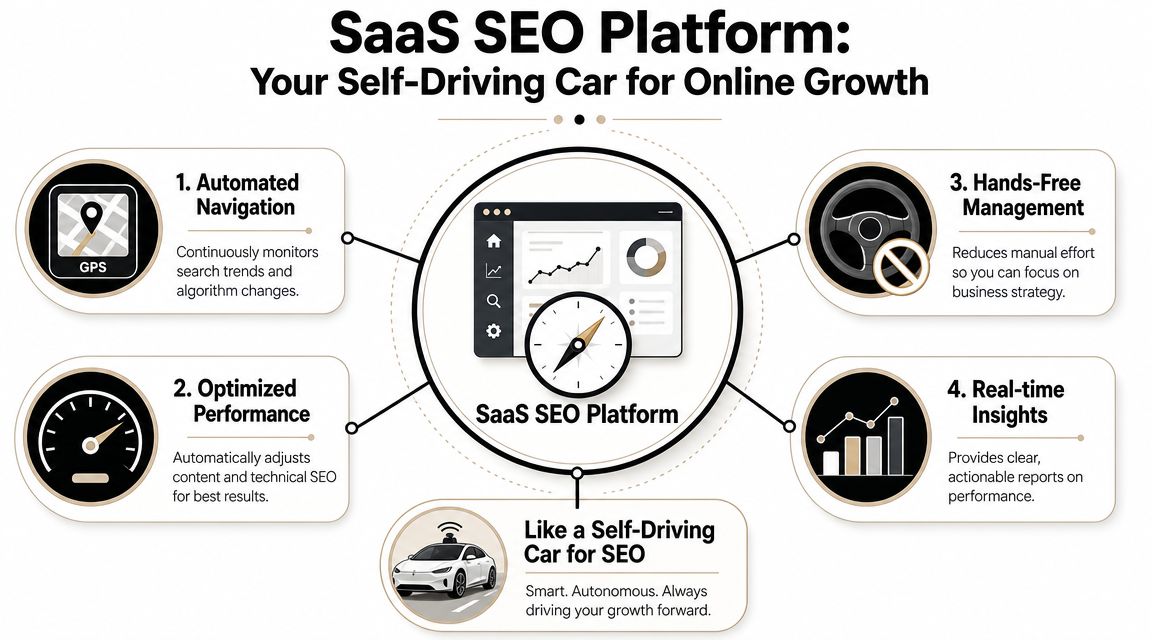
    A diagram comparing a SaaS SEO platform to a self-driving car for automating online business growth.

    Why disconnected tools break momentum

    Point solutions can be useful. Ahrefs can help with research. Surfer can support optimization. Google Search Console is essential for visibility checks. But disconnected tools create handoff problems.

    You research in one place, export to a doc, brief a writer elsewhere, paste content into your CMS, then try to remember which pages should link to what. By the time the article is live, the original strategy is already diluted.

    That's where many businesses lose momentum:

    • The keyword target gets softened during writing.
    • The page structure gets weakened during editing.
    • Internal links get skipped during publishing.
    • Performance review happens too late to fix weak pages quickly.

    A real platform closes those gaps.

    Here's a quick visual on the idea in action:

    What a real platform actually does

    A mature SaaS SEO platform usually combines these functions:

    • Demand discovery: It identifies keyword opportunities, clusters related topics, and helps you prioritize pages by intent.
    • Content operations: It creates briefs, drafts content, applies on-page optimization, and supports direct publishing.
    • Authority support: It tracks backlink needs or integrates link acquisition into the workflow.
    • Measurement: It shows which pages are gaining rankings, which topics are underperforming, and where competitors are pulling ahead.

    The point isn't automation for its own sake. The point is removing the lag between strategy and execution.

    The strongest platforms also don't treat SEO as “blog production.” They act more like an operating layer for growth. That means they help you choose the right pages, publish in the right sequence, and reinforce those pages with links and internal architecture so the work compounds.

    When people buy the wrong tool, they usually buy for output. More articles. Faster drafts. Easier reporting. When they buy the right platform, they're buying a machine that turns SEO into a controlled process.

    The Four Pillars of an Automated SEO Engine

    A platform only works if it supports a complete method. The Agency Secrets approach is practical because it doesn't treat SEO as a pile of tasks. It treats it as a system with four connected pillars.
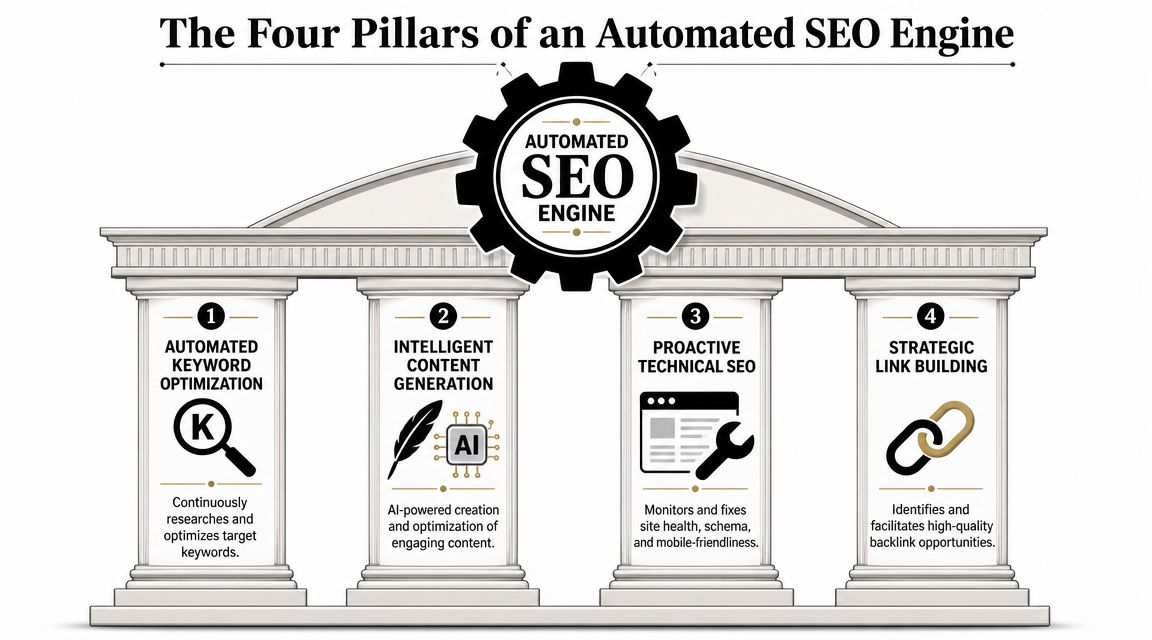
    A graphic depicting four pillars of an automated SEO engine including keyword research, content, technical, and links.

    Pillar one keyword and topic clustering

    The essential need isn't for more keywords; it's for improved organization.

    A good platform groups related queries into clusters so you can build one strong page, then support it with adjacent content instead of publishing five weak pages that cannibalize each other. As a result, strategy stops being abstract. You can see which page is the hub, which articles support it, and how each asset fits the buyer journey.

    This also matters technically. Enterprise SaaS SEO guidance from SERPsculpt on technical SEO for enterprise SaaS emphasizes consolidating fragmented URLs into fewer, stronger pages through a hub-and-spoke architecture to improve crawl efficiency and indexability across large content inventories.

    A platform that automates clustering does more than save research time. It protects your site from becoming bloated and disorganized.

    Pillar two content generation and publishing

    Most automation tools stop too early. They draft content, then leave the rest to you.

    A stronger platform handles the full editorial chain:

    • Brief creation: It frames the topic, angle, headings, and likely supporting entities.
    • Draft production: It generates a first version that can be edited to match your offer and voice.
    • On-page formatting: It structures headings, FAQs, internal links, and metadata.
    • Publishing workflow: It pushes content into WordPress, Webflow, Shopify, or your chosen CMS.

    The key trade-off is speed versus control. Full automation is fast, but it can flatten nuance. Human-only workflows protect voice, but they're slow and expensive. The sweet spot is assisted automation. Let the platform handle structure and repetition, then use editorial review for positioning, examples, and conversion clarity.

    Pillar three backlink acquisition

    Content without authority often just sits there.

    Most businesses underinvest in links because outreach is tedious and agency retainers are expensive. A useful platform either manages backlink acquisition directly or makes link opportunities easier to identify and track. What matters is relevance. A page about pricing software doesn't need random links. It needs contextually sensible links that strengthen the exact topic and page group you want to rank.

    If the platform can publish pages but can't support authority growth, you're only solving half the problem.

    This is also where the workflow matters more than the feature list. Link building should support your most commercially important clusters first, not your least important blog posts.

    Pillar four analytics and competitor tracking

    SEO gets expensive when you can't tell what's working.

    A proper platform should show:

    • Which target pages are moving
    • Which clusters are gaining traction
    • Where rankings are stuck
    • Which competitors own the terms you need
    • What to update next

    The best reporting doesn't drown you in charts. It tells you what action to take. Refresh this page. Add links to that cluster. Expand this comparison page. Consolidate those overlapping URLs.

    That's what makes the platform an engine instead of a dashboard. It doesn't just display performance. It supports the next decision.

    Who Wins with an All-in-One SEO Platform

    Not every business needs the same SEO stack, but certain operators get a huge advantage from an all-in-one system because they can't afford waste.

    The solo founder

    A solo founder usually has the right instincts and no spare time. They know they need pages for problems, features, comparisons, and use cases. What they don't have is the bandwidth to research terms, brief writers, edit drafts, publish consistently, and monitor results every week.

    With a platform, they can turn one afternoon of planning into a repeatable queue. Topics get prioritized. drafts move faster. Internal links aren't forgotten. The founder stays focused on product and sales instead of spending nights patching together SEO tasks.

    The e-commerce operator

    An e-commerce business has a different problem. Product and collection pages often exist, but supporting search demand is scattered across category descriptions, buying guides, and comparison content. Rankings get split across too many thin pages or ignored because the team treats SEO like merchandising copy.

    An all-in-one platform helps by creating structure around product-adjacent content. It supports category hubs, problem-solving pages, and question-based content that feeds revenue pages instead of living in a disconnected blog archive.

    The local service business

    A clinic, contractor, legal practice, or home service company doesn't need a hundred random articles. It needs location pages, service pages, and trust-building content that answers the exact questions buyers ask before calling.

    The wrong setup leads to generic city pages and blog posts nobody reads. The right platform helps the business build a clean footprint around real service intent. That means tighter page targeting, better internal linking between service and location pages, and a publishing cadence that doesn't depend on a busy owner remembering to “do SEO.”

    Small local teams often don't lose because they lack expertise. They lose because they never turn that expertise into searchable pages.

    The in-house generalist

    This is the most common profile in growing SMEs. One marketing manager owns paid, email, web updates, content, and reporting. SEO gets pushed down the list because it takes too many moving parts.

    A platform gives that person leverage. Instead of managing vendors, chasing drafts, and stitching reports together, they can run a centralized workflow. They still need judgment. They don't need more admin.

    The businesses that win here aren't the ones chasing every feature. They're the ones reducing friction enough to execute every week.

    Your Evaluation Checklist for Choosing the Right Platform

    A lot of SEO software demos look convincing because they show output. They show keyword lists, article drafts, colorful graphs, and a publishing button. None of that tells you whether the platform can help you rank pages that matter to revenue.

    The right way to evaluate a SaaS SEO platform is to ask questions that expose workflow quality, not just features.

    Questions that expose weak platforms fast

    Start with content quality. Ask how briefs are built, how search intent is handled, and what controls exist for voice, structure, and internal links. If the answer is mostly about generating volume, that's a warning sign.

    Then ask about technical performance. Google's mobile-first indexing and Core Web Vitals make page experience a critical factor, and SEOmator's SaaS technical SEO guidance says a good platform should ensure efficient delivery with TTFB at or below 800 ms and optimized assets. If a provider can publish content but has no view on asset weight, render-blocking resources, or script bloat, the workflow is incomplete.

    You should also ask how the platform handles these trade-offs:

    • Content scale versus content usefulness
    • Automation versus editorial control
    • Publishing speed versus technical cleanliness
    • Ranking reports versus business reporting

    Good platforms reduce manual work. Weak platforms relocate it.

    SaaS SEO Platform Evaluation Checklist

    Evaluation Area Key Question to Ask Why It Matters
    Content strategy How do you decide which pages to create first? You need buyer-intent prioritization, not random topic generation.
    Brief quality How are headings, entities, and internal links planned? Poor briefs create generic pages that are hard to rank.
    CMS workflow Can content move from draft to publish without copy-paste chaos? Friction slows consistency and creates formatting errors.
    Technical SEO How do you handle site speed, rendering, schema, and indexability? More pages only help if search engines can crawl and process them well.
    Site architecture Can the platform support clusters, hubs, and page consolidation? Authority builds faster when related pages reinforce each other.
    Link support What's the backlink process for priority pages? Ranking competitive terms usually requires authority, not just content.
    Reporting Do reports connect rankings to leads, trials, or sales? Traffic without business context leads to bad decisions.
    Workflow ownership Who is this platform built for day to day? If it assumes a full SEO team, it may fail inside a small business.

    A provider doesn't need perfect answers to every question. But if they can't explain the system clearly, they probably don't have one.

    The Agency Secrets Playbook for Implementation

    Most businesses don't need a bigger SEO plan. They need a sequence they can stick to. That's the core value behind the Agency Secrets method. It turns SEO into a weekly operating rhythm instead of a burst of disconnected projects.
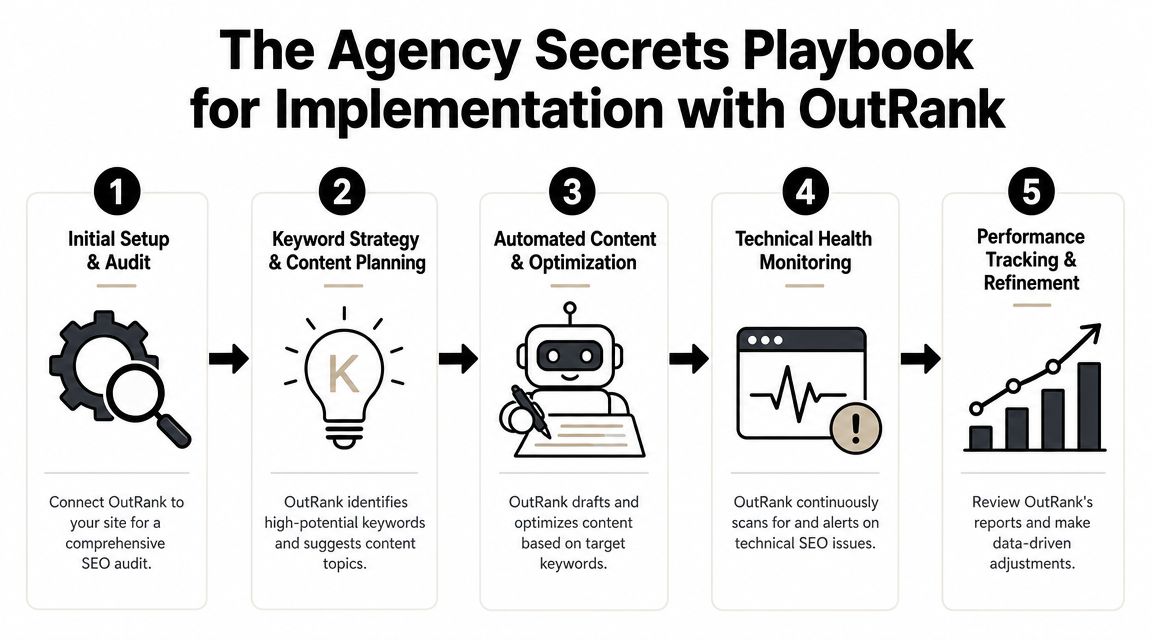
    A five-step workflow diagram illustrating the implementation process for the OutRank SaaS SEO platform.

    Start with revenue pages not vanity traffic

    One of the biggest mistakes in SaaS SEO is overinvesting in broad educational blogs while neglecting comparison pages, problem-specific landing pages, and other commercial assets. RankScience's SaaS guidance specifically notes that many teams neglect comparison pages and problem-specific landing pages that map more directly to buyer intent and conversion.

    That insight changes implementation order.

    Start by listing the pages closest to revenue:

    1. Comparison pages for alternatives and competitor-adjacent searches
    2. Use-case pages tied to specific buyer problems
    3. Feature or solution pages aligned to core product value
    4. Documentation or help content that answers pre-purchase questions
    5. Supporting educational content that feeds authority into those pages

    This is the part many agencies get backward. They build a blog first because it's easier to produce. The smarter move is to build the pages that can convert first, then support them with topic clusters.

    Build the system before you chase scale

    Once the priority pages are defined, run the playbook in order:

    • Map one core cluster: Choose a high-intent topic and define the main page plus supporting articles.
    • Publish with internal links from day one: Don't wait until later to connect the cluster.
    • Set a realistic cadence: Consistency beats bursts. A sustainable publishing rhythm matters more than occasional content sprints.
    • Review winners and laggards monthly: Expand the pages that gain traction. Rework the ones that miss intent.
    • Add links to the pages that matter most: Support commercial pages and their nearest supporting content first.

    A tool like OutRank fits naturally. It's built to automate keyword research, article generation and publishing, backlink support, and competitor analysis inside one workflow, which makes this agency-free system easier for a small team to execute without stitching together separate vendors and tools.

    A practical SEO playbook should tell you what to publish first, what to reinforce next, and what to ignore for now.

    The businesses that get traction don't publish everything. They publish in sequence. That's what makes growth more predictable.

    Measuring Success and Calculating Your ROI

    The simplest way to know whether your platform is working is to watch the metrics in the right order.

    First, track visibility on the pages tied to buyer intent. Then track organic traffic to those pages. After that, measure leads, demos, trials, or sales generated from organic visits. If rankings rise but the wrong pages get traffic, your targeting is off. If traffic rises but conversions don't, your page intent or offer alignment needs work.

    You also need patience with a standard. According to SeoProfy's SaaS marketing statistics, B2B SaaS SEO delivers about 702% ROI, with a break-even period of roughly 7 months. The same source notes that the #1 result in Google gets nearly 27.6% of all clicks. That's why even modest ranking improvements on high-intent terms can have outsized business value.

    Focus on a short scoreboard:

    • Commercial keyword rankings
    • Organic traffic to revenue pages
    • Conversions from organic search
    • Page-level improvement after updates
    • Cost versus revenue contribution over time

    SEO becomes far easier to defend when you measure it like an acquisition channel instead of a publishing program.


    If you want an agency-free system instead of another pile of SEO tasks, Agency Secrets lays out a practical playbook you can run. It's built for owners, operators, and lean marketing teams that want a clear workflow for keywords, content, links, and compounding organic growth without hiring a full agency.

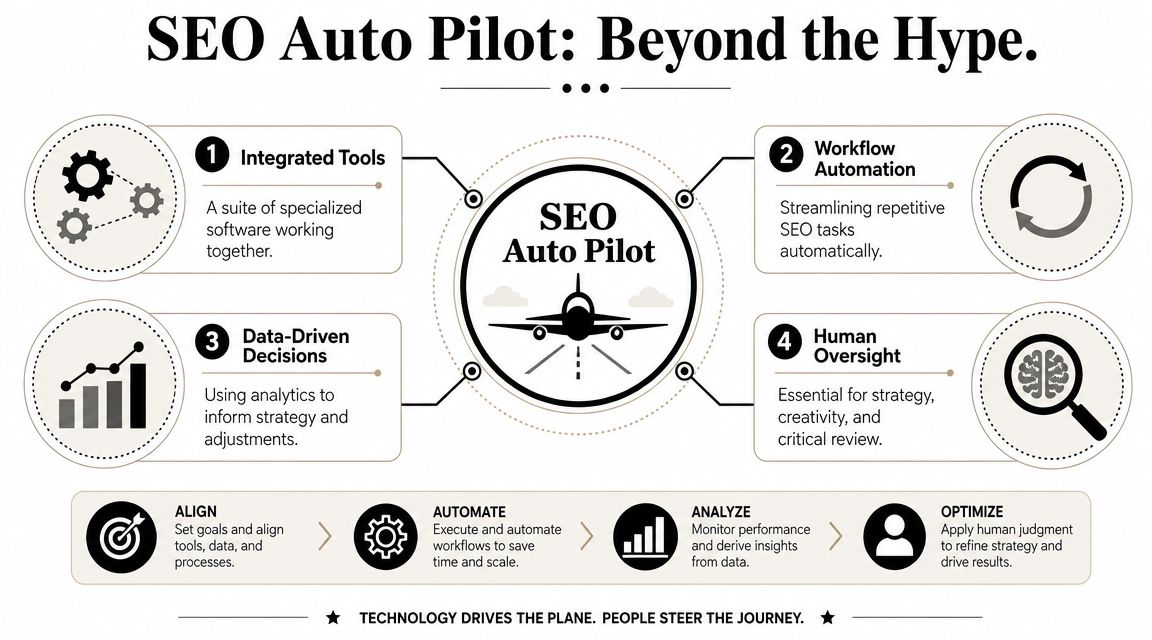
  • SEO Auto Pilot: Hype vs. Reality in 2026

    SEO Auto Pilot: Hype vs. Reality in 2026

    Most advice about SEO auto pilot is wrong in the way that matters most to a small business owner. It sells a fantasy: turn on a tool, publish at scale, watch rankings climb. That version is attractive because it promises amplified results without involvement. It also creates some of the messiest SEO cleanups I see.

    The useful version of automation is narrower and better. It doesn't replace judgment. It removes repetitive execution, keeps your team from missing obvious opportunities, and creates a system that can run every week without depending on memory or spare time. That's a very different promise from "set it and forget it."

    If you want sustainable organic growth, the winning model is governed automation. Machines handle the routine work they're good at. A person still decides what deserves to be published, what matches buyer intent, what sounds credible, and what supports the business.

    Table of Contents

    Putting Your SEO on Auto Pilot Is a Myth

    Most blog posts about SEO auto pilot get the promise backward. The problem is not whether software can do SEO tasks. The problem is whether anyone is steering the system.

    SEO is a chain of decisions tied to revenue, lead quality, and brand trust. Some of those decisions are repetitive and easy to standardize. Others require judgment about what your business should rank for, what a customer needs to see before contacting you, and which pages deserve more investment.

    That is where the fully automated pitch falls apart. A tool can draft pages, monitor rankings, flag technical issues, suggest internal links, and push some updates live. It still cannot judge whether a service page matches your actual offer, whether a claim is credible, or whether the copy sounds like it came from a contractor, dentist, lawyer, or agency that has done the work.

    For local businesses, that distinction carries weight. Search demand is often high intent, close to purchase, and tied to specific services and places. Publishing more pages does not solve that on its own. Covering the right topics, in the right geography, with the right proof does.

    Practical rule: Use automation to increase coverage of commercially relevant searches. Do not use it to mass-produce thin pages.

    This is why governed automation works better than "set it and forget it." The system handles the repeatable work so a small team can keep pace. The owner, marketer, or consultant reviews what affects positioning, trust, and conversion. That split is what makes automation useful instead of expensive.

    I have seen both outcomes. A governed workflow helps a small business refresh aging pages, catch technical problems early, improve internal linking, and keep reporting consistent. An ungoverned workflow publishes weak content at scale, targets terms that never convert, and creates a cleanup project six months later.

    SEO auto pilot works best as supervised execution. The upside is speed, consistency, and broader coverage. The risk is scaling the wrong decision faster.

    What SEO Auto Pilot Really Means

    The term is often used loosely. In practice, SEO auto pilot means a connected workflow where software handles repeatable SEO actions, then feeds the results back into the next round of decisions.

    A diagram illustrating SEO auto pilot strategies including integrated tools, workflow automation, data-driven decisions, and human oversight.

    It is a workflow, not a button

    A capable setup usually follows a closed-loop workflow. It crawls the site, pulls performance data, prioritizes issues, generates fixes, deploys changes, and watches what happens next. That structure is described in this Search Atlas explanation of SEO autopilot workflows.

    That matters because it turns SEO from a pile of disconnected tasks into a system. Instead of manually checking rankings, scanning pages, rewriting metadata, and remembering what changed, the system keeps the loop moving.

    Common autopilot actions inside that loop include:

    • Page-level updates: title rewrites, meta description changes, and content expansion prompts.
    • Internal architecture work: internal link insertion with controlled anchor text.
    • Technical cleanup: schema.org JSON-LD updates, canonical corrections, noindex fixes, redirect-rule changes, and hreflang annotations.
    • Performance triage: surfacing pages that are close to page-one visibility and likely worth improving.

    A useful setup also connects to the tools that already hold your real search signals. Google Search Console is the big one. Platforms often use it to pull impressions, clicks, and average position so the backlog isn't based on guesswork. Distribb's overview of SEO autopilot software describes that operating model clearly.

    The airplane analogy is useful if you use it correctly

    The airplane comparison gets overused, but it helps if you keep it grounded. On a commercial flight, autopilot handles stable cruising conditions. Pilots still manage takeoff, landing, route changes, and anything unusual.

    SEO works the same way.

    The machine is good at stable, rules-based execution:

    • crawling sites on a schedule
    • flagging broken pages
    • validating schema
    • collecting ranking changes
    • surfacing quick-win pages
    • applying templated on-page improvements

    The human still owns the risky parts:

    • choosing which topics deserve resources
    • deciding what the page should say
    • making claims responsibly
    • protecting brand voice
    • rejecting low-value output
    • changing direction when the market shifts

    A healthy SEO system doesn't ask, "How can we automate everything?" It asks, "Which work is repetitive enough to automate, and which decisions are too valuable to hand off?"

    If you keep that distinction clear, the term SEO auto pilot stops sounding like hype and starts sounding like operations. That's where it earns its keep.

    The Reality Check What Automation Can and Cannot Do

    The fastest way to waste money on SEO automation is to ask software to do judgment-heavy work without supervision. The fastest way to get value from it is to use it where the rules are clear and the feedback loop is frequent.

    A useful benchmark comes from a 2026 industry analysis of SEO autopilot software. It found that only 23% of SEO tasks can be fully automated without quality degradation, while technical monitoring such as daily rank tracking, weekly crawls, broken-link detection, and schema validation is 95–100% suitable for automation. The same analysis notes that base automation tools often cost $50–150 per month, while the true monthly cost of ownership can rise to $150–250 once supporting services are added.

    A robotic hand sketching a conceptual SEO strategy diagram combining automated tasks with human creativity and intelligence.

    Where automation earns its keep

    The best candidates for automation have three traits. They are repetitive, rules-based, and easy to verify.

    That includes work like:

    • Monitoring routines: rank tracking, crawl scheduling, broken-link detection, schema validation, and alerting.
    • Backlog generation: finding pages that slipped, pages stuck just outside stronger visibility, and pages missing obvious on-page elements.
    • Controlled edits: metadata rewrites, internal linking suggestions, canonical cleanup, and templated schema updates.
    • Reporting hygiene: collecting recurring visibility data so you don't rebuild the same report every week.

    This is the part many owners underestimate. The value isn't glamorous. It's operational consistency. A small company usually doesn't lose because it lacked one genius insight. It loses because nobody ran the basics often enough.

    Where human judgment still wins

    Automation struggles when the task depends on nuance, originality, or context that lives outside the tool.

    That includes:

    • Intent interpretation: deciding whether a keyword maps to a service page, a comparison page, a local landing page, or a post that shouldn't be written at all.
    • Commercial fit: separating traffic terms from buyer terms.
    • Differentiation: adding first-hand detail, edge cases, objections, pricing context, operational constraints, and trust signals.
    • Relationship work: earning strong backlinks through actual outreach, partnerships, PR, referrals, and reputation.
    • Final QA: spotting factual sloppiness, duplicated angles, awkward claims, and pages that sound polished but empty.

    Reality check: If a draft could be written for any company in your industry, it probably won't become an asset for yours without editing.

    A lot of small businesses hear "AI content" and think the bottleneck is writing speed. It usually isn't. The bottleneck is knowing what deserves to exist, what should be combined, what should be left unpublished, and what needs a real operator's insight before it goes live.

    So the answer isn't manual-only or automated-only. It's a hybrid workflow with a firm boundary between machine execution and human responsibility.

    Comparing Manual SEO and Automated Workflows

    The choice isn't between old-school discipline and shiny software. The essential choice is how you want work to move through your business. Manual SEO gives you control but often stalls. Automated workflows create momentum but can drift if nobody sets boundaries.

    Manual vs. Automated SEO A Head-to-Head Comparison

    Factor Manual SEO Workflow Automated SEO Workflow
    Speed Slower. Progress depends on available time and staff attention. Faster. Recurring tasks run on schedule and surface issues quickly.
    Scale Hard to maintain across many pages, locations, or product lines. Better for larger page sets and recurring optimizations.
    Consistency Quality may be high, but execution often varies week to week. Strong for repeatable routines, templates, and monitoring cycles.
    Cost Lower software complexity, higher labor burden over time. More efficient for repetitive work, but tool sprawl can raise operating cost.
    Strategic depth Strong when led by an experienced operator. Weak if left unguided. Better when paired with a human reviewer.
    Content quality Usually better when subject knowledge is applied directly. Useful for drafts and scale, risky if published without review.
    Technical hygiene Often delayed because it competes with everything else. Better suited to scheduled crawls, alerts, and recurring fixes.
    Reporting Frequently manual and inconsistent. Easier to standardize and repeat.

    The table makes one thing obvious. Each model solves the other model's weakness. Manual work protects quality and context. Automation protects cadence and coverage.

    The hybrid model is usually the right answer

    For most small businesses, fully manual SEO is too fragile. It depends on spare time, and spare time disappears. Fully automated SEO is too loose. It tends to overproduce and underthink.

    The practical middle looks like this:

    • Automate discovery: keyword clustering, technical scans, rank monitoring, issue alerts.
    • Automate controlled execution: internal links, metadata suggestions, refresh prompts, structured technical fixes.
    • Keep humans on decisions: keyword selection, page purpose, content review, service positioning, trust elements, and publish approval.

    That model also changes how you think about cost. Cheap software isn't cheap if it creates a cleanup project. Manual effort isn't efficient if skilled staff spend their time gathering data instead of making decisions.

    A governed setup usually wins because it lets software do what software does best while preserving the parts of SEO that still need someone who understands the business.

    The SEO Auto Pilot Playbook for Small Businesses

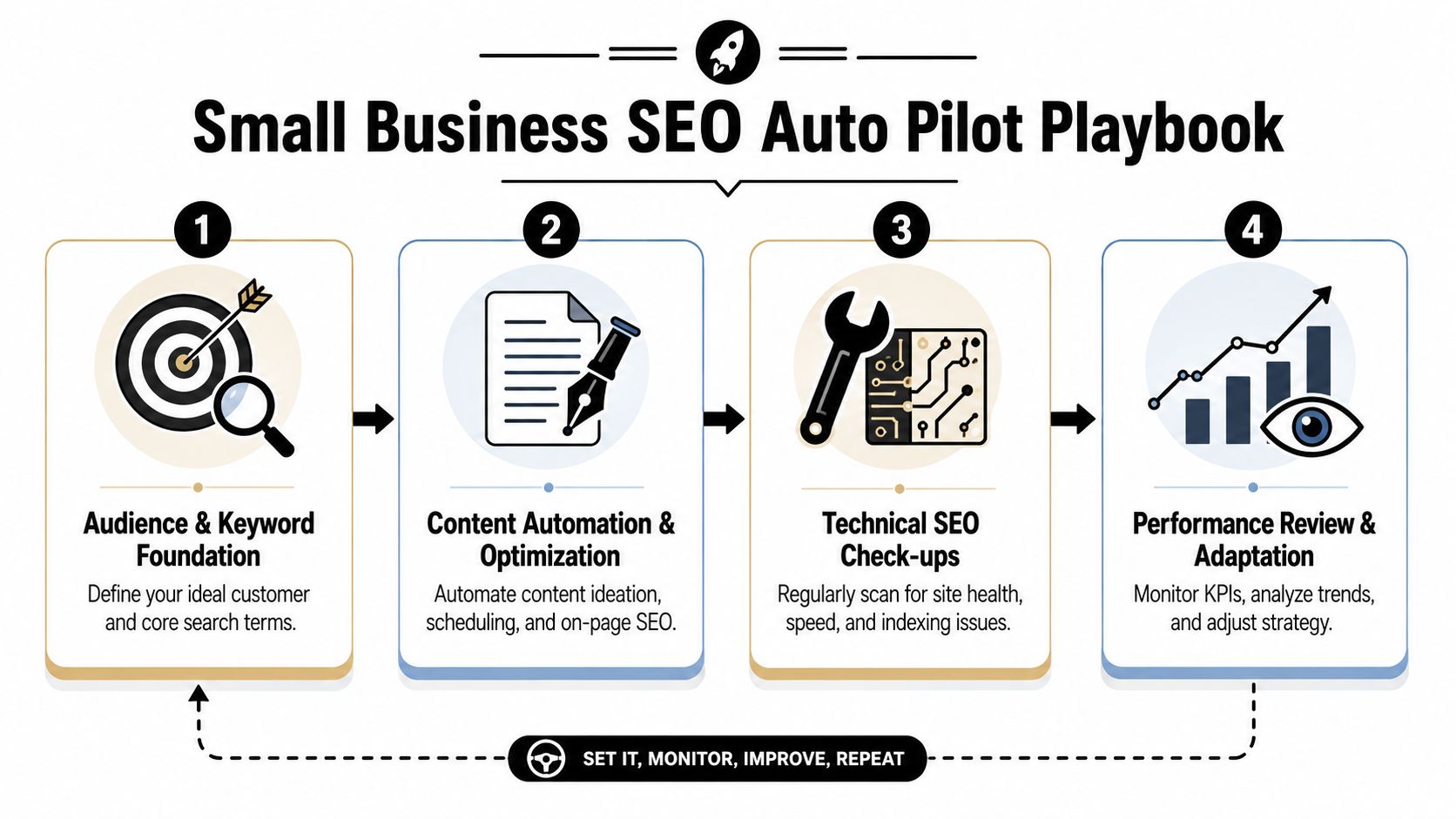
    Small businesses do not need an SEO machine that runs unattended. They need a system that keeps work moving without lowering the standard. The version that holds up in practice has four jobs: find demand, publish pages that can win business, earn credible links, and revisit pages based on real signals.

    A four-step infographic illustrating a Small Business SEO Auto Pilot Playbook process from keyword strategy to review.

    Start with buyer-intent keyword discovery

    For a small business, bad keyword targeting creates expensive busywork. You end up publishing pages that attract impressions but not calls, bookings, or quote requests. A governed system starts closer to revenue.

    That usually means building keyword clusters around commercial intent and local relevance, then filtering hard before anything gets written. The tool can collect patterns quickly. A person still needs to decide which terms belong on service pages, which deserve supporting content, and which are a distraction.

    Use your workflow to surface clusters such as:

    • Service modifiers: emergency, same-day, affordable, specialist, pediatric, commercial.
    • Location patterns: city pages, neighborhood terms, nearby intent, regional variants.
    • Comparison intent: best option, alternative, versus pages, cost and timing questions.
    • Problem-aware searches: symptoms, warning signs, repair indicators, when to replace, when to book.

    The goal is coverage with intent, not volume for its own sake.

    Use AI drafts, then add operator knowledge

    Many small teams either save serious time or create a cleanup problem.

    AI is useful for structure. It can draft headings, pull together common questions, and give a writer a workable starting point. That is a productivity gain. It is not quality control.

    The pages that perform for service businesses usually include details a generic model will miss: what the job involves, who it is for, what it costs, what can delay service, what your team does differently, what proof supports the claim, and what a buyer should do next. Those details often decide whether a page ranks well and converts once it does.

    A governed content workflow usually includes:

    1. An approved brief with target intent, page type, audience, angle, and required sections.
    2. A machine-generated draft based on that brief.
    3. A human edit that adds specifics, examples, objections, local details, photos, policies, service constraints, and trust signals.
    4. A final review before publishing.

    "Automation should produce a stronger first draft, not remove editorial responsibility."

    I have seen small businesses publish dozens of AI pages in a month and then spend the next quarter fixing thin copy, duplicate intent, and weak conversion paths. The faster route was slower because nobody set publishing standards upfront.

    A short walkthrough helps if you're evaluating workflow design in practice:

    Build links in two lanes

    Link building is another area where automation helps, then quickly becomes risky if left alone.

    Split it into two lanes. The first lane is repeatable and operational. Use software to find citations, unlinked brand mentions, reclaimable links, supplier mentions, directories worth having, and straightforward partner opportunities. The second lane is reputation-driven. Handle sponsorships, local associations, guest contributions, digital PR, and referral relationships manually because context matters and templated outreach burns goodwill fast.

    That division keeps the system honest. Software handles prospecting and tracking. People handle trust.

    Let monitoring trigger the next action

    Publishing is the midpoint, not the finish line.

    A useful autopilot setup watches for conditions that justify intervention. That includes pages gaining impressions but losing clicks, URLs stuck just below stronger rankings, local pages with weak internal links, aging content that no longer reflects the offer, and technical issues that interfere with crawling or indexing.

    The important shift is operational. Instead of asking, "What should we publish next?" every week, the system also asks, "What already exists that deserves a better result?" That is how small businesses get more out of limited resources.

    SEO auto pilot works when automation creates the next best action and someone is accountable for approving it. That is the playbook. Controlled scale, clear ownership, and fewer expensive mistakes.

    Measuring Success and Implementing Guardrails

    A lot of SEO automation fails unnoticed because teams measure output instead of impact. They count pages, briefs, or tasks completed. None of those prove the system is helping the business.

    A stronger framework starts with search visibility signals and connects them to business outcomes. SEO Scout's guidance on tracking SEO data on autopilot points to a practical base: use Google Search Console to track impressions and average position, then relate those changes to the actions your workflow took.

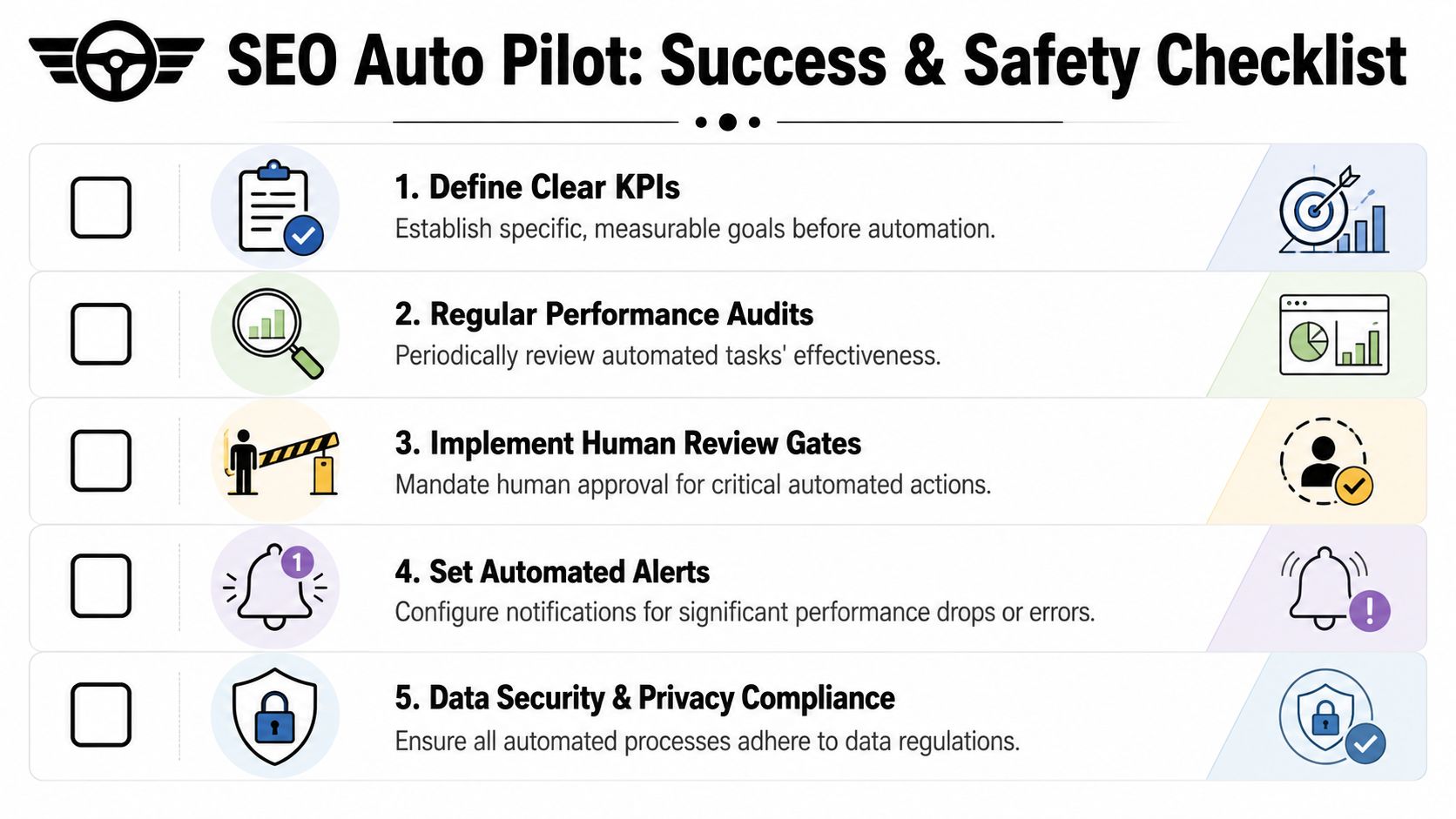
    A checklist infographic titled SEO Auto Pilot outlining five essential steps for successful automated search engine optimization.

    Measure movement, not just output

    For a small business, the cleanest scoreboard usually includes:

    • Visibility indicators: impressions, average position, and page-level movement in Search Console.
    • Engagement signals: whether searchers are clicking and interacting with the right pages.
    • Business response: leads, calls, bookings, quote requests, or sales that can be tied back to relevant pages.
    • Refresh cadence: whether the system improves existing winners instead of only creating new URLs.

    That last point matters. A lot of tools are built to produce more. Mature SEO systems are built to learn what to improve next.

    Operator note: If reporting can't show which automated action preceded a visibility gain, the system is running, but it isn't being managed.

    Guardrails that prevent expensive drift

    The biggest operational risk in SEO auto pilot isn't usually immediate failure. It's unmanaged success. You create more pages, more edits, more moving parts, and the system slowly drifts away from strategy. This field guide on governed automation puts the emphasis in the right place: use one-page briefs, cluster keywords by intent, and require a human edit step.

    Those guardrails are not bureaucracy. They're protection.

    Use them aggressively:

    • One-page briefs: define target intent, page type, required proof points, and what makes the page different.
    • Intent-based clustering: don't let one topic spawn multiple weak pages that compete with each other.
    • Human review gates: require approval before publication and before high-impact sitewide changes.
    • Change logs: record what the system changed so wins and losses can be traced back to actions.
    • Alert thresholds: flag sudden drops, indexing problems, or unusual output volume before they become bigger problems.

    The businesses that get the most from automation don't trust it blindly. They govern it well.

    Choosing Your Tools and Taking Command

    The right tool stack depends on your bottleneck. If your team misses technical issues, start there. If keyword discovery is inconsistent, fix research and clustering first. If content production keeps stalling, choose a platform that can move briefs, drafts, optimization, and publishing through one controlled workflow.

    In general, you're choosing between point solutions and integrated platforms. Point solutions can work well when you already have strong internal process. Integrated platforms are often better for small businesses because they reduce handoffs and keep data in one place.

    What matters most is control. You want software that can connect to Search Console, surface real opportunities, support review steps, and make it easy to see whether automated actions are improving visibility. That's the core measurement challenge, and it matters more than fancy dashboards. As noted in the earlier section, the system has to prove itself through movement in impressions and average position, not just a higher publishing count.

    SEO auto pilot works when you stay in command. Let the machine handle repetition. Keep strategy, quality, and commercial judgment in human hands. That's how a small business gets scale without losing its grip on what makes the business worth choosing.


    If you want a practical way to apply this governed-automation approach, Agency Secrets is built for exactly that kind of operator. It focuses on the core SEO levers that matter to small businesses: buyer-intent keyword research, consistent authoritative publishing, relevant backlinks, and evergreen content that compounds over time. If you want agency-style execution without hiring an agency-sized team, it's a smart place to start.

  • Google Keyword Position Checker API: The 2026 Guide

    Google Keyword Position Checker API: The 2026 Guide

    You're probably here because manual rank checking has started to break down.

    At first, checking a few keywords in an incognito window feels manageable. Then you add locations, devices, product lines, service pages, and competitors. Soon you're spending time on a process that still doesn't give you a clean answer. One search shows you near the top. Another shows something else entirely. Your team wants a dashboard, not screenshots.

    That's where a google keyword position checker api becomes useful. But the hard part isn't making an API call. The hard part is choosing the right kind of API in the first place. For most businesses, that choice decides your reporting quality, your maintenance burden, and whether your data is trustworthy enough to guide decisions.

    Table of Contents

    What Is a Google Keyword Position Checker API

    A google keyword position checker api is a way for software to request ranking data automatically instead of having a person search manually. In plain English, an API is a structured way for one system to ask another system for information. For SEO, that usually means asking for ranking data for a keyword, domain, page, location, or device.

    The business value is simple. You stop checking rankings one by one and start pulling them into tools you already use. That could be a reporting dashboard, a spreadsheet, an internal app, or a client portal. Once ranking checks become repeatable, you can track movement over time instead of arguing over isolated screenshots.

    A hand-drawn graph showing a search ranking rising from ten to one under a magnifying glass.

    Why this category exists at all

    A lot of business owners assume Google must provide a native API for live rank checks. It doesn't. A long-running discussion in Google Groups on the old AJAX Search API said there was “no way to check keywords rankings through Google API,” and noted that the Custom Search API was limited to a custom search engine rather than standard google.com results, with a free tier of only 100 requests per day. That limitation is one reason specialist rank-tracking providers took over this category.

    That history matters because it explains the market. If you want live SERP snapshots, competitor checks, or repeated monitoring at scale, you're almost always looking at third-party infrastructure, not Google-native tooling.

    Practical rule: If someone promises “official Google live rank tracking,” they're usually blending together different products that solve different problems.

    What businesses actually use it for

    For the vast majority of teams, rank data isn't useful for its own sake. Instead, it serves to answer operational questions like these:

    • Content teams want to know whether a page is climbing or slipping for target queries.
    • Local businesses need to compare desktop and mobile visibility across service areas.
    • Agencies and consultants need a repeatable way to monitor competitors and client terms.
    • Founders want reporting that doesn't depend on someone remembering to run manual checks.

    A rank-checking API is useful when it turns rankings into a workflow. If it only gives you a raw number with no context, it won't help much.

    Comparing the Three Main API Approaches

    A business usually reaches this decision after the same frustrating moment. Someone asks for weekly rankings, competitor visibility, and local SERP checks in one dashboard, then assumes a single "Google API" will cover all of it.

    It won't. These three approaches solve different business problems, and choosing the wrong one creates bad reporting, wasted spend, or unnecessary legal exposure.

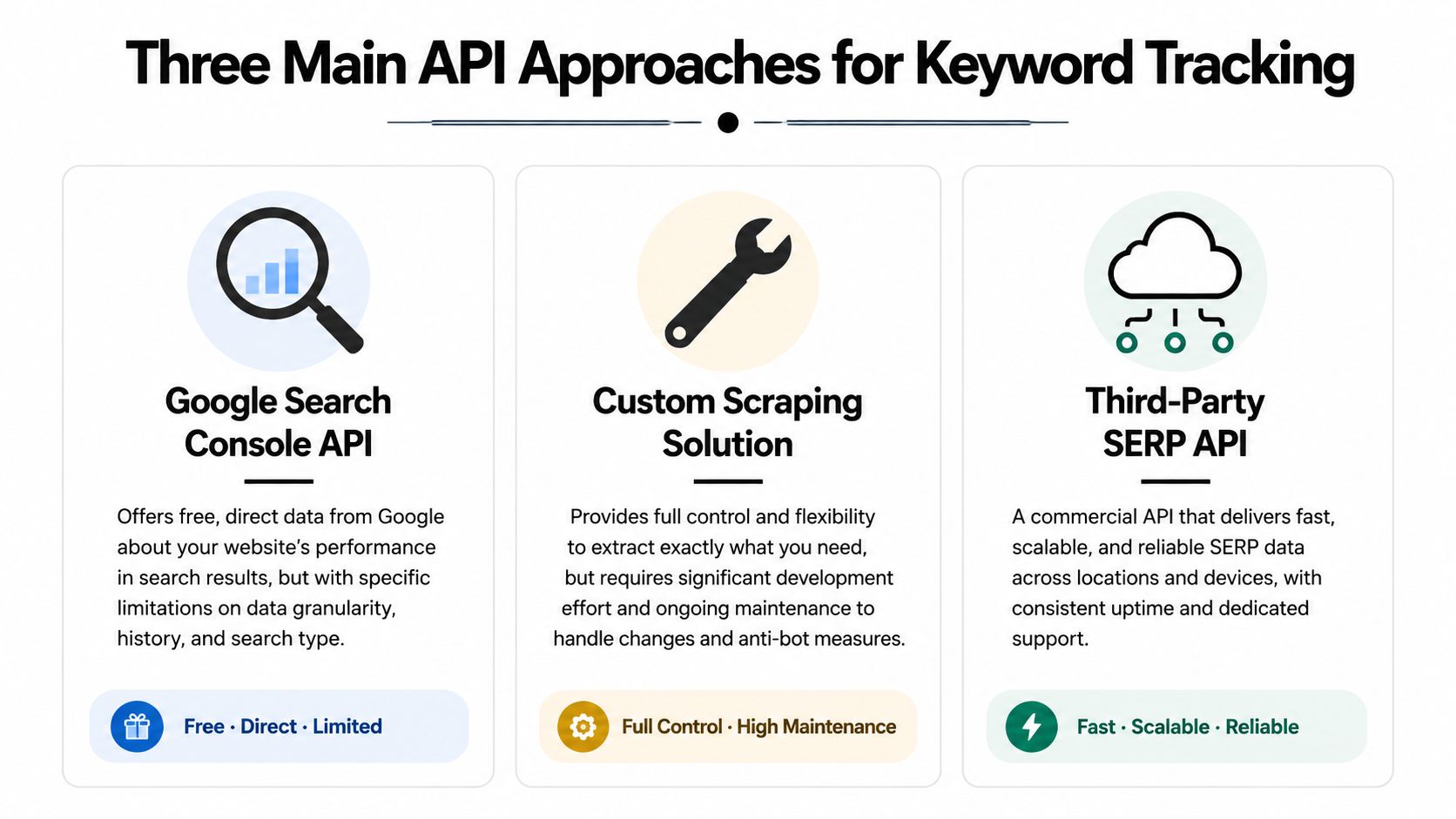
    A chart illustrating three main API approaches for keyword tracking: Google Search Console, custom scraping, and third-party APIs.

    How the three options differ

    Google Search Console API is a first-party source. It reports how Google has recorded search performance for a verified property over time. That makes it strong for measuring your own site, but weak for competitor tracking or on-demand SERP snapshots.

    Third-party SERP APIs are built for observation of the public results page. They are the practical choice when the question is "what ranks for this keyword in this location on this device right now?" That is a different job from Search Console, and the pricing reflects it because the vendor is handling collection, proxies, parsing, and uptime.

    DIY scraping sits in a third category. It can produce the exact output you want if you have the engineering appetite to build and maintain it. In a business setting, though, the cheap-looking option often turns into the expensive one once you account for blocked requests, parser fixes, proxy costs, and the time required to keep it running.

    The comparison is not feature versus feature. It is first-party analytics versus market observation versus custom infrastructure.

    Use Search Console for owned-property performance analysis. Use a third-party SERP API for live rank monitoring and competitor visibility. Build scraping only if custom control matters enough to justify ongoing technical and legal overhead.

    A practical comparison table

    Criterion Google Search Console API Third-Party SERP API DIY Scraping
    Primary use Owned-site search performance reporting Live SERP collection and rank tracking Custom SERP collection pipeline
    Data type Aggregated metrics tied to a verified property Snapshot of search results at a specific time Whatever your system can collect and parse
    Best for Trends, queries, CTR, impressions, average position Competitor monitoring, local rank checks, device-specific tracking Internal tools with unusual data requirements
    Competitor tracking No Yes Yes, if you build and maintain it
    Setup effort Moderate Usually low to moderate High
    Ongoing maintenance Low to moderate Low on your side High on your side
    Legal and platform risk Low for standard use Lower than DIY because the vendor absorbs collection risk Higher
    Reporting quality Strong for owned properties and trend analysis Strong for ranking visibility and SERP features Depends on parser quality and operational discipline

    For decision-making, six criteria matter more than API jargon: accuracy, recency, scale, setup time, legal risk, and whether the data is actually useful in reporting.

    • Choose Google Search Console API if the goal is to understand how your site is performing in Google over time.
    • Choose a third-party SERP API if you need rankings for competitors, local markets, device variants, or fresh snapshots on demand.
    • Choose DIY scraping only if off-the-shelf APIs cannot support a specific workflow and you are prepared to own the maintenance burden.

    That last trade-off gets underestimated. Buying an API can look expensive on a pricing page. Rebuilding one internally is usually more expensive once a developer has to babysit it.

    Using the Google Search Console API for Owned Properties

    Monday morning, the CEO asks a simple question: “Did we move up for our main keyword?” If your only data source is Google Search Console, the honest answer is usually, “We can measure trend and visibility for our site, but not a live, single-slot ranking in the way rank trackers report it.”

    That distinction matters because Search Console is an ownership and performance tool first. It is strongest when the business question is about how Google has exposed your verified site over time, and what that exposure produced in clicks and impressions.

    What GSC is actually good at

    For owned properties, the Search Console API gives you the cleanest line from search visibility to business outcomes. The searchanalytics/query endpoint lets you segment data by query, page, country, device, search type, and date. You can pull clicks, impressions, CTR, and average position, then use those fields to answer questions a snapshot rank checker cannot answer well.

    Examples:

    • Which queries are starting to generate impressions for a newly optimized page
    • Whether mobile performance is improving faster than desktop
    • Which countries deserve separate SEO reporting
    • Whether branded traffic is masking weakness in non-branded discovery
    • Which pages earn visibility but fail to attract clicks

    That last point is where GSC becomes especially useful for decision-making. A position metric on its own can look healthy while CTR stays weak because the snippet is poor, the query intent is mixed, or the SERP is crowded with ads and rich results. Search Console helps separate “we appear” from “we win traffic.”

    What average position really means

    Average position is often misunderstood in executive reporting.

    Google does not return one fixed rank for a keyword across all searches. It returns an aggregated average based on the impressions your property received. That average can blend mobile and desktop behavior, different locations, and different moments in time. For a business owner, the practical implication is simple. “Average position 4.2” does not mean your result sat in slot four every time someone searched.

    Use the metric for trend analysis. Use it to compare periods, pages, devices, and countries. Do not use it as a substitute for a live SERP snapshot.

    A common reporting mistake is turning GSC average position into a claim like “we rank number four.” That overstates the precision of the metric and creates false confidence.

    Where GSC fits in a business stack

    Search Console API is a strong choice when you need reporting that is defensible, low-risk, and directly tied to your own property. It is also usually the cheapest option if your scope is limited to sites you control, because the collection layer already exists inside Google's product.

    The trade-off is visibility. You cannot use GSC to monitor competitors, inspect a precise local SERP on demand, or verify how a result looked at a specific moment for an unverified property. If the business needs those answers, GSC should stay in the stack, but it should not be the only source.

    A practical way to frame it is this: use GSC to measure owned-site performance and SEO progress over time. Use other methods only when the question goes beyond what a verified-property analytics API was designed to show.

    Leveraging Third-Party SERP APIs for Full Visibility

    A common scenario looks like this. A retailer wants to know why revenue dipped for a high-intent keyword, but the answer is not in Search Console because the actual question is broader than their own site. They need to see who replaced them, whether ads pushed organic listings down, and whether mobile results in a specific city look different from desktop results nationwide.

    That is the job third-party SERP APIs handle well.

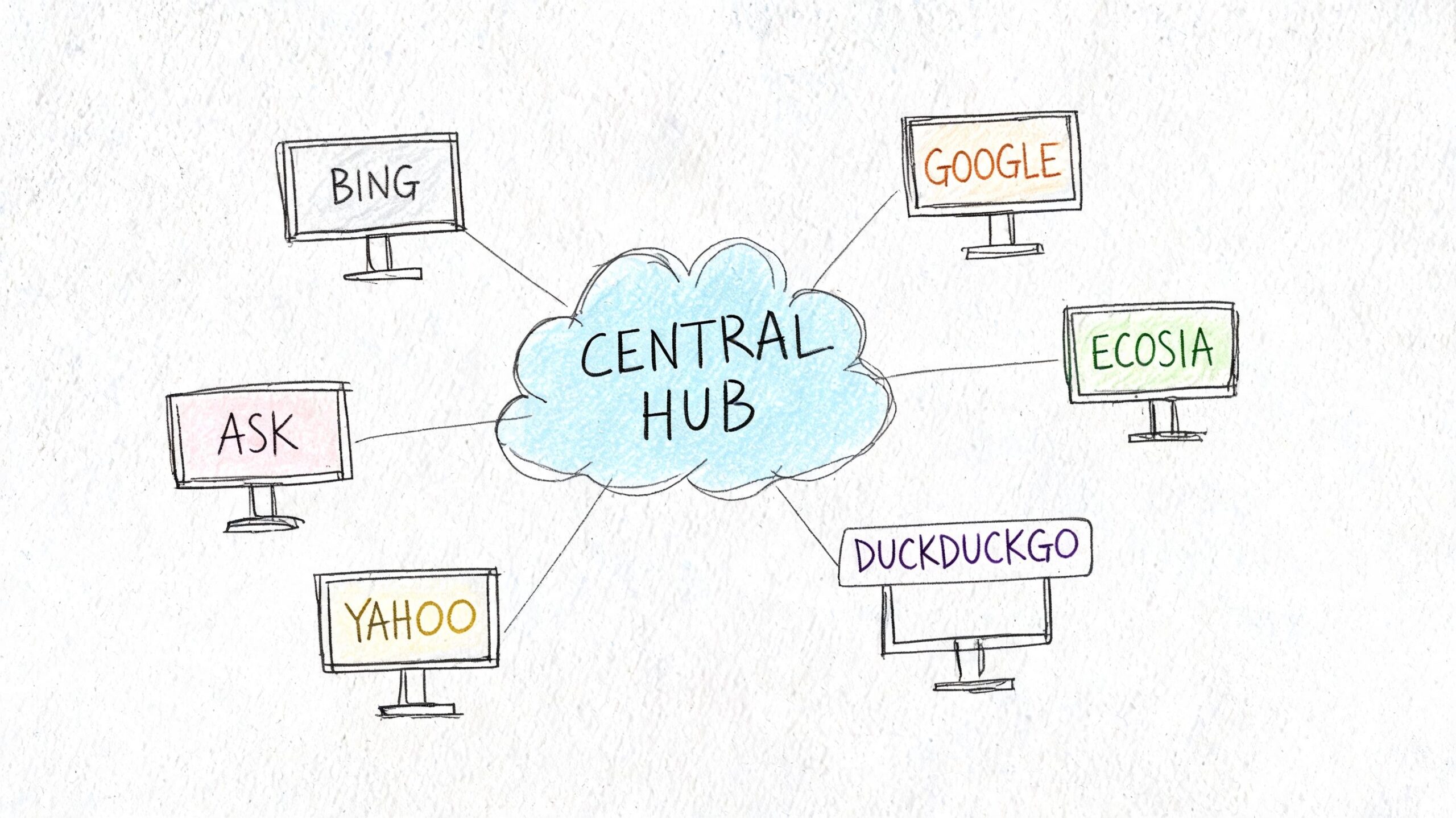
    A hand-drawn illustration showing a central hub connected to various search engines like Google, Bing, and Yahoo.

    Why businesses pay for this layer

    Third-party SERP APIs collect live or scheduled search results for queries, devices, and locations you choose, then return structured data your team can directly report on. The business value is not just access to rankings. It is the removal of operational work that sits behind reliable collection.

    That matters because Google results are no longer a simple ranked list. A useful API needs to capture organic listings, paid placements, local packs, shopping results, featured snippets, video blocks, images, and other page features that change what "position" means in practice. If your report says you moved from position 3 to 5, the commercial impact depends on what filled the space above you.

    For teams buying software, this is usually the clearest trade-off. You accept a vendor bill and a fixed schema. In return, you get speed, broader visibility, and less engineering overhead.

    What to look for in a SERP API

    The best vendors help answer business questions, not just collect rows of rank data. Evaluate them on points that change decisions:

    • Geo precision. Can you request results at the country, city, or ZIP level if local intent matters?
    • Device coverage. Mobile and desktop often produce different result pages and different click opportunities.
    • SERP feature parsing. Rank alone is incomplete if ads, maps, or snippets are taking attention.
    • Historical collection. Scheduled tracking matters more than one-off checks if you want to separate volatility from a real trend.
    • Output format and limits. Clean JSON, consistent fields, and predictable rate limits reduce downstream reporting work.
    • Vendor reliability. If the API fails during peak reporting periods, the low price stops looking cheap.

    One more filter gets overlooked. Ask how quickly your team can turn the raw response into something a client, founder, or department head can understand. A technically rich API can still be a poor fit if every report requires manual cleanup.

    Where third-party APIs outperform first-party data

    Search Console is strong for owned-site performance over time. Third-party SERP APIs answer a different class of question.

    Use them when the business needs to:

    • Track competitors or marketplaces you do not control
    • Verify rankings for a specific place, device, or search context
    • Measure visibility across multiple domains
    • See the actual SERP composition, not just an averaged metric
    • Run alerting when a keyword changes sharply or a SERP feature appears

    This is why agencies, multi-location businesses, and e-commerce teams often keep a third-party SERP source in the stack even when they already use GSC. The two systems answer different questions.

    The practical trade-offs

    Third-party APIs solve collection, but they introduce vendor dependency. Pricing usually scales with request volume, location depth, frequency, and feature coverage. A cheap plan can become expensive if you track thousands of keywords across many markets. The opposite is also true. Building internal reporting on top of a stable API is often far less expensive than assigning engineers to maintain fragile collection systems.

    Accuracy also needs a realistic definition. No vendor can promise a single universal "true rank" for Google because results vary by device, location, personalization, and timing. Good providers reduce that uncertainty by letting you define the context clearly and collect consistently. That is what makes the data decision-ready.

    This walkthrough gives a feel for how these tools are typically implemented:

    The Risks and Realities of DIY Scraping

    DIY scraping sounds appealing because it promises control. You pick the queries, define the parser, and avoid a monthly vendor bill. On paper, that can feel efficient.

    In practice, most small and mid-sized businesses don't want a scraping project. They want ranking data.

    Why teams underestimate scraping

    The first version of a scraper is usually the easiest part. The hard part is keeping it alive. Search results change layout. Anti-bot defenses tighten. Parsers fail without warning. A field you relied on disappears and now your reports are wrong without obvious errors.

    There's also a policy issue. Scraping public results directly sits in a riskier position than using a vendor designed for this job. Even if a team is technically capable, many businesses don't want legal and operational ambiguity attached to a reporting system.

    A few hidden costs show up fast:

    • Infrastructure overhead grows as you add requests, locations, and retries.
    • Maintenance work never really stops because SERPs keep changing.
    • Debugging time often lands on your most expensive technical people.
    • Trust in the data drops when the system breaks in subtle ways.

    When DIY might make sense

    There are cases where building in-house is defensible. Large companies with specialized engineering support, unusual compliance requirements, or proprietary workflows may decide control is worth the effort.

    For everyone else, DIY usually solves the wrong problem. It optimizes for avoiding vendor spend while creating a fragile internal product. If rank tracking isn't part of your core business model, that's usually a poor trade.

    Practical Code Examples for API Calls

    The mechanics of using a SERP API are much simpler than the category makes them seem. Once you've chosen a provider, the workflow is usually just: define the keyword, pass location or device parameters if needed, send the request, and parse the response.

    You don't need a large software team to make that useful. A developer can wire this into a dashboard quickly, and a technical marketer can usually understand the logic from a short example.

    Python example

    import requests
    
    API_KEY = "YOUR_API_KEY"
    ENDPOINT = "https://api.example.com/google/rank-tracking"
    
    params = {
        "keyword": "best running shoes",
        "location": "United States",
        "device": "desktop",
        "api_key": API_KEY
    }
    
    response = requests.get(ENDPOINT, params=params)
    data = response.json()
    
    # Example logic:
    # Assume the API returns a list of organic results
    organic_results = data.get("organic_results", [])
    
    for result in organic_results:
        print(result.get("position"), result.get("domain"))
    

    This example shows the pattern, not a provider-specific schema. In a real implementation, your developer would map the response fields from the vendor you choose.

    JavaScript example

    const endpoint = "https://api.example.com/google/rank-tracking";
    const params = new URLSearchParams({
      keyword: "best running shoes",
      location: "United States",
      device: "mobile",
      api_key: "YOUR_API_KEY"
    });
    
    fetch(`${endpoint}?${params.toString()}`)
      .then(response => response.json())
      .then(data => {
        const organicResults = data.organic_results || [];
        organicResults.forEach(result => {
          console.log(result.position, result.domain);
        });
      })
      .catch(error => console.error(error));
    

    A practical implementation usually adds three things beyond this starter code:

    • Error handling for failed requests or rate limits
    • Normalization so data from multiple runs follows one schema
    • Storage so you can analyze changes over time instead of printing output once

    The hard part isn't the API call. It's deciding what you'll store, how often you'll check, and which movements should trigger action.

    Best Practices for Managing API Data

    Rank tracking gets expensive when every question triggers a fresh API call. It also gets unreliable fast if historical snapshots are missing, labels change over time, or your team mixes different data sources into one metric.

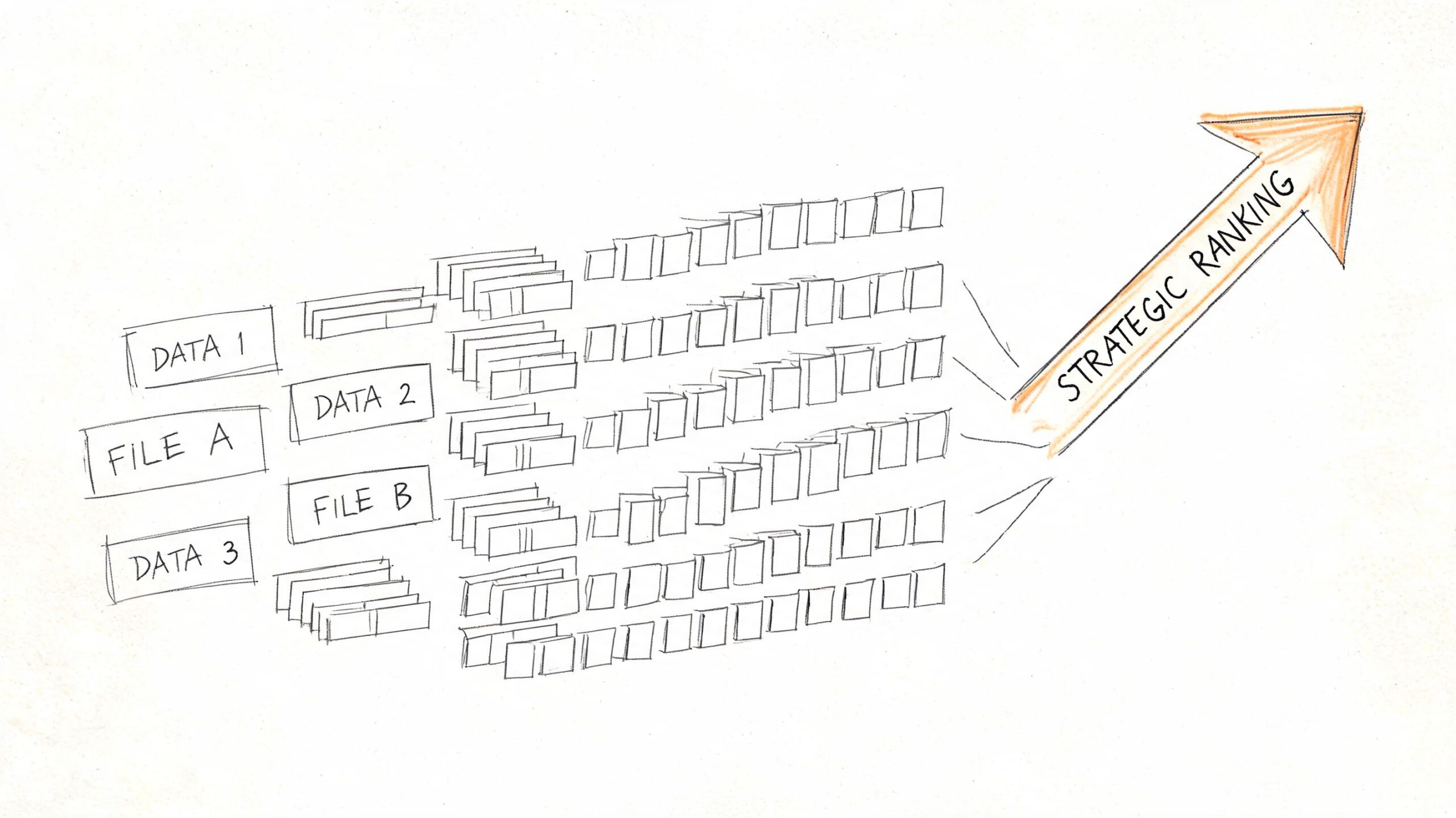
    A hand-drawn illustration showing multiple data files organized into rows leading to a strategic ranking arrow.

    The practical fix is to treat rank data like reporting data, not like a live lookup tool. Pull on a schedule, store the result, and build reports from your own database or warehouse. That cuts repeat API costs, makes trend analysis possible, and gives you an audit trail when someone asks why a ranking changed last month.

    A simple table structure is enough to start:

    Field Purpose
    keyword The query you're tracking
    checked_at When the snapshot was collected
    search_engine Usually Google, but keep it explicit
    location Country or local market
    device Desktop or mobile
    domain The site being tracked
    rank Observed position in that snapshot
    url Landing page shown in results
    result_type Organic result, ad, or rich-result context

    That schema covers the business questions that come up in reporting. Which keyword moved. In which market. On which device. And whether Google swapped in a different URL.

    A few operating rules prevent messy data later:

    • Use a fixed pull schedule so week-over-week comparisons mean the same thing.
    • Normalize country, device, and domain naming early so reports do not split the same entity into multiple labels.
    • Store raw responses before transformation so your team can debug parser issues or vendor schema changes.
    • Version your logic if you change ranking rules, result classification, or matching methods.
    • Separate collection from reporting so dashboard traffic does not trigger more API calls.

    The trade-off is storage and pipeline work. That cost is usually lower than repeated API requests, manual cleanup, and bad reporting decisions based on inconsistent snapshots.

    How to reconcile GSC with live rank data

    Search Console data and live SERP data answer different questions. Teams get into trouble when they force both into a single "position" field and expect them to line up.

    Use Search Console for owned-site performance over time. Use SERP APIs for point-in-time visibility into a specific query, location, and device. One is impression-based reporting from Google for verified properties. The other is an external observation of the results page in a defined context.

    Keep them separate in your model and in your dashboards:

    • GSC position for search performance reporting on sites you own
    • Live rank for monitored snapshots, competitor checks, and localized tracking
    • Timestamp, location, and device attached to every live observation
    • Clear source labels so executives do not compare unlike metrics

    That single reporting discipline prevents a lot of false alarms.

    One more rule matters if you track multiple APIs over time. Do not assume field names mean the same thing across vendors. One provider's "position" may exclude ads and SERP features. Another may count them. Some return the first organic result position separately from the absolute rank on the page. Map those definitions once, document them, and keep the logic consistent. That is what turns technical API output into reporting a business owner can trust.

    A Decision Framework for Choosing Your API

    The right choice usually becomes obvious when you stop asking “which API is best” and start asking “what question am I trying to answer.”

    Start with the business question

    Ask these in order:

    1. Do you only need performance data for a site you own?
      Start with Search Console API.

    2. Do you need to monitor competitors or public search results for any domain?
      Use a third-party SERP API.

    3. Do you need city-level, device-specific, or highly localized snapshots?
      Lean toward a third-party provider built for that workflow.

    4. Do you have engineers available to maintain a scraping system over time, and are you comfortable with the associated risk?
      Only then should DIY scraping enter the conversation.

    The simplest recommendation for most teams

    For most SMEs, agencies, local businesses, and in-house marketers, the best setup is a hybrid:

    • Use GSC for owned-site performance reporting
    • Use a third-party SERP API for competitor and live snapshot tracking
    • Avoid DIY scraping unless rank collection itself is a strategic capability for your company

    That combination gives you both sides of the picture. You get first-party evidence of how your site is performing and external visibility into what the search results look like.

    Frequently Asked Questions

    Is there an official Google API for live keyword rankings

    No. Google doesn't provide a public API for live SERP rank checking in the way modern SEO tools do. If someone points you to Google's own APIs for this, they're usually referring to Search Console for owned-site analytics or to other Google products that don't mirror standard google.com organic rankings.

    Are third-party rank tracking APIs accurate

    They can be very useful, but accuracy depends on setup. Rankings vary by location, device, language, time, and SERP features. A good API lets you define those parameters clearly. The more specific your request context, the more useful the result.

    The wrong question is “is it perfectly accurate.” The right question is “is it consistently measuring the search context I care about.”

    Can I track competitors with Google Search Console

    No. Search Console works for properties you can verify and access. It's a first-party analytics source, not a public competitive intelligence tool.

    If competitive tracking matters, you need a third-party SERP API or a software platform built on that kind of data collection.

    How should I think about API cost

    Think in total system cost, not subscription cost alone. A paid SERP API may look more expensive than doing it yourself, but a DIY setup can consume technical time, maintenance effort, and reporting trust very quickly.

    For most businesses, cost should be evaluated against three things:

    • How many keywords and markets you need to monitor
    • How much internal time setup and maintenance will consume
    • How costly bad or inconsistent data would be for decision-making

    How do location and device affect rankings

    They affect rankings a lot. A local service business can look strong on mobile in one area and much weaker on desktop or in a nearby city. That's why one generic national rank often tells an incomplete story.

    When choosing an API, make sure it supports the parameters your business needs. For many local and service businesses, this matters more than fancy dashboard features.

    If you report rankings internally, keep these distinctions visible:

    • Separate desktop from mobile
    • Separate brand from non-brand terms
    • Separate core markets from secondary markets
    • Separate live snapshots from aggregated performance data

    Those reporting cuts usually matter more than adding more tracked keywords.


    If you want practical SEO guidance without hiring an agency, Agency Secrets is worth a look. It helps business owners turn data like keyword rankings into action through clear playbooks on keyword research, content production, backlinks, and sustainable organic growth.