Tag: google business profile

  • Keyword Research for Local SEO: Your 2026 Success Guide

    Keyword Research for Local SEO: Your 2026 Success Guide

    If you're a small business owner doing your own marketing, keyword research for local SEO usually starts the same way. You open a tool, type in a broad service term, see a pile of keyword ideas, and then get stuck deciding what matters.

    The issue isn't finding more keywords. It's choosing the right local keywords, matching them to the right pages, and focusing on terms that can lead to calls, bookings, and walk-ins without turning this into a full-time job. That's where most small teams lose momentum.

    A practical local SEO workflow is simpler than people make it sound. Start with the services you sell, layer in the places you serve, validate demand with localized tools, study the search results, and then put your best terms on the pages that can win. That's the difference between random optimization and a system that compounds.

    Table of Contents

    The Foundation of Local SEO Keyword Strategy

    Keyword research for local SEO starts with one question. Is the searcher trying to learn, compare, or act nearby right now?

    That sounds obvious, but it's where local businesses go wrong. They treat local search like general SEO and end up writing pages for broad topics that attract curiosity instead of customers. Someone searching for "how to fix a leaky faucet" wants advice. Someone searching for "plumber near me" usually wants a provider, a phone number, hours, reviews, or directions. Those are completely different jobs.

    Why local intent changes everything

    Local search intent is tied to place. The searcher may include a city name, a neighborhood, a ZIP code, or a phrase like "near me." They may also leave the location out and still expect local results. Google often understands that intent from the query itself and responds with maps, listings, reviews, and business profiles.
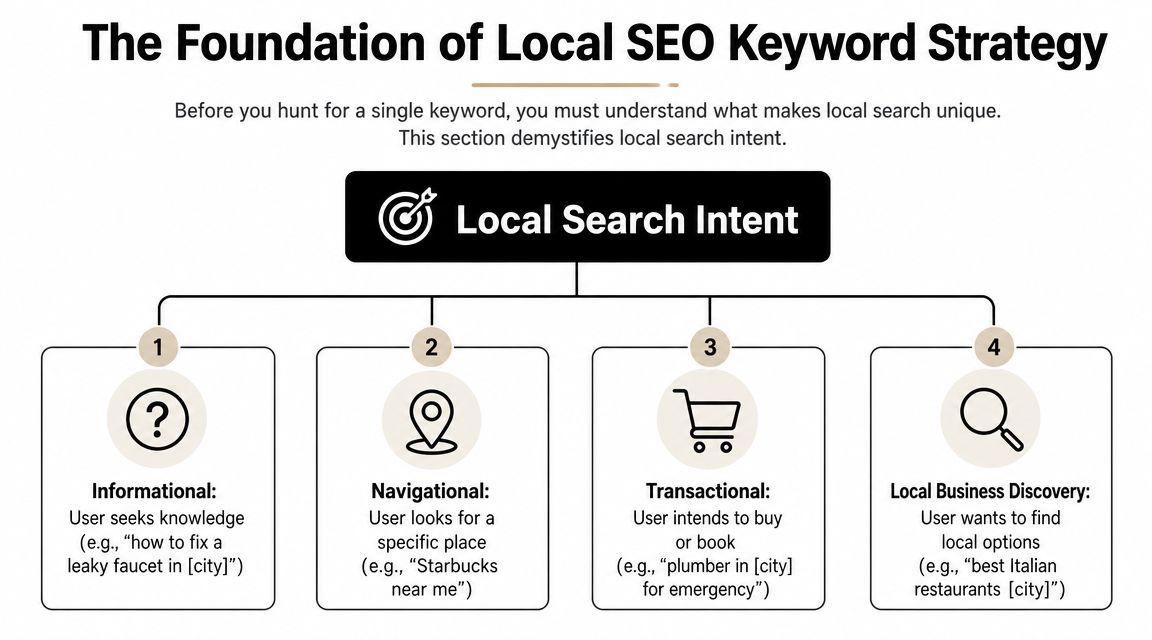
    A diagram illustrating the four types of local search intent for local SEO keyword strategy planning.

    The commercial value of that intent is hard to ignore. SOCi reported that in the U.S., there are over 5.9 million keywords related to "near me" and 800 million searches per month, while LocaliQ found that 28% of local searches lead to a purchase within 24 hours according to SOCi's local SEO statistics roundup. That is why local keyword research belongs at the front of your SEO work, not at the end.

    Practical rule: If a keyword doesn't connect clearly to a service you offer in a place you serve, it's usually not a priority yet.

    Four local intent patterns show up again and again:

    • Informational intent: Searches like "how to choose an HVAC system in Dallas." Useful for trust-building content.
    • Navigational intent: Searches for a specific brand or business, such as "Joe's Auto Repair near me."
    • Transactional intent: Searches with immediate buying or booking intent, such as "emergency dentist in Austin."
    • Local business discovery: Searches like "best coffee shop downtown" where the searcher wants options nearby.

    What success looks like for a local business

    For a local company, traffic alone isn't a useful finish line. A page can get visits and still fail if it doesn't lead to action.

    A better KPI set is grounded in outcomes that matter to a business owner:

    KPI Why it matters
    Phone calls High-intent local searchers often call before they click around
    Direction requests A strong sign that map visibility is doing its job
    Contact form submissions Useful for service businesses with longer sales cycles
    Bookings or appointments Direct proof that the keyword matched buyer intent
    Google Business Profile interactions Important when the search results page is the conversion point

    If you remember one thing, remember this. Local SEO is not a traffic game first. It's an intent-matching game. The business that wins usually isn't the one with the biggest keyword list. It's the one that understands which searches are closest to revenue.

    Discovering Your Core and Long-Tail Local Keywords

    Most small businesses overcomplicate discovery. They start with software when they should start with the business itself.

    The cleanest workflow begins with a short list of seed terms. These are the plain-English names of your services or products. A plumber might start with drain cleaning, water heater repair, leak detection, sewer line repair, and emergency plumbing. A med spa might start with Botox, facials, laser hair removal, and lip filler.

    Start with services, not tools

    An effective local workflow follows a structured path. Semrush and Neil Patel recommend listing solution terms and locations, finding variations with tools, evaluating metrics, analyzing competitors, and then mapping keywords to pages, as outlined in Semrush's local keyword research guide. That's a better approach than opening a tool and chasing whatever looks popular.

    Build your seed list from sources you already have:

    • Service menu: Your main categories, sub-services, and specialty jobs.
    • Sales conversations: The phrases customers use on the phone or in forms.
    • Customer emails and texts: Often more revealing than polished marketing copy.
    • Reviews: They show how people describe your work in natural language.
    • Google Search Console: If your site already has visibility, this often reveals surprise queries worth expanding.

    Once you have your seed list, start combining it with local qualifiers.

    Build your modifier bank

    These are the origins of long-tail local keywords. You don't need to invent clever phrasing. You need to reflect how real customers search.

    Use a bank of modifiers like these:

    • Geographic modifiers: City, neighborhood, district, county, ZIP or postcode, nearby landmarks
    • Service qualifiers: Emergency, same-day, affordable, commercial, residential, 24-hour
    • Problem-based modifiers: Repair, replacement, installation, cost, near me, open now
    • Audience modifiers: Pediatric, family, luxury, small business, apartment, senior

    A few examples make this easier to see:

    Seed term Local modifier Expanded keyword idea
    water heater repair Phoenix water heater repair Phoenix
    dentist near me dentist near me
    dog grooming downtown dog grooming downtown
    HVAC installation 24-hour 24-hour HVAC installation in Tampa
    electrician commercial commercial electrician in Brooklyn

    Broad terms often look attractive in a keyword tool, but small teams usually get faster traction from specific service-plus-location combinations.

    A simple keyword capture template

    You don't need a fancy dashboard. A spreadsheet works.

    Use columns like this:

    Keyword idea Service Location Intent Notes
    emergency plumber Chicago Emergency plumbing Chicago Transactional Strong fit for core service page
    plumber near me General plumbing Service area Discovery Likely Local Pack heavy
    drain cleaning Lincoln Park Drain cleaning Lincoln Park Transactional Candidate for neighborhood section
    how to prevent frozen pipes Chicago Plumbing advice Chicago Informational Blog or FAQ support content

    Keep going until you have a raw list that feels messy. That's normal. Discovery is supposed to create options. The next step is where you cut the list down.

    Analyzing Keywords with Tools and Competitor Insights

    Raw keyword ideas need a reality check before they deserve a page, a GBP update, or a month of effort. For a small team, that check should answer three questions fast. Is anyone nearby searching for this? Does the search show buying intent? Is Google sending people to websites, the map, or both?
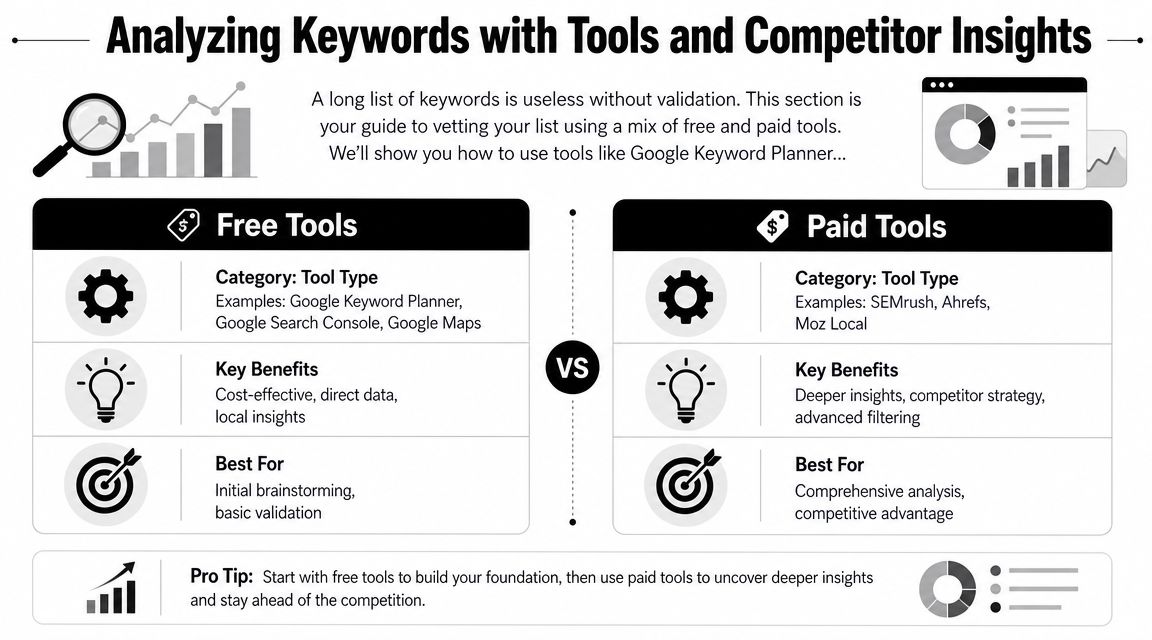
    A comparison chart highlighting the differences between free and paid SEO keyword research and analysis tools.

    I usually tell owners to stop shopping for tools and start building a workflow. Good local keyword analysis comes from combining one source for demand, one for competitor clues, and one manual review of the live search results.

    Good Better Best tool stacks

    Use the stack that matches your time and budget, not the one an agency with six subscriptions uses.

    Level Best for Tool stack Trade-off
    Good Solopreneurs Google Keyword Planner, Google Search Console, Google Trends, Google Maps Low cost, slower research, more manual checking
    Better Small teams Good stack plus Semrush or Ahrefs Faster filtering, better competitor discovery, higher monthly cost
    Best Competitive local markets Better stack plus a dedicated local rank tracker or GBP-focused workflow Better visibility into map performance, more setup and spend

    The trade-off is straightforward. Free tools can get you to good decisions, but they take more judgment. Paid tools save time, surface more variations, and make competitor research easier. They also tempt small teams to chase too many keywords at once.

    A simple rule helps. If you manage one location, start with the Good stack and add one paid tool only after you have clear service pages and a working Google Business Profile. If you compete in a dense market like legal, dental, HVAC, or home services across multiple suburbs, the Better stack usually pays for itself in saved time.

    A practical review workflow

    Run each keyword through the same filter so you do not make decisions based on volume alone.

    1. Check local demand in Google Keyword Planner, Google Trends, and Search Console if you already have some visibility.
    2. Check the live SERP from the target area. Search on mobile and desktop if possible.
    3. Check the map results to see whether the Local Pack is the main conversion point.
    4. Check competitor pages and profiles for the query. Look at page type, GBP categories, reviews, and service wording.
    5. Score the keyword based on relevance, intent, and difficulty to win.

    That fifth step matters because small teams need a way to choose, not just collect.

    A prioritization matrix you can use in a spreadsheet

    This is the version I use with businesses that need to make decisions in one working session.

    Keyword Local demand Intent Local Pack presence Difficulty Business value Priority
    emergency plumber Austin High High High Medium High Do now
    water heater installation Round Rock Medium High Medium Medium High Next
    plumbing tips Austin Medium Low Low Low Low Later
    plumber near me High High Very high High High GBP + service page support

    Keep the scoring simple. High, medium, and low is enough. A messy but usable sheet beats a detailed scoring model you never finish.

    How to read the live search results

    Keyword tools estimate demand. Google's results show the format you have to win.

    Search the phrase as a customer would. For example, search “plumber near me” or “water heater repair Phoenix” and study the first screen. If you mostly see a map with three businesses, reviews, call buttons, and directions, that keyword is not just an SEO content play. It is a Local Pack play. Your page still matters, but your Google Business Profile, category choice, reviews, and landing page alignment matter just as much.

    Check these questions:

    • What shows first? Local Pack, ads, organic pages, directories, AI Overview, or a mix
    • Who is winning? Independent local businesses, large directories, franchises, or national brands
    • What page type ranks? Homepage, service page, location page, review page, or article
    • What intent is Google assuming? Emergency help, general research, price comparison, or brand lookup
    • Is a click to the website even likely? Some searches lead to calls or direction requests straight from the map

    The last point is easy to miss. If the map is doing most of the work, a keyword can still be valuable even when website traffic stays modest. For a locksmith, roofer, dentist, or towing company, phone calls from the Local Pack often matter more than pageviews.

    Analysts cited in Koom's local SEO research article note that local searches often end on the results page itself through map interactions and business profile actions. That matches what small businesses see in practice. The win is often the call, not the click.

    To get a visual walk-through of keyword validation and search result analysis, this overview is useful:

    What to check in the Local Pack

    Local pack analysis sounds technical, but it just means studying the businesses shown in the map for your target search. Open Google, search a service in your area, and inspect the three map listings that appear first.

    Look for patterns you can act on:

    • Primary category fit: Does the listed category closely match the search term?
    • Review language: Do recent reviews mention the exact service in the search query?
    • GBP completeness: Are hours, services, photos, and attributes filled out and current?
    • Landing page match: Does the profile link to a page that clearly answers the query?
    • Location strength: Is the business physically close to the search area or strongly associated with it?
    • Reputation signals: Are ratings, review volume, and recency noticeably stronger than yours?

    Competitor research is useful here, but keep it practical. Do not copy every category, service label, or page title a competitor uses. Find the few signals that repeat across winners, then fix gaps on your own profile and pages.

    I often see businesses lose local rankings because their signals are split. The page targets “drain cleaning,” the GBP leans toward “emergency plumber,” and reviews mostly mention “water heater repair.” Google has to guess what the business is best known for. Competitors with tighter alignment make that decision easy.

    For small teams, that is the goal of this stage. Find the terms where demand exists, the SERP matches your offer, and the Local Pack gives you a realistic path to calls and leads.

    Prioritizing High-Intent Keywords for Quick Wins

    This is the point where discipline matters. Most small teams don't fail because they chose zero good keywords. They fail because they tried to target too many at once.

    A practical keyword plan favors keywords that are highly relevant, locally validated, commercially useful, and realistically winnable. That's not always the highest-volume term.
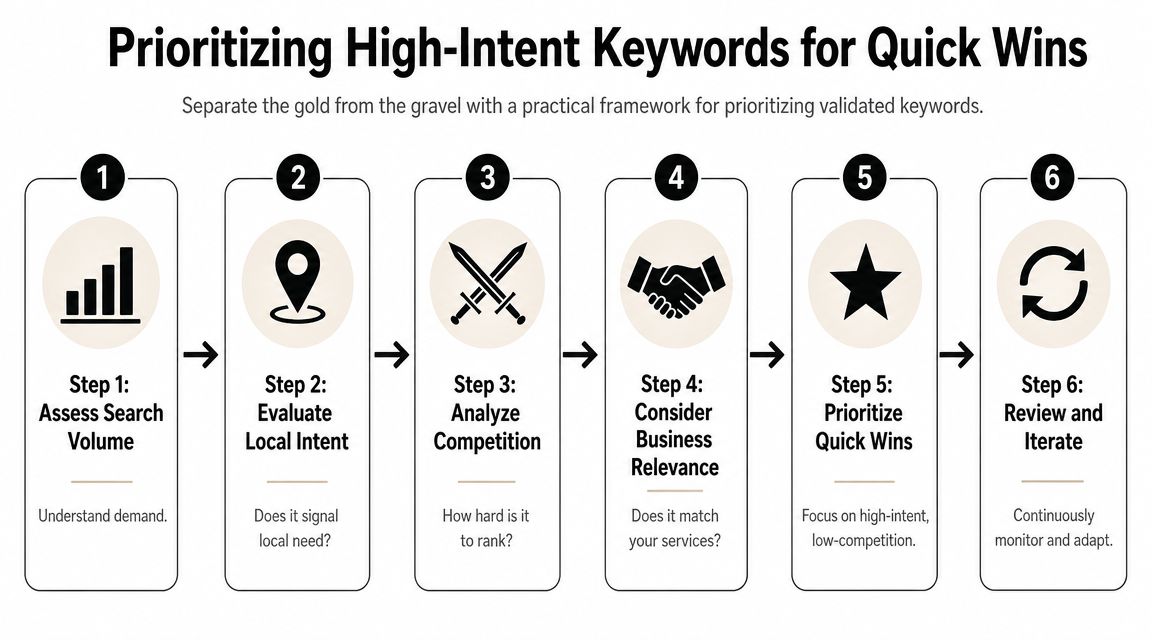
    A six-step infographic illustrating a practical framework for prioritizing high-intent keywords to achieve quick SEO wins.

    The four-factor filter that keeps you honest

    Experts at LocalDominator and SEObility agree that local keyword prioritization turns on relevance, local search volume, competition, and intent, with relevance as the most important factor, based on LocalDominator's local keyword research framework.

    Here's how to apply those four factors in practice:

    1. Relevance
      If you don't want the lead, don't target the keyword. A family law firm shouldn't chase "criminal defense lawyer near me" just because it appears nearby on the SERP.

    2. Local volume
      You need evidence that people in your service area search for it. Local demand beats national volume every time in local SEO.

    3. Competition
      Some terms are crowded by directories, mature brands, and aggressive local players. Others have weaker pages, thin profiles, or poor page matching. Those are often better entry points.

    4. Intent
      "How to unclog a sink" and "emergency plumber open now" are not equal. One is educational. One is urgent. If your time is limited, urgency wins.

    A good local keyword often looks boring on paper. That's usually a good sign. Specific service terms convert better than flashy broad phrases.

    A prioritization matrix you can use today

    Use a simple 1 to 3 scoring model. Keep it lightweight so you'll maintain it.

    Keyword Relevance Local volume Competition Intent Total Action
    emergency plumber Chicago 3 3 2 3 11 Target now
    drain cleaning Lincoln Park 3 2 2 3 10 Target now
    plumbing tips Chicago 2 2 2 1 7 Support content
    plumber 2 3 1 2 8 Defer

    A few quick rules make this matrix more useful:

    • Target now: High relevance, strong intent, manageable competition
    • Support content: Useful for blog posts, FAQs, and trust-building pages
    • Defer: Broad terms that need more authority or a stronger local footprint
    • Drop: Keywords that don't fit your business model or service area

    Small teams achieve quick wins. They stop chasing the biggest phrase and start publishing the page most likely to rank and convert first.

    Mapping Keywords to Pages and On-Page Optimization

    Keyword research only starts the job. The ranking asset is the page, and in local SEO, the wrong page match costs calls.

    A common example is a plumber with one general Services page trying to rank for emergency plumbing, drain cleaning, water heater repair, and every neighborhood in the city. Google has to guess which query that page deserves to rank for. Customers have the same problem. A person searching "emergency plumber Chicago" wants a fast, obvious answer, not a page that also talks about remodels and sump pumps.
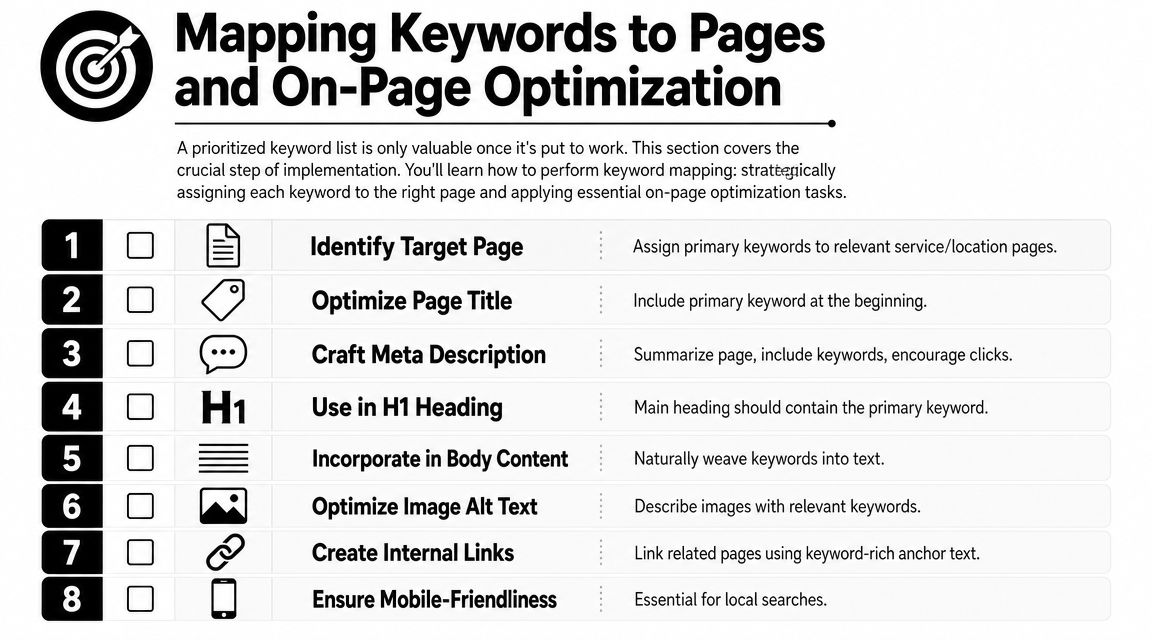
    A numbered checklist showing eight essential steps for mapping keywords to pages and performing on-page SEO optimization.

    Map existing pages first

    For a small team, the fastest workflow is simple. Start with the pages you already have. Assign one primary keyword to each page. Then look for gaps.

    Use a page map like this:

    Page Primary keyword Secondary terms Keep or create
    Emergency plumbing page emergency plumber Chicago 24-hour plumber Chicago, urgent plumbing repair Keep
    Drain cleaning page drain cleaning Chicago clogged drain repair Chicago Keep
    Water heater page water heater repair Chicago hot water heater repair near me Keep
    Lincoln Park service area page plumber Lincoln Park local plumbing service Lincoln Park Create only if truly distinct

    This step prevents keyword cannibalization, which is just a technical way of saying two pages from the same site compete for the same search.

    A few rules keep the map usable:

    • One primary keyword per page: Variants and close synonyms can support the main term
    • Match intent to page type: Service terms belong on service pages. Informational terms belong on blog posts or FAQs
    • Create location pages only when they can be unique: If the page has no distinct proof, service details, or local relevance, skip it
    • Support the money page instead of competing with it: A blog post on "signs you need drain cleaning" should link to the drain cleaning service page, not target the same main phrase

    If time is tight, use a Good, Better, Best approach.

    • Good: Spreadsheet with page URL, target keyword, title tag, and status
    • Better: Spreadsheet plus a quick SERP check for each keyword to confirm the right page type is ranking
    • Best: Spreadsheet, SERP check, and local pack review to see whether the keyword is won mainly through the website, the Google Business Profile, or both

    That last point matters more than many business owners realize. If the search result is dominated by the map pack, your page still needs to rank, but it also needs to reinforce the profile that may get the click or call first.

    How to optimize the page without stuffing it

    After the keyword is mapped, make the page obvious to both searchers and Google.

    Place the primary keyword in the spots that carry the most meaning:

    • Title tag: Lead with the service and city when it fits naturally
    • H1 heading: Keep it clear and close to the title tag
    • Opening paragraph: Confirm the service and area early
    • Subheadings: Use related service terms and real customer questions
    • Body copy: Add useful local details such as service areas, response times, common job types, and trust signals
    • Image alt text: Describe the image first. Add local context only when it is relevant

    Read the page out loud.

    If it sounds repetitive, salesy, or strange, fix the copy. Local pages usually improve when they are more specific, not when they repeat the exact keyword five extra times.

    Schema can support this work by clarifying business details, services, and location. It helps search engines interpret the page, but it does not fix weak page targeting or thin content.

    Don't ignore your Google Business Profile

    For many local keywords, the Local Pack is the first real conversion point. That is the map and three business listings people see when they search for something like "plumber near me." If your profile shows up there, the customer may call without ever opening your website.

    That changes how page mapping should work.

    Your service pages and your Google Business Profile should use the same service language so Google sees a consistent pattern across your site and profile. Keep that alignment across:

    • Primary and secondary categories
    • Business description
    • Services and products
    • Posts and updates
    • Photos and captions
    • Questions and answers

    Here is the practical trade-off. A page targeting "water heater repair Chicago" may help organic rankings, but if the map pack gets most of the clicks and calls for that query, the win comes from both assets working together. The page supplies relevance and detail. The profile supplies visibility, reviews, hours, and a fast path to contact.

    For a solopreneur, that means prioritizing pages that support high-intent map pack searches first. Build the emergency service page before the broad company overview. Tight alignment beats more content.

    Tracking Your Local SEO Performance and Iterating

    Local SEO work compounds only if you review it. Otherwise you're publishing pages, tweaking profiles, and guessing.

    Tracking doesn't need to be complicated. For a small team, the best system is the one you'll check consistently. That usually means a short keyword set, a simple notes field, and a monthly review of business outcomes.

    Track business signals, not just ranks

    Rank tracking matters, especially by city or service area, but don't treat it as the only scorecard.

    Watch these signals together:

    • Keyword positions in your target area: Especially for service-plus-location terms
    • Google Business Profile actions: Calls, direction requests, and other profile interactions
    • Lead form submissions: Look for pages that start generating qualified inquiries
    • Call quality: Ask staff which services people mention when they call
    • Page engagement: Are visitors landing on the intended page and taking the next step?

    One useful pattern shows up often. A keyword may never drive huge website traffic because the search results page answers the query with map listings and profile details. It can still be a winner if it leads to more calls or direction requests. That's why local SEO performance needs business context.

    A lightweight review rhythm for small teams

    A monthly review works well for most small businesses.

    Use a short checklist:

    • Check your top target keywords: Did any move up, down, or trigger different SERP features?
    • Review your best pages: Are the mapped service pages still the right fit?
    • Inspect one competitor: Did they launch a better page, add reviews, or improve their profile?
    • Look for near-miss keywords: Terms where you're visible but not yet strong enough to win consistently
    • Refine the next batch: Update one page, improve one profile area, and build one supporting asset

    What works is steady iteration. Update pages with better local details. Tighten service language. Improve internal links. Add FAQs that reflect real customer questions. Expand into adjacent neighborhoods only when the current service pages are doing their job.

    The businesses that get the most from keyword research for local SEO don't treat it like a one-time spreadsheet exercise. They use it as a feedback loop. That's where the edge comes from.


    If you want a simpler way to turn keyword research into content and rankings without hiring an agency, Agency Secrets is worth a look. It gives small business owners a practical SEO playbook built around buyer-intent keyword targeting, strong content structure, backlinks, and evergreen growth, with OutRank helping automate research, article creation, publishing, and competitor analysis.

  • SEO for Auto Repair Shops: A 2026 Local Playbook

    SEO for Auto Repair Shops: A 2026 Local Playbook

    You know the pattern. Your techs do solid work, your repeat customers trust you, and your schedule should be fuller than it is. Then you search your own shop name, or worse, “brake repair near me,” and a weaker competitor is sitting above you in Google Maps with more reviews, a cleaner website, and a better online footprint.

    That gap usually isn’t about who fixes cars better. It’s about who built the better local search system.

    SEO for auto repair shops works when it’s tied to how drivers buy. They search on their phones, compare a few options fast, scan reviews, tap to call, and book with the shop that looks trustworthy and easy to reach. In 2026 local search benchmarks for auto repair shops, mobile devices account for 65-80% of organic search sessions, according to Authority Specialist’s auto repair SEO statistics. If your site is clunky on mobile or your profile is incomplete, you’re losing people before they ever ask for a quote.

    Most shop owners don’t need another generic marketing checklist. They need a playbook that gets them more calls, more appointments, and more cars in the bays without turning them into full-time marketers. That’s what this is.

    Table of Contents

    Your Blueprint for Local SEO Success in 2026

    Most shops don’t have an SEO problem. They have a focus problem. They spread effort across random blog posts, half-finished profile updates, and broad homepage copy that tries to rank for everything from oil changes to engine rebuilds on one page.

    The better approach is simpler. Build your local presence in layers. First, lock down your Google Business Profile. Second, give every core service its own page. Third, publish useful supporting content. Fourth, strengthen trust with reviews, citations, and technical cleanup. Then track calls, direction requests, and bookings so you know what’s effective.

    That order matters because local SEO for a repair shop isn’t won by traffic alone. It’s won by being visible at the exact moment someone needs brakes, diagnostics, tires, AC work, or routine maintenance nearby.

    Practical rule: If a tactic doesn’t help a local driver find you, trust you, or contact you faster, it’s probably not a priority for your shop.

    There’s also a real trade-off between doing everything manually and doing what will get done. Shop owners are busy. Service managers are busy. If your SEO plan depends on somebody remembering to publish articles, update links, request reviews, and audit pages every week, it usually stalls.

    A working system for seo for auto repair shops needs three traits:

    • Clear service targeting: Each money-making repair category needs its own destination page.
    • Local proof: Reviews, profile completeness, and citation consistency need to support what your website claims.
    • Operational consistency: Content, updates, and authority building need a cadence you can maintain.

    The shops that win don’t always have the biggest brand. They usually have the cleanest execution.

    Dominate Google Maps with Your Business Profile

    Monday morning, a driver hears grinding brakes on the way to work and searches “brake repair near me.” Your shop shows up in the map pack beside two competitors. At that point, ranking helps, but the profile that looks complete, current, and trustworthy usually gets the call.

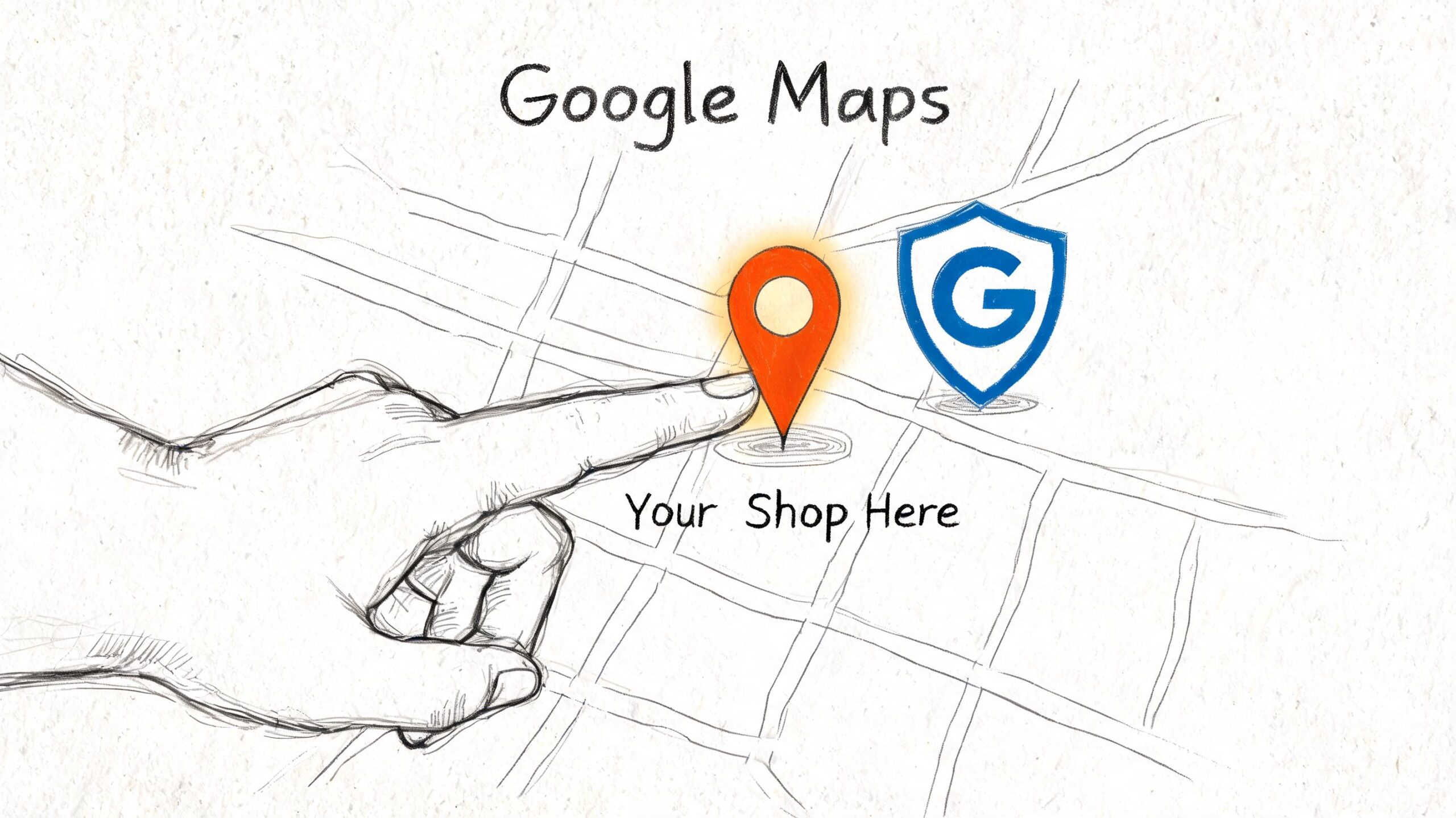
    A hand pointing to a location pin on a drawn map, illustrating local SEO for shop visibility.

    I treat Google Business Profile like a second homepage for auto shops. In many cases, it gets checked before the website. Drivers want fast answers. Can this shop handle my problem, is it open, and does it look credible enough to trust with my car?

    A claimed profile with a phone number is not enough. The shops that pull more calls usually have tighter category targeting, fuller service lists, better photos, and recent activity that shows the business is open and paying attention. That matters even more for busy owners who do not have time to babysit marketing every week. This is one of the best places to use AI and automation well. Use it to draft Google Posts, turn common front-desk questions into Q&A entries, and build a monthly checklist your team can follow.

    Treat your profile like a front counter that sells

    Start with the fields that shape relevance and trust.

    • Choose the right primary category: For most shops, that means selecting the category that matches the core business, not the broadest label available. Secondary categories should reflect real revenue lines such as brake service, oil change service, transmission shop, tire shop, or auto air conditioning service if those fit the business.
    • Write a useful business description: Say what the shop does, which vehicles it works on, and what makes the operation credible. Mention diagnostics, scheduled maintenance, fleet work, diesel repair, or European vehicles only if those are real strengths.
    • Build out the services list: Add each major service a customer might search for. Brake repair, check engine light diagnostics, suspension repair, wheel alignment, AC service, battery replacement, tire replacement, and transmission service should not be missing if you sell them every week.
    • Upload current photos: Show the storefront, service bays, waiting area, scan tools, alignment rack, technicians, and finished work. Fresh photos do two jobs. They improve trust with searchers and give Google more signals that the business is active.
    • Seed your own Q&A: Put common pre-appointment questions in place before random users do it for you. Cover warranty terms, towing, shuttle service, after-hours key drop, financing, same-day appointments, and whether you service specific makes.

    Shops ask about Google Posts all the time. They help most when they support buying intent, not when they read like filler. Post about seasonal AC inspections before summer, battery testing before winter, holiday hours, or a short explanation of what a brake inspection includes. Skip generic “Happy Monday” updates. They do nothing for calls.

    A quick walkthrough helps if you haven’t touched your profile much lately.

    What to update every month

    A Google Business Profile does not need constant tinkering. It needs clean maintenance and quick response times.

    Area What good looks like Common mistake
    Photos Fresh shop, team, and service photos Same old storefront image for months
    Hours Standard and holiday hours are accurate Wrong holiday hours
    Services Service list matches what you actually sell Missing profitable services
    Q&A Common buyer questions answered Leaving public questions unanswered
    Posts Timely updates tied to real offers or service needs Posting generic motivational content

    For busy shops, I recommend assigning this to a simple monthly workflow. Have AI draft the post, suggest new Q&A ideas from recent phone calls, and flag missing photos or outdated hours for approval. The owner or service manager still reviews the final updates, but the prep work gets done faster. That trade-off matters. Manual SEO plans often die in the service lane.

    A strong Google Business Profile helps a rushed driver decide to call you in under a minute.

    Keep the priority straight. A polished profile gets you shortlisted in Google Maps. Reviews, accurate service details, and a credible website are what turn that visibility into booked work.

    Build a Website That Converts Searchers into Customers

    A driver searches "brake repair near me" from a phone in your parking lot, lands on your site, and still does not call. That usually comes down to one problem. The page does not match the service they need, or it makes the next step harder than it should be.

    For auto shops, website SEO is not about publishing more pages for the sake of volume. It is about building the few pages that line up with high-intent searches and turn that visit into an appointment request or phone call. Shops that are short on time can use AI to speed up page drafts, pull common customer questions from call logs, and keep service copy current. The owner still approves the final version. The time savings are what keep the plan running.

    Use one service per page

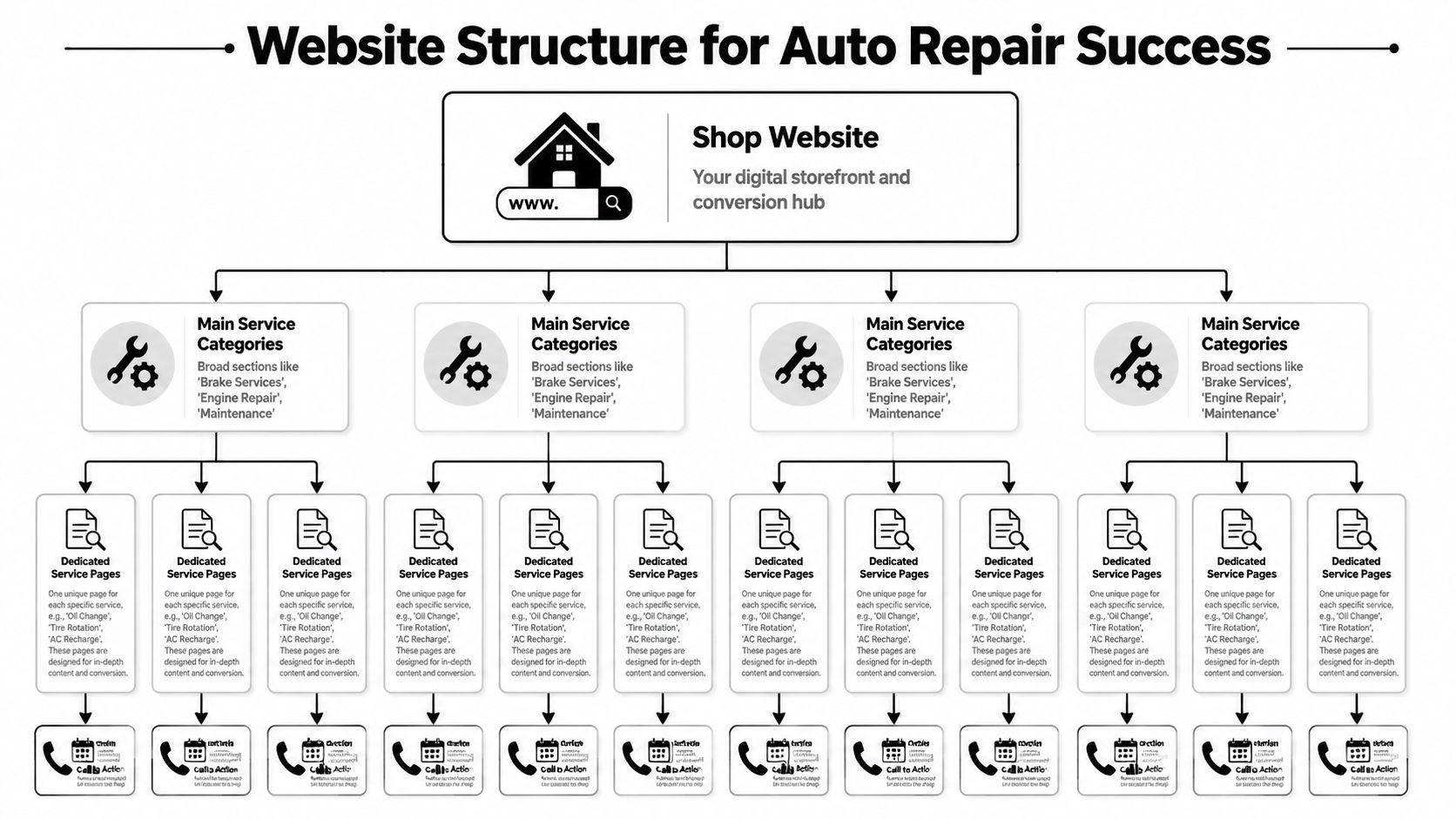
    A single "Services" page forces Google and the customer to do too much work. If you want to show up for brake repair, oil changes, engine diagnostics, AC recharge, transmission service, and suspension work, each service needs its own page.

    That structure works because it matches how people search.

    A brake page should focus on brake problems, warning signs, inspection steps, repair options, and how to book. An oil change page should speak to maintenance intervals, oil types, filter replacement, and wait time. Those are different searches with different buying intent, even if both happen in the same shop.

    A diagram illustrating a tiered website structure designed for auto repair shop search engine optimization and conversions.

    Thin location pages with swapped city names are still common in this industry, and they still underperform. A useful service page answers the questions a real customer asks before calling. What does the noise mean? Is the car safe to drive? What does your inspection include? Do you work on my make?

    Here is a page hierarchy that fits most independent shops:

    • Homepage: Brand, primary location, trust signals, and immediate contact options
    • Main service category pages: Broad areas like maintenance, diagnostics, brake service, and engine repair
    • Dedicated service pages: Specific jobs such as oil change, check engine light diagnostics, brake pad replacement, and AC recharge
    • Contact and appointment pages: Clear paths for customers who are ready to book

    What a high-converting service page needs

    The best service pages rank because they are specific. They convert because they reduce doubt.

    Every core service page should include:

    1. A precise title and H1
      "Brake Repair in Austin" tells both Google and the customer what the page covers.

    2. A first paragraph that matches the search
      Someone who searched for engine diagnostics wants a repair answer fast, not a long intro about your company's history.

    3. Service details in plain language
      Explain what the service includes, what symptoms usually lead to it, and what the customer should do next.

    4. Proof that your shop is trustworthy
      Warranties, certifications, technician experience, review snippets, brands serviced, and years in business all help.

    5. A visible CTA above the fold and again near the bottom
      "Call now," "Request an appointment," and "Schedule an inspection" work because they are direct.

    6. Mobile-first contact options
      Tap-to-call buttons, short forms, map access, and hours should be easy to find on a phone.

    One trade-off matters here. Long pages can rank well if they answer real questions, but they still need to get to the point fast. I usually front-load the page with the problem, the service, trust signals, and the CTA, then use the rest of the page to handle objections and support the ranking.

    AI can help here too. It can turn service advisor notes, review themes, and recorded FAQs into draft copy for each service page, which cuts production time without forcing your team to write from scratch. That matters for busy shops with ten profitable services and no marketing department.

    If your phone number is buried, your forms ask for too much information, or your key service pages sit three clicks deep in a menu, fix that first. Rankings help. Easy booking gets the job.

    Automate Content and Links to Build Authority

    Content and link building are where most shop SEO plans die. Not because they’re unimportant, but because they take time your team doesn’t have. The owner isn’t going to become a part-time publisher. The service writer isn’t going to research keywords between customer calls.

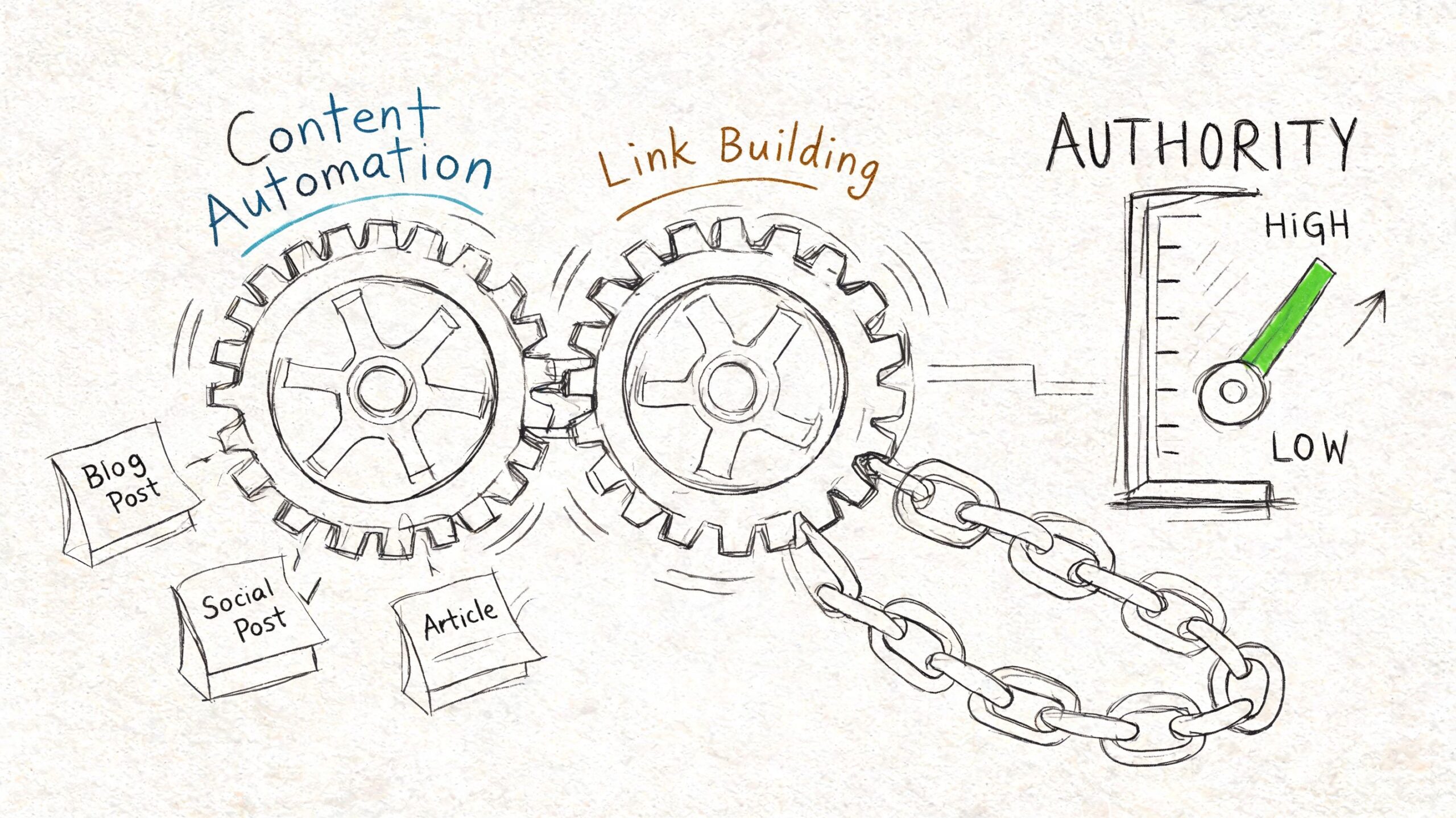
    That’s why automation matters now. It isn’t a shortcut around strategy. It’s a way to execute strategy consistently.

    Manual content breaks down fast

    Most shops know they should publish useful content. They just never get around to it. The result is a website with a few service pages, an outdated blog, and no support around the questions drivers search.

    That leaves easy authority on the table. Content topics for auto shops are practical and repetitive in a good way. Drivers ask the same things every week:

    • Maintenance timing: When should I get an oil change?
    • Warning signs: What does a grinding brake noise mean?
    • Urgency questions: Can I drive with the check engine light on?
    • Cost framing: What affects the price of AC repair?
    • Seasonal concerns: Why does my battery keep dying in cold weather?

    Recent data reports that AI SEO tools have generated over 750k articles with 4.7 ratings, enabling small businesses to publish 30 optimized posts per month and secure high-authority backlinks, driving up to 3x traffic growth for local services in 2025-2026 benchmarks, according to Auto Repair SEO’s report on common shop SEO mistakes and AI-driven execution.

    A hand-drawn illustration depicting content automation and link building gears working together to increase website authority.

    What to automate and what to keep human

    Many often stumble at this point. They either reject AI entirely or let it publish generic junk. Neither approach is smart.

    Use automation for repeatable production work:

    • Keyword clustering: Group related questions around brakes, maintenance, diagnostics, tires, and AC service.
    • Draft generation: Create first drafts for FAQ posts, maintenance explainers, and local support content.
    • Publishing workflows: Keep content going out on a schedule instead of in random bursts.
    • Backlink outreach support: Surface relevant opportunities and standardize outreach steps.

    Keep human review on the parts that shape trust:

    • Local accuracy: Make sure your city, service area, and actual offerings are correct.
    • Shop voice: The content should sound like your shop, not a generic automotive encyclopedia.
    • Offer positioning: Mention what makes your process better, faster, more transparent, or more convenient.
    • Compliance and quality control: Remove vague claims and make sure advice is technically sound.

    If your competitors still rely on occasional manual blog posts, consistent automation becomes an unfair advantage.

    The trade-off is simple. Manual work can be better when a subject is highly specialized, but it usually happens less often. Automated workflows can scale fast, but only if someone sets standards and reviews output. For most independent shops, the right answer is a hybrid system. Let automation handle volume and consistency, then have a human tighten the details that affect trust and conversions.

    Lock Down Your Local Reputation and Citations

    You can have a strong profile and solid pages and still lose the click if your reputation signals are weak. In local search, drivers make snap decisions. They compare ratings, scan recent feedback, and look for signs that your shop is active and reliable.

    Reviews and citations do different jobs, but both build trust. Reviews help convince people. Citations help confirm that your business information is consistent across the web.

    Build a review request system your front desk will actually use

    The mistake most shops make is treating review requests as optional. They ask when they remember, usually after a great interaction, then go quiet for a week. That creates uneven momentum.

    A better system is simple and repeatable.

    • Ask at the right moment: Right after a successful pickup or follow-up call, when the customer is relieved and satisfied.
    • Use one link everywhere: Put the same review request link in texts, emails, invoices, and follow-up messages.
    • Train the counter staff: Give them one natural sentence they can use every time.
    • Reply to every review: Thank happy customers and respond calmly to complaints with specifics and professionalism.

    Here’s a response style that works well:

    Thanks for trusting us with your vehicle. We appreciate the feedback and are glad we could help.

    And for a negative review:

    We’re sorry the visit didn’t meet expectations. We take that seriously and would like to review what happened and make it right.

    Keep the tone human. Don’t argue in public. Don’t copy and paste robotic responses.

    Keep your citations boring and consistent

    Citations are mentions of your name, address, and phone number on business listings, directories, maps, and industry sites. This is not a creative task. It’s a consistency task.

    Your shop details should match exactly across your website, Google Business Profile, Apple Business Connect, Bing Places, Yelp, and relevant automotive directories. If one listing says “Suite B,” another drops it, and a third has an old phone number, you create trust friction for both search engines and customers.

    Use this cleanup checklist:

    Citation item What to check
    Business name Same spelling everywhere
    Address Same formatting everywhere
    Phone number One primary local number
    Website URL Correct canonical homepage or location page
    Hours Match current operating hours
    Categories Relevant to your actual services

    A few shop-specific directories can also help if the listings are accurate and complete. What matters most is not how many you build in a rush. It’s whether your core listings are clean, duplicate-free, and maintained.

    If you’ve changed locations, phone numbers, or branding, citation cleanup becomes urgent. Old data lingers for a long time and confuses both ranking systems and customers trying to contact you.

    Essential Technical SEO Checks for Your Shop Website

    A shop owner usually notices technical SEO when the phone goes quiet after a site redesign. Rankings slip, mobile visitors hit the page, the tap-to-call button loads late or the form breaks, and those searchers move to the next shop. That is the version of technical SEO that matters for auto repair. It affects calls, appointments, and direction requests.

    For most local shops, the work is straightforward. Get the site fast enough on mobile, remove friction from key actions, and make your business details easy for Google to read. AI tools can speed up the audit process by flagging broken schema, large images, slow templates, and indexing issues in minutes, which is useful if you do not have time to hunt through reports yourself. The fix still needs human judgment. A busy brake repair page matters more than a blog post nobody visits.

    Fix the issues that block calls first

    Start with page speed on your money pages. If your oil change, brake repair, check engine light, or transmission service pages drag on mobile, you lose high-intent traffic before the page has a chance to convert. Focus on Core Web Vitals, but do not treat them like a trophy. The practical goal is simple. Your main service pages should load quickly enough that someone on a phone can read, tap, and call without waiting.

    Mobile usability comes next, and many shop sites fall short here. I regularly see websites that look fine on desktop but force mobile visitors to pinch the screen, fight a sticky popup, or scroll past a giant hero image before they can contact the shop. That is not a design issue. It is lost revenue.

    Check these items on an actual phone, not just in a browser preview:

    • Tap-to-call buttons appear above the fold
    • Forms are short and submit cleanly
    • Menus open without covering the whole screen
    • Text is readable without zooming
    • Maps, hours, and location details are easy to find

    Then add LocalBusiness schema and keep it accurate. Schema gives search engines a cleaner read on your shop name, location, hours, phone number, and services. It will not fix weak local SEO by itself, but it supports the rest of the signals you are already building.

    Your website needs to help a stressed driver call you fast. Fancy effects do not help if the page is slow or the contact path is clumsy.

    Give your developer a short, specific ticket list

    Vague requests produce vague results. Send a punch list tied to lead generation.

    • Speed: compress oversized images, delay nonessential scripts, and improve load times on service and location pages
    • Mobile UX: test tap targets, menu behavior, form fields, and click-to-call buttons on real devices
    • Schema: add valid LocalBusiness markup to the homepage and location pages
    • Indexing: make sure important service pages are crawlable, indexable, and included in the sitemap
    • Security: keep the site on HTTPS and fix mixed-content warnings
    • Internal linking: connect related services naturally so Google and users can move between them

    If you manage the site in-house, use PageSpeed Insights, Google Search Console, and Google’s Rich Results Test to catch the obvious problems. AI site audit tools can help prioritize the list so you are not wasting hours on minor warnings. Fix the pages that drive calls first. For most shops, that means service pages, location pages, and the contact page.

    Measure What Matters and Refine Your Strategy

    Monday starts the same way at a lot of shops. The bays are full, the phone rang all weekend, and the owner still has no clear read on whether SEO is producing brake jobs, diagnostics, or transmission work. A traffic chart does not answer that. Booked work does.

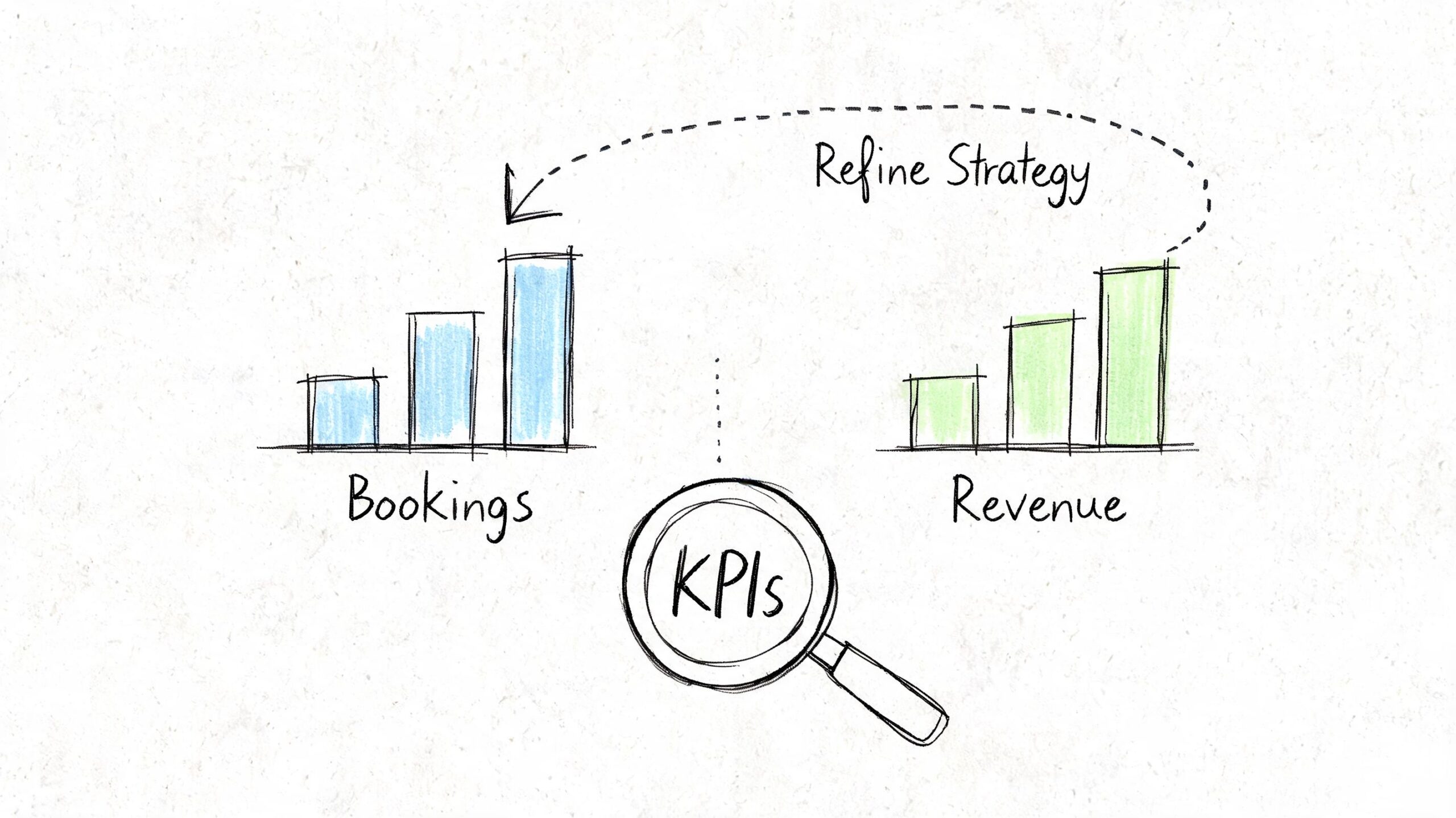
    The shops that improve fastest track lead signals tied to revenue, then use that data to decide what to fix next. If a location page gets more impressions but calls stay flat, the issue is probably conversion. If GBP calls rise after new reviews and fresh photos, keep pushing there. Good reporting should tell you where the next appointment is coming from and where the bottleneck is.

    Track revenue signals, not vanity metrics

    For an auto repair shop, the core question is simple. Did search visibility turn into calls, direction requests, and appointments?

    Use three tools as your baseline:

    • Google Business Profile insights for calls, views, and direction requests
    • Google Analytics 4 for form submissions, call clicks, and the pages that drive leads
    • Google Search Console for keyword impressions, clicks, and page-level visibility

    Here’s the KPI set I watch for local shop campaigns:

    KPI Why it matters
    Calls from GBP Strong signal that map visibility is producing high-intent leads
    Direction requests Good proxy for local buying intent and walk-in demand
    Appointment form submissions Direct website lead volume
    Rankings for core service keywords Visibility for pages tied to revenue
    Top landing pages Shows which services and locations attract real demand

    A hand-drawn illustration showing bar charts for bookings and revenue being analyzed under a KPI magnifying glass.

    A shop owner does not need a custom dashboard with 40 widgets. They need a short scorecard they can review in 10 minutes. That is where AI helps. Instead of pulling reports by hand, use automation to summarize month-over-month movement, flag drops on money pages, and surface patterns like "oil change page up, AC repair page down, GBP calls flat." Busy owners usually do not skip SEO because they disagree with it. They skip it because reporting takes too much time.

    Run a monthly review loop

    Monthly is enough for most independent shops. Weekly checks make sense if you run aggressive promotions or manage multiple locations, but for a single shop, a disciplined monthly review catches the important shifts without turning SEO into a second job.

    253 Media’s local SEO results for auto repair shops show what happens when a shop sticks with a consistent process over time. Rankings improve, calls increase, and paid ads become less necessary for every lead.

    Use this review loop:

    1. Check lead volume first
      Review GBP calls, direction requests, appointment forms, and call clicks from the site.

    2. Review the pages tied to real jobs
      Look at brake repair, check engine light diagnostics, AC repair, transmission service, and your top location pages. Those pages should carry the campaign.

    3. Compare visibility against outcomes
      If rankings improved but leads did not, strengthen the page. Add clearer service details, trust signals, financing info, stronger calls to action, or better mobile contact options.

    4. Update one underperforming asset
      Refresh a weak service page, add new before-and-after photos to GBP, tighten title tags, or expand a thin page that gets impressions but few clicks.

    5. Queue the next month’s work with automation
      Use AI to draft page updates, pull review themes into on-page copy, generate FAQ ideas from Search Console queries, and prepare content briefs without spending half a day in spreadsheets.

    That last step matters more than many owners realize.

    A lot of SEO campaigns stall because the review happens, but nothing ships after it. The best system is the one your shop can keep running while managing technicians, parts delays, and front desk traffic. AI does not replace strategy. It handles the repetitive execution so the strategy gets carried out.

    If one page starts producing calls, build around it. Add related FAQs. Strengthen internal relevance on the page itself. Create supporting content that answers adjacent search intent, like "why does my car shake when braking" or "how long does AC repair take." If a page gets impressions but no leads, fix the offer and contact path before chasing more traffic.

    If you want a practical way to execute this without hiring an agency or building a content team, Agency Secrets is worth a look. It lays out a clear SEO playbook for small business owners and pairs it with OutRank, which helps automate keyword research, article production, publishing, and backlink workflows so your shop can keep building organic visibility while you stay focused on running the business.