Blog

  • Content Marketing for E-commerce: A Practical Guide (2026)

    Content Marketing for E-commerce: A Practical Guide (2026)

    You’re probably in one of two situations right now. Your store gets traffic, but too much of it comes from ads that stop working the second you stop paying. Or you’ve built a decent product line, but organic sales still feel random, and every month starts with the same question: how do I get more people to buy without burning margin?

    That’s where content marketing for e-commerce stops being a “brand play” and starts being an operating system. Not the fluffy kind built around posting more on social because someone said you should. The kind built around answering buying questions, ranking for searches with intent, tightening product pages, and tracking which content leads to revenue.

    Small stores usually don’t win by outspending larger brands. They win by being more useful, more specific, and easier to trust. That’s why SEO-driven, text-based content is still one of the most underused advantages in e-commerce. A helpful buying guide, a product comparison, or a sharp product page often does more for sales than another forgettable batch of generic social posts.

    Table of Contents

    Why Your Store Needs More Than Just Products

    A shopper lands on your store from Google, opens three product tabs, then leaves without buying. The products may be fine. The missing piece is the information that helps them trust what they’re seeing, compare options, and decide with less risk.

    A catalog by itself rarely does that job.

    Product pages close demand that already exists. Content creates and captures demand earlier, especially for small stores that cannot outspend larger brands on ads, creators, or constant promotions. That is why text-based, search-driven content matters so much in e-commerce. It keeps working after publication, it lives on your site, and it meets buyers while they are still figuring out what to buy.

    Paid traffic still has a place. I use it. But ads stop the moment spend stops, while a useful buying guide or comparison page can keep bringing in qualified traffic for months. According to BrightEdge research on channel performance, organic search drives a large share of overall website traffic, which is exactly why SEO content punches above its weight for smaller merchants.

    The advantage is not volume for its own sake. The advantage is intent.

    If someone searches “best pillow for side sleepers with neck pain,” a solid article or collection page can do work that a standard product grid cannot. It can explain the trade-offs, narrow the options, answer objections, and move the shopper to the right SKU. That is sales support, not publishing for appearance.

    Small stores win by answering buyer questions better

    Large retailers often win on assortment, price pressure, and brand recognition. Small stores can still win the click and the sale by being more useful.

    In practice, that usually means publishing pages like these:

    • Pre-purchase education: “How to choose the right espresso grinder for a small kitchen”
    • Decision support: “Ceramic vs stainless steel lunch containers”
    • Purchase confidence: “What size weighted blanket should you buy”

    These pages do not exist to collect empty traffic. They reduce hesitation that blocks conversion.

    That discipline is where many stores fall short. The Content Marketing Institute’s research with MarketingProfs found broad adoption of content marketing among B2B organizations, while a smaller share report having a documented strategy. E-commerce has the same problem in plain English. Stores publish blog posts, but many never connect those posts to a category, a product, or a measurable revenue goal.

    I have seen this play out over and over. A store posts broad lifestyle articles that bring in readers who were never going to buy. Traffic goes up. Revenue does not.

    The fix is usually straightforward:

    • Cut broad topics that have no clear link to what you sell
    • Prioritize search-led articles over expensive formats that are hard to produce consistently
    • Treat product and collection copy as conversion assets, not admin tasks
    • Measure content by assisted revenue, product page visits, and conversion paths, not likes or pageviews alone

    Useful text content looks plain compared with polished video campaigns. It often wins anyway, especially for lean teams. A well-ranked guide, comparison page, FAQ, or use-case article can bring in buyers every week without another production cycle or media budget.

    A good content asset should do one job well. Bring in the right shopper, help them choose, or remove a reason not to buy.

    Mapping Content to Your Sales Funnel

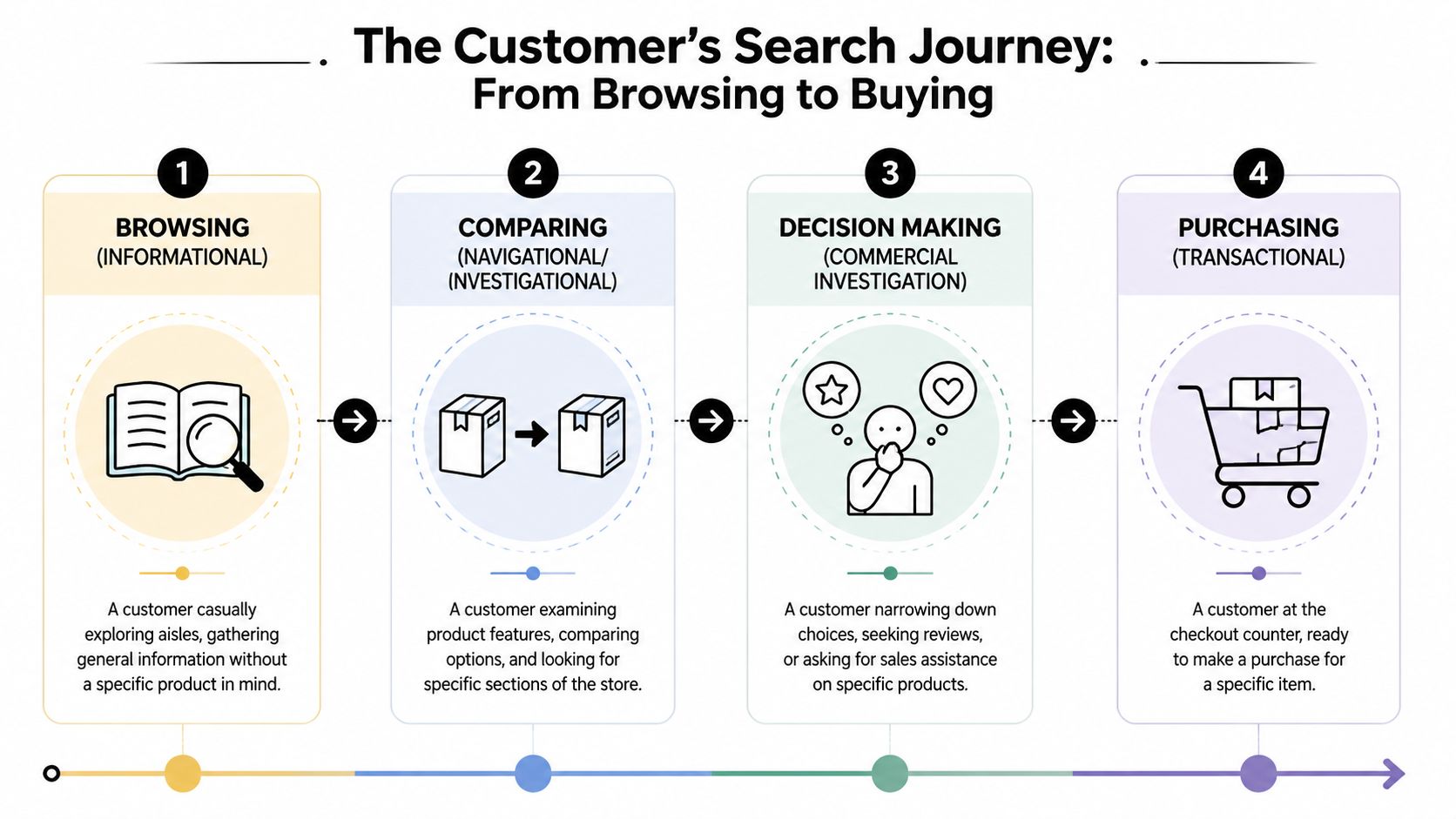
    Think about your online store the same way you’d think about a physical shop.

    Some people are walking past the window. Some are inside, comparing options. Some are standing at the counter with their card in hand, deciding whether to go through with it. Your content should match that moment.

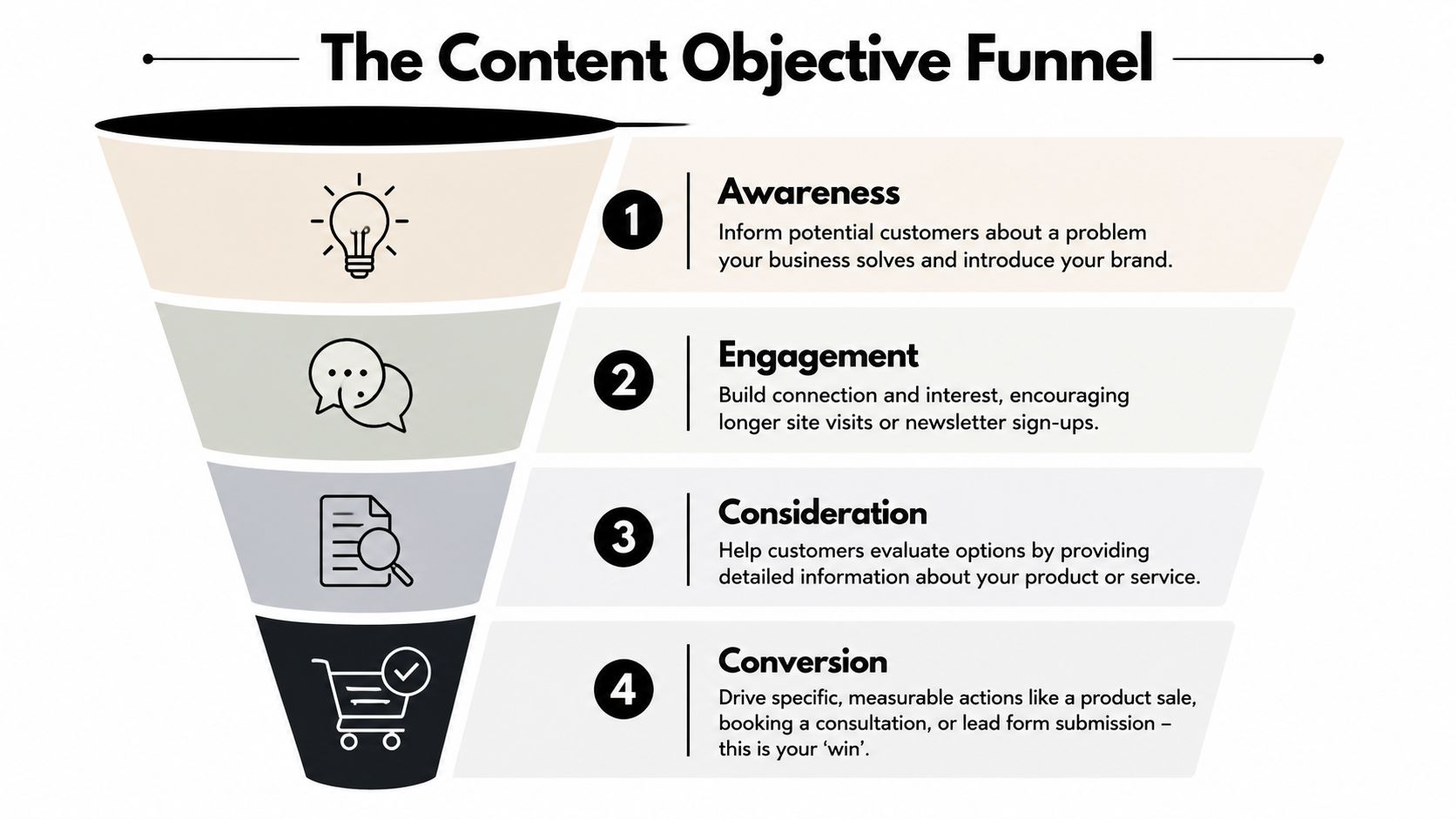
    A diagram illustrating how content marketing strategies map to the different stages of an e-commerce sales funnel.

    Top of funnel is your storefront window

    Top-of-funnel content brings in people who know the problem or interest, but haven’t chosen a product yet. They’re browsing the window. They’re not asking for a discount code. They’re asking basic questions.

    Educational blog posts, beginner guides, and simple social content do the heavy lifting.

    Typical examples:

    • Problem-first articles: how to store coffee beans properly
    • Beginner content: starter guide to home Pilates equipment
    • Lifestyle education: what to pack for a winter hiking trip

    The mistake here is trying to sell too hard, too early. If someone searches for advice and lands on a page that feels like a thin sales pitch, they bounce.

    Middle of funnel is the sales floor

    Middle-of-funnel content helps a shopper evaluate options. This is the in-store moment where a good associate asks the right questions, narrows the choices, and explains trade-offs.

    Useful formats here include:

    • Product comparisons
    • Buying guides
    • Expert reviews
    • Category pages with educational copy
    • Video demos that answer practical questions

    A comparison page works because it helps the customer make a decision without leaving your ecosystem. Instead of forcing them back to search results to compare products elsewhere, you guide the comparison on your site.

    One of the smartest ways to structure this content is through topic clusters. Research cited by JoinBrands on content marketing best practices found that organizing content around a pillar page linked to 10 to 15 supporting cluster articles can improve rankings for the topic set by 23% to 40% within 6 to 12 months compared to disconnected content.

    That matters because e-commerce stores often publish isolated pieces. A buying guide here, a product page there, maybe a blog post from six months ago. Search engines respond better when those pieces clearly connect.

    Bottom of funnel is the checkout counter

    Bottom-of-funnel content closes the sale. This is the checkout counter. The customer is close, but close isn’t the same as sold.

    This stage depends on:

    • Product pages that answer objections
    • Product descriptions that explain value clearly
    • Customer testimonials and reviews
    • FAQ sections
    • Offer pages and launch pages

    The strongest bottom-funnel content removes friction. It covers sizing, use case, compatibility, materials, shipping expectations, return concerns, and who the product is best for.

    For many stores, the fix with the greatest impact isn’t more traffic. It’s better conversion content on the pages that already get visits.

    Don’t create content by format first. Create it by sales job first. Then choose the format that matches the moment.

    A simple way to judge any asset is to ask: is this attracting, guiding, or converting? If you can’t answer that in one line, the content probably doesn’t have a real role.

    Finding Keywords That Drive Sales

    Keyword research for e-commerce doesn’t start with volume. It starts with intent.

    You’re not looking for random topics that happen to get searched. You’re looking for questions and phrases that lead naturally to a product category, a product page, or a high-intent next step.
    A hand-drawn marketing funnel showing the stages of awareness, interest, desire, and action for e-commerce.

    Start with buyer questions, not topic ideas

    Most store owners brainstorm content from the brand’s point of view. That usually produces weak ideas. “Our spring collection.” “Behind the scenes.” “Why we started the company.”

    There’s a place for brand content, but it usually isn’t what drives search-led sales. The better starting point is this: what does a customer type into Google before they buy?

    The overlooked opportunity is old-fashioned SEO content. As Semrush notes in its e-commerce content strategy guide, most e-commerce content marketing advice leans toward visual formats, while educational blog posts and text-based SEO content are often overlooked, even though they can help smaller stores capture high-intent organic traffic.

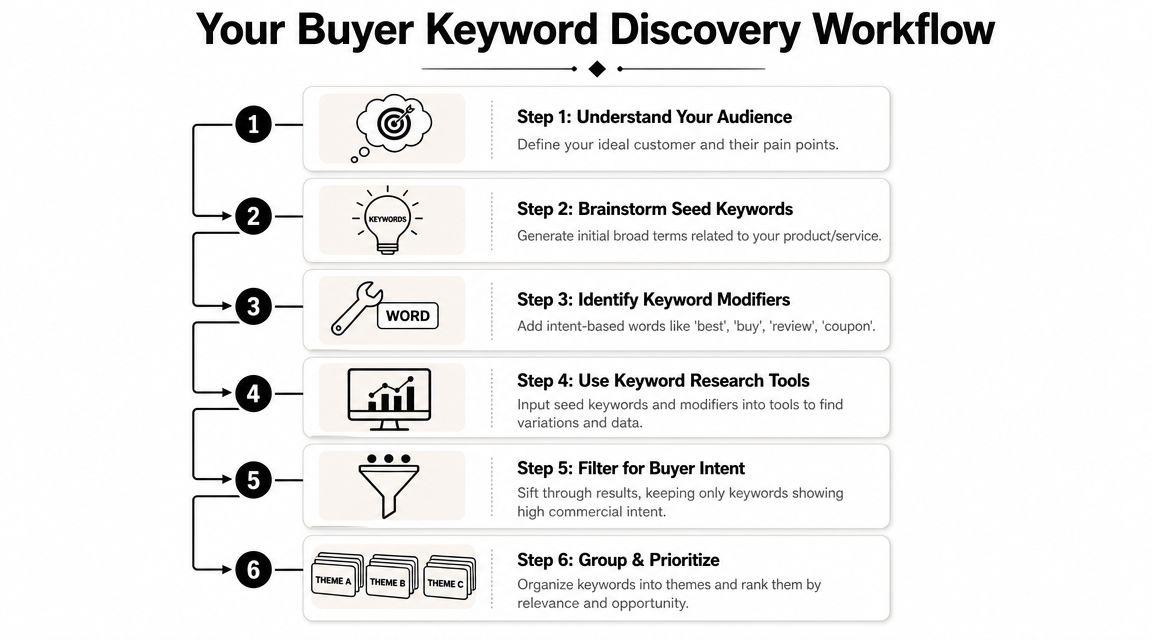
    A quick research process works well:

    1. Open Google and start with product-led phrases
      Type your category, then note autocomplete suggestions.

    2. Look at People Also Ask
      These are buying objections and pre-purchase questions handed to you.

    3. Use your own site search and support inbox
      Customer questions are keyword seeds.

    4. Check category modifiers
      Words like best, for beginners, for small spaces, vs, worth it, how to choose.

    Separate informational and transactional searches

    This is the divide most stores miss.

    Informational keywords attract people earlier in the journey. They often start with phrases like how to, what is, why does, or best way to. These belong in blog posts, guides, and FAQ content.

    Examples:

    • how to clean suede sneakers
    • how much protein powder should a beginner use
    • what bedding is best for hot sleepers

    Transactional keywords show stronger buying intent. They often include product types, comparisons, or qualifiers that suggest the shopper is narrowing choices.

    Examples:

    • best protein powder for beginners
    • cooling sheets queen
    • suede sneaker protector spray

    The video below gives a practical look at search intent and content structure.

    The trick isn’t choosing one or the other. It’s pairing them. A strong informational article should lead naturally to a category, buying guide, or product. A strong transactional page should still educate enough to remove hesitation.

    Build clusters around product categories

    Treat each major category like a content hub.

    If you sell skincare, one category cluster might center on cleansers. If you sell outdoor gear, one cluster might center on daypacks. From there, build supporting pages around needs, comparisons, care, fit, use cases, and common questions.

    A practical cluster could include:

    • Pillar page: beginner’s guide to choosing a daypack
    • Support article: daypack vs hiking backpack
    • Support article: what size daypack do you need
    • Support article: best daypack features for commuters
    • Commercial page: best daypacks for travel and daily use

    This structure does two things well. It helps the shopper move logically through a decision, and it makes internal linking much easier. Every article can point readers toward the most relevant category or product collection.

    If a keyword doesn’t connect to a product path, be careful. It may still be worth publishing, but it shouldn’t dominate your calendar.

    Search traffic only matters if the visitor is close enough to your product to matter commercially.

    For a small e-commerce store, that filter saves a lot of wasted effort.

    Your E-commerce Content Type Playbook

    A small store usually does not lose on content because it picked the wrong channel. It loses because it publishes the same kind of asset over and over. Three blog posts. Then a burst of Instagram. Then a product launch email. None of it is bad, but none of it covers the full buying journey.

    The fix is a tighter mix of formats tied to revenue. For small e-commerce brands, text usually carries more of that load than people admit. Search-friendly articles, buying guides, comparison pages, FAQs, and stronger product copy keep working after publish day. They also cost less to produce than a steady stream of video or creator campaigns.

    Match the format to the buying decision

    Use content types based on the question the shopper is trying to answer.

    Content Type Primary Funnel Stage Main Goal Example Title
    Blog post Top of funnel Attract search traffic from problem-aware shoppers How to Choose the Right Running Belt for Long Runs
    Buying guide Middle of funnel Help shoppers compare options and narrow choices The Best Coffee Grinder Type for Small Apartments
    Product comparison page Middle of funnel Capture high-intent evaluation searches Ceramic vs Stainless Steel Travel Mug
    Product page copy Bottom of funnel Convert visitors who are close to purchase Compact Cold Brew Maker With Stainless Filter
    FAQ page Bottom of funnel Remove objections and reduce hesitation Questions About Our Organic Cotton Sheet Set
    Customer review roundup Bottom of funnel Reinforce trust with social proof Why Customers Keep Reordering Our Everyday Tote
    Demo video Middle to bottom Show use, fit, or setup clearly How Our Adjustable Desk Lamp Works in Small Spaces
    Email content Middle to bottom Re-engage visitors and move them back to product pages Which Backpack Fits Your Weekend Travel Style

    That table keeps teams honest.

    If traffic is the problem, publish search-driven articles and comparison pages. If conversion is the problem, improve product pages, FAQs, review roundups, and post-visit email. A lot of stores skip straight to social content because it feels faster. In practice, text-based assets often produce a better return for smaller catalogs because they rank, answer buying questions, and support internal linking at the same time.

    What each format is best at

    SEO blog posts work when the topic is specific and close to a purchase. Broad lifestyle content rarely pays back for a smaller store unless it supports a brand play with a long time horizon. The better move is to answer a narrow question a shopper asks right before comparing products.

    A practical post usually does four things in order:

    • Answer the question fast
    • Explain the decision criteria
    • Show which features or product types fit each need
    • Send the reader to the right product or collection

    Buying guides sit one step closer to revenue. They help shoppers choose between types, sizes, materials, or use cases. They also tend to convert better than general blog content because the visitor is already evaluating options.

    Product comparison pages deserve more attention than they get. Searches like “X vs Y,” “best for small apartment,” or “ceramic vs stainless” often come from shoppers who are close to buying and trying to reduce risk. For many small stores, these pages are some of the highest-value text assets on the site.

    Product page copy carries more sales weight than a lot of brands realize. The Salsify 2024 Consumer Research report found that product descriptions and product images rank among the top information shoppers use when deciding what to buy online. That matches what shows up in store data. Weak copy forces the shopper to guess. Strong copy answers the last few questions before checkout.

    A product page that sells usually includes:

    • A clear use case
    • Specific benefits tied to real outcomes
    • Material, feature, or ingredient detail
    • Size, fit, care, or compatibility information
    • Answers to common objections
    • Proof close to the buy button

    FAQ pages pull more weight than their name suggests. They help on-page conversion, capture long-tail searches, and reduce support tickets if the questions are real. “How does this fit?” “Will this work with X?” “How long does it last?” Those are sales questions, not housekeeping.

    Customer review roundups and user-generated content work best near the point of decision. A polished testimonial page buried in the footer does very little. A review snippet, customer photo, or short quote placed next to sizing, materials, or delivery details can remove hesitation fast.

    Video still has a place, but the trade-off matters. Video takes more time, costs more to produce, and is harder to update at scale. Use it where motion or setup changes the buying decision: apparel fit, furniture assembly, texture, before-and-after use, or side-by-side demonstration. Skip it for products that can be explained clearly in photos and copy.

    Build a stack, not isolated assets

    The strongest content programs are built in layers.

    A search article brings in a shopper who is defining the problem. A buying guide helps narrow the field. A comparison page resolves the final debate. The product page closes. Email and reviews help recover visitors who needed more time.

    That sequence is why SEO-driven text content is still so useful for small e-commerce stores. One good article can bring traffic for months. One good comparison page can assist dozens of product visits. One better product page can lift conversion without any extra traffic.

    The playbook is simple. Publish fewer content types, but make each one do a clear sales job.

    Creating a Simple Content Workflow

    Monday starts with good intentions. By Thursday, you are answering support tickets, fixing a product feed issue, chasing inventory, and the draft you meant to publish is still sitting in Google Docs. That is how content dies in small e-commerce stores. Not because the ideas were bad, but because nothing in the week was built to get the work out the door.

    A simple workflow fixes that.

    A hand-drawn illustration showing the circular five-step content marketing process from planning to analyzing.

    Build one source of truth

    A spreadsheet is enough for a small store. The point is not to create an editorial machine. The point is to stop losing good topics, publishing disconnected pieces, and forgetting which pages were supposed to support which products.

    Track these fields:

    • Keyword or topic
    • Search intent
    • Funnel stage
    • Target page type
    • Primary product or category linked
    • Status
    • Publish date
    • Results notes

    Documented processes tend to beat ad hoc ones. Content Marketing Institute has repeatedly found that marketers with a documented content strategy are more likely to describe their efforts as successful. The reason is practical. A written plan forces topic selection, publishing cadence, and business goals into the same place.

    For e-commerce, that matters even more because text content only pays off when it connects to a product path. A keyword without a destination page is traffic. A keyword tied to a collection, product, or comparison page is potential revenue.

    Keep the workflow small enough to survive a busy week

    I have seen stores kill momentum by building a workflow meant for a six-person team. Solo founders and lean teams need a process that still works during a messy week.

    A workable rhythm looks like this:

    • Research block: pull search terms from Search Console, customer emails, reviews, and competitor gaps
    • Outline block: map 3 to 5 pieces at once so the angle is clear before writing starts
    • Draft block: write fast, leave editing for later
    • Optimization block: add product references, on-page SEO, images, and conversion points
    • Publish block: upload, schedule, and log the page in your tracker

    Batching cuts switching costs. It also makes SEO-driven content easier to sustain, which is one of the few channels where a small store can still compound results without paying for every click.

    One useful rule. Keep one content format in production at a time. If you are already writing a buyer's guide, do not also try to script three videos, launch a quiz, and redesign a category page in the same week.

    Assign clear ownership

    Content stalls when every step depends on someone remembering what comes next.

    Even a two-person team should decide who owns research, who drafts, who reviews product accuracy, and who publishes. If one person handles all of it, write the steps down anyway. That removes guesswork and makes it easier to outsource pieces later without breaking quality.

    Use simple status labels such as:

    • Backlog
    • Researching
    • Drafting
    • Review
    • Ready to publish
    • Published
    • Updating

    That last status matters. Text content for e-commerce is not a one-and-done asset. Sizes change, product lines shift, and comparison pages get stale fast. A lightweight update cycle often produces better ROI than publishing more net-new posts.

    Use a pre-publish checklist that protects revenue

    Before anything goes live, check the page against the job it is supposed to do.

    For blog posts

    • Intent match: Does the article answer the exact question behind the search?
    • Commercial path: Is there a clear next click to a product, collection, or comparison page?
    • Specificity: Does the copy include details a shopper can use to decide?

    For product pages

    • Speed to clarity: Can someone understand the product in a few seconds?
    • Objection handling: Are fit, compatibility, materials, shipping, or care questions answered?
    • Scannability: Can a shopper skim benefits, specs, and proof without reading every line?

    For all content

    • Headline quality: Is the promise clear and specific?
    • Support media: Does an image, chart, or short demo improve understanding?
    • Measurement setup: Can you track organic visits, clicks to product pages, assisted conversions, and sales?

    The goal is consistency, not perfection. Small stores do not need a heavy content operation. They need a repeatable system that publishes useful pages, ties them to products, and makes ROI easier to measure later.

    Promoting Your Content to Drive Traffic

    A small store publishes a solid buying guide, posts it once on Instagram, gets a handful of clicks, and writes content off as a bad channel. I’ve seen that mistake over and over. The page was often fine. Distribution was the weak point.

    For e-commerce, promotion works best when it starts with channels that keep paying back. Search is first on that list, especially for small stores that cannot afford to chase reach every week. A useful, text-based page that ranks for a purchase-adjacent query can bring in qualified traffic for months, sometimes longer, with only light updates. That is a much better bet than pouring hours into social posts that disappear in a day.

    Email comes next because it turns content into action. A comparison article can go to shoppers who viewed a collection and stalled. A care guide can support post-purchase customers and reduce confusion that leads to returns. A fit explainer can help hesitant buyers get comfortable enough to click through to a product page.

    Use promotion paths that match how people buy:

    • New guide to email subscribers: give a specific reason to read, such as choosing the right size, material, or model
    • Browse abandonment emails: send comparison or decision-support content, not just a discount
    • Post-purchase flows: send setup, care, or usage content that improves the customer experience
    • Category merchandising: place educational content near collection promotions so shoppers can move from research to product pages

    Social still has a place, but it is usually a support channel for small e-commerce teams, not the engine. A raw blog link dropped into a feed rarely drives meaningful sales. A tighter approach is to pull one sharp point from the article, pair it with a product angle, and send people back to the full piece on your site.

    The strongest content also gets reused. One well-built article can feed several revenue-focused assets without creating from zero again.

    A buying guide can become:

    • A short email series
    • Several social posts built around objections or questions
    • Product page FAQ copy
    • Retargeting ad angles
    • Support copy for category pages

    That matters because competition keeps rising. As noted earlier, more brands are investing in content. Small stores do not win by publishing everywhere. They win by publishing text content that captures search intent, then pushing that same asset through owned channels that move shoppers closer to a purchase.

    My rule is simple. Put the full version on your site first. Build it to rank. Send it to your list. Then adapt it for other channels only after it proves it can pull clicks to products, assist conversions, or generate sales.

    For a small store, one useful article promoted well usually beats five articles that get posted once and forgotten.

    That approach is less flashy than influencer campaigns or constant video production. It is also easier to measure, cheaper to sustain, and often more profitable for stores that need content to earn its keep.

    Measuring the ROI of Your Content

    A small store publishes a buying guide, gets a few hundred visits, and calls it a win. Two months later, that same guide has sent 47 readers to product pages, assisted 9 orders, and brought in more revenue than three weeks of social posts. That is the level to measure at.

    Content earns its keep when it helps sell products. For a lean e-commerce team, that usually means text-based pages that rank for buyer intent, pull shoppers into product paths, and keep doing that without ongoing media spend.

    Track revenue, not just reach

    Many e-commerce content guides spend plenty of time on formats and promotion, then get vague on measurement. CXL points out the need for a clear framework for tying content work to revenue, especially in e-commerce where the goal is sales, not attention alone (CXL).

    Start with a short list of metrics you can act on:

    • Revenue from sessions that start on content pages
    • Assisted conversions from content
    • Clicks from content pages to product or category pages
    • Conversion rate for readers who continue to a commercial page
    • Email signups from content, if email helps close the sale
    • Repeat purchases from customers first acquired through content

    This keeps the focus where it belongs. A post with modest traffic can outperform a high-traffic article if it consistently sends qualified visitors into the catalog.

    Use a simple attribution model

    You do not need expensive attribution software to answer the core question: which pages help produce orders?

    Use a setup like this:

    1. Tag internal calls to action
      Track clicks from articles to category pages, collection pages, and products so you can see which content pushes readers deeper into the store.

    2. Group content by job
      Separate educational posts, buying guides, comparisons, product education, and on-page product content. Each type plays a different role and should not be judged the same way.

    3. Check assisted conversions
      Review orders where a shopper visited content before buying, even if the final session came through email, direct, or branded search.

    4. Review common paths
      Look for content pages that appear often before product views, add-to-carts, or purchases.

    5. Score commercial usefulness
      Give more weight to content that leads to product engagement than content that only pulls top-of-funnel traffic.

    I like piece-level math because it forces honesty. If an article costs $400 to research, write, and publish, and it drives $625 in attributable sales, the ROI is clear. That is not perfect attribution, but it is good enough to decide whether the page deserves an update, more internal links, or a companion article.

    Judge content over a realistic window

    Timing matters.

    A comparison page can influence revenue within days if it targets bottom-funnel searches. A search-first educational article usually needs more time to rank, collect impressions, and start assisting purchases. Treating both on the same timeline leads to bad decisions, usually cutting pages that would have become profitable with another month or two.

    A simple review model works well:

    Content bucket What to measure first What matters later
    Educational blog posts Qualified traffic and clicks to commercial pages Assisted conversions and first-order revenue
    Buying guides and comparisons Product page click-through and add-to-cart behavior Direct and assisted revenue
    Product page content improvements Conversion rate and average behavior on page Repeat purchase quality and support load reduction

    The trade-off is straightforward. Educational content often has a slower payoff but can compound through search. Buyer-intent content usually drives fewer visits, but the visits are worth more. Small stores tend to do better when they know which lane each piece belongs in before publishing it.

    The practical standard is simple. Keep content that brings in qualified search traffic and moves shoppers closer to a sale. Update content that shows promise but weak product engagement. Cut or merge content that attracts visits and does nothing else.

    If content marketing for e-commerce is going to deserve budget, it has to prove it can produce orders, assist revenue, or lower acquisition costs over time. That is why SEO-driven text content is so useful for smaller stores. It is cheaper to produce than constant video, easier to test than influencer campaigns, and far easier to measure against sales.

  • SEO for Real Estate Agents: Generate Leads in 2026

    SEO for Real Estate Agents: Generate Leads in 2026

    You’re probably in one of two spots right now. You’re either paying for leads and wondering why every month starts at zero again, or you’ve got a website that looks decent but barely produces calls, valuation requests, or serious buyer inquiries.

    That’s where most agents get stuck. They don’t need another giant SEO checklist. They need the few actions that move rankings, show up in Google Maps, and turn local searches into conversations. That’s what seo for real estate agents should be about. Not vanity traffic. Not blogging for the sake of blogging. Leads.

    The playbook below is the one that matters when time is tight and consistency is the primary bottleneck. It focuses on the handful of moves that create local visibility, build authority, and keep generating inquiries long after the work is published. It also addresses directly the trade-off every busy agent faces: do it manually and risk inconsistency, or automate the repetitive parts so the strategy is executed.

    Table of Contents

    Why SEO Is Your Best Investment for Leads in 2026

    Agents feel the pain of paid lead channels fast. You fund ads, buy portal exposure, or pay for promoted placements, and the moment you stop paying, the pipeline slows down. That model can work for short bursts, but it doesn’t build an asset you own.

    SEO does. A strong local site keeps attracting buyers and sellers while you’re on appointments, handling inspections, or negotiating offers. That’s the part many agents miss. Good seo for real estate agents isn’t just marketing activity. It’s business infrastructure.

    A scale weighing paid leads against organic growth tree to show value of SEO for real estate.

    The economics are hard to ignore. Organic search drives 300% more traffic to websites than social media, 97% of homebuyers start their search online, and real estate SEO delivers an average ROI of 1,389% over three years, according to Siteimprove’s real estate SEO overview. That’s why SEO keeps outperforming channels that rely on constant spend.

    SEO brings in better intent

    Traffic alone doesn’t pay the bills. Intent does.

    Someone searching for your name after a referral is useful. Someone typing “realtor near me,” “homes for sale in [neighborhood],” or “how to price my home in [city]” is often even better because they’re actively trying to solve a property problem right now. SEO captures that demand at the moment it exists.

    Practical rule: If a page doesn’t target a search with clear local or transaction intent, it’s usually not a priority page.

    That’s why broad lifestyle content rarely carries a solo agent’s growth plan on its own. It can support authority, but the pages that generate leads usually sit closer to action: area pages, seller pages, service pages, and detailed local guides.

    SEO compounds while paid media resets

    Paid campaigns can still have a place. They’re useful when you need immediate visibility. But they reset every month. SEO compounds. A neighborhood guide you publish today can keep ranking, attracting clicks, and feeding inquiries long after the page goes live.

    There’s also a control issue. Portals own their platform. Ad networks control pricing. Your website is the one marketing asset you fully control. If you want predictable inbound leads over time, that asset deserves the first serious investment.

    A lot of agents delay SEO because it feels technical. In practice, the winning version is much simpler. Get found locally. Publish pages around buyer and seller intent. Keep the site fast and usable. Earn local trust signals. Repeat consistently.

    The Foundation Winning Local Search and Google Maps

    If an agent asks where to start, the answer is almost never “write more blogs” first. It’s local search. Specifically, Google Business Profile, reviews, citations, and location relevance. If those signals are weak, you’ll struggle to appear where high-intent local searches happen.

    For local visibility, a fully optimized Google Business Profile is paramount, and success metrics include mobile site speed scores above 80 and accurate IDX data feeds, according to FatJoe’s real estate SEO guide.

    This visual breaks the local blueprint into the core actions worth doing first.

    A five-step blueprint infographic outlining essential strategies for improving local SEO for real estate agents.

    Treat your Google Business Profile like a sales page

    Most agent profiles are half-complete. That leaves money on the table.

    A fully built profile should include:

    • Correct business details: Your name, address, phone number, website, and service areas must match everywhere else online.
    • Service clarity: Add services that match what you want to rank for, such as buyer representation, listing agent services, relocation help, or property valuations.
    • Real photos: Office photos, team photos, local area shots, and property-related images help the profile feel active and credible.
    • Ongoing updates: Use Google Posts for listings, market updates, and local news. It keeps the profile fresh and gives searchers more reasons to click.
    • Q&A coverage: Seed common questions and answer them clearly. Think valuation timelines, neighborhoods served, or whether you handle first-time buyers or luxury sellers.

    A neglected profile sends the wrong signal. Google wants complete local businesses it can trust. So do prospects.

    After your profile, make sure your website supports it. That means your city and neighborhood pages should exist, load cleanly on mobile, and reflect the same core business information.

    A practical walkthrough helps here:

    Reviews and citations decide whether Google trusts you locally

    Reviews do more than build persuasion. They strengthen local relevance.

    The mistake is asking randomly. The better system is to request reviews at moments when clients already feel relief or excitement, right after a successful closing milestone, after handing over keys, or after solving a difficult issue well. Keep the request short, direct, and easy to complete.

    What matters most:

    • Consistency: A steady flow of reviews looks healthier than occasional bursts.
    • Specificity: Reviews that mention neighborhoods, buying or selling experience, and service quality help both users and local relevance.
    • Responses: Reply to every review. A thoughtful response shows activity and professionalism.

    The Map Pack usually goes to the agent who looks the most complete, trusted, and locally relevant, not the one with the fanciest website.

    Citations matter for the same reason. Your NAP data, meaning name, address, and phone, should be identical across directories like Yelp and BBB, plus any local chambers, broker pages, or industry profiles you control. Inconsistent details create avoidable confusion.

    One more local search trap deserves attention. Many agent sites have messy IDX feeds. If listing pages are thin, outdated, or duplicative, they often clutter the site without adding ranking strength. Accurate IDX data is useful. A bloated IDX setup isn’t. Keep indexable pages focused on the ones that provide unique value.

    Keyword Research That Finds Ready-to-Act Clients

    Keyword research for agents goes wrong when it starts and ends with volume. High search volume looks exciting, but it often pulls you toward broad phrases that are hard to rank for and weaker at converting.

    The better approach is intent layering. You’re not just collecting keywords. You’re mapping what people search when they’re learning, comparing, and getting ready to act. Follow Up Boss describes this well: effective SEO involves semantic search, where you identify a primary keyword like “homes for sale in [Neighborhood]” and layer related questions from Google into the page so it satisfies user intent more completely. Their guide also warns against keyword stuffing and recommends a hub-and-spoke structure for connected pages, as shown in Follow Up Boss’s realtor SEO tactics.

    Think in intent layers, not just keywords

    A useful keyword set for seo for real estate agents usually spans three buckets:

    Client Type Search Intent Example Keyword
    Buyer Early research cost to buy a house in Austin
    Buyer Comparison homes for sale in Hyde Park Austin
    Buyer Transactional realtor near me
    Seller Early research best time to sell home in Dallas
    Seller Comparison how to price my home in Bishop Arts
    Seller Transactional listing agent in Dallas

    Each search warrants a distinct page type. Early research queries fit guides and explainers. Comparison terms fit neighborhood pages and market pages. Transactional terms belong on service pages that make contacting you easy.

    A few practical patterns work well:

    • Buyer research terms: target moving guides, cost guides, school-area guides, and neighborhood comparisons.
    • Mid-funnel location terms: target pages about specific suburbs, ZIP codes, building types, or lifestyle pockets.
    • Bottom-funnel service terms: target agent, valuation, and sell-with-me pages.

    If you lump all of that onto one generic homepage, you dilute the relevance.

    Seller keywords are the opening most agents ignore

    Most agents overbuild buyer content because listings feel more tangible. That’s a mistake. Seller intent is often less crowded and closer to revenue.

    Good seller topics include:

    • Pricing questions: “how to price my home in [area]”
    • Timing questions: “best time to sell in [neighborhood]”
    • Condition questions: “should I renovate before selling”
    • Process questions: “what to expect when selling a home in [city]”

    These searches usually come from owners making decisions, not casual browsers. They also let you compete where big portals are weaker. Portals dominate listing inventory. They don’t dominate nuanced local seller advice.

    Use tools like Google Ads Keyword Planner, Keywords Everywhere, and Google’s related questions to build the list manually. If consistency is the issue, this is one of the best areas to automate with OutRank. It can surface buyer and seller topics continuously, which is useful when you don’t have time to sit in spreadsheets every week.

    A strong content calendar for an agent should include seller topics every month, not just listing pages and buyer articles.

    One caution. Don’t force exact-match phrases into every line. Semantic SEO works because the page answers the topic broadly and naturally. Stuffing “seo for real estate agents” or “homes for sale in [area]” into awkward sentences does the opposite of what you want.

    Creating Content That Builds Authority and Trust

    The easiest way to tell whether an agent understands content is to look at their neighborhood pages. Weak ones read like brochure copy. Strong ones help someone make a decision.

    That difference matters because Google rewards pages that answer the search. Prospects do too. If a buyer lands on your page and learns something useful about the area, schools, commute patterns, housing style, or local buying considerations, you’ve done more than attract a click. You’ve started building trust.

    A hand-drawn illustration showing blogs, guides, and videos building up to a house labeled trust.

    What a strong neighborhood guide actually looks like

    A useful neighborhood guide has a clear main topic and a structure that helps both readers and search engines. The page might target a phrase like “living in [neighborhood]” or “homes for sale in [neighborhood],” but it shouldn’t stop at a thin paragraph and a listings widget.

    A solid page usually includes:

    • A direct opening answer: Explain who the area suits and why people move there.
    • Lifestyle detail: Cover parks, walkability, housing stock, transport, and local amenities.
    • Buyer context: Mention who tends to buy there, such as families, commuters, or downsizers, without making unsupported claims.
    • Relevant FAQs: Add natural subheadings based on real search questions.
    • Strong internal links: Connect to related suburb pages, buyer guides, valuation pages, and contact pages.

    One practical example. If you’re building a page on a family-oriented suburb, don’t just say it’s “popular.” Explain what a buyer would want to know: property types, school-related decision factors, commuting trade-offs, and nearby amenities that shape day-to-day living.

    Write pages that rank and still sound human

    On-page SEO is mostly about clarity.

    Use a title that leads with the core topic. Write an H1 that matches the page intent. Break the page into H2s and H3s that answer real questions. Add a meta description that makes the click worthwhile. If you’re writing a property page, practical keyword-led titles like those recommended in the earlier Follow Up Boss guidance work well because they align with how people search.

    The same principle applies to seller content. Creating content for seller-intent searches like “how to price my home in [city]” can yield 2-3x higher conversion rates, according to Visuable’s guide to SEO for real estate agents. That’s why seller pages deserve the same attention as buyer guides.

    A simple content stack for agents looks like this:

    • Core money pages: city pages, neighborhood pages, buyer service pages, seller service pages
    • Trust builders: neighborhood guides, market explainers, moving guides, school-area content
    • Conversion helpers: FAQs, valuation pages, contact pages, listing appointment pages

    Good real estate content shouldn’t read like it was written for an algorithm. It should feel like the most helpful agent in town sat down and answered the search properly.

    This is also where automation can make sense. Writing one strong page is manageable. Publishing and interlinking useful pages month after month is where agents fall off. OutRank can help keep the publication rhythm going, but the strategy still has to be right. Automation amplifies a good plan. It doesn’t rescue a weak one.

    Technical SEO and Backlinks Made Simple

    Technical SEO sounds intimidating until you strip it down to what affects lead generation. For most agent sites, the big issues are speed, mobile usability, crawl clarity, and structured data. If those are in reasonable shape, your content and local relevance can do their job.

    Backlinks are similar. People overcomplicate them or turn them into spam. In practice, the best links for agents usually come from local relationships, partnerships, and useful content that deserves a mention.

    Fix the three technical issues that hurt agents most

    Start with the basics:

    1. Speed
      Slow pages lose leads. Heavy images, bloated themes, and scripts from too many plugins are common causes. Compress images, keep templates lean, and test key pages on mobile.

    2. Mobile usability
      Most property searches happen on phones. If your contact buttons are awkward, text is cramped, or forms are painful to complete, rankings aren’t your only problem. Conversion drops too.

    3. Schema and structure
      Clear headings, logical site architecture, and basic schema markup help search engines understand your pages. For agent sites, schema such as RealEstateAgent can add useful context.

    The important part is restraint. You don’t need to chase every technical tweak on a checklist. You need a site that loads well, works on mobile, and makes your key pages easy to crawl and understand.

    A few common problems are worth removing fast:

    • Thin duplicate area pages: These often happen when agents create dozens of near-identical location pages.
    • Broken internal links: They weaken crawl paths and create a poor user experience.
    • Index bloat from poor IDX setups: Too many low-value pages can distract from the pages you want ranking.

    Backlinks work best when they come from real local relationships

    Think of link building as digital PR.

    The strongest link opportunities for agents often come from the work they already do offline. Mortgage brokers, stagers, conveyancers, local charities, builders, neighborhood businesses, and community publications all create realistic paths to relevant mentions.

    Useful approaches include:

    • Local partnerships: Exchange useful resource mentions with trusted local businesses.
    • Community involvement: Sponsor an event or support a local organization that lists partners on its website.
    • Expert contributions: Offer market commentary to local publications or contribute a housing article.
    • Directory quality control: Keep profiles on credible directories complete and accurate.

    What doesn’t work well is the cheap shortcut approach. Random paid links, irrelevant blog networks, and spammy outreach usually create more risk than value. Agents don’t need hundreds of questionable links. They need a credible local footprint.

    Field note: If you’d be embarrassed to show the website linking to you to a client, it’s probably not a backlink worth chasing.

    This is another area where automation helps if done carefully. Outreach, prospecting, and placement take time. OutRank can reduce that workload, which is useful for solo operators, but it should still support a quality-first approach. Relevance beats volume.

    Tracking What Matters and Automating for Growth

    SEO only feels vague when you measure the wrong things. Agents who obsess over every keyword fluctuation usually burn out. Agents who track visibility and lead signals stay focused.

    The main numbers worth watching are straightforward: organic traffic, rankings for your main city and neighborhood terms, Google Business Profile visibility, and conversions like calls or form submissions. The question isn’t “Did traffic go up?” It’s “Did the right pages bring the right inquiries?”

    Watch lead signals, not just ranking reports

    A clean monthly review should include:

    • Organic traffic by landing page: Which pages are bringing search visitors in?
    • Local keyword rankings: Are your city, suburb, and service pages moving up?
    • Click-through rate from search: Low CTR often means your titles and meta descriptions need work.
    • Conversions: Calls, valuation requests, contact forms, and booked consultations matter most.

    If a page ranks but never converts, look at intent mismatch. You may be attracting the wrong visitor, or the page may fail to move them toward contact. If a page gets impressions but poor clicks, rewrite the title and meta description. If a page gets traffic and no inquiries, the CTA may be weak or buried.

    A realistic timeline helps keep expectations grounded. Agents typically see initial ranking improvements within 3–6 months, while significant organic traffic from content like neighborhood guides often takes 6–12 months to build, according to SEO Team Toronto’s guidance on real estate SEO timelines.

    A hand-drawn sketch illustrating how automation drives website traffic and business conversions over time.

    Automation is how busy agents stay consistent

    That timeline is exactly why execution discipline matters. Most agents don’t fail at SEO because they chose the wrong tactic. They fail because they stop. They publish a few pages, update a profile once, ask for a handful of reviews, then disappear back into reactive marketing.

    Automation solves a practical problem. It keeps the machine running.

    Used properly, OutRank can help with:

    • Keyword discovery: so you keep finding buyer and seller topics worth publishing
    • Content production: so the site grows even when your week gets consumed by deals
    • Backlink support: so authority building doesn’t become another abandoned task
    • Competitor monitoring: so you can see where rivals are gaining ground

    That doesn’t remove the need for judgment. You still need to know which pages matter, which neighborhoods deserve dedicated coverage, and which seller topics match your market. But once the playbook is clear, automation is often the difference between a strategy that sounds good and one that compounds.

    The agents who win with seo for real estate agents usually do boring things well for a long time. They own their Google Business Profile. They build pages around buyer and seller intent. They publish useful local content. They keep the site technically healthy. They measure leads. Then they repeat.


    If you want that process without hiring an agency or turning SEO into a second job, Agency Secrets is a practical place to start. It lays out the playbook clearly and shows how to use OutRank to automate the heavy lifting, from keyword research and article publishing to backlinks and competitor analysis, so your site keeps growing while you stay focused on clients and closings.

  • Long Form Content: The SMB Guide to SEO Dominance

    Long Form Content: The SMB Guide to SEO Dominance

    Long form content gets an average of 77.2% more links than short articles. That single number should change how most small businesses think about SEO.

    If you're still publishing thin blog posts because they feel easier to produce, you're choosing the hardest path to growth. Bigger competitors already have stronger domains, larger teams, and more brand recognition. You won't beat them by publishing more noise. You beat them by publishing assets that deserve rankings, links, and leads.

    Long form content works because it gives Google and real buyers what short posts usually don't: complete answers, clear structure, strong internal links, and enough depth to signal authority. For a small business, that's not a branding exercise. It's a distribution strategy. One strong long form system can compound for months without paying an agency, funding nonstop ads, or hiring a full editorial team.

    Table of Contents

    What Is Long Form Content and Why It’s Your SEO Secret Weapon

    Articles in the top results are often long for a reason. Backlinko’s analysis of Google search results found that the average first-page result contains 1,447 words. That does not mean you should chase a word count target. It means search winners usually cover the topic with enough depth to satisfy the search.

    Long form content is a page built to finish the job. It answers the core question, handles the obvious follow-up questions, addresses objections, and gives the reader a clear next step. For an SMB, that could be a service page, buyer’s guide, comparison post, or pillar article. The format matters less than the outcome. The page should reduce uncertainty and move a prospect closer to action.
    A hand-drawn illustration showing a rocket labeled SEO Secret Weapon launching from long-form content.

    That is why long form content works so well for SEO. Google rewards pages that solve the search, not pages that hit a cute word count. Readers reward pages that save them another 10 tabs.

    Short posts usually miss on both fronts.

    Why short posts keep losing

    A 600-word post can work for a narrow query. It fails for anything tied to evaluation, comparison, pricing, implementation, or trust. Those searches need substance. If your page only scratches the surface, readers bounce and keep looking.

    Short posts also create an efficiency problem for small teams. You publish more often, but each post has less ranking range, fewer internal link opportunities, and less chance of becoming the page people reference, bookmark, or share. You stay busy without building an asset base.

    Here’s the practical filter:

    • Use short content for updates, announcements, single-answer FAQs, and support docs.
    • Use long form content for topics that influence revenue, require trust, or involve multiple decision points.
    • Prioritize depth anywhere a prospect is comparing options, costs, timelines, risks, or providers.

    If a topic can help someone choose whether to buy, hire, book, or request a quote, give it a serious page.

    Why this matters more for SMBs than big brands

    Big companies can afford wasted content. Small businesses cannot. You need every article to do more than fill a calendar slot. It should rank, support sales, answer repeated customer questions, and create material you can reuse in email, social, and sales conversations.

    That is the genuine advantage of long form content for SMBs. One strong article can become a working asset. Ten strong articles built from the same system can become a lead engine.

    Smaller teams can beat bigger competitors through this approach. You are closer to customer pain points. You hear the same objections on calls. You know what buyers ask before they commit. Put that knowledge into structured long form pages and you can publish content that is sharper than the bland, committee-written pieces larger brands push out.

    The win does not come from writing one heroic 3,000-word article. It comes from building a repeatable system to produce useful long form content every month. That is exactly why tools like OutRank matter for resource-strapped teams. They help you research faster, organize content around real search demand, and keep publishing without hiring an agency or stalling out after three posts.

    Long form content is not a writing style. It is a production model for turning what your business already knows into search traffic, trust, and qualified leads.

    Building Your Strategic Foundation with Topic Clusters

    If you publish random long articles, you'll get random results. You need a structure that tells Google what your site is about and helps readers move from one question to the next.

    That structure is the topic cluster.

    A diagram illustrating the SEO topic cluster strategy featuring a central pillar page and supporting content pieces.

    Think like a library, not a blog

    A good cluster works like a small reference library. The pillar page is the main book on the shelf. It covers the broad subject in an all-encompassing way. The supporting articles are the specialist volumes. Each one expands a subtopic and links back to the pillar and to related pages.

    That internal structure matters. Search Engine Land’s guide to longform content notes that pillar pages of 2,000 to 5,000 words linking to 10 to 20 supporting articles can yield 40 to 50% higher domain authority scores. That's the kind of advantage small businesses need because it lets one focused content system do more work than disconnected posts ever can.

    Later in the section, watch this breakdown if you want a visual explanation of how clusters support SEO performance.

    What a usable cluster looks like

    Let's say you run a local dental clinic. Don't publish one article on “teeth whitening tips” and call it content strategy. Build a pillar around a broader commercial theme such as cosmetic dentistry or teeth whitening treatments. Then support it with articles that answer the decision-level questions buyers ask.

    A practical cluster might include:

    • Core pillar page: Your complete guide to teeth whitening options, candidates, risks, maintenance, and booking considerations.
    • Comparison article: In-office whitening versus take-home kits.
    • Concern-driven article: How long whitening results last.
    • Local intent article: What to ask a clinic before booking treatment in your city.
    • Eligibility article: Whether whitening works for stains, crowns, or sensitive teeth.

    A cluster gives Google context and gives buyers a path. Both matter.

    Many SMBs overcomplicate things. You don't need fifty topics. You need a few revenue-connected themes and the discipline to build depth around each one.

    Start with buyer intent. Pick topics tied to services, categories, or repeated sales questions. Then map the cluster before writing anything. When every article has a job, content stops feeling like a guessing game and starts behaving like infrastructure.

    The Anatomy of a Perfect Long Form Article

    Google’s first-page results average 1,447 words, according to Backlinko research cited in Network Solutions’ overview of long-form content. That number matters for one reason. Winning pages usually cover the topic with enough depth to satisfy the searcher and move them toward a decision.

    For an SMB, that changes how you should write. Stop treating long form content like a school assignment. Build each article like a sales asset you can repeat, templatize, and publish at scale with a tool like OutRank.

    A strong long form article does four jobs. It answers the core question fast, organizes the topic into clear decision points, proves credibility, and gives the reader a next step.

    Start with the answer

    Business owners often waste the first 200 words on scene-setting. That hurts rankings and conversions.

    Lead with the direct answer. If the search is “how long does commercial epoxy flooring last,” open with the actual range, then explain what changes the outcome. After that, break down traffic level, installation quality, maintenance, cost tradeoffs, and replacement timing.

    Your introduction should handle three things immediately:

    1. Confirm the reader is in the right place
    2. Give the short answer in plain language
    3. Show what the article will help them decide

    That structure improves engagement because the visitor gets value before they commit to reading the full page.

    Build the article around decision points

    Good long form content is structured around the questions a buyer asks before taking action. That is what keeps the article useful instead of bloated.

    Use sections that match real intent:

    • Definition or quick answer: What it is, who it is for, or the short verdict
    • Key variables: What affects the result, price, timeline, or outcome
    • Comparisons: Option A versus Option B
    • Common mistakes: What buyers get wrong
    • Proof and evidence: Experience, examples, specifications, cited sources
    • Next step: What to do now

    This is the difference between a page that ranks and a page that helps sell. For SMBs producing content consistently, this structure also gives you a repeatable template. You do not need to reinvent the article format every time. OutRank or a similar workflow can speed up drafting, but the underlying structure still needs to be sound.

    Format for skimming

    Readers scan first. If your page looks heavy, they leave before your best point shows up.

    Use formatting that makes the article easy to move through:

    • Clear H2 and H3 headings built from real sub-questions
    • Short paragraphs that keep one idea per block
    • Bullets and numbered lists for steps, comparisons, and checklists
    • Tables when the reader needs to compare options quickly
    • Trust signals such as firsthand experience, product details, expert input, and cited sources

    Put the strongest information high on the page and make it easy to spot. Summaries, subheads, and clean visual flow improve usability. They also make your content easier to scale because every article follows the same reading pattern.

    Long Form Content Best Practices Checklist

    Element Best Practice Why It Matters
    Headline Promise a clear outcome or answer Improves relevance and qualifies the click
    Introduction Answer the main query in the opening lines Reduces bounce and sets expectations fast
    Structure Use H2s and H3s based on sub-questions Makes the page easier to scan and understand
    Paragraphs Keep them short and focused Improves readability on desktop and mobile
    Evidence Use cited studies, product details, and real expertise Builds credibility and supports E-E-A-T
    Internal linking Link to related supporting pages naturally Strengthens topical relevance and supports deeper journeys
    Visual flow Break up text with bullets, tables, and callouts Helps scanners find useful information quickly
    Conclusion End with a decision, summary, or next step Turns attention into action

    One more rule. Every section must earn its place.

    Do not pad the article to hit an arbitrary word count. Do not repeat the same point in three different headings. Do not add generic FAQ fluff if it does not help the buyer decide. The best long form content feels complete because it is tightly organized, easy to scan, and built from a system your business can repeat every month.

    Your Scalable Workflow for Publishing High-Impact Content

    One excellent article won't change your business. A repeatable publishing system might.

    That's the difference between content as a project and content as a growth engine.

    Amra & Elma’s roundup of long-form marketing statistics says that by 2026, 61% of marketing strategies incorporate long-form content, up from 42% in 2023, and 74% of marketers rank long-form blogging as the top-performing format for lead generation. Treat that as a projection and a warning. If you wait until everyone around you has built a content engine, you'll be catching up from behind.

    An illustration showing a four-step content production process from idea generation to publishing high-impact content.

    The workflow that keeps you consistent

    A practical SMB workflow doesn't need a newsroom. It needs a sequence you can repeat without burning out.

    Here's the model I recommend:

    1. Choose one commercial theme

      Start with a service line, product category, or problem tied to revenue. Ignore vanity topics unless they support a money page.

    2. Build a content map

      Create one pillar topic and a list of supporting article angles. This removes guesswork before writing starts.

    3. Outline before drafting

      Your outline should include the primary question, major sub-questions, internal links to add, and the action you want the reader to take.

    4. Draft fast, edit hard

      Don't write and edit at the same time. Get the substance down, then tighten the structure, examples, and readability.

    5. Publish and interlink immediately

      New pages should connect to relevant existing pages on day one. A lonely post is wasted effort.

    Where automation actually helps

    Most founders don't fail because they lack ideas. They fail because the process is too heavy to sustain. Keyword research takes time. Outlining takes time. Drafting takes time. Publishing takes time. Link building takes time.

    Tools like OutRank become useful. Not because software replaces judgment, but because it removes repetitive work. If the platform can handle keyword discovery, draft generation, publishing support, competitor analysis, and backlink workflows, a small team can maintain output without turning content into a full-time internal job.

    Use automation for the repeatable parts:

    • Research support: Surface keyword opportunities and related subtopics.
    • Production speed: Generate structured drafts faster than starting from a blank page.
    • Publishing rhythm: Keep articles moving instead of leaving them stuck in a backlog.
    • Cluster expansion: Turn one strong topic into a planned series, not a one-off post.

    The real win isn't writing faster. It's publishing consistently enough that your site becomes difficult to ignore.

    If you're resource-strapped, that's the entire game. Not perfection. Not endless polishing. A reliable system that keeps producing strong long form content month after month.

    From Post to Powerhouse Repurposing Your Content

    Most businesses publish a long article, share it once, and abandon it. That's wasteful.

    A strong article should feed your email, social, sales enablement, and short-form content for weeks. Long form content is expensive in attention. Squeeze everything out of it.

    Turn one article into a content pack

    Take a finished guide and strip it for parts. Each subsection, objection, example, or checklist can become a distribution asset.

    Useful repurposing formats include:

    • Email sequence: Pull three to five sections into short educational emails that lead back to the full article.
    • LinkedIn post series: Turn one article into opinion posts, common-mistake posts, and buyer-question posts.
    • Sales follow-up asset: Send the article after discovery calls to handle objections at scale.
    • Carousel outline: Break the article into a step-by-step visual summary for social.
    • FAQ snippets: Rework subheadings into short answers for product pages or service pages.

    One article should create a small orbit of supporting content. That's how you increase reach without constantly inventing new ideas.

    Use a shorts-to-long-form funnel

    Short-form video gets attention quickly. It usually doesn't build the same value as a deep article. That's why the better play is to let short content attract interest and let long form content do the serious selling and ranking work.

    VirVid’s discussion of the Shorts-to-long-form funnel says YouTube Shorts have 5.91% engagement, but low monetization, and marketers use short clips to drive traffic into long-form assets. The same source describes this funnel as growing channels 41% faster. For a small business, the lesson is simple. Use short content for discovery. Use long form content for depth, trust, and conversion.

    A simple funnel looks like this:

    • Clip one strong insight: Pull a sharp claim, mistake, or myth from your article.
    • Create a short script: Keep it focused on one question only.
    • Use the article as the destination: Send viewers to the full guide, not your homepage.
    • Match the message: If the short talks about a specific problem, link to the article that solves that exact problem.

    This works especially well for local services and niche ecommerce because your short content can stay narrow and practical. You don't need to become a creator. You need to become useful.

    Measuring the True ROI of Your Content Engine

    If you measure long form content by likes, you'll miss the point and probably kill the strategy too early.

    Content should be judged by whether it brings the right visitors, improves search visibility, and helps produce leads or sales. These are the key metrics; everything else is secondary.

    Track business metrics, not vanity metrics

    The best content programs use a short list of hard metrics. Keep it simple enough that you'll review it.

    Focus on:

    • Keyword movement: Are your core buyer-intent pages climbing for the terms that matter?
    • Qualified organic traffic: Are the right pages attracting visitors from search?
    • Lead conversions: Are contact forms, calls, demo requests, or purchases tied to those visits?
    • Assisted conversions: Are people reading content before they convert later through another page?
    • Internal page flow: Are readers clicking deeper into service pages, category pages, or related guides?

    Traffic without commercial relevance is just activity. Track what helps revenue.

    Don't panic if a strong article takes time to mature. Long form content often compounds because one page can rank for many related searches and strengthen nearby pages through internal links.

    What to check in Search Console and GA4

    You don't need an expensive analytics stack to get useful answers. Google Search Console and GA4 are enough for most SMBs.

    In Search Console, check which queries trigger impressions for your long form pages. Look for signs that one article is starting to rank for a wider set of related searches than you originally targeted. That's usually a sign the topic is gaining traction.

    In GA4, create a habit of checking which landing pages bring organic sessions and what those users do next. Watch whether readers continue to service pages, product pages, contact pages, or checkout steps. If the article earns traffic but nobody moves deeper, the page may be attracting the wrong intent or failing to push the next action clearly enough.

    A practical review routine looks like this:

    • Monthly review: Check which articles gained visibility, clicks, and downstream actions.
    • Content refresh decisions: Improve pages that show promise but need better structure, stronger intros, or clearer internal links.
    • Pruning decisions: Merge or redirect weak overlap pages that dilute the cluster.
    • Expansion decisions: Double down on subtopics that start surfacing new relevant queries.

    This is how you prove ROI without guesswork. Not by asking whether content “feels valuable,” but by seeing whether your content engine is increasing search presence and moving prospects toward revenue.

    Your Final Playbook for Long Form Content Success

    Long form content is one of the few SEO plays that still gives small businesses a real structural advantage. It lets you compete on usefulness instead of budget. That matters because larger competitors usually win on brute force. You win on precision, depth, and consistency.

    The playbook is straightforward.

    Build around revenue-connected topics, not random blog ideas. Turn those topics into clusters, not isolated posts. Write articles that answer the main question early, cover the decision thoroughly, and guide readers toward the next step. Then stop treating publishing as the finish line. Repurpose the article, distribute it, and use short-form channels to bring more people back to the full asset.
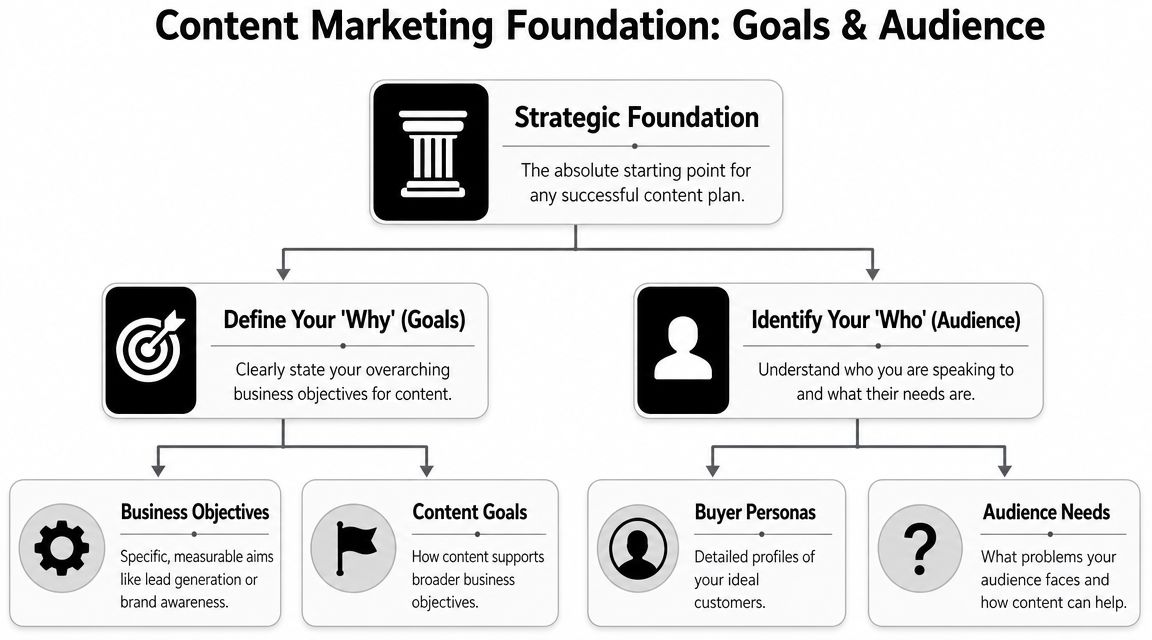
    Most important, make the process repeatable. The businesses that get outsized SEO results aren't always the ones with the best writer in the room. They're the ones that keep publishing useful, structured, authoritative content without dropping the ball after three weeks.

    If you're a solo founder or lean in-house team, don't wait for ideal conditions. Start with one cluster. Publish one serious pillar. Add supporting content. Track outcomes. Tighten the workflow. Then scale with tools that remove bottlenecks and keep production moving.

    That's how long form content turns from “something we should do” into a durable acquisition channel.


    Agency Secrets gives small business owners a practical path to do exactly that. If you want an agency-free SEO system built around buyer-intent keyword research, authoritative article production, backlinks, and compounding evergreen growth, start with Agency Secrets. It’s the clearest next step if you want to build a long form content engine instead of publishing one-off posts.

  • SEO for Small Business: The 2026 Playbook

    SEO for Small Business: The 2026 Playbook

    You’re probably doing what most small business owners do. You post on social media when you remember, boost a few posts, maybe run some ads, and hope something sticks. Then a month later you’re looking at the spend, looking at the leads, and wondering why marketing feels like rent instead of an asset.

    That’s exactly why seo for small business matters. Done right, it doesn’t behave like a campaign. It behaves like an engine. One useful page ranks, brings in customers, and keeps working long after you publish it. The problem is that most DIY SEO advice turns that engine into a second full-time job.

    You don’t need a giant checklist. You need the few actions that move revenue. This playbook strips SEO down to the work that drives sales, local visibility, and long-term growth, without forcing you to become a full-time marketer.

    Table of Contents

    Why SEO Is Your Best Investment in 2026

    You put money into ads on Monday, get calls on Tuesday, and watch the pipeline go quiet the week you cut budget. That cycle burns small businesses out. SEO gives you a system that keeps working after the initial setup, which is exactly why it deserves a bigger share of your 2026 marketing budget.

    Google’s own SEO starter guide makes the core point plain. Search visibility comes from building useful pages that search engines can understand and users can trust. For a small business, that matters because one well-built page can keep bringing in calls, quote requests, and store visits long after you publish it.

    A hand drawing a line graph illustrating SEO growth alongside a chaotic marketing spend black hole.

    Paid attention is rented

    Paid traffic is useful for launches, promotions, and short-term demand. It is not a durable growth engine for a budget-conscious business.

    SEO gives you owned visibility. A service page, location page, or product page can keep attracting buyers without daily babysitting. That is the difference small business owners should care about. You are building a sales asset, not feeding a meter.

    Practical rule: If a customer asks the question before they call, search for it, or compare options online, your site needs a page that answers it clearly.

    SEO compounds while ads reset

    The compounding effect is what DIY guides often miss. You do not need 200 blog posts and a color-coded content calendar. You need the few pages that drive revenue, a site structure that supports them, and a simple workflow to keep them updated.

    That is the 80/20 play. Publish the pages closest to a sale. Improve the pages already getting impressions. Automate the repetitive work, like performance checks, review requests, schema generation, and routine content updates. Small businesses win with consistency, not content volume.

    Here’s the blunt takeaway:

    Marketing channel What happens when you stop spending Long-term value
    Paid ads Traffic drops fast Limited unless continuously funded
    Social posting Reach fades quickly Inconsistent
    SEO Pages can keep attracting customers High if built well

    If your budget is tight, SEO is the practical investment. It lowers your dependence on ads, turns your website into a sales tool, and scales better when you use automation instead of doing everything by hand.

    Find Keywords That Drive Sales Not Just Clicks

    Most keyword research advice is useless because it trains you to chase volume instead of buyers. Traffic alone won’t save your business. You need search terms that map to money.

    The fastest way to improve seo for small business is to split keywords into three buckets: informational, commercial, and transactional. Then prioritize the phrases closest to revenue first.

    A funnel diagram illustrating three types of SEO keywords: informational, commercial investigation, and transactional.

    Stop chasing broad traffic

    A keyword like “how to fix a leaking pipe” may bring visitors. But if you’re a plumber, that search could be full of DIY people who never hire anyone. A keyword like “emergency plumber near me” is different. That search comes from someone who has a problem now and wants to pay someone to fix it.

    Use this lens when you evaluate every keyword:

    • Informational keywords help you build trust. They answer questions.
    • Commercial keywords catch people comparing options.
    • Transactional keywords bring in people ready to buy, book, call, or visit.

    Broad traffic feels productive. Buyer-intent traffic pays the bills.

    A busy owner should build pages in this order:

    1. Core service and product pages first. These target the searches closest to a sale.
    2. Location pages second. These win local demand.
    3. Supporting articles third. These answer questions and feed authority into the money pages.

    How a local service business should think

    Let’s say you run a plumbing company. Don’t start by writing general advice articles. Start with what a customer types when there’s urgency or intent.

    Good targets look like this:

    • Service plus city such as “water heater repair in Denver”
    • Problem plus city such as “drain cleaning in Denver”
    • Urgency plus service such as “emergency plumber near me”
    • Comparison intent such as “best plumber for sewer line repair”

    Now check Google itself. Type the phrase in. Look at autocomplete, People Also Ask, and the businesses already ranking. You’re not trying to be clever. You’re trying to match the wording customers already use.

    Then map each phrase to a dedicated page. Don’t cram five different services onto one vague page called “Our Services.” That’s lazy, and Google knows it.

    How an ecommerce store should think

    If you sell products online, the mistake is similar. Owners often write top-of-funnel content and ignore collection pages, product pages, and comparison content.

    Focus on searches like:

    • Product plus modifier such as “waterproof hiking backpack”
    • Use case searches such as “best backpack for weekend travel”
    • Comparison searches such as “leather tote vs canvas tote”
    • Brand or model intent if relevant to your catalog

    A simple workflow works well:

    Keyword type Best page type Business value
    Transactional Product page or collection page Highest direct conversion potential
    Commercial Comparison article or category guide Strong buying influence
    Informational Blog article or FAQ Builds trust and supports internal linking

    If you only have a few hours a month, don’t spend them writing random blog posts. Build the pages that answer “what do you sell,” “where do you sell it,” and “why should I choose you.” That’s where small business SEO gets practical.

    Structure Content That Ranks and Converts

    Most small business websites don’t have a content problem. They have a structure problem. The information exists, but it’s buried, vague, or written like a brochure.

    Google wants clarity. Customers want clarity too. If your page makes people hunt for the answer, it loses.

    A hand-drawn flowchart illustrating a website layout with an introduction, key benefits section, and call to action.

    The page structure that works

    A strong page should answer the main question immediately. Don’t spend four paragraphs warming up. If the page is about “roof repair in Austin,” say what you do, who you serve, and how to take the next step near the top.

    Use a clean hierarchy:

    • Headline that matches the search intent
    • Short opening that gives the answer fast
    • H2 sections for key subtopics
    • H3 sections for details, examples, FAQs, or proof
    • Call to action placed naturally, not hidden at the bottom

    This isn’t just for blog posts. It applies to service pages, product pages, location pages, and resource content.

    If a visitor can’t understand your offer in a quick scan, your page is underperforming before rankings even matter.

    Internal links are not optional

    Internal linking is one of the most ignored levers in seo for small business. It helps search engines understand what pages matter, and it helps visitors move from research to action.

    If you write a guide about “how to choose the right water heater,” link it to your water heater installation page. If you have a city page for “HVAC repair in Phoenix,” link it from broader service pages and related articles. This builds topical relevance and directs real users toward conversion pages.

    A good internal link system does three jobs:

    • Shows relevance by connecting related pages
    • Passes authority toward revenue pages
    • Improves navigation so visitors don’t stall on one page

    Here’s a useful explainer if you want to see how content structure supports rankings:

    A simple example

    Say you own a med spa. A weak site has one general services page and a few disconnected blog posts. A strong site looks more like this:

    1. A main Botox page
    2. Separate location pages for each target area
    3. Supporting articles like “Botox vs fillers” and “How long Botox lasts”
    4. Internal links from those articles back to the Botox service page and booking page

    That structure helps Google understand the site’s topic. It also helps a real customer move from curiosity to appointment.

    Don’t write content to “have a blog.” Write content that supports your service pages and gives your site a clear center of gravity.

    Master the Technical Basics That Matter

    Technical SEO scares small business owners because it sounds like developer territory. Most of it isn’t. You do not need to become technical. You need to stop ignoring the few technical basics that directly affect rankings, clicks, and usability.

    The highest-impact fixes are Core Web Vitals, mobile performance, and structured data.

    Fix speed first

    According to the 2026 SEO checklist for small businesses from AMST, the key projected Core Web Vitals benchmarks for 2026 are LCP under 2.5 seconds, CLS under 0.1, and INP under 200ms. The same source says optimizing for these can lower bounce rates by 24%.

    In plain English, this means your site should load fast, stay visually stable, and respond quickly when someone taps or clicks.

    Start with this checklist:

    • Audit before guessing using Google PageSpeed Insights or Lighthouse in Chrome DevTools.
    • Compress large images with tools like TinyPNG and use lazy loading where appropriate.
    • Minify CSS and JavaScript with tools such as Autoptimize, and defer non-critical scripts.
    • Use a CDN like Cloudflare if your site serves visitors across regions.
    • Check mobile first because that’s where weak sites usually break.

    If your site runs on WordPress, watch plugin bloat. Too many plugins, heavy themes, and page builders can turn a normal site into a slow one.

    Use schema so Google understands your business

    Structured data helps search engines interpret your pages more clearly. For small businesses, the most useful schema types are LocalBusiness, Product, Review, and FAQ.

    The Gen3 Marketing guide on advanced small business SEO tactics says implementing structured data can boost click-through rates by 20% to 30%, and notes strong use cases for rich snippets and AI overviews.

    A simple LocalBusiness JSON-LD example looks like this:

    <script type="application/ld+json">
    {
      "@type":"LocalBusiness",
      "name":"Business Name",
      "address":{
        "@type":"PostalAddress",
        "streetAddress":"123 Main St",
        "addressLocality":"City"
      },
      "telephone":"+1-xxx-xxx-xxxx",
      "openingHours":"Mo-Fr 09:00-17:00"
    }
    </script>
    

    Use Google’s Structured Data Markup Helper if you want assistance generating it, then validate it with Google’s Rich Results Test.

    Keep the technical stack lean

    Small business owners often make one technical mistake that causes five others. They stack tools, themes, widgets, and plugins until the site becomes fragile.

    Keep the setup simple:

    Technical area What to do What to avoid
    Speed Compress images, defer scripts, test mobile Oversized media and plugin overload
    Schema Add only relevant schema types per page Duplicated or invalid markup
    Hosting Choose reliable hosting and monitor performance Cheapest hosting with slow response

    Technical SEO doesn’t need to be advanced. It needs to be clean.

    If you only fix one part of your site this month, fix the pages that already attract impressions and leads. That’s where technical improvements pay off fastest.

    Win Your Local Area and Build Authority

    For most small businesses, national rankings don’t matter. Your market is local. Your revenue is local. Your authority should start there too.

    That means two things. First, you need a Google Business Profile that helps you win. Second, you need local trust signals that make your website look credible, not isolated.

    A sketched illustration of a red map location pin inside a glowing shield surrounded by small houses.

    Treat your Google Business Profile like a sales page

    A neglected profile is a wasted asset. Fill out every field you can. Make sure your business name, address, phone number, hours, service categories, and photos are accurate. Then keep it active.

    Here’s the practical standard:

    • Complete every core field so Google has no ambiguity about what you do.
    • Use real photos of your location, team, work, or products.
    • Collect reviews consistently and respond to them like a business owner, not a robot.
    • Match your site and listings so your contact details stay consistent everywhere.

    If you serve multiple nearby areas, create useful location pages on your site that support the profile. Don’t duplicate the same page and swap city names. Write pages that reflect actual services, neighborhoods, and customer needs.

    Local SEO works best when your profile, website, and customer reviews tell the same story.

    Build local authority the practical way

    Most small businesses don’t need some elaborate digital PR campaign. They need credible local mentions and relevant links.

    Good link opportunities usually come from things you’re already doing:

    • Sponsor something local such as a school event, charity run, or community program.
    • Join business organizations where your profile includes a real website link.
    • Partner with nearby businesses for local guides, resource pages, or event pages.
    • Publish useful local resources that people in your area would refer to.

    Examples work better than theory. A family law firm might publish a plain-English local guide to filing paperwork. A gardening professional might build a seasonal planting guide for the region. A pediatric clinic might create a back-to-school health checklist for local parents.

    Those pages do more than rank. They give chambers, local blogs, community groups, and nearby businesses something worth linking to.

    Keep your standards high. Don’t buy junk links. Don’t stuff city names into every paragraph. Don’t confuse “local SEO” with spam. The goal is simple: become the obvious local result for the services you provide.

    Scale Your SEO Without an Agency

    A common failing of small business SEO advice is this: The strategy might be sound, but the execution assumes you have spare time, a content team, and the patience to do repetitive work forever.

    You don’t.

    Manual SEO breaks small teams

    The core problem is capacity. According to the Network Solutions small business SEO guide, 70% of small businesses are solo-operated or have tiny teams. The same source says AI-driven automation tools can deliver 4x traffic growth in 6 months for bootstrapped sites, without the typical $5k per month agency fee.

    That’s why the usual advice fails. Manual keyword research, manual briefs, manual writing, manual publishing, manual optimization, manual outreach. It sounds disciplined on paper. In real life, it becomes another job you won’t sustain.

    The owners who win usually do one thing differently. They remove repetitive work from the process.

    What to automate first

    You should still control strategy. You should not personally handle every task inside the system.

    Automate the parts that are slow, repetitive, and easy to standardize:

    • Keyword discovery so you keep finding buyer-intent opportunities
    • Content production workflows so pages publish consistently
    • Optimization checks so articles follow clear on-page rules
    • Backlink support so authority grows without endless manual chasing
    • Competitor monitoring so you can react when rivals create better pages

    That doesn’t mean handing everything to a black box and hoping for miracles. It means building a repeatable workflow that keeps your site moving without constant willpower.

    Track a few simple signals in Google Search Console:

    Metric Why it matters
    Impressions Shows whether Google is surfacing your pages more often
    Clicks Shows whether titles and rankings are earning traffic
    Queries Reveals what buyers actually find you for
    Top pages Helps you identify winners worth improving further

    If you’re a solo founder or running lean, this is the right way to think about seo for small business. Keep your judgment. Automate the grind. Consistency beats intensity every time.


    If you want a practical, agency-free system for doing this without turning SEO into another full-time job, Agency Secrets is worth your attention. It breaks SEO down into the work that effectively drives growth, and its recommended workflow helps small business owners handle keyword research, content publishing, backlinks, and evergreen compounding without building a big team.

  • Evergreen Content Strategy: Boost Traffic & Sales in 2026

    Evergreen Content Strategy: Boost Traffic & Sales in 2026

    Evergreen content generates three times more traffic than time-sensitive articles, according to a 2026 HubSpot finding summarized here. That should change how most small businesses think about content.

    A lot of owners are still trapped in a publishing cycle that looks productive but creates very little lasting value. They post a quick reaction piece, a seasonal update, a short promotional blog, then repeat the process next week because traffic falls off almost immediately. The work never stops, yet the asset base never grows.

    An evergreen content strategy fixes that by shifting the goal. You stop treating content as disposable output and start treating it as infrastructure. A useful guide, tutorial, checklist, or pillar page can keep attracting search traffic, assist sales conversations, support email nurture, and answer customer questions long after it’s published.

    That matters even more for lean teams. If you run a local service business, an e-commerce store, or a small B2B company, you probably don’t need more random posts. You need a content system that keeps working when you’re busy serving customers.

    Table of Contents

    Stop the Content Treadmill Start Building Assets

    Most small businesses don't have a content problem. They have an asset problem.

    They publish often enough, but too much of that work is tied to short-lived topics. A promotion expires. A platform update changes. A trend cools off. Then the post that took hours to write stops pulling its weight. The team moves on, but the workload stays.

    That cycle feels like momentum because something is always getting published. In practice, it acts more like rent than investment. You keep paying for attention, but you don't build much equity.

    Why more content often produces less leverage

    Time-sensitive content has a role. It can capture a spike of interest, support a launch, or give your brand a reason to comment on something current. The problem starts when it becomes the whole strategy.

    When every article depends on novelty, your calendar controls you. You have to keep feeding it. That usually creates three issues:

    • The archive loses value: Old posts stop helping because they were never built to last.
    • Sales teams get weak support: Reps can't keep reusing content that goes stale fast.
    • SEO compounds slowly: Search performance gets scattered across disconnected posts instead of strengthening a topic over time.

    Practical rule: If a piece won't still help a prospect months from now, it probably shouldn't be the core of your content plan.

    What an asset-first mindset looks like

    An evergreen asset does more than rank. It answers a durable question your customers keep asking. Think "how to choose the right HVAC system," "what affects shipping costs," or "how to compare bookkeeping software for a small business."

    Those topics don't depend on a news cycle. They map to recurring customer intent.

    A strong evergreen content strategy treats each piece as something that can serve multiple jobs:

    Content type Short-term role Long-term role
    Buyer guide Supports active prospects Keeps attracting search traffic
    Tutorial Reduces pre-sale friction Becomes a reusable support asset
    FAQ hub Helps conversion pages Builds topical relevance over time

    This is the shift that matters. You stop asking, "What can we post this week?" and start asking, "What can we publish once, improve over time, and use everywhere?"

    For a small business, that's a much better game.

    What Is an Evergreen Content Strategy

    Think of content like a garden.

    A trending content garden needs constant replanting. You get a burst of color, then it fades. If you stop planting, it stops producing. An evergreen content strategy works more like a perennial garden. You choose the right plants, put them in the right places, maintain them on a schedule, and they keep growing back stronger.

    A hand-drawn illustration depicting plants labeled Evergreen, Sustainable Growth, and Seasonal to contrast growth strategies.

    That analogy helps because evergreen isn't about age. It's about continued relevance. A page can be published today and still be evergreen if the topic stays useful over time.

    What counts as evergreen

    Evergreen topics solve recurring problems, explain stable concepts, or guide buyers through decisions that don't disappear. Good examples include:

    • How-to guides: step-by-step instructions tied to enduring needs
    • Beginner explainers: pages that answer foundational questions
    • Comparison resources: content that helps buyers evaluate options
    • Operational checklists: repeatable processes customers want to follow
    • Core FAQs: answers your team gives repeatedly in sales or support

    These formats work because they align with persistent intent. People keep searching for them, and businesses keep benefiting from having them published.

    What doesn't count

    Some content should never be mistaken for evergreen:

    • News reactions
    • Seasonal promotions
    • Year-specific trend posts
    • Short-lived platform updates
    • Announcements with an expiration date

    That content isn't bad. It's just not a durable foundation.

    Evergreen content should still feel useful after the original campaign ends.

    The strategy is bigger than the article

    A lot of teams misunderstand evergreen by treating it as a writing style. It isn't. It's an operating model.

    The strategy includes topic selection, keyword filtering, content format, internal linking, update cadence, and repurposing. It also includes deciding where current content fits. Some businesses need a few trend-driven pieces for social reach or launch support, but those should sit on top of a stable evergreen base, not replace it.

    A practical way to judge a topic is simple. Ask three questions:

    1. Will customers still care about this later?
    2. Can sales or support reuse it?
    3. Can it connect to other pages on the same topic?

    If the answer is yes to all three, you're probably looking at evergreen potential.

    The Compounding ROI of an Evergreen Approach

    The primary advantage of an evergreen content strategy isn't that it sounds disciplined. It's that the economics are better.

    A trending article often acts like a campaign expense. It gets attention, then tapers off. An evergreen asset behaves more like owned media. It can keep producing traffic, support conversions, and create linking opportunities long after publication. That changes the return profile of every hour you put into content.

    Start with the right content mix

    A useful baseline comes from Allied Insight's evergreen versus trending analysis, which states that an 80/20 evergreen-to-trending content ratio serves as the optimal baseline for B2B strategies, and that one original piece often generates five additional assets like infographics, videos, and case studies.

    That mix works because it protects both sides of the business. You keep enough timely content to stay relevant, but the bulk of your effort goes into pages that can keep earning results.

    For small businesses, that usually means your monthly calendar should be built around assets first, then topped up with reactive pieces only when they serve a clear purpose.

    Why the return compounds

    Evergreen content can improve performance in several ways at once:

    • Search value accumulates: A useful page can keep collecting impressions, clicks, and backlinks over time.
    • Sales enablement improves: One guide can answer objections in calls, emails, and landing pages.
    • Repurposing gets cheaper: A strong original article can become a short video, email series, lead magnet, or FAQ page without starting from zero.
    • Update costs stay lower than replacement costs: Improving an existing winner is usually more efficient than inventing a new post every week.

    That last point is where many owners miss the opportunity. They keep commissioning net-new content when a stronger move is often to expand, improve, and redistribute assets that already proved demand.

    Owner mindset: Don't ask whether a post performed in week one. Ask whether it can keep helping your business next quarter.

    Asset value versus activity value

    Here’s the trade-off in plain terms.

    Approach What you get fast What you keep later
    Trending-heavy publishing Short-term spikes and social hooks Limited residual value
    Evergreen-heavy publishing Slower early momentum in some cases Reusable assets and steadier search value

    This is why the system matters. If your team is always optimizing for immediate activity, you'll produce a lot and retain little. If you're building evergreen assets, each publication can strengthen the next one.

    A guide can become a cluster. A cluster can support a category page. A category page can help your whole domain rank better on a commercial theme. That isn't abstract theory. That's what sustainable content economics look like.

    The Core Components of a Winning Strategy

    A strong evergreen content strategy usually stands or falls before the writing starts. Most weak results come from one of three mistakes. The topic isn't durable, the format doesn't fit the intent, or the keyword target was chosen because it sounded good instead of because demand looked stable.

    A six-step infographic outlining a comprehensive evergreen content strategy blueprint for long-term marketing success and growth.

    Choose topics that survive your next campaign

    The best evergreen topics come from repeated customer questions. Look at sales call notes, chat transcripts, support tickets, quote requests, and product demos. If people keep asking the same thing, that topic has staying power.

    Good examples by business type:

    • Local services: repair timelines, cost factors, buying criteria, service comparisons
    • E-commerce: sizing guides, material care, compatibility, product selection help
    • B2B services: implementation steps, vendor evaluation, pricing models, common mistakes

    Bad topic selection usually sounds more exciting than useful. "Big changes in the market" gets attention for a minute. "How to compare payroll providers for a growing company" keeps earning its place.

    Pick formats built for long shelf life

    Format matters more than people think. Some formats naturally support skimming, updates, and internal links. Others age badly.

    The formats I trust most for evergreen work are:

    • Pillar guides for broad educational topics
    • Step-by-step tutorials for process-driven searches
    • Checklists for operational tasks
    • Comparison pages for evaluation-stage intent
    • FAQ libraries for recurring objections

    These formats hold up because they are modular. You can revise a section, add examples, improve structure, and keep the URL intact. That's hard to do with content built around novelty or opinion.

    A durable format makes maintenance easier. That becomes critical once your library grows.

    Filter keywords for staying power

    A simple technical filter can save you from a lot of wasted effort. Leadspanda's evergreen guidelines state that targeting keywords with sustained search volume of at least 1,000 monthly searches is a critical benchmark, because it signals durable interest rather than a short-lived spike.

    That doesn't mean every small business should ignore lower-volume terms. It means this threshold is a useful benchmark when you're evaluating whether a topic has broad, lasting demand.

    Use tools like Google Search Console, GA4, and your keyword platform of choice to check whether interest looks stable. Favor queries that are question-based, problem-based, or decision-based. Be careful with keywords that depend on dates, product releases, or temporary events.

    A practical planning table helps:

    Component What to look for What to avoid
    Topic Recurring customer problem Trend-driven curiosity
    Format Update-friendly structure One-off commentary
    Keyword Stable informational intent Short-term spike terms

    When those three line up, you don't just have an article idea. You have something worth building into a system.

    A Practical Playbook for Evergreen Execution

    Execution is where most evergreen plans fall apart. Teams either overcomplicate the process or they publish isolated articles with no structure behind them.

    A better approach is simple. Build one authoritative page, surround it with closely related support content, then maintain the cluster on a schedule.

    A hand selecting the Optimize step within a four-part marketing workflow process diagram.

    Start with one pillar, not ten blog posts

    Most businesses should begin with a pillar page. This is the main resource on a core topic your audience cares about. It should be thorough, well structured, and designed to answer the major questions around that topic in one place.

    That structure isn't just neat. It's effective. According to GWI's evergreen content strategy write-up, employing topic clusters, with a central pillar page linking to supporting articles, can lift cluster rankings by 15-25% within 6 months, and longer formats of 2,000-4,000 words rank 2x higher for informational intent.

    That makes the choice pretty clear. Don't scatter effort across thin posts. Build one strong hub.

    Build the cluster around real buying questions

    Once the pillar exists, create supporting pages that go deeper on subtopics. Each one should answer a specific question and link back to the pillar with clear anchor text. The pillar should also link out to those supporting pages where relevant.

    A simple cluster might look like this:

    • Pillar page: Complete guide to choosing a home security system
    • Support article: Wired versus wireless systems
    • Support article: What installation typically involves
    • Support article: Common mistakes when comparing providers
    • Support article: Maintenance checklist for homeowners

    This model works because it matches how people search. Some want the broad overview. Others want one narrow answer. Your cluster lets both paths strengthen the same topic.

    Internal links should help readers finish a decision, not just satisfy an SEO checklist.

    Use a simple editorial calendar

    Small businesses don't need a fancy content operation. They need consistency.

    Here’s a practical monthly rhythm:

    Week Primary task Output
    Week 1 Research core topic and search intent Pillar outline
    Week 2 Publish pillar page Main evergreen asset
    Week 3 Publish support article Cluster expansion
    Week 4 Refresh older page and re-promote Maintenance and distribution

    If you have more capacity, add another support article. If you have less, keep the rhythm but slow the volume. The system still works.

    Later in the process, this video gives a useful view of how evergreen planning fits broader SEO execution:

    Refresh before content decays

    Publishing is only half the job. Evergreen content needs upkeep.
    A lightweight refresh checklist keeps pages useful:

    1. Review search intent: Does the page still match what searchers want?
    2. Update examples: Remove anything dated or unclear.
    3. Strengthen internal links: Add links to new supporting pages.
    4. Improve readability: Tighten headings, bullets, tables, and summaries.
    5. Check conversion paths: Make sure the next step is obvious.

    What doesn't work is random rewriting. Keep the core URL and topic stable. Improve the page without turning it into something else. That's how you preserve momentum while making the asset stronger.

    Automate and Scale Your Strategy with OutRank

    The biggest myth about evergreen content is that it's low-effort. It isn't. It's lower waste.

    That distinction matters. A good evergreen content strategy still needs research, production, internal linking, optimization, republishing, and refresh cycles. For a solo founder or a small in-house team, that workload becomes the bottleneck long before strategy becomes the problem.

    A hand presses a red OutRank button to transform complex SEO strategy and analytics into optimized content results.

    Manual upkeep is where small teams get stuck

    At this stage, many content plans frequently falter. The first few articles go live, then daily business pulls attention elsewhere. No one updates old pages. No one expands clusters. No one checks which rankings slipped.

    That problem isn't theoretical. Evergreen Feed's analysis notes that evergreen content requires "active maintenance" to preserve authority, as static assets can see 20-30% traffic drops after 12 months, and it specifically frames this as a challenge for SMEs.

    If you're running payroll, handling service delivery, and answering leads, manual maintenance usually loses.

    What automation should handle

    Here, a tool like OutRank becomes useful. Not because it replaces strategy, but because it removes repetitive production work that small businesses struggle to do consistently.

    The right automation layer should help with:

    • Keyword discovery: surface relevant search opportunities tied to stable intent
    • Content production: generate structured drafts at a consistent publishing pace
    • Competitor analysis: identify gaps and themes worth covering
    • Publishing workflow: reduce the friction between draft and live page
    • Update cycles: flag assets that need revision before they slide

    For a lean operator, that changes the math. You don't need to build a mini agency inside the business just to keep your evergreen system alive.

    Automation should take over repeatable steps. Humans should still decide positioning, accuracy, and commercial relevance.

    What not to automate blindly

    There are real trade-offs here.

    Don't hand your strategy to a tool and assume output equals authority. If your offers are poorly positioned, your topics are off-target, or your internal linking is sloppy, automation will produce more of the wrong thing faster.

    Use tools for speed, but keep editorial judgment on these points:

    • Topic priority
    • Brand voice
    • Offer alignment
    • Accuracy checks
    • Conversion paths

    The businesses that win with automation don't abandon discipline. They use automation to protect discipline. That's what makes an evergreen content strategy accessible to small teams instead of just large marketing departments.

    Build Your Traffic Engine for 2026 and Beyond

    The businesses that get the most from content don't act like publishers chasing constant novelty. They act like asset builders.

    That's the key lesson behind an evergreen content strategy. You choose durable topics. You package them in formats that hold up. You structure them into clusters. You maintain them before they lose value. Then you automate the repetitive parts so the system keeps moving even when the team is busy.
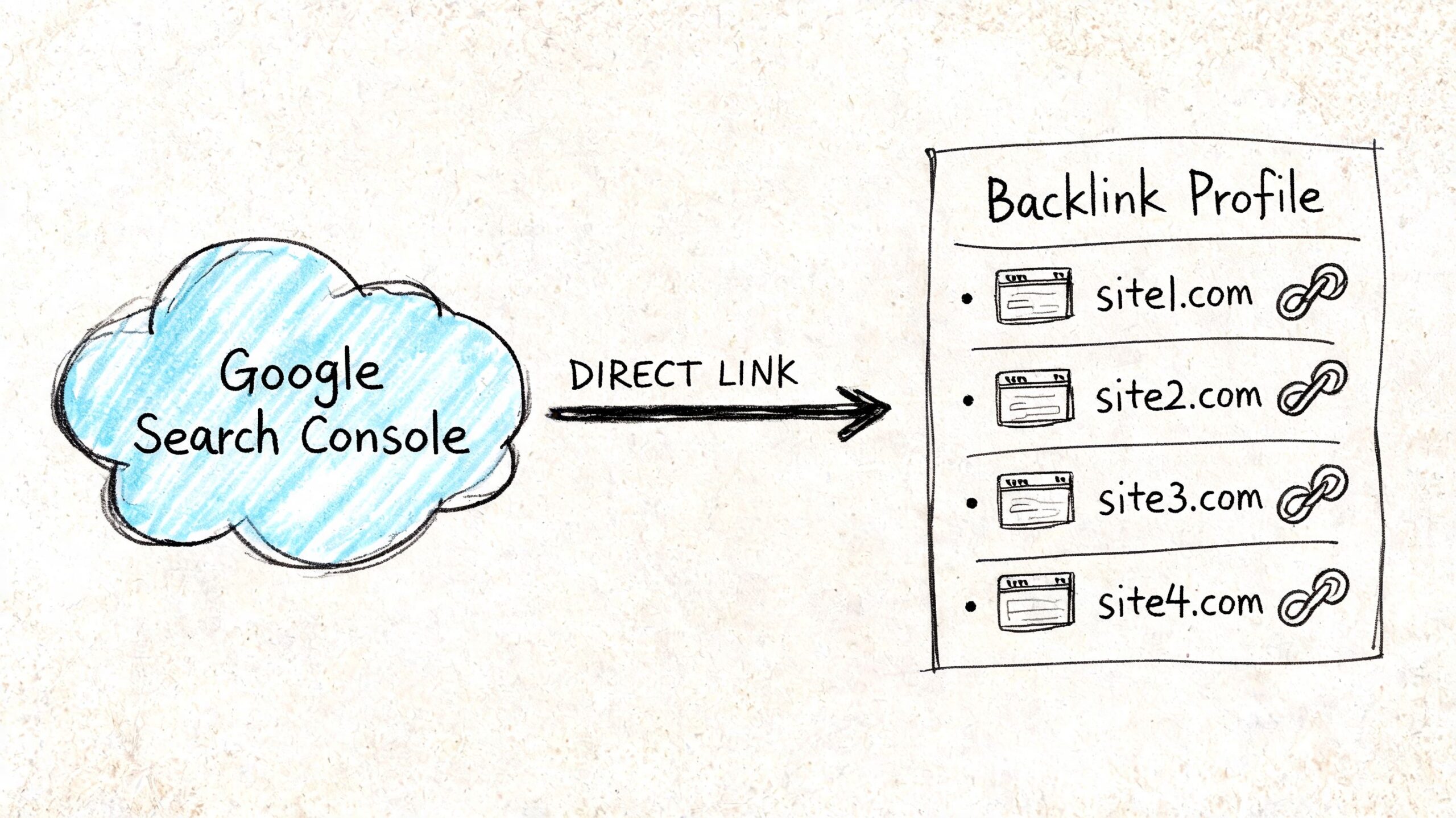
    This approach is better for ROI because it reduces waste. It is better for SEO because it builds topical depth. It is better for sales because prospects keep finding useful answers at the exact moment they need them. And it is better for small businesses because it doesn't require a giant budget to work.

    The trade-off is patience. Evergreen content usually asks for more planning up front and more discipline after publication. But the alternative is the treadmill. More posts, more scrambling, more short-lived spikes, and very little compounding value.

    A sustainable traffic engine isn't built from random output. It's built from a repeatable system.

    If you want content to keep helping your business months from now, start with one pillar page on a recurring customer problem. Build a cluster around it. Put a refresh date on the calendar. Then use automation where manual effort would otherwise stall the whole process.


    If you want a practical, agency-free way to put this into action, Agency Secrets shows small business owners how to build an SEO system around buyer-intent keywords, strong evergreen articles, relevant backlinks, and consistent publishing. It also points you to OutRank, which can automate large parts of that workflow so you can create, publish, and maintain search-driven assets without hiring a full team. Start there, test the system on one core topic, and build your traffic engine from the ground up.

    Refined using the Outrank tool

  • 10 Alternative Google Search Engines for 2026

    10 Alternative Google Search Engines for 2026

    Chasing every Google alternative is a poor use of a small business owner's time.

    The SEO question is simpler. Which search engines can bring qualified traffic or citations without creating a second full optimization workload?

    Google still sets the pace, and for many businesses it will remain the main source of search visibility. That does not make the rest of the field irrelevant. Buyers use Bing on work devices, privacy-focused users rely on DuckDuckGo and Brave, and answer engines are starting to influence which brands get cited before a click ever happens. If your business depends on search, putting all discovery risk in one platform is a weak position.

    The practical upside is that these engines do not all require separate campaigns. Some rely heavily on Bing or Google results. Some use their own index. Some matter less for raw traffic and more for brand discovery, citation visibility, or reaching audiences that behave differently from standard Google users.

    This guide focuses on the business and SEO implications of each option. The point is to help you decide where direct indexing work matters, where strong technical SEO already carries over, and where extra effort is unlikely to pay back.

    For a local service company, ecommerce brand, solo operator, or lean in-house team, that prioritization matters more than a feature list. The goal is not to be everywhere. The goal is to get found in the places that can expand visibility with the least wasted effort.

    Table of Contents

    1. Microsoft Bing

    Microsoft Bing

    Small businesses often overestimate how many Google alternatives deserve active SEO work. Bing is the exception. If resources are tight, this is usually the first platform to treat as a real acquisition channel, not a nice-to-have side project.

    The reason is practical. Bing has enough usage, enough commercial intent, and enough overlap with existing SEO workflows that the return can show up without building a separate search strategy from scratch. That makes it the best starting point for businesses that want to diversify search exposure without spreading effort across ten minor engines.

    Why Bing matters first

    Bing is usually the highest-priority alternative because the operational lift is low and the upside is real. In many accounts I have worked on, Bing traffic converts more like paid search traffic than experimental referral traffic. Users skew more desktop-heavy, often older, and often closer to purchase for local services, B2B research, and product comparison queries.

    It also has multiplier value. Bing powers Yahoo search, so better Bing visibility can extend into another search property without extra optimization work. Yahoo still operates at meaningful scale across search and media properties, which gives Bing more business relevance than its headline reputation suggests.

    For a small business owner, the useful question is not "How different is Bing from Google?" The better question is "What prevents my existing site from being understood and indexed cleanly by Bing?"

    The answer is usually one of three things:

    • Bing Webmaster Tools is not set up: No sitemap submission, no indexing diagnostics, no crawl visibility.
    • Local and entity signals are weak: Business name, address, phone, service area, and category details are inconsistent or vague.
    • Pages are clear to humans but muddy to crawlers: Important service pages lack direct headings, supporting copy, or obvious topical focus.

    Practical rule: If your site performs reasonably on Google but barely appears on Bing, check crawl access, indexation, and page clarity first. In a lot of cases, Bing has not fully processed the site rather than rejecting the content.

    Bing also tends to reward straightforward SEO. Clear titles, descriptive headings, strong internal site structure, and explicit location or service information go a long way. Businesses that rely on thin city pages, weak category architecture, or brand-heavy copy often underperform here.

    That is the trade-off. Bing can be easier to improve than Google, but it is less forgiving when your site structure is vague. If you want one alternative search engine to prioritize first, Bing usually earns that spot because the path from technical cleanup to measurable traffic is shorter than on the smaller players.

    2. DuckDuckGo

    DuckDuckGo

    DuckDuckGo matters less as a platform you optimize for directly and more as a distribution layer you influence through the sources it trusts. That distinction matters for small businesses, because it changes the work. The goal is usually not to build a separate DuckDuckGo SEO playbook. The goal is to make sure your site is readable, indexable, and strong in the ecosystems DuckDuckGo draws from.

    That makes DuckDuckGo a second-priority engine for many local and service businesses. It can send qualified traffic, especially from users who want cleaner results and less tracking. But it rarely deserves the same level of direct effort as Bing, because you have fewer levers to pull.

    What actually improves visibility on DuckDuckGo

    The businesses that do best here usually get the basics right and avoid overcomplicating things.

    • Get your core pages into shape: Service pages need clear headings, plain language, and obvious topical focus.
    • Treat Bing performance as an input: DuckDuckGo often reflects how well other sources can understand your site, so weak visibility upstream usually shows up here too.
    • Answer the query fast: Pages that bury the main answer under branding, vague intros, or filler tend to underperform.
    • Build for trust, not SERP gimmicks: Strong page structure, accurate business details, and useful copy matter more than chasing every search feature.

    DuckDuckGo is also a good reality check for businesses that rely too heavily on personalization-driven assumptions. Users here are more likely to see a cleaner, less customized result set. If your page only wins when search history, location cues, or heavy brand familiarity do the work, that weakness becomes easier to spot.

    For local SEO, the trade-off is straightforward. DuckDuckGo can produce useful exposure, but its local experience is often thinner than Google for map-heavy, high-intent searches. A plumber, dentist, personal injury lawyer, or med spa should treat it as a supporting channel, not the main local acquisition engine.

    Practical rule: If your business depends on nearby customers finding you at the moment they need help, improve your site and local signals for broader search visibility first. DuckDuckGo benefits usually follow from that work rather than from channel-specific tweaks.

    This is why I would prioritize DuckDuckGo after Bing, not before it. For a small business owner, the upside is real but the path is indirect. Clean technical SEO, strong service pages, and consistent business information do most of the work. If those pieces are weak, DuckDuckGo will not give you a shortcut.

    3. Brave Search

    Brave Search

    Brave Search deserves more attention than it usually gets. Small businesses often dismiss it because the audience is smaller than Google or Bing. For SEO, that misses its true benefit.

    Brave runs on its own index to a much greater extent than many privacy-first search tools. That matters because it gives you a cleaner read on whether your pages are understandable, well-linked, and useful without leaning so heavily on Google or Bing's interpretation of the web.

    I use Brave less as a volume play and more as a diagnostic tool.

    If a service page ranks in Google and Bing but disappears or slides badly in Brave, I do not treat that as random noise. It usually points to one of a few problems. The page may be too template-heavy, the entity signals may be weak, the copy may say the same thing as every competitor, or the internal linking may not give the page enough context. Brave can expose those weaknesses faster than another round of rank tracking inside the same two major ecosystems.

    Where Brave is useful for businesses

    Brave is worth checking if your customers skew toward privacy-aware users, software buyers, technical audiences, crypto-native communities, or younger web users who have already switched browsers. For those segments, Brave traffic may stay modest but commercially relevant.

    It also has a clear SEO use case beyond traffic. Brave helps answer a practical question. Does your site have enough topical depth to travel across indexes?

    From a business and prioritization standpoint, Brave is useful in three ways:

    • Independent-index visibility check: Search your core terms in Brave to see whether your main money pages still surface without the same ranking assumptions you see in Google and Bing.
    • Content planning from real discussions: Brave's Discussions feature can reveal forum threads and community conversations that point to objections, pain points, and phrasing worth using in content.
    • Competitive gap spotting: On some queries, Brave gives smaller publishers more room. That makes it easier to see whether a large brand is winning because it is better or because the dominant engines already trust it.

    There is a trade-off. Brave can be less consistent on obscure long-tail searches, especially in very narrow local or niche B2B categories. A small business owner should not treat that as a reason to ignore it. Treat it as a signal about channel priority. If your revenue depends on broad local pack visibility or high-volume commercial terms, Bing usually deserves work first. If you publish educational content, comparison pages, or niche expertise pieces, Brave is a smart secondary check because it shows whether your authority travels outside the usual ranking stack.

    That is why I would rank Brave below Bing for direct acquisition, but above a lot of smaller alternatives for SEO diagnosis. It helps you find weak pages, thin topic coverage, and over-optimized copy before those issues spread across the rest of your search visibility.

    4. Startpage

    Startpage

    Startpage is the easiest search engine on this list to misunderstand. Users often treat it as a completely separate alternative. For SEO, that's usually the wrong frame.

    Startpage is best understood as a privacy layer in front of Google-style results. Users choose it because they want Google's relevance without Google's tracking footprint. For a business owner, that changes the tactical question from "How do I optimize for Startpage?" to "Am I already strong enough in Google's core organic results to benefit when users choose a privacy wrapper?"

    What Startpage means for your SEO

    For most sites, there isn't a separate Startpage playbook. If your pages already rank well in Google, you have the best chance of appearing well in Startpage's results too. That makes Startpage less of a new SEO channel and more of a hedge against users who are leaving Google at the interface level, not necessarily at the results level.

    That said, there are trade-offs:

    • Great for preserving existing SEO gains: If you already publish strong evergreen content, Startpage can extend visibility to privacy-first users.
    • Less useful as a direct optimization target: You won't usually get special tactics to gain Startpage-specific traffic.
    • Different SERP features: Some rich-result behaviors won't look identical, so click behavior can change.

    What works here is boring and effective. Publish pages with clear search intent, answer the main query early, avoid fluff, and make sure your page can earn a click without depending on flashy SERP extras. That's especially true for service pages, buying guides, and category content.

    Startpage is a reminder that privacy shifts don't always create a new ranking game. Sometimes they just reroute users to a cleaner version of the old one.

    If your Google rankings are weak, Startpage won't save you. If your Google rankings are strong, it can preserve reach among users who don't want to search inside Google's front door.

    5. Kagi

    Kagi

    Kagi matters less for volume than for signal.

    It runs on a paid model, not an ad model, which changes the kind of user it attracts and the kind of pages that tend to hold up. Kagi searchers are usually paying to avoid clutter, recycled advice, and pages built to capture clicks before they deliver value. For a business owner, that makes Kagi less of a traffic play and more of a quality filter.

    That filter is useful. If your site performs well in Kagi, you're often doing something right at the content level, not just checking technical SEO boxes.

    Who should care about Kagi visibility

    Kagi belongs higher on the priority list for B2B SaaS companies, consultants, niche publishers, technical service firms, and premium ecommerce brands. These businesses often sell to buyers who research carefully and have a low tolerance for fluff.

    Local service businesses can mostly treat Kagi as a secondary channel. A roofer, dentist, or emergency plumber is unlikely to see enough demand there to justify Kagi-specific work unless the brand also publishes strong educational content that reaches a national audience.

    The practical SEO takeaway is simple. Do not build a separate Kagi strategy. Use Kagi as a pressure test for whether your pages deserve to rank in any serious search environment.

    What usually works on Kagi:

    • Original expertise: First-hand insight, strong opinions, and real examples beat generic summaries.
    • Clear topical focus: Sites with a defined niche tend to make more sense here than broad sites covering everything.
    • Clean page experience: Heavy popups, ad clutter, and bloated templates work against the expectations of Kagi users.
    • Direct answers: Pages that get to the point quickly have a better shot than pages padded for word count.

    I like Kagi as an audit tool for high-consideration businesses. Search your main commercial and informational terms there. If thin comparison pages or vague listicles outrank your best work, the problem usually is not that Kagi is broken. The problem is that your content is easier to index than to trust.

    For small businesses, that is the essential value of Kagi. It helps you separate visibility from credibility.

    6. Mojeek

    Mojeek

    Mojeek is a true independent crawler, and that independence is its biggest strength and biggest weakness.

    For businesses, Mojeek is rarely a major traffic source. But it does something useful that larger engines often don't. It gives you another reading on whether your pages are discoverable and understandable without leaning on a dominant ecosystem's assumptions.

    When Mojeek is worth the effort

    If you're a publisher, technical founder, privacy-focused brand, or niche ecommerce operator, Mojeek can be worth checking manually. For everyone else, it sits lower on the action list.

    Its practical value comes from contrast:

    • Index independence: You're not just seeing a recycled version of the same ranking stack.
    • Smaller ecosystem: Thin authority or weak site structure shows up faster.
    • Limited local depth: If you rely on maps, business profiles, and local intent modifiers, Mojeek won't be your primary growth lever.

    The downside is obvious. Result relevance can be mixed, especially for very specific or local queries. That aligns with the broader issue noted earlier: independent engines can struggle with niche long-tail precision. For a plumber or med spa, that limits the upside. For a specialist blog or high-expertise site, it can still be a useful secondary check.

    Use Mojeek like a diagnostic tool, not a primary acquisition channel.

    If your content is clear, crawlable, and tightly focused, you'll usually have a better chance of surfacing across independent engines over time. If your pages only perform when massive platforms validate them, Mojeek tends to expose that quickly.

    7. Qwant

    Qwant

    Qwant sits in an interesting middle ground. It's privacy-oriented, Europe-leaning, and useful for businesses that care about visibility beyond a US-only search mindset.

    If your customers are concentrated in Europe, or your brand story leans hard into privacy and data restraint, Qwant deserves more attention than most US-centric SEO guides give it.

    Best fit for Qwant

    Qwant isn't usually where a local US roofer or dentist should spend extra time. But for SaaS companies, ecommerce brands shipping across Europe, publishers with multilingual content, and regulated industries that benefit from a more privacy-aware audience, it can be relevant.

    The practical trade-off is familiar. Coverage can rely partly on outside infrastructure, so your success often still depends on strong core SEO fundamentals rather than Qwant-specific tricks.

    A few situations where Qwant matters more:

    • European market positioning: If your business sells to privacy-aware European buyers, search alignment matters.
    • Brand trust: A privacy-forward search environment can be a better fit for serious informational content than ad-heavy SERPs.
    • Multilingual support: Clear language targeting and structured site architecture matter more than clever SEO hacks.

    Qwant is not a volume-first opportunity for most small businesses. It's a fit-first opportunity. If your market and message align, that's enough reason to include it in your periodic visibility checks.

    8. Ecosia

    Ecosia is often treated as a feel-good consumer choice. For business owners, it matters more than that because mission-driven search behavior can overlap with purchase behavior.

    Users who choose Ecosia aren't only making a privacy or convenience choice. They're signaling values. If your brand sells eco-friendly products, sustainable services, ethical fashion, refill systems, local goods, or low-waste home solutions, Ecosia traffic can be unusually aligned even if it isn't massive.

    What Ecosia changes for small businesses

    Ecosia works best as a drop-in search alternative, and that means your SEO gains usually come from solid underlying indexing rather than bespoke optimization. If your site already performs well in mainstream search, especially on non-brand informational and commercial queries, you have a better chance of earning visibility here too.

    That creates a useful strategic filter:

    • Strong fit for values-led brands: Sustainable brands can benefit from audience alignment.
    • Weak fit for SERP-feature dependence: If your strategy relies on rich shopping units or heavy local pack behavior, the upside is narrower.
    • Good support channel, not core channel: Treat it as diversified demand, not your main acquisition engine.

    The brands that do best with Ecosia usually don't change their SEO just for Ecosia. They improve category pages, publish specific buying guides, and make trust signals obvious. Certifications, sourcing details, product materials, shipping info, and transparent business practices matter because the audience cares.

    That same discipline helps everywhere else too. Ecosia rewards clarity and values alignment more than gimmicks.

    9. You.com

    You.com is less useful as a classic search engine comparison and more useful as a signal about where search behavior is heading. People use it to blend web search, AI assistance, summarization, and task completion in one place.

    That matters if your business produces content that needs to be cited, summarized, or surfaced as an answer instead of just clicked as a blue link.

    How to think about You.com traffic

    I wouldn't build a small business SEO plan around You.com traffic alone. The interface and product direction can evolve fast, which makes it a poor candidate for channel dependency. But it is a good place to pressure-test your content architecture.

    Pages that tend to surface well in AI-forward environments usually share a few traits:

    • Direct question-answer structure: The page states the answer early.
    • Scannable hierarchy: Headings map cleanly to subtopics.
    • Distinctive value: The content adds expertise, examples, or a point of view instead of remixing common advice.

    If you run a B2B service, software product, agency, or education-led brand, You.com is worth monitoring because your buyers may use it during research, not just casual browsing. They may never visit your homepage first. They may encounter your explanation inside an AI-assisted result path.

    That changes how you write. Dense brand copy and vague positioning pages don't travel well in these environments. Crisp definitions, strong comparisons, and practical guidance do.

    10. Perplexity

    Perplexity matters less as a traffic channel than as a preview of where organic visibility is heading. It rewards pages that can be cited inside an answer, not just pages that win a click from a results page.

    For a small business, that changes the SEO question. The goal is no longer only "Can this page rank?" It is also "Would an answer engine trust this page enough to quote it?"

    How to evaluate Perplexity for SEO

    Perplexity is still a secondary priority compared with Bing for direct traffic and compared with Google for overall demand capture. I would not treat it as a primary acquisition channel for a local service business, a simple ecommerce catalog, or branded searches.

    It matters more if your sales process includes research. That usually applies to B2B services, software, healthcare, finance, education, legal content, and any business where buyers compare options before they contact you.

    Pages that tend to perform better in Perplexity usually share a few practical traits:

    • They answer the core question early: The reader and the model can find the main point fast.
    • They support claims clearly: Facts, examples, methodology, and firsthand experience are easy to identify.
    • They separate topics cleanly: Strong headings and focused sections make the page easier to parse and cite.
    • They add something specific: Original examples, comparisons, or expert commentary give the page a reason to be referenced.

    One pattern shows up often. Thin SEO pages can still rank in traditional search for lower-competition queries, but they are weaker candidates for citation. Perplexity tends to favor content that explains, compares, and substantiates.

    That is the trade-off.

    If your team publishes short landing pages built around keyword variations, Perplexity is unlikely to become a meaningful visibility source. If you publish decision-stage guides, product comparisons, pricing explainers, FAQ hubs, and expert-led articles, it is worth tracking now.

    The business implication is straightforward. Do not build a full SEO plan around Perplexity traffic, but do use it as a quality filter. If your page cannot earn a citation in an answer engine, it often needs stronger structure, clearer claims, or more original insight anyway.

    Top 10 Google-Alternative Search Engines Comparison

    Engine Core Strengths (✨) SEO Value & Features (🏆) UX & Quality (★) Best For (👥) Pricing / Value (💰)
    Microsoft Bing ✨Broad web/image/video/shopping + AI answers 🏆Strong commercial intent coverage; webmaster/indexing tools ★★★★☆ Fast, mainstream SERPs (ads present) 👥E‑commerce, local businesses, Windows/Edge users 💰Free (ad‑supported)
    DuckDuckGo ✨Privacy‑first; “!bang” shortcuts 🏆Good for private SERP checks; fewer partner verticals ★★★★ Simple, ad‑light UI 👥Privacy‑conscious users & developers 💰Free (privacy‑focused)
    Brave Search ✨Independent index, Goggles & Discussions 🏆Transparent indexing; useful for ranking experiments ★★★★ Growing feature set, privacy‑forward 👥Researchers, bias‑sensitive searchers 💰Free (opt. paid features)
    Startpage ✨Proxy for Google results with strong privacy 🏆Google‑grade relevance anonymously (good testbed) ★★★★ Minimal, familiar Google‑like UX 👥Users wanting Google relevance without tracking 💰Free (some premium options)
    Kagi ✨Ad‑free, domain boosts/blocks & Lenses + Assistant 🏆Clean, research‑oriented SERPs; less SEO clutter ★★★★★ Premium, research‑friendly 👥Researchers, professionals, power users 💰Subscription required (premium value)
    Mojeek ✨Own crawler + strict privacy 🏆Independent coverage; good for cross‑checking indexes ★★★ Compact, utilitarian UX 👥SEO auditors & independence‑seeking users 💰Free (independent value)
    Qwant ✨European privacy defaults & region focus 🏆Europe‑centric perspective; mixed partner sources ★★★ Simple, ad‑light interface 👥EU users and privacy‑minded audiences 💰Free (ad‑light)
    Ecosia ✨Search funds tree‑planting; transparent mission 🏆Everyday queries with basic privacy protections ★★★ Easy, eco‑focused UX 👥Environmentally conscious users 💰Free (mission‑driven value)
    You.com ✨AI chat + app‑like verticals & developer APIs 🏆Retrieval + summarization; integration friendly ★★★★ Versatile, experiment‑friendly 👥Teams building AI workflows & developers 💰Free + paid tiers/APIs
    Perplexity ✨Source‑backed answers with inline citations 🏆Great for multi‑step research & competitive intel ★★★★ Fast, synthesis‑oriented UX 👥Researchers, analysts, content strategists 💰Free / Pro / Enterprise tiers

    How to Prioritize Alternative Search Engines for Your Business

    Seeing a list like this can push small businesses into the wrong mindset. You don't need a ten-engine optimization program. You need a sensible order of operations.

    Start with Bing. It is the most practical second engine for most businesses, especially if you sell in the US, rely on desktop traffic, or want visibility that can extend into other search experiences connected to Microsoft's ecosystem. Set up Bing Webmaster Tools, submit your sitemap, inspect index coverage, and make sure your core service, category, and location pages are crawled. This is not optional.

    After that, think in clusters instead of individual engines. DuckDuckGo and often other privacy-first alternatives reward the same foundational work. Strong indexing, clear page structure, useful content, and solid authority signals carry farther than platform-specific tinkering. If your site is thin, slow, or unclear, these engines won't rescue it. If your site is authoritative and easy to understand, they often pick it up with very little extra effort.

    The next tier is where strategy matters more than volume. Startpage matters if you want to preserve reach among users who still want Google-grade relevance without using Google directly. Brave matters if you want exposure in a more independent search environment and a better read on whether your content stands on its own. Qwant and Ecosia matter when audience fit is stronger than headline traffic. That includes European reach, privacy-sensitive markets, and mission-led branding.

    Then come the answer engines and premium tools. Kagi, You.com, and Perplexity probably won't replace your main organic acquisition channel today. But they do affect how serious buyers research, compare, and validate options. If your content is generic, over-optimized, or built only for traditional rankings, these platforms expose that fast. If your content is clear, original, and structured around real questions, you're in a much better position.

    The biggest mistake I see is trying to "optimize for every engine" instead of building content that travels well across engines. Strong evergreen articles, tight internal linking, obvious topical authority, and pages that answer the query immediately still win. That's why a systemized publishing process matters so much. Agency Secrets points business owners toward that exact model through keyword research, authoritative article creation, backlinks, and the compounding effect of evergreen SEO. The broader point is sound even if your stack is different. Build assets once, and make them discoverable everywhere.

    Alternative google search engines aren't a side project anymore. They're part of a resilient search strategy. The businesses that treat them that way will be less dependent, easier to find, and better prepared for the next shift in how people search.


    If you want a practical way to build that kind of multi-engine visibility without hiring an agency, Agency Secrets is worth a look. It focuses on the parts that move SEO for small businesses: buyer-intent keyword research, publishing authoritative evergreen content, earning strong backlinks, and creating compounding organic growth over time. Its recommended workflow with OutRank is built for owners and lean teams who need execution, not theory.

    Built with the Outrank tool

  • How to Monitor Web Traffic: A Founder’s Guide for 2026

    How to Monitor Web Traffic: A Founder’s Guide for 2026

    You launched the site. The pages look sharp. Your offer is clear in your head. Then you log in a week later and ask the question almost every founder asks at some point: is anyone visiting, and if they are, are they the right people?

    That’s where most small businesses go wrong. They check a traffic number, feel either encouraged or discouraged, and move on. But how to monitor web traffic isn’t really about counting visits. It’s about learning which pages attract buyers, which channels send time-wasters, and where your site leaks revenue.

    If you run a low-volume, high-margin business, that distinction matters even more. A local service company, consultant, clinic, or niche e-commerce store doesn’t need a flood of random clicks. It needs the right visitors, on the right pages, taking the right actions.

    Table of Contents

    Beyond Visitors You Need to Understand Them

    A founder checks analytics and sees 100 visits for the week. The first reaction is often, "We need more traffic." Sometimes you do. Sometimes you already have enough of the right people visiting, but the site is doing a poor job turning interest into inquiries.

    That distinction matters a lot in small, high-margin businesses. If one qualified lead can turn into a project worth thousands, traffic monitoring should help you separate serious buyers from casual readers. Raw visit counts will not do that. You need to know which pages attract prospects, which sources send people who take buying actions, and where good opportunities stall.

    A pencil sketch of a hand interacting with a blank computer monitor screen with a question mark above.

    Why raw traffic numbers mislead founders

    Traffic totals flatten important differences.

    Someone who lands on a blog post, skims for 20 seconds, and leaves is not equal to someone who visits a service page, reads your pricing, checks your testimonials, and fills out a form. If both count as just "one visitor," you cannot tell whether your marketing is attracting buyers or tire-kickers.

    I see this mistake all the time with small firms that sell expensive services. They celebrate a spike in traffic from a broad informational article, then wonder why sales stay flat. The answer is usually simple. The traffic was cheap in effort or cost, but weak in commercial intent.

    A better rule is this:

    If a metric does not help you decide what to improve, promote, or stop, it is probably a vanity metric.

    Useful monitoring answers business questions such as:

    • Which pages start visits that turn into leads
    • Which traffic sources bring people who view pricing, case studies, or contact pages
    • Which content attracts the right-fit prospect instead of low-intent visitors
    • Where interested visitors hesitate or exit before contacting you

    What useful monitoring looks like

    Good monitoring connects attention to outcome.

    For a small business, that usually means tracking more than sessions and pageviews. Watch the path people take. Do they move from a search landing page to a service page? Do they visit your pricing page before they submit a form? Do referral visitors from a directory bounce, while visitors from local search spend time on bottom-of-funnel pages? Those patterns are much closer to ROI than a top-line traffic chart.

    This is also where trade-offs show up. A blog post that brings in a lot of visitors may still be worth keeping if it introduces qualified prospects to your brand and assists conversions later. On the other hand, a traffic source that sends volume but produces irrelevant inquiries can waste sales time, especially for lean teams.

    The goal is not to admire traffic. The goal is to identify which visits have business value.

    That changes the questions you ask. Instead of asking, "How many visitors did we get?" ask, "Which channel brings people who act like buyers?" Instead of asking, "Which page gets the most clicks?" ask, "Which page helps a prospect move one step closer to revenue?"

    A store owner would not judge a day by how many people walked past the window. They would care who came in, who asked informed questions, and who bought. Your website should be measured with the same standard.

    Choosing Your Traffic Monitoring Toolkit

    Most founders don’t need more tools. They need the right few, chosen for the right reason.

    Some businesses need deep event tracking and flexible reporting. Others need a simpler setup with fewer privacy headaches. If you operate in a regulated market, the wrong analytics stack can create compliance problems you only discover after the fact.

    Pick tools based on business risk

    GA4 is still the default for many businesses because it gives broad traffic and event visibility. If you want to monitor channels, page performance, and conversion paths in one system, it’s powerful.

    But power comes with trade-offs. The interface can be more than a small business owner needs, and for companies in stricter jurisdictions, privacy questions aren’t academic. As Shoplazza’s overview of site traffic tools points out, businesses in regions with strict data protection laws like the EU may need a privacy-compliant option such as Matomo because some setups involving Google Analytics can create compliance risk if not configured correctly.

    That means the right tool choice depends on more than price. It depends on what would hurt more in your business: limited reporting, setup complexity, or a legal cleanup later.

    Don’t choose analytics software the way people choose a to-do app. Choose it based on reporting depth, compliance exposure, and whether you’ll actually use it every week.

    Traffic Monitoring Tool Comparison

    Tool Type Best For Cost Key Feature
    GA4 Businesses that want broad traffic and conversion tracking Free Event-based analytics and flexible reporting
    Matomo Businesses that need stronger privacy control Paid or self-managed depending on setup Data ownership and privacy-focused analytics
    Built-in website platform stats Founders who want simple visibility fast Usually included with platform Quick view of traffic basics without extra setup
    Server log or host-level reporting Technical teams that want raw access data Varies Direct traffic records from the hosting layer

    A few practical calls:

    • Use GA4 if you want depth and are willing to invest time in setup.
    • Use Matomo if privacy compliance sits near the top of your risk list.
    • Use built-in platform stats if you need a quick pulse check, but don’t mistake them for a real decision system.
    • Use server-side or host reporting as a supplement, not your main dashboard, unless you’re unusually technical.

    For most founders, the worst option is not “the wrong tool.” It’s half-installing three tools and trusting none of them.

    Getting Your Tracking Codes in Place

    A lot of small business owners reach this point, paste in a tracking code, see pageviews coming through, and assume the job is done. Then six months later they still cannot answer a basic question: which traffic source brings actual buyers, not just people who browse and leave.

    That problem starts in setup.

    If your tracking only measures visits, you will overvalue channels that drive curiosity and miss the ones that produce qualified calls, booked consultations, and closed deals. For a low-volume, high-margin business, that mistake gets expensive fast. Ten visits from the right audience can matter more than 500 from the wrong one.

    A hand illustration showing how to embed a tracking script code snippet into an HTML document structure.

    Direct install versus tag manager

    You have two practical ways to install tracking. Put the base script directly on the site, or install it through a tag manager.

    Direct install is fine for a simple site with a few pages and one primary conversion action. It is usually faster to launch, and there is less that can break during setup. The trade-off is maintenance. Every new event, ad platform tag, or call tracking script may require another site edit.

    A tag manager takes a little more care up front, but it usually pays for itself once you want to track more than pageviews. If you expect to measure form submits, appointment clicks, checkout starts, phone taps on mobile, or traffic from multiple ad platforms, a tag manager gives you more control without asking your developer to touch the site every time.

    Use a simple decision rule:

    • Choose direct install if your site is small, your tracking needs are limited, and you want the fastest path to reliable basics.
    • Choose a tag manager if you plan to test campaigns, add events over time, or need cleaner control over multiple tags.

    Whichever route you choose, complete the setup in this order:

    1. Create the analytics property in your chosen platform.
    2. Install the base tag on every page, either directly or through your tag manager.
    3. Verify it fires on your main entry pages, service pages, contact page, and thank-you page.
    4. Set up your core conversion events before building reports.

    What to track from day one

    Founders often ask whether they should track everything. No. Track the actions that signal buying intent.

    For a local service business, a homepage view is weak evidence. A pricing-page visit, consultation request, financing-page click, or completed lead form tells you much more about commercial value. Those are the signals that help you judge traffic quality.

    Start with actions like these:

    • Form submissions on contact, quote, or service pages
    • Quote or consultation requests
    • Checkout starts for e-commerce
    • Key CTA clicks such as “book now,” “get pricing,” or “call today”
    • Thank-you page views that confirm a completed action

    The goal is not more events. The goal is cleaner decisions.

    If organic search sends fewer visitors than social, but those visitors request estimates at a much higher rate, you have learned something useful. If paid traffic drives lots of landing page visits but no booked calls, that traffic may be cheap and still unprofitable. Good tracking lets you spot that difference early.

    A short walkthrough helps if the setup feels abstract:

    If you use WordPress, Shopify, or Squarespace, the menu names will vary. The standard does not. Install the tag once, confirm it loads on the pages that matter, then test your important actions yourself. Submit the form. Click the booking button. Reach the thank-you page. If your analytics platform does not record those actions, fix that before you trust any traffic report.

    Building a Dashboard That Tells a Story

    A default analytics account gives you data. It doesn’t give you judgment.

    The right dashboard should help you answer business questions quickly, not admire charts. For a founder, the best dashboard is usually a one-page view that tells you whether traffic quality is improving, stagnating, or drifting toward the wrong audience.

    Start with five business questions

    A dashboard becomes useful when every widget earns its place. Keep only the views that help you decide what to do next.

    Start with these questions:

    • How many sessions are we getting
    • Where are those sessions coming from
    • Which pages bring people in
    • Which actions signal buyer intent
    • How does this compare with the previous period

    A flowchart diagram illustrating the six steps to transform raw web analytics data into actionable business insights.

    A session is one of the few web metrics that deserves first-page treatment. HubSpot defines sessions as a series of user activities on your site within a 30-minute window, and notes that healthy sites often average 2 to 3 pages per session and 2 to 3 minutes of duration in many cases. It also recommends monitoring sessions by source to understand which channels bring engaged visitors in its web traffic analytics documentation.

    That “by source” part matters more than the top-line number. Organic, referral, direct, email, and paid traffic often behave very differently. If one source sends short, shallow visits and another sends fewer but better sessions, the smaller source may deserve more investment.

    The simplest dashboard that works

    A founder dashboard doesn’t need twenty charts. It needs a clean reading of signal over noise.

    A strong version includes:

    Dashboard Element Why it matters
    Sessions trend Shows whether overall demand is rising or falling
    Sessions by source Reveals where engaged traffic comes from
    Top landing pages Shows which pages attract attention first
    Conversion actions Connects visits to business outcomes
    Period comparison Helps you spot direction, not just totals

    A good dashboard answers “What changed?” A great dashboard also answers “Why should I care?”

    One more rule. Keep your dashboard review short. If it takes longer than a few minutes to understand the story, the dashboard is doing too much. Founders need signal they can act on before the next meeting, not a new hobby in data analysis.

    Interpreting What Your Traffic Is Telling You

    Analytics becomes valuable when you stop reading numbers as verdicts and start reading them as clues.

    A founder sees “high bounce rate” and thinks failure. An analyst sees a starting point: wrong message, wrong audience, weak page structure, slow load, unclear offer, or a mismatch between the promise in the source and the reality on the page.

    How to read bounce rate without guessing

    Bounce rate is the percentage of single-page visits. It’s useful because it often exposes friction fast.

    According to Semrush’s website metrics overview, bounce rate averages 40 to 60% across industries, and a rate above that on a key landing page is a warning sign. If your services page shows a 70% bounce rate, that points to a problem in messaging, pricing clarity, or user experience.

    That doesn’t mean every high bounce is bad. A visitor may get the answer they needed and leave. But on a page meant to generate leads, high bounce with low inquiry volume usually means something is off.

    Use this diagnostic sequence:

    1. Check the source. Did the traffic come from a keyword or campaign that mismatches the offer?
    2. Check the message. Does the headline confirm what the visitor expected?
    3. Check the path. Is the next step obvious, credible, and easy to take?

    Ask “why?” three times for every bad metric. The first answer is usually too shallow to fix the real issue.

    Patterns that point to revenue problems

    Some combinations of metrics are more revealing than any single number.

    • High traffic and weak inquiries often means the content attracts interest but not buyers.
    • Strong engagement on one page and weak performance elsewhere usually means that page has a sharper promise than the rest of the site.
    • A spike from one article or referral source often signals a topic or channel worth expanding.
    • Traffic to informational pages without movement to service or product pages suggests your internal linking or calls to action need work.

    Low-volume businesses require discipline. If you only get a modest number of visits, each wrong click costs attention. You can’t afford to optimize for empty traffic.

    The better question isn’t “Which page has the most visitors?” It’s “Which page attracts people who act like future customers?”

    Troubleshooting and Automating Your Monitoring

    Even a well-built setup breaks. Plugins update, scripts disappear, pages change, and reports suddenly look wrong.

    The fix is to stop treating analytics as something you manually inspect only when you feel nervous. Build a baseline, then let the system alert you when something unusual happens.

    Fix the common failures first

    If traffic suddenly drops to zero, don’t start with panic. Start with the boring checks.

    • Check whether the tracking code still exists on the site after a theme or platform update.
    • Compare page coverage to make sure the script appears on all key templates.
    • Test a conversion action yourself and confirm it appears in the analytics tool.
    • Review date ranges and filters before assuming performance changed.

    If two tools disagree, that doesn’t always mean one is broken. Different platforms measure activity differently. What matters is whether your primary tool is consistent enough to support decisions.

    Use alerts so you stop babysitting dashboards

    The smarter model comes from network monitoring, not just marketing analytics. As Paessler’s guide to traffic analysis methods explains, the practical principle is to establish a baseline of normal traffic patterns first, then set meaningful thresholds so you catch real problems without creating alert fatigue.

    That approach works for founders too. Watch for significant deviations, not every wiggle.

    Useful alerts include:

    • Organic traffic drops on pages that usually bring leads
    • Sharp spikes to a specific page that may signal an opportunity
    • Conversion tracking failures when a key action suddenly stops recording
    • Channel anomalies when one source behaves far outside its normal range

    The point of automation isn’t more notifications. It’s fewer pointless dashboard checks and faster response when something matters.


    If you want a practical SEO system that goes beyond analytics and helps you turn traffic insights into content that attracts better leads, Agency Secrets is worth a look. It’s built for business owners who want clear execution, stronger organic visibility, and a simpler path to revenue without hiring a full agency team.

    Authored using Outrank