
You launch a product you know people want. The photos are clean. The price is competitive. Reviews start coming in. But sales stay flat because shoppers never see the listing in the first place.
That's the moment most sellers start searching for the best keyword research tool for Amazon. Not because they want another dashboard, but because they need a way out of guessing. They want to know which terms shoppers use, which competitor listings keep winning visibility, and how to turn that research into a listing that gets indexed and converts.
The mistake is thinking this is a tool problem first. It's a workflow problem. A good tool helps, but the win comes from using that tool to move from discovery, to prioritization, to listing execution, to ongoing refinement. That's where most Amazon keyword guides fall apart. They compare features, then stop right before the part that makes money.
Table of Contents
- Why Your Amazon Products Are Invisible
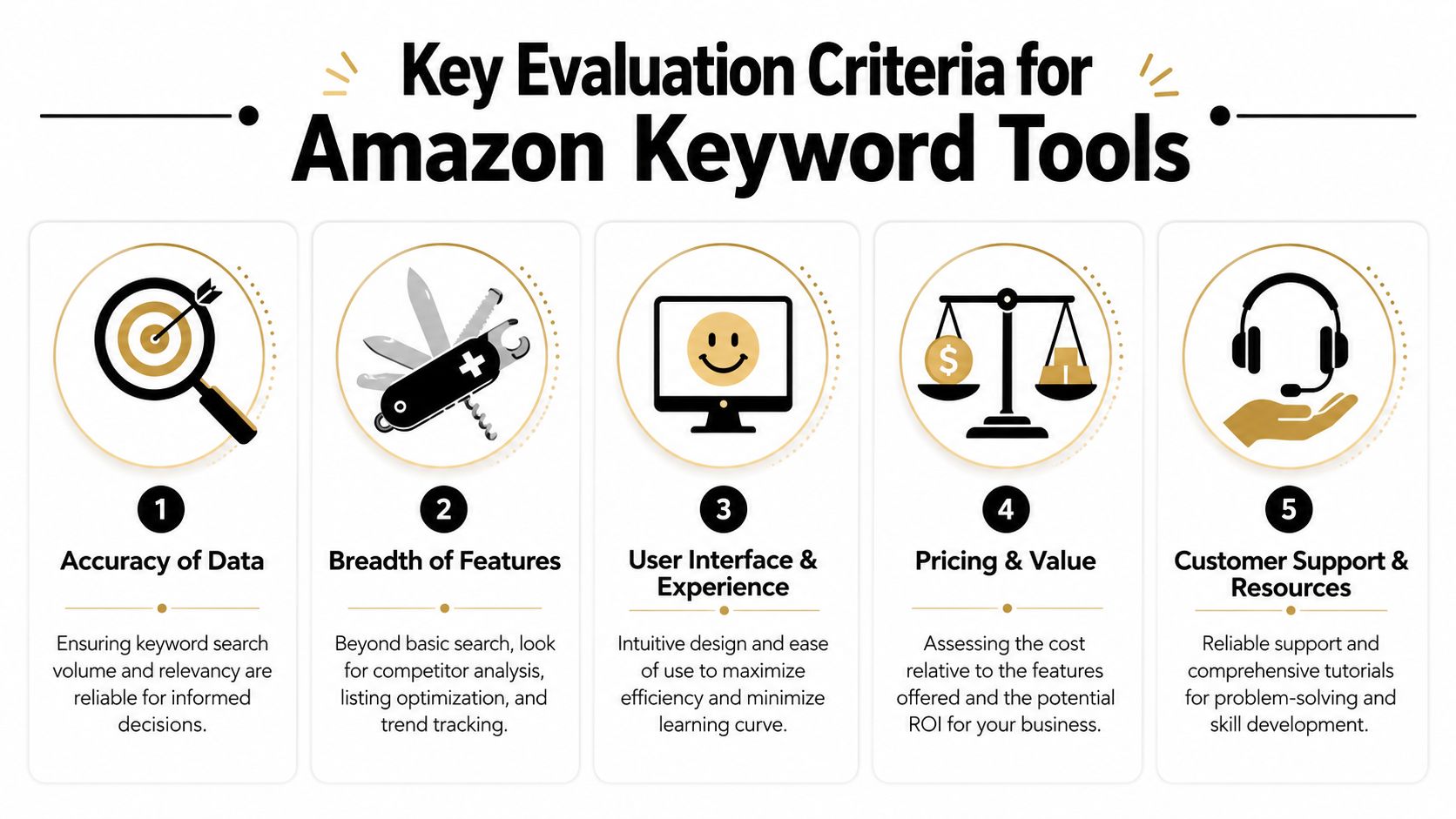
- The Core Criteria for Evaluating Amazon Keyword Tools
- A Head-to-Head Comparison of the Top 3 Tools
- A Practical Workflow from Keyword to Optimized Listing
- Our Final Recommendation and Your SEO Playbook
- Frequently Asked Questions About Amazon Keyword Research
Why Your Amazon Products Are Invisible
A lot of Amazon listings don't fail because the product is weak. They fail because the listing is written from the seller's point of view instead of the buyer's search behavior.
That usually looks like this. A seller writes “Premium Kitchen Board Set” because it sounds polished. Buyers search for “bamboo cutting board,” “large chopping board,” or “wood cutting board with juice groove.” The seller thinks the listing is optimized because the copy sounds professional. Amazon sees a weak relevance match, and the listing sinks.
This is why invisibility on Amazon feels so frustrating. You can have a better product than the top result and still lose because the algorithm can't confidently connect your listing to the searches that matter.
Most sellers don't need more hustle. They need a repeatable keyword playbook they can run every time they launch or refresh a listing.
The good news is that keyword research on Amazon isn't magic. It's a practical discipline. You start by finding the language buyers use, expand it with long-tail variants, study the terms competitors already rank for, and then map those keywords into the parts of a listing that influence discoverability and conversion.
The real problem isn't traffic alone
Low visibility usually comes from one of these issues:
- Weak relevance signals: The title and bullets don't align with high-intent product searches.
- Shallow keyword coverage: The listing targets one or two obvious phrases and misses the related variations buyers use.
- No competitor intelligence: The seller never checks which terms the winning ASINs are already owning.
- Poor workflow: Research lives in one spreadsheet, copy lives somewhere else, and nothing gets prioritized.
A seller who fixes those problems doesn't just “do SEO.” They build a system for getting found.
The Core Criteria for Evaluating Amazon Keyword Tools
Before naming a winner, it helps to define what a keyword tool should do for an Amazon seller. A flashy interface means nothing if it can't help you choose terms that match buyer intent and improve listing execution.
Here's the quick comparison before the deeper breakdown:
| Tool | Best for | Standout strength | Main trade-off |
|---|---|---|---|
| Helium 10 | Sellers who want depth | Strong reverse-ASIN workflow and broad keyword discovery | Can feel heavy if you only need a lean workflow |
| Jungle Scout | Sellers who want a smoother all-in-one experience | Balanced research environment with product and keyword workflows | Less appealing if your main priority is deep competitor mining |
| SellerApp | Sellers who want simpler keyword support with optimization help | Accessible workflow for research plus listing work | Not usually the first choice for sellers who obsess over data depth |
What good Amazon keyword data actually looks like
Amazon keyword research has changed. It's no longer about grabbing one broad phrase and repeating it everywhere. Amazon has documented a move from simple keyword matching toward a more advanced relevance model, and sellers are advised to prioritize relevance first, then search volume, keyword sales, click share, conversion share, competition, and PPC bid costs when choosing terms. Helium 10 also says its Magnet system processes billions of data points each day and presents itself as having the largest keyword database on the market, while its Cerebro workflow is built around reverse-ASIN discovery and trend review over the last year and longer, as described on Helium 10's Amazon keyword tool page.
That shift matters because it changes what “good data” means. You're not just buying search volume estimates. You're buying a way to assess fit, competitor overlap, and stability over time.
The five criteria that matter in practice
A keyword tool earns its keep if it helps with these five jobs:
- Reliable relevance signals: Search volume matters, but only after the term clearly matches the product. A tool should help you separate broad attention keywords from buyer-ready phrases.
- Reverse-ASIN research: Reverse-ASIN research offers a significant strategic benefit. You want to see what established listings rank for so you can close obvious gaps instead of brainstorming from scratch.
- Long-tail expansion: Amazon search is fragmented. Buyers describe the same product in different ways, and the tool should help you capture those variations.
- Listing integration: Research should feed directly into titles, bullets, descriptions, and backend terms. If the workflow breaks here, the research often dies in a spreadsheet.
- Usability and speed: A clumsy tool doesn't save time. It creates friction, and friction kills consistency.
Practical rule: If a tool helps you find keywords but makes it hard to act on them inside a listing workflow, it's only solving half the problem.
Another thing experienced sellers learn fast is that the “best” tool depends on the type of operator using it. A single-product bootstrapped seller doesn't need the same setup as a larger catalog brand. Some need faster wins and cleaner workflows. Others need deeper competitive intelligence because they're fighting in mature categories.
A Head-to-Head Comparison of the Top 3 Tools
The three names that come up most often in real Amazon selling conversations are Helium 10, Jungle Scout, and SellerApp. All three can help. They just help in different ways.

Helium 10
Helium 10 is the tool I'd put in front of a seller who wants to go deep. Its biggest advantage isn't that it gives you more keywords. It's that it encourages the right behavior: start with a seed term, branch into related phrases, then reverse-engineer the ASINs already winning the search results.
Helium 10's killer feature is the way it turns competitor ASINs into a keyword map you can actually work from.
That matters because modern Amazon keyword research isn't just about one head term. Amazon search behavior breaks into many long-tail queries, and Keyword Tool's Amazon documentation says its autocomplete-based generator can produce hundreds of long-tail keyword suggestions in seconds by pulling search-suggestion data from Amazon and other platforms. In practical terms, Helium 10 fits well into that reality because it supports broader coverage through idea generation, competitor intelligence, and trend review.
What works well with Helium 10:
- Competitor mining: Cerebro is built for reverse-ASIN workflows.
- Prioritization: It supports a more mature way to score terms instead of blindly chasing volume.
- Research depth: It's useful when you need to compare multiple competing listings before rewriting yours.
What doesn't work as well:
- Simplicity: Newer sellers can open it and immediately feel buried.
- Speed for casual users: If you only want a quick list of starter phrases, it can feel like using a full workshop to tighten one screw.
Jungle Scout
Jungle Scout usually appeals to sellers who want keyword research as part of a broader Amazon operating system. It tends to feel more approachable, and that matters if you need a tool your team will keep using.
Its strongest use case is the seller who doesn't separate product research, category observation, and keyword discovery into isolated tasks. If that's your workflow, Jungle Scout feels cohesive.
Jungle Scout's killer feature is balance. It doesn't always feel like the deepest specialist, but it often feels like the easiest place to keep moving.
That makes it a strong option for operators who want keyword insights without building an elaborate process around every listing refresh. It's especially workable for teams that value clarity over total control.
Good fits for Jungle Scout include:
- Established operators who want fewer moving parts
- Small in-house teams where multiple people touch the same workflow
- Sellers who prefer a cleaner learning curve
The trade-off is straightforward. If your strategy revolves around squeezing every competitive clue out of rival ASINs, some sellers still lean toward Helium 10's style of workflow.
A quick walkthrough helps if you're comparing interfaces and process in real time:
SellerApp
SellerApp tends to attract sellers who want keyword support tied closely to optimization and performance tasks without feeling buried in complexity. It often feels less like a researcher's playground and more like a practical operating environment.
SellerApp's killer feature is accessibility. It can be easier to turn insights into action when the platform doesn't overwhelm you.
That can be useful for a seller who knows they need better keywords but also needs help connecting those keywords to listing changes and advertising decisions. For that kind of user, a cleaner workflow can beat a more advanced one.
Here's the side-by-side at a glance:
| Criteria | Helium 10 | Jungle Scout | SellerApp |
|---|---|---|---|
| Reverse-ASIN depth | Strong | Good | Good |
| Long-tail discovery | Strong | Good | Good |
| Ease of use | Moderate learning curve | Easier for many sellers | Accessible |
| Best for competitor-driven optimization | Strong fit | Solid fit | Moderate fit |
| Best for straightforward execution | Good | Strong | Strong |
Which tool actually wins
If you define “best keyword research tool for Amazon” as the tool with the richest competitor-driven workflow, Helium 10 usually comes out ahead.
If you define it as the one your team is most likely to use consistently without friction, Jungle Scout becomes very attractive.
If you want a more approachable environment that still supports keyword work tied to listing execution, SellerApp deserves a serious look.
The wrong way to choose is to compare feature lists in isolation. The right way is to ask a blunt question: Which tool best matches the way you run listing optimization every week?
A Practical Workflow from Keyword to Optimized Listing
Most sellers stop too early. They collect keywords, feel productive, and never turn that research into a listing structure that can rank and convert. The useful workflow is simple enough to repeat, but disciplined enough to produce better decisions.

Start with discovery, not writing
Use a product example like bamboo cutting board.
First, pull a seed list. Start with your core product phrase, then expand into modifiers buyers naturally use. That usually includes material, size, feature, usage, and audience variations. You're looking for terms like “bamboo cutting board,” “large bamboo cutting board,” “wood cutting board for kitchen,” and feature-driven variants tied to how shoppers buy.
Then move to reverse-ASIN research. Find the top competing listings for your main phrase and inspect the keywords they appear to target. You're not copying their copy. You're identifying the search language Amazon already connects with this product type.
Build three buckets:
- Primary keyword for the clearest product-defining phrase
- Secondary keywords for close variations and adjacent high-relevance terms
- Long-tail phrases for specific buyer-intent searches
If a keyword sounds clever but not like something a buyer would type into Amazon, cut it.
Turn the keyword list into listing structure
Once the list is grouped, place terms based on role.
- Title: Put the primary keyword early. Use one or two strong secondary terms if they fit naturally.
- Bullet points: Work in feature-driven and use-case phrases. Here, secondary and long-tail terms do useful work.
- Product description: Use it to reinforce relevance and cover important phrases that didn't fit naturally elsewhere.
- Backend search terms: Add relevant variants, alternate phrasing, and leftover long-tail coverage that belongs in indexing but not in customer-facing copy.
A practical listing flow for the bamboo cutting board example might look like this:
| Listing element | Keyword job |
|---|---|
| Title | Main product phrase plus top qualifier |
| Bullet 1 | Core feature and related keyword |
| Bullet 2 | Size or use-case phrase |
| Bullet 3 | Material and durability wording |
| Description | Supporting variations and natural language coverage |
| Backend terms | Synonyms, alternate order, niche long-tail phrasing |
What works and what fails
What works is coverage with discipline. You want enough phrase variety that your listing matches many related searches, but not so much that the copy turns into nonsense.
What fails is stuffing. Sellers still do this. They jam every keyword into the title, repeat the same phrase across bullets, and end up with a listing that looks robotic. That approach usually hurts readability and often signals weak judgment.
A better rule is this: every keyword must serve both indexing and clarity. If it improves discoverability but makes the listing worse for a buyer, find a better placement.
Our Final Recommendation and Your SEO Playbook
If I had to choose one answer for the broad market, Helium 10 is the strongest pick for sellers who want the most complete keyword research workflow. It aligns well with how Amazon search has evolved, and it gives serious sellers the ability to work from relevance, trends, and competitor intelligence instead of guesses.
That said, the smartest recommendation depends on who's using it.
Best fit by seller type
Bootstrapped SMB seller
Start with the tool you'll use every week. If Helium 10 feels overwhelming, Jungle Scout or SellerApp may give you better execution because they reduce friction. A simpler workflow used consistently beats a powerful tool you avoid.
Established brand with a broader catalog
Helium 10 usually makes more sense here. Larger catalogs create more opportunities for overlap analysis, competitor mapping, and ongoing keyword refreshes across multiple ASINs.
Lean operator managing listings without a specialist team
Jungle Scout often fits well because it supports a practical all-around Amazon workflow. If you don't want your keyword process split across too many systems, it's a solid operational choice.
Seller focused on easier execution
SellerApp is worth considering if you want keyword support tightly connected to listing work and broader optimization tasks without a steeper learning curve.
What actually works long term
The sellers who win with Amazon SEO do a few things repeatedly:
- They refresh keyword coverage: Buyer language shifts, competitors adapt, and stale listings lose ground.
- They mine competitors carefully: Reverse-ASIN research keeps them close to real market behavior.
- They optimize for fit, not vanity: Relevance beats empty traffic.
- They treat keyword research as an operating habit: Not a one-time launch task.
The best keyword research tool for Amazon is the one that helps you keep shipping better listing decisions, month after month.
If you're choosing today, pick the platform that matches your complexity, then commit to one workflow. Don't spend months comparing tools while your listings sit under-optimized.
Frequently Asked Questions About Amazon Keyword Research
Do I really need a paid tool
Not always. If you're validating a very small catalog or learning how buyers phrase searches, free methods can still teach you a lot. But free research usually breaks down when you need scale, competitor analysis, and structured prioritization. Paid tools become more valuable when you're optimizing multiple listings or entering a competitive category.
How is Amazon keyword research different from Google SEO
The intent is different. On Amazon, the search is much closer to a purchase decision. That changes the kind of keywords that matter and how you evaluate them. Product discovery, category trend analysis, reverse-ASIN research, and autocomplete all play different roles depending on what you're trying to do.
Amazon's own guidance also separates product keyword discovery from broader category trend analysis, which is why one “best” tool answer often feels incomplete. Different seller types have different constraints, and Amazon highlights different use cases such as Product Opportunity Explorer for trend discovery versus reverse-ASIN and autocomplete for listing optimization in its guidance on Amazon keyword research for sellers.
Should I prioritize search volume or relevance
Relevance first.
That's the point many public guides still get wrong. Amazon's guidance and the strongest seller workflows don't reduce keyword selection to raw volume alone. The better question is whether a term fits the product, shows stable demand, reflects conversion potential, and avoids unnecessary competition.
That's also why so-called golden keywords matter. Sometimes the best target isn't the biggest phrase. It's the one that fits your product tightly, matches buyer intent, and gives your listing a realistic chance to compete.
For a bootstrapped seller, that distinction matters a lot. You usually won't beat entrenched listings by chasing the broadest term first. You win by covering the right set of relevant phrases better than the average competitor.
If you want the playbook behind this article in a practical, agency-free format, Agency Secrets is worth a look. It shows business owners how to win with keyword research, content, and backlinks without building a large team, and its recommended platform OutRank is built for operators who want that workflow automated instead of managed by hand.
Leave a Reply