Tag: small business marketing

  • Boost Traffic: Best SEO Software for Small Business

    Boost Traffic: Best SEO Software for Small Business

    You're probably in one of two situations right now. Either you've been trying to do SEO with a pile of free tools, spreadsheets, and guesswork, or you've looked at platforms like Semrush and SE Ranking and thought, “I have no idea if I need this much software.”

    That's a normal place to be. Most small business owners don't need more features. They need less manual work, clearer priorities, and a system that turns search traffic into leads and sales. The right seo software for small business doesn't just give you data. It saves hours, cuts decision fatigue, and tells you what to do next.

    Table of Contents

    Why SEO Software Is Your New Must-Have Employee

    Most small business owners don't struggle with SEO because they're lazy. They struggle because SEO looks like ten jobs disguised as one. Keyword research, technical fixes, content planning, rankings, backlinks, local visibility. It becomes one more thing sitting on your desk unfinished.

    That's why I want you to stop thinking about SEO software as a marketing expense. Think of it as an employee. A good one. It doesn't sleep, doesn't forget follow-ups, and keeps checking what customers are searching, what pages need work, and where competitors are pulling ahead.

    SEO is no longer niche or optional. According to AIOSEO's 2026 SEO statistics roundup, 74% of small businesses invest in SEO, the average monthly spend is $497, and the global SEO services market is valued at $83.98 billion in 2026. That should tell you something simple. This isn't experimental anymore. It's standard operating procedure.

    Software gives small teams leverage

    If you run a lean company, software is how you compete without hiring an agency or building an in-house SEO department. It helps you spot buyer-intent keywords, catch technical issues before they hurt visibility, and keep publishing pages that can bring in traffic long after they go live.

    Practical rule: If a tool saves you from guessing what to publish, what to fix, and what to track, it's not overhead. It's leverage.

    True ROI isn't just rankings. It's time saved. It's fewer bad decisions. It's knowing what matters this week instead of poking around in random reports.

    The wrong purchase creates more work

    A lot of seo software for small business fails for one reason. The owner buys a feature-heavy platform, logs in twice, gets overwhelmed, and goes back to doing nothing. That's not a software problem. That's a workflow problem.

    You don't need the most powerful tool on the market. You need the tool that fits the way your business works. If you're a local service company, your priorities are different from an e-commerce store. If you publish content weekly, your needs are different from a five-page brochure site.

    So yes, you need software. But you need software that reduces effort, not software that creates another part-time job for you.

    What SEO Software Actually Does For Your Business

    Good SEO software acts like a digital business scout. It goes out into the market, gathers intelligence, reports back, and helps you act faster than a business relying on instinct alone.
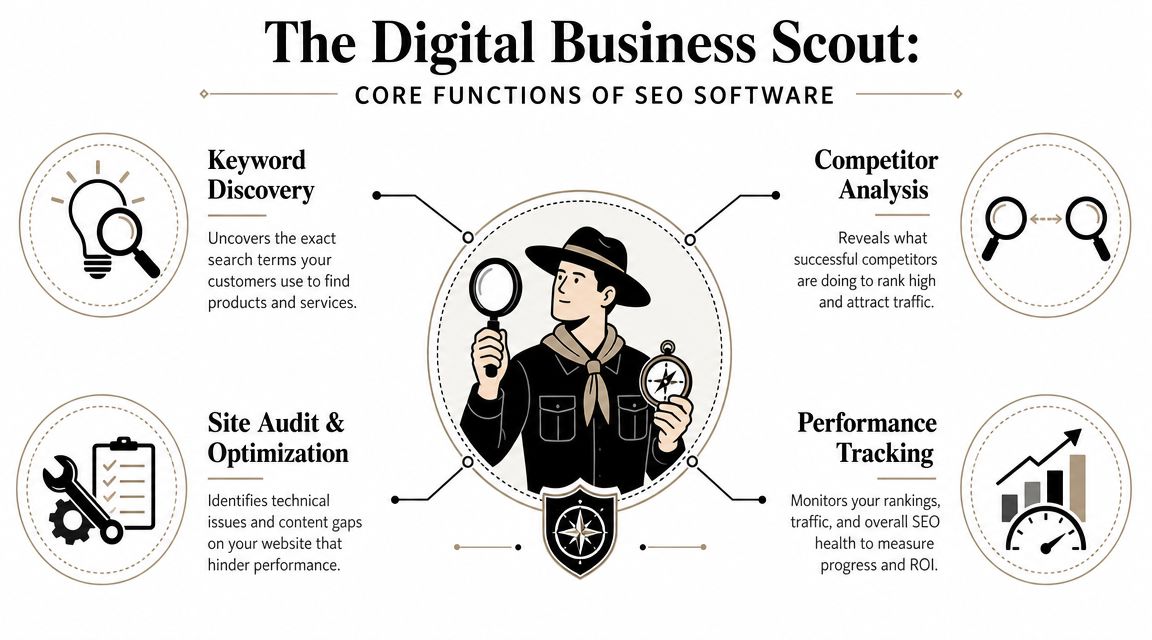
    An infographic titled The Digital Business Scout detailing the four core functions of SEO software for businesses.

    Search is still where people start. SmartClick's overview of SEO tools for small businesses notes that Google processes over 8.5 billion searches per day, and 46% of monthly Google searches have local intent. That's why software evolved from basic keyword tools into platforms that help businesses capture very specific demand.

    It finds demand before your competitors do

    The first job is keyword discovery. Tools uncover the phrases people type when they're ready to compare, buy, book, or call.

    For a small business, this answers practical questions like:

    • What should we build a page around: service terms, product terms, or local variations
    • What should we write next: educational topics, buyer questions, or comparison content
    • Where is intent strongest: broad awareness or ready-to-act searches

    A tool like Google Keyword Planner can help with early research. Platforms like Semrush or SE Ranking take it further by tying keywords to competitors, ranking difficulty, and content opportunities.

    It shows what is broken and what is worth fixing

    The second job is site auditing and optimization. Your website may look fine to a customer and still have problems that weaken search visibility. Broken pages, weak metadata, indexing issues, duplicate content, thin pages, or poor internal linking all chip away at performance.

    The third job is competitor analysis. This isn't about obsessing over rivals. It's about learning what they rank for, which pages bring them traffic, and where they're vulnerable.

    The fourth job is performance tracking. Rankings move. Pages improve. Some fall off. Without tracking, you can't tell whether your SEO work is paying off or whether your team is just staying busy.

    The best tools don't drown you in charts. They shorten the path from insight to action.

    A business owner doesn't need a lecture on crawl depth. They need software that says: these pages are underperforming, these keywords matter, these competitors are outranking you, and these fixes will move the needle first.

    The Must-Have Features Every Small Business Needs

    If a platform can't help you go from opportunity to action in one sitting, it's probably too fragmented. That's the test I use.

    Buy the workflow not the dashboard

    The biggest mistake I see is buying tools based on feature count. More features sounds better until your team has one tool for keywords, another for audits, another for rank tracking, and a fourth for backlink checks. Then nobody keeps the whole machine running.

    Select Software Reviews' buyer guide makes this point well. All-in-one platforms like Semrush and SE Ranking reduce tool fragmentation, which is a major efficiency gain for small teams moving from keyword selection to remediation to monitoring inside one environment.

    That matters because small businesses don't lose at SEO from lack of ambition. They lose because important tasks fall through the cracks.

    The features that actually earn their keep

    Here's what I'd call essential.

    • Keyword research with intent clues
      You need to see what people search for and decide whether those searches could turn into business. Not every keyword deserves a page.

    • Site audits with prioritized fixes
      A long error list is useless. The tool should help you identify what's actually hurting visibility and what can wait.

    • Rank tracking
      You need a reliable view of whether your important pages are moving up, flatlining, or slipping.

    • Competitor visibility research
      If a competitor keeps outranking you, the software should help explain why. Better pages, better links, broader coverage, or stronger local signals.

    • Backlink analysis
      You don't need a fancy report. You need to understand where authority gaps exist and where link opportunities may come from.

    • On-page optimization guidance
      This is the bridge between research and execution. Good tools help shape titles, headings, content structure, and internal links.

    Here's the business question behind each feature:

    Feature The real question it answers
    Keyword research What should we target next
    Site audit What is quietly hurting our visibility
    Rank tracking Are our efforts improving visibility
    Competitor analysis Why are they beating us
    Backlink analysis Where is our authority weaker
    On-page guidance How do we improve this page today

    My blunt recommendation

    If you're serious about search and you have more than a tiny site, buy an integrated platform before you buy another disconnected tool. The point of seo software for small business is efficiency. A platform that saves one or two hours every week is already doing real work for you.

    How to Choose The Right SEO Software For Your Business

    There is no universal best tool. There is only the best fit for your business model and your workflow.
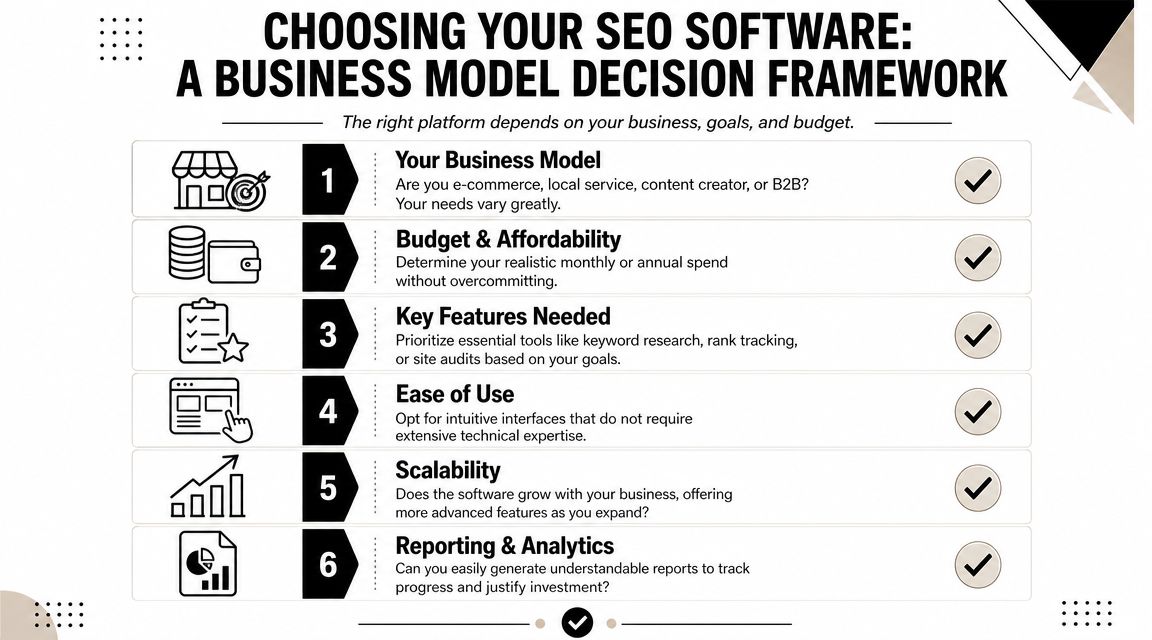
    A visual framework with six numbered steps for selecting the ideal SEO software for your business.

    Most review articles make this harder than it needs to be. They compare feature lists as if every business wants the same thing. They don't. A local clinic, a home services company, an online store, and a B2B firm need different workflows.

    Local businesses should choose differently

    However, many recommendations fall short. If you're a local operator, generic SEO features aren't enough. You need software that helps with Google Business Profile visibility, reviews, citations, Q&A, and map rankings.

    A discussion on local SEO tools including BrightLocal, Local Viking, and Paige by Merchynt highlights this gap well. Many broader platforms are strong on analytics, but local businesses often need tools built around local ranking actions, not just reporting.

    If you run a trade business, clinic, home service, or storefront, ask this first: will this tool help me show up in the places local buyers click?

    If your revenue depends on local discovery, local workflow matters more than broad SEO breadth.

    A simple decision filter

    Use these four filters before you buy anything.

    Business type

    A local service business should prioritize local visibility tools and page optimization for service areas. An e-commerce store needs category, product, and competitor research support. A content-heavy site needs stronger editorial planning and on-page workflow.

    Team size and time

    If you are the team, complexity is expensive. Choose a platform with a clean workflow and clear recommendations. If you have a marketing generalist or content person, you can justify a broader suite.

    Technical comfort

    Some tools assume you already speak SEO. If you hate digging through dashboards, don't buy a platform built for agencies and power users unless someone on your team will operate it.

    Core goal

    Pick based on the business outcome you want most:

    • Leads: prioritize local SEO, service page optimization, and rank tracking
    • Sales: prioritize product keyword research, competitor intelligence, and content support
    • Authority: prioritize content planning, backlinks, and topic coverage
    • Operational simplicity: prioritize all-in-one workflows over specialist tools

    Here's my short take on common fits:

    Business situation Better fit
    First serious SEO setup SE Ranking or Semrush
    Local visibility first BrightLocal-style local tools plus core SEO basics
    Free starting stack Google Search Console, Google Business Profile, Screaming Frog free crawl
    One owner, very little time The simplest workflow-driven option available

    Buying software based on a review site's “best overall” badge is lazy. Buy for the work you need done every week.

    Comparing Common Pricing And Feature Tiers

    You don't need to overspend to get traction. You do need to stop pretending free tools can support a growing SEO operation forever.

    SEO Software Tiers Compared

    Tier Typical Monthly Price Key Features & Limits Best For
    Free or freemium Free Search Console data, basic keyword discovery, limited crawling, manual workflows New sites, very small teams, owners learning the basics
    Starter Lower-cost paid plan More structured keyword research, recurring audits, rank tracking, some competitor visibility Businesses with active SEO but limited scope
    Pro or business Higher paid tier Broader reporting, integrated workflows, larger tracking limits, stronger competitor and backlink analysis Teams publishing regularly or competing in harder markets

    You can build a useful free stack with Google Search Console, Google Keyword Planner, Screaming Frog's free crawl for under 500 URLs, AnswerThePublic, and Ubersuggest-style budget tools. That's enough to learn, audit a small site, and make early improvements.

    But free stacks come with a cost. The cost is manual effort. You jump between tabs, export data, lose context, and react slowly.

    When free tools stop being enough

    The right time to upgrade is not when a salesperson pressures you. It's when your workflow breaks.

    The U.S. Chamber's roundup of free SEO tools for small business points to a practical rule. Upgrade when you have enough content volume or competitive pressure to need daily tracking and integrated workflows. Free tools are a strong starting point, but they don't give you the same competitor analysis or proactive auditing at scale.

    That means you should move up when:

    • You're publishing regularly and need a system for planning and tracking
    • You serve multiple locations and manual checking becomes messy
    • Competitors are aggressive and you need visibility into what they're doing
    • Your site has grown enough that spot checks no longer cut it
    • You keep postponing SEO work because managing the tools is annoying

    Cheap tools get expensive when they waste your time.

    If you have a tiny site and no publishing rhythm, stay lean. If you have momentum and search matters to revenue, pay for the workflow that removes friction.

    The Agency Secrets Workflow A Turnkey Path to Results

    Most software discussions stop at tools. That's incomplete. Small businesses don't just need software. They need a repeatable workflow.
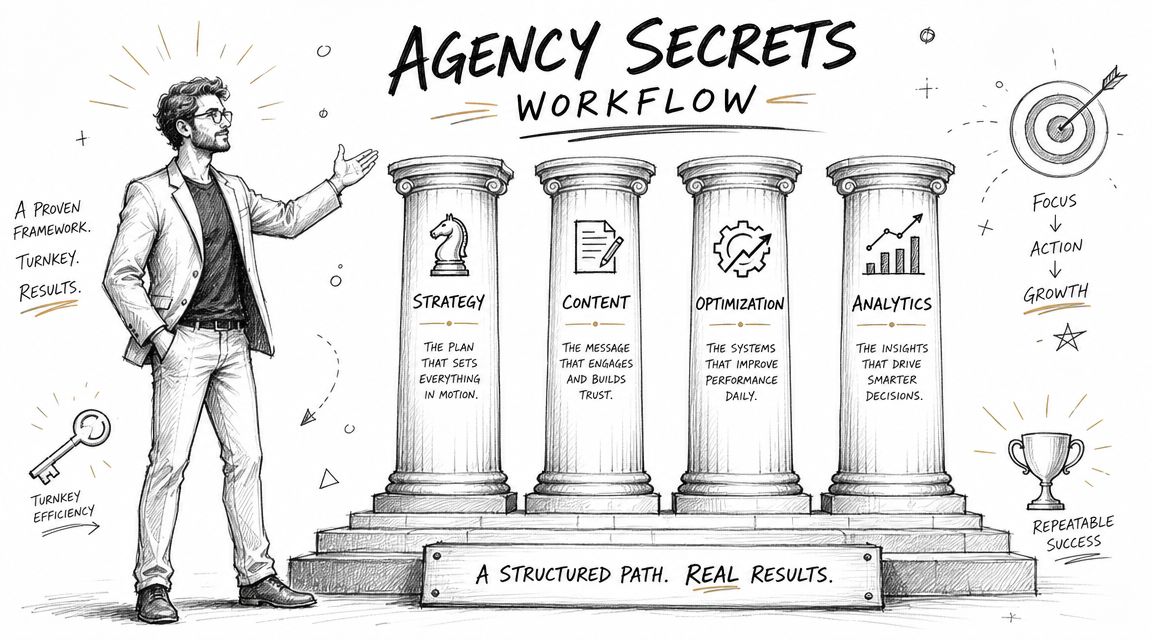
    A professional drawing representing an agency secrets workflow featuring four pillars labeled strategy, content, optimization, and analytics.

    The best-performing SEO systems I've seen all run on the same four pillars. Not hacks. Not random publishing. A disciplined engine.

    The four-part workflow that actually moves rankings

    First, buyer-intent keyword research. You don't need more traffic for its own sake. You need pages aimed at searches that can turn into business.

    Second, consistent publishing. Most owners stumble here. They buy software, collect ideas, and never ship enough useful content to build momentum.

    Third, authority building through backlinks. Even strong pages often need external trust signals to compete.

    Fourth, evergreen compounding. Good SEO content keeps working after it's published. It doesn't vanish when ad spend stops.

    Why turnkey beats piecing tools together

    A turnkey workflow matters because most small businesses don't fail from lack of information. They fail from broken execution. Research sits in one tool. Drafts sit in another. Publishing is delayed. Backlink work never happens. Reporting shows up too late.

    That's why systems like OutRank are compelling. Instead of giving you another dashboard to manage, they package the workflow itself. Keyword research, content generation, publishing support, backlink acquisition, and competitor insight live in one process. That's the right direction for owners who want results without turning themselves into part-time SEO operators.

    I'm opinionated on this point. If you're busy, workflow beats features. The software that gets used wins. The software that automates the boring but important work wins faster.

    Smart small businesses should buy momentum, not just access to data.

    If you've been comparing tools line by line, step back. The bigger question is whether the software helps you execute the core SEO jobs consistently with minimal manual effort.

    Your 30-Day Implementation Plan For Quick Wins

    If you buy software and then spend a month exploring menus, you've already lost. Use the first month to force action.

    Start with this checklist.
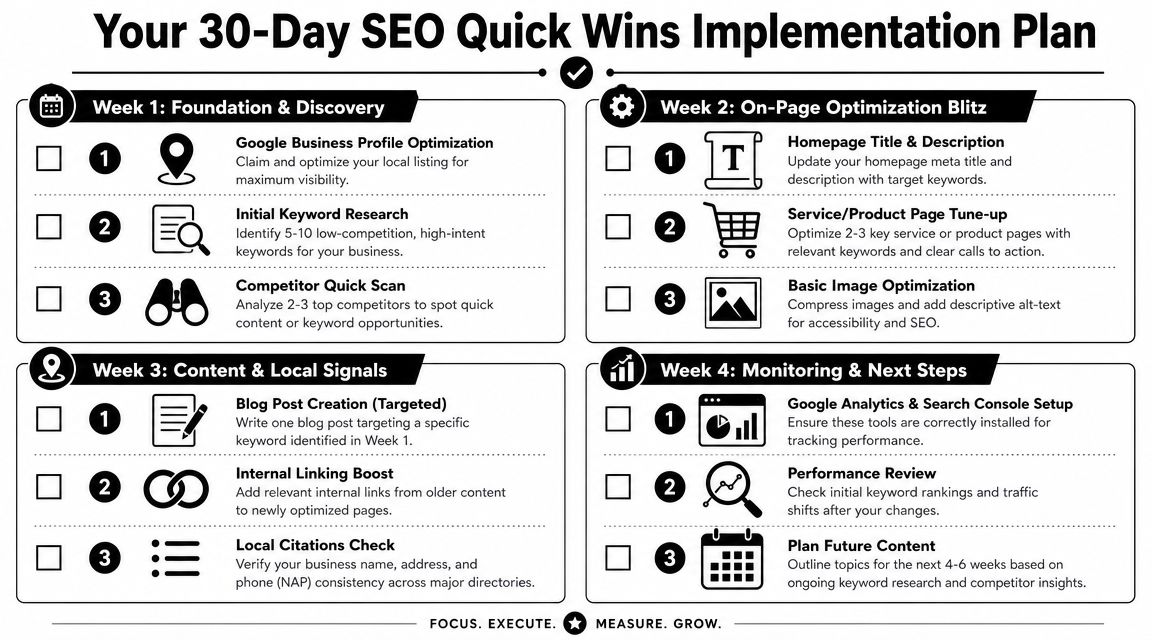
    A 30-day SEO quick wins implementation plan infographic for small business owners and digital marketers.

    Week-by-week execution

    Week 1

    • Run a full site audit: find obvious technical issues, weak titles, and missing basics
    • Identify five to ten practical keywords: focus on buyer intent or local intent
    • Check a few competitors: look at what pages they rank with and what topics they cover

    Week 2

    • Fix your homepage metadata: keep it clear and relevant
    • Tune up your top service or product pages: improve headings, copy, and calls to action
    • Clean up images and alt text: this is easy and worth doing

    Week 3

    • Publish one optimized article: answer a real customer question
    • Add internal links: point older pages to your most important updated pages
    • Review local consistency: make sure your business details match across major listings

    A quick walkthrough can help if you want to see the process in motion.

    Week 4

    • Set up Search Console and Analytics correctly: make sure tracking is in place
    • Check early movement: look for impressions, rankings, and page engagement shifts
    • Plan next month's content: don't stop after one post

    What to expect after the first month

    Don't expect a miracle in thirty days. Expect momentum. Expect a cleaner site, clearer keyword targets, and a content process you can repeat.

    The biggest win is operational. You move from random SEO activity to a working system. Once that happens, scaling becomes realistic.


    If you want the fastest path from strategy to execution, look at Agency Secrets. It's built for business owners who want the playbook without hiring an agency, and it points you toward a more turnkey workflow with OutRank so keyword research, publishing, and authority building don't keep stalling on your to-do list.
  • SEO for Small Business: The 2026 Playbook

    SEO for Small Business: The 2026 Playbook

    You’re probably doing what most small business owners do. You post on social media when you remember, boost a few posts, maybe run some ads, and hope something sticks. Then a month later you’re looking at the spend, looking at the leads, and wondering why marketing feels like rent instead of an asset.

    That’s exactly why seo for small business matters. Done right, it doesn’t behave like a campaign. It behaves like an engine. One useful page ranks, brings in customers, and keeps working long after you publish it. The problem is that most DIY SEO advice turns that engine into a second full-time job.

    You don’t need a giant checklist. You need the few actions that move revenue. This playbook strips SEO down to the work that drives sales, local visibility, and long-term growth, without forcing you to become a full-time marketer.

    Table of Contents

    Why SEO Is Your Best Investment in 2026

    You put money into ads on Monday, get calls on Tuesday, and watch the pipeline go quiet the week you cut budget. That cycle burns small businesses out. SEO gives you a system that keeps working after the initial setup, which is exactly why it deserves a bigger share of your 2026 marketing budget.

    Google’s own SEO starter guide makes the core point plain. Search visibility comes from building useful pages that search engines can understand and users can trust. For a small business, that matters because one well-built page can keep bringing in calls, quote requests, and store visits long after you publish it.

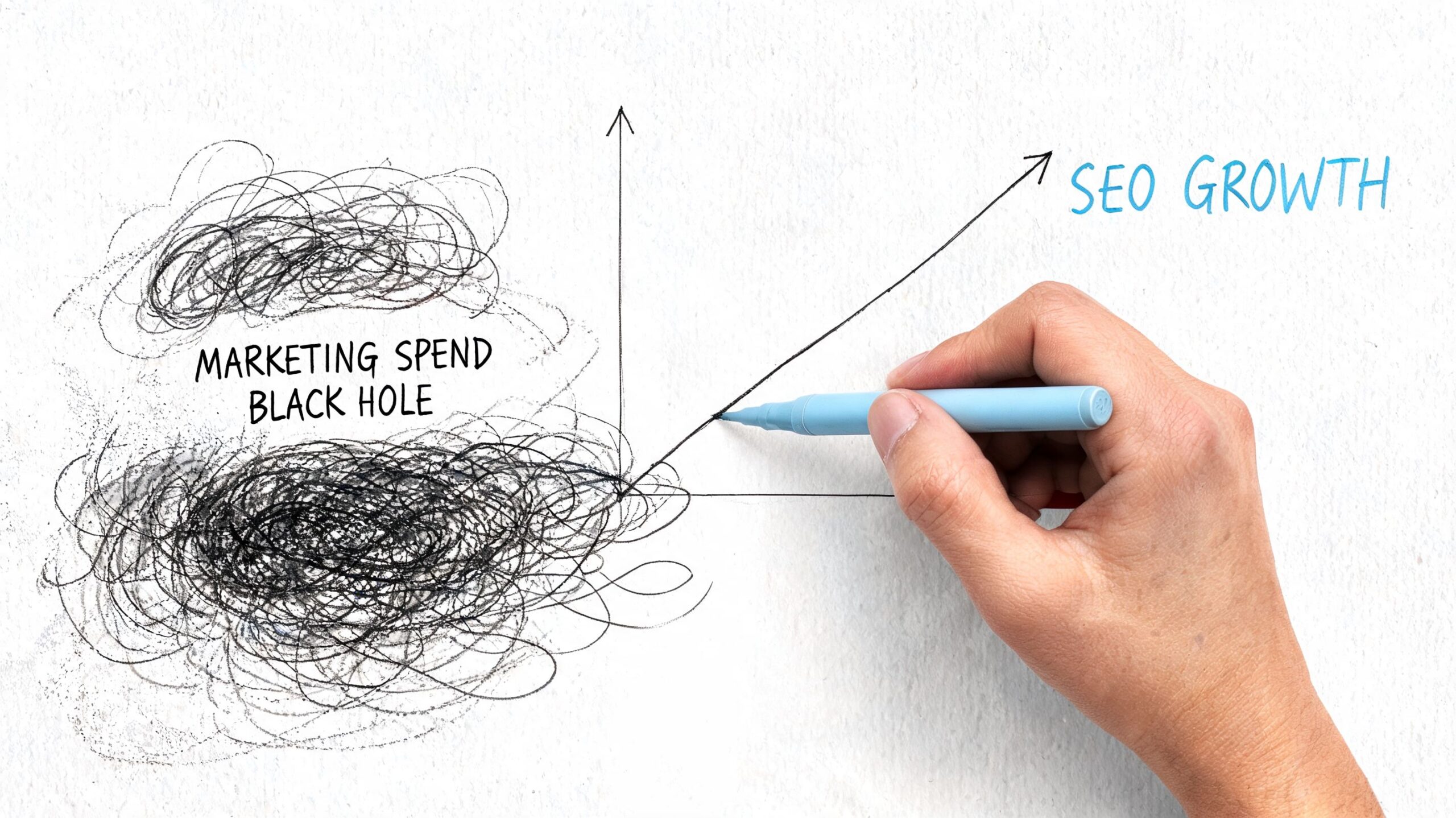
    A hand drawing a line graph illustrating SEO growth alongside a chaotic marketing spend black hole.

    Paid attention is rented

    Paid traffic is useful for launches, promotions, and short-term demand. It is not a durable growth engine for a budget-conscious business.

    SEO gives you owned visibility. A service page, location page, or product page can keep attracting buyers without daily babysitting. That is the difference small business owners should care about. You are building a sales asset, not feeding a meter.

    Practical rule: If a customer asks the question before they call, search for it, or compare options online, your site needs a page that answers it clearly.

    SEO compounds while ads reset

    The compounding effect is what DIY guides often miss. You do not need 200 blog posts and a color-coded content calendar. You need the few pages that drive revenue, a site structure that supports them, and a simple workflow to keep them updated.

    That is the 80/20 play. Publish the pages closest to a sale. Improve the pages already getting impressions. Automate the repetitive work, like performance checks, review requests, schema generation, and routine content updates. Small businesses win with consistency, not content volume.

    Here’s the blunt takeaway:

    Marketing channel What happens when you stop spending Long-term value
    Paid ads Traffic drops fast Limited unless continuously funded
    Social posting Reach fades quickly Inconsistent
    SEO Pages can keep attracting customers High if built well

    If your budget is tight, SEO is the practical investment. It lowers your dependence on ads, turns your website into a sales tool, and scales better when you use automation instead of doing everything by hand.

    Find Keywords That Drive Sales Not Just Clicks

    Most keyword research advice is useless because it trains you to chase volume instead of buyers. Traffic alone won’t save your business. You need search terms that map to money.

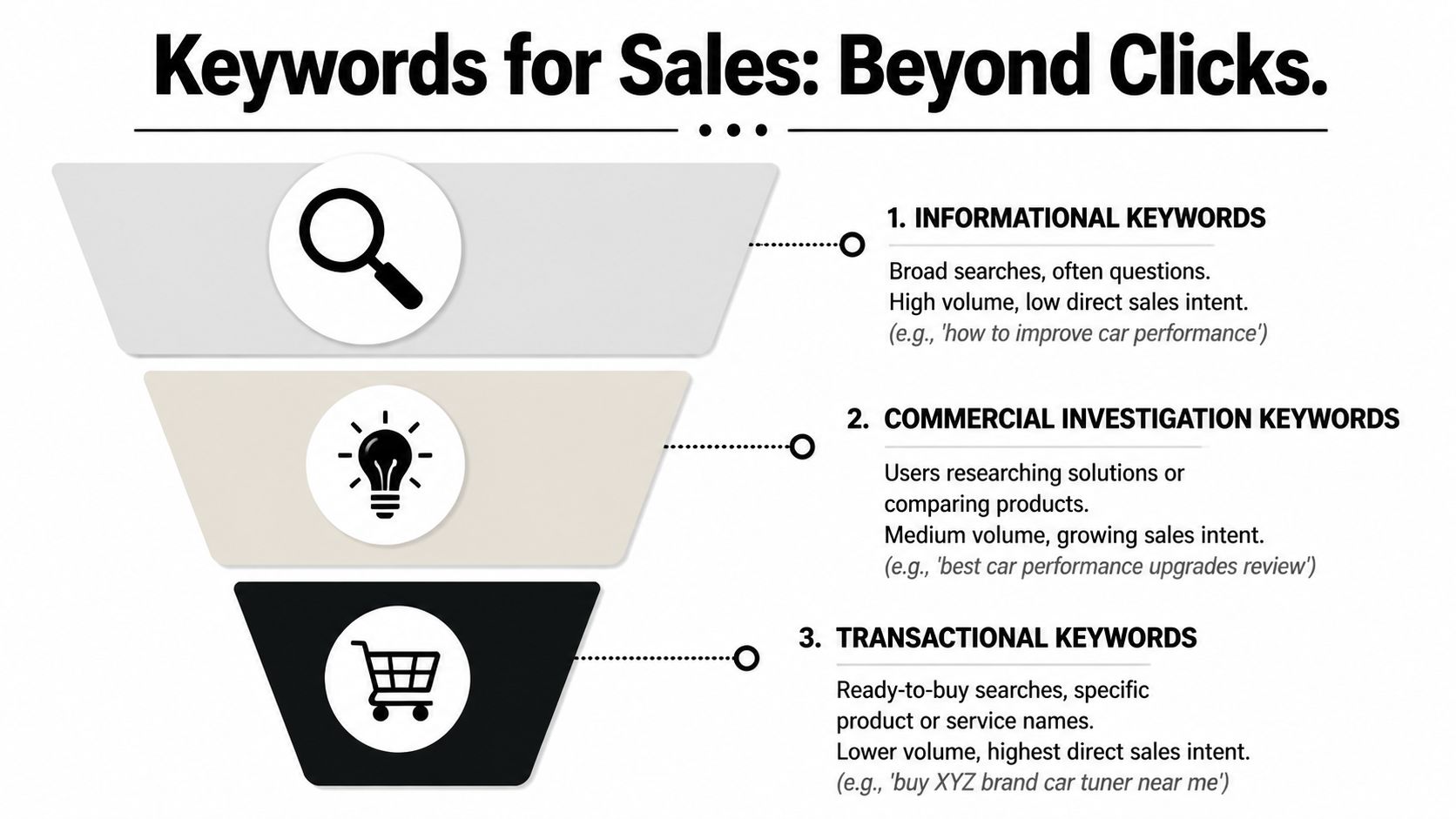
    The fastest way to improve seo for small business is to split keywords into three buckets: informational, commercial, and transactional. Then prioritize the phrases closest to revenue first.

    A funnel diagram illustrating three types of SEO keywords: informational, commercial investigation, and transactional.

    Stop chasing broad traffic

    A keyword like “how to fix a leaking pipe” may bring visitors. But if you’re a plumber, that search could be full of DIY people who never hire anyone. A keyword like “emergency plumber near me” is different. That search comes from someone who has a problem now and wants to pay someone to fix it.

    Use this lens when you evaluate every keyword:

    • Informational keywords help you build trust. They answer questions.
    • Commercial keywords catch people comparing options.
    • Transactional keywords bring in people ready to buy, book, call, or visit.

    Broad traffic feels productive. Buyer-intent traffic pays the bills.

    A busy owner should build pages in this order:

    1. Core service and product pages first. These target the searches closest to a sale.
    2. Location pages second. These win local demand.
    3. Supporting articles third. These answer questions and feed authority into the money pages.

    How a local service business should think

    Let’s say you run a plumbing company. Don’t start by writing general advice articles. Start with what a customer types when there’s urgency or intent.

    Good targets look like this:

    • Service plus city such as “water heater repair in Denver”
    • Problem plus city such as “drain cleaning in Denver”
    • Urgency plus service such as “emergency plumber near me”
    • Comparison intent such as “best plumber for sewer line repair”

    Now check Google itself. Type the phrase in. Look at autocomplete, People Also Ask, and the businesses already ranking. You’re not trying to be clever. You’re trying to match the wording customers already use.

    Then map each phrase to a dedicated page. Don’t cram five different services onto one vague page called “Our Services.” That’s lazy, and Google knows it.

    How an ecommerce store should think

    If you sell products online, the mistake is similar. Owners often write top-of-funnel content and ignore collection pages, product pages, and comparison content.

    Focus on searches like:

    • Product plus modifier such as “waterproof hiking backpack”
    • Use case searches such as “best backpack for weekend travel”
    • Comparison searches such as “leather tote vs canvas tote”
    • Brand or model intent if relevant to your catalog

    A simple workflow works well:

    Keyword type Best page type Business value
    Transactional Product page or collection page Highest direct conversion potential
    Commercial Comparison article or category guide Strong buying influence
    Informational Blog article or FAQ Builds trust and supports internal linking

    If you only have a few hours a month, don’t spend them writing random blog posts. Build the pages that answer “what do you sell,” “where do you sell it,” and “why should I choose you.” That’s where small business SEO gets practical.

    Structure Content That Ranks and Converts

    Most small business websites don’t have a content problem. They have a structure problem. The information exists, but it’s buried, vague, or written like a brochure.

    Google wants clarity. Customers want clarity too. If your page makes people hunt for the answer, it loses.

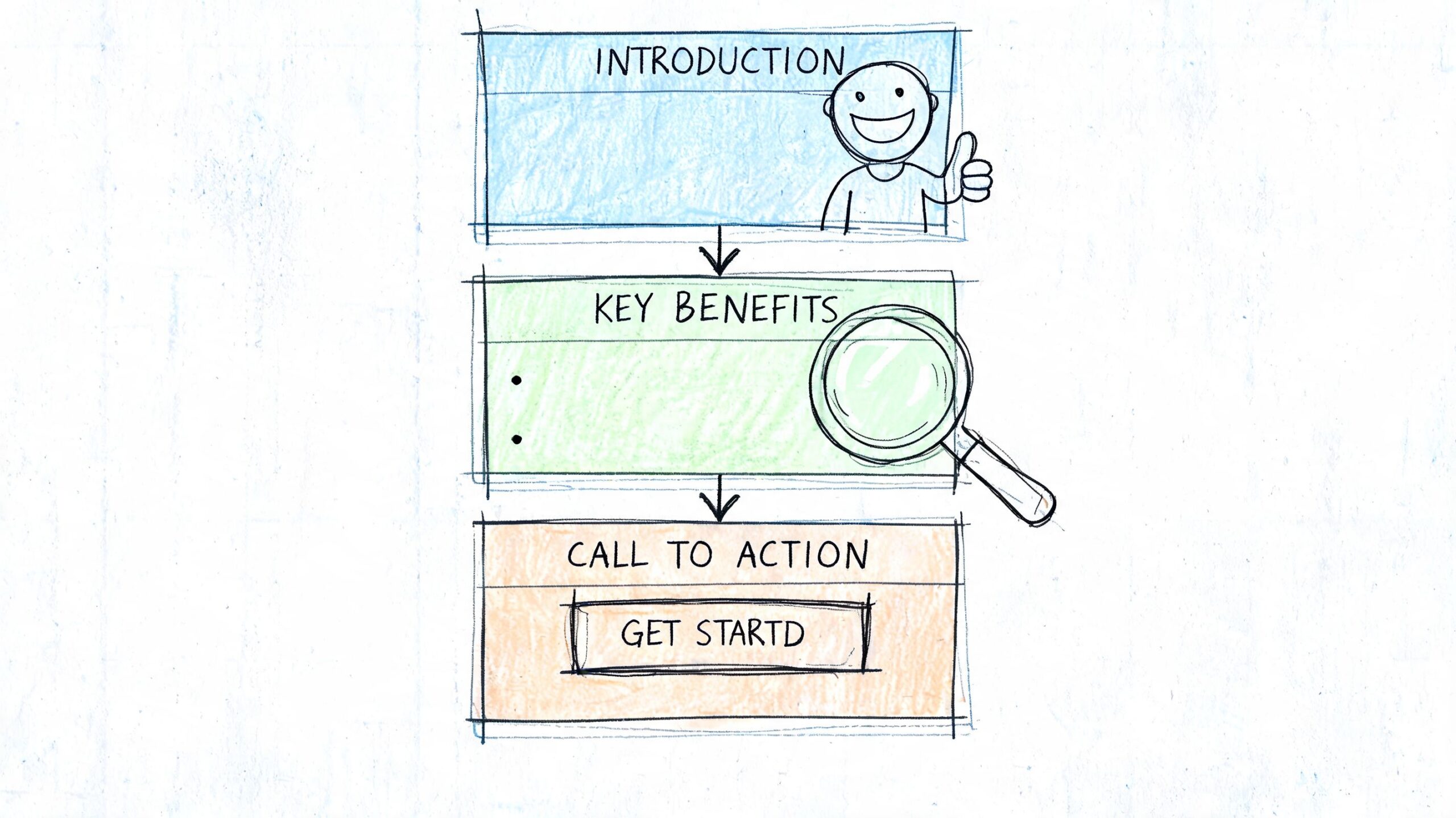
    A hand-drawn flowchart illustrating a website layout with an introduction, key benefits section, and call to action.

    The page structure that works

    A strong page should answer the main question immediately. Don’t spend four paragraphs warming up. If the page is about “roof repair in Austin,” say what you do, who you serve, and how to take the next step near the top.

    Use a clean hierarchy:

    • Headline that matches the search intent
    • Short opening that gives the answer fast
    • H2 sections for key subtopics
    • H3 sections for details, examples, FAQs, or proof
    • Call to action placed naturally, not hidden at the bottom

    This isn’t just for blog posts. It applies to service pages, product pages, location pages, and resource content.

    If a visitor can’t understand your offer in a quick scan, your page is underperforming before rankings even matter.

    Internal links are not optional

    Internal linking is one of the most ignored levers in seo for small business. It helps search engines understand what pages matter, and it helps visitors move from research to action.

    If you write a guide about “how to choose the right water heater,” link it to your water heater installation page. If you have a city page for “HVAC repair in Phoenix,” link it from broader service pages and related articles. This builds topical relevance and directs real users toward conversion pages.

    A good internal link system does three jobs:

    • Shows relevance by connecting related pages
    • Passes authority toward revenue pages
    • Improves navigation so visitors don’t stall on one page

    Here’s a useful explainer if you want to see how content structure supports rankings:

    A simple example

    Say you own a med spa. A weak site has one general services page and a few disconnected blog posts. A strong site looks more like this:

    1. A main Botox page
    2. Separate location pages for each target area
    3. Supporting articles like “Botox vs fillers” and “How long Botox lasts”
    4. Internal links from those articles back to the Botox service page and booking page

    That structure helps Google understand the site’s topic. It also helps a real customer move from curiosity to appointment.

    Don’t write content to “have a blog.” Write content that supports your service pages and gives your site a clear center of gravity.

    Master the Technical Basics That Matter

    Technical SEO scares small business owners because it sounds like developer territory. Most of it isn’t. You do not need to become technical. You need to stop ignoring the few technical basics that directly affect rankings, clicks, and usability.

    The highest-impact fixes are Core Web Vitals, mobile performance, and structured data.

    Fix speed first

    According to the 2026 SEO checklist for small businesses from AMST, the key projected Core Web Vitals benchmarks for 2026 are LCP under 2.5 seconds, CLS under 0.1, and INP under 200ms. The same source says optimizing for these can lower bounce rates by 24%.

    In plain English, this means your site should load fast, stay visually stable, and respond quickly when someone taps or clicks.

    Start with this checklist:

    • Audit before guessing using Google PageSpeed Insights or Lighthouse in Chrome DevTools.
    • Compress large images with tools like TinyPNG and use lazy loading where appropriate.
    • Minify CSS and JavaScript with tools such as Autoptimize, and defer non-critical scripts.
    • Use a CDN like Cloudflare if your site serves visitors across regions.
    • Check mobile first because that’s where weak sites usually break.

    If your site runs on WordPress, watch plugin bloat. Too many plugins, heavy themes, and page builders can turn a normal site into a slow one.

    Use schema so Google understands your business

    Structured data helps search engines interpret your pages more clearly. For small businesses, the most useful schema types are LocalBusiness, Product, Review, and FAQ.

    The Gen3 Marketing guide on advanced small business SEO tactics says implementing structured data can boost click-through rates by 20% to 30%, and notes strong use cases for rich snippets and AI overviews.

    A simple LocalBusiness JSON-LD example looks like this:

    <script type="application/ld+json">
    {
      "@type":"LocalBusiness",
      "name":"Business Name",
      "address":{
        "@type":"PostalAddress",
        "streetAddress":"123 Main St",
        "addressLocality":"City"
      },
      "telephone":"+1-xxx-xxx-xxxx",
      "openingHours":"Mo-Fr 09:00-17:00"
    }
    </script>
    

    Use Google’s Structured Data Markup Helper if you want assistance generating it, then validate it with Google’s Rich Results Test.

    Keep the technical stack lean

    Small business owners often make one technical mistake that causes five others. They stack tools, themes, widgets, and plugins until the site becomes fragile.

    Keep the setup simple:

    Technical area What to do What to avoid
    Speed Compress images, defer scripts, test mobile Oversized media and plugin overload
    Schema Add only relevant schema types per page Duplicated or invalid markup
    Hosting Choose reliable hosting and monitor performance Cheapest hosting with slow response

    Technical SEO doesn’t need to be advanced. It needs to be clean.

    If you only fix one part of your site this month, fix the pages that already attract impressions and leads. That’s where technical improvements pay off fastest.

    Win Your Local Area and Build Authority

    For most small businesses, national rankings don’t matter. Your market is local. Your revenue is local. Your authority should start there too.

    That means two things. First, you need a Google Business Profile that helps you win. Second, you need local trust signals that make your website look credible, not isolated.

    A sketched illustration of a red map location pin inside a glowing shield surrounded by small houses.

    Treat your Google Business Profile like a sales page

    A neglected profile is a wasted asset. Fill out every field you can. Make sure your business name, address, phone number, hours, service categories, and photos are accurate. Then keep it active.

    Here’s the practical standard:

    • Complete every core field so Google has no ambiguity about what you do.
    • Use real photos of your location, team, work, or products.
    • Collect reviews consistently and respond to them like a business owner, not a robot.
    • Match your site and listings so your contact details stay consistent everywhere.

    If you serve multiple nearby areas, create useful location pages on your site that support the profile. Don’t duplicate the same page and swap city names. Write pages that reflect actual services, neighborhoods, and customer needs.

    Local SEO works best when your profile, website, and customer reviews tell the same story.

    Build local authority the practical way

    Most small businesses don’t need some elaborate digital PR campaign. They need credible local mentions and relevant links.

    Good link opportunities usually come from things you’re already doing:

    • Sponsor something local such as a school event, charity run, or community program.
    • Join business organizations where your profile includes a real website link.
    • Partner with nearby businesses for local guides, resource pages, or event pages.
    • Publish useful local resources that people in your area would refer to.

    Examples work better than theory. A family law firm might publish a plain-English local guide to filing paperwork. A gardening professional might build a seasonal planting guide for the region. A pediatric clinic might create a back-to-school health checklist for local parents.

    Those pages do more than rank. They give chambers, local blogs, community groups, and nearby businesses something worth linking to.

    Keep your standards high. Don’t buy junk links. Don’t stuff city names into every paragraph. Don’t confuse “local SEO” with spam. The goal is simple: become the obvious local result for the services you provide.

    Scale Your SEO Without an Agency

    A common failing of small business SEO advice is this: The strategy might be sound, but the execution assumes you have spare time, a content team, and the patience to do repetitive work forever.

    You don’t.

    Manual SEO breaks small teams

    The core problem is capacity. According to the Network Solutions small business SEO guide, 70% of small businesses are solo-operated or have tiny teams. The same source says AI-driven automation tools can deliver 4x traffic growth in 6 months for bootstrapped sites, without the typical $5k per month agency fee.

    That’s why the usual advice fails. Manual keyword research, manual briefs, manual writing, manual publishing, manual optimization, manual outreach. It sounds disciplined on paper. In real life, it becomes another job you won’t sustain.

    The owners who win usually do one thing differently. They remove repetitive work from the process.

    What to automate first

    You should still control strategy. You should not personally handle every task inside the system.

    Automate the parts that are slow, repetitive, and easy to standardize:

    • Keyword discovery so you keep finding buyer-intent opportunities
    • Content production workflows so pages publish consistently
    • Optimization checks so articles follow clear on-page rules
    • Backlink support so authority grows without endless manual chasing
    • Competitor monitoring so you can react when rivals create better pages

    That doesn’t mean handing everything to a black box and hoping for miracles. It means building a repeatable workflow that keeps your site moving without constant willpower.

    Track a few simple signals in Google Search Console:

    Metric Why it matters
    Impressions Shows whether Google is surfacing your pages more often
    Clicks Shows whether titles and rankings are earning traffic
    Queries Reveals what buyers actually find you for
    Top pages Helps you identify winners worth improving further

    If you’re a solo founder or running lean, this is the right way to think about seo for small business. Keep your judgment. Automate the grind. Consistency beats intensity every time.


    If you want a practical, agency-free system for doing this without turning SEO into another full-time job, Agency Secrets is worth your attention. It breaks SEO down into the work that effectively drives growth, and its recommended workflow helps small business owners handle keyword research, content publishing, backlinks, and evergreen compounding without building a big team.