You're probably in one of two situations right now. Either you've been trying to do SEO with a pile of free tools, spreadsheets, and guesswork, or you've looked at platforms like Semrush and SE Ranking and thought, “I have no idea if I need this much software.”
That's a normal place to be. Most small business owners don't need more features. They need less manual work, clearer priorities, and a system that turns search traffic into leads and sales. The right seo software for small business doesn't just give you data. It saves hours, cuts decision fatigue, and tells you what to do next.
Table of Contents
- Why SEO Software Is Your New Must-Have Employee
- What SEO Software Actually Does For Your Business
- The Must-Have Features Every Small Business Needs
- How to Choose The Right SEO Software For Your Business
- Comparing Common Pricing And Feature Tiers
- The Agency Secrets Workflow A Turnkey Path to Results
- Your 30-Day Implementation Plan For Quick Wins
Why SEO Software Is Your New Must-Have Employee
Most small business owners don't struggle with SEO because they're lazy. They struggle because SEO looks like ten jobs disguised as one. Keyword research, technical fixes, content planning, rankings, backlinks, local visibility. It becomes one more thing sitting on your desk unfinished.
That's why I want you to stop thinking about SEO software as a marketing expense. Think of it as an employee. A good one. It doesn't sleep, doesn't forget follow-ups, and keeps checking what customers are searching, what pages need work, and where competitors are pulling ahead.
SEO is no longer niche or optional. According to AIOSEO's 2026 SEO statistics roundup, 74% of small businesses invest in SEO, the average monthly spend is $497, and the global SEO services market is valued at $83.98 billion in 2026. That should tell you something simple. This isn't experimental anymore. It's standard operating procedure.
Software gives small teams leverage
If you run a lean company, software is how you compete without hiring an agency or building an in-house SEO department. It helps you spot buyer-intent keywords, catch technical issues before they hurt visibility, and keep publishing pages that can bring in traffic long after they go live.
Practical rule: If a tool saves you from guessing what to publish, what to fix, and what to track, it's not overhead. It's leverage.
True ROI isn't just rankings. It's time saved. It's fewer bad decisions. It's knowing what matters this week instead of poking around in random reports.
The wrong purchase creates more work
A lot of seo software for small business fails for one reason. The owner buys a feature-heavy platform, logs in twice, gets overwhelmed, and goes back to doing nothing. That's not a software problem. That's a workflow problem.
You don't need the most powerful tool on the market. You need the tool that fits the way your business works. If you're a local service company, your priorities are different from an e-commerce store. If you publish content weekly, your needs are different from a five-page brochure site.
So yes, you need software. But you need software that reduces effort, not software that creates another part-time job for you.
What SEO Software Actually Does For Your Business
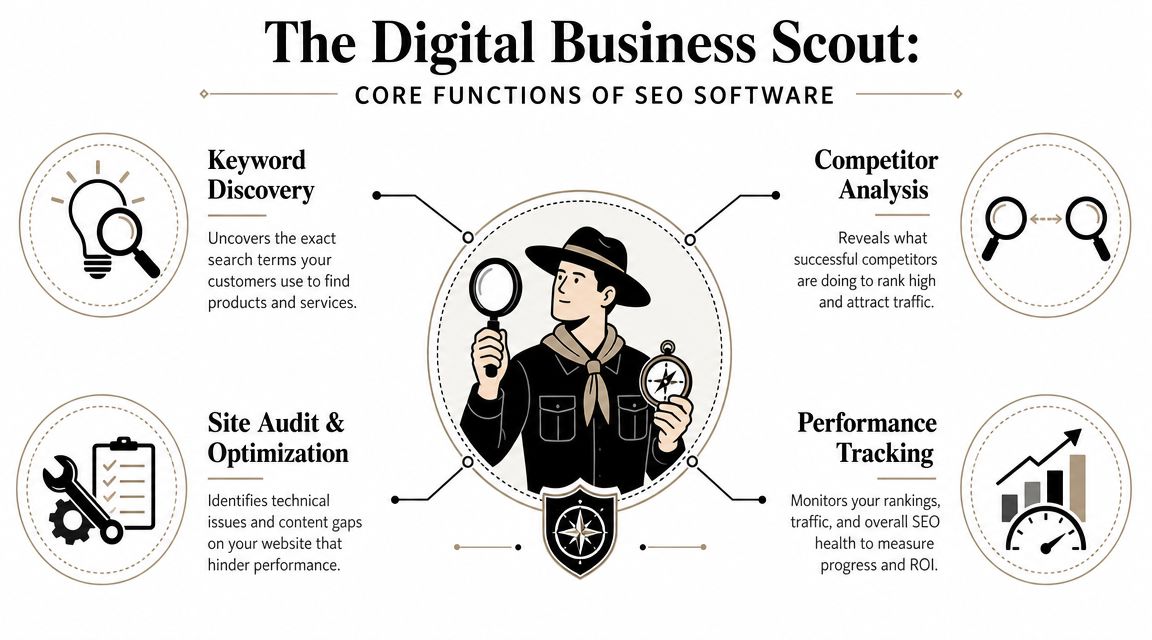
Good SEO software acts like a digital business scout. It goes out into the market, gathers intelligence, reports back, and helps you act faster than a business relying on instinct alone.
Search is still where people start. SmartClick's overview of SEO tools for small businesses notes that Google processes over 8.5 billion searches per day, and 46% of monthly Google searches have local intent. That's why software evolved from basic keyword tools into platforms that help businesses capture very specific demand.
It finds demand before your competitors do
The first job is keyword discovery. Tools uncover the phrases people type when they're ready to compare, buy, book, or call.
For a small business, this answers practical questions like:
- What should we build a page around: service terms, product terms, or local variations
- What should we write next: educational topics, buyer questions, or comparison content
- Where is intent strongest: broad awareness or ready-to-act searches
A tool like Google Keyword Planner can help with early research. Platforms like Semrush or SE Ranking take it further by tying keywords to competitors, ranking difficulty, and content opportunities.
It shows what is broken and what is worth fixing
The second job is site auditing and optimization. Your website may look fine to a customer and still have problems that weaken search visibility. Broken pages, weak metadata, indexing issues, duplicate content, thin pages, or poor internal linking all chip away at performance.
The third job is competitor analysis. This isn't about obsessing over rivals. It's about learning what they rank for, which pages bring them traffic, and where they're vulnerable.
The fourth job is performance tracking. Rankings move. Pages improve. Some fall off. Without tracking, you can't tell whether your SEO work is paying off or whether your team is just staying busy.
The best tools don't drown you in charts. They shorten the path from insight to action.
A business owner doesn't need a lecture on crawl depth. They need software that says: these pages are underperforming, these keywords matter, these competitors are outranking you, and these fixes will move the needle first.
The Must-Have Features Every Small Business Needs
If a platform can't help you go from opportunity to action in one sitting, it's probably too fragmented. That's the test I use.
Buy the workflow not the dashboard
The biggest mistake I see is buying tools based on feature count. More features sounds better until your team has one tool for keywords, another for audits, another for rank tracking, and a fourth for backlink checks. Then nobody keeps the whole machine running.
Select Software Reviews' buyer guide makes this point well. All-in-one platforms like Semrush and SE Ranking reduce tool fragmentation, which is a major efficiency gain for small teams moving from keyword selection to remediation to monitoring inside one environment.
That matters because small businesses don't lose at SEO from lack of ambition. They lose because important tasks fall through the cracks.
The features that actually earn their keep
Here's what I'd call essential.
Keyword research with intent clues
You need to see what people search for and decide whether those searches could turn into business. Not every keyword deserves a page.Site audits with prioritized fixes
A long error list is useless. The tool should help you identify what's actually hurting visibility and what can wait.Rank tracking
You need a reliable view of whether your important pages are moving up, flatlining, or slipping.Competitor visibility research
If a competitor keeps outranking you, the software should help explain why. Better pages, better links, broader coverage, or stronger local signals.Backlink analysis
You don't need a fancy report. You need to understand where authority gaps exist and where link opportunities may come from.On-page optimization guidance
This is the bridge between research and execution. Good tools help shape titles, headings, content structure, and internal links.
Here's the business question behind each feature:
| Feature | The real question it answers |
|---|---|
| Keyword research | What should we target next |
| Site audit | What is quietly hurting our visibility |
| Rank tracking | Are our efforts improving visibility |
| Competitor analysis | Why are they beating us |
| Backlink analysis | Where is our authority weaker |
| On-page guidance | How do we improve this page today |
My blunt recommendation
If you're serious about search and you have more than a tiny site, buy an integrated platform before you buy another disconnected tool. The point of seo software for small business is efficiency. A platform that saves one or two hours every week is already doing real work for you.
How to Choose The Right SEO Software For Your Business
There is no universal best tool. There is only the best fit for your business model and your workflow.
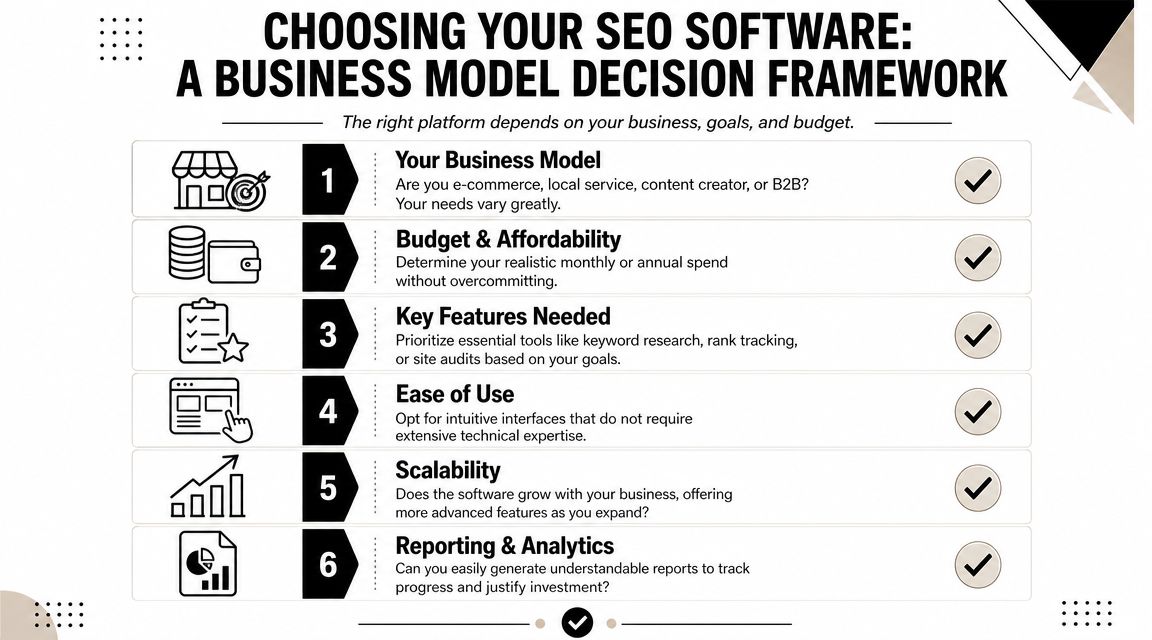
Most review articles make this harder than it needs to be. They compare feature lists as if every business wants the same thing. They don't. A local clinic, a home services company, an online store, and a B2B firm need different workflows.
Local businesses should choose differently
However, many recommendations fall short. If you're a local operator, generic SEO features aren't enough. You need software that helps with Google Business Profile visibility, reviews, citations, Q&A, and map rankings.
A discussion on local SEO tools including BrightLocal, Local Viking, and Paige by Merchynt highlights this gap well. Many broader platforms are strong on analytics, but local businesses often need tools built around local ranking actions, not just reporting.
If you run a trade business, clinic, home service, or storefront, ask this first: will this tool help me show up in the places local buyers click?
If your revenue depends on local discovery, local workflow matters more than broad SEO breadth.
A simple decision filter
Use these four filters before you buy anything.
Business type
A local service business should prioritize local visibility tools and page optimization for service areas. An e-commerce store needs category, product, and competitor research support. A content-heavy site needs stronger editorial planning and on-page workflow.
Team size and time
If you are the team, complexity is expensive. Choose a platform with a clean workflow and clear recommendations. If you have a marketing generalist or content person, you can justify a broader suite.
Technical comfort
Some tools assume you already speak SEO. If you hate digging through dashboards, don't buy a platform built for agencies and power users unless someone on your team will operate it.
Core goal
Pick based on the business outcome you want most:
- Leads: prioritize local SEO, service page optimization, and rank tracking
- Sales: prioritize product keyword research, competitor intelligence, and content support
- Authority: prioritize content planning, backlinks, and topic coverage
- Operational simplicity: prioritize all-in-one workflows over specialist tools
Here's my short take on common fits:
| Business situation | Better fit |
|---|---|
| First serious SEO setup | SE Ranking or Semrush |
| Local visibility first | BrightLocal-style local tools plus core SEO basics |
| Free starting stack | Google Search Console, Google Business Profile, Screaming Frog free crawl |
| One owner, very little time | The simplest workflow-driven option available |
Buying software based on a review site's “best overall” badge is lazy. Buy for the work you need done every week.
Comparing Common Pricing And Feature Tiers
You don't need to overspend to get traction. You do need to stop pretending free tools can support a growing SEO operation forever.
SEO Software Tiers Compared
| Tier | Typical Monthly Price | Key Features & Limits | Best For |
|---|---|---|---|
| Free or freemium | Free | Search Console data, basic keyword discovery, limited crawling, manual workflows | New sites, very small teams, owners learning the basics |
| Starter | Lower-cost paid plan | More structured keyword research, recurring audits, rank tracking, some competitor visibility | Businesses with active SEO but limited scope |
| Pro or business | Higher paid tier | Broader reporting, integrated workflows, larger tracking limits, stronger competitor and backlink analysis | Teams publishing regularly or competing in harder markets |
You can build a useful free stack with Google Search Console, Google Keyword Planner, Screaming Frog's free crawl for under 500 URLs, AnswerThePublic, and Ubersuggest-style budget tools. That's enough to learn, audit a small site, and make early improvements.
But free stacks come with a cost. The cost is manual effort. You jump between tabs, export data, lose context, and react slowly.
When free tools stop being enough
The right time to upgrade is not when a salesperson pressures you. It's when your workflow breaks.
The U.S. Chamber's roundup of free SEO tools for small business points to a practical rule. Upgrade when you have enough content volume or competitive pressure to need daily tracking and integrated workflows. Free tools are a strong starting point, but they don't give you the same competitor analysis or proactive auditing at scale.
That means you should move up when:
- You're publishing regularly and need a system for planning and tracking
- You serve multiple locations and manual checking becomes messy
- Competitors are aggressive and you need visibility into what they're doing
- Your site has grown enough that spot checks no longer cut it
- You keep postponing SEO work because managing the tools is annoying
Cheap tools get expensive when they waste your time.
If you have a tiny site and no publishing rhythm, stay lean. If you have momentum and search matters to revenue, pay for the workflow that removes friction.
The Agency Secrets Workflow A Turnkey Path to Results
Most software discussions stop at tools. That's incomplete. Small businesses don't just need software. They need a repeatable workflow.
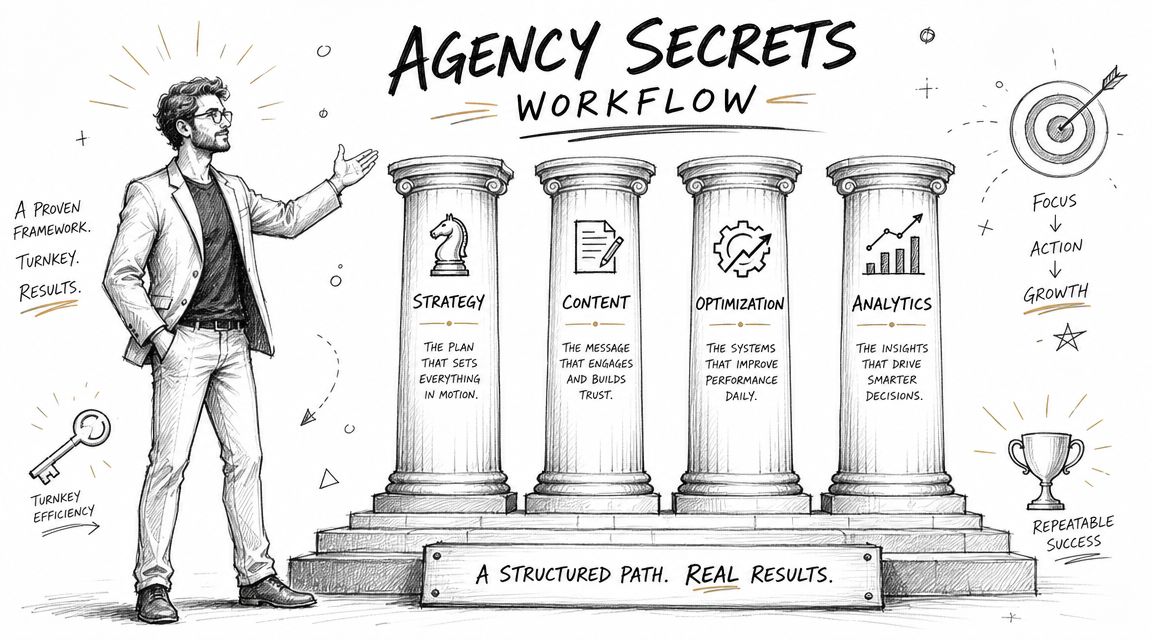
The best-performing SEO systems I've seen all run on the same four pillars. Not hacks. Not random publishing. A disciplined engine.
The four-part workflow that actually moves rankings
First, buyer-intent keyword research. You don't need more traffic for its own sake. You need pages aimed at searches that can turn into business.
Second, consistent publishing. Most owners stumble here. They buy software, collect ideas, and never ship enough useful content to build momentum.
Third, authority building through backlinks. Even strong pages often need external trust signals to compete.
Fourth, evergreen compounding. Good SEO content keeps working after it's published. It doesn't vanish when ad spend stops.
Why turnkey beats piecing tools together
A turnkey workflow matters because most small businesses don't fail from lack of information. They fail from broken execution. Research sits in one tool. Drafts sit in another. Publishing is delayed. Backlink work never happens. Reporting shows up too late.
That's why systems like OutRank are compelling. Instead of giving you another dashboard to manage, they package the workflow itself. Keyword research, content generation, publishing support, backlink acquisition, and competitor insight live in one process. That's the right direction for owners who want results without turning themselves into part-time SEO operators.
I'm opinionated on this point. If you're busy, workflow beats features. The software that gets used wins. The software that automates the boring but important work wins faster.
Smart small businesses should buy momentum, not just access to data.
If you've been comparing tools line by line, step back. The bigger question is whether the software helps you execute the core SEO jobs consistently with minimal manual effort.
Your 30-Day Implementation Plan For Quick Wins
If you buy software and then spend a month exploring menus, you've already lost. Use the first month to force action.
Start with this checklist.
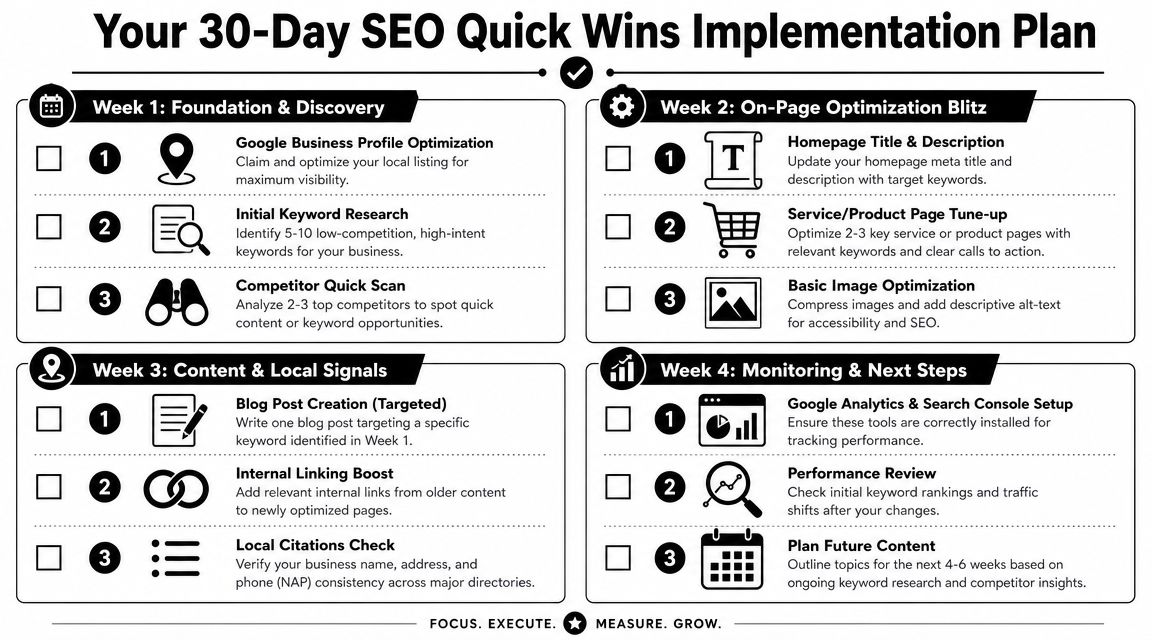
Week-by-week execution
Week 1
- Run a full site audit: find obvious technical issues, weak titles, and missing basics
- Identify five to ten practical keywords: focus on buyer intent or local intent
- Check a few competitors: look at what pages they rank with and what topics they cover
Week 2
- Fix your homepage metadata: keep it clear and relevant
- Tune up your top service or product pages: improve headings, copy, and calls to action
- Clean up images and alt text: this is easy and worth doing
Week 3
- Publish one optimized article: answer a real customer question
- Add internal links: point older pages to your most important updated pages
- Review local consistency: make sure your business details match across major listings
A quick walkthrough can help if you want to see the process in motion.
Week 4
- Set up Search Console and Analytics correctly: make sure tracking is in place
- Check early movement: look for impressions, rankings, and page engagement shifts
- Plan next month's content: don't stop after one post
What to expect after the first month
Don't expect a miracle in thirty days. Expect momentum. Expect a cleaner site, clearer keyword targets, and a content process you can repeat.
The biggest win is operational. You move from random SEO activity to a working system. Once that happens, scaling becomes realistic.
If you want the fastest path from strategy to execution, look at Agency Secrets. It's built for business owners who want the playbook without hiring an agency, and it points you toward a more turnkey workflow with OutRank so keyword research, publishing, and authority building don't keep stalling on your to-do list.